


 随着macOS Catalina 10.15的发布,32位应用程序不再被支持。开发者需要将应用迁移到64位平台,以确保在新系统上的兼容性。迁移过程中可能会遇到许多非显而易见的错误,使用静态代码分析工具如PVS-Studio可以帮助检测和修复这些问题。

On October 7, 2019, Apple released a new version of its Mac operating system, macOS Catalina. Version 10.15 contains many changes and improvements. One of the significant is the complete phasing out of 32-bit applications. As a developer of such macOS apps, what can you do? That's right, port the app to the 64-bit platform. Will the application work properly from the first attempt? Perhaps, it's possible. Depends on the complexity and amount of the code. But most likely, developers will face a lot of non-obvious errors, which can previously detected using PVS-Studio.
苹果于2019年10月7日发布了其Mac操作系统macOS Catalina的新版本。 版本10.15包含许多更改和改进。 其中一项重要功能是完全淘汰了32位应用程序。 作为此类macOS应用程序的开发人员,您可以做什么? 是的,将应用程序移植到64位平台。 从第一次尝试开始,该应用程序就能正常运行吗? 也许有可能。 取决于代码的复杂性和数量。 但是最有可能的是,开发人员将面临很多非显而易见的错误,以前使用PVS-Studio可以检测到这些错误。
介绍 (Introduction)
Although it is technically possible to run 32-bit applications in the 64-bit environment, Apple has decided not to go down this path and complete the process of switching to the 64-bit platform which has started 10 years ago. For the user, this means that if the developer of the user's favorite app hasn't taken heed of porting it to the 64-bit platform in time, the app will simply stop working in the updated macOS Catalina.
尽管从技术上讲可以在64位环境中运行32位应用程序,但是Apple决定不走这条路,并完成切换到10年前开始的64位平台的过程。 对于用户来说,这意味着如果用户最喜欢的应用程序的开发人员没有及时将其移植到64位平台,则该应用程序将仅停止在更新的macOS Catalina中工作。
It's not that Apple's decision was unexpected: in 2018, at the Worldwide Developers Conference, the company said that macOS Mojave would be the latest version of macOS with 32-bit software support. Probably most of the developers of popular apps have already successfully upgraded to 64-bit to the macOS Catalina release, or are completing the transition.
并非苹果的决定出乎意料:2018年,在全球开发者大会上,苹果表示macOS Mojave将成为支持32位软件的最新版macOS。 可能大多数流行应用程序的开发人员已经成功升级到macOS Catalina版本的64位,或者正在完成过渡。
It should be noted that with all its apparent simplicity, porting of the application to a 64-bit platform has a lot of pitfalls. If some part of an application is written using the C++ language, the developer might need deep understanding of handling memory and pointers, as well as taking account of many non-obvious nuances. In this case usage of the tool, monitoring the code correctness when porting from 32 to a 64-bit platform, will be extremely helpful. PVS-Studio is one of the examples of such tools.
应该注意的是,尽管应用程序看上去很简单,但将其移植到64位平台上却有很多陷阱。 如果应用程序的某些部分是使用C ++语言编写的,则开发人员可能需要对内存和指针的处理有深刻的理解,并要考虑许多不明显的细微差别。 在这种情况下,使用该工具监视从32移植到64位平台时的代码正确性将非常有帮助。 PVS-Studio是此类工具的示例之一。
64位诊断 (64-bit diagnostics)
The PVS-Studio analyzer comprises a special group of diagnostics for such a case. Initially PVS-Studio was meant to analyze C/C++ code and search for errors occurring right in the result of porting to 64-bit. Only after that PVS-Studio evolved into the general-purpose analyzer: support of C# and Java languages, search for potential vulnerabilities, support of safe coding standards (for example, MISRA) and many other features became available.
PVS-Studio分析仪包括针对此类情况的一组特殊诊断 。 最初,PVS-Studio旨在分析C / C ++代码并搜索移植到64位的结果中出现的错误。 只是在PVS-Studio演变为通用分析器之后:支持C#和Java语言,搜索潜在的漏洞,支持安全编码标准(例如MISRA)和许多其他功能。
Since then, we have accumulated a great deal of expertise on porting to a 64-bit platform. Our team wrote many articles on this topic. One of the articles on this topic: "A Collection of Examples of 64-bit Errors in Real Programs". The article is quite old, but the problems described in it are also relevant today. I recommend reading it, especially if you're planning or already working on upgrading your apps to 64-bit (either apps in C++ for macOS or any other OS).
从那时起,我们在移植到64位平台上积累了很多专业知识。 我们的团队就该主题写了许多文章。 关于该主题的文章之一:“ 真实程序中64位错误的示例集合 ”。 这篇文章很老,但是其中描述的问题也与今天有关。 我建议您阅读它,特别是如果您正在计划或已经在将应用程序升级到64位(适用于macOS的C ++应用程序或任何其他操作系统)时,尤其如此。
You can enable 64-bit warnings in the following way:
您可以通过以下方式启用64位警告:
Windows / Visual Studio (Windows/Visual Studio)
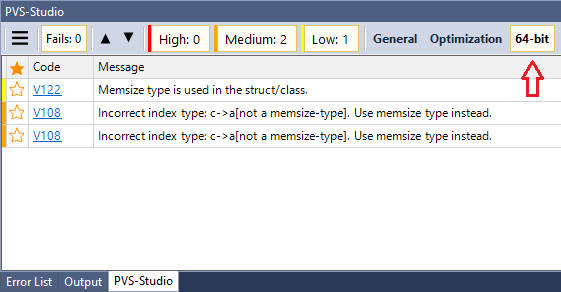
In the warning view window there is a button to enable the entire group of 64-bit diagnostics:
在警告视图窗口中,有一个用于启用整个64位诊断组的按钮:
Linux / macOS (Linux/macOS)
When starting the analyzer from the console you need to enable 64-bit diagnostics both in the analyzer and the report generator:
从控制台启动分析器时,需要在分析器和报告生成器中都启用64位诊断:
pvs-studio-analyzer analyze ... -a 5 ...
plog-converter ... -a "64:1,2,3"
结论 (Conclusion)
And, of course, nothing prevents you from downloading and trying the PVS-Studio analyzer on your code. Good luck in fighting against 64-bit and other errors!
而且,当然,没有什么可以阻止您在代码上下载并尝试使用PVS-Studio分析仪。 与64位错误和其他错误作斗争的好运!





 扫一扫
扫一扫


 1690
1690

 被折叠的 条评论
为什么被折叠?
被折叠的 条评论
为什么被折叠?
 到【灌水乐园】发言





