ml.net1.2版本教程
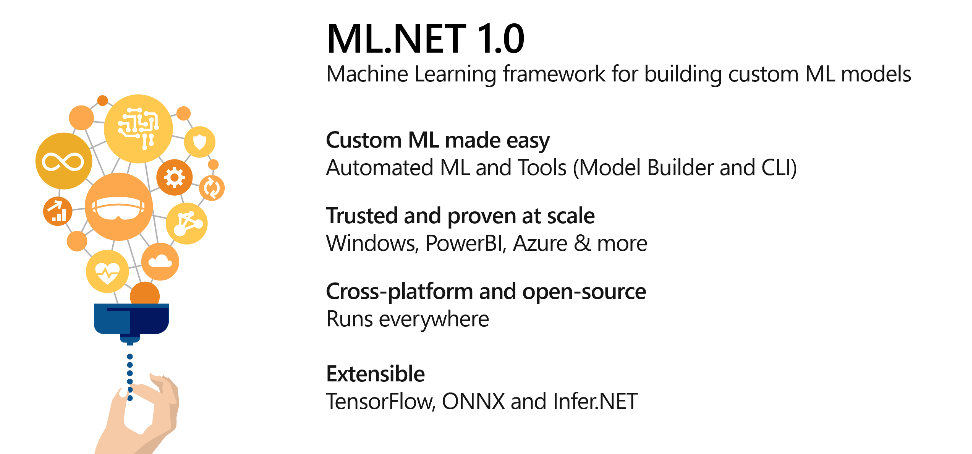
We are excited to announce the release of ML.NET 1.0 today. ML.NET is a free, cross-platform and open source machine learning framework designed to bring the power of machine learning (ML) into .NET applications.
我们很高兴宣布今天发布ML.NET 1.0 。 ML.NET是一个免费的,跨平台的开源机器学习框架,旨在将机器学习(ML)的功能引入.NET应用程序。
https://github.com/dotnet/machinelearning
https://github.com/dotnet/machinelearning
Get Started: http://dot.net/ml
入门: http : //dot.net/ml
ML.NET allows you to train, build and ship custom machine learning models using C# or F# for scenarios such as sentiment analysis, issue classification, forecasting, recommendations and more. You can check out these common scenarios and tasks at our ML.NET samples repo.
ML.NET允许您使用C#或F#训练,构建和交付自定义机器学习模型,以用于诸如情绪分析,问题分类,预测,建议等场景。 您可以在我们的ML.NET示例存储库中查看这些常见的场景和任务。
ML.NET was originally developed within Microsoft Research, and evolved into a significant framework used by many Microsoft products such as Windows Defender, Microsoft Office (Powerpoint design ideas, Excel Chart recommendations), Azure Machine Learning, PowerBI key influencers to name a few!
ML.NET最初是在Microsoft Research内部开发的,后来演变为许多Microsoft产品使用的重要框架,例如Windows Defender,Microsoft Office(Powerpoint设计思想,Excel Chart建议),Azure机器学习,PowerBI重要影响者!
Since its launch ML.NET is being used by many organizations like SigParser (Spam Email Detection), William Mullens (Legal Issue Classification) and Evolution Software (Moisture Level Detection for Hazelnuts). You can follow the journey of these and many other organisations using ML.NET at our ML.NET customer showcase. These users tell us that the ease of use of ML.NET, ability to reuse their .NET skills and keeping their tech stack entirely in .NET are primary drivers for their use of ML.NET.
自发布以来,ML.NET已被SigParser (垃圾邮件检测), William Mullens(法律问题分类)和Evolution Software(榛子水分水平检测 )等许多组织所使用。 您可以在ML.NET客户展示中使用ML.NET来跟踪这些组织以及许多其他组织的旅程。 这些用户告诉我们ML.NET的易用性,重用他们的.NET技能以及将其技术堆栈完全保留在.NET中的能力是他们使用ML.NET的主要动力。
Along with the ML.NET 1.0 release we are also adding new preview features like the power of Automated machine learning (AutoML) and new tools like ML.NET CLI and ML.NET Model Builder which means adding machine learning models to your applications is now only a right click away!
与ML.NET 1.0版本一起,我们还添加了新的预览功能,例如自动机器学习(AutoML)的功能,以及新的工具,例如ML.NET CLI和ML.NET Model Builder,这意味着现在可以在您的应用程序中添加机器学习模型只有右键单击即可!
The remainder of this post focuses on these new experiences.
ML.NET核心组件 (ML.NET Core Components)
ML.NET is aimed at providing the end-end workflow for consuming ML into .NET apps across various steps of machine learning (pre-processing, feature engineering, modeling, evaluation and operationalization). ML.NET 1.0 provides the following key components:
ML.NET旨在提供用于在机器学习的各个步骤(预处理,功能工程,建模,评估和操作化)中将ML消费到.NET应用程序中的最终工作流。 ML.NET 1.0提供以下关键组件:
Data Representation
数据表示
Support for machine learning tasks:
支持机器学习任务:
- Binary Classification 二进制分类
- Multi-Class classification 多类别分类
- Regression 回归
- Ranking 排行
- Anomaly Detection 异常检测
- Clustering 聚类
- Recommendation (preview) 推荐(预览)
Data Transformation and featurization
数据转换和功能化
- Text 文本
- Categories 分类目录
- Feature Selection 功能选择
- Normalization and missing value handling 规范化和缺失值处理
- Image featurization 图像特征化
- Time Series (preview) 时间序列(预览)
- Support for ONNX and TensorFlow model integration (preview) 支持ONNX和TensorFlow模型集成(预览)
Other
其他
- Model understanding and explainability 模型的理解和可解释性
- User-defined custom transformations 用户定义的自定义转换
- Schema operations 模式操作
- Support for dataset manipulation and cross-validation 支持数据集操作和交叉验证
自动化机器学习预览 (Automated Machine Learning Preview)
Getting started with machine learning today involves a steep learning curve. When building custom machine learning models, you have to figure out which machine learning task to pick for your scenario (i.e. classification or regression?), transform your data into a format that ML algorithms can understand (e.g. textual data -> numeric vectors), and fine tune these ML algorithms to provide best performance. If you are new to ML each of these steps can be quite daunting!
今天的机器学习入门涉及陡峭的学习曲线。 在构建自定义机器学习模型时,您必须弄清楚要为您的场景选择哪种机器学习任务(即分类还是回归?),将数据转换为ML算法可以理解的格式(例如,文本数据->数值向量),并微调这些ML算法以提供最佳性能。 如果您不熟悉ML,那么每个步骤都可能会令人生畏!
Automated Machine Learning makes your journey with ML simpler by automatically figuring out how to transform your input data and selecting the best performing ML algorithm with the right settings allowing you to build best-in-class custom ML models easily.
自动化机器学习通过自动找出如何转换输入数据并选择正确设置来选择性能最佳的ML算法,从而使您轻松构建ML,从而轻松构建一流的定制ML模型。
AutoML support in ML.NET is in preview and we currently support Regression (used for scenarios like Price Prediction) and Classification (used for scenarios like Sentiment Analysis, Document Classification, Spam Detection etc.) ML tasks.
ML.NET中的AutoML支持处于预览状态,并且我们目前支持回归(用于价格预测等场景)和分类(用于情感分析,文档分类,垃圾邮件检测等场景)ML任务。
You can try out the AutoML experience in ML.NET in three form factors using ML.NET Model Builder, ML.NET CLI or by using the AutoML API directly (samples can be found here).
您可以使用ML.NET Model Builder,ML.NET CLI或直接使用AutoML API (可在此处找到示例 )以三种形式尝试ML.NET中的AutoML体验。
For users who are new to Machine Learning we recommend starting with the ML.NET Model Builder in Visual Studio and the ML.NET CLI on any platform. The AutoML API is also very handy for scenarios where you want to build models on the fly.
对于机器学习的新用户,我们建议从Visual Studio中的ML.NET Model Builder和任何平台上的ML.NET CLI开始。 AutoML API对于要动态构建模型的场景也非常方便。
模型制作器预览 (Model Builder Preview)
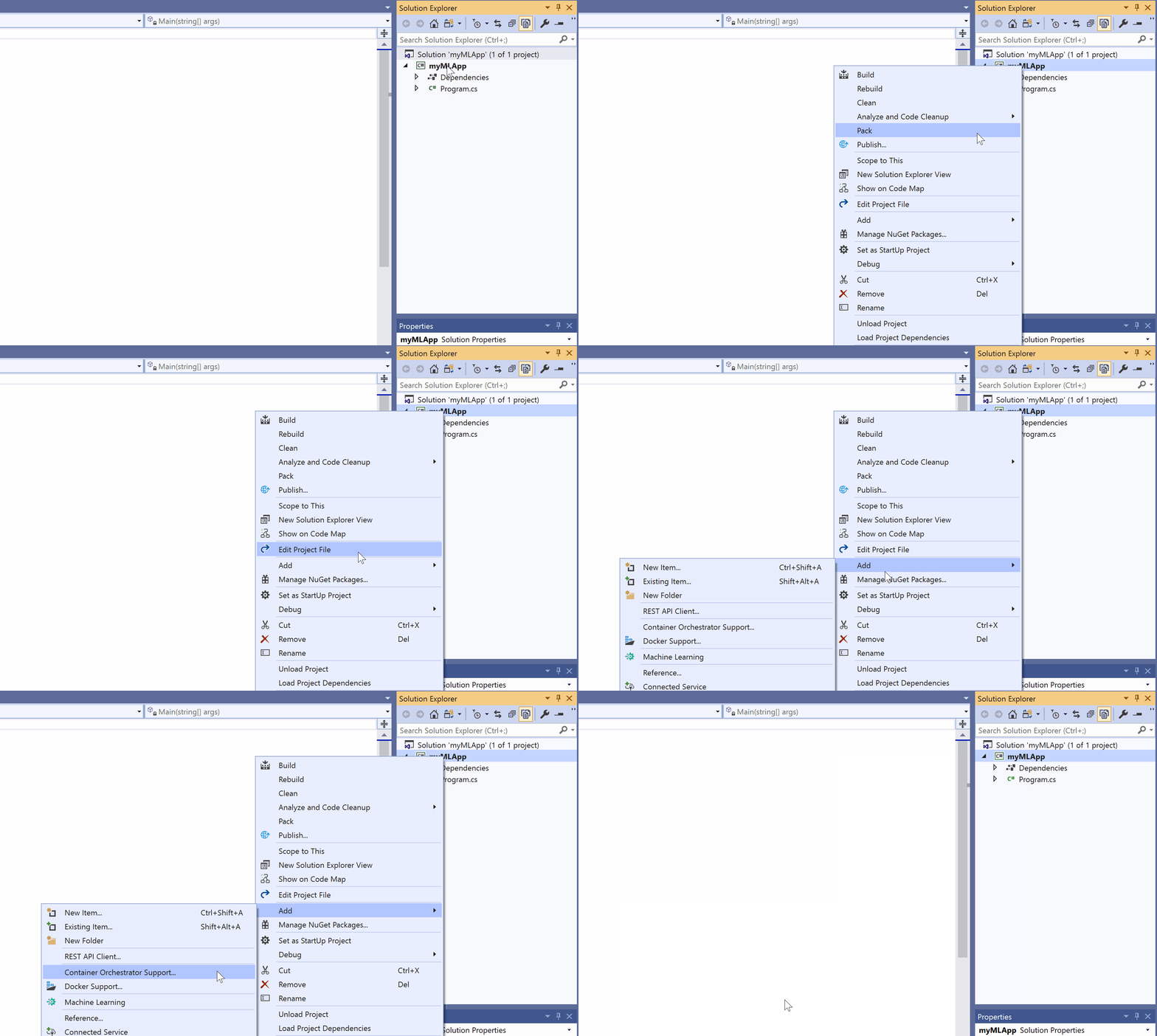
In order to simplify the journey of .NET developers to build ML Models, we are today also excited to announce ML.NET Model Builder. With ML.NET Model builder adding machine learning to your apps is only a right-click away!
为了简化.NET开发人员构建ML模型的过程,我们今天也很高兴宣布ML.NET Model Builder。 使用ML.NET模型构建器,只需右键单击即可向您的应用程序添加机器学习!
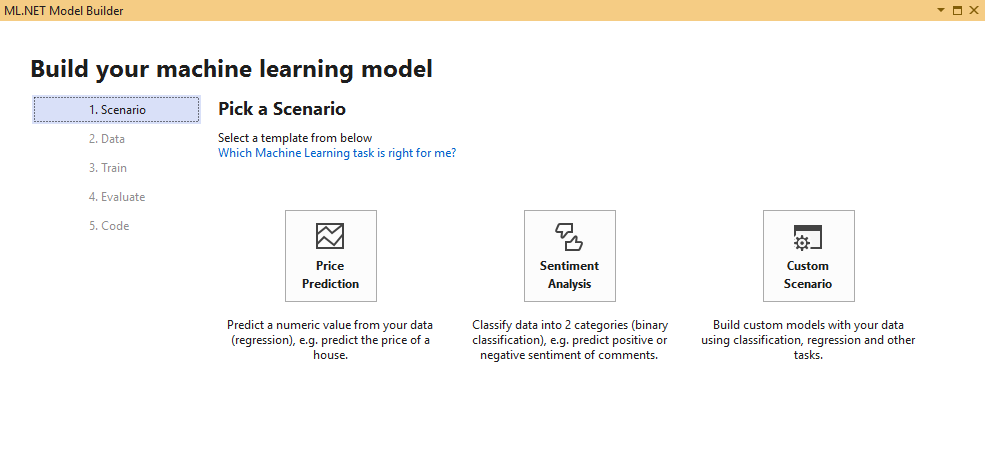
Model Builder is a simple UI tool for developers which uses AutoML to build best in class ML models using the dataset you provide. In addition to this, Model Builder also generates model training and model consumption code for the best performing model allowing you to quickly add ML to your existing application.
模型构建器是面向开发人员的简单UI工具,它使用AutoML使用您提供的数据集构建最佳的ML模型。 除此之外,Model Builder还为最佳性能模型生成模型训练和模型使用代码,使您可以将ML快速添加到现有应用程序中。
Learn more about the ML.NET Model Builder
Model Builder is currently in preview and we would love for you to try it out and tell us what you think!
模型构建器目前处于预览阶段,我们非常希望您可以尝试一下并告诉我们您的想法!
ML.NET CLI预览 (ML.NET CLI Preview)
The ML.NET CLI (command-line interface) is another new tool we are introducing today!
ML.NET CLI(命令行界面)是我们今天引入的另一个新工具!
ML.NET CLI is a dotnet tool which allows for generating ML.NET Models using AutoML and ML.NET. The ML.NET CLI quickly iterates through your dataset for a specific ML Task (currently supports regression and classification) and produces the best model.
ML.NET CLI是一个dotnet工具,允许使用AutoML和ML.NET生成ML.NET模型。 ML.NET CLI快速遍历您的数据集以查找特定的ML任务(当前支持回归和分类),并生成最佳模型。
The CLI in addition to producing the best model also allows users to generate model training and model consumption code for the best performing model.
除了生成最佳模型外,CLI还允许用户为最佳性能模型生成模型训练和模型消耗代码。
ML.NET CLI is cross-platform and is an easy add-on to the .NET CLI. The Model Builder Visual Studio extension also uses ML.NET CLI to provide model builder capabilities.
ML.NET CLI是跨平台的,并且是.NET CLI的简单附加组件。 模型构建器Visual Studio扩展还使用ML.NET CLI提供模型构建器功能。
You can install the ML.NET CLI through this command.
您可以通过此命令安装ML.NET CLI。
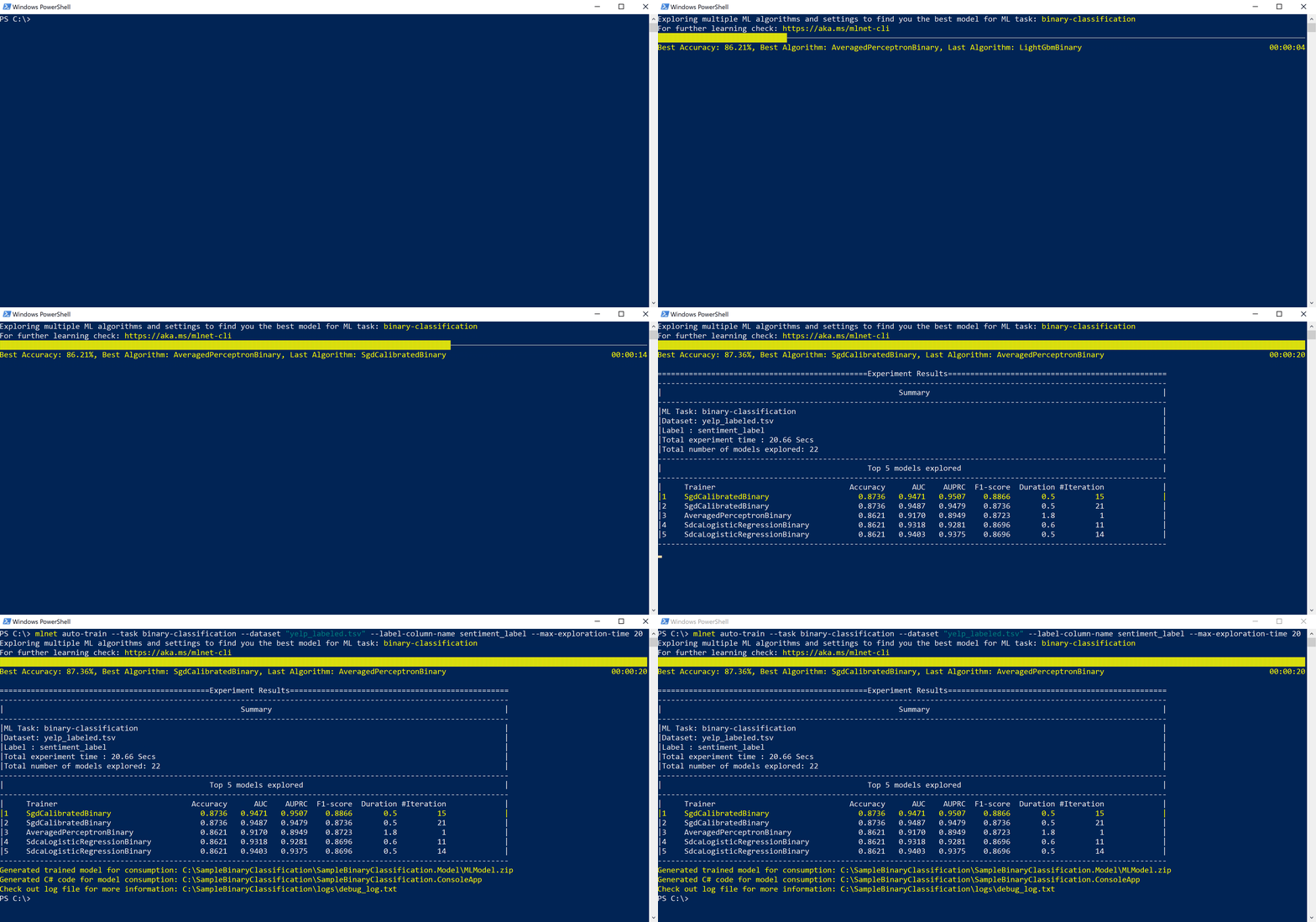
dotnet tool install -g mlnetFollowing picture shows the ML.NET CLI building a sentiment analysis dataset.
下图显示了ML.NET CLI构建情感分析数据集。
Learn more about the ML.NET CLI
ML.NET CLI is also currently in preview and we would love for you to try it out and share your thoughts below!
ML.NET CLI也正在预览中,我们很乐意您尝试一下并在下面分享您的想法!
开始吧! (Get Started!)
If you haven’t already, getting started with ML.NET is easy and you can do so in a few simple steps as shown below. The example below shows how you can perform sentiment analysis with ML.NET.
如果您还没有开始学习ML.NET,那么这很容易,您可以按照以下几个简单的步骤进行操作。 以下示例显示了如何使用ML.NET执行情感分析 。
//Step 1. Create a ML Context
var ctx = new MLContext();

//Step 2. Read in the input data for model training
IDataView dataReader = ctx.Data
    .LoadFromTextFile<MyInput>(dataPath, hasHeader: true);

//Step 3. Build your estimator
IEstimator<ITransformer> est = ctx.Transforms.Text
    .FeaturizeText("Features", nameof(SentimentIssue.Text))
    .Append(ctx.BinaryClassification.Trainers
        .LbfgsLogisticRegression("Label", "Features"));

//Step 4. Train your Model
ITransformer trainedModel = est.Fit(dataReader);

//Step 5. Make predictions using your model
var predictionEngine = ctx.Model
    .CreatePredictionEngine<MyInput, MyOutput>(trainedModel);

var sampleStatement = new MyInput { Text = "This is a horrible movie" };

var prediction = predictionEngine.Predict(sampleStatement);
You can also explore various other learning resources like tutorials and resources for ML.NET along with ML.NET samples demonstrating popular scenarios like product recommendation, anomaly detection and more in action.
您还可以探索各种其他学习资源,例如ML.NET的教程和资源,以及ML.NET示例,这些示例演示了流行的场景,例如产品推荐,异常检测以及更多实际应用。
ML.NET的下一步 (What’s next with ML.NET)
While we are very excited to release ML.NET 1.0 today, the team is already hard at work towards enabling the following features for ML.NET release post 1.0.
尽管我们很高兴今天发布ML.NET 1.0,但是该团队已经在努力为ML.NET 1.0版以下版本启用以下功能。
- AutoML experience for additional ML scenarios 有关其他ML场景的AutoML经验
- Improved support for deep learning scenarios 改进了对深度学习场景的支持
- Support for other additional sources like SQL Server, CosmosDB, Azure Blob storage and more. 支持其他其他来源,例如SQL Server,CosmosDB,Azure Blob存储等。
- Scale-out on Azure for model training and consumption 在Azure上横向扩展以进行模型训练和使用
- Support for additional ML scenarios and features when using Model Builder and CLI 使用模型构建器和CLI时支持其他ML场景和功能
- Native integration for machine learning at scale with .NET for Apache Spark and ML.NET 与适用于Apache Spark和ML.NET的.NET进行大规模机器学习的本机集成
- New ML Types in .NET e.g. DataFrame .NET中的新ML类型,例如DataFrame
ml.net1.2版本教程





 扫一扫
扫一扫


 2063
2063

 被折叠的 条评论
为什么被折叠?
被折叠的 条评论
为什么被折叠?
 到【灌水乐园】发言