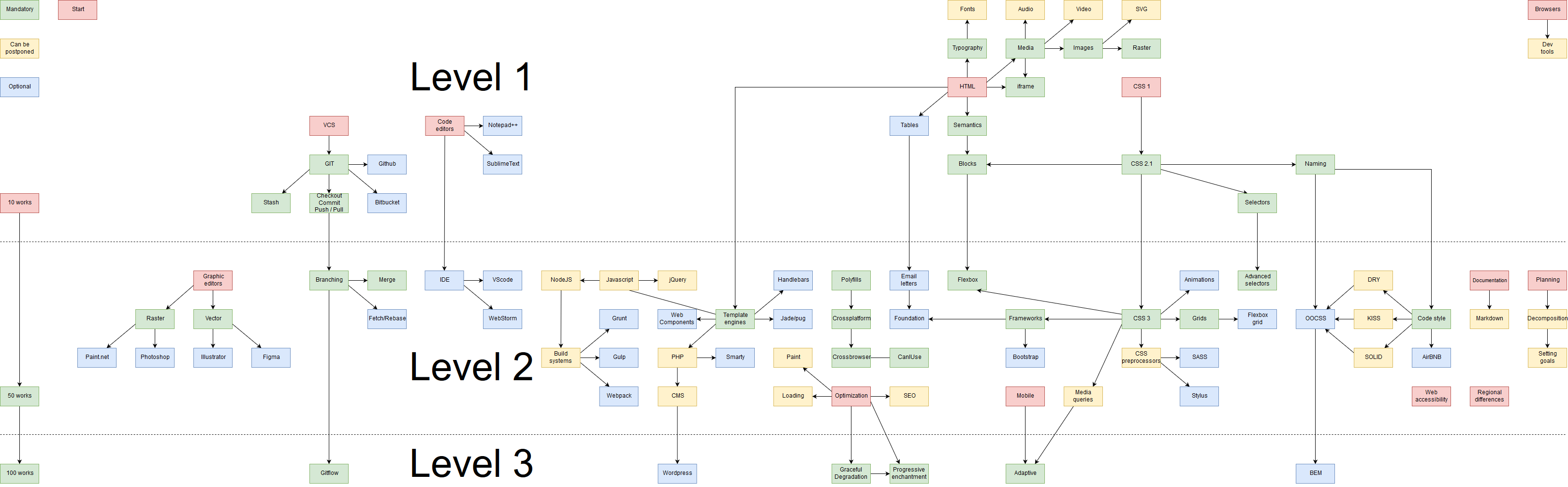
本文提供了一个详细的Web开发人员成长路线图,分为三个级别,涵盖HTML、CSS、JavaScript基础到高级技能,包括响应式设计、代码管理和团队协作。强调了代码风格、项目规划和文档编写的重要性。
web开发指南
Here is tree with 3 levels to start your journey as web developer.
这是一棵有3个级别的树,可以开始您作为Web开发人员的旅程。
Of cause all of this very subjectively, and you can define your plan. There is a lot of differences between regions, countries and so on. But this one gives at least some level of overview.
当然,所有这些都非常主观,您可以定义您的计划。 地区,国家/地区等之间存在很多差异。 但这至少提供了一定程度的概述。
我们对每个级别都有什么期望? (What we expect from every level?)
Let's define our expectations. Your expectations may differ.
让我们定义我们的期望。 您的期望可能会有所不同。
Level 1 — new basic tags, can edit the content on ready HTML site, can format the text properly, can insert some embedded thing (youtube, google map), can use git for himself (master, 1 contributor). He can make some simple sites, and it might look good (at his personal computer). Not a standalone unit, some guidance required to succeed.
级别1-新的基本标记,可以在就绪HTML网站上编辑内容,可以正确设置文本格式,可以插入一些嵌入式内容(youtube,google map),可以自己使用git(主,1个贡献者)。 他可以创建一些简单的网站,并且看起来不错(在他的个人计算机上)。 不是独立的单位,需要一些指导才能成功。
Level 2 — plus-minus standalone unit (or standalone for small-medium projects). He can create a fine layout from scratch for a small-medium project, and it will look great in all modern browsers. Know how to work with template engines, can use them (if another code is provided). Can plan his work well, document what was done and how to use it can estimate time. Understand the importantness of code style. Understand why grid systems and CSS frameworks exist. Can collect required information by himself from designers or from mockups. He can interact with small to medium teams. He can create branches and pull requests.
级别2-负号独立单元(对于中小型项目则为独立单元)。 他可以从头开始为中小型项目创建精细的布局,并且在所有现代浏览器中看起来都很棒。 知道如何使用模板引擎,可以使用它们(如果提供了其他代码)。 可以很好地计划他的工作,记录所做的事情以及如何使用它可以估计时间。 了解代码风格的重要性。 了解为什么存在网格系统和CSS框架。 可以自己从设计师或模型中收集所需的信息。 他可以与中小型团队互动。 他可以创建分支并提取请求。
Level 3 — can design a block system for a big project from scratch. Know how to avoid duplicated code and problems when his code will be used by other developers. He can decomposite complex problems and define tasks well. He can apply at least one modern methodology (BEM, for example). He can make the site blazingly fast. Well understanding couple of modern template engines. Can create build scripts to automate the CSS/HTML/js combination process. Can do code review well and teach other frontenders.
级别3-可以从头开始为大型项目设计一个块系统。 知道如何避免重复的代码和其他开发人员将使用他的代码时遇到的问题。 他可以分解复杂的问题并很好地定义任务。 他可以应用至少一种现代方法(例如BEM)。 他可以使站点快速发展。 很好地理解了几个现代模板引擎。 可以创建构建脚本来自动化CSS / HTML / js组合过程。 可以很好地进行代码审查,并教其他前端开发者。
确切的块说明 (Exact blocks explanation)
Most of the blocks represent some type of skillset. It can be replaced with a similar one. You can use any IDE, any CMS or whatever. I just point some popular ones, with ones you can start work "right now" (there is a lot of related job offers). There can be a lot of job offers for other skills in your area. I had tried to make a universal schema that will work for most regions.
大多数模块代表某种类型的技能。 可以用类似的代替。 您可以使用任何IDE,任何CMS或任何其他工具。 我只是指出一些受欢迎的职位,其中一些职位可以“立即”开始工作(有很多相关的工作机会)。 您所在地区可能会提供很多其他技能的工作机会。 我试图制作一个适用于大多数地区的通用模式。
1级 (Level 1)
HTML — knowledge of basic tags and attributes. Understanding how to write HTML (what is "tag", "property", etc) Typography — proper text formatting. Text — the base of (nearly) every project. Add no-breaking-spaces where is required, bold, cursive, abbr, etc. Use some kind of typographer or similar service, understand why +1 234 567 better than +1 234 567. Fonts (can be postponed) — more complicated than looks like; I recommend for beginners to use system fonts. Ability to load fonts, to fall back to another one, optimize look/speed, minimize render time for custom fonts. Semantics — ability to find a proper tag for proper usage. Understanding why so many tags exist. Media — types of media can be displayed on a page Iframe — import 3rd party widgets (video, audio, maps, etc) Audio, Video (can be postponed) — can be solved with iframes initially. Understanding what types of media are supported by browsers, know how to design player and etc. Images — graphic formats, how they work in browsers. Procs and cons for different formats Raster — jpg, png, gif. Understand differences and ability to choose proper one (maybe optimize them). SVG (can be postponed) — Procs/cons/limitations, how to use. Tables (optional, good for email letters) — but tables itself should be learned under "HTML" :-)
HTML-基本标签和属性的知识。 了解如何编写HTML(什么是“标签”,“属性”等) 排版 -正确的文本格式。 文本-(几乎)每个项目的基础。 在需要的地方添加不间断空格,粗体,草书,缩写等。使用某种印刷术或类似服务,了解为什么+1 234 567比+1 234 567好。 字体 (可以推迟)—比好像; 我建议初学者使用系统字体。 能够加载字体,回退到另一种字体,优化外观/速度,最小化自定义字体的渲染时间。 语义 -能够找到正确标签以正确使用的能力。 了解为什么存在这么多标签。 媒体 - 媒体类型可以显示在页面上iframe-导入第三方小部件(视频,音频,地图等) 音频,视频 (可以推迟)-最初可以使用iframe解决。 了解浏览器支持哪些类型的媒体,了解如何设计播放器等。 图像 -图形格式,以及它们在浏览器中的工作方式。 不同格式的栅格的利弊— jpg,png,gif。 了解差异和选择合适的差异的能力(可能对其进行优化)。 SVG (可以推迟)— Procs / cons / limits,如何使用。 表格(可选,适合于电子邮件)-但表格本身应在“ HTML”下学习:-)
CSS 1 — fonts, colors, aligning, sizes CSS 2.1 — blocks behavior, positioning, design Selectors — simple selectors on tag, class, nested element. Simple pseudo-selectors, like :hover. Naming — how to name classes to avoid pain in future Blocks — how to split mockup to separate blocks, how to implement these blocks in HTML and design with CSS
CSS 1-字体,颜色,对齐方式,大小CSS 2.1-阻止行为,定位,设计选择器 -标签,类,嵌套元素上的简单选择器。 简单的伪选择器,如:hover。 命名 -如何命名类以避免将来的代码块中的痛苦-如何将模型拆分为单独的代码块,如何在HTML中实现这些代码块并使用CSS进行设计
Browsers (can be postponed) — which browsers exist, what the difference. Dev Tools (can be postponed) — Use browser tools to identify why something looks wrong, how to "debug" CSS
浏览器 (可以推迟)-存在哪些浏览器,有什么区别。 开发工具 (可以推迟)—使用浏览器工具来确定为什么出现问题,如何“调试” CSS
Code editors — what editors exist, why they exist. Notepad++ and SublimeText here just for example as well known ones. Know how to set basic settings like tabs, newlines, charset and so on.
代码编辑器 -存在什么编辑器,为什么存在。 Notepad ++和SublimeText仅作为示例。 知道如何设置选项卡,换行符,字符集等基本设置。
VCS (Version Control System) — I believe that this is a must, at least for yourself. Why they exist, and what types. Git/ Bitbucket — be able to use at least one of the popular platforms for git Checkout / commit / push / pull — base operations enough for personal usage Stash — for temporary saving not required at this moment things
VCS (版本控制系统)—我认为这是必须的,至少对于您自己而言。 它们为什么存在,以及什么类型。 Git / Bitbucket-能够至少使用一种流行的平台进行git Checkout / commit / push / pull-基本操作足以满足个人使用Stash-暂时不需要暂时保存
10 works — a minimum of 10 works with a different design. Maybe it just formatted text or whatever. But they should use the maximum of your current knowledge.
10件作品 -至少10件采用不同设计的作品。 也许它只是格式化文本或其他格式。 但是他们应该尽量利用您当前的知识。
2级 (Level 2)
CSS 3 — gradients, shadows, roundings, filters, transformations, etc. Advanced selectors — combined selectors with usage like "+", nth-child, shadow-dom, before/after and so on Flexbox — understand model, be able to use it Animations (optional) — transition, animation. Proc/cons/limitations. Grids — why they exist, how to use them, what ready solutions exist. As an example, you can take a look at "Flexbox grid" or any other one Frameworks — why exists, how to use. I highly recommend learning good at least one of them. Very useful for prototyping. Dramatically increase the quality of the project with no designers (internal project, for example). CSS preprocessors (can be postponed) — better code organized and clean code, mixins, variables, etc. Try different ones like SASS, LESS, Stylus Media queries (can be postponed) — show proper style depending on conditions (device, screen size, print version, etc) Email letters (optional) — useful skill; There are dozens of mail systems with some differences, and the main goal is to make your letter looks good in any of them, on any device. Know how to pass filters and not go to spam. Polyfills — understand how to use modern semantics with back compatibility. Know proc/cons. Cross-platform — understand hot to make the site not just for Windows, Mac, and Linux, but for SmartTV, PS, kindle and so on.
CSS 3-渐变,阴影,舍入,滤镜,变换等。高级选择器-组合了选择器,用法如“ +”,nth-child,shadow-dom, Flexbox的前/后等等-了解模型,可以使用it 动画 (可选)—过渡,动画。 过程/缺点/限制。 网格 -它们为什么存在,如何使用它们,存在哪些现成的解决方案。 例如,您可以看一下“ Flexbox网格”或任何其他框架 -为什么存在,如何使用。 我强烈建议至少学习其中之一。 对于原型制作非常有用。 在没有设计师的情况下,可以显着提高项目的质量(例如,内部项目)。 CSS预处理程序 (可以推迟)-更好地组织代码,清理代码,mixin,变量等。尝试使用其他方法,例如SASS,LESS,Stylus Media查询 (可以推迟)-根据条件(设备,屏幕尺寸,印刷版等) 电子邮件 (可选)—有用的技巧; 有数十种邮件系统存在一些差异,其主要目标是使您的信件在任何设备上的任何情况下看起来都很好。 知道如何通过过滤器而不是垃圾邮件。 Polyfills —了解如何使用具有向后兼容性的现代语义。 知道proc / cons。 跨平台 -了解热点使该站点不仅适用于Windows,Mac和Linux,而且适用于SmartTV,PS,kindle等。
Mobile (can be postponed) — understand mobile platform limitations. Use space wisely.
移动 (可以推迟)-了解移动平台的局限性。 明智地使用空间。
Optimization (can be postponed) — understand the "price" of different techniques. Understand browser phases to display site to a user Loading (can be postponed) — Optimizations, related to size, cache, combining resources, etc. Paint (can be postponed) — Optimizations of render after (on in progress) load SEO (can be postponed) — At least a basic understanding of search engines. Ability to help to them understand your site, what is important and so on
优化 (可以推迟)-了解不同技术的“价格”。 了解浏览器阶段以向用户显示站点加载 (可以推迟)-与大小,缓存,资源组合等相关的优化。 绘制 (可以推迟)-加载SEO (正在进行)后优化渲染推迟)-至少对搜索引擎有基本的了解。 能够帮助他们了解您的网站,重要内容等的能力
Template engines — how to reuse code, how to group elements, how to assemble pages. Very important to understand both: server and client rendering. There are also pure-language templates, like direct PHP code parts. Parts before the template engine is out of scope. PHP (can be postponed) — understand basic syntax and be able to add small changes, related to page design CMS (can be postponed) — know, what type of CMS exists, why they were created. Learn how to write templates to at least one of them (Wordpress is recommended) Javascript (can be postponed) — basic syntax, understanding of simple event handlers and simple DOM manipulations Jquery (can be postponed) — learn how to save a lot of time for the small/medium project by using ready plugins for common tasks NodeJS (can be postponed) — learn how to run the simplest server, serve static files, render on the server-side. Maybe use express or so. Build systems (can be postponed) — how to assemble a project from CSS/HTML files. Highly recommend to at least take a look at few different systems (grunt — gulp).
模板引擎 -如何重用代码,如何对元素进行分组,如何组合页面。 理解这两者非常重要:服务器和客户端渲染。 也有纯语言模板,例如直接PHP代码部分。 模板引擎之前的零件超出范围。 PHP (可以推迟)-了解基本语法并能够添加与页面设计CMS相关的小更改(可以推迟)-知道存在哪种类型的CMS,为什么创建它们。 了解如何为其中至少之一编写模板(建议使用Wordpress) Javascript (可以推迟)-基本语法,对简单事件处理程序和简单DOM操作的理解Jquery (可以推迟)-了解如何节省大量时间通过使用现成的插件执行常见任务NodeJS (可以推迟)来为中小型项目服务—了解如何运行最简单的服务器,提供静态文件以及在服务器端进行渲染。 也许使用快递左右。 构建系统(可以推迟)—如何从CSS / HTML文件组装项目。 强烈建议至少看看几个不同的系统(咕—声-吞咽)。
Code style — why people agree on some styles, learn at least one and start using it (take a look at Airbnb one, or for any modern js framework like Vue) DRY / KISS / SOLID (can be postponed) — important theories of development, dramatically affect project support in the future. OOCSS (optional) — what is object-oriented CSS? Why and how to use? In some form used in most of the projects (but without understanding that they use it :-D). Ideally, learn how to design it. It can be very useful for big projects. Documentation (can be postponed) — understand how and what to document. Start to document. Markdown syntax highly recommended.
代码风格 -人们为什么同意某种风格,至少学习一种并开始使用它(看看Airbnb,或者使用任何现代js框架,如Vue) DRY / KISS / SOLID (可以推迟)-重要的开发理论,极大地影响未来的项目支持。 OOCSS (可选)—什么是面向对象CSS? 为什么以及如何使用? 在大多数项目中以某种形式使用(但不了解他们是否使用它:-D)。 理想情况下,学习如何设计它。 这对于大型项目可能非常有用。 文档 (可以推迟)—了解如何以及如何记录。 开始记录。 强烈推荐Markdown语法。
Planning — learn how to estimate time by just look on the image, define the order of works Decomposition (can be postponed) — split the big task into small ones. It is harder than it looks. Settings goals (can be postponed) — be able to write tasks that way, that other developers (including ones, that lower level than you), will able to understand them clearly.
计划 -学习如何仅通过查看图像来估计时间,定义作品的顺序分解(可以推迟)-将大任务分解为小任务。 它比看起来难。 设置目标(可以推迟)—能够以这种方式编写任务,以便其他开发人员(包括比您低级别的开发人员)可以清楚地理解它们。
IDE (can be postponed) — why IDE exists, how to use them. Learning any IDE is equal to learn some programming language (otherwise you will not utilize its power). I, personally, use just text editors and run IDE only for really big projects.
IDE (可以推迟)— IDE存在的原因,使用方法。 学习任何IDE都等于学习某种编程语言(否则,您将不会利用它的功能)。 我个人仅使用文本编辑器,仅对大型项目运行IDE。
Branching — control branches in git Merge — learn how to merge branches that have merge conflicts Fetch / Rebase (optional) — what is this? Learn how and when to use
分支-git中的控制分支合并 -学习如何合并有合并冲突的分支提取/重新设置 (可选)-这是什么? 了解如何以及何时使用
Graphic editors — understand different types of them, what is the difference between vector and raster. Be able to read mockups from the designer in them. Be able to choose a proper font, size, color, and other things, to make the site looks exactly like the designer asks you to.
图形编辑器 -了解它们的不同类型,矢量和栅格之间有什么区别。 能够从设计器中读取模型。 能够选择合适的字体,大小,颜色等,以使网站看起来完全像设计师要求的那样。
Web accessibility — crucial, if you're a good person. Make your site accessible by disabled people.
Web可访问性 -如果您是一个好人,那么至关重要。 使残障人士可以访问您的网站。
Regional differences (optional) — left-to-right, right-to-left, and other crazy things of Arabic (or any other) market. There are dozens of fun things.
区域差异 (可选)-阿拉伯(或任何其他)市场的从左到右,从右到左以及其他疯狂的事物。 有很多有趣的东西。
50 works — at the end of "Level 2" you should have about 50 different projects, that show your skills. (If this is a project with 20 totally different layouts, count it as 20).
50件作品 -在“ Level 2”的结尾处,您应该有大约50个不同的项目,这些项目可以展示您的技能。 (如果这是一个布局完全不同的20个项目,则将其计为20)。
3级 (Level 3)
On schema this part looks like the smallest one, but, in fact, this is the largest one, because at this moment you should know all "can be postponed" things.
在模式上,这部分看起来像是最小的部分,但是实际上,这是最大的部分,因为此时您应该知道所有“可以推迟”的事情。
Adaptive/responsive — highest level; combine all your knowledge! The project should look awesome anywhere and on anything. Graceful Degradation / Progressive enchantment — why it is good, how to use it. Use. Gitflow (or another branching model) — be able to utilize some good practice, be able to explain to another developer how to use git, were to merge branches, how to do code review (of HTML/CSS) BEM (optional) — Learn some methodology that gives the ability to create unlimited large projects that way, so with minimum synchronization, different teams will able to use blocks from each other. There is a lot of methodologies that give the same/better result. At this moment of time, you will hear about some of them and will be able to choose one wisely.
自适应/响应 -最高水平; 结合您所有的知识! 该项目无论在任何地方都应该看起来很棒。 优雅的退化/渐进式结界 -为什么如此好,如何使用它。 用。 Gitflow (或其他分支模型)-能够利用一些良好的实践,能够向另一位开发人员解释如何使用git,合并分支,如何进行代码审查(HTML / CSS) BEM (可选)-了解一些方法可以以这种方式创建无限的大型项目,因此,在最小化同步的情况下,不同的团队将能够使用彼此之间的模块。 有很多方法可以得出相同/更好的结果。 此时此刻,您将听到其中的一些信息,并且能够明智地选择一个。
100 works — sounds like a nice goal, as for me. They should show the different skills that you have. But you can have just one work (consist of different parts) in the portfolio, that will show that you are not afraid of anything.
对我来说,这100幅作品听起来像是一个不错的目标。 他们应该显示您拥有的不同技能。 但是,投资组合中只有一件作品(由不同部分组成),这表明您不惧怕任何事情。
Thank you for reading and have a nice day.
感谢您的阅读,并祝您愉快。
web开发指南





 扫一扫
扫一扫


 被折叠的 条评论
为什么被折叠?
被折叠的 条评论
为什么被折叠?
 到【灌水乐园】发言