


 KConfig是一种强大的Linux配置工具,能解决脚本配置文件的问题。它提供自动配置生成,设定默认值,保存历史配置等功能。通过解释器mconf、gconf等,用户可以选择所需选项并保存。本文介绍了KConfig的工作原理,展示了如何在示例项目中应用,并提供了通过文本和图形界面运行的解释器示例。
kconfig
介绍 (Intro)
Every Linux professional write scripts. Someеimes light, linear. Sometimes complex script with functions and libs(yes, you can write your bash-library for use in other scripts).
每个Linux专业人士都编写脚本。 淡淡的,线性的。 有时带有功能和库的复杂脚本(是的,您可以编写bash库以供其他脚本使用)。
But some of the scripts need a configuration file to work. For instance, I wrote a script that builds the ubuntu image for pxe, and I need to change the build process without build-script changes. The best way to resolve this task is to add configuration files.
但是某些脚本需要配置文件才能起作用。 例如,我编写了一个脚本来为pxe构建ubuntu图像,我需要更改构建过程而无需更改构建脚本。 解决此任务的最佳方法是添加配置文件。
Writing this config by hands is not a great idea:
手动编写此配置不是一个好主意:
- every user should know all available options 每个用户都应该知道所有可用选项
- hight risk of incorrect data entry 错误输入数据的高风险
- uncomfortable 不舒服
- maybe something else 也许别的
Linux kernel gave us a great solution — KConfig. This system resolves all these troubles:
Linux内核为我们提供了一个很好的解决方案-KConfig。 该系统解决了所有这些问题:
- New config generated automatically 自动生成新配置
- You can set the default value 您可以设置默认值
- The previous version of config saved automatically 以前版本的config自动保存
- text/graphical interface available 提供文字/图形界面
These are not all the benefits. You can see more here.
这些并不是全部好处。 你可以在这里看到更多。
这个怎么运作 (How it works)
Simplified schema:
简化架构:
- All configuration parameters described in KConfig-format file (including available ones) KConfig格式文件中描述的所有配置参数(包括可用的参数)
- Interpreter (mconf, gconf, qconf, others) reads this file, current config (if it exists), and shows the menu 解释器(mconf,gconf,qconf等)读取此文件,当前配置(如果存在)并显示菜单
- The user selects needed options and selects the SAVE option 用户选择所需的选项,然后选择“保存”选项
- KConfig moves old config to .config.old and creates new config (default name .config) KConfig将旧配置移到.config.old并创建新配置(默认名称.config)
After that, you get a ready-made config that can be used in scripts(or for project build).
之后,您将获得一个现成的配置,可以在脚本中使用(或用于项目构建)。
示例项目 (Example project)
Now, I'll show you the demo-project. I placed it on github.
现在,我将向您展示该演示项目。 我把它放在github上 。
概观 (overview)
It's a simple script that shows the information about the last logins. Available options:
这是一个简单的脚本,显示有关上次登录的信息。 可用选项:
- Select destination (file or console) 选择目的地(文件或控制台)
- If the selected destination is a file, the user can set the filename 如果选择的目标是文件,则用户可以设置文件名
- Shows information about both all and only current users 显示有关所有用户以及仅当前用户的信息
Just clone this repo and go to its directory:
只需克隆此存储库并转到其目录:
boozlachu@debian:~$ git clone https://github.com/skif-web/demo-kbuild.git
Cloning into 'demo-kbuild'...
remote: Enumerating objects: 8, done.
remote: Counting objects: 100% (8/8), done.
remote: Compressing objects: 100% (6/6), done.
remote: Total 8 (delta 0), reused 5 (delta 0), pack-reused 0
Unpacking objects: 100% (8/8), done.
boozlachu@debian:~$ cd demo-kbuild/
boozlachu@debian:~/demo-kbuild$ ls
getLast.sh  KConfig  README.md
KConfig解释器说明 (KConfig interpreter notes)
KConfig is just a language. You have to use the interpreter to show the menu. In the Linux kernel, the interpreter is built when you run the "make menuconfig" command. But I'm a lazy potato and will use the kconfig-frontends package. It is available in Debian/Ubuntu, and you can also build it from the source. Or add an interpreter build from source to your project.
KConfig只是一种语言。 您必须使用解释器来显示菜单。 在Linux内核中,运行“ make menuconfig”命令时将构建解释器。 但是我是一个懒惰的土豆,将使用kconfig-frontends包。 它在Debian / Ubuntu中可用,您也可以从源代码构建它。 或从源将解释器版本添加到您的项目。
KConfig文件 (KConfig file)
The main file here is KConfig. KConfig supports a lot of operators, but I'll use only some of them.
这里的主要文件是KConfig。 KConfig支持许多运算符,但我只会使用其中一些。
Various types of variables are available there. The most useful are:
那里有各种类型的变量。 最有用的是:
- string to save string data 字符串以保存字符串数据
- bool to save the bool value (y or commented string in config) bool保存bool值(y或配置中的注释字符串)
- tristate (*/m/commented) 三态(* / m / commented)
boozlachu@debian:~/demo-kbuild$ cat KConfig
choice SELECT_DESTINATION
    prompt "Select data destination"
    default DESTINATION_TTY

config SELECT_DESTINATION_TTY
    bool "show data in console"
config SELECT_DESTINATION_FILE
    bool "save data to file"
endchoice

config SELECT_DESTINATION_FILE_FILENAME
    string "destination file"
    depends on SELECT_DESTINATION_FILE
    default "last.log"
    help
      Write destination file with relative or full path

config SHOW_ONLY_CURRENT_USER
    bool "show data only for current user"
    default y
    help
      script will get data only for current user
Let's see it. Choice-endchoice pair allows creating SELECT of variants. Inside these keywords, I set definition (prompt), default value (default), and added available variants (SELECT_DESTINATION_TTY, SELECT_DESTINATION_FILE).
让我们来看看它。 选择-选择对允许创建变体的SELECT。 在这些关键字中,我设置了定义(提示),默认值(默认)并添加了可用的变体(SELECT_DESTINATION_TTY,SELECT_DESTINATION_FILE)。
The next option (SELECT_DESTINATION_FILE_FILENAME) will only be shown if the destination is the file. The keyword "depends on" allows us to do this. Also, the available keyword "selects" that works in the opposite direction.
仅当目标是文件时,才会显示下一个选项(SELECT_DESTINATION_FILE_FILENAME)。 关键字“取决于”使我们能够做到这一点。 同样,可用的关键字“选择”以相反的方向起作用。
Option SHOW_ONLY_CURRENT_USER will always be shown.
选项SHOW_ONLY_CURRENT_USER将始终显示。
Run kconfig in text mode:
在文本模式下运行kconfig:
boozlachu@debian:~/demo-kbuild$ kconfig-mconf KConfig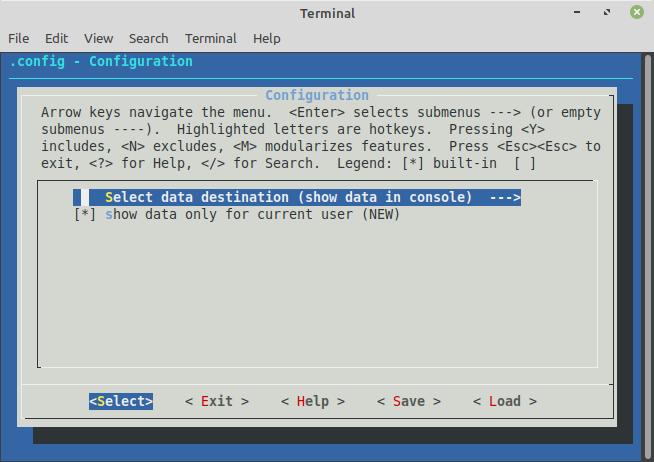
And with qt:
与qt:
boozlachu@debian:~/demo-kbuild$ kconfig-qconf KConfig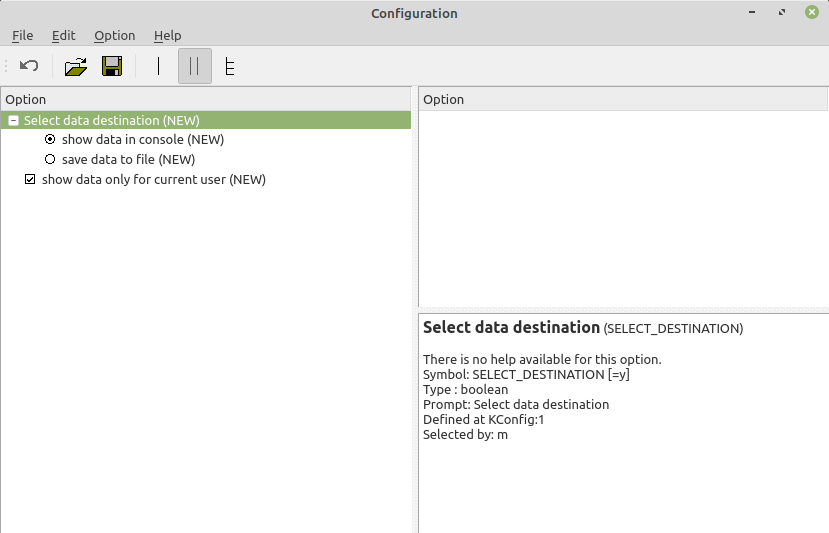
测试运行 (Test run)
After configuring it, we get .config file with options:
配置完之后,我们得到带有选项的.config文件:
boozlachu@debian:~/demo-kbuild$ cat .config
#
# Automatically generated file; DO NOT EDIT.
# Configuration
#
CONFIG_SELECT_DESTINATION_TTY=y
# CONFIG_SELECT_DESTINATION_FILE is not set
CONFIG_SHOW_ONLY_CURRENT_USER=y
As you can see, non-selected options are commented on. It's useful for my script.
如您所见,未选择的选项已被注释。 这对我的脚本很有用。
I run it with this config:
我使用此配置运行它:
boozlachu@debian:~/demo-kbuild$ ./getLast.sh
boozlach pts/0        192.168.2.4      Sun Jul 19 06:00   still logged in
boozlach pts/0        192.168.2.4      Sun Jul 19 05:58 - 05:58  (00:00)

wtmp begins Thu Apr 16 05:48:31 2020
I changed the parameters via KConfig and got another result. Now the date was saved to a file, instead of being shown in the console:
我通过KConfig更改了参数,并得到了另一个结果。 现在,日期已保存到文件中,而不是显示在控制台中:
boozlachu@debian:~/demo-kbuild$ cat .config
#
# Automatically generated file; DO NOT EDIT.
# Configuration
#
# CONFIG_SELECT_DESTINATION_TTY is not set
CONFIG_SELECT_DESTINATION_FILE=y
CONFIG_SELECT_DESTINATION_FILE_FILENAME="last.log"
CONFIG_SHOW_ONLY_CURRENT_USER=y
boozlachu@debian:~/demo-kbuild$ ./getLast.sh
boozlachu@debian:~/demo-kbuild$ cat last.log
boozlach pts/0        192.168.2.4      Sun Jul 19 06:00   still logged in
boozlach pts/0        192.168.2.4      Sun Jul 19 05:58 - 05:58  (00:00)
结论 (Conclusion)
As you can see, KConfig is very powerful and friendly util for configuring. It can be used for scripts, package building, and other variants.
如您所见,KConfig是非常强大且友好的配置实用程序。 它可以用于脚本,程序包构建和其他变体。
If you want to see an improved variant of KConfig using a makefile in the real project — write in comments.
如果要在实际项目中使用makefile来查看KConfig的改进变体,请在注释中编写。
kconfig





 扫一扫
扫一扫


 315
315

 被折叠的 条评论
为什么被折叠?
被折叠的 条评论
为什么被折叠?
 到【灌水乐园】发言





