


 本文介绍了一种在Windows系统完全卡死时,通过任务管理器而非强制重启来进行计算机重启的方法。这一技巧避免了对硬件可能造成的损害,并提供了两种打开任务管理器的方式:使用Ctrl+Alt+Del组合键后选择任务管理器,或者直接按下Ctrl+Shift+Esc。在任务管理器中,可以选择重启已挂起的进程或直接重启电脑。

windows启动管理器
For those times when Windows completely freezes and you can’t even open the start menu, you can also restart your computer from Task Manager instead of just powering the machine off.
在Windows完全死机甚至无法打开开始菜单的情况下,也可以从任务管理器重新启动计算机,而不仅仅是关闭计算机电源。
Doing a hard reset isn’t as healthy for your computer’s internal components, this method would be preferable if possible.
进行硬重置对计算机的内部组件不利,因此,如果可能的话,这种方法会更好。
There are two ways you can bring up Task Manager:
有两种方法可以启动任务管理器:
- Hit Ctrl+Alt+Del and click on Task Manager. 点击Ctrl + Alt + Del并单击任务管理器。
- Hit Ctrl+Shift+Esc to bring up Task Manager 按Ctrl + Shift + Esc打开任务管理器
Once you are in Task Manager, you can restart a hung process in the processes list, or you can click on Shutdown \ Restart to restart your computer.
进入任务管理器后,您可以在进程列表中重新启动挂起的进程,也可以单击Shutdown \ Restart来重新启动计算机。
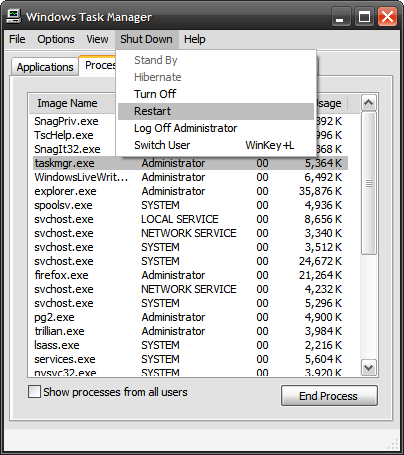
Pretty simple tip, but very useful
非常简单的提示,但非常有用
翻译自: https://www.howtogeek.com/howto/windows/quick-tip-restart-windows-from-task-manager/
windows启动管理器





 扫一扫
扫一扫


 5188
5188

 被折叠的 条评论
为什么被折叠?
被折叠的 条评论
为什么被折叠?
 到【灌水乐园】发言





