





 本文汇总了在CentOS7系统中安装和使用Python3.7过程中遇到的六个常见错误,包括gzip解压错误、C编译器找不到、zlib缺失、_ctypes模块未找到、pip SSL模块不可用以及PyCharm运行Python3.7时的SSL问题,并提供了详细的解决步骤和方法。
目录:
1、tar解压包的时候出现错误 gzip: stdin: not in gzip format
2、编译的时候出现:configure: error: no acceptable C compiler found in $PATH
3、zipimport.ZipImportError: can’t decompress data; zlib not available
4、ModuleNotFoundError: No module named ‘_ctypes’
5、pip is configured with locations that require TLS/SSL, however the ssl module in Python is not available.
6、在安装pycharm后运行python3.7出现如第五点错误
一、出现错误gzip: stdin: not in gzip format
在Linux环境下,通过tar -zxvf 命令解压文件时遇到”gzip: stdin: not in gzip format“等错误:如图所示
[root@localhost Downloads]# tar -xzvf Python-3.7.0.tar.xz

gzip: stdin: not in gzip format
tar: Child returned status 1
tar: Error is not recoverable: exiting now
解决方法:
(1)这个压缩包没有用gzip格式压缩,所以不用加z参数:
tar -zxvf Python-3.7.0.tar.xz 改成 tar -xvf Python-3.7.0.tar.xz
(2)如果上面不能解决,那你就要考虑下是否下载的压缩包有误,检测压缩包是否完整。
二、错误configure: error: no acceptable C compiler found in $PATH
在执行配置文件,编译,编译安装的时候出现如下错误:
[root@localhost Python-3.7.0]# ./configure --prefix=/usr/local/python3;
checking build system type... x86_64-pc-linux-gnu
checking host system type... x86_64-pc-linux-gnu
checking for python3.7... no
checking for python3... no
checking for python... python
checking for --enable-universalsdk... no
checking for --with-universal-archs... no
checking MACHDEP... checking for --without-gcc... no
checking for --with-icc... no
checking for gcc... no
checking for cc... no
checking for cl.exe... no
configure: error: in `/home/jiang/Downloads/Python-3.7.0':
configure: error: no acceptable C compiler found in $PATH
See `config.log' for more details
解决办法:安装GCC软件套件
[root@localhost jiang]# cd ~
[root@localhost ~]# yum install gcc
。。。

总下载量:32 M
安装大小:59 M
Is this ok [y/d/N]: y
在执行安装命令:
[root@localhost Python-3.7.0]# ./configure --prefix=/usr/local/python3
三、zipimport.ZipImportError: can’t decompress data; zlib not available
在CentOS以及其他的Linux系统中遇到安装包安装错误的原因,大多数都是因为缺少依赖包导致的,标题所示的错误是因为缺少zlib 的相关工具包导致的
[root@localhost Python-3.7.0]# yum -y install zlib*
四、ModuleNotFoundError: No module named ‘_ctypes’
在安装python3.7的时候出现如标题错误,原因3.7版本需要一个新的包libffi-devel
[root@localhost Python-3.7.0]# yum install libffi-devel -y
五、pip is configured with locations that require TLS/SSL, however the ssl module in Python is not available.
在centos7安装完python3.7之后,执行:pip3 install requests,出现如标题的报错
pip is configured with locations that require TLS/SSL, however the ssl module in Python is not available.
Could not fetch URL https://pypi.org/simple/pip/: There was a problem confirming the ssl certificate: HTTPSConnectionPool(host='pypi.org', port=443): Max retries exceeded with url: /simple/pip/ (Caused by SSLError("Can't connect to HTTPS URL because the SSL module is not available.")) - skipping
发现是ssl证书的问题,解决办法,在参照安装教材的安装方式的情况下,对python3.7重新编译安装,操作如下:
# 进入解压缩目录
[root@localhost ~]# cd Python-3.7.0

# 检查安装平台属性,系统是否有编译时所需要额库,以及库的版本是否满足编译需要
[root@localhost Python-3.7.0]# ./configure --with-ssl

# 编译源码
[root@localhost Python-3.7.0]# make

# 成功编译之后,安装
sudo make install
至此,pip3的ssl的问题解决!
六、在安装pycharm后运行python3.7出现如第五点错误
在使用pip3 install requests的时候出现如下图报错:
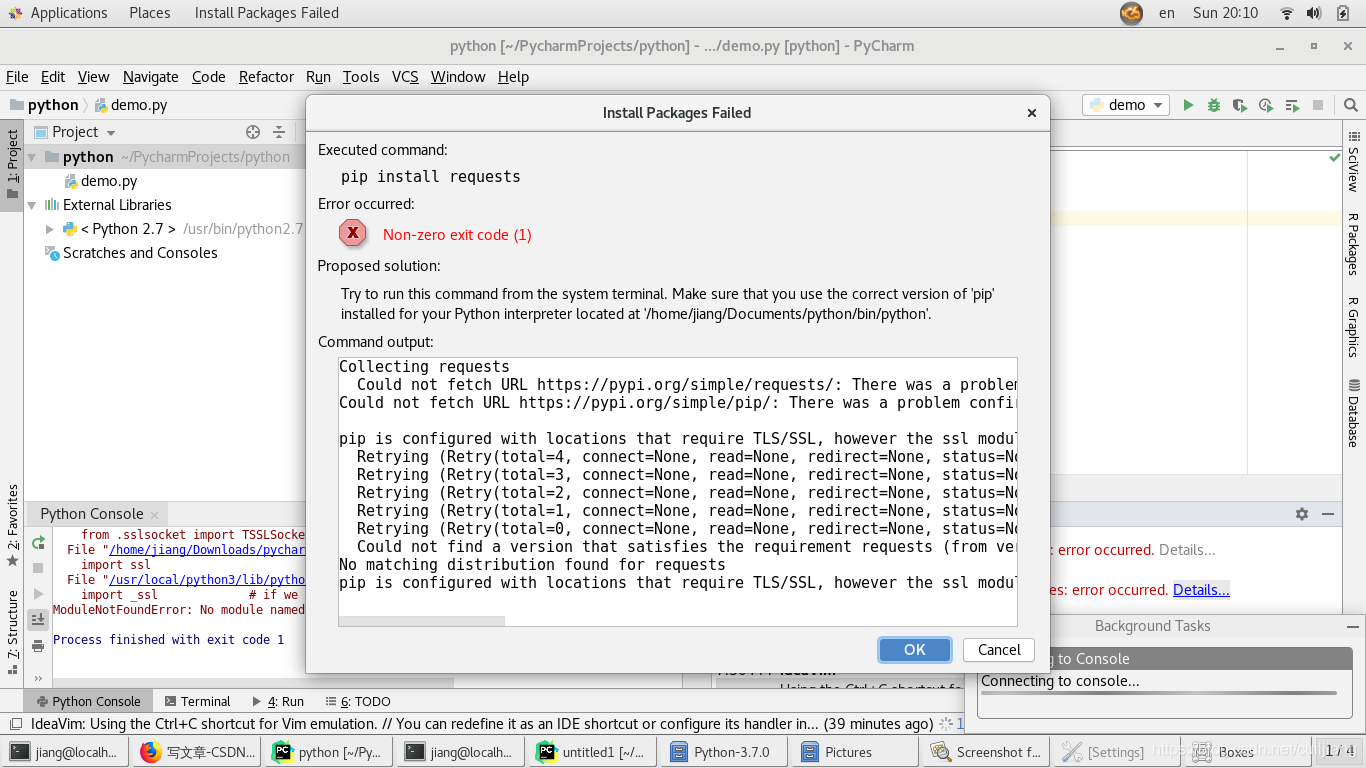
查看后发现也没有如下图所示的包,如下图:
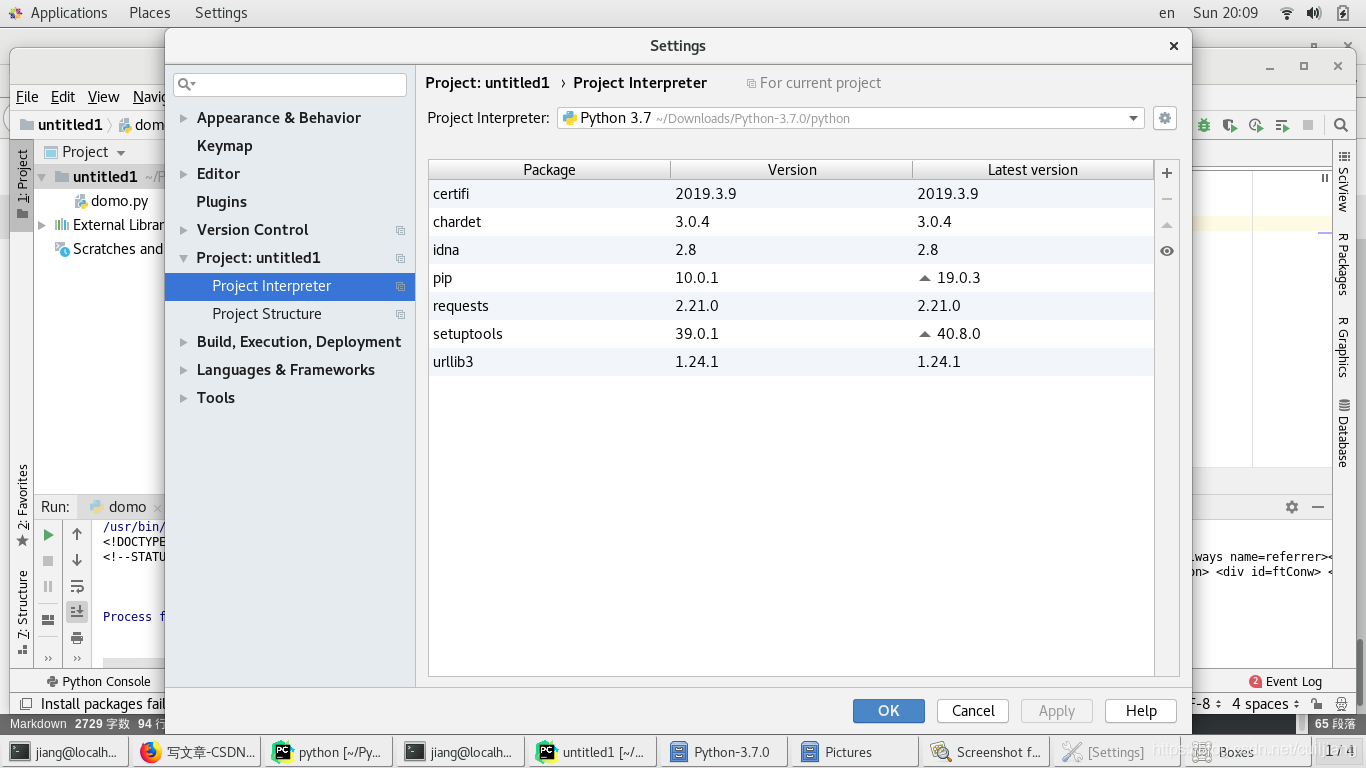
推测为编译器的路径错误:经检查对比发现,在使用python2.7的编译器图标上不存在一个箭头(即表示快捷方式)因此更改编译器的路径,至下载文件处。见上图片。
至此,问题解决。





 扫一扫
扫一扫


 4143
4143

 被折叠的 条评论
为什么被折叠?
被折叠的 条评论
为什么被折叠?
 到【灌水乐园】发言





