svchost.exe CPU 过高

http://www.hanselman.com/blog/FiguringOutWhyMySVCHOSTEXEIsAt100CPUWithoutComplicatedToolsInWindows7.aspx

The SvcHost.exe process hosts services that run in the background on Windows. It's literally "Service Host." You may have a dozen services or more running inside that process. More complex is that you'll sometimes see multiple SvcHost.exe's in your TaskManager. 

Let me tell you now, Task Manager will not save you. You can see the PIDs for a running Service for the Services tab, but when a service goes insane, good luck nailing it down.

This inevitably leads you to questions like, "What Services are running inside what SvcHost.exe?" and "Which Service is using 100% CPU."

There's lots of ways to figure this out, but first I'll tell you that simply killing the SvcHost.exe process that is using the most CPU will also kill ALL the other services that were running inside that host process.

There's many command line ways to figure this stuff out, like

net start

or

sc query type= service

or

tasklist /svc

But this post is about doing it the easy way without lining up Process IDs and such.

Which Service is Freaking Out?

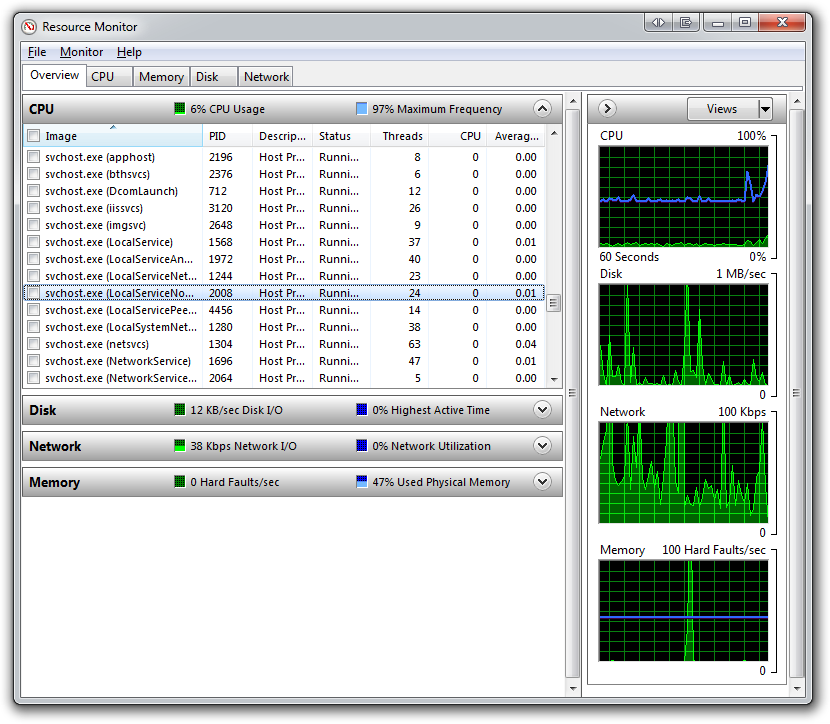
From the Start Menu, type "Resource Monitor" and run it.

Resource Monitor

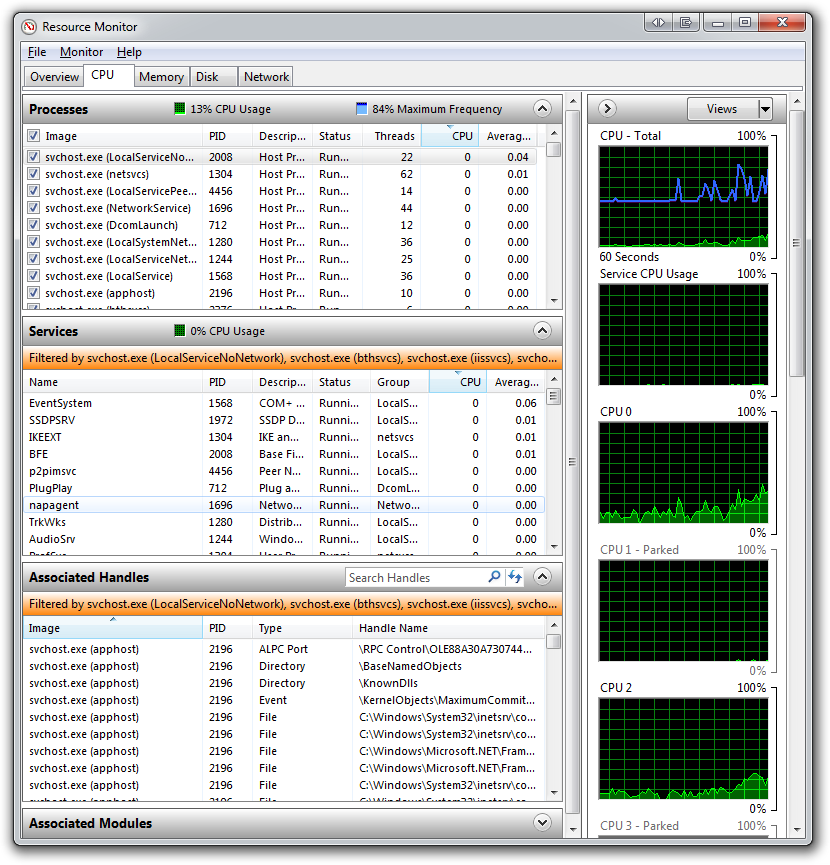
Click the checkboxes to the left of each of the svchost.exe processes (or just those that you care about). Now, switch to the CPU tab:

Resource Monitor - CPU

See the names of the logical services in the middle pane? Now you can sort by the CPU column and you've got the name of your out of control process.

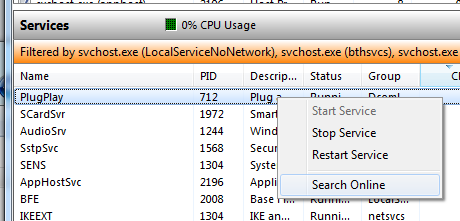
You can right click and try to stop or restart just the one services, or even use default browser's default search engine to "Search Online" for that service name:

Resource Monitor with the Right Click Menu showing

This tip has helped me several times while writing and debugging services. Resource Monitor is your friend. Many folks don't' even know it's there!

Enjoy!

来自 “ ITPUB博客 ” ,链接:http://blog.itpub.net/310974/viewspace-2080183/,如需转载,请注明出处,否则将追究法律责任。

转载于:http://blog.itpub.net/310974/viewspace-2080183/

2026年医疗AI的可信革命全栈实现(上) 医疗AI可信化:贝叶斯网络与向量数据库的协同架构 本文探讨2026年医疗AI发展的关键转折点——从追求生成能力转向构建可信决策系统。核心观点认为,医疗AI下一阶段的竞争焦点在于不确定性量化和错误传播约束,而非单纯的问答流畅度。研究提出以Python为开发语言、结合向量数据库与贝叶斯网络的混合架构: 技术分层 语言层(LLM):处理自然语言交互与工具调用 证据层(Milvus/Qdrant):实现可审计的临床知识检索 概率层(pgmpy/PyMC):执行贝叶斯推理与风险路由 治理层:确保权限控制与人工复核机制 阅读详情

相关推荐

PyTorch、Torchvision、Torchaudio历史版本whl文件下载地址、版本对应关系与离线安装全攻略

本文详细解析了PyTorch、Torchvision和Torchaudio历史版本whl文件的下载地址、版本对应关系及离线安装全攻略。针对无网络环境下的安装挑战,提供了官方whl文件获取路径、版本匹配技巧和完整安装流程,帮助开发者高效解决兼容性问题,确保深度学习环境的稳定部署。

weixin_31960565的博客 378

Windows服务器CPU使用过高(svchost.exe)

cpu使用率的查看一般可以通过任务管理器中的cpu使用百分比排序,依次查看哪些进程导致使用率过高。 不同的程序不同的处理。以下主要讲解svchost.exe进场占用cpu过高的问题。svchost.exe 进程,一般都是与系统服务相关的,大部分均是来自服务。 1、服务导致。找到cpu使用率比较大的进程,右键-》转到服务,若是是由服务启动的,会自动定位到相应的服务。 可以点击,右下角的

xia_xing的专栏 3万+

linux redis7 完整的集群搭建过程

一。安装: 1.1 说明: Redis官方只提供了源码,并没有提供经过编译之后的安装包。 因此,安装Redis,要先编译、后安装。(即源码安装方式) 注意:需要联网安装 1.2 安装编译的工具: yum install gcc gcc-c++ -y 1.3 下载tar包,上传到linux服务器,解压配置环境变量 1.4 cd +解压的目录下:编译 make 注意:如果编译失败,请重新进行解压编译,...

m0_38028438的博客 719

svchost.exe占用cpu过高的问题(适合和我一样的电脑小白)

一大早开机发现360的加速球蹦到了95%+,平时都没有这样的情况,一般都在30%多一点,虽说是ADM单核处理器,但我加了6G内存条,也没装什么东西。忙活了好一会,现在终于解决了,下面记录一下解决的步骤: 首先查看你的任务管理器(在桌面下面的工具栏点击右键),查看是什么进程在占用你的CPU,我的是svchost.exe,一长串的svchost.exe,我按照网上的办法查看了PID等等,还是不太懂,

xiangluer的博客 5925

Linux中断子系统分析之(四):驱动程序申请中断

中断子系统中有一个重要的设计机制,那就是Top-half和Bottom-half,将紧急的工作放置在Top-half中来处理,而将耗时的工作放置在Bottom-half中来处理。 如果中断不分上下半部处理,那么意味着只有等上一个中断完成处理后才会打开中断,下一个中断才能得到响应。当某个中断处理处理时间较长时,很有可能就会造成其他中断丢失而无法响应,影响系统性能。 中断分成上下半部处理可以提高中断的响应能力,在上半部处理完成后便将中断打开,这样就可以响应其他中断了,等到中断退出的时候再进行下半部的处理。为了进

m0_46525308的博客 1225

国内优秀MES开源框架

一套springboot 开源框架 代码标准规范化。 界面展示 演示地址 http://wangziyangmes.pzzd.xyz 用户名admin 密码123 系统管理 工艺管理 计划管理 物料管理 *用户管理* *工艺路线管理* 工单下达...

q707231019的博客 2万+

svchost.exe占用cpu过高怎么处理(原因及解决办法)

http://www.to8to.com/yezhu/v3382.html   我们知道,电脑使用久了一般运行起来就会比较慢,这其中很大一部分原因是svchost.exe占用cpu过高引起的。那么,svchost.exe是什么?svchost.exe占用cpu过高怎么处理呢?一起来看。 svchost.exe是什么?     Svchost.exe是一个系统的核心进程,svc

zenwanxin的专栏 2万+

Cesium 相机操作

Cesium 提供了三种方式对相机的位置进行摆放。

虎康的博客 2588

svchost.exe是什么意思?占比CPU非常高是否能强制结束?

svchost.exe是Windows系统核心进程,负责托管多个系统服务。虽然合法,但可能被病毒利用。判断其安全性需检查文件位置(应在system32目录)和数字签名(需显示Microsoft有效签名)。当出现内存占用过高时,切勿直接结束进程,否则可能导致系统崩溃。正确做法是通过任务管理器定位具体服务,针对性处理或扫描病毒。建议定期进行系统维护(磁盘清理、驱动更新等)保持系统稳定。若问题复杂应寻求专业技术支持。

caaAhHhAaac的博客 2万+

手把手教你学Simulink——基于Simulink的模糊自适应PI调节FOC电流环

本文提出基于模糊自适应PI控制的FOC电流环优化方案,针对传统PI控制参数固化、抗扰性差等问题,通过模糊逻辑在线调整PI参数。方案采用双输入(电流误差及变化率)和三输出(ΔKp/ΔKi/PI调节)结构,实现动态响应时间<30μs(提升38%)、超调<5%(降低71%)、参数摄动下误差<±0.4A(精度提升73%)。详细介绍了Simulink建模步骤,包括模糊规则设计(7语言变量、49条规则)、隶属度函数配置及自适应PI实现逻辑,并提供实机部署建议。仿真结果表明,该方法显著提升系统鲁棒性,特

MHD0815的博客 79

【银河麒麟桌面系统】安装英伟达(NVIDIA)显卡驱动

本文详细介绍了在麒麟桌面操作系统V10 SP1(版本号2503)上安装NVIDIA RTX 5060显卡驱动的完整流程。主要内容包括:查看系统版本信息,从NVIDIA官网下载Linux 64位驱动,授予执行权限后运行安装程序,处理安装过程中的X server警告、32位库安装、DKMS模块选择等问题,以及安装完成后如何验证驱动状态。同时提供了卸载驱动的步骤和常见问题解决方案,如处理X server警告、libglvnd EGL依赖问题等。该指南适用于需要在国产麒麟系统上安装NVIDIA显卡驱动的用户,包含完

信创运维工程师 · 银河麒麟 & 容器实战 | 金融生产环境迁移·等保加固 | 142篇原创·17万+阅读 6312

Svchost.exe 程序占用CPU高

问题程序解释: Svchost.exe是一个属于微软Windows操作系统的系统程序 官方解释:Svchost.exe 是从动态链接库 (DLL) 中运行的服务的通用主机进程名称。这个程序对系统的正常运行是非常重要,而且是不能被结束的。   问题说明: Svchost.exe占用CPU百分之90以上,使用任务管理器结束任务或者重启后反复存在并占用CPU   问题解决: 先使用杀毒软...

猫咪的一生, 1万+

IEM模型,地表粗糙度模拟

利用微波反演土壤水分时候,利用IEM模型可以实现对随机地表的模拟

关于svchost.exe的CPU占用率过高的原因以及解决方法

前两天电脑经常开机后CPU占用率就90%多,卡的玩儿不了游戏,最后确定是其中的一个svchost.exe搞的鬼,看来跟本地服务有关,没办法,又得忙活一下了。因为我一直对Windows中的服务的概念理解的不是十分透彻,可能是由于我也是个DOS时代的人吧,没有对这些有更多的研究,所以以下我所分析的原因和解决方法不一定正确,也不一定适用于所有计算机,应用时请慎重。     首先,svc

yuyin86的专栏 3193

VB摄像头监控

该VB模块可对摄像头捕获的画面进行录像等,可在创建的窗口进行控制

锂电池充电器电路设计 里面有电路

锂电池充电器电路设计 里面有电路 3.7V升压到5V电路设计。

记录一次线上环境svchost.exe antimalware service executable 进程占用CPU过高问题

首先说下病毒 svchost.exe进程描述为antimalware service executable 的特点是操作系统任务管理器无法使用CPU占用过高当CPU占用过高时,数据库的读写操作会不定时异常缓慢,这个与系统使用情况有关,写操作时会导致大量锁表,系统业务会被阻塞。另外再处理这个问题过程中,也在搜到了关于svchost.exe进程描述为antimalware service executable 的几个其他的处理方法,也提供参考。

Yuperman的专栏 1176

深度学习工具包 DeepLearningToolbox

深度学习工具包Deprecation notice.-----This toolbox is outdated and no longer maintained.There are much better tools available for deep learning than this toolbox, e.g. [Theano](http://deeplearning.net/software/theano/), [torch](http://torch.ch/) or [tensorflow](http://www.tensorflow.org/)I would suggest you use one of the tools mentioned above rather than use this toolbox.Best, Rasmus.DeepLearnToolbox================A Matlab toolbox for Deep Learning.Deep Learning is a new subfield of machine learning that focuses on learning deep hierarchical models of data.It is inspired by the human brain's apparent deep (layered, hierarchical) architecture.A good overview of the theory of Deep Learning theory is[Learning Deep Architectures for AI](http://www.iro.umontreal.ca/~bengioy/papers/ftml_book.pdf)For a more informal introduction, see the following videos by Geoffrey Hinton and Andrew Ng.* [The Next Generation of Neural Networks](http://www.youtube.com/watch?v=AyzOUbkUf3M) (Hinton, 2007)* [Recent Developments in Deep Learning](http://www.youtube.com/watch?v=VdIURAu1-aU) (Hinton, 2010)* [Unsupervised Feature Learning and Deep Learning](http://www.youtube.com/watch?v=ZmNOAtZIgIk) (Ng, 2011)If you use this toolbox in your research please cite [Prediction as a candidate for learning deep hierarchical models of data](http://www2.imm.dtu.dk/pubdb/views/publication_details.php?id=6284)```@MASTERSTHESIS\{IMM2012-06284, author = "R. B. Palm", title = "Prediction as a candidate for learning deep hierarchical models of data", year = "2012",}```Contact: rasmusbergpalm at gmail dot comDirectories included in the toolbox-----------------------------------`NN/` - A library for Feedforward Backpropagation Neural Networks`CNN/` - A library for Convolutional Neural Networks`DBN/` - A library for Deep Belief Networks`SAE/` - A library for Stacked Auto-Encoders`CAE/` - A library for Convolutional Auto-Encoders`util/` - Utility functions used by the libraries`data/` - Data used by the examples`tests/` - unit tests to verify toolbox is workingFor references on each library check REFS.mdSetup-----1. Download.2. addpath(genpath('DeepLearnToolbox'));Example: Deep Belief Network---------------------```matlabfunction test_example_DBNload mnist_uint8;train_x = double(train_x) / 255;test_x = double(test_x) / 255;train_y = double(train_y);test_y = double(test_y);%% ex1 train a 100 hidden unit RBM and visualize its weightsrand('state',0)dbn.sizes = [100];opts.numepochs = 1;opts.batchsize = 100;opts.momentum = 0;opts.alpha = 1;dbn = dbnsetup(dbn, train_x, opts);dbn = dbntrain(dbn, train_x, opts);figure; visualize(dbn.rbm{1}.W'); % Visualize the RBM weights%% ex2 train a 100-100 hidden unit DBN and use its weights to initialize a NNrand('state',0)%train dbndbn.sizes = [100 100];opts.numepochs = 1;opts.batchsize = 100;opts.momentum = 0;opts.alpha = 1;dbn = dbnsetup(dbn, train_x, opts);dbn = dbntrain(dbn, train_x, opts);%unfold dbn to nnnn = dbnunfoldtonn(dbn, 10);nn.activation_function = 'sigm';%train nnopts.numepochs = 1;opts.batchsize = 100;nn = nntrain(nn, train_x, train_y, opts);[er, bad] = nntest(nn, test_x, test_y);assert(er < 0.10, 'Too big error');```Example: Stacked Auto-Encoders---------------------```matlabfunction test_example_SAEload mnist_uint8;train_x = double(train_x)/255;test_x = double(test_x)/255;train_y = double(train_y);test_y = double(test_y);%% ex1 train a 100 hidden unit SDAE and use it to initialize a FFNN% Setup and train a stacked denoising autoencoder (SDAE)rand('state',0)sae = saesetup([784 100]);sae.ae{1}.activation_function = 'sigm';sae.ae{1}.learningRate = 1;sae.ae{1}.inputZeroMaskedFraction = 0.5;opts.numepochs = 1;opts.batchsize = 100;sae = saetrain(sae, train_x, opts);visualize(sae.ae{1}.W{1}(:,2:end)')% Use the SDAE to initialize a FFNNnn = nnsetup([784 100 10]);nn.activation_function = 'sigm';nn.learningRate = 1;nn.W{1} = sae.ae{1}.W{1};% Train the FFNNopts.numepochs = 1;opts.batchsize = 100;nn = nntrain(nn, train_x, train_y, opts);[er, bad] = nntest(nn, test_x, test_y);assert(er < 0.16, 'Too big error');```Example: Convolutional Neural Nets---------------------```matlabfunction test_example_CNNload mnist_uint8;train_x = double(reshape(train_x',28,28,60000))/255;test_x = double(reshape(test_x',28,28,10000))/255;train_y = double(train_y');test_y = double(test_y');%% ex1 Train a 6c-2s-12c-2s Convolutional neural network %will run 1 epoch in about 200 second and get around 11% error. %With 100 epochs you'll get around 1.2% errorrand('state',0)cnn.layers = { struct('type', 'i') %input layer struct('type', 'c', 'outputmaps', 6, 'kernelsize', 5) %convolution layer struct('type', 's', 'scale', 2) %sub sampling layer struct('type', 'c', 'outputmaps', 12, 'kernelsize', 5) %convolution layer struct('type', 's', 'scale', 2) %subsampling layer};cnn = cnnsetup(cnn, train_x, train_y);opts.alpha = 1;opts.batchsize = 50;opts.numepochs = 1;cnn = cnntrain(cnn, train_x, train_y, opts);[er, bad] = cnntest(cnn, test_x, test_y);%plot mean squared errorfigure; plot(cnn.rL);assert(er<0.12, 'Too big error');```Example: Neural Networks---------------------```matlabfunction test_example_NNload mnist_uint8;train_x = double(train_x) / 255;test_x = double(test_x) / 255;train_y = double(train_y);test_y = double(test_y);% normalize[train_x, mu, sigma] = zscore(train_x);test_x = normalize(test_x, mu, sigma);%% ex1 vanilla neural netrand('state',0)nn = nnsetup([784 100 10]);opts.numepochs = 1; % Number of full sweeps through dataopts.batchsize = 100; % Take a mean gradient step over this many samples[nn, L] = nntrain(nn, train_x, train_y, opts);[er, bad] = nntest(nn, test_x, test_y);assert(er < 0.08, 'Too big error');%% ex2 neural net with L2 weight decayrand('state',0)nn = nnsetup([784 100 10]);nn.weightPenaltyL2 = 1e-4; % L2 weight decayopts.numepochs = 1; % Number of full sweeps through dataopts.batchsize = 100; % Take a mean gradient step over this many samplesnn = nntrain(nn, train_x, train_y, opts);[er, bad] = nntest(nn, test_x, test_y);assert(er < 0.1, 'Too big error');%% ex3 neural net with dropoutrand('state',0)nn = nnsetup([784 100 10]);nn.dropoutFraction = 0.5; % Dropout fraction opts.numepochs = 1; % Number of full sweeps through dataopts.batchsize = 100; % Take a mean gradient step over this many samplesnn = nntrain(nn, train_x, train_y, opts);[er, bad] = nntest(nn, test_x, test_y);assert(er < 0.1, 'Too big error');%% ex4 neural net with sigmoid activation functionrand('state',0)nn = nnsetup([784 100 10]);nn.activation_function = 'sigm'; % Sigmoid activation functionnn.learningRate = 1; % Sigm require a lower learning rateopts.numepochs = 1; % Number of full sweeps through dataopts.batchsize = 100; % Take a mean gradient step over this many samplesnn = nntrain(nn, train_x, train_y, opts);[er, bad] = nntest(nn, test_x, test_y);assert(er < 0.1, 'Too big error');%% ex5 plotting functionalityrand('state',0)nn = nnsetup([784 20 10]);opts.numepochs = 5; % Number of full sweeps through datann.output = 'softmax'; % use softmax outputopts.batchsize = 1000; % Take a mean gradient step over this many samplesopts.plot = 1; % enable plottingnn = nntrain(nn, train_x, train_y, opts);[er, bad] = nntest(nn, test_x, test_y);assert(er < 0.1, 'Too big error');%% ex6 neural net with sigmoid activation and plotting of validation and training error% split training data into training and validation datavx = train_x(1:10000,:);tx = train_x(10001:end,:);vy = train_y(1:10000,:);ty = train_y(10001:end,:);rand('state',0)nn = nnsetup([784 20 10]); nn.output = 'softmax'; % use softmax outputopts.numepochs = 5; % Number of full sweeps through dataopts.batchsize = 1000; % Take a mean gradient step over this many samplesopts.plot = 1; % enable plottingnn = nntrain(nn, tx, ty, opts, vx, vy); % nntrain takes validation set as last two arguments (optionally)[er, bad] = nntest(nn, test_x, test_y);assert(er < 0.1, 'Too big error');```[![Bitdeli Badge](https://d2weczhvl823v0.cloudfront.net/rasmusbergpalm/deeplearntoolbox/trend.png)](https://bitdeli.com/free "Bitdeli Badge")

window系统svchost.exe占用CPU或者内存过高的解决方案

现象: 系统刚安装某些软件后,系统会变得很卡,查看任务管理器,发现CPU占用率很高,一个名字为svchost.exe进程占用了CPU的一大部分。 这时候的解决方案是: 右键svchost.exe 转到服务,一般是上面的安装程序的自动更新服务,把它的自动启动关掉并且禁用就行了。 做完这些后系统恢复正常。

酒醉东坡的专栏 4022

win7 svchost.exe 占用内存cpu过高

自己新安装系统 开机发现svchost.exe 占用cpu 和内存过高,网上找到有个有效的解决方法,原来是windows update服务占用的。这里推荐有个查看系统进程的软件Process Explorer,下载地址:http://pan.baidu.com/s/1qXrtAkk 。免安装非常方便,打开软件,找到svchost进程,再找到属性,转到服务就可以找到

学习的约束力,提醒自己 864

svchost.exe占用过高CPU和内存的解决方案

svchost.exe占用过高CPU和内存的解决方案 废话不多少,直接说怎么解决这个烦人的问题:       首先要找出究竟是哪个服务占用了这么多的资源,方法有两种      1) 用管理员身份打开cmd.exe,输入tasklist -svc 可以看到如下图所示进程信息       我的电脑是4核单CPU,这个svchost就占满了我一个核的资源。        输入tasklist

akjw008的专栏 9507

安装第三方网络软件导致svchost.exe占CPU过高使其过热

近来发现笔记本CPU温度过高,想来小本用了一年,帝都空气又厚重,可能风扇灰太多了,夏天天又热。但可是 Acer 的本拆机太麻烦了,拖了良久,最终决定作为一名IT人士不应惧怕这些点,于是乎从网上按着教程,拆了,过程真是繁杂,吓了一身汗!除了排线卡口基本弄坏了外,其它基本良好,拆开后发现也没多少灰啊,然后有说有可能导热硅胶出问题了,奈何实在不敢折腾,就此作罢,把本复原了,但键盘部分有点鼓起,还算可以接

Xunixing的专栏 1522

Windows服务器svchost.exe高CPU占用排查与优化

在Windows服务器运维中,服务宿主进程(svchost.exe)是系统核心组件,负责托管多个Windows服务。其工作原理是通过服务分组机制提升资源利用率,但当某个托管服务异常时,会导致整个进程组出现CPU飙高问题。这类故障的排查需要结合系统工具链(如Process Explorer、性能监视器)和服务状态分析,常见诱因包括Windows Update服务异常、Superfetch内存管理问题等。通过精准识别问题服务、分析事件日志、重建关键服务组件等方法,可以有效解决CPU持续高负载问题。对于企业级运维

weixin_34094282的博客 350

WinXP补丁升级极疯狂 《关于svchost.exe的CPU占用率过高的原因以及解决方法》

2019独角兽企业重金招聘Python工程师标准>>> ...

weixin_34085658的博客 234

关于使用WindowsUpdate 或 Windows 自动升级时碰到的 svchost.exe 进程 CPU 资源占用过高的问题的相关信息...

当你使用 WindowsUpdate 或 Windows 自动升级的时候,可能会碰到 svchost.exe 进程CPU占用100%的现象。如果你的现象符合下面的相关症状,请安装一个补丁程序用于缓解这个问题。 症状 系统里面有一个 svchost.exe 进程 CPU 占用率非常高 硬盘读写频繁 使用 Process Explorer 检查会发现该 svcho...

weixin_34258078的博客 335

解决开机时svchost.exe的CPU占用率过高导致系统异常缓慢 - 好软之家

2012-09-14 08:19 解决开机时svchost.exe的CPU占用率过高导致系统异常缓慢 - 好软之家 网上有很多关于开机时SVCHOST.exe的CPU占用率过高问题的文章,基本上都说出了绝大部分用户的情况并给出解决方案,我引用一篇网上随便搜索的关于这SVCHOST的文章给大家看看,如果大家也有类似的问题可参考一下。 来源:http://www.gzjunju

多媒体编程、网络编程、系统编程、网络安全编程、驱动编程 934

解决服务主机:功能访问管理器服务占用CPU过高的问题(可能能用于其它svchost.exe服务相关进程CPU占用过高的情况)

摘要:电脑频繁卡顿,发现"服务主机:功能访问管理器服务"进程持续占用过高CPU资源。尝试禁用系统服务等方法均未解决,每次开机需手动关闭进程。怀疑系统文件损坏或遭恶意修改,使用sfc/scannow命令检查未发现问题。最终尝试系统映像修复后成功解决问题,CPU占用恢复正常。

weixin_73457223的博客 1万+

svchost.exe占用cpu100 的解决方法

今天郁闷了,星期六自主去公司加下班,下午来的开机下个DW5结果界面卡了半天以为同事在下载,就开P2P监视下,结果发现是自己的机子的下载上传特别的高,麻痹神马情况,直接开 开启流量监测,没有进程,或程序占资源,这不可能的,直接转 显示所有程序 发现了 svchost.exe 这个占了 上传下载也太离谱了 简直比病毒还恐怖。 路径:C:\WINDOWS\system32\svchost.exe

路漫漫 修远兮 1万+
上一篇: disable CompatTelRunner.exe
下一篇: jQuery - remove select option based on text not value
cuichen4524
博客等级 码龄11年 0粉丝 0原创
评论
成就一亿技术人!
拼手气红包6.0元
还能输入1000个字符  | 博主筛选后可见
 
 条评论被折叠 查看
添加红包

请填写红包祝福语或标题

个

红包个数最小为10个

元

红包金额最低5元

当前余额3.43元 前往充值 >
需支付:10.00元
成就一亿技术人!
领取后你会自动成为博主和红包主的粉丝 规则
hope_wisdom
发出的红包
实付元
使用余额支付
点击重新获取
扫码支付
钱包余额 0

抵扣说明:

1.余额是钱包充值的虚拟货币,按照1:1的比例进行支付金额的抵扣。
2.余额无法直接购买下载,可以购买VIP、付费专栏及课程。

余额充值