



 本文详细解析了MVC模式下部门信息添加及员工登录的具体实现过程,包括表单数据获取、业务逻辑调用、页面跳转等关键步骤,展示了如何通过Java Servlet进行数据处理与页面交互。
案例:
AddDept.jsp 视图
DoAddDept.jsp 控制器 作用:①获取表单数据②调用业务逻辑③页面跳转
WebContent下的代码:
1.DoAddDept.jsp
<%@page import="cn.qf.emp.service.DeptService"%>
<%@page import="cn.qf.emp.pojo.Dept"%>
<%@ page language="java" contentType="text/html; charset=UTF-8"
    pageEncoding="UTF-8"%>
<%
//控制器:3个职责
//1、获取表单数据
//表单的提交方式为post,解决中文乱码
//设置获取时的编码方式为utf-8
request.setCharacterEncoding("utf-8");
String dno=request.getParameter("dno");
String dname=request.getParameter("dname");
String loc=request.getParameter("loc");
//创建部门对象
Dept dept=new Dept();
dept.setDeptno(dno);
dept.setDname(dname);
dept.setLoc(loc);
//2、调用业务逻辑
DeptService ds=new DeptService();
String result=ds.addDept(dept);
if(result.equals("添加成功")){
	//用转发的方式 页面跳转
	//请求Doindex.jsp   获取所有部门数据
	response.sendRedirect("DoIndex.jsp");
}else{
    //跳转回添加界面
	response.sendRedirect("AddDept.jsp");
}
%>
2.AddDept.jsp
<form method="post" action="DoAddDept.jsp">
用post方式提交,提交到DoAddDept.jsp
<%@ page language="java" contentType="text/html; charset=UTF-8"
    pageEncoding="UTF-8"%>
<!DOCTYPE html PUBLIC "-//W3C//DTD HTML 4.01 Transitional//EN" "http://www.w3.org/TR/html4/loose.dtd">
<html>
<head>
<meta http-equiv="Content-Type" content="text/html; charset=UTF-8">
<title>添加部门</title>
</head>
<body>
<form method="post" action="DoAddDept.jsp">
<p><input type="text" name="dno"/></p>
<p><input type="text" name="dname"/></p>
<p><input type="text" name="loc"/></p>
<p><input type="submit" value="添加部门"/></p>
<p><input type="reset" value="重置"/></p>
</form>
</body>
</html>
3.DoIndex.jsp
<%@page import="cn.qf.emp.service.DeptService"%>
<%@page import="cn.qf.emp.pojo.Dept"%>
<%@page import="java.util.List"%>
<%@ page language="java" contentType="text/html; charset=UTF-8"
    pageEncoding="UTF-8"%>
<%
DeptService ds=new DeptService();
//调用获取所有数据的业务逻辑
List<Dept> depts=ds.getAllDepts();
//把获取到的数据存在request中
request.setAttribute("alldept", depts);
//重定向跳转到index.jsp页面,会报空指针异常
//response.sendRedirect("index.jsp");
//转发的方式跳转,添加成功后,跳转到登录界面
RequestDispatcher rd=request.getRequestDispatcher("Login.jsp");
rd.forward(request, response);
%>
4.doLogin.jsp
<%@page import="cn.qf.emp.service.EmpService"%>
<%@page import="cn.qf.emp.pojo.Emp"%>
<%@ page language="java" contentType="text/html; charset=UTF-8"
    pageEncoding="UTF-8"%>
<%
request.setCharacterEncoding("utf-8");
Emp emp=new Emp();
emp.setEmpno(request.getParameter("uid"));
emp.setPwd(request.getParameter("pwd"));

EmpService es=new EmpService();
Emp e=es.login(emp);
if(e==null){
	response.sendRedirect("Login.jsp");
}else{
	//在登录成功后,使用sesssion存储用户对象信息
	session.setAttribute("userinfo", e);
	response.sendRedirect("index.jsp");
}
%>
5.login
<%@ page language="java" contentType="text/html; charset=UTF-8"
    pageEncoding="UTF-8"%>
<!DOCTYPE html PUBLIC "-//W3C//DTD HTML 4.01 Transitional//EN" "http://www.w3.org/TR/html4/loose.dtd">
<html>
<head>
<meta http-equiv="Content-Type" content="text/html; charset=UTF-8">
<title>登录</title>
</head>
<body>
<form action="doLogin.jsp" method="post">
<p>账号:<input type="text" name="uid"/></p>
<p>密码:<input type="password" name="pwd"/></p>
<p><input type="submit" value="登录"/></p>
</form>
</body>
</html>
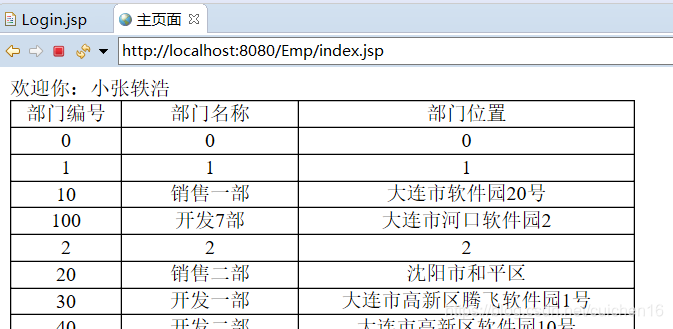
6.index.jsp
<%@page import="cn.qf.emp.pojo.Emp"%>
<%@page import="cn.qf.emp.service.DeptService"%>
<%@page import="cn.qf.emp.pojo.Dept"%>
<%@page import="java.util.List"%>
<%@ page language="java" contentType="text/html; charset=UTF-8"
    pageEncoding="UTF-8"%>
<!DOCTYPE html PUBLIC "-//W3C//DTD HTML 4.01 Transitional//EN" "http://www.w3.org/TR/html4/loose.dtd">
<html>
<head>
<meta http-equiv="Content-Type" content="text/html; charset=UTF-8">
<title>主页面</title>
<style type="text/css">
	table{
		width:500px;
		border-collapse:collapse;
	}
	td{
		border:1px solid black;
		text-align:center;
	}
</style>
</head>
<body>
<%
   //获取session中的值
   Object o=session.getAttribute("userinfo");
   if(o==null){
	   response.sendRedirect("Login.jsp");
   }
   //获取request中存储的集合值
   List<Dept> depts=(List<Dept>)request.getAttribute("alldept");
   //判断获取到的数据是否为空
   if(depts==null){
	   //获取部门数据
	   //调用业务逻辑
	   DeptService ds=new DeptService();
	   depts=ds.getAllDepts();
   }
%>
欢迎你:<%=((Emp)o).getEname() %>
<table>
	<tr>
		<td>部门编号</td>
		<td>部门名称</td>
		<td>部门位置</td>
	</tr>
	<%
	for(int i=0; i<depts.size(); i++){
	%>
	<tr>
		<td><%=depts.get(i).getDeptno() %></td>
		<td><%=depts.get(i).getDname() %></td>
		<td><%=depts.get(i).getLoc() %></td>
	</tr>
	<%
	}
	%>
</table>
</body>
</html>





 扫一扫
扫一扫


 401
401

 被折叠的 条评论
为什么被折叠?
被折叠的 条评论
为什么被折叠?
 到【灌水乐园】发言





