



最近发现我们的日志系统没有新的数据,排查日志发现报错:
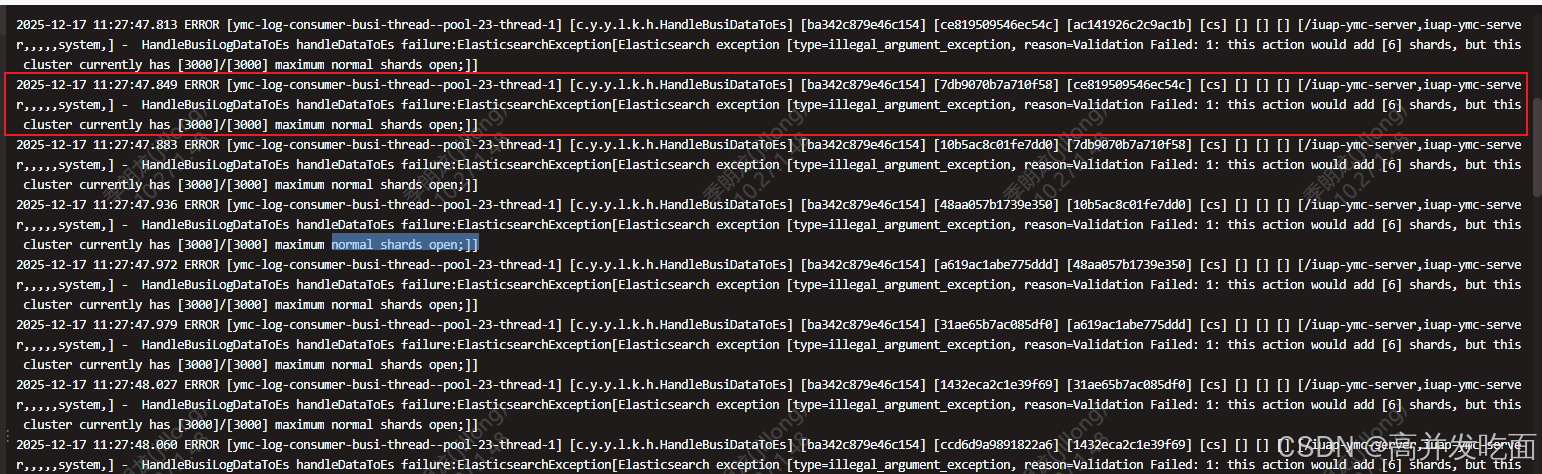
你遇到的这个提示 cluster currently has maximum normal shards open 是 Elasticsearch 集群的一个核心告警,意思是你的 ES 集群已经达到了普通分片(normal shards) 的最大打开数量限制,无法再创建新的分片。
一、问题原因分析
这个限制主要来自两个层面:
- 集群级别的分片总数限制:ES 有一个动态设置
cluster.max_shards_per_node(默认值通常是 1000),表示每个节点允许的最大分片数(主分片+副本分片)。当集群中所有节点的分片数总和达到这个阈值时,就会触发该告警。 - 节点级别的文件描述符限制:每个分片对应 ES 中的多个文件(索引文件、事务日志等),如果服务器的文件描述符(file descriptors)被耗尽,也会表现为“无法打开新分片”(本质是无法为新分片创建文件)。
二、解决方案(按优先级排序)
1. 临时调整集群分片上限(快速缓解)
如果是分片数达到集群阈值导致的问题,可以先临时调高分片上限:
# 适用于 ES 无密码认证的情况
curl -XPUT "http://<ES节点IP>:<端口>/_cluster/settings" -H "Content-Type: application/json" -d '{
  "persistent": {
    "cluster.max_shards_per_node": 2000
  }
}'

# 若 ES 开启了账号密码认证(添加 -u 用户名:密码)
curl -XPUT "http://<ES节点IP>:<端口>/_cluster/settings" -u "elastic:你的密码" -H "Content-Type: application/json" -d '{
  "persistent": {
    "cluster.max_shards_per_node": 2000
  }
}'
2. 检查并优化现有分片(长期解决方案)
分片过多本身是 ES 集群的“性能杀手”,调整上限只是临时方案,核心是优化分片规划:
- 删除无用索引:清理过期、测试、无用的索引,直接减少分片数:
# 删除单个索引
curl -XDELETE "http://<ES节点IP>:<端口>/old_index_name" -H "Content-Type: application/json"

# 按通配符删除(谨慎!)
curl -XDELETE "http://<ES节点IP>:<端口>/test_*" -H "Content-Type: application/json"

# 带认证的删除
curl -XDELETE "http://<ES节点IP>:<端口>/old_index_name" -u "elastic:你的密码" -H "Content-Type: application/json"
- 合并小索引:将多个小索引合并为一个大索引(比如按时间维度合并),减少分片总数:
# 基础版(无认证)
curl -XPOST "http://<ES节点IP>:<端口>/_reindex" -H "Content-Type: application/json" -d '{
  "source": {
    "index": ["small_index_1", "small_index_2"]
  },
  "dest": {
    "index": "merged_large_index"
  }
}'

# 带认证的 reindex
curl -XPOST "http://<ES节点IP>:<端口>/_reindex" -u "elastic:你的密码" -H "Content-Type: application/json" -d '{
  "source": {
    "index": ["small_index_1", "small_index_2"]
  },
  "dest": {
    "index": "merged_large_index"
  }
}'
- 调整索引分片策略:
- 新建索引时减少主分片数(比如从 5 个主分片改为 2 个),避免过度分片;
- 合理设置副本数(非生产环境可设为 0)。
3. 检查服务器文件描述符限制(底层排查)
如果调整分片上限后仍报错,需检查服务器文件描述符:
# 查看 ES 进程的文件描述符限制
cat /proc/$(ps -ef | grep elasticsearch | grep -v grep | awk '{print $2}')/limits | grep "Open Files"

# 临时调高文件描述符(需 root 权限)
ulimit -n 65535

# 永久修改(编辑 /etc/security/limits.conf)
echo "* soft nofile 65535" >> /etc/security/limits.conf
echo "* hard nofile 65535" >> /etc/security/limits.conf
修改后需重启 Elasticsearch 生效。
三、验证解决方案
执行以下命令检查集群状态和分片数,确认问题解决:
# 查看集群健康状态
curl -XGET "http://<ES节点IP>:<端口>/_cluster/health?pretty" -H "Content-Type: application/json"

# 查看所有索引的分片数(格式化输出,更易读)
curl -XGET "http://<ES节点IP>:<端口>/_cat/shards?v" -H "Content-Type: application/json"

# 查看集群分片上限配置
curl -XGET "http://<ES节点IP>:<端口>/_cluster/settings?flat_settings=true&pretty" -H "Content-Type: application/json" | grep "max_shards_per_node"

# 带认证的验证命令(以查看集群健康为例)
curl -XGET "http://<ES节点IP>:<端口>/_cluster/health?pretty" -u "elastic:你的密码" -H "Content-Type: application/json"
总结
- 该告警核心原因是 ES 集群分片数达到上限或服务器文件描述符耗尽;
- 临时解决:调高
cluster.max_shards_per_node配置; - 长期优化:清理无用索引、合并小索引、合理规划分片数,同时检查服务器文件描述符限制。
关键点:不要盲目调高分片上限,分片过多会导致集群性能下降(比如频繁的分片重分配、内存占用过高),优化分片规划才是根本。






 扫一扫
扫一扫


 1万+
1万+

 被折叠的 条评论
为什么被折叠?
被折叠的 条评论
为什么被折叠?
 到【灌水乐园】发言





