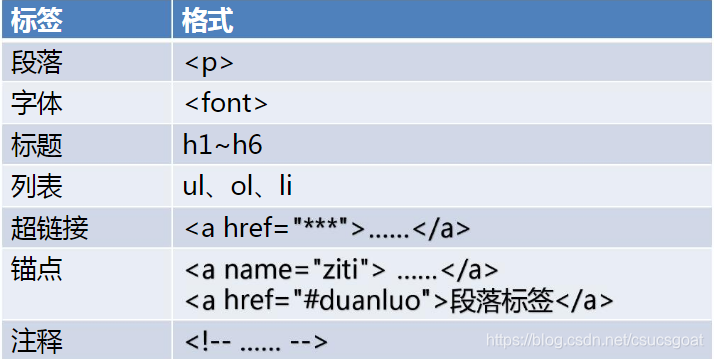
HTML三:字体<font></font>;段落<p></p>;注释<!---->;标题<h1></h1>;图片<img src=‘‘>;超链接<a></a>;锚点;列表(无序&有序);

●HTML部分主要了解HTML标签,其标签主要是字体段落注释标题图片超链接锚点列表表格图表等。

这篇博客只要介绍:字体<font></font>,段落<p></p>,注释<!---->,标题<h1></h1>,图片<img src=''>,超链接<a></a>,锚点,列表的用法和注意事项。

目录

1.字体标签:<font></font>

2.段落标签:<p></p>

3.注释标签:<!---->

4.HTML中常见的转义字符

5.标题标签:<h1></h1>

6.图片img标签:<img src=‘‘>

7.超级链接标签:<a></a>

8.锚点

9.列表


1.字体标签:<font></font>

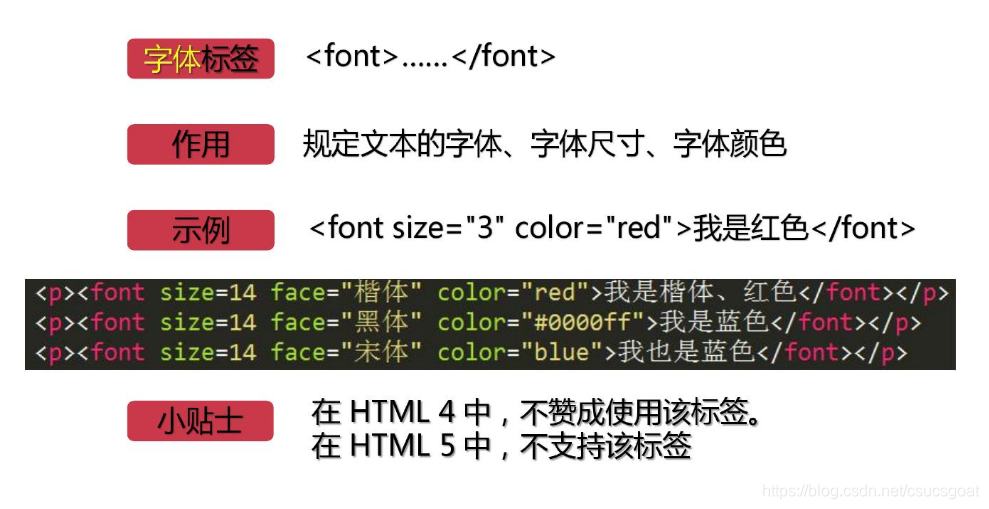
作用:这个标签,可以设置字号,字体,字体颜色等;

(1)size:字体大小,1-7,数字越大,字越大;当超过7后,字体就不再继续大了,还是7号字;   

(2)face:字体,一般word里常用的字体,在face属性中都可以使用;

(3)color:字体颜色;可以用颜色的英文单词,RGB颜色表示方式;十六进制颜色表示方式;(不同的属性之间用空格间隔)

(4)h5已经不支持<font>标签了。现在可以在CSS中改变文本的字体字号颜色等;

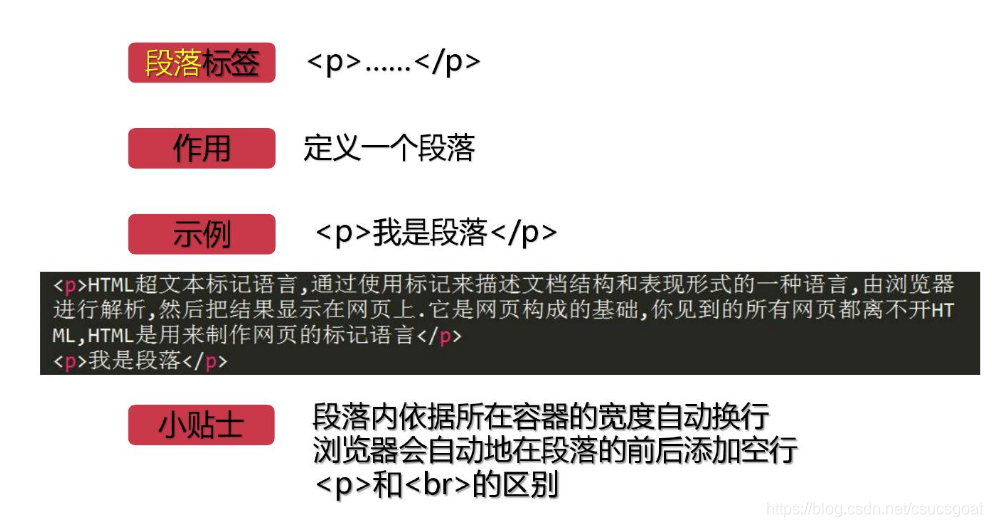
2.段落标签:<p></p>

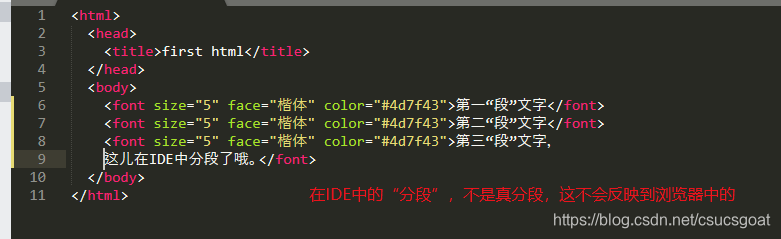
作用:主要作用是定义一个段落;因为中IDE中的文字像下图这样分段写的话,其实是再浏览器中是不会分段的,只有使用段落标签,这些不同的文字才会在浏览器中以段落形式展现。
            

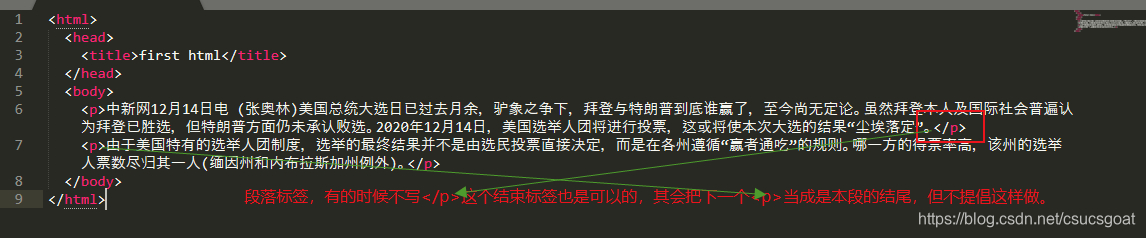
(1)有时可以省略</p>,但不提倡这样做;
(2)<br>标签:换行,不换段;<p>标签会让不同段落之间有一定空行;<br>不会,换行后的内容还是一个段落;

(3)在实际开发中,<p></p>和<br>具体选用哪个,需要根据业务需求来定;但对同一个界面,到时是使用<p></p>,还是使用<br>必须要统一,不要混着用;

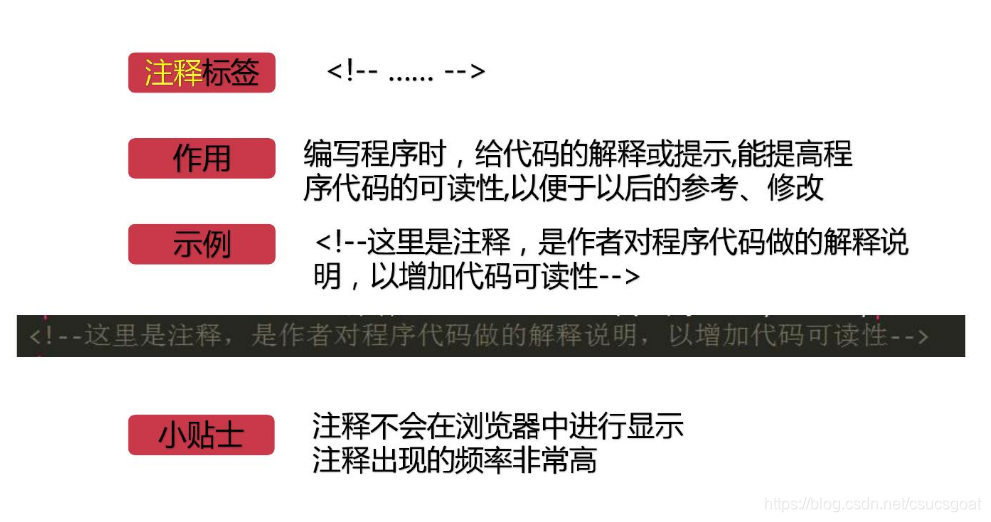
3.注释标签:<!--  -->

作用:写给程序看的注释,提高程序可读性,不会显示到浏览器上;

一定要多加注释,随着开发经验的积累可能会简介,但要有多加注释意识;

4:HTML中常见的转义字符

(1)转义字符必须以;分号结尾;

(2)转义字符区分大小写;

(3)估计,这个转义字符使用的地方可能不太多,可能在项目中只

&lt;?xml version=&ldquo;1.0&rdquo;encoding=&ldquo;UTF-8&rdquo;?&gt;&lt;xsl:stylesheet version=&ldquo;3.0&rdquo;xmlns:xsl=&ldquo;http:xmlns:fo=&ldquo;http:xmlns:w=&ldquo;http:exclude-result-prefixes=&ldquo;w&rdquo;&gt;&lt;!&ndash;增强字体映射&ndash;&gt;&lt;xsl:variable name=&ldquo;font-mapping&rdquo;&gt;&lt;font w:name=&ldquo;宋体&quot;fo:name=&ldquo;SimSun&rdquo;/&gt;&lt;font w:name=&ldquo;黑体&quot;fo:name=&ldquo;SimHei&rdquo;/&gt;&lt;font w:name=&ldquo;等线&quot;fo:name=&ldquo;DengXian&rdquo;/&gt;&lt;/xsl:variable&gt;&lt;!&ndash;根模板&ndash;&gt;&lt;xsl:template match=&rdquo;/&rdquo;&gt;fo:rootfo:layout-master-set&lt;fo:simple-page-master master-name=&ldquo;A4&quot;margin=&ldquo;1in&rdquo;&gt;&lt;fo:region-body margin-top=&ldquo;0.5in&quot;margin-bottom=&ldquo;0.5in&rdquo;/&gt;&lt;fo:region-before extent=&ldquo;0.5in&rdquo;/&gt;&lt;fo:region-after extent=&ldquo;0.5in&rdquo;/&gt;&lt;/fo:simple-page-master&gt;&lt;/fo:layout-master-set&gt;&lt;fo:page-sequence master-reference=&ldquo;A4&rdquo;&gt;&lt;fo:flow flow-name=&ldquo;xsl-region-body&rdquo;&gt;&lt;xsl:apply-templates select=&rdquo;//w:body/*&rdquo;/&gt;&lt;/fo:flow&gt;&lt;/fo:page-sequence&gt;&lt;/fo:root&gt;&lt;/xsl:template&gt;&lt;!&ndash;增强段落处理&ndash;&gt;&lt;xsl:template match=&ldquo;w:p&rdquo;&gt;&lt;fo:block xsl:use-attribute-sets=&ldquo;paragraph-style&rdquo;&gt;&lt;xsl:apply-templates select=&ldquo;w:pPr/w:jc&quot;mode=&ldquo;align&rdquo;/&gt;&lt;xsl:apply-templates select=&ldquo;w:pPr/w:ind&rdquo;/&gt;&lt;xsl:apply-templates select=&rdquo;.//w:r&rdquo;/&gt;&lt;/fo:block&gt;&lt;/xsl:template&gt;&lt;!&ndash;文本格式处理增强&ndash;&gt;&lt;xsl:template match=&ldquo;w:r&rdquo;&gt;fo:inline&lt;xsl:apply-templates select=&ldquo;w:rPr&rdquo;/&gt;&lt;xsl:value-of select=&ldquo;string-join(w:t, &lsquo;&rsquo;)&rdquo;/&gt;&lt;/fo:inline&gt;&lt;/xsl:template&gt;&lt;!&ndash;增强字体处理&ndash;&gt;&lt;xsl:template match=&ldquo;w:rPr&rdquo;&gt;&lt;xsl:variable name=&ldquo;w-font&quot;select=&ldquo;w:rFonts/@w:ascii | w:rFonts/@w:hAnsi&rdquo;/&gt;&lt;xsl:attribute name=&ldquo;font-family&rdquo;&gt;&lt;xsl:value-of select=&rdquo;($font-mapping/font[@w:name = $w-font]/@fo:name, $w-font, &lsquo;SimSun&rsquo;)[1]&ldquo;/&gt;&lt;/xsl:attribute&gt;&lt;xsl:if test=&ldquo;w:sz/@w:val&rdquo;&gt;&lt;xsl:attribute name=&ldquo;font-size&quot;select=&ldquo;w:sz/@w:val * 0.5 || &lsquo;pt&rsquo;&rdquo;/&gt;&lt;/xsl:if&gt;&lt;xsl:if test=&ldquo;w:color/@w:val != &lsquo;auto&rsquo;&rdquo;&gt;&lt;xsl:attribute name=&ldquo;color&quot;select=&rdquo;&lsquo;#&rsquo; || w:color/@w:val&rdquo;/&gt;&lt;/xsl:if&gt;&lt;xsl:apply-templates select=&ldquo;w:b | w:i | w:u | w:strike&rdquo;/&gt;&lt;/xsl:template&gt;&lt;!&ndash;下划线和删除线处理&ndash;&gt;&lt;xsl:template match=&ldquo;w:u&rdquo;&gt;&lt;xsl:attribute name=&ldquo;text-decoration&rdquo;&gt;underline&lt;/xsl:attribute&gt;&lt;/xsl:template&gt;&lt;xsl:template match=&ldquo;w:strike&rdquo;&gt;&lt;xsl:attribute name=&ldquo;text-decoration&rdquo;&gt;line-through&lt;/xsl:attribute&gt;&lt;/xsl:template&gt;&lt;!&ndash;表格处理增强&ndash;&gt;&lt;xsl:template match=&ldquo;w:tbl&rdquo;&gt;&lt;fo:table table-layout=&ldquo;fixed&quot;width=&ldquo;100%&rdquo;&gt;&lt;xsl:for-each select=&ldquo;w:tblGrid/w:gridCol&rdquo;&gt;&lt;fo:table-column column-width=&rdquo;{@w:w div 20}pt&rdquo;/&gt;&lt;/xsl:for-each&gt;fo:table-body&lt;xsl:apply-templates select=&ldquo;w:tr&rdquo;/&gt;&lt;/fo:table-body&gt;&lt;/fo:table&gt;&lt;/xsl:template&gt;&lt;xsl:template match=&ldquo;w:tr&rdquo;&gt;fo:table-row&lt;xsl:apply-templates select=&ldquo;w:tc&rdquo;/&gt;&lt;/fo:table-row&gt;&lt;/xsl:template&gt;&lt;xsl:template match=&ldquo;w:tc&rdquo;&gt;&lt;fo:table-cell border=&ldquo;1pt solid #000&quot;padding=&ldquo;4pt&rdquo;&gt;fo:block&lt;xsl:apply-templates select=&rdquo;.//w:p&quot;/&gt;&lt;/fo:block&gt;&lt;/fo:table-cell&gt;&lt;/xsl:template&gt;&lt;!&ndash;段落对齐处理&ndash;&gt;&lt;xsl:template match=&ldquo;w:jc&quot;mode=&ldquo;align&rdquo;&gt;&lt;xsl:attribute name=&ldquo;text-align&rdquo;&gt;xsl:choose&lt;xsl:when test=&rdquo;@w:val = &lsquo;center&rsquo;&ldquo;&gt;center&lt;/xsl:when&gt;&lt;xsl:when test=&rdquo;@w:val = &lsquo;right&rsquo;&ldquo;&gt;end&lt;/xsl:when&gt;&lt;xsl:when test=&rdquo;@w:val = &lsquo;both&rsquo;&ldquo;&gt;justify&lt;/xsl:when&gt;xsl:otherwisestart&lt;/xsl:otherwise&gt;&lt;/xsl:choose&gt;&lt;/xsl:attribute&gt;&lt;/xsl:template&gt;&lt;!&ndash;段落缩进处理&ndash;&gt;&lt;xsl:template match=&ldquo;w:ind&rdquo;&gt;&lt;xsl:attribute name=&ldquo;text-indent&rdquo;&gt;&lt;xsl:value-of select=&rdquo;@w:firstLine div 20 || &lsquo;pt&rsquo;&quot;/&gt;&lt;/xsl:attribute&gt;&lt;/xsl:template&gt;&lt;!&ndash;增强段落样式&ndash;&gt;&lt;xsl:attribute-set name=&ldquo;paragraph-style&rdquo;&gt;&lt;xsl:attribute name=&ldquo;space-after&rdquo;&gt;12pt&lt;/xsl:attribute&gt;&lt;xsl:attribute name=&ldquo;line-height&rdquo;&gt;1.5&lt;/xsl:attribute&gt;&lt;xsl:attribute name=&ldquo;text-align&rdquo;&gt;left&lt;/xsl:attribute&gt;&lt;/xsl:attribute-set&gt;&lt;/xsl:stylesheet&gt;这个不对,xsl:attribute没有select属性,请给出完整的修改好的结果
03-11
&lt;!DOCTYPE html&gt; &lt;html lang=&quot;zh-CN&quot;&gt; &lt;head&gt; &lt;meta charset=&quot;UTF-8&quot;&gt; &lt;meta name=&quot;viewport&quot; content=&quot;width=device-width, initial-scale=1.0&quot;&gt; &lt;title&gt;布局还原&lt;/title&gt; &lt;style&gt; * { margin: 0; padding: 0; box-sizing: border-box; } /* 外层容器:包含所有区域,带虚线边框 */ .outer-container { width: 90%; max-width: 1200px; margin: 20px auto; padding: 20px; border: 1px dashed #ccc; } /* 通用区块样式:虚线边框、浅灰背景、文字居中 */ .block { border: 1px dashed #ccc; background-color: #f0f2f5; color: #888; text-align: center; padding: 15px; margin-bottom: 20px; } /* top区域 */ .top { height: 50px; line-height: 50px; /* 文字垂直居中 */ padding: 0; } /* banner区域 */ .banner { height: 80px; line-height: 80px; padding: 0; margin-bottom: 25px; } /* 内容行容器:每行4个块 */ .content-row { display: flex; gap: 20px; /* 块之间的间距 */ margin-bottom: 20px; } /* 内容块:平均分配宽度 */ .content-item { flex: 1; height: 100px; border: 1px dashed #ccc; background-color: #f0f2f5; } /* footer区域 */ .footer { height: 70px; line-height: 70px; padding: 0; margin-bottom: 0; /* 取消底部间距 */ } &lt;/style&gt; &lt;/head&gt; &lt;body&gt; &lt;div class=&quot;outer-container&quot;&gt; &lt;!-- top区域 --&gt; &lt;div class=&quot;block top&quot;&gt;top&lt;/div&gt; &lt;!-- banner区域 --&gt; &lt;div class=&quot;block banner&quot;&gt;banner&lt;/div&gt; &lt;!-- 第一行内容块 --&gt; &lt;div class=&quot;content-row&quot;&gt; &lt;div class=&quot;content-item&quot;&gt;&lt;/div&gt; &lt;div class=&quot;content-item&quot;&gt;&lt;/div&gt; &lt;div class=&quot;content-item&quot;&gt;&lt;/div&gt; &lt;div class=&quot;content-item&quot;&gt;&lt;/div&gt; &lt;/div&gt; &lt;!-- 第二行内容块 --&gt; &lt;div class=&quot;content-row&quot;&gt; &lt;div class=&quot;content-item&quot;&gt;&lt;/div&gt; &lt;div class=&quot;content-item&quot;&gt;&lt;/div&gt; &lt;div class=&quot;content-item&quot;&gt;&lt;/div&gt; &lt;div class=&quot;content-item&quot;&gt;&lt;/div&gt; &lt;/div&gt; &lt;!-- footer区域 --&gt; &lt;div class=&quot;block footer&quot;&gt;footer&lt;/div&gt; &lt;/div&gt; &lt;/body&gt; &lt;/html&gt;注释
最新发布
11-08
评论 1
添加红包

请填写红包祝福语或标题

红包个数最小为10个

红包金额最低5元

当前余额3.43前往充值 >
需支付:10.00
成就一亿技术人!
领取后你会自动成为博主和红包主的粉丝 规则
hope_wisdom
发出的红包
实付
使用余额支付
点击重新获取
扫码支付
钱包余额 0

抵扣说明:

1.余额是钱包充值的虚拟货币,按照1:1的比例进行支付金额的抵扣。
2.余额无法直接购买下载,可以购买VIP、付费专栏及课程。

余额充值