





 本文介绍了一种使用Vue和MapleConfirmBox组件来展示后台返回的导入错误信息的方法。通过弹窗组件展示错误详情,包括错误数量和具体错误信息。
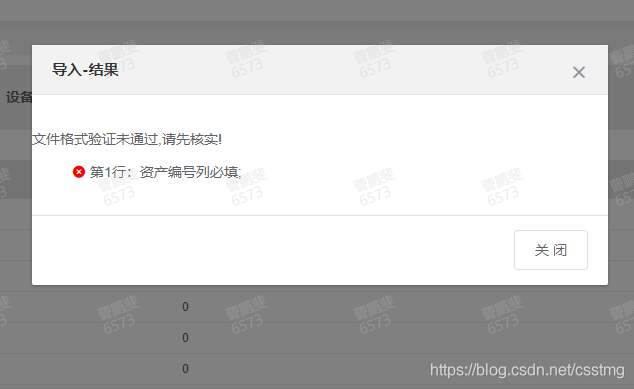
// 用弹窗也是可以的
<MapleConfirmBox
      title="导入-结果"
      :dialogVisible="dialogVisible"
      @onChange="v => (dialogVisible = v)"
      :isShowMsg="false"
      :isConfirmName="false"
      cancelName="关 闭"
    >
      <template slot="content">
        <!-- 展示 -->
        <p><span v-text="result.message"></span></p>
        <!-- <p>导入失败:<span v-text="result.failNum"></span></p> -->
        // 用到的是 ul  li 错误信息是后台返回的
        <ul style="list-style:none">
          // 遍历循环信息
          <li
            v-for="(item, index) in result.data"
            :key="index"
          >
            // 图标
            <i  class="el-icon-error" style="color:red"></i>
            // 文字
            <span v-text="item"></span>
          </li>
        </ul>
      </template>
    </MapleConfirmBox>
 data() {
    return {
        result: {},
    }
  },

uploaderror(res, file){
      // res 是后台返回的信息
      res.code===511 && (this.result = Object.assign(this.result, res))
      // this.result 是用来展示的错误的信息
    },
这个就是MapleConfirmBox组件
<template>
  <div class="maple-confirm-box">
    <el-dialog
      :title="title"
      :visible.sync="dialogabled"
      width="30%"
      center
      :modal-append-to-body="false"
    >
      <div class="content m-auto w-100">
        <div v-if="isShowMsg" class="d-center-center">
          <i class="el-icon-warning warning"></i>
          <span class="tips" v-text="tips"></span>
        </div>
        <slot name="content" v-if="isShowContent" class="w-100"></slot>
      </div>
      <span slot="footer" class="dialog-footer">
        <el-button @click="dialogabled = false">{{ cancelName }}</el-button>
        <el-button
          v-if="isConfirmName"
          type="primary"
          @click="handleClick('onConfirm')"
          >{{ confirmName }}</el-button
        >
      </span>
    </el-dialog>
  </div>
</template>

<script>
export default {
  name: "MapleConfirmBox",
  props: {
    dialogVisible: {
      type: Boolean,
      default: false
    },
    confirmName: {
      type: String,
      default: "确 定"
    },
    cancelName: {
      type: String,
      default: "取 消"
    },
    title: {
      type: String,
      default: "提示"
    },
    isShowMsg: {
      type: Boolean,
      default: true
    },
    tips: {
      type: String,
      default: "Maple"
    },
    isConfirmName: {
      type: Boolean,
      default: true
    },
    isShowContent: {
      type: Boolean,
      default: true
    }
  },
  data() {
    return {
      dialogabled: false
    };
  },
  methods: {
    handleClick(type) {
      this.$emit(type);
    }
  },
  watch: {
    dialogVisible(v) {
      this.dialogabled = v;
    },
    dialogabled(v) {
      this.$emit("onChange", v);
      if (v) {
        setTimeout(() => {
          const $el = document.querySelector(".v-modal");
          $el.onclick = _ => {
            this.dialogabled = false;
          };
        }, 60);
      }
    }
  }
};
</script>

<style lang="scss" scoped>
.maple-confirm-box {
  .content {
    width: 82%;
    padding: 20px 0;
  }
  .warning {
    color: #e6a23c;
    font-size: 34px;
  }
  .tips {
    font-size: 16px;
    padding-left: 20px;
  }
}
</style>





 扫一扫
扫一扫


 3464
3464

 被折叠的 条评论
为什么被折叠?
被折叠的 条评论
为什么被折叠?
 到【灌水乐园】发言





