



一、 Java IO 流的概念
Java中的IO(input和output)是实现输入和输出的基础,可以方便的实现数据的输入和输出操作。java.ioopen in new window 包下提供了大量的供我们使用的操作【流】的方法和接口,用于进行各类数据的处理和传输。
计算机的输入和输出都是通过二进制来完成的。在网络中我们要传递数据就要将数据【流化】,换句话说就是将文件、复杂的对象转化成能够在网络上传输的一个个的0和1,我在这里先画几幅图帮助大家理解一下。
文件在磁盘的输入输出:
文件在网络中的输入输出: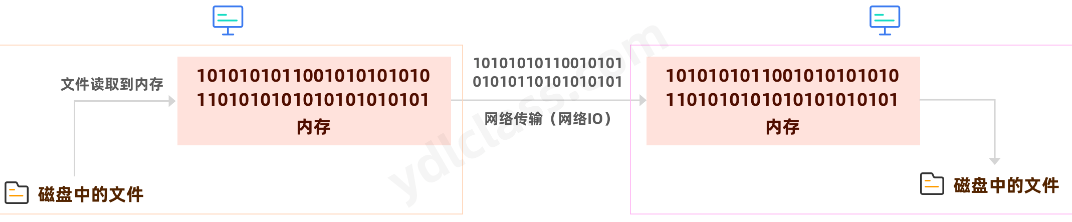
内存中的对象的输入输出: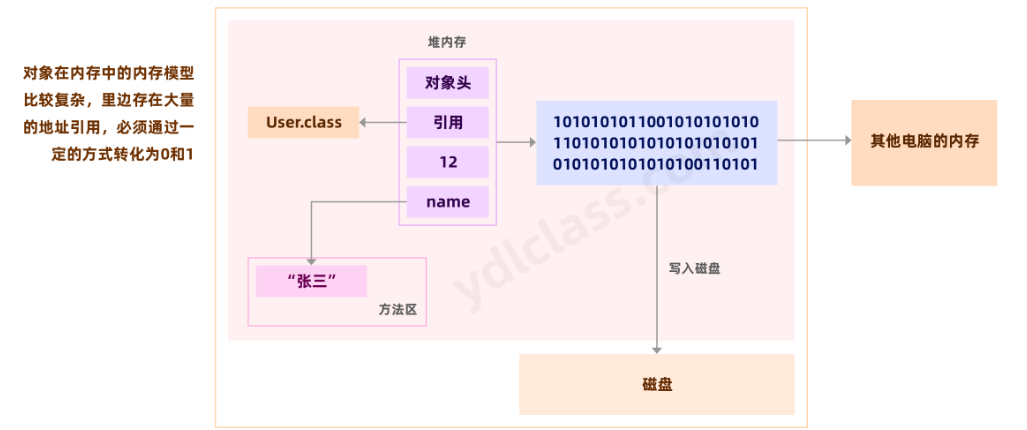
二、文件的操作
1、文件路径
正斜杠,又称左斜杠,符号是"/“;反斜杠,也称右斜杠,符号是”" 。
在Unix/Linux中,路径的分隔采用正斜杠"/“,比如”/home/hutaow";而在Windows中,路径分隔采用反斜杠"“,比如"C:\Windows\System”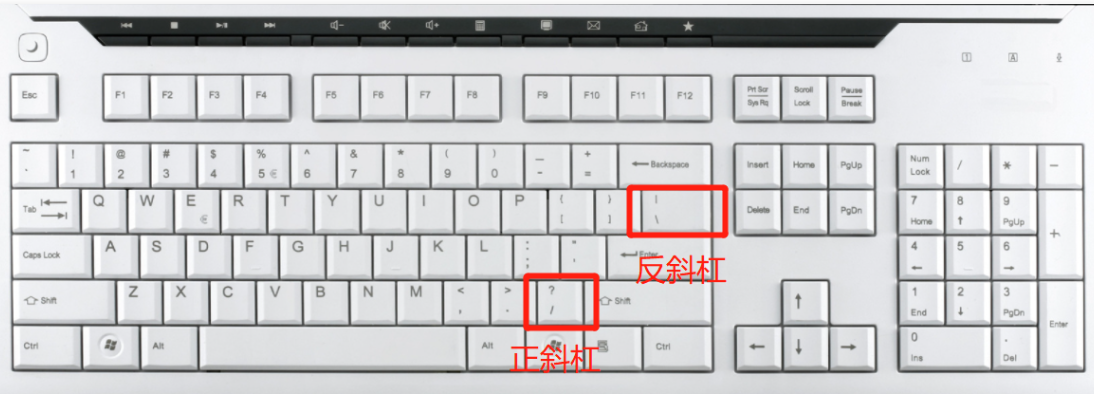
在Java当中反斜杠代表的是转义:
比如:
制表符(也叫制表位)的功能是在不使用表格的情况下在垂直方向按列对齐文本,就是咱们的Tab键。
- " 将双引号转义为真正的双引号
- ‘\r’ (回车):即将光标回到当前行的行首(而不会换到下一行),之后的输出会把之前的输出覆盖
- ‘\n’ 换行,换到当前位置的下一位置,而不会回到行首
2、File类简介
在 Java 中,File 类是 java.ioopen in new window 包中唯一代表磁盘文件本身的对象。File 类定义了一些与平台无关的方法来操作文件,File类主要用来获取或处理与磁盘文件相关的信息,像文件名、 文件路径、访问权限和修改日期等,还可以浏览子目录层次结构。 File 类表示处理文件和文件系统的相关信息。也就是说,File 类不具有从文件读取信息和向文件写入信息的功能,它仅描述文件本身的属性。
3、构造方法
| 构造器 | 描述 |
|---|---|
| File(String pathname) | 通过将给定路径名字符串来创建一个新 File 实例 |
| File(String parent,String child) | 根据指定的父路径和文件路径创建一个新File对象实例 |
| File(File parent,String child) | 根据指定的父路径对象和文件路径创建一个新的File对象实例 |
File file = new File("D:\\code\\a.txt");

File file = new File("D:\\code","a.txt");

File file = new File("D:\\code");
File child = new File(file,"a.txt");
4、File类创建和删除功能
| boolean | createNewFile() | 指定路径不存在该文件时创建文件,返回true 否则false |
| boolean | mkdir() | 当指定的单击文件夹不存在时创建文件夹并返回true 否则false |
| boolean | mkdirs() | 当指定的多级文件夹在某一级文件夹不存在时,创建多级文件夹并返回true 否则false |
| boolean | delete() | 删除文件或者删除单级文件夹 |
5、File类的判断功能
| boolean | exists() | 判断指定路径的文件或文件夹是否为空 |
|---|---|---|
| boolean | isAbsolute() | 判断当前路径是否是绝对路径 |
| boolean | isDirectory() | 判断当前的目录是否存在 |
| boolean | isFile() | 判断当前的目录是否是一个文件 |
| boolean | isHidden() | 判断当前路径是否是一隐藏文件 |
6、File类的获取功能和修改名字功能
| File | getAbsoluteFile() | 获取文件的绝对路径,返回File对象 |
| String | getAbsolutePath() | 获取文件的绝对路径,返回路径的字符串 |
| String | getParent() | 获取当前路径的父级路径,以字符串形式返回该父级路径 |
| String | getName() | 获取文件或文件夹的名称 |
| String | getPath() | 获取File对象中封装的路径 |
| long | lastModified() | 以毫秒值返回最后修改时间 |
| long | length() | 返回文件的字节数 |
| boolean | renameTo(File dest) | 将当前File对象所指向的路径修改为指定File所指向的路径 |
7、文件夹列表操作
| 返回值 | 方法 | 描述 |
|---|---|---|
| String | list() | 得到这个文件夹下的所有文件,返回路径数组 |
| String[] | list(FilenameFilter filter) | 通过过滤器过滤文件,过滤通过文件名过滤,返回路径数组 |
| File[] | listFiles() | 得到这个文件夹下的所有文件,返回文件数组 |
| File[] | listFiles(FileFilter filter) | 通过过滤器过滤文件,过滤通过文件过滤,返回文件数组 |
| File[] | listFiles(FilenameFilter filter) | 通过过滤器过滤文件,过滤通过文件名过滤,返回文件数组 |
8、练习
列出D:\code\image文件夹下的所有的图片:
public class ListAllPng {
    static class MyFilter implements FilenameFilter {

        @Override
        public boolean accept(File dir, String name) {
            return name.contains(".jpg") || dir.isDirectory();
        }

    }
    public static void listAll(File parent){
        MyFilter myFilter = new MyFilter();
        File[] files = parent.listFiles(myFilter);

        for (int i = 0; i < files.length; i++) {
            if (files[i].isDirectory()){
                listAll(files[i]);
            }else {
                System.out.println(files[i].getName());
            }
        }

    }

    public static void main(String[] args) {
        File file = new File("d:\\code\\image");
        listAll(file);
    }
}
三、 IO流的分类:
Java中一切皆对象,流也是对象,在学习之前我们不妨先看分类和概念,至于是哪个类其实没那么重要。
其实说到流,我们能想到流水,其实这已经很形象了,水从汪洋大海流入湖泊就是要通过河流。如果你还不知道,接着往下看。
其实到目前为止,我们对流已经有了基本的概念,接下来我们就要深入学习流了。按照不同的分类方式,可以把流分为不同的类型。常用的分类有三种:
1、 按照流向分
- 输入流: 只能从中读取数据,而不能向其写入数据。
- 输出流:只能向其写入数据,而不能向其读取数据。

计算机在读取文件的时候是很麻烦的:
当然系统级别的方法调用我们可以暂时不用考虑。但是我们确确实实看到一个文件在传输过程中经历了很多次的拷贝,IO的性能本来就不是很高,所以后来又有了零拷贝、Nio等技术,这些知识点我们计划在后续学习。
2 、按照操作单元划分
- 字节流:是一个字节一个字节的读取或写入
- 字符流:是一个字符一个字符的读取或写入,一个字符就是两个字节,主要用来处理字符。
3、 按照角色划分
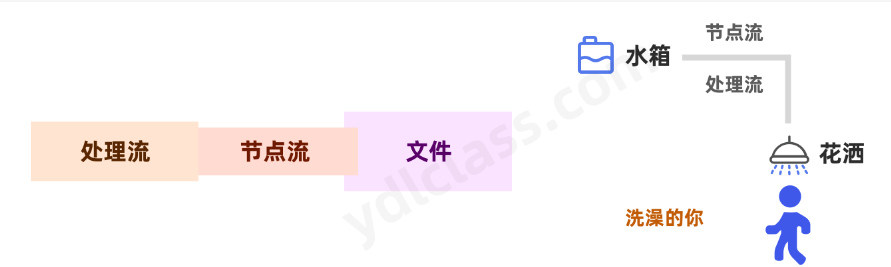
- 节点流:直接从/向一个特定的IO设备(如磁盘,网络)读/写数据的流,称为节点流。
- 处理流:“连接”在已存在的流(节点流或处理流)之上通过对数据的处理为程序提供更为强大的读写功能的流。
4、Java输入/输出流体系中常用的流的分类表
| 分类 | 字节输入流 | 字节输出流 | 字符输入流 | 字符输出流 |
|---|---|---|---|---|
| 抽象基类 | InputStream | OutputStream | Reader | Writer |
| 访问文件 | FileInputStream | FileOutputStream | FileReader | FileWriter |
| 访问数组 | ByteArrayInputStream | ByteArrayOutputStream | CharArrayReader | CharArrayWriter |
| 访问字符串 | StringReader | StringWriter | ||
| 缓冲流(处理) | BufferedInputStream | BufferedOutputStream | BufferedReader | BufferedWriter |
| 操作对象 | ObjectInputStream | ObjectOutputStream |
四、流的案例
1、继承结构
InputStream和OutputStream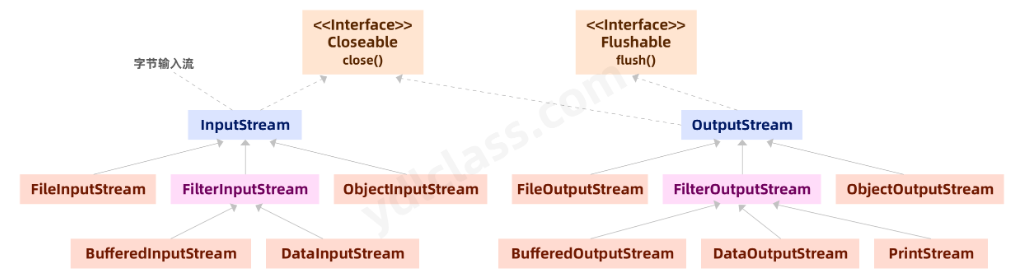
Reader和Writer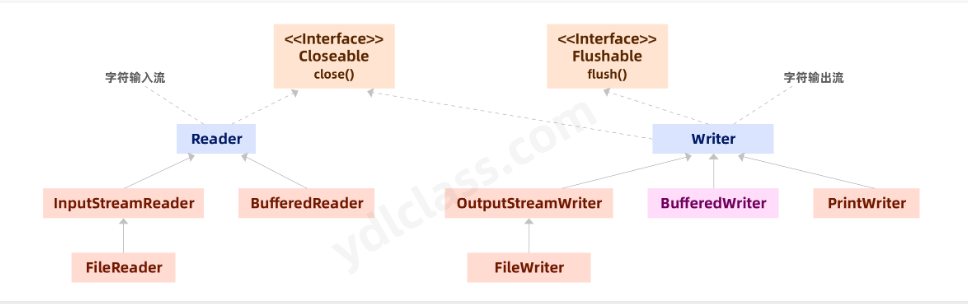
2、流如何使用
(1)将一个流对象插在一个节点上:
其实通过名字我们就可以很好的理解了:FileInputStream就是怼在文件上的输入流啊!
public abstract class InputStream implements Closeable
InputStream本身是抽象类,我们需要使用它的子类去构造对象:
InputStream inputStream = new FileInputStream(file);
既然是输入流就要往内存里读数据
[外链图片转存失败,源站可能有防盗链机制,建议将图片保存下来直接上传(img-1SlCS6Pi-1677743161746)(https://cdn.nlark.com/yuque/0/2023/png/22334367/1677718793396-cc537078-55e2-470e-99f1-89600a8a0264.png#averageHue=%23f0eceb&clientId=ua08d2001-9af1-4&from=paste&height=324&id=u3b87d975&name=image.png&originHeight=324&originWidth=620&originalType=binary&ratio=1&rotation=0&showTitle=false&size=83174&status=done&style=none&taskId=u94c98653-b664-4ad2-9347-a3b3b813fd2&title=&width=620)]
inputStream的方法并不多,关键在于几个read方法。
// 读一个字节
int read = inputStream.read();

// 一次性读1024个字节到那个内存数组
int read = inputStream.read(new byte[1024]);

// 从第0个字节开始读,读120个字节
int read = inputStream.read(new byte[1024],0,120);
(2)使用read()方法读取
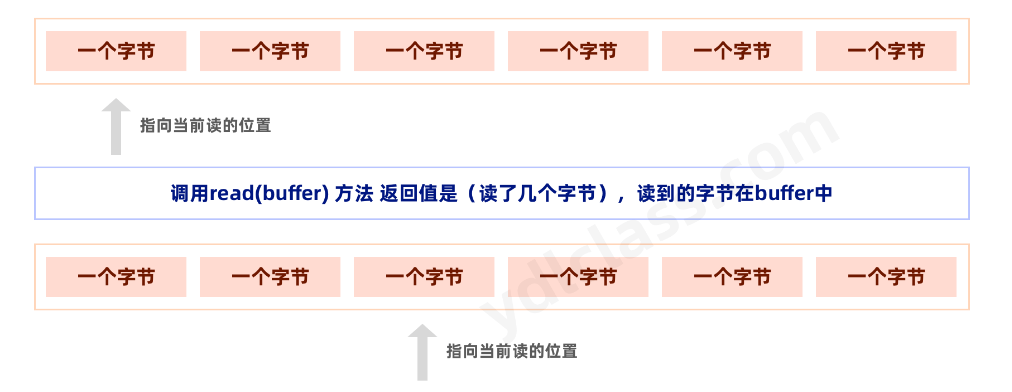
它的读取流程大概是这个样子的,inputStream内部有一个游标,它会记录目前读到哪里了,看下图: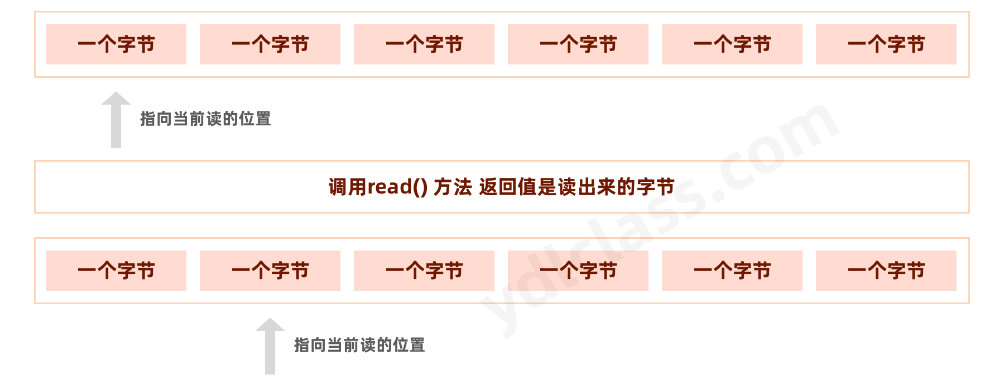
我们不妨尝试一下:
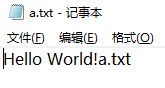
我的D盘的code目录下新建一个文本: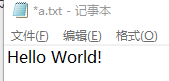
read返回-1时就代表文件读完了,代码如下:
public class Main {
    public static void main(String[] args) throws IOException {
        FileInputStream fileInputStream = new FileInputStream("d:\\code\\a.txt");
        int read;
        while ((read = fileInputStream.read())!=-1){
            System.out.print(read+"  ");
        }
    }
}


72  101  108  108  111  32  87  111  114  108  100  33
H    e    l    l    o       W   o    r    l    d    !
read就是每次读出的字节,直到-1就停止。
一个流我读完了一次还能读第二次吗?
public class Main {
    public static void main(String[] args) throws IOException {
        FileInputStream fileInputStream = new FileInputStream("d:\\code\\a.txt");
        int read;
        while ((read = fileInputStream.read())!=-1){
            System.out.print(read+"  ");
        }
        System.out.println("第二次");
        while ((read = fileInputStream.read())!=-1){
            System.out.print(read+"  ");
        }
    }
}

72  101  108  108  111  32  87  111  114  108  100  33  第二次
我们发现一个流读完了就没有了,就不能在读了。当然文档里有mark和reset方法,我们在系统中测试是不可用的。
System.out.println(inputStream.markSupported());
该方法的返回类型是boolean, 当该流支持 mark(), reset() 方法时返回真,否则返回假。
public class Main {
    public static void main(String[] args) throws IOException {
        FileInputStream fileInputStream = new FileInputStream("d:\\code\\a.txt");
        int read;
        while ((read = fileInputStream.read())!=-1){
            System.out.print(read+"  ");
        }
        boolean b = fileInputStream.markSupported();
        System.out.println(b);

        System.out.println("第二次");
        while ((read = fileInputStream.read())!=-1){
            System.out.print(read+"  ");
        }
    }
}

72  101  108  108  111  32  87  111  114  108  100  33  false
第二次
(3)使用read(byte[] byte)读取
public class Main {
    public static void main(String[] args) throws IOException {
        FileInputStream fileInputStream = new FileInputStream("d:\\code\\a.txt");
        int read;
        byte[] buf = new byte[3];
        while ((read = fileInputStream.read(buf))!=-1){
            System.out.print(read+"  ");

            System.out.println(Arrays.toString(buf));
        }

    }
}
我们想向深入走一步,看看源码:
但是发现,源码目前位置看不了了,这些方法都带有native,这更加说明了读文件一定是JVM调用系统方法读取的。
(4)输出流的使用
注:在定义文件输出流时,有两个参数,第二个如果是true代表追加文件,如果false代表覆盖文件,意思就是如果人家这个文件原来有内容,就覆盖的没了,这一点要注意。
FileOutputStream fileOutputStream = new FileOutputStream("d:\\code\\a.txt",true);

public class Main {
    public static void main(String[] args) throws IOException {
        FileOutputStream fileOutputStream = new FileOutputStream("d:\\code\\a.txt",true);
        fileOutputStream.write("a.txt".getBytes());

    }
}
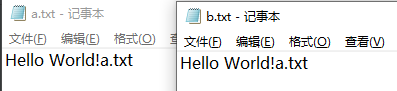
一个文件的拷贝程序
public class Main {
    public static void main(String[] args) throws IOException {
        FileInputStream fileInputStream = new FileInputStream("d:\\code\\a.txt");
        FileOutputStream fileOutputStream = new FileOutputStream("d:\\code\\b.txt",true);
    	//读取长度
        int len;
        byte[] bytes = new byte[3];
        while ((len = fileInputStream.read(bytes)) != -1){
            fileOutputStream.write(bytes,0,len);
            //不要写3,写成len,是因为,最后有可能读出来的可能不是3
        }


    }
}
(5)资源的释放
一个IO流的标准写法是什么呢?
我们发现IO有以下几点需要我们处理:
1、绝大部分的对IO的操作都需要处理可能出现的IO异常。
2、我们发现不管是inputStream还是outputStream都有一个close方法,IO是需要消耗系统资源的,每一个stream都需要系统分配资源,是弥足珍贵的,所以没有流一旦使用完成就一定要关闭资源。
修改写出如下代码:
public class Main {
    public static void main(String[] args) {
        FileInputStream fileInputStream = null;
        FileOutputStream fileOutputStream = null;


        try {
            fileOutputStream = new FileOutputStream("d:\\code\\b.txt",true);
            fileInputStream = new FileInputStream("d:\\code\\a.txt");

            int len;
            byte[] bytes = new byte[3];
            while ((len = fileInputStream.read(bytes)) != -1){
                fileOutputStream.write(bytes,0,len);
            }
        } catch (FileNotFoundException e) {
            throw new RuntimeException(e);
        } catch (IOException e) {
            throw new RuntimeException(e);
        } finally {
            if (fileOutputStream != null ){
                try {
                    fileOutputStream.close();
                } catch (IOException e) {
                    throw new RuntimeException(e);
                }
            }
            if (fileInputStream != null){
                try {
                    fileInputStream.close();
                } catch (IOException e) {
                    throw new RuntimeException(e);
                }
            }
        }

    }
}
【AutoCloseable接口的好处】
以上代码如此繁杂,jdk1.7之后,很多资源类的类都实现了AutoCloseable接口
实现了这个接口的类可以在try中定义资源,并会主动释放资源:
这样就极大的简化了代码的编写,但是你这么写了可能会有人看不懂呦!
public static void main(String[] args) {
    try(InputStream inputStream = new FileInputStream("D:/code/a.txt");
        OutputStream outputStream= new FileOutputStream("D:/code/b.txt",true)) {
        byte[] buf = new byte[3];
        int len;
        while ((len =inputStream.read(buf))  != -1){
            outputStream.write(buf,0,len);
        }
    }  catch (IOException e) {
        e.printStackTrace();
    }
}
3、小练习
(1)字符流读文件
@Test
    public void testReader() throws IOException {
        FileReader fileReader = new FileReader("d:\\code\\a.txt");
        BufferedReader bufferedReader = new BufferedReader(fileReader);
        String str;

        while ((str = (bufferedReader.readLine())) != null){
            System.out.println(str);
        }
        fileReader.close();
        bufferedReader.close();
    }
(2)向文件里写内容
public class Main {
    public static void main(String[] args) throws IOException {
        FileWriter fileWriter = new FileWriter("d:\\code\\a.txt");
        BufferedWriter bufferedWriter = new BufferedWriter(fileWriter);
        Scanner scanner = new Scanner(System.in);

        while (true){
            System.out.println("请输入:");
            String str = scanner.next();
            bufferedWriter.write(str);
            bufferedWriter.flush();
        }


    }

}
五、序列化和反序列化
1、对象序列化
- 序列化:将对象写入到IO流中,说的简单一点就是将内存模型的对象变成字节数字,可以进行存储和传输。
- 反序列化:从IO流中恢复对象,将存储在磁盘或者从网络接收的数据恢复成对象模型。
- 使用场景:所有可在网络上传输的对象都必须是可序列化的,否则会出错;所有需要保存到磁盘的Java对象都必须是可序列化的。
该对象必须实现Serializable接口,才能被序列化。
public class User implements Serializable {
    private String name;

    private int age;

    private int gander;

    public User(){

    }

    public String getName() {
        return name;
    }

    public void setName(String name) {
        this.name = name;
    }

    public int getAge() {
        return age;
    }

    public void setAge(int age) {
        this.age = age;
    }

    public int getGander() {
        return gander;
    }

    public void setGander(int gander) {
        this.gander = gander;
    }

}
public class Main {
    public static void main(String[] args) throws IOException {
        OutputStream is = new FileOutputStream("d:\\code\\a.txt");
        ObjectOutputStream oi  = new ObjectOutputStream(is);
        User user = new User();
        user.setName("zs");
        oi.writeObject(user);

        is.close();
        oi.close();
    }
    @Test
    public void testObjectInput() throws Exception{
        InputStream is = new FileInputStream("d:\\code\\a.txt");
        ObjectInputStream oi  = new ObjectInputStream(is);
        User user = (User)(oi.readObject());
        System.out.println(user.getName());
        is.close();
        oi.close();
    }
}
2、序列化版本号
我们知道,反序列化必须拥有class文件,但随着项目的升级,class文件也会升级,序列化怎么保证升级前后的兼容性呢?
Java序列化提供了一个``private static final long serialVersionUID` 的序列化版本号,只要版本号相同,即使更改了序列化属性,对象也可以正确被反序列化回来。
public class Person implements Serializable {
    //序列化版本号
    private static final long serialVersionUID = 1111013L;
    private String name;
    private int age;
    //省略构造方法及get,set
}
如果反序列化使用的版本号与序列化时使用的不一致,反序列化会报InvalidClassException’异常。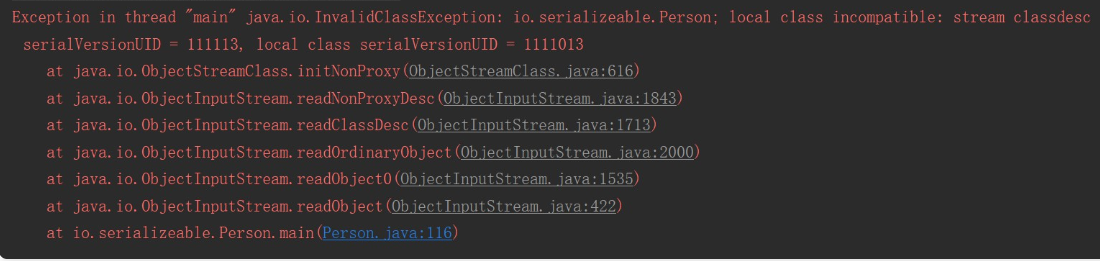
序列化版本号可自由指定,如果不指定,JVM会根据类信息自己计算一个版本号,这样随着class的升级、代码的修改等因素无法正确反序列化;
不指定版本号另一个明显隐患是,不利于jvm间的移植,可能class文件没有更改,但不同jvm可能计算的规则不一样,这样也会导致无法反序列化。
什么情况下需要修改serialVersionUID呢:
- 如果只是修改了方法,反序列化不容影响,则无需修改版本号;
- 如果只是修改了静态变量,瞬态变量(transient修饰的变量),反序列化不受影响,无需修改版本号。
3、总结
- 所有需要网络传输的对象都需要实现序列化接口。
- 对象的类名、实例变量(包括基本类型,数组,对其他对象的引用)都会被序列化;方法、类变量、transient实例变量都不会被序列化。
- 如果想让某个变量不被序列化,使用transient修饰。
- 序列化对象的引用类型成员变量,也必须是可序列化的,否则,会报错。
- 反序列化时必须有序列化对象的class文件。
- 同一对象序列化多次,只有第一次序列化为二进制流,以后都只是保存序列化编号,不会重复序列化。
- 建议所有可序列化的类加上serialVersionUID 版本号,方便项目升级。
Intellij idea用快捷键自动生成序列化id,类继承了Serializable接口之后,使用alt+enter快捷键自动创建序列化id
方法:进入setting→inspections→serialization issues→选择图中的选项。serializable class without ‘serialVersionUID’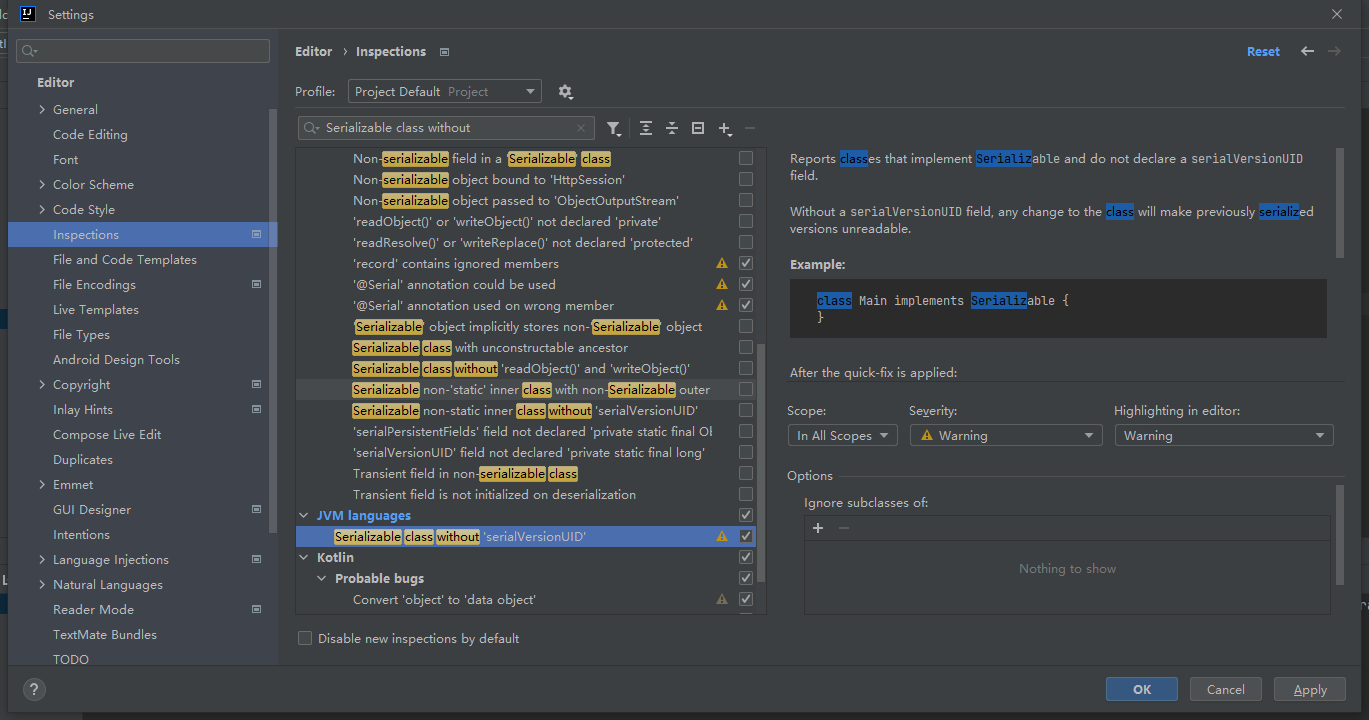
4、深拷贝
参考:深拷贝与浅拷贝
(1)对象的拷贝: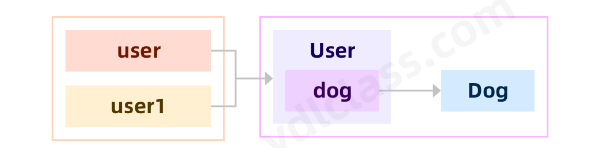
public void deepCopyTest() throws  CloneNotSupportedException {
    User user = new User(12, "zhagnsna");
    user.setDog(new Dog(2));
    User user1 = user;

    user.getDog().setAge(23);
    System.out.println(user1);
}
(2)浅拷贝:实现clonable接口,重写clone方法。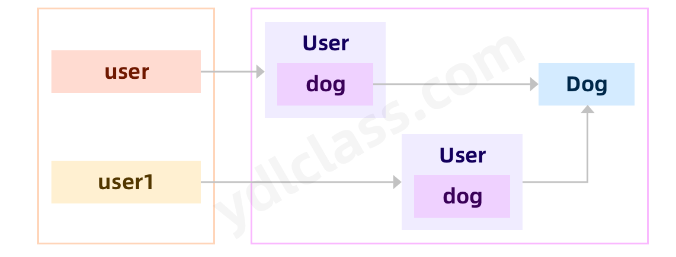
public class User implements Serializable,Cloneable {


    @Override
    protected Object clone() throws CloneNotSupportedException {
        return super.clone();
    }
}

@Test
public void deepCopyTest() throws  CloneNotSupportedException {
    User user = new User(12, "zhagnsna");
    user.setDog(new Dog(2));
    User user1 = (User)user.clone();

    user.getDog().setAge(23);
    System.out.println(user1);
}
(3)深拷贝:使用对象流先写入byte数组,再读出来。
通过字节流方法
@Test
public void deepCopyTest2() throws CloneNotSupportedException, IOException, ClassNotFoundException {
    User user = new User(12, "zhangsan");
    user.setDog(new Dog(2));

    // 将对象写到字节数组当中
    ByteArrayOutputStream outputStream = new ByteArrayOutputStream();
    ObjectOutputStream objectOutputStream = new ObjectOutputStream(outputStream);
    objectOutputStream.writeObject(user);
    // 获取字节数组
    byte[] bytes = outputStream.toByteArray();
    // 用输入流读出来
    ByteArrayInputStream byteArrayInputStream = new ByteArrayInputStream(bytes);
    ObjectInputStream objectInputStream = new ObjectInputStream(byteArrayInputStream);
    Object object = objectInputStream.readObject();
    User user1 = (User) object;

    user.setAge(44);
    user.getDog().setAge(11);
    System.out.println(user);
    System.out.println(user1);

}
六、大练习:
写一个程序,能够给一个商品文件进行增、删、改、查。
第一列是编号,第二列是商品名称,第三列是价格。
骨架代码:
import java.util.Scanner;

public class Shop {

    private static Scanner scanner = new Scanner(System.in);

    public static void main(String[] args) {

        while (true) {
            System.out.println("请选择功能:1、插入新商品 2、删除商品 3、修改商品 4、查找一个商品 5、退出");
            int function = scanner.nextInt();
            switch (function){
                case 1:
                    insert();
                    break;
                case 2:
                    delete();
                    break;
                case 3:
                    update();
                    break;
                case 4:
                    findOne();
                    break;
                case 5:
                    System.exit(-1);
                    break;
            }
        }
    }

    private static void findOne() {
        System.out.println("请输入商品编号:");
        int id = scanner.nextInt();
        // 思路一:一行一行的读,找到为止

        // 思路二:全部读到内存,内存里找
    }

    private static void update() {
        System.out.println("请输入商品编号:");
        // 全部拿出来,更新后覆盖
    }

    private static void delete() {
        System.out.println("请输入商品编号:");
        // 全部拿出来,删除后覆盖
    }

    private static void insert() {
        System.out.println("请输入商品编号:");
        // 最简单,直接追加
    }

    private static class Goods{
        private int id;
        private String name;
        private int price;

        public Goods() {
        }

        public Goods(int id, String name, int price) {
            this.id = id;
            this.name = name;
            this.price = price;
        }

        public int getId() {
            return id;
        }

        public void setId(int id) {
            this.id = id;
        }

        public String getName() {
            return name;
        }

        public void setName(String name) {
            this.name = name;
        }

        public int getPrice() {
            return price;
        }

        public void setPrice(int price) {
            this.price = price;
        }
    }
}
代码:
package com.ydlclass;

import java.io.*;
import java.util.*;

public class Shop {
    private static Scanner scanner = new Scanner(System.in);
    public static final String PATH = "D:\\code\\image\\a\\1.txt";

    public static void main(String[] args) {

        while (true) {
            System.out.println("请选择功能:1、插入新商品 2、删除商品 3、修改商品 4、查看商品 4、查看一个商品 5、退出");
            int function = scanner.nextInt();
            switch (function){
                case 1:
                    insert();
                    break;
                case 2:
                    delete();
                    break;
                case 3:
                    update();
                    break;
                case 4:
                    check();
                    break;
                case 5:
                    findOne();
                    break;
                case 6:
                    System.exit(-1);
                    break;
            }
        }
    }

    private static void findOne() {
        System.out.println("请输入商品编号:");
        int id = scanner.nextInt();
        // 函数式编程找到对应id的商品
        Optional<Goods> first = findAllGoods().stream().filter(g -> g.getId() == id).findFirst();
        if (first.isPresent()){
            Goods goods = first.get();
            System.out.println(goods.getId() + " " + goods.getName() + " " + goods.getPrice());
        } else {
            System.out.println("您需要的商品不存在");
        }
    }

    private static void check() {
        List<Goods> allGoods = findAllGoods();
        for (Goods goods : allGoods) {
            System.out.println(goods.getId() + " " + goods.getName() + " " + goods.getPrice());
        }
    }

    private static void update() {
        // 输入商品id
        System.out.println("请输入商品编号:");
        int id = scanner.nextInt();
        System.out.println("请输入商品名字:");
        String name = scanner.next();
        System.out.println("请输入商品价格:");
        int price = scanner.nextInt();
        // 内存中删除对应的商品
        List<Goods> allGoods = findAllGoods();
        Iterator<Goods> iterator = allGoods.iterator();
        while (iterator.hasNext()){
            Goods goods = iterator.next();
            if(goods.getId() == id){
                goods.setName(name);
                goods.setPrice(price);
            }
        }

        // 刷入磁盘
        writeGoods(allGoods,false);
    }

    private static void delete() {
        // 输入商品id
        System.out.println("请输入商品编号:");
        int id = scanner.nextInt();
        // 内存中删除对应的商品
        List<Goods> allGoods = findAllGoods();
        Iterator<Goods> iterator = allGoods.iterator();
        while (iterator.hasNext()){
            Goods goods = iterator.next();
            if(goods.getId() == id){
                iterator.remove();
            }
        }

        // 刷入磁盘
        writeGoods(allGoods,false);
    }

    private static void insert() {
        // 防止id重复
        boolean flag = true;
        Integer id = null;
        while (flag) {
            System.out.println("请输入商品编号:");
            id = scanner.nextInt();
            final Integer i = id;
            Optional<Goods> first = findAllGoods().stream().filter(p -> p.getId() == i).findFirst();
            flag = first.isPresent();
            if (flag) {
                System.out.println("该编号已经存在!");
            }
        }

        System.out.println("请输入商品名字:");
        String name = scanner.next();
        System.out.println("请输入商品价格:");
        int price = scanner.nextInt();
        // 最简单,直接追加
        writeGoods(Arrays.asList(new Goods(id,name,price)),true);
    }

    /**
     * 从磁盘中获取所有的数据
     * @return
     */
    private static List<Goods> findAllGoods(){
        List<Goods> goodsList = new ArrayList<>();
        try (Reader reader = new FileReader(Shop.PATH);
             BufferedReader bufferedReader = new BufferedReader(reader);
        ){
            String goodsStr;
            while ((goodsStr = bufferedReader.readLine()) != null){
                // 1 肥皂 23
                String[] goodsElem = goodsStr.split(" ");
                Goods goods = new Goods(
                        Integer.parseInt(goodsElem[0]),
                        goodsElem[1],
                        Integer.parseInt(goodsElem[2]));
                goodsList.add(goods);
            }

        } catch (IOException e){
            e.printStackTrace();
        }
        return goodsList;
    }

    private static void writeGoods(List<Goods> allGoods,boolean append){
        try( Writer writer = new FileWriter(Shop.PATH,append);
             BufferedWriter bufferedWriter = new BufferedWriter(writer);
        ) {
            for (Goods goods : allGoods) {
                bufferedWriter.write(goods.getId() + " " + goods.getName() + " " + goods.getPrice());
                bufferedWriter.newLine();
            }

        } catch (IOException e){
            e.printStackTrace();
        }
    }

    private static class Goods{
        private int id;
        private String name;
        private int price;

        public Goods() {
        }

        public Goods(int id, String name, int price) {
            this.id = id;
            this.name = name;
            this.price = price;
        }

        public int getId() {
            return id;
        }

        public void setId(int id) {
            this.id = id;
        }

        public String getName() {
            return name;
        }

        public void setName(String name) {
            this.name = name;
        }

        public int getPrice() {
            return price;
        }

        public void setPrice(int price) {
            this.price = price;
        }

        @Override
        public String toString() {
            return "Goods{" +
                    "id=" + id +
                    ", name='" + name + '\'' +
                    ", price=" + price +
                    '}';
        }
    }
}





 扫一扫
扫一扫


 928
928

 被折叠的 条评论
为什么被折叠?
被折叠的 条评论
为什么被折叠?
 到【灌水乐园】发言





