


摘要
在人工智能和大数据时代,网页内容的自动化抓取和智能化处理已成为许多应用的核心需求。Firecrawl作为一个新兴的AI驱动分布式爬虫系统,凭借其强大的功能和易用性,正受到越来越多开发者的关注。本文将全面解析Firecrawl系统,详细介绍其架构设计、部署过程、核心功能、常见问题解决方案以及最佳实践。通过丰富的实践案例和代码示例,帮助中国开发者特别是AI应用开发者快速掌握该系统的使用方法。
正文
1. Firecrawl 简介
Firecrawl是一个基于AI的现代化分布式爬虫系统,旨在高效地抓取网页内容并进行智能化处理。它结合了现代爬虫技术和AI能力,能够处理复杂的网页结构和动态内容,为AI应用提供高质量的数据源。
1.1 核心功能
Firecrawl具有以下核心功能:
- 分布式架构:支持多节点部署,提高爬取效率
- AI驱动:利用AI技术处理动态内容和复杂网页结构
- 高可扩展性:易于扩展,适应不同规模的爬取任务
- 智能内容提取:自动提取网页核心内容,过滤无关信息
- 多种输出格式:支持Markdown、HTML、纯文本等多种输出格式
- API接口:提供RESTful API,便于集成到各种应用中
11.2 应用场景
Firecrawl适用于多种应用场景:
- 数据采集:从多个网站采集数据,用于数据分析和机器学习
- 内容监控:实时监控网页内容变化,用于舆情分析
- 搜索引擎优化:抓取和分析网页内容,优化搜索引擎排名
- 知识库构建:为AI应用构建结构化知识库
- 竞品分析:自动化收集竞争对手信息
2. 系统架构设计
2.1 整体架构
Firecrawl采用微服务架构,主要包含以下几个核心组件:
2.2 架构组件详解
- API服务:提供RESTful API接口,用于接收爬取任务和返回结果
- Worker服务:处理具体的爬取任务,与Redis和Playwright服务交互
- Redis缓存:用于任务队列管理和速率限制
- Playwright服务:负责处理JavaScript渲染的网页内容
- 数据库:存储爬取结果和系统日志
- Supabase:用于身份验证和高级日志记录
- Posthog:用于事件日志记录和分析
- Slack:发送服务器健康状态消息
- OpenAI:用于处理LLM相关任务
- LLamaparse:用于解析PDF文件
- Stripe:用于支付处理
- Fire Engine:用于高级功能支持
- 自托管Webhook:用于自托管版本的回调
2.3 服务交互流程
3. 环境准备与部署
3.1 系统要求
在开始部署Firecrawl之前,确保系统满足以下基本要求:
- 操作系统:Linux(推荐Ubuntu 20.04+)、macOS或Windows(WSL2)
- 内存:至少8GB RAM(推荐16GB以上)
- 存储:至少20GB可用磁盘空间
- Docker:版本19.03或更高
- Docker Compose:版本1.27或更高
3.2 安装Docker和Docker Compose
以下是Ubuntu系统上的安装步骤:
# 更新包索引
sudo apt-get update

# 安装必要的包
sudo apt-get install \
    apt-transport-https \
    ca-certificates \
    curl \
    gnupg \
    lsb-release

# 添加Docker官方GPG密钥
curl -fsSL https://download.docker.com/linux/ubuntu/gpg | sudo gpg --dearmor -o /usr/share/keyrings/docker-archive-keyring.gpg

# 设置稳定版仓库
echo \
  "deb [arch=amd64 signed-by=/usr/share/keyrings/docker-archive-keyring.gpg] https://download.docker.com/linux/ubuntu \
  $(lsb_release -cs) stable" | sudo tee /etc/apt/sources.list.d/docker.list > /dev/null

# 安装Docker Engine
sudo apt-get update
sudo apt-get install docker-ce docker-ce-cli containerd.io

# 安装Docker Compose
sudo curl -L "https://github.com/docker/compose/releases/download/v2.20.2/docker-compose-$(uname -s)-$(uname -m)" -o /usr/local/bin/docker-compose
sudo chmod +x /usr/local/bin/docker-compose

# 验证安装
docker --version
docker-compose --version
3.3 Docker Compose配置
创建一个完整的Docker Compose配置文件:
# docker-compose.yml
version: '3.8'

# 定义通用服务配置
x-common-service: &common-service
  image: swr.cn-north-4.myhuaweicloud.com/ddn-k8s/ghcr.io/mendableai/firecrawl:latest
  ulimits:
    nofile:
      soft: 65535
      hard: 65535
  networks:
    - backend
  extra_hosts:
    - "host.docker.internal:host-gateway"
  deploy:
    resources:
      limits:
        memory: 2G
        cpus: '1.0'

# 定义通用环境变量
x-common-env: &common-env
  REDIS_URL: ${REDIS_URL:-redis://redis:6381}
  REDIS_RATE_LIMIT_URL: ${REDIS_RATE_LIMIT_URL:-redis://redis:6381}
  PLAYWRIGHT_MICROSERVICE_URL: ${PLAYWRIGHT_MICROSERVICE_URL:-http://playwright-service:3000/scrape}
  USE_DB_AUTHENTICATION: ${USE_DB_AUTHENTICATION:-false}
  OPENAI_API_KEY: ${OPENAI_API_KEY}
  LOGGING_LEVEL: ${LOGGING_LEVEL:-INFO}
  PROXY_SERVER: ${PROXY_SERVER}
  PROXY_USERNAME: ${PROXY_USERNAME}
  PROXY_PASSWORD: ${PROXY_PASSWORD}

# 定义服务
services:
  # Playwright服务 - 用于网页自动化
  playwright-service:
    image: swr.cn-north-4.myhuaweicloud.com/ddn-k8s/ghcr.io/mendableai/playwright-service:latest
    environment:
      PORT: 3000
      PROXY_SERVER: ${PROXY_SERVER}
      PROXY_USERNAME: ${PROXY_USERNAME}
      PROXY_PASSWORD: ${PROXY_PASSWORD}
      BLOCK_MEDIA: ${BLOCK_MEDIA:-true}
    networks:
      - backend
    ports:
      - "3000:3000"
    deploy:
      resources:
        limits:
          memory: 2G
          cpus: '1.0'
    shm_size: 2gb
    healthcheck:
      test: ["CMD", "wget", "--quiet", "--tries=1", "--spider", "http://localhost:3000"]
      interval: 30s
      timeout: 10s
      retries: 3
      start_period: 40s

  # API服务 - 提供对外接口
  api:
    <<: *common-service
    environment:
      <<: *common-env
      HOST: "0.0.0.0"
      PORT: ${INTERNAL_PORT:-8083}
      FLY_PROCESS_GROUP: app
      ENV: local
    depends_on:
      redis:
        condition: service_started
      playwright-service:
        condition: service_healthy
    ports:
      - "${PORT:-8083}:${INTERNAL_PORT:-8083}"
    command: ["pnpm", "run", "start:production"]
    deploy:
      resources:
        limits:
          memory: 1G
          cpus: '0.5'

  # Worker服务 - 处理后台任务
  worker:
    <<: *common-service
    environment:
      <<: *common-env
      FLY_PROCESS_GROUP: worker
      ENV: local
      NUM_WORKERS_PER_QUEUE: ${NUM_WORKERS_PER_QUEUE:-2}
    depends_on:
      redis:
        condition: service_started
      playwright-service:
        condition: service_healthy
    command: ["pnpm", "run", "workers"]
    deploy:
      replicas: ${WORKER_REPLICAS:-1}
      resources:
        limits:
          memory: 2G
          cpus: '1.0'

  # Redis服务 - 用作缓存和任务队列
  redis:
    image: swr.cn-north-4.myhuaweicloud.com/ddn-k8s/docker.io/library/redis:7.0.12
    networks:
      - backend
    ports:
      - "6381:6381"
    command: redis-server --bind 0.0.0.0 --port 6381
    volumes:
      - redis-data:/data
    deploy:
      resources:
        limits:
          memory: 512M
          cpus: '0.5'

# 定义网络
networks:
  backend:
    driver: bridge

# 定义卷
volumes:
  redis-data:
    driver: local
3.4 环境变量配置
在项目目录下创建[.env](file:///C:/Users/13532/Desktop/%E5%8D%9A%E5%AE%A2/.history/.env)文件,并根据需求配置环境变量:
# .env - Firecrawl环境变量配置文件

# ===== 必需的环境变量 =====
NUM_WORKERS_PER_QUEUE=2
WORKER_REPLICAS=1
PORT=8083
INTERNAL_PORT=8083
HOST=0.0.0.0
REDIS_URL=redis://redis:6381
REDIS_RATE_LIMIT_URL=redis://redis:6381
PLAYWRIGHT_MICROSERVICE_URL=http://playwright-service:3000/scrape
USE_DB_AUTHENTICATION=false

# ===== 可选的环境变量 =====
LOGGING_LEVEL=INFO
BLOCK_MEDIA=true

# ===== 代理配置 =====
PROXY_SERVER=
PROXY_USERNAME=
PROXY_PASSWORD=

# ===== AI模型配置 =====
OPENAI_API_KEY=
MODEL_NAME=gpt-3.5-turbo
MODEL_EMBEDDING_NAME=text-embedding-ada-002

# ===== Redis性能优化配置 =====
REDIS_MAX_RETRIES_PER_REQUEST=3
BULL_REDIS_POOL_MIN=1
BULL_REDIS_POOL_MAX=10

# ===== 资源限制配置 =====
API_MEMORY_LIMIT=1G
API_CPU_LIMIT=0.5
WORKER_MEMORY_LIMIT=2G
WORKER_CPU_LIMIT=1.0
REDIS_MEMORY_LIMIT=512M
REDIS_CPU_LIMIT=0.5
PLAYWRIGHT_MEMORY_LIMIT=2G
PLAYWRIGHT_CPU_LIMIT=1.0
3.5 启动服务
使用以下命令启动Firecrawl服务:
# 创建项目目录
mkdir firecrawl
cd firecrawl

# 保存上述docker-compose.yml和.env文件

# 启动所有服务
docker-compose up -d

# 查看服务状态
docker-compose ps

# 查看服务日志
docker-compose logs -f
3.6 验证服务
服务启动后,可以通过以下方式验证:
# 验证API服务
curl -X GET http://localhost:8083/health

# 验证Playwright服务
curl -X GET http://localhost:3000

# 查看队列状态(在浏览器中访问)
# http://localhost:8083/admin/@/queues
4. Python客户端开发
4.1 基础爬取功能
以下是一个简单的Python示例,展示如何使用Firecrawl API爬取网页内容:
#!/usr/bin/env python3
# -*- coding: utf-8 -*-
"""
Firecrawl基础爬取示例
演示如何使用Firecrawl API进行基础网页爬取
"""

import requests
import json
import time
from typing import Dict, Optional

class FirecrawlClient:
    """Firecrawl API客户端"""

    def __init__(self, base_url: str = "http://localhost:8083"):
        """
        初始化Firecrawl客户端

        Args:
            base_url (str): Firecrawl API基础URL
        """
        self.base_url = base_url
        self.session = requests.Session()
        self.session.headers.update({
            "Content-Type": "application/json",
            "User-Agent": "Firecrawl-Python-Client/1.0"
        })

    def scrape_url(self, url: str, formats: Optional[list] = None,
                   headers: Optional[Dict] = None) -> Dict:
        """
        爬取指定URL的内容

        Args:
            url (str): 要爬取的网页URL
            formats (list, optional): 需要返回的数据格式
            headers (Dict, optional): 自定义请求头

        Returns:
            Dict: 爬取结果
        """
        endpoint = f"{self.base_url}/v1/scrape"

        # 构造请求数据
        data = {
            "url": url
        }

        # 如果指定了返回格式
        if formats:
            data["formats"] = formats

        # 如果指定了请求头
        if headers:
            data["headers"] = headers

        try:
            # 发送POST请求
            response = self.session.post(
                endpoint,
                json=data,
                timeout=30
            )

            # 检查响应状态
            response.raise_for_status()

            # 返回JSON数据
            return response.json()

        except requests.exceptions.RequestException as e:
            print(f"❌ 请求失败: {e}")
            return {"success": False, "error": str(e)}
        except json.JSONDecodeError as e:
            print(f"❌ JSON解析失败: {e}")
            return {"success": False, "error": "JSON解析失败"}

    def crawl_site(self, url: str, max_depth: int = 1, limit: int = 50) -> Dict:
        """
        爬取整个网站(根据网站地图)

        Args:
            url (str): 要爬取的网站根URL
            max_depth (int): 最大爬取深度
            limit (int): 最大爬取页面数

        Returns:
            Dict: 爬取结果
        """
        endpoint = f"{self.base_url}/v1/crawl"

        # 构造请求数据
        data = {
            "url": url,
            "maxDepth": max_depth,
            "limit": limit
        }

        try:
            # 发送POST请求
            response = self.session.post(
                endpoint,
                json=data,
                timeout=30
            )

            # 检查响应状态
            response.raise_for_status()

            # 返回JSON数据
            return response.json()

        except requests.exceptions.RequestException as e:
            print(f"❌ 请求失败: {e}")
            return {"success": False, "error": str(e)}
        except json.JSONDecodeError as e:
            print(f"❌ JSON解析失败: {e}")
            return {"success": False, "error": "JSON解析失败"}

def main():
    """主函数"""
    # 创建客户端实例
    client = FirecrawlClient()

    print("🔥 Firecrawl基础爬取示例")
    print("=" * 50)

    # 示例1: 爬取单个页面
    print("📝 示例1: 爬取单个页面")
    result = client.scrape_url("https://example.com")
    if result.get("success"):
        data = result.get("data", {})
        print(f"  标题: {data.get('metadata', {}).get('title', 'N/A')}")
        print(f"  状态码: {data.get('metadata', {}).get('statusCode', 'N/A')}")
        print(f"  内容预览: {data.get('markdown', '')[:100]}...")
        print()
    else:
        print(f"  爬取失败: {result.get('error', '未知错误')}")
        print()

    # 示例2: 爬取网站(限制页面数)
    print("🌐 示例2: 爬取网站")
    result = client.crawl_site("https://example.com", max_depth=1, limit=5)
    if result.get("success"):
        print(f"  爬取任务已提交,任务ID: {result.get('id', 'N/A')}")
        # 这里可以轮询获取结果
        print()
    else:
        print(f"  爬取失败: {result.get('error', '未知错误')}")
        print()

    # 示例3: 指定返回格式
    print("📄 示例3: 指定返回格式")
    result = client.scrape_url(
        "https://example.com",
        formats=["markdown", "html"],
        headers={"Accept-Language": "zh-CN,zh;q=0.9"}
    )
    if result.get("success"):
        data = result.get("data", {})
        print(f"  Markdown长度: {len(data.get('markdown', ''))} 字符")
        print(f"  HTML长度: {len(data.get('html', ''))} 字符")
        print()
    else:
        print(f"  爬取失败: {result.get('error', '未知错误')}")
        print()

if __name__ == "__main__":
    main()
4.2 错误处理机制
#!/usr/bin/env python3
# -*- coding: utf-8 -*-
"""
Firecrawl错误处理示例
演示如何处理各种可能的错误情况
"""

import requests
import json
import time
from typing import Dict, Optional
from requests.adapters import HTTPAdapter
from urllib3.util.retry import Retry

class RobustFirecrawlClient:
    """健壮的Firecrawl客户端,包含完善的错误处理机制"""

    def __init__(self, base_url: str = "http://localhost:8083",
                 max_retries: int = 3):
        """
        初始化健壮的Firecrawl客户端

        Args:
            base_url (str): Firecrawl API基础URL
            max_retries (int): 最大重试次数
        """
        self.base_url = base_url

        # 配置会话和重试策略
        self.session = requests.Session()
        self.session.headers.update({
            "Content-Type": "application/json",
            "User-Agent": "Robust-Firecrawl-Client/1.0"
        })

        # 配置重试策略
        retry_strategy = Retry(
            total=max_retries,
            backoff_factor=1,
            status_forcelist=[429, 500, 502, 503, 504],
        )
        adapter = HTTPAdapter(max_retries=retry_strategy)
        self.session.mount("http://", adapter)
        self.session.mount("https://", adapter)

    def scrape_url_with_retry(self, url: str, timeout: int = 30) -> Dict:
        """
        带重试机制的网页爬取

        Args:
            url (str): 要爬取的网页URL
            timeout (int): 超时时间(秒)

        Returns:
            Dict: 爬取结果
        """
        endpoint = f"{self.base_url}/v1/scrape"
        data = {"url": url}

        try:
            # 发送POST请求
            response = self.session.post(
                endpoint,
                json=data,
                timeout=timeout
            )

            # 检查响应状态
            response.raise_for_status()

            # 返回JSON数据
            return {
                "success": True,
                "data": response.json(),
                "status_code": response.status_code
            }

        except requests.exceptions.Timeout:
            return {
                "success": False,
                "error": "请求超时",
                "error_type": "timeout"
            }
        except requests.exceptions.ConnectionError:
            return {
                "success": False,
                "error": "连接错误",
                "error_type": "connection_error"
            }
        except requests.exceptions.HTTPError as e:
            return {
                "success": False,
                "error": f"HTTP错误: {e}",
                "error_type": "http_error",
                "status_code": e.response.status_code if e.response else None
            }
        except json.JSONDecodeError:
            return {
                "success": False,
                "error": "响应不是有效的JSON格式",
                "error_type": "json_decode_error"
            }
        except Exception as e:
            return {
                "success": False,
                "error": f"未知错误: {str(e)}",
                "error_type": "unknown_error"
            }

    def batch_scrape_urls(self, urls: list, delay: float = 1.0) -> list:
        """
        批量爬取多个URL

        Args:
            urls (list): URL列表
            delay (float): 请求间隔时间(秒)

        Returns:
            list: 爬取结果列表
        """
        results = []

        for i, url in enumerate(urls):
            print(f"[{i+1}/{len(urls)}] 正在爬取: {url}")

            result = self.scrape_url_with_retry(url)
            results.append({
                "url": url,
                "result": result
            })

            # 添加延迟以避免过于频繁的请求
            if i < len(urls) - 1:  # 最后一个URL不需要延迟
                time.sleep(delay)

        return results

def main():
    """主函数"""
    # 创建客户端实例
    client = RobustFirecrawlClient(max_retries=3)

    print("🛡️ Firecrawl错误处理示例")
    print("=" * 50)

    # 测试正常URL
    print("✅ 测试正常URL:")
    result = client.scrape_url_with_retry("https://example.com")
    if result["success"]:
        print(f"  成功爬取: {result['data']['data']['metadata']['title']}")
    else:
        print(f"  爬取失败: {result['error']}")

    # 测试无效URL
    print("\n❌ 测试无效URL:")
    result = client.scrape_url_with_retry("https://this-domain-does-not-exist-12345.com")
    if result["success"]:
        print(f"  成功爬取")
    else:
        print(f"  爬取失败: {result['error']} (错误类型: {result['error_type']})")

    # 批量爬取示例
    print("\n📋 批量爬取示例:")
    urls = [
        "https://example.com",
        "https://httpbin.org/status/404",  # 404错误
        "https://example.com/nonexistent-page"
    ]

    results = client.batch_scrape_urls(urls, delay=0.5)

    for item in results:
        url = item["url"]
        result = item["result"]

        if result["success"]:
            print(f"  ✅ {url}: 成功")
        else:
            print(f"  ❌ {url}: {result['error']}")

if __name__ == "__main__":
    main()
4.3 高级功能使用
#!/usr/bin/env python3
# -*- coding: utf-8 -*-
"""
Firecrawl高级功能示例
演示如何使用Firecrawl的高级功能
"""

import requests
import json
import time
from typing import Dict, Optional

class AdvancedFirecrawlClient:
    """支持高级功能的Firecrawl客户端"""

    def __init__(self, base_url: str = "http://localhost:8083"):
        """
        初始化高级Firecrawl客户端

        Args:
            base_url (str): Firecrawl API基础URL
        """
        self.base_url = base_url
        self.session = requests.Session()
        self.session.headers.update({
            "Content-Type": "application/json"
        })

    def scrape_with_custom_headers(self, url: str, custom_headers: Dict) -> Dict:
        """
        使用自定义请求头爬取网页

        Args:
            url (str): 要爬取的网页URL
            custom_headers (Dict): 自定义请求头

        Returns:
            Dict: 爬取结果
        """
        endpoint = f"{self.base_url}/v1/scrape"

        data = {
            "url": url,
            "headers": custom_headers
        }

        try:
            response = self.session.post(endpoint, json=data, timeout=30)
            response.raise_for_status()
            return response.json()
        except Exception as e:
            return {"success": False, "error": str(e)}

    def scrape_with_formats(self, url: str, formats: list) -> Dict:
        """
        指定返回格式爬取网页

        Args:
            url (str): 要爬取的网页URL
            formats (list): 需要返回的数据格式列表

        Returns:
            Dict: 爬取结果
        """
        endpoint = f"{self.base_url}/v1/scrape"

        data = {
            "url": url,
            "formats": formats
        }

        try:
            response = self.session.post(endpoint, json=data, timeout=30)
            response.raise_for_status()
            return response.json()
        except Exception as e:
            return {"success": False, "error": str(e)}

    def crawl_with_options(self, url: str, options: Dict) -> Dict:
        """
        使用高级选项爬取网站

        Args:
            url (str): 要爬取的网站根URL
            options (Dict): 爬取选项

        Returns:
            Dict: 爬取结果
        """
        endpoint = f"{self.base_url}/v1/crawl"

        data = {
            "url": url,
            **options  # 展开选项字典
        }

        try:
            response = self.session.post(endpoint, json=data, timeout=60)
            response.raise_for_status()
            return response.json()
        except Exception as e:
            return {"success": False, "error": str(e)}

def main():
    """主函数"""
    client = AdvancedFirecrawlClient()

    print("🚀 Firecrawl高级功能示例")
    print("=" * 50)

    # 示例1: 使用自定义请求头
    print("🌐 示例1: 使用自定义请求头")
    custom_headers = {
        "User-Agent": "Mozilla/5.0 (Windows NT 10.0; Win64; x64) AppleWebKit/537.36",
        "Accept-Language": "zh-CN,zh;q=0.9,en;q=0.8",
        "Referer": "https://www.google.com/"
    }

    result = client.scrape_with_custom_headers(
        "https://example.com",
        custom_headers
    )

    if result.get("success"):
        print("  ✅ 成功使用自定义请求头爬取网页")
    else:
        print(f"  ❌ 爬取失败: {result.get('error')}")

    # 示例2: 指定返回格式
    print("\n📄 示例2: 指定返回格式")
    result = client.scrape_with_formats(
        "https://example.com",
        ["markdown", "html", "rawHtml", "links"]
    )

    if result.get("success"):
        data = result.get("data", {})
        print(f"  返回格式: {list(data.keys())}")
        if "markdown" in data:
            print(f"  Markdown长度: {len(data['markdown'])} 字符")
        if "links" in data:
            print(f"  发现链接数: {len(data['links'])}")
    else:
        print(f"  ❌ 爬取失败: {result.get('error')}")

    # 示例3: 使用高级爬取选项
    print("\n⚙️ 示例3: 使用高级爬取选项")
    options = {
        "maxDepth": 2,
        "limit": 10,
        "excludePaths": ["/admin", "/private"],
        "includePaths": ["/products", "/blog"],
        "generateImgAltText": True
    }

    result = client.crawl_with_options("https://example.com", options)

    if result.get("success"):
        print(f"  ✅ 爬取任务已提交,任务ID: {result.get('id')}")
    else:
        print(f"  ❌ 爬取失败: {result.get('error')}")

if __name__ == "__main__":
    main()
5. 实践案例
5.1 新闻网站爬取案例
#!/usr/bin/env python3
# -*- coding: utf-8 -*-
"""
新闻网站爬取案例
演示如何使用Firecrawl爬取新闻网站并构建新闻数据库
"""

import requests
import json
import sqlite3
import time
from datetime import datetime
from typing import List, Dict

class NewsCrawler:
    """新闻爬虫"""

    def __init__(self, db_path: str = "news.db"):
        """
        初始化新闻爬虫

        Args:
            db_path (str): 数据库文件路径
        """
        self.db_path = db_path
        self.firecrawl_url = "http://localhost:8083"
        self.session = requests.Session()
        self.session.headers.update({
            "Content-Type": "application/json"
        })

        # 初始化数据库
        self.init_database()

    def init_database(self):
        """初始化数据库表"""
        conn = sqlite3.connect(self.db_path)
        cursor = conn.cursor()

        # 创建新闻表
        cursor.execute('''
            CREATE TABLE IF NOT EXISTS news (
                id INTEGER PRIMARY KEY AUTOINCREMENT,
                title TEXT NOT NULL,
                url TEXT UNIQUE NOT NULL,
                content TEXT,
                summary TEXT,
                publish_date TEXT,
                source TEXT,
                created_at TIMESTAMP DEFAULT CURRENT_TIMESTAMP
            )
        ''')

        conn.commit()
        conn.close()
        print("✅ 数据库初始化完成")

    def scrape_news_article(self, url: str) -> Dict:
        """
        爬取单篇新闻文章

        Args:
            url (str): 新闻文章URL

        Returns:
            Dict: 爬取结果
        """
        try:
            response = self.session.post(
                f"{self.firecrawl_url}/v1/scrape",
                json={
                    "url": url,
                    "formats": ["markdown", "html"]
                },
                timeout=30
            )
            response.raise_for_status()
            return response.json()
        except Exception as e:
            print(f"❌ 爬取文章失败 {url}: {e}")
            return {"success": False, "error": str(e)}

    def save_news_to_db(self, article_data: Dict) -> bool:
        """
        保存新闻到数据库

        Args:
            article_data (Dict): 新闻数据

        Returns:
            bool: 是否保存成功
        """
        try:
            conn = sqlite3.connect(self.db_path)
            cursor = conn.cursor()

            data = article_data.get("data", {})
            metadata = data.get("metadata", {})

            # 提取关键信息
            title = metadata.get("title", "")
            url = metadata.get("sourceURL", "")
            content = data.get("markdown", "")
            publish_date = metadata.get("date", "")

            # 插入数据
            cursor.execute('''
                INSERT OR IGNORE INTO news
                (title, url, content, publish_date, source)
                VALUES (?, ?, ?, ?, ?)
            ''', (title, url, content, publish_date, "unknown"))

            conn.commit()
            conn.close()

            if cursor.rowcount > 0:
                print(f"✅ 新闻已保存: {title[:50]}...")
                return True
            else:
                print(f"ℹ️ 新闻已存在: {title[:50]}...")
                return False

        except Exception as e:
            print(f"❌ 保存新闻失败: {e}")
            return False

    def crawl_news_site(self, base_url: str, max_pages: int = 20) -> int:
        """
        爬取新闻网站

        Args:
            base_url (str): 新闻网站根URL
            max_pages (int): 最大爬取页面数

        Returns:
            int: 成功保存的新闻数量
        """
        print(f"🌐 开始爬取新闻网站: {base_url}")

        try:
            # 爬取网站
            response = self.session.post(
                f"{self.firecrawl_url}/v1/crawl",
                json={
                    "url": base_url,
                    "maxDepth": 1,
                    "limit": max_pages,
                    "includePaths": ["/news", "/article", "/blog"]
                },
                timeout=60
            )
            response.raise_for_status()
            crawl_result = response.json()

            if not crawl_result.get("success"):
                print(f"❌ 爬取任务失败: {crawl_result.get('error')}")
                return 0

            # 获取爬取结果
            crawl_id = crawl_result.get("id")
            if not crawl_id:
                print("❌ 未获取到爬取任务ID")
                return 0

            # 轮询获取结果
            saved_count = 0
            max_attempts = 30
            attempt = 0

            while attempt < max_attempts:
                time.sleep(5)  # 等待5秒

                try:
                    status_response = self.session.get(
                        f"{self.firecrawl_url}/v1/crawl/{crawl_id}",
                        timeout=30
                    )
                    status_response.raise_for_status()
                    status_data = status_response.json()

                    if status_data.get("status") == "completed":
                        # 处理爬取到的数据
                        crawled_data = status_data.get("data", [])
                        print(f"✅ 爬取完成,共获取 {len(crawled_data)} 篇文章")

                        for article in crawled_data:
                            if self.save_news_to_db({"data": article}):
                                saved_count += 1

                        break
                    elif status_data.get("status") == "failed":
                        print(f"❌ 爬取任务失败: {status_data.get('error')}")
                        break

                except Exception as e:
                    print(f"❌ 检查爬取状态失败: {e}")

                attempt += 1

            return saved_count

        except Exception as e:
            print(f"❌ 爬取新闻网站失败: {e}")
            return 0

    def search_news(self, keyword: str) -> List[Dict]:
        """
        搜索新闻

        Args:
            keyword (str): 搜索关键词

        Returns:
            List[Dict]: 搜索结果
        """
        try:
            conn = sqlite3.connect(self.db_path)
            cursor = conn.cursor()

            cursor.execute('''
                SELECT id, title, url, summary, publish_date, created_at
                FROM news
                WHERE title LIKE ? OR content LIKE ?
                ORDER BY publish_date DESC, created_at DESC
                LIMIT 20
            ''', (f"%{keyword}%", f"%{keyword}%"))

            results = []
            for row in cursor.fetchall():
                results.append({
                    "id": row[0],
                    "title": row[1],
                    "url": row[2],
                    "summary": row[3],
                    "publish_date": row[4],
                    "created_at": row[5]
                })

            conn.close()
            return results

        except Exception as e:
            print(f"❌ 搜索新闻失败: {e}")
            return []

def main():
    """主函数"""
    crawler = NewsCrawler()

    print("📰 新闻网站爬取案例")
    print("=" * 50)

    # 示例: 爬取示例网站的新闻
    # 注意: 在实际使用中,请替换为真实的新闻网站URL
    print("⚠️ 注意: 请将示例URL替换为真实的新闻网站URL")
    news_sites = [
        "https://example-news-site.com",
        "https://example-blog-site.com"
    ]

    total_saved = 0
    for site in news_sites:
        saved_count = crawler.crawl_news_site(site, max_pages=10)
        total_saved += saved_count
        print(f"📊 从 {site} 保存了 {saved_count} 篇新闻")

    print(f"\n✅ 总共保存了 {total_saved} 篇新闻")

    # 搜索示例
    print("\n🔍 搜索示例:")
    results = crawler.search_news("技术")
    print(f"  找到 {len(results)} 篇包含'技术'的新闻:")
    for news in results[:3]:  # 只显示前3条
        print(f"  - {news['title'][:50]}...")

if __name__ == "__main__":
    main()
5.2 电商平台数据采集案例
#!/usr/bin/env python3
# -*- coding: utf-8 -*-
"""
电商平台数据采集案例
演示如何使用Firecrawl采集电商平台商品信息
"""

import requests
import json
import csv
import time
from datetime import datetime
from typing import List, Dict

class EcommerceCrawler:
    """电商平台爬虫"""

    def __init__(self, output_file: str = "products.csv"):
        """
        初始化电商平台爬虫

        Args:
            output_file (str): 输出CSV文件名
        """
        self.firecrawl_url = "http://localhost:8083"
        self.output_file = output_file
        self.session = requests.Session()
        self.session.headers.update({
            "Content-Type": "application/json"
        })

        # 初始化CSV文件
        self.init_csv()

    def init_csv(self):
        """初始化CSV文件"""
        with open(self.output_file, 'w', newline='', encoding='utf-8') as csvfile:
            writer = csv.writer(csvfile)
            writer.writerow([
                'product_name', 'price', 'description',
                'rating', 'review_count', 'url', 'scraped_at'
            ])
        print(f"✅ CSV文件初始化完成: {self.output_file}")

    def scrape_product_page(self, url: str) -> Dict:
        """
        爬取商品页面

        Args:
            url (str): 商品页面URL

        Returns:
            Dict: 爬取结果
        """
        try:
            response = self.session.post(
                f"{self.firecrawl_url}/v1/scrape",
                json={
                    "url": url,
                    "formats": ["markdown"]
                },
                timeout=30
            )
            response.raise_for_status()
            return response.json()
        except Exception as e:
            print(f"❌ 爬取商品页面失败 {url}: {e}")
            return {"success": False, "error": str(e)}

    def extract_product_info(self, scrape_result: Dict) -> Dict:
        """
        从爬取结果中提取商品信息

        Args:
            scrape_result (Dict): 爬取结果

        Returns:
            Dict: 提取的商品信息
        """
        if not scrape_result.get("success"):
            return {}

        data = scrape_result.get("data", {})
        markdown_content = data.get("markdown", "")
        metadata = data.get("metadata", {})

        # 简单的信息提取(实际应用中可能需要更复杂的解析逻辑)
        product_info = {
            "product_name": metadata.get("title", ""),
            "url": metadata.get("sourceURL", ""),
            "scraped_at": datetime.now().isoformat()
        }

        # 从Markdown内容中提取价格、评分等信息
        # 这里是简化的示例,实际应用中需要根据具体网站结构调整
        lines = markdown_content.split('\n')
        for line in lines:
            if '价格' in line or 'price' in line.lower():
                product_info["price"] = line.strip()
            elif '评分' in line or 'rating' in line.lower():
                product_info["rating"] = line.strip()
            elif '评价' in line or 'review' in line.lower():
                product_info["review_count"] = line.strip()

        # 提取描述信息
        product_info["description"] = markdown_content[:500]  # 前500字符作为描述

        return product_info

    def save_product_to_csv(self, product_info: Dict) -> bool:
        """
        保存商品信息到CSV文件

        Args:
            product_info (Dict): 商品信息

        Returns:
            bool: 是否保存成功
        """
        try:
            with open(self.output_file, 'a', newline='', encoding='utf-8') as csvfile:
                writer = csv.writer(csvfile)
                writer.writerow([
                    product_info.get("product_name", ""),
                    product_info.get("price", ""),
                    product_info.get("description", ""),
                    product_info.get("rating", ""),
                    product_info.get("review_count", ""),
                    product_info.get("url", ""),
                    product_info.get("scraped_at", "")
                ])
            return True
        except Exception as e:
            print(f"❌ 保存商品信息到CSV失败: {e}")
            return False

    def crawl_product_category(self, category_url: str, max_products: int = 50) -> int:
        """
        爬取商品分类页面

        Args:
            category_url (str): 商品分类页面URL
            max_products (int): 最大爬取商品数

        Returns:
            int: 成功保存的商品数量
        """
        print(f"🛍️ 开始爬取商品分类: {category_url}")

        try:
            # 爬取分类页面
            response = self.session.post(
                f"{self.firecrawl_url}/v1/crawl",
                json={
                    "url": category_url,
                    "maxDepth": 1,
                    "limit": max_products,
                    "includePaths": ["/product", "/item", "/goods"]
                },
                timeout=60
            )
            response.raise_for_status()
            crawl_result = response.json()

            if not crawl_result.get("success"):
                print(f"❌ 爬取任务失败: {crawl_result.get('error')}")
                return 0

            # 获取爬取结果
            crawl_id = crawl_result.get("id")
            if not crawl_id:
                print("❌ 未获取到爬取任务ID")
                return 0

            # 轮询获取结果
            saved_count = 0
            max_attempts = 30
            attempt = 0

            while attempt < max_attempts:
                time.sleep(5)  # 等待5秒

                try:
                    status_response = self.session.get(
                        f"{self.firecrawl_url}/v1/crawl/{crawl_id}",
                        timeout=30
                    )
                    status_response.raise_for_status()
                    status_data = status_response.json()

                    if status_data.get("status") == "completed":
                        # 处理爬取到的数据
                        crawled_data = status_data.get("data", [])
                        print(f"✅ 爬取完成,共获取 {len(crawled_data)} 个商品页面")

                        for item in crawled_data:
                            # 模拟爬取单个商品页面
                            product_result = {
                                "success": True,
                                "data": item
                            }

                            # 提取商品信息
                            product_info = self.extract_product_info(product_result)

                            # 保存到CSV
                            if product_info and self.save_product_to_csv(product_info):
                                saved_count += 1

                        break
                    elif status_data.get("status") == "failed":
                        print(f"❌ 爬取任务失败: {status_data.get('error')}")
                        break

                except Exception as e:
                    print(f"❌ 检查爬取状态失败: {e}")

                attempt += 1

            return saved_count

        except Exception as e:
            print(f"❌ 爬取商品分类失败: {e}")
            return 0

def main():
    """主函数"""
    crawler = EcommerceCrawler("ecommerce_products.csv")

    print("🛒 电商平台数据采集案例")
    print("=" * 50)

    # 示例: 爬取示例电商平台的商品
    # 注意: 在实际使用中,请替换为真实的电商平台URL
    print("⚠️ 注意: 请将示例URL替换为真实的电商平台URL")
    categories = [
        "https://example-ecommerce.com/category/electronics",
        "https://example-ecommerce.com/category/books"
    ]

    total_saved = 0
    for category_url in categories:
        saved_count = crawler.crawl_product_category(category_url, max_products=20)
        total_saved += saved_count
        print(f"📊 从 {category_url} 保存了 {saved_count} 个商品")

    print(f"\n✅ 总共保存了 {total_saved} 个商品信息到 {crawler.output_file}")

if __name__ == "__main__":
    main()
6. 系统监控与管理
6.1 系统状态监控脚本
#!/usr/bin/env python3
# -*- coding: utf-8 -*-
"""
Firecrawl系统监控脚本
用于监控Firecrawl系统的运行状态和资源使用情况
"""

import docker
import time
import json
import psutil
import requests
from typing import Dict, List

class FirecrawlMonitor:
    """Firecrawl监控器"""

    def __init__(self, project_name: str = "firecrawl"):
        """
        初始化Firecrawl监控器

        Args:
            project_name (str): Docker Compose项目名称
        """
        self.project_name = project_name
        try:
            self.client = docker.from_env()
            print("✅ Docker客户端初始化成功")
        except Exception as e:
            print(f"❌ Docker客户端初始化失败: {e}")
            raise

    def get_system_resources(self) -> Dict:
        """
        获取系统资源使用情况

        Returns:
            Dict: 系统资源使用情况
        """
        # CPU使用率
        cpu_percent = psutil.cpu_percent(interval=1)

        # 内存使用情况
        memory = psutil.virtual_memory()

        # 磁盘使用情况
        disk = psutil.disk_usage('/')

        return {
            'cpu_percent': cpu_percent,
            'memory_total_gb': round(memory.total / (1024**3), 2),
            'memory_used_gb': round(memory.used / (1024**3), 2),
            'memory_percent': memory.percent,
            'disk_total_gb': round(disk.total / (1024**3), 2),
            'disk_used_gb': round(disk.used / (1024**3), 2),
            'disk_percent': round((disk.used / disk.total) * 100, 2)
        }

    def get_container_stats(self, container_name: str) -> Dict:
        """
        获取容器资源统计信息

        Args:
            container_name (str): 容器名称

        Returns:
            Dict: 容器资源统计信息
        """
        try:
            container = self.client.containers.get(container_name)
            stats = container.stats(stream=False)

            # CPU使用率计算
            cpu_stats = stats['cpu_stats']
            precpu_stats = stats['precpu_stats']
            cpu_delta = cpu_stats['cpu_usage']['total_usage'] - precpu_stats['cpu_usage']['total_usage']
            system_delta = cpu_stats['system_cpu_usage'] - precpu_stats['system_cpu_usage']

            if system_delta > 0 and cpu_delta > 0:
                cpu_percent = (cpu_delta / system_delta) * len(cpu_stats['cpu_usage']['percpu_usage']) * 100
            else:
                cpu_percent = 0.0

            # 内存使用情况
            memory_stats = stats['memory_stats']
            memory_usage = memory_stats.get('usage', 0) / (1024 * 1024)  # MB
            memory_limit = memory_stats.get('limit', 0) / (1024 * 1024)  # MB
            memory_percent = (memory_usage / memory_limit) * 100 if memory_limit > 0 else 0

            return {
                'container_name': container_name,
                'cpu_percent': round(cpu_percent, 2),
                'memory_usage_mb': round(memory_usage, 2),
                'memory_limit_mb': round(memory_limit, 2),
                'memory_percent': round(memory_percent, 2)
            }
        except Exception as e:
            print(f"获取容器 {container_name} 统计信息失败: {e}")
            return {}

    def get_service_status(self) -> List[Dict]:
        """
        获取服务状态

        Returns:
            List[Dict]: 服务状态列表
        """
        try:
            # 使用docker-compose命令获取服务状态
            import subprocess
            result = subprocess.run([
                "docker-compose",
                "-p", self.project_name,
                "ps", "--format", "json"
            ], capture_output=True, text=True)

            if result.returncode == 0:
                # 解析JSON输出
                services = []
                for line in result.stdout.strip().split('\n'):
                    if line:
                        service_info = json.loads(line)
                        services.append(service_info)
                return services
            else:
                print(f"获取服务状态失败: {result.stderr}")
                return []
        except Exception as e:
            print(f"获取服务状态时发生错误: {e}")
            return []

    def check_service_health(self, service_url: str) -> Dict:
        """
        检查服务健康状态

        Args:
            service_url (str): 服务URL

        Returns:
            Dict: 健康检查结果
        """
        try:
            response = requests.get(service_url, timeout=5)
            if response.status_code == 200:
                return {'status': 'healthy', 'message': '服务运行正常'}
            else:
                return {'status': 'unhealthy', 'message': f'HTTP状态码异常: {response.status_code}'}
        except Exception as e:
            return {'status': 'unhealthy', 'message': f'健康检查失败: {str(e)}'}

    def print_system_status(self):
        """打印系统状态报告"""
        print(f"\n{'='*70}")
        print(f"🔥 Firecrawl系统状态报告 - {time.strftime('%Y-%m-%d %H:%M:%S')}")
        print(f"{'='*70}")

        # 系统资源使用情况
        print("\n💻 系统资源使用情况:")
        resources = self.get_system_resources()
        print(f"  CPU使用率: {resources['cpu_percent']}%")
        print(f"  内存使用: {resources['memory_used_gb']}GB / {resources['memory_total_gb']}GB ({resources['memory_percent']}%)")
        print(f"  磁盘使用: {resources['disk_used_gb']}GB / {resources['disk_total_gb']}GB ({resources['disk_percent']}%)")

        # 服务状态
        print("\n📦 服务状态:")
        services = self.get_service_status()
        if services:
            for service in services:
                name = service.get('Service', 'N/A')
                state = service.get('State', 'N/A')
                status_icon = "✅" if state == 'running' else "❌" if state in ['exited', 'dead'] else "⚠️"
                print(f"  {status_icon} {name}: {state}")
        else:
            print("  未获取到服务信息")

        # 容器资源使用情况
        print("\n📊 容器资源使用情况:")
        if services:
            print("-" * 85)
            print(f"{'容器名称':<25} {'CPU使用率':<15} {'内存使用(MB)':<15} {'内存限制(MB)':<15} {'内存使用率':<15}")
            print("-" * 85)

            for service in services:
                # 获取项目中的容器
                try:
                    containers = self.client.containers.list(filters={
                        "label": f"com.docker.compose.service={service.get('Service', '')}"
                    })

                    for container in containers:
                        stats = self.get_container_stats(container.name)
                        if stats:
                            print(f"{stats['container_name'][:24]:<25} "
                                  f"{stats['cpu_percent']:<15} "
                                  f"{stats['memory_usage_mb']:<15} "
                                  f"{stats['memory_limit_mb']:<15} "
                                  f"{stats['memory_percent']:<15}%")
                except Exception as e:
                    print(f"监控服务 {service.get('Service', '')} 时出错: {e}")

            print("-" * 85)

        # 健康检查
        print("\n🏥 服务健康检查:")
        health_checks = {
            'API服务': 'http://localhost:8083/health',
            'Playwright服务': 'http://localhost:3000'
        }

        for service_name, url in health_checks.items():
            try:
                health = self.check_service_health(url)
                status_icon = "✅" if health['status'] == 'healthy' else "❌"
                print(f"  {status_icon} {service_name}: {health['message']}")
            except Exception as e:
                print(f"  ❌ {service_name}: 健康检查失败: {e}")

def main():
    """主函数"""
    monitor = FirecrawlMonitor("firecrawl")

    try:
        while True:
            monitor.print_system_status()
            print(f"\n⏱️  10秒后刷新,按 Ctrl+C 退出...")
            time.sleep(10)
    except KeyboardInterrupt:
        print("\n👋 Firecrawl监控已停止")
    except Exception as e:
        print(f"❌ 监控过程中发生错误: {e}")

if __name__ == "__main__":
    main()
6.2 服务管理脚本
#!/usr/bin/env python3
# -*- coding: utf-8 -*-
"""
Firecrawl服务管理脚本
用于管理Firecrawl服务的启动、停止、扩展等操作
"""

import subprocess
import sys
import time
from typing import List

class FirecrawlManager:
    """Firecrawl服务管理器"""

    def __init__(self, project_name: str = "firecrawl"):
        """
        初始化Firecrawl服务管理器

        Args:
            project_name (str): Docker Compose项目名称
        """
        self.project_name = project_name

    def run_command(self, command: List[str]) -> subprocess.CompletedProcess:
        """
        执行命令

        Args:
            command (List[str]): 命令列表

        Returns:
            subprocess.CompletedProcess: 命令执行结果
        """
        try:
            print(f"执行命令: {' '.join(command)}")
            result = subprocess.run(command, capture_output=True, text=True)
            if result.returncode == 0:
                print("✅ 命令执行成功")
            else:
                print(f"❌ 命令执行失败: {result.stderr}")
            return result
        except Exception as e:
            print(f"❌ 命令执行出错: {e}")
            return subprocess.CompletedProcess(args=command, returncode=1, stdout="", stderr=str(e))

    def start_services(self, detach: bool = True):
        """
        启动服务

        Args:
            detach (bool): 是否在后台运行
        """
        print("🚀 正在启动Firecrawl服务...")
        command = ["docker-compose", "-p", self.project_name, "up"]
        if detach:
            command.append("-d")
        self.run_command(command)

    def stop_services(self):
        """停止服务"""
        print("🛑 正在停止Firecrawl服务...")
        command = ["docker-compose", "-p", self.project_name, "down"]
        self.run_command(command)

    def restart_services(self):
        """重启服务"""
        print("🔄 正在重启Firecrawl服务...")
        command = ["docker-compose", "-p", self.project_name, "restart"]
        self.run_command(command)

    def view_logs(self, service_name: str = None, follow: bool = False):
        """
        查看服务日志

        Args:
            service_name (str): 服务名称
            follow (bool): 是否持续跟踪日志
        """
        print("📋 正在查看服务日志...")
        command = ["docker-compose", "-p", self.project_name, "logs"]
        if follow:
            command.append("-f")
        if service_name:
            command.append(service_name)
        self.run_command(command)

    def scale_service(self, service_name: str, replicas: int):
        """
        扩展服务副本数

        Args:
            service_name (str): 服务名称
            replicas (int): 副本数
        """
        print(f"📈 正在扩展服务 {service_name} 到 {replicas} 个副本...")
        command = ["docker-compose", "-p", self.project_name, "up", "-d", "--scale", f"{service_name}={replicas}"]
        self.run_command(command)

    def get_service_status(self):
        """获取服务状态"""
        print("📊 正在获取服务状态...")
        command = ["docker-compose", "-p", self.project_name, "ps"]
        self.run_command(command)

    def build_services(self, no_cache: bool = False):
        """
        构建服务镜像

        Args:
            no_cache (bool): 是否不使用缓存
        """
        print("🏗️  正在构建服务镜像...")
        command = ["docker-compose", "-p", self.project_name, "build"]
        if no_cache:
            command.append("--no-cache")
        self.run_command(command)

def print_help():
    """打印帮助信息"""
    help_text = """
🔥 Firecrawl服务管理工具

用法: python firecrawl_manager.py [命令] [选项]

命令:
  start     启动服务
  stop      停止服务
  restart   重启服务
  status    查看服务状态
  logs      查看服务日志
  scale     扩展服务副本数
  build     构建服务镜像

选项:
  start:
    -d, --detach    在后台运行(默认)

  logs:
    -f, --follow    持续跟踪日志
    <service>       指定服务名称

  scale:
    <service>       服务名称
    <replicas>      副本数

  build:
    --no-cache      不使用缓存构建

示例:
  python firecrawl_manager.py start
  python firecrawl_manager.py logs api
  python firecrawl_manager.py logs -f worker
  python firecrawl_manager.py scale worker 3
  python firecrawl_manager.py build --no-cache
    """
    print(help_text)

def main():
    """主函数"""
    if len(sys.argv) < 2:
        print_help()
        return

    manager = FirecrawlManager("firecrawl")
    command = sys.argv[1]

    try:
        if command == "start":
            detach = "-d" in sys.argv or "--detach" in sys.argv
            manager.start_services(detach=not ("-f" in sys.argv or "--foreground" in sys.argv))
        elif command == "stop":
            manager.stop_services()
        elif command == "restart":
            manager.restart_services()
        elif command == "status":
            manager.get_service_status()
        elif command == "logs":
            follow = "-f" in sys.argv or "--follow" in sys.argv
            service_name = None
            for arg in sys.argv[2:]:
                if not arg.startswith("-"):
                    service_name = arg
                    break
            manager.view_logs(service_name, follow)
        elif command == "scale":
            if len(sys.argv) >= 4:
                service_name = sys.argv[2]
                try:
                    replicas = int(sys.argv[3])
                    manager.scale_service(service_name, replicas)
                except ValueError:
                    print("❌ 副本数必须是整数")
            else:
                print("❌ 请提供服务名称和副本数")
                print("示例: python firecrawl_manager.py scale worker 3")
        elif command == "build":
            no_cache = "--no-cache" in sys.argv
            manager.build_services(no_cache)
        else:
            print_help()
    except Exception as e:
        print(f"❌ 执行命令时发生错误: {e}")

if __name__ == "__main__":
    main()
7. 常见问题与解决方案
7.1 任务超时问题
问题现象:提交的爬取任务长时间未完成或超时
问题原因:
- Playwright Service 无法连接
- 网页加载时间过长
- 网络连接不稳定
解决方案:
# 1. 验证Playwright Service网络连接
docker exec -it firecrawl-worker-1 bash -c \
  "apt-get update -qq && apt-get install -y curl && \
   curl -m 10 http://playwright-service:3000/health"

# 2. 增加超时时间配置
echo "WORKER_TIMEOUT=600" >> .env

# 3. 重启服务使配置生效
docker-compose down
docker-compose up -d
7.2 Redis连接问题
问题现象:出现Redis连接错误或连接数过多
问题原因:
- Redis连接池配置不当
- 连接未正确释放
- 并发请求过多
解决方案:
# 1. 查看当前Redis连接数
docker exec -it firecrawl-redis-1 redis-cli -p 6381 info clients | grep connected_clients

# 2. 优化Redis配置
cat >> .env << EOF
# Redis性能优化配置
REDIS_MAX_RETRIES_PER_REQUEST=3
BULL_REDIS_POOL_MIN=1
BULL_REDIS_POOL_MAX=10
EOF

# 3. 重启服务使配置生效
docker-compose down
docker-compose up -d
7.3 Worker挂起问题
问题现象:Worker服务无响应或挂起
问题原因:
- Playwright Service未正确启动
- 内存不足导致进程挂起
- 死锁或无限循环
解决方案:
# 1. 验证Playwright Service是否正确启动
docker exec -it firecrawl-playwright-service-1 bash -c \
  "ss -lntp | grep 3000"

# 2. 查看Worker日志
docker-compose logs worker

# 3. 增加Worker资源限制
# 在docker-compose.yml中调整:
# worker:
#   deploy:
#     resources:
#       limits:
#         memory: 4G
#         cpus: '2.0'

# 4. 重启Worker服务
docker-compose restart worker
7.4 内存不足问题
问题现象:容器被系统终止或应用性能下降
问题原因:
- 容器内存限制过低
- 应用内存泄漏
- 处理大数据量时内存不足
解决方案:
# 在docker-compose.yml中增加内存限制
services:
  worker:
    deploy:
      resources:
        limits:
          memory: 4G  # 增加到4GB
          cpus: '2.0'
        reservations:
          memory: 2G  # 保证最小2GB内存
          cpus: '1.0'
# 在Python代码中及时释放内存
import gc

# 处理完大数据后强制垃圾回收
del large_data_object
gc.collect()
8. 最佳实践
8.1 资源优化配置
# .env - 资源优化配置
# Worker配置
NUM_WORKERS_PER_QUEUE=2
WORKER_REPLICAS=2
WORKER_TIMEOUT=300

# Redis配置优化
REDIS_MAX_RETRIES_PER_REQUEST=3
BULL_REDIS_POOL_MIN=1
BULL_REDIS_POOL_MAX=10

# 内存优化
BLOCK_MEDIA=true  # 阻止加载媒体文件以节省内存

# 日志级别
LOGGING_LEVEL=INFO
8.2 监控与日志
#!/usr/bin/env python3
# -*- coding: utf-8 -*-
"""
Firecrawl监控与日志管理示例
演示如何实现系统监控和日志管理
"""

import logging
import psutil
import time
from datetime import datetime

# 配置日志
logging.basicConfig(
    level=logging.INFO,
    format='%(asctime)s - %(name)s - %(levelname)s - %(message)s',
    handlers=[
        logging.FileHandler('firecrawl_monitor.log'),
        logging.StreamHandler()
    ]
)

logger = logging.getLogger('FirecrawlMonitor')

class SystemMonitor:
    """系统监控器"""

    def __init__(self):
        """初始化系统监控器"""
        self.logger = logger

    def monitor_resources(self):
        """监控系统资源使用情况"""
        try:
            # CPU使用率
            cpu_percent = psutil.cpu_percent(interval=1)

            # 内存使用情况
            memory = psutil.virtual_memory()

            # 磁盘使用情况
            disk = psutil.disk_usage('/')

            # 记录日志
            self.logger.info(f"系统资源监控 - CPU: {cpu_percent}%, "
                           f"内存: {memory.percent}%, "
                           f"磁盘: {disk.percent}%")

            # 资源使用警告
            if cpu_percent > 80:
                self.logger.warning(f"CPU使用率过高: {cpu_percent}%")

            if memory.percent > 80:
                self.logger.warning(f"内存使用率过高: {memory.percent}%")

            if disk.percent > 80:
                self.logger.warning(f"磁盘使用率过高: {disk.percent}%")

        except Exception as e:
            self.logger.error(f"监控系统资源时出错: {e}")

def main():
    """主函数"""
    monitor = SystemMonitor()

    print("📊 Firecrawl系统监控已启动...")
    print("按 Ctrl+C 停止监控")

    try:
        while True:
            monitor.monitor_resources()
            time.sleep(60)  # 每分钟检查一次
    except KeyboardInterrupt:
        print("\n👋 系统监控已停止")

if __name__ == "__main__":
    main()
8.3 安全配置
# docker-compose.yml - 安全增强配置
version: '3.8'

services:
  redis:
    image: redis:7-alpine
    command: redis-server --port 6381 --requirepass ${REDIS_PASSWORD}
    networks:
      - backend
    ports:
      - "127.0.0.1:6381:6381"  # 仅本地访问
    volumes:
      - redis-data:/data
    deploy:
      resources:
        limits:
          memory: 512M
    user: "1001:1001"  # 非root用户运行
    security_opt:
      - no-new-privileges:true

networks:
  backend:
    driver: bridge
    ipam:
      config:
        - subnet: 172.20.0.0/16

volumes:
  redis-data:
    driver: local
# .env - 安全配置
# Redis密码
REDIS_PASSWORD=your_secure_password

# API密钥(如果需要)
API_KEY=your_api_key_here

# 仅本地访问Redis
REDIS_URL=redis://:your_secure_password@127.0.0.1:6381
9. 性能优化策略
9.1 并发处理优化
#!/usr/bin/env python3
# -*- coding: utf-8 -*-
"""
Firecrawl并发处理优化示例
演示如何优化并发处理能力
"""

import asyncio
import aiohttp
import time
from typing import List, Dict
from concurrent.futures import ThreadPoolExecutor

class ConcurrentCrawler:
    """并发爬虫"""

    def __init__(self, base_url: str = "http://localhost:8083"):
        """
        初始化并发爬虫

        Args:
            base_url (str): Firecrawl API基础URL
        """
        self.base_url = base_url

    async def scrape_url_async(self, session: aiohttp.ClientSession,
                               url: str) -> Dict:
        """
        异步爬取单个URL

        Args:
            session (aiohttp.ClientSession): HTTP会话
            url (str): 要爬取的URL

        Returns:
            Dict: 爬取结果
        """
        try:
            async with session.post(
                f"{self.base_url}/v1/scrape",
                json={"url": url},
                timeout=aiohttp.ClientTimeout(total=30)
            ) as response:
                if response.status == 200:
                    data = await response.json()
                    return {"url": url, "success": True, "data": data}
                else:
                    return {"url": url, "success": False,
                           "error": f"HTTP {response.status}"}
        except Exception as e:
            return {"url": url, "success": False, "error": str(e)}

    async def scrape_urls_concurrent(self, urls: List[str],
                                     max_concurrent: int = 5) -> List[Dict]:
        """
        并发爬取多个URL

        Args:
            urls (List[str]): URL列表
            max_concurrent (int): 最大并发数

        Returns:
            List[Dict]: 爬取结果列表
        """
        connector = aiohttp.TCPConnector(limit=max_concurrent)
        timeout = aiohttp.ClientTimeout(total=30)

        async with aiohttp.ClientSession(
            connector=connector,
            timeout=timeout,
            headers={"Content-Type": "application/json"}
        ) as session:
            # 创建任务列表
            tasks = [self.scrape_url_async(session, url) for url in urls]

            # 并发执行任务
            results = await asyncio.gather(*tasks, return_exceptions=True)

            return results

    def scrape_urls_threaded(self, urls: List[str],
                             max_workers: int = 5) -> List[Dict]:
        """
        使用线程池爬取多个URL

        Args:
            urls (List[str]): URL列表
            max_workers (int): 最大工作线程数

        Returns:
            List[Dict]: 爬取结果列表
        """
        import requests

        def scrape_single_url(url):
            try:
                response = requests.post(
                    f"{self.base_url}/v1/scrape",
                    json={"url": url},
                    timeout=30
                )
                response.raise_for_status()
                return {"url": url, "success": True, "data": response.json()}
            except Exception as e:
                return {"url": url, "success": False, "error": str(e)}

        with ThreadPoolExecutor(max_workers=max_workers) as executor:
            results = list(executor.map(scrape_single_url, urls))

        return results

async def async_main():
    """异步主函数"""
    crawler = ConcurrentCrawler()

    # 要爬取的URL列表
    urls = [
        "https://example.com/page1",
        "https://example.com/page2",
        "https://example.com/page3",
        "https://example.com/page4",
        "https://example.com/page5"
    ]

    print("🚀 开始异步并发爬取...")
    start_time = time.time()

    results = await crawler.scrape_urls_concurrent(urls, max_concurrent=3)

    end_time = time.time()
    print(f"✅ 爬取完成,耗时: {end_time - start_time:.2f}秒")

    # 统计结果
    success_count = sum(1 for r in results if isinstance(r, dict) and r.get("success"))
    print(f"  成功: {success_count}/{len(urls)}")

def threaded_main():
    """线程池主函数"""
    crawler = ConcurrentCrawler()

    # 要爬取的URL列表
    urls = [
        "https://example.com/page1",
        "https://example.com/page2",
        "https://example.com/page3",
        "https://example.com/page4",
        "https://example.com/page5"
    ]

    print("🚀 开始线程池并发爬取...")
    start_time = time.time()

    results = crawler.scrape_urls_threaded(urls, max_workers=3)

    end_time = time.time()
    print(f"✅ 爬取完成,耗时: {end_time - start_time:.2f}秒")

    # 统计结果
    success_count = sum(1 for r in results if r.get("success"))
    print(f"  成功: {success_count}/{len(urls)}")

if __name__ == "__main__":
    # 运行异步版本
    print("=== 异步并发爬取 ===")
    asyncio.run(async_main())

    print("\n=== 线程池并发爬取 ===")
    threaded_main()
9.2 缓存策略
#!/usr/bin/env python3
# -*- coding: utf-8 -*-
"""
Firecrawl缓存策略示例
演示如何实现缓存机制以提高性能
"""

import redis
import json
import hashlib
import time
from typing import Dict, Optional
from functools import wraps

class FirecrawlCache:
    """Firecrawl缓存管理器"""

    def __init__(self, host: str = "localhost", port: int = 6381,
                 password: Optional[str] = None):
        """
        初始化缓存管理器

        Args:
            host (str): Redis主机
            port (int): Redis端口
            password (str, optional): Redis密码
        """
        try:
            self.redis_client = redis.Redis(
                host=host,
                port=port,
                password=password,
                decode_responses=True,
                socket_connect_timeout=5,
                socket_timeout=5
            )
            # 测试连接
            self.redis_client.ping()
            print("✅ Redis缓存连接成功")
        except Exception as e:
            print(f"❌ Redis缓存连接失败: {e}")
            self.redis_client = None

    def _generate_cache_key(self, url: str, params: Dict = None) -> str:
        """
        生成缓存键

        Args:
            url (str): URL
            params (Dict, optional): 参数

        Returns:
            str: 缓存键
        """
        # 创建唯一的缓存键
        key_data = f"{url}:{json.dumps(params, sort_keys=True) if params else ''}"
        cache_key = f"firecrawl:cache:{hashlib.md5(key_data.encode()).hexdigest()}"
        return cache_key

    def get_cached_result(self, url: str, params: Dict = None) -> Optional[Dict]:
        """
        获取缓存结果

        Args:
            url (str): URL
            params (Dict, optional): 参数

        Returns:
            Optional[Dict]: 缓存结果
        """
        if not self.redis_client:
            return None

        try:
            cache_key = self._generate_cache_key(url, params)
            cached_data = self.redis_client.get(cache_key)

            if cached_data:
                print(f"✅ 从缓存获取数据: {url}")
                return json.loads(cached_data)
            else:
                print(f"🔍 缓存未命中: {url}")
                return None
        except Exception as e:
            print(f"❌ 获取缓存时出错: {e}")
            return None

    def set_cached_result(self, url: str, result: Dict,
                         params: Dict = None, expire: int = 3600) -> bool:
        """
        设置缓存结果

        Args:
            url (str): URL
            result (Dict): 结果数据
            params (Dict, optional): 参数
            expire (int): 过期时间(秒)

        Returns:
            bool: 是否设置成功
        """
        if not self.redis_client:
            return False

        try:
            cache_key = self._generate_cache_key(url, params)
            self.redis_client.setex(
                cache_key,
                expire,
                json.dumps(result, ensure_ascii=False)
            )
            print(f"✅ 结果已缓存: {url}")
            return True
        except Exception as e:
            print(f"❌ 设置缓存时出错: {e}")
            return False

    def cache_result(self, expire: int = 3600):
        """
        缓存装饰器

        Args:
            expire (int): 过期时间(秒)
        """
        def decorator(func):
            @wraps(func)
            def wrapper(*args, **kwargs):
                # 生成缓存键
                url = kwargs.get('url') or (args[0] if args else None)
                if not url:
                    return func(*args, **kwargs)

                # 尝试从缓存获取
                cached_result = self.get_cached_result(url, kwargs)
                if cached_result is not None:
                    return cached_result

                # 执行函数并缓存结果
                result = func(*args, **kwargs)
                if result and result.get("success"):
                    self.set_cached_result(url, result, kwargs, expire)

                return result
            return wrapper
        return decorator

# 使用示例
class CachedFirecrawlClient:
    """带缓存的Firecrawl客户端"""

    def __init__(self, base_url: str = "http://localhost:8083"):
        """
        初始化客户端

        Args:
            base_url (str): Firecrawl API基础URL
        """
        self.base_url = base_url
        self.cache = FirecrawlCache(port=6381)  # 假设Redis在6381端口

    @property
    def session(self):
        """获取HTTP会话"""
        import requests
        session = requests.Session()
        session.headers.update({"Content-Type": "application/json"})
        return session

    @FirecrawlCache().cache_result(expire=7200)  # 缓存2小时
    def scrape_url(self, url: str, **kwargs) -> Dict:
        """
        爬取URL(带缓存)

        Args:
            url (str): 要爬取的URL
            **kwargs: 其他参数

        Returns:
            Dict: 爬取结果
        """
        try:
            response = self.session.post(
                f"{self.base_url}/v1/scrape",
                json={"url": url},
                timeout=30
            )
            response.raise_for_status()
            return response.json()
        except Exception as e:
            return {"success": False, "error": str(e)}

def main():
    """主函数"""
    client = CachedFirecrawlClient()

    # 测试缓存功能
    urls = [
        "https://example.com",
        "https://example.com/page1",
        "https://example.com"  # 重复URL,应该从缓存获取
    ]

    for url in urls:
        print(f"\n🔄 爬取: {url}")
        result = client.scrape_url(url=url)
        if result.get("success"):
            print(f"  ✅ 成功,标题: {result['data']['metadata']['title']}")
        else:
            print(f"  ❌ 失败: {result.get('error')}")

if __name__ == "__main__":
    main()
10. 项目实施计划
11. 资源分布情况
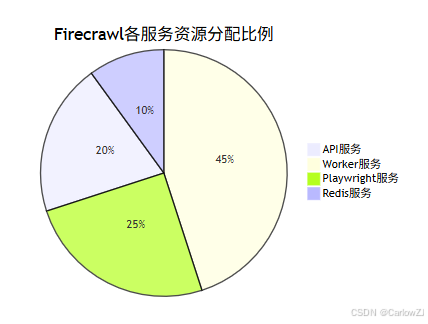
总结
通过对Firecrawl系统的全面解析,我们可以看到它作为一个AI驱动的分布式爬虫系统具有以下显著优势:
核心优势
- AI驱动的智能处理:能够处理复杂的动态网页内容,提取核心信息
- 分布式架构:支持水平扩展,适应不同规模的爬取任务
- 易于部署:基于Docker Compose的部署方案,简化了系统安装和配置
- 丰富的API接口:提供RESTful API,便于集成到各种应用中
- 多种输出格式:支持Markdown、HTML、纯文本等多种输出格式
关键技术要点
- 合理的架构设计:采用微服务架构,将复杂系统拆分为独立的服务组件
- 完善的配置管理:通过环境变量和配置文件管理应用配置
- 有效的监控机制:编写Python脚本实时监控系统状态和资源使用情况
- 系统的故障排查:提供诊断工具快速定位和解决常见问题
- 持续的性能优化:根据系统负载动态调整资源配置
实践建议
- 逐步部署:从最小化配置开始,逐步增加复杂性
- 资源监控:建立完善的资源监控机制,及时发现性能瓶颈
- 缓存策略:合理使用缓存机制,提高系统响应速度
- 安全配置:重视系统安全,合理配置访问控制和数据保护
- 日志管理:建立完善的日志管理系统,便于问题排查
通过遵循这些最佳实践,AI应用开发者可以快速构建稳定、高效、可扩展的网页爬取系统。Firecrawl作为现代化的爬虫解决方案,特别适合需要处理复杂网页内容和构建AI数据源的场景,能够显著提高开发效率和系统可靠性。
在实际应用中,应根据具体业务场景和性能要求,灵活调整优化策略,持续改进系统性能。同时,建议建立完善的监控和告警机制,确保系统稳定运行。







 扫一扫
扫一扫


 被折叠的 条评论
为什么被折叠?
被折叠的 条评论
为什么被折叠?
 到【灌水乐园】发言





