


一般来说,制作一个网站是需要很多地址设置,而这个地址便是路由,通过去设置路由来达到对应网页显示对应界面
比如,baidu.com和baidu.com/search就是两个截然不同的界面
对于经典的路由设置,大概就是直接在js里面放入具体的name/path/component三个嘛
//导入views视图组件
import friend from "../views/friend/friend.vue"
import my from "../views/my/index.vue"
import home from "../views/home/home.vue"

//导入vue
import Vue from 'vue'
//导入路由对象
import VueRouter from 'vue-router'
//把路由挂在vue上
Vue.use(VueRouter)
//创建路由对象(管理者)
const router = new VueRouter({
	routes:[
        {
            name:"home",
            path:"/",
            component:home
        },
        {
            name:"my",
            path:"/my",
            component:my
        },
        {
            name:"friend",
            path:"/friend",
            component:friend
        }
	]

})
//暴露路由对象
export default router;
大概就是像上面代码里面router的设置,这种设置方法在页面较少的情况下是好用,但是问题就是页面一多起来怎么办,在这个js里面统一设置的话,对开发者来说,看着就感觉非常臃肿,可能在后面加入代码就会越写越烦。
我们可以把
routes:[
{
name:"home",
path:"/",
component:home
},
{
name:"my",
path:"/my",
component:my
},
{
name:"friend",
path:"/friend",
component:friend
}
]
这些页面数据统一放在一个json文件里面,就拿我的网站实战举例子吧
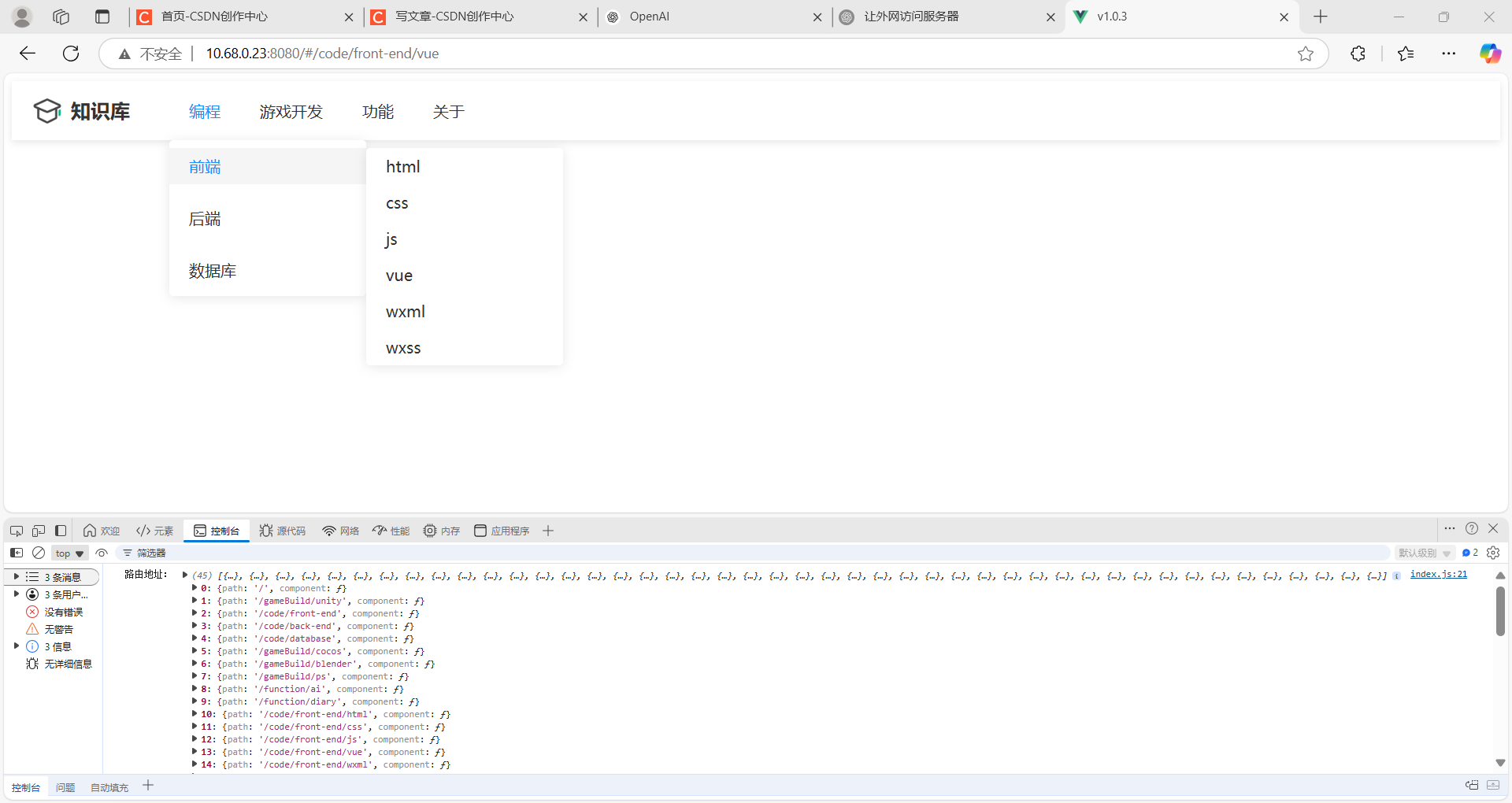
可以看到在我的这个网站里面最顶部有4个按钮,而次级tab和次次级tab叠加起来的话,那展示的页面数将会是相当大的。
举出一些线程:
编程->前端->vue
编程->前端->html
编程->前端->css
编程->前端->js
编程->前端->wxml
编程->前端->wxss
那么使用json来装载就可以是这样
"code":{
    "name":"编程",
    "path":"路径"
}
那么了解了一个,接下来就是无限套娃了。
"code": {
            "name": "编程",
            "list":[
                {
                    "前端":{
                        "path":"/code/front-end",
                        "list":[
                            {
                                "name":"html",
                                "path":"/code/front-end/html"
                            },
                            {
                                "name":"css",
                                "path":"/code/front-end/css"
                            },
                            {
                                "name":"js",
                                "path":"/code/front-end/js"
                            },
                            {
                                "name":"vue",
                                "path":"/code/front-end/vue"
                            },
                            {
                                "name":"wxml",
                                "path":"/code/front-end/wxml"
                            },
                            {
                                "name":"wxss",
                                "path":"/code/front-end/wxss"
                            }
                        ]
                    }
                }
            ]
}
只管去一直套娃就好了,那么接下来三个按钮就是如法炮制了。
以下是json代码:
"code": {
            "name": "编程",
            "list":[
                {
                    "前端":{
                        "path":"/code/front-end",
                        "list":[
                            {
                                "name":"html",
                                "path":"/code/front-end/html"
                            },
                            {
                                "name":"css",
                                "path":"/code/front-end/css"
                            },
                            {
                                "name":"js",
                                "path":"/code/front-end/js"
                            },
                            {
                                "name":"vue",
                                "path":"/code/front-end/vue"
                            },
                            {
                                "name":"wxml",
                                "path":"/code/front-end/wxml"
                            },
                            {
                                "name":"wxss",
                                "path":"/code/front-end/wxss"
                            }
                        ]
                    }
                },
                {
                    "后端":{
                        "path":"/code/back-end",
                        "list":[
                            {
                                "name":"java",
                                "path":"/code/back-end/java"
                            },
 最低0.47元/天 解锁文章






 扫一扫
扫一扫


 2143
2143

 被折叠的 条评论
为什么被折叠?
被折叠的 条评论
为什么被折叠?
 到【灌水乐园】发言





