



 本文介绍了Elasticsearch的CatAPI,一个用于快速浏览和查询集群信息的工具,包括子目录、常用接口(如别名、分配、文档计数等)、参数选项以及各接口的具体功能和返回结果格式。
查看API
JSON格式非常适合计算机,虽然打印得很好,但用户试图在数 据中查找到关系时也会感到乏味。人类的眼睛,尤其是在看终端时, 需要的是紧凑和对齐的文本。/_cat旨在满足这一需求。
1、查看子目录
_cat/后不跟任何子节点,返回的结果是目录,也就是可用的 URL节点,这个功能是非常有用的,当忘记某个接口时可以先执行这 个接口。示例如下:
get /_cat
返回结果就是所有可用的Cat API:
/_cat/allocation
/_cat/shards
/_cat/shards/{index}
/_cat/master
/_cat/nodes
/_cat/tasks
/_cat/indices
/_cat/indices/{index}
/_cat/segments
/_cat/segments/{index}
/_cat/count
/_cat/count/{index}
/_cat/recovery
/_cat/recovery/{index}
/_cat/health
/_cat/pending_tasks
/_cat/aliases
/_cat/aliases/{alias}
/_cat/thread_pool
/_cat/thread_pool/{thread_pools}
/_cat/plugins
/_cat/fielddata
/_cat/fielddata/{fields}
/_cat/nodeattrs
/_cat/repositories
/_cat/snapshots/{repository}
/_cat/templates
/_cat/transforms
/_cat/transforms/{transform_id}
2、公共参数
可以多个参数一起使用,用&连接
GET /_cat/indices?v&s=store.size:desc
2.1、Verbose
每个命令都接受一个查询字符串参数v来打开详细输出。例如:
GET /_cat/master?v
返回:
id                     host      ip        node
Cc6ARDA6TY-poOdtxvsA6g 127.0.0.1 127.0.0.1 zhangchenglongdeMacBook-Pro.local
2.2、help
每个命令都接受一个查询字符串参数help,该参数将输出其可用 值。示例:
GET /_cat/master?help
返回:
id   |   | node id
host | h | host name
ip   |   | ip address
node | n | node name
2.3、h
每个命令都接受一个查询字符串参数h,该参数只强制显示这些 列。示例
GET /_cat/nodes?h=ip,port,heapPercent,name
返回:
127.0.0.1 9300 35 zhangchenglongdeMacBook-Pro.local
2.4、sort
指定输出的列进行排序,默认按照升序排序:
GET /_cat/indices/?v&s=pri,rep:desc
返回:
health status index                           uuid                   pri rep docs.count docs.deleted store.size pri.store.size
yellow open   a                               G8WjS7PoQRG9kCQznaDmsg   1   1          1            0      3.4kb          3.4kb
yellow open   recipes                         agtHN2npS2GE90N81xtjEA   1   1          9            0      4.8kb          4.8kb
yellow open   b                               lnBia7kNQJOBAKvFLWefTg   1   1          1            0      3.6kb          3.6kb
yellow open   log                             H3bResC1QyK-9hdZQ0gs0g   1   1          1            0      4.3kb          4.3kb
yellow open   geo_shape
2.5、format
指定响应返回的数据格式:text(默认),json,yaml,smile,cbor
(通过设置 Accept的HTTP头部的多媒体格式的优先级更高)
GET /_cat/master?format=json
返回:
[
  {
    "id" : "Cc6ARDA6TY-poOdtxvsA6g",
    "host" : "127.0.0.1",
    "ip" : "127.0.0.1",
    "node" : "zhangchenglongdeMacBook-Pro.local"
  }
]
3、常用接口
3.1、aliases——别名、过滤器、路由信息
显示别名,过滤器,路由信息:
GET /_cat/aliases?v

| 返回字段 | 原文 | 含义 |
|---|---|---|
| alias | alias name | 别名 |
| index | index alias points to | 别名指向 |
| filter | filter | 过滤器 |
| routing.index | index routing | 索引路由 |
| routing.search | search routing | 搜索路由 |
| is_write_index | write index | 写索引 |
3.2、allocation——分片数量、占用空间
显示每个节点分片数量、占用空间
GET /_cat/allocation?v

| 返回字段 | 原文 | 含义 |
|---|---|---|
| shards | number of shards on node | 节点承载的分片数量 |
| disk.indics | disk used by ES indices | 索引占用的空间大小 |
| disk.used | dis used(total,not just ES) | 节点所在及其已使用的磁盘空间大小 |
| disk.avail | disk available | 节点可用空间大小 |
| disk.total | total capacity of all volumes | 节点总空间大小 |
| disk.percent | percent disk used | 节点磁盘占用百分比 |
| host | host of node | 节点host |
| ip | ip of noe | 节点ip |
| node | name of node | 节点名称 |
3.3、count——文档数量
显示索引文档的数量
GET /_cat/count?v

| 返回字段 | 原文 | 含义 |
|---|---|---|
| epoch | seconds since 1970-01-01 00:00:00 | 自标准时间(1970-01-01 00:00:00)以来的秒数 |
| timestamp | time in HH:MM:SS | 时分秒,utc时区 |
| count | the document count | 文档总数 |
3.4、health——健康信息
查看集群健康状况
GET /_cat/health?v

| 返回字段 | 原文 | 含义 |
|---|---|---|
| epoch | seconds since 1970-01-01 00:00:00 | 自标准时间(1970-01-01 00:00:00)以来的秒数 |
| timestamp | time in HH:MM:SS | 时分秒,utc时区 |
| cluster | cluster name | 集群名称 |
| status | health stauts | 集群状态 |
| node.total | total number of nodes | 节点总数 |
| node.data | number of nodes that can store data | 数据节点总数 |
| shards | total number of shards | 分片总数 |
| pri | number of primary shards | 主分片总数 |
| relo | number of relocating nodes | 复制节点总数 |
| init | number of initializing nodes | 初始化节点总数 |
| unassign | number of unassigned shards | 未分配分片总数 |
| pending_tasks | number of pending tasks | 待定任务总数 |
| max_task_wait_time | wait time of longest task pending | 等待最长任务的等待时间 |
| active_shards_percent | active number of shards in percent | 活动分片百分比 |
3.5、indices——索引信息
查看索引信息
GET /_cat/indices?v
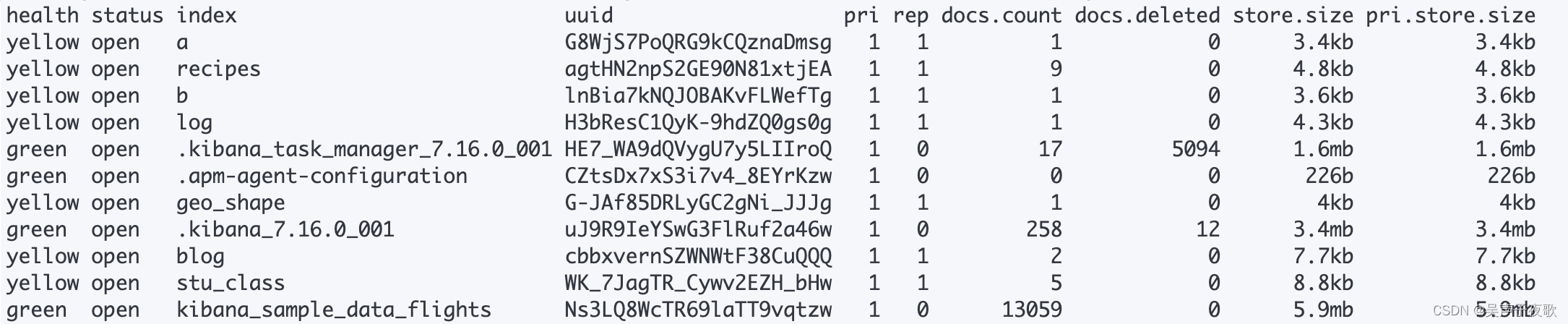
| 返回字段 | 原文 | 含义 |
|---|---|---|
| health | current health status | 索引健康状态 |
| status | open/close status | 索引的开启状态 |
| index | index name | 索引名称 |
| uuid | index uuid | 索引uuid |
| pri | number of primary shards | 索引主分片数 |
| rep | number of replica shards | 所以副本分片数量 |
| docs.count | available docs | 索引中文档总数 |
| docs.deleted | deleted docs | 索引中删除状态的文档 |
| store.size | store size of primaries & replicas | 主分片+副本分片的大小 |
| pri.store.size | store size of primaries | 主分片的大小 |
3.6、master——master节点信息
显示master节点信息
GET /_cat/master?v

| 返回字段 | 原文 | 含义 |
|---|---|---|
| id | node id | 节点id |
| host | host name | host |
| ip | ip address | ip |
| node | node name | 节点名称 |
3.7、nodeattrs——节点属性
显示node节点属性
GET /_cat/nodeattrs?v

| 返回字段 | 原文 | 含义 |
|---|---|---|
| node | node name | 节点名称 |
| host | host name | host |
| ip | ip address | ip |
| attr | arrribute description | 属性描述 |
| value | attribute value | 属性值 |
3.8、nodes——节点信息
显示node节点信息
GET /_cat/nodes?v

| 返回字段 | 原文 | 含义 |
|---|---|---|
| ip | ip | ip |
| hap.percent | used heap | 堆内存占用百分比 |
| ram.percent | used machine memory ratio | 内存占用百分比 |
| cpu | recent cpu | CPU占用百分比 |
| load_1m | 1m load avg | 1分钟的系统负载 |
| load_5m | 5m load avg | 5分钟的系统负载 |
| load_15m | 15m load avg | 15分钟的系统负载 |
| node.role | m:master eligible node, d:data node, i:ingest node, -:coordinating node only | node节点的角色 |
| master | *:current master | 是否是master节点 |
| name | node name | 节点名称 |
3.9、pending_tasks——等待任务
显示正在等待的任务
GET /_cat/pending_tasks?v

| 返回字段 | 原文 | 含义 |
|---|---|---|
| insertOrder | task insertion order | 任务插入顺序 |
| timeInQueue | how long task has been in queue | 任务排队了多长时间 |
| priority | task priority | 任务优先级 |
| source | task source | 任务源 |
3.10、plugins——插件信息
显示节点上的插件
GET /_cat/plugins?v

| 返回字段 | 原文 | 含义 |
|---|---|---|
| name | node name | 节点名称 |
| component | component | 插件名称 |
| version | component version | 插件版本 |
3.11、recovery——索引碎片恢复视图
显示正在进行和先前完成的索引碎片恢复的视图
GET /_cat/recovery?format=json
返回:
[
  {
    "index" : "log",
    "shard" : "0",
    "time" : "22ms",
    "type" : "existing_store",
    "stage" : "done",
    "source_host" : "n/a",
    "source_node" : "n/a",
    "target_host" : "127.0.0.1",
    "target_node" : "zhangchenglongdeMacBook-Pro.local",
    "repository" : "n/a",
    "snapshot" : "n/a",
    "files" : "0",
    "files_recovered" : "0",
    "files_percent" : "100.0%",
    "files_total" : "4",
    "bytes" : "0",
    "bytes_recovered" : "0",
    "bytes_percent" : "100.0%",
    "bytes_total" : "4498",
    "translog_ops" : "0",
    "translog_ops_recovered" : "0",
    "translog_ops_percent" : "100.0%"
  },
  ...
]
| 返回字段 | 原文 | 含义 |
|---|---|---|
| index | index name | 索引名称 |
| shard | shard name | 分片名称 |
| time | recovery time | 恢复时间 |
| type | recovery type | 恢复类型 |
| stage | recovery stage | 恢复阶段 |
| source_host | source host | 源主机 |
| source_node | source node name | 源节点名称 |
| target_host | target host | 目标主机 |
| target_node | target node name | 目标节点名称 |
| repository | repository | 仓库 |
| snapshot | snpshot | 快照 |
| files | number offiles to recover | 要恢复的文件数 |
| files_recovered | files recovered | 已恢复的文件数 |
| files_pervent | pervent of files recoverd | 恢复文件百分比 |
| files_total | total number of files | 文件总数 |
| bytes | number of bytes to recover | 要恢复的字节数 |
| bytes_recovered | bytes recovered | 已恢复的字节数 |
| bytes_percent | percent of bytes recovered | 恢复字节百分比 |
| bytes_total | total number of bytes | 字节总数 |
| translog_ops | number of translog ops to recover | 要恢复的translog操作数 |
| translog_ops_recovered | translog ops recovered | 已恢复的translog操作数 |
| translog_ops_percent | percent of transog ops recovered | 恢复的translog操作的百分比 |
3.12、segments——分段信息
显示分片中的分段信息
GET /_cat/segments?v
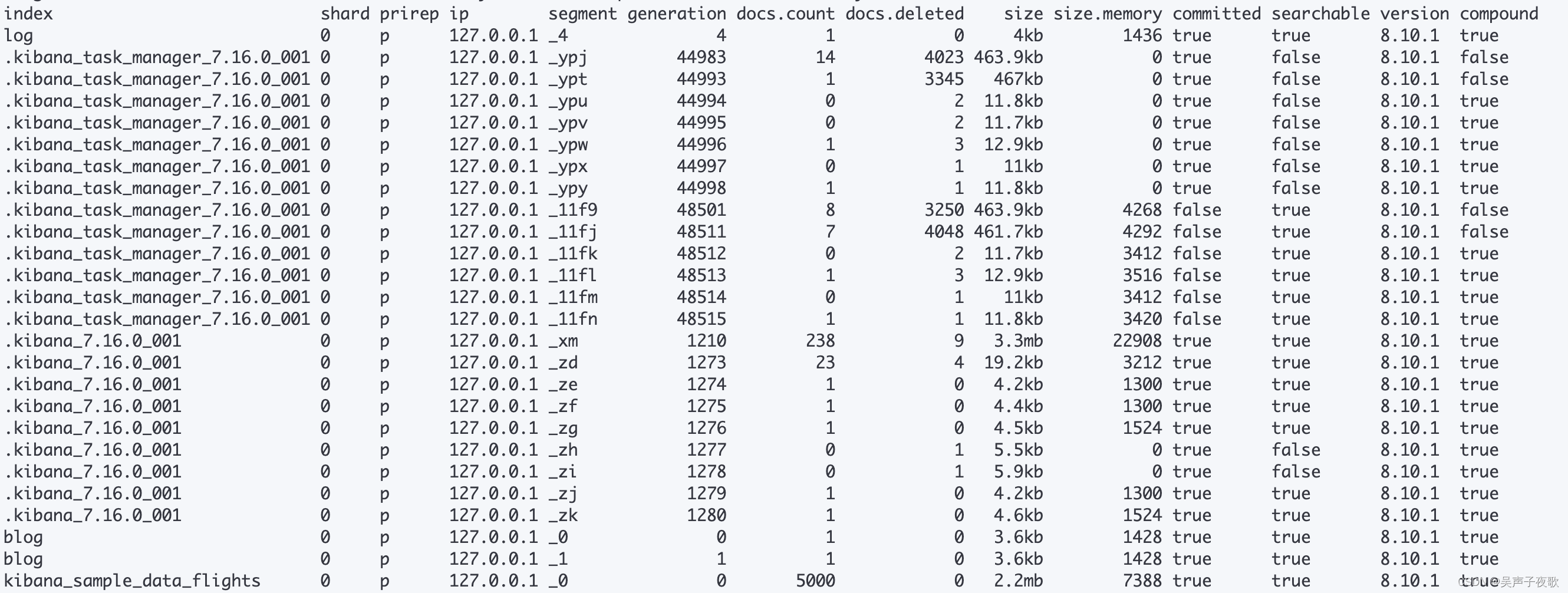
| 返回字段 | 原文 | 含义 |
|---|---|---|
| index | index name | 索引名称 |
| shard | shard name | 分片名称 |
| prirep | primary or replica | 主分片还是副本分片 |
| ip | ip of node where it lives | 所在节点ip |
| segment | segment name | segments段名 |
| generation | segment generation | 分段生成 |
| docs.count | number of docs in segment | 段中的文档数 |
| docs.deleted | number of deleted docs in segment | 段中删除的文档数 |
| size | segment size in bytes | 段大小,以字节为单位 |
| size.memory | segment memory in bytes | 段内存大小,以字节为单位 |
| committed | is segment committed | 段是否已提交 |
| searchable | is segment searched | 段是否可搜索 |
| version | version | 版本 |
| compound | is segment compound | compound模式 |
3.13、shards——分片信息
显示索引分片信息
GET /_cat/shards?v
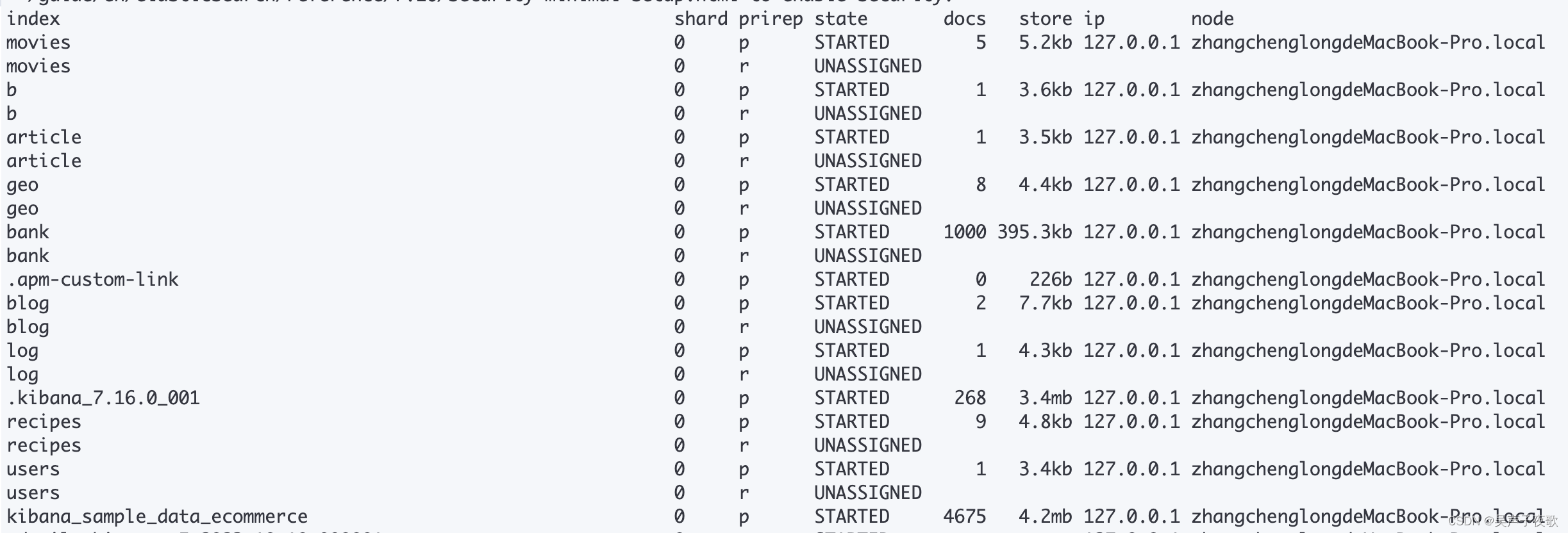
| 返回字段 | 原文 | 含义 |
|---|---|---|
| index | index name | 索引名称 |
| shard | shard name | 分片序号 |
| prirep | primary or replica | 分片类型,p表示是主分片,r表示是复制分片 |
| state | shard state | 分片状态 |
| docs | number of docs in shard | 该分片存放的文档数量 |
| store | store size of shard(how much disk it uses) | 该分片占用的存储空间大小 |
| ip | ip of node where it lives | 该分片所在服务器ip |
| node | name of node where it | 该分片所在的节点名称 |
3.14、thread_pool——线程池信息
显示线程池信息
GET /_cat/thread_pool?v
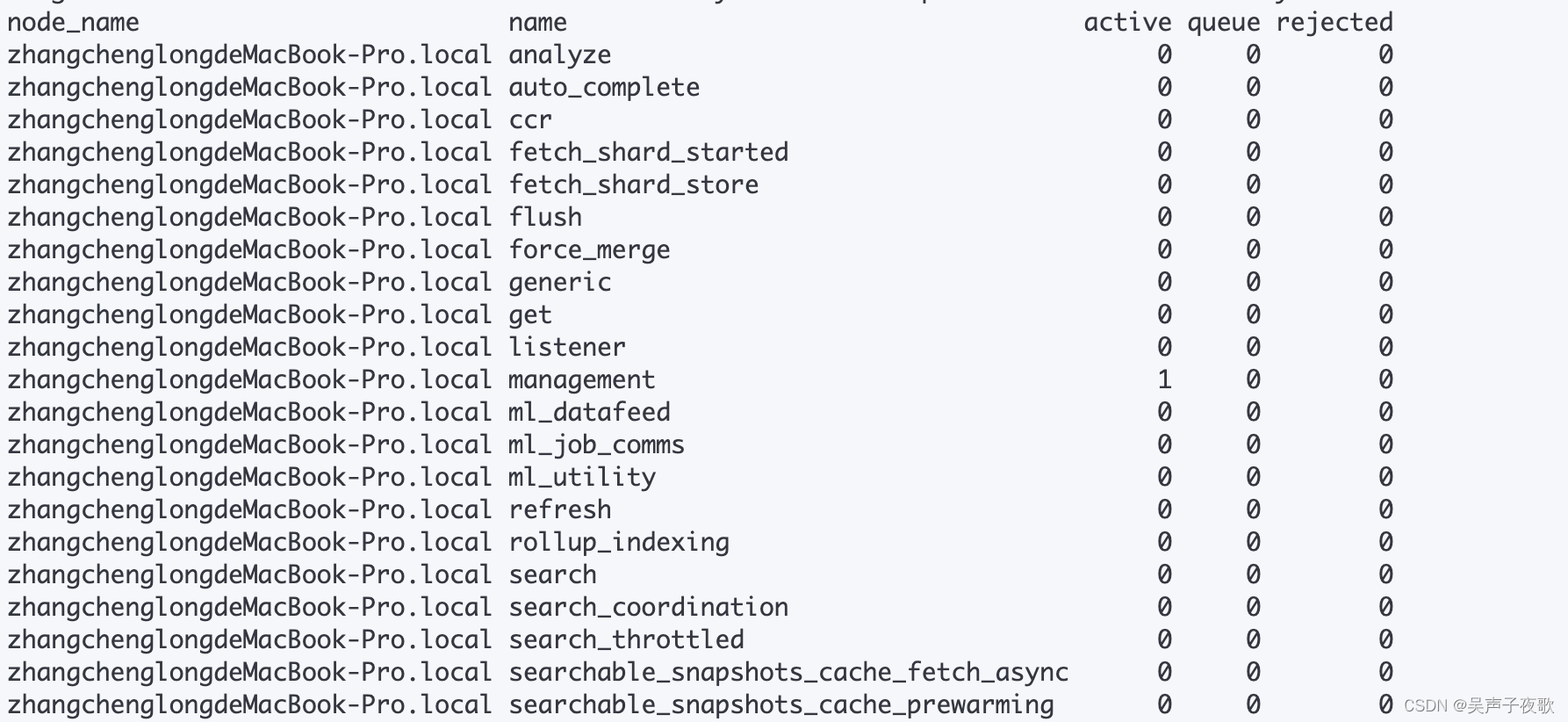
| 返回字段 | 原文 | 含义 |
|---|---|---|
| node_name | node name | 节点名称 |
| name | thread pool name | 线程池名称 |
| active | number of active treads | 活跃线程数 |
| queue | number of tasks currently in queue | 当前队列中的任务数 |
| rejected | number of rejected tasks | 被拒绝的任务数 |
3.15、templates——模板信息
显示模板信息
GET /_cat/templates?v
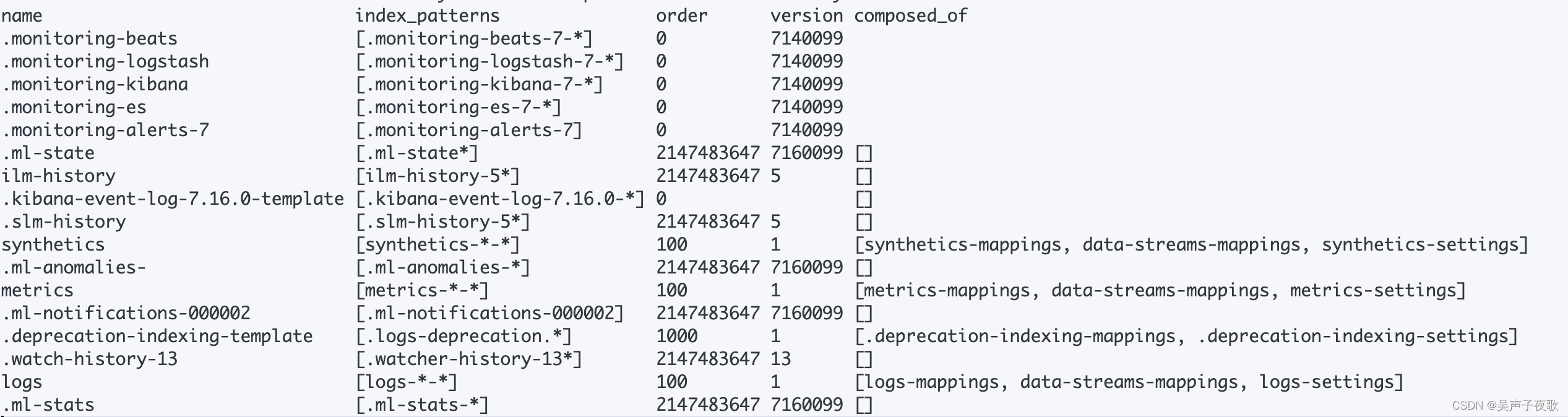
| 返回字段 | 原文 | 含义 |
|---|---|---|
| name | template name | 模板名称 |
| index_patterns | template index patterns | 模板匹配规则 |
| order | template application order number | 模板优先级 |
| version | version | 模板版本 |





 扫一扫
扫一扫


 1538
1538

 被折叠的 条评论
为什么被折叠?
被折叠的 条评论
为什么被折叠?
 到【灌水乐园】发言





