



 本文详细介绍Vue.js中如何使用v-bind:class和v-bind:style动态绑定元素的类名和内联样式,包括对象语法、数组语法及在组件上的应用。
绑定Class
示例:基本用法,点击按钮切换样式
<!DOCTYPE html>
<html lang="en">
<head>
    <meta charset="UTF-8">
    <meta name="viewport" content="width=device-width, initial-scale=1.0">
    <meta http-equiv="X-UA-Compatible" content="ie=edge">
    <script src="https://unpkg.com/vue/dist/vue.js"></script>
    <title>Class绑定</title>
    <style>
        body{
            font-size: 24px;
        }
        .active{
            color: red;
        }
    </style>
</head>
<body>
    <div id="myApp">
        <div v-bind:class="{active:isActive}">红色文本1</div>
        <div :class="{active:isActive}">红色文本2</div>
        <button @click="btnClick">改变class</button>
    </div>
    <script>
        var myApp = new Vue({
            el: '#myApp',
            data: {
                isActive: true
            },
            methods: {
                btnClick: function () {
                    this.isActive = !this.isActive;
                }
            }
        });
    </script>

</body>
</html>
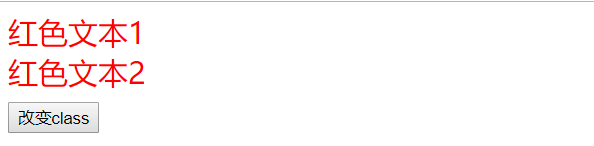
绑定class有几种语法:
对象语法:
<div id="app">
    <div :class="{'active':isActive}"></div>
    <!-- 渲染结果:<div class="active"></div> -->
</div>
<script>
    var app = new Vue({
        el: '#app',
        data: {
            isActive: true
        }
    });
</script>
active依赖于数据isActive,当其为tre时,div会拥有类名为Active的样式,为false时则没有。
对象中也可以传入多个属性,来动态切换class。另外,:class可以与普通class共存 ```html
当 :class 的表达式过长或逻辑复杂时,还可以绑定一个计算属性,这是一种很友好和常见的用法,一般当条件多于两个时,都可以使用data或computed。
var app = new Vue({
    el: '#app',
    data: {
        isActive: true,
        error: null
    },
    computed: {
        classes: function () {
            return {
                active: this.isActive && !this.error,
                'text-fail': this.error && this.error.type === 'fail'
            }
        }
    }
});
除了计算属性,也可以直接绑定一个Object类型的数据,或者使用类似计算属性的methods。
<!DOCTYPE html>
<html lang="en">
<head>
    <meta charset="UTF-8">
    <meta name="viewport" content="width=device-width, initial-scale=1.0">
    <meta http-equiv="X-UA-Compatible" content="ie=edge">
    <script src="https://unpkg.com/vue/dist/vue.js"></script>
    <title>Class对象绑定</title>
    <style>
        body{
            font-size: 24px;
        }
        .active{
            color: red;
        }
        .big {
            font-weight: bolder;
            font-size: 64px;
        }
    </style>
</head>
<body>
    <div id="myApp">
        <div :class="myClass">红色文本</div>
        <button @click="btnClick">改变class</button>
    </div>

    <script>
        var myApp = new Vue({
            el: '#myApp',
            data: {
                myClass: {
                    active: true,
                    big: true
                }
            },
            methods: {
                btnClick: function () {
                    this.myClass.big = !this.myClass.big;
                }
            }
        });
    </script>
</body>
</html>
**数组语法:** 当需要应用多个class时,可以使用数组语法,给 :class绑定一个数组,应用一个class列表:
<div id="app">
    <div :class="[activeCls, errorCls]"></div>
    <!--渲染结果:<div class="active error"></div> -->
</div>
<script>
    var app = new Vue({
        el: '#app',
        data: {
            activeCls: 'active',
            errorCls: 'error'
        }
    });
</script>
也可以使用三元表达式来根据条件切换class:
<div id="myApp">
    <div :class="{isActive ? activeCls : '', errorCls}"></div>
</div>
<script>
    var myApp = new Vue({
        el: '#myApp',
        data: {
            isActive: true,
            activeCls: 'active',
            error: 'error'
        }
    });
</script>
样式error会始终应用,当数据isActive为真时,样式active才会被应用。
class有多个条件时,这样写比较麻烦,可以在数组语法中使用对象语法:
<div id="myApp">
    <div :class="[{'active': isActive}, errorCls]"></div>
</div>
<script>
    var myApp = new Vue({
        el: '#myApp',
        data: {
            isActive: true,
            errorCls: 'error'
        }
    });
</script>
与对象语法一样,也可以使用data、computed和methods三种方法: ```html
注意:如果表达式较长或逻辑复杂,应该尽可能地优先使用计算属性。
**在组件上使用:** 如果直接在自定义组件上使用class或:class,样式规则会直接应用到这个组件的跟元素上:
//定义一个组件
Vue.component('my-component', {
    template: '<p class="article">一些文本</p>'
});
调用这个组件:
<div id="app">
    <my-component :class="{'active': isActive}"></my-component>
    <!--渲染结果:-->
    <!-- <p class="article active">一些文本</p> -->
</div>
<script>
    var app = new Vue({
        el: '#app',
        data: {
            isActive: true
        }
    });
</script>
这种语法仅适用于自定义组件的最外层是一个根元素,否则会无效,当不满足这种条件或需要给具体的子元素设置类名时,应当使用组件的props来传递。
绑定内联样式
使用v-bind:sytle可以给元素绑定内联样式,方法与 :class 类似,也有对象语法和数组语法,看来就像直接在元素上写CSS:
<div id="app">
    <div :style="{'color': color, 'fontSize': fontSize + 'px'}">文本</div>
    <!--渲染結果:-->
    <!-- <div style="color: red; font-size: 14px;">文本</div> -->
</div>
<script>
    var app = new Vue({
        el: '#app',
        data: {
            color: 'red',
            fontSize: 14
        }
    });
</script>
大多数情况下,直接写一长串的样式不便于阅读和维护,所以一般写在data或computed里,以data为例改写上面的示例:
<div id="myApp">
    <div :style="styles">文本</div>
</div>
<script>
    var myApp = new Vue({
        el: '#myApp',
        data: {
            styles: {
                color: 'red',
                fontSize: 14 + 'px'
            }
        }
    });
</script>
应用多个样式对象时,可以使用数组语法:
<div :style="[styleA, styleB]">文本</div>
注意:使用 :style 时,Vue.js会自动给特殊的CSS属性名称加前缀,比如transform等。





 扫一扫
扫一扫


 1404
1404

 被折叠的 条评论
为什么被折叠?
被折叠的 条评论
为什么被折叠?
 到【灌水乐园】发言





