



 本文深入解析数据操作语言(DML),涵盖插入、更新、删除数据的关键语法及应用实例,包括使用INSERT语句插入数据,UPDATE语句修改数据,DELETE语句删除数据等核心操作。
数据操作语言
DML(Data Manipulation Language - 数据操作语言)可以在下列条件执行:
- 向表中插入数据
- 修改现存数据
- 删除现存数据
事务是由完成若干项工作的DML语句组成的
插入数据
insert语句语法:
insert into table [(column [, column...]}]
values (value [, value...]);
使用这种语法一次只能向表中插入一条\color{red}{一条}一条数据。
- 为每一列添加一个新值。
- 按列的默认顺序列出各个列的值。
- 在insert子句中随意列出列名和它们的值。
- 字符和日期型数据应包含在单引号中。\color{red}{字符和日期型数据应包含在单引号中。}字符和日期型数据应包含在单引号中。
insert into departments(department_id, department_name, manager_id, location_id)
values(17, 'Public Relations', 100, 1700);

1 row created.
向表中插入空值
- 隐式方式:在列名表中省略该列的值。
insert into department (department_id, department_name)
values (30, 'Purchasing');

1 row created.
- 显示方式:在VALUES子句中指定空值。
insert into departments
values (100, 'Finance', NULL, NULL);

1 row created.
插入指定的值
SYSDATE记录当前系统的日期和时间
insert into employees (employee_id, first_name, last_name, email, phone_number, hire_date, job_id, salary, commission_pct, manager_id, department_id)
values (113, 'Louis', 'Popp', 'LPOPP', '515.124.4567', SYSDATE, 'AC_ACCOUNT', 6900, NULL, 205,100);
加入新成员
insert into employees
values (114, 'Den', 'Raphealy', 'DRAPHEAL', '515.127.4561', TO_DATE('FEB 3,1999', 'MON DD, YYYY'), 'AC_ACCOUNT', 11000, NULL, 100, 30);

1 row created.
创建脚本
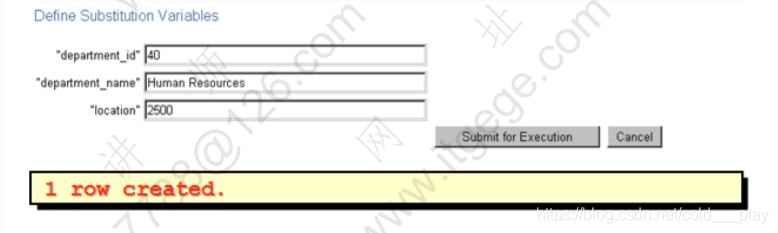
- 在SQL语句中使用 & 变量指定列值。
- & 变量放在VALUES子句中。
insert into departments (department_id, department_name, location_id)
values(&department_id, '&department_name', &location);
从其它表中拷贝数据
- 在INSERT语句中加入子查询。
insert into sales_reps(id, name, salary, commission_pct)
select employee_id, last_name, salary, commission_pct
from employees
where job_id like '%REP%';

4 rows created.
- 不必书写VALUES子句
- 子查询中的值列表应与INSERT子句中的列名对应
更新数据
- 使用UPDATE语句更新数据
update table
set column = value[, column = value, ...]
[where condition];
- 可以一次更新多条数据
- 使用where子句指定需要更新的数据
update employees
set department id = 70
where employee_id = 113;

1 row updated.
- 如果省略where子句,则表中的所有数据都将被更新
update copy_emp
set department_id = 110;

22 rows updated.
在update语句使用子查询
示例:更新114号员工的工作和工资使其与205号员工相同
update employees
set job_id = (select job_id
	from employees
	where employee_id = 205), salary = (select salary
		from employees
		where employee id = 205)
where employee_id = 114;

1 row updated.
在update语句中使用子查询
- 在update中使用子查询,使更新基于另一个表中的数据
update copy_emp
set department_id = (select department_id
	from employees
	where employee_id = 100)
where job_id = (select job_id
	from employees
	where employee_id = 200);

1 row updated.
更新中的数据完整性错误
update employees
set department_id = 55
where department_id = 110;
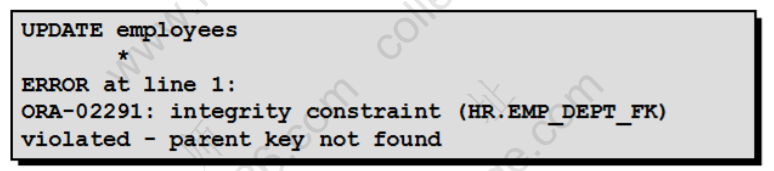
不存在55号部门
使用DELETE语句从表中删除数据
delete [from] table
[where condition];
- 使用where子句指定删除的记录
delete from departments
where department_name = 'Finace';

1 row deleted.
- 如果省略where子句,则表中的全部数据将被删除
delete from copy_emp;

22 rows deleted.
在DELETE中使用子查询
- 在delete中使用子查询,使删除基于另一个表中的数据
delete from employees
where department_id = (select department_id
	from departments
	where department_name like '%Public%');

1 row deleted.
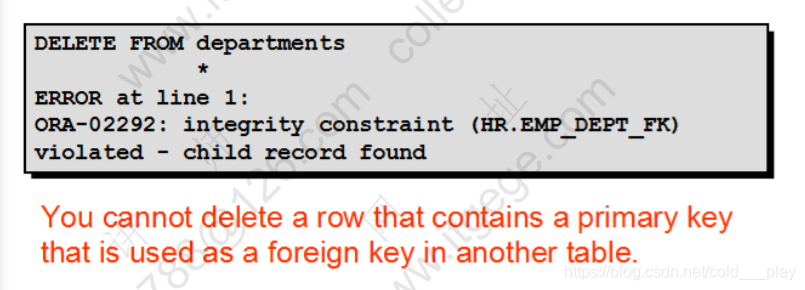
删除中的数据完整性错误
delete from departments
where department_id = 60;
Delete 和 Truncate
- 都是删除表中的数据
- Delete操作可以rollback,可以闪回
- Delete操作可能产生碎片,并且不释放空间
- Truncate:清空表
控制事务
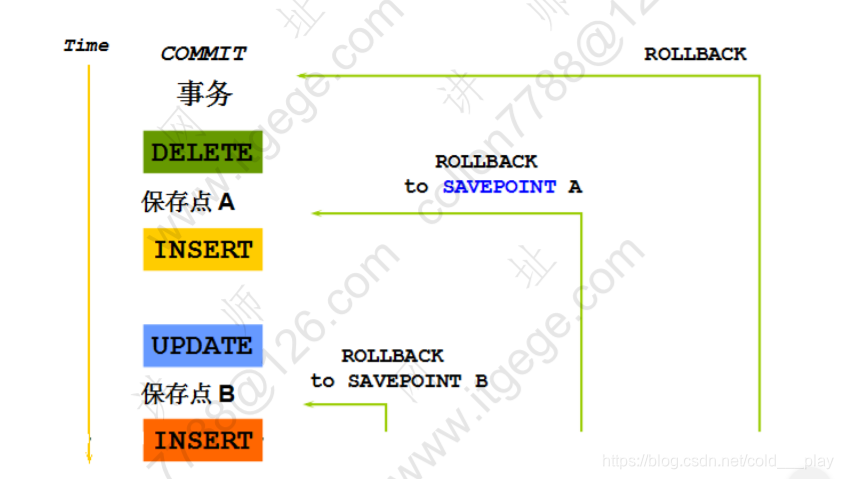
回滚到保留点
- 使用 SAVEPOINT\color{red}{SAVEPOINT}SAVEPOINT 语句在当前事务中创建保存点
- 使用ROLLBACK\color{red}{ROLLBACK}ROLLBACK TO\color{red}{TO}TO SAVEPOINT\color{red}{SAVEPOINT}SAVEPOINT 语句回滚到创建的保存点
update...
savepoint update done;

Savepoint created.

insert...
rollback to update_done;

Rollback complete.
数据库的隔离级别
-
对于同时运行的多个事务,当这些事务访问数据库中相同的数据时,如果没有采取必要的隔离机制,就会导致各种并发问题:
- 脏读:
对于两个事务T1,T2, T1读取了已经被T2更新但还没有提交的字段。之后,若T2回滚,T1读取的内容就是临时且无效的。 - 不可重复读:
对于两个事务T1, T2, T1读取了一个字段,然后T2更新了该字段。之后,T1再次读取同一个字段,值就不同了。 - 幻读:
对于两个事务T1,T2,T1从一个表中读取了一个字段,然后T2在该表中插入了一些新的行。之后,如果T1再次读取同一个表,就会多出几行。
- 脏读:
-
数据库事务的隔离性:数据库系统必须具有隔离并发运行各个事务的能力,是他们不会相互影响,避免各种并发问题。
-
一个事务与其它事务隔离的程度称为隔离级别。数据库规定了多种事务隔离级别,不同隔离级别对应不同的干扰程度,隔离级别越高,数据一致性越好,但并发性越弱。
数据库提供的4种事务隔离级别
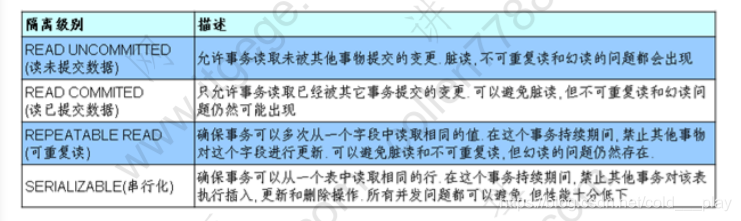
- Oracle支持的2种事务隔离级别:
- READ COMMITED
- SERIALIZABLE
Oracle默认的事务隔离级别为:READ COMMITED
MySQL默认的事务隔离级别为:REPEATABLE READ
总结
| 语句 | 功能 |
|---|---|
| INSERT | 插入 |
| UPDATE | 修正 |
| DELETE | 删除 |
| COMMIT | 提交 |
| SAVEPOINT | 保存点 |
| ROLLBACK | 回滚 |





 扫一扫
扫一扫


 4191
4191

 被折叠的 条评论
为什么被折叠?
被折叠的 条评论
为什么被折叠?
 到【灌水乐园】发言





