



QBC检索
QBC(Query By Criteria)是Hibernate提供的另一种检索对象的方式,它主要由Criteria接口、Criterion接口和Expression类组成。
Criteria接口是Hibernate API中的一个查询接口,它需要由session进行创建。一个单独的查询就是Criterion接口的一个实例,用于限制Criteria对象的擦查询,在Hibernate中Criterion对象的创建通常是通过Restrictions工厂类完成的,它提供了条件查询方法。
Criterion是Criteria的查询条件,在Criteria中提供了add(Criterion criterion)方法来添加查询条件。
使用QBC检索对象的实例代码,如下所示
	//创建criteria对象
	Criteria criteria = session.createCriteria(Customer.class);
	//设定查询条件
	Criterion criterion = Restrictions.eq("id",1);
	//添加查询条件
	criteria.add(criterion);
	//执行查询,返回查询结果
	List<Customer> cs = criteria.list();
上述代码中查询的是id为1的Customer对象。
QBC检索是使用Restricions对象编写查询条件的,在Restrictions类中提供了大量的静态方法来创建查询条件。
准备工作
创建一个Customer类:
package pers.zhang.domain;

public class Customer {

	private Long cust_id;
	private String cust_name;
	private String cust_source;
	private String cust_industry;
	private String cust_level;
	private String cust_linkman;
	private String cust_phone;
	private String cust_mobile;

	public Long getCust_id() {
		return cust_id;
	}
	public void setCust_id(Long cust_id) {
		this.cust_id = cust_id;
	}
	public String getCust_name() {
		return cust_name;
	}
	public void setCust_name(String cust_name) {
		this.cust_name = cust_name;
	}
	public String getCust_source() {
		return cust_source;
	}
	public void setCust_source(String cust_source) {
		this.cust_source = cust_source;
	}
	public String getCust_industry() {
		return cust_industry;
	}
	public void setCust_industry(String cust_industry) {
		this.cust_industry = cust_industry;
	}
	public String getCust_level() {
		return cust_level;
	}
	public void setCust_level(String cust_level) {
		this.cust_level = cust_level;
	}
	public String getCust_linkman() {
		return cust_linkman;
	}
	public void setCust_linkman(String cust_linkman) {
		this.cust_linkman = cust_linkman;
	}
	public String getCust_phone() {
		return cust_phone;
	}
	public void setCust_phone(String cust_phone) {
		this.cust_phone = cust_phone;
	}
	public String getCust_mobile() {
		return cust_mobile;
	}
	public void setCust_mobile(String cust_mobile) {
		this.cust_mobile = cust_mobile;
	}
	@Override
	public String toString() {
		return "Customer [cust_id=" + cust_id + ", cust_name=" + cust_name + "]";
	}
}
配置ORM元数据:
<?xml version="1.0" encoding="UTF-8"?>
<!DOCTYPE hibernate-mapping PUBLIC
    "-//Hibernate/Hibernate Mapping DTD 3.0//EN"
    "http://www.hibernate.org/dtd/hibernate-mapping-3.0.dtd">
<hibernate-mapping package="pers.zhang.domain" >
	<class name="Customer" table="cst_customer" >
		<id name="cust_id"  >
			<generator class="identity"></generator>
		</id>
		<property name="cust_name" column="cust_name" ></property>
		<property name="cust_source" column="cust_source" ></property>
		<property name="cust_industry" column="cust_industry" ></property>
		<property name="cust_level" column="cust_level" ></property>
		<property name="cust_linkman" column="cust_linkman" ></property>
		<property name="cust_phone" column="cust_phone" ></property>
		<property name="cust_mobile" column="cust_mobile" ></property>
	</class>
</hibernate-mapping>
向表中插入数据:
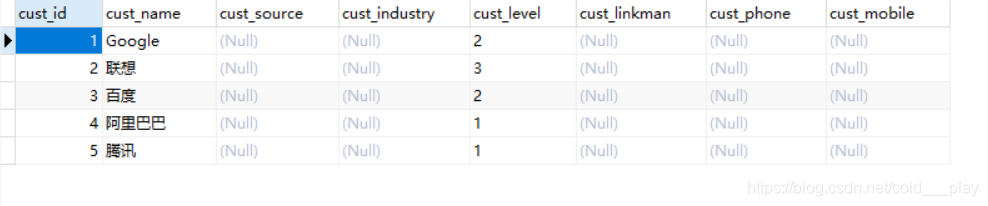
基本查询–查询所有
@Test
	//基本查询
	public void fun1(){

		Session session = HibernateUtils.openSession();
		Transaction tx = session.beginTransaction();
		//-------------------------------------------
		//查询所有的Customer对象
		Criteria criteria = session.createCriteria(Customer.class);
		List<Customer> list = criteria.list();
		System.out.println(list);
		//-------------------------------------------
		tx.commit();
		session.close();
	}
运行JUnit测试输出:
Hibernate:
    select
        this_.cust_id as cust_id1_0_0_,
        this_.cust_name as cust_nam2_0_0_,
        this_.cust_source as cust_sou3_0_0_,
        this_.cust_industry as cust_ind4_0_0_,
        this_.cust_level as cust_lev5_0_0_,
        this_.cust_linkman as cust_lin6_0_0_,
        this_.cust_phone as cust_pho7_0_0_,
        this_.cust_mobile as cust_mob8_0_0_
    from
        cst_customer this_
[Customer [cust_id=1, cust_name=Google], Customer [cust_id=2, cust_name=联想], Customer [cust_id=3, cust_name=百度], Customer [cust_id=4, cust_name=阿里巴巴], Customer [cust_id=5, cust_name=腾讯]]
条件查询
条件查询需要调用criteria.add()方法,参数为Restricions对象。
–》Restrictions常量和方法
@Test
	//条件查询
	// > 				gt
	// >=				ge
	// <				lt
	// <=				le
	// ==				eq
	// !=				ne
	// in				in
	// between and		between
	// like 			like
	// is not null 		isNotNull
	// is null			isNull
	// or				or
	// and				and
	public void fun2(){
		Session session = HibernateUtils.openSession();
		Transaction tx = session.beginTransaction();
		//-------------------------------------------
		//创建criteria查询对象
		Criteria criteria = session.createCriteria(Customer.class);
		//添加查询参数 => 查询cust_id为1的Customer对象
		criteria.add(Restrictions.eq("cust_id", 1l));
		//执行查询获得结果
		Customer c = (Customer) criteria.uniqueResult();
		System.out.println(c);
		//-------------------------------------------
		tx.commit();
		session.close();
	}
运行JUnit测试输出:
Hibernate:
    select
        this_.cust_id as cust_id1_0_0_,
        this_.cust_name as cust_nam2_0_0_,
        this_.cust_source as cust_sou3_0_0_,
        this_.cust_industry as cust_ind4_0_0_,
        this_.cust_level as cust_lev5_0_0_,
        this_.cust_linkman as cust_lin6_0_0_,
        this_.cust_phone as cust_pho7_0_0_,
        this_.cust_mobile as cust_mob8_0_0_
    from
        cst_customer this_
    where
        this_.cust_id=?
Customer [cust_id=1, cust_name=Google]
分页查询
QBC的分页查询与MySql的limit十分相似,使用两个方法:
1.criteria.setFirstResult(arg),设置第一条结果从哪个索引开始,相当于limit中的第一个?。
2.criteria.setMaxResults(arg),设置一次查询多少条数据,相遇于limit中的第二个?。
	@Test
	//分页查询
	public void fun3(){
		Session session = HibernateUtils.openSession();
		Transaction tx = session.beginTransaction();
		//-------------------------------------------
		Criteria criteria = session.createCriteria(Customer.class);
		//设置分页信息 limit ?,?  从第1条开始查,查询2条数据
		criteria.setFirstResult(1);
		criteria.setMaxResults(2);
		List<Customer> list = criteria.list();
		System.out.println(list);
		//-------------------------------------------
		tx.commit();
		session.close();
	}
运行JUnit测试输出:
Hibernate:
    select
        this_.cust_id as cust_id1_0_0_,
        this_.cust_name as cust_nam2_0_0_,
        this_.cust_source as cust_sou3_0_0_,
        this_.cust_industry as cust_ind4_0_0_,
        this_.cust_level as cust_lev5_0_0_,
        this_.cust_linkman as cust_lin6_0_0_,
        this_.cust_phone as cust_pho7_0_0_,
        this_.cust_mobile as cust_mob8_0_0_
    from
        cst_customer this_ limit ?,
        ?
[Customer [cust_id=2, cust_name=联想], Customer [cust_id=3, cust_name=百度]]
排序查询
条件查询需要调用criteria.addOrder()方法,参数为Order对象。
Order类的常用方法:作为查询容器的参数
| 方法名称 | 描述 | 使用 |
|---|---|---|
| Order.asc | 升序 | Order.asc(String propertyName) |
| Order.desc | 降序 | Order.desc(String propertyName) |
@Test
	public void fun4() {
		Session session = HibernateUtils.openSession();
		Transaction tx = session.beginTransaction();
		//-------------------------------------------
		Criteria criteria = session.createCriteria(Customer.class);
		//设置排序规则 按id降序排序
		criteria.addOrder(Order.desc("cust_id"));
		//执行查询
		List<Customer> list = criteria.list();
		System.out.println(list);
		//-------------------------------------------
		tx.commit();
		session.close();
	}
运行JUnit测试输出:
Hibernate:
    select
        this_.cust_id as cust_id1_0_0_,
        this_.cust_name as cust_nam2_0_0_,
        this_.cust_source as cust_sou3_0_0_,
        this_.cust_industry as cust_ind4_0_0_,
        this_.cust_level as cust_lev5_0_0_,
        this_.cust_linkman as cust_lin6_0_0_,
        this_.cust_phone as cust_pho7_0_0_,
        this_.cust_mobile as cust_mob8_0_0_
    from
        cst_customer this_
    order by
        this_.cust_id desc
[Customer [cust_id=5, cust_name=腾讯], Customer [cust_id=4, cust_name=阿里巴巴], Customer [cust_id=3, cust_name=百度], Customer [cust_id=2, cust_name=联想], Customer [cust_id=1, cust_name=Google]]
统计查询
条件查询需要调用criteria.setProjection()方法,参数为Projection对象。
Projections类的常用方法:作为查询容器的参数:
| 方法名称 | 描述 | 使用 |
|---|---|---|
| Projections.avg | 求平均值 | Projections.avg(String propertyName) |
| Projections.count | 统计某属性的数量 | Projections.count(String propertyName) |
| Projections.countDistinct | 统计某属性不同值的数量 | Projections.countDistinct(String propertyName) |
| Projections.groupProperty | 指定某个属性为分组属性 | Projections.groupProperty(String propertyName) |
| Projections.max | 求最大值 | Projections.max(String propertyName) |
| Projections.min | 求最小值 | Projections.min(String propertyName) |
| Projections.projectionList | 创建一个ProjectionList对象 | Projections.projectionList() |
| Projections.rowCount | 统计结果集中的记录条数 | Projections.rowCount() |
| Projections.sum | 求某属性的合计 | Projections.sum(String propertyName) |
@Test
	//查询总记录数
	public void fun5(){
		Session session = HibernateUtils.openSession();
		Transaction tx = session.beginTransaction();
		//-------------------------------------------
		//创建criteria查询对象
		Criteria criteria = session.createCriteria(Customer.class);
		//设置查询的聚合函数 => 总行数
		criteria.setProjection(Projections.rowCount());
		Long count = (Long) criteria.uniqueResult();
		System.out.println(count);
		//-------------------------------------------
		tx.commit();
		session.close();
	}
运行JUnit测试输出:
Hibernate:
    select
        count(*) as y0_
    from
        cst_customer this_
5





 扫一扫
扫一扫


 1304
1304

 被折叠的 条评论
为什么被折叠?
被折叠的 条评论
为什么被折叠?
 到【灌水乐园】发言





