


1. ELASTICSEARCH
1、安装elastic search
dokcer中安装elastic search
(1)下载ealastic search和kibana
docker pull elasticsearch:7.6.2
docker pull kibana:7.6.2
(2)配置
mkdir -p /mydata/elasticsearch/config
mkdir -p /mydata/elasticsearch/data
echo "http.host: 0.0.0.0" >/mydata/elasticsearch/config/elasticsearch.yml
chmod -R 777 /mydata/elasticsearch/
(3)启动Elastic search
docker run --name elasticsearch -p 9200:9200 -p 9300:9300 \
-e  "discovery.type=single-node" \
-e ES_JAVA_OPTS="-Xms64m -Xmx512m" \
-v /mydata/elasticsearch/config/elasticsearch.yml:/usr/share/elasticsearch/config/elasticsearch.yml \
-v /mydata/elasticsearch/data:/usr/share/elasticsearch/data \
-v  /mydata/elasticsearch/plugins:/usr/share/elasticsearch/plugins \
-d elasticsearch:7.6.2
设置开机启动elasticsearch
docker update elasticsearch --restart=always
(4)启动kibana:
docker run --name kibana -e ELASTICSEARCH_HOSTS=http://172.17.0.3:9200 -p 5601:5601 -d kibana:7.6.2
设置开机启动kibana
docker update kibana --restart=always
(5)测试
查看elasticsearch版本信息: http://#:9200/
{
    "name": "0adeb7852e00",
    "cluster_name": "elasticsearch",
    "cluster_uuid": "9gglpP0HTfyOTRAaSe2rIg",
    "version": {
        "number": "7.6.2",
        "build_flavor": "default",
        "build_type": "docker",
        "build_hash": "ef48eb35cf30adf4db14086e8aabd07ef6fb113f",
        "build_date": "2020-03-26T06:34:37.794943Z",
        "build_snapshot": false,
        "lucene_version": "8.4.0",
        "minimum_wire_compatibility_version": "6.8.0",
        "minimum_index_compatibility_version": "6.0.0-beta1"
    },
    "tagline": "You Know, for Search"
}
显示elasticsearch 节点信息http://#:9200/_cat/nodes ,
127.0.0.1 76 95 1 0.26 1.40 1.22 dilm * 0adeb7852e00
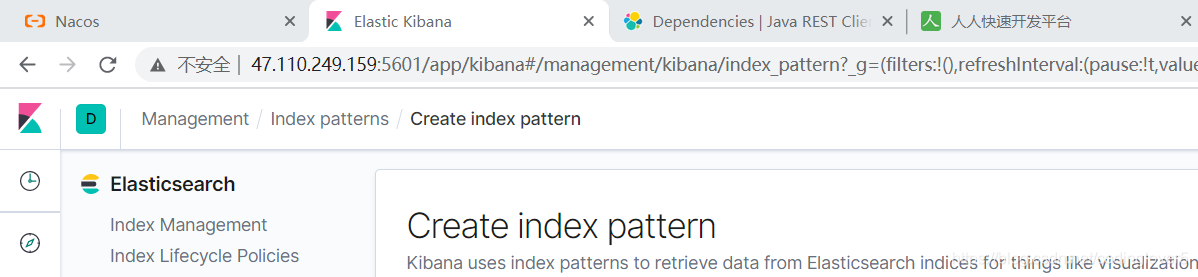
访问Kibana: http://#:5601/app/kibana
2、初步检索
1)_CAT
(1)GET/cat/nodes:查看所有节点
如:http://#:9200/_cat/nodes :
127.0.0.1 61 91 11 0.08 0.49 0.87 dilm * 0adeb7852e00
注:*表示集群中的主节点
(2)GET/cat/health:查看es健康状况
如: http://#:9200/_cat/health
1588332616 11:30:16 elasticsearch green 1 1 3 3 0 0 0 0 - 100.0%
注:green表示健康值正常
(3)GET/cat/master:查看主节点
如: http://#:9200/_cat/master
vfpgxbusTC6-W3C2Np31EQ 127.0.0.1 127.0.0.1 0adeb7852e00
(4)GET/_cat/indicies:查看所有索引 ,等价于mysql数据库的show databases;
如: http://#:9200/_cat/indices
green open .kibana_task_manager_1   KWLtjcKRRuaV9so_v15WYg 1 0 2 0 39.8kb 39.8kb
green open .apm-agent-configuration cuwCpJ5ER0OYsSgAJ7bVYA 1 0 0 0   283b   283b
green open .kibana_1                PqK_LdUYRpWMy4fK0tMSPw 1 0 7 0 31.2kb 31.2kb
2)索引一个文档
保存一个数据,保存在哪个索引的哪个类型下,指定用那个唯一标识
PUT customer/external/1;在customer索引下的external类型下保存1号数据为
PUT customer/external/1
{
 "name":"John Doe"
}
PUT和POST都可以
POST新增。如果不指定id,会自动生成id。指定id就会修改这个数据,并新增版本号;
PUT可以新增也可以修改。PUT必须指定id;由于PUT需要指定id,我们一般用来做修改操作,不指定id会报错。
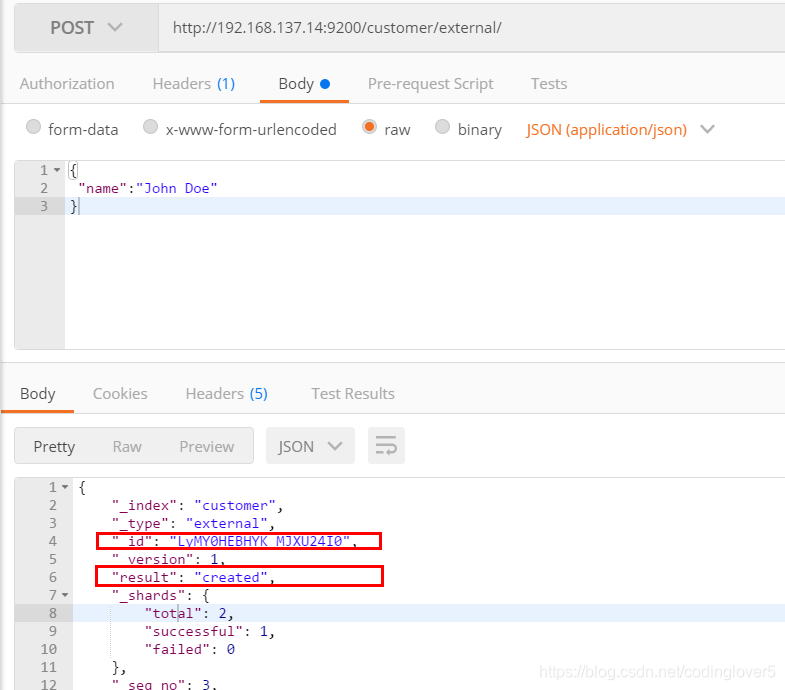
下面是在postman中的测试数据:
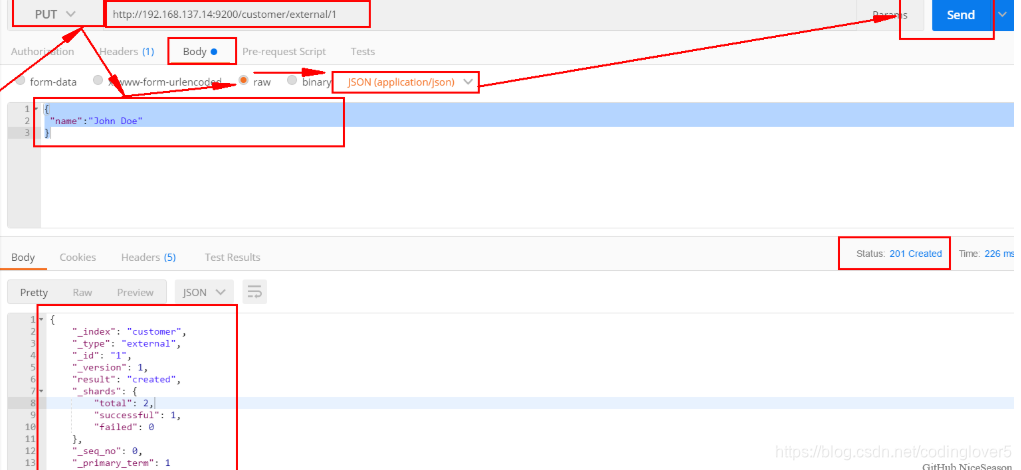
创建数据成功后,显示201 created表示插入记录成功。
{
    "_index": "customer",
    "_type": "external",
    "_id": "1",
    "_version": 1,
    "result": "created",
    "_shards": {
        "total": 2,
        "successful": 1,
        "failed": 0
    },
    "_seq_no": 0,
    "_primary_term": 1
}
这些返回的JSON串的含义;这些带有下划线开头的,称为元数据,反映了当前的基本信息。
“_index”: “customer” 表明该数据在哪个数据库下;
“_type”: “external” 表明该数据在哪个类型下;
“_id”: “1” 表明被保存数据的id;
“_version”: 1, 被保存数据的版本
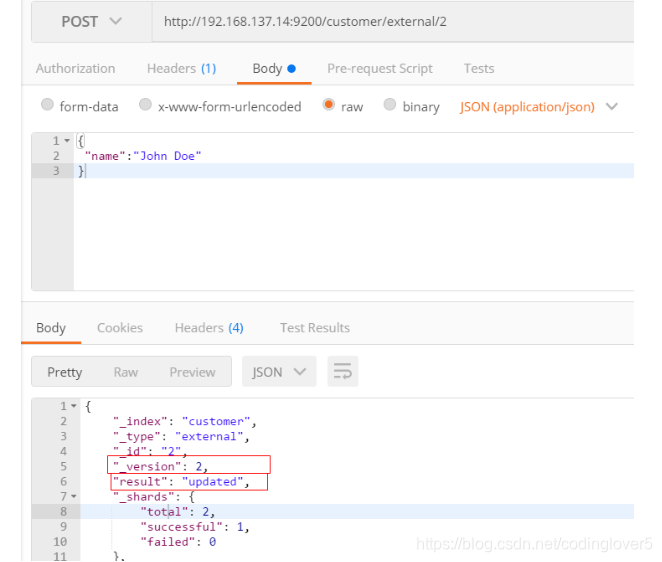
“result”: “created” 这里是创建了一条数据,如果重新put一条数据,则该状态会变为updated,并且版本号也会发生变化。
下面选用POST方式:
添加数据的时候,不指定ID,会自动的生成id,并且类型是新增:
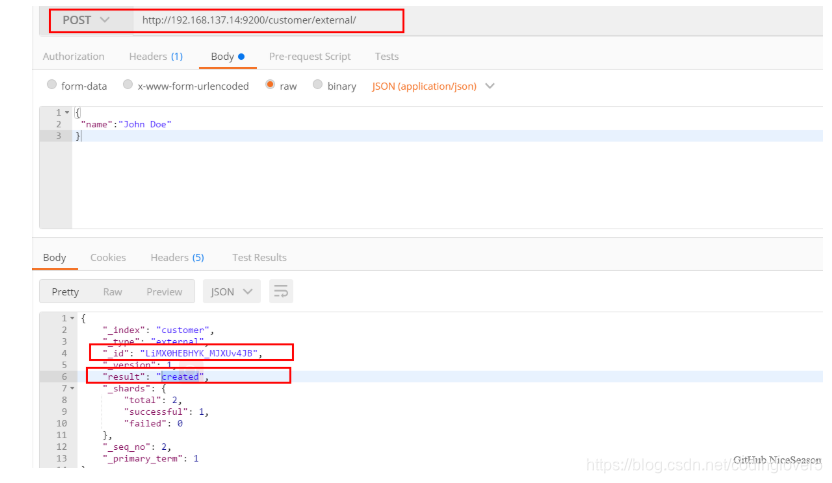
再次使用POST插入数据,仍然是新增的:
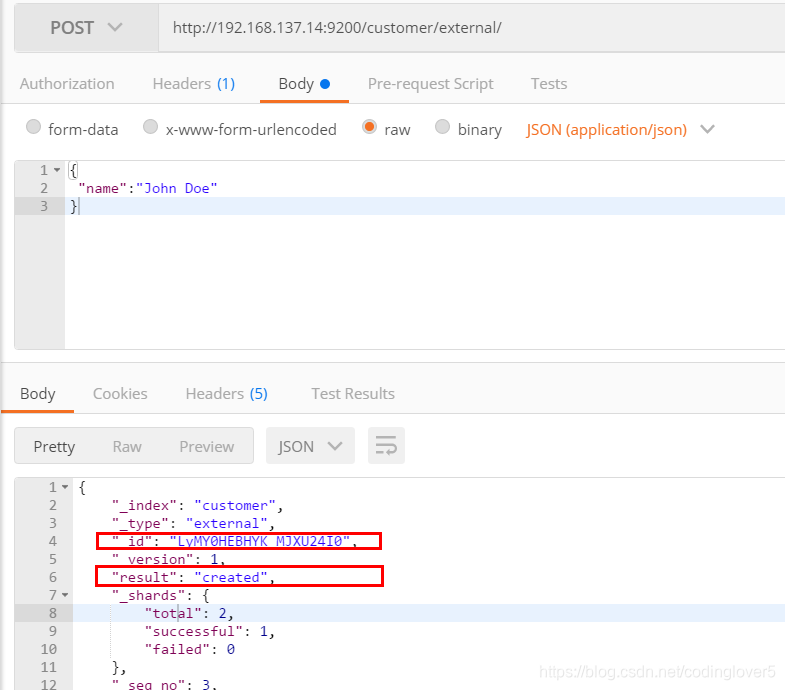
添加数据的时候,指定ID,会使用该id,并且类型是新增:
再次使用POST插入数据,类型为updated
3)查看文档
GET /customer/external/1
http://#:9200/customer/external/1
{
    "_index": "customer",//在哪个索引
    "_type": "external",//在哪个类型
    "_id": "1",//记录id
    "_version": 3,//版本号
    "_seq_no": 6,//并发控制字段,每次更新都会+1,用来做乐观锁
    "_primary_term": 1,//同上,主分片重新分配,如重启,就会变化
    "found": true,
    "_source": {
        "name": "John Doe"
    }
}
通过“if_seq_no=1&if_primary_term=1 ”,当序列号匹配的时候,才进行修改,否则不修改。
实例:将id=1的数据更新为name=1,然后再次更新为name=2,起始_seq_no=6,_primary_term=1
(1)将name更新为1
http://#:9200/customer/external/1?if_seq_no=6&if_primary_term=1
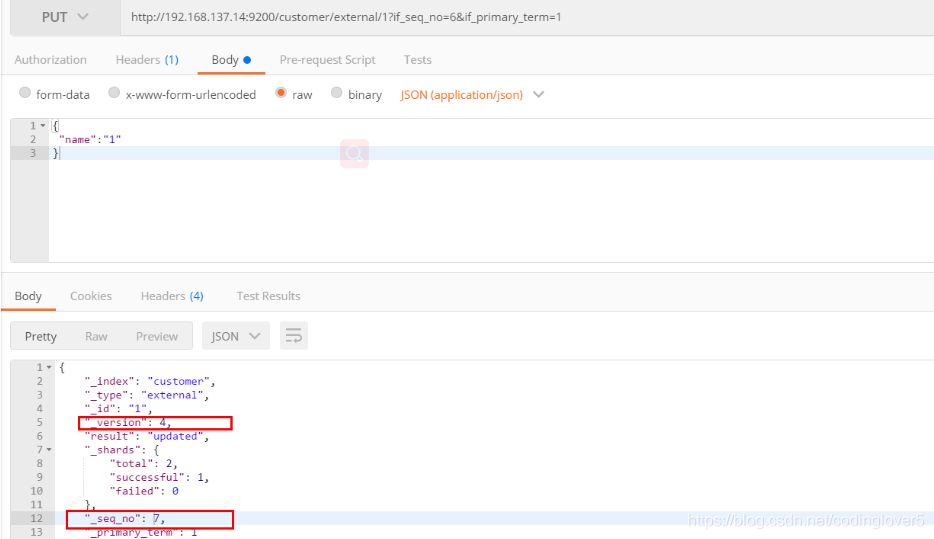
(2)将name更新为2,更新过程中使用seq_no=6
http://#:9200/customer/external/1?if_seq_no=6&if_primary_term=1
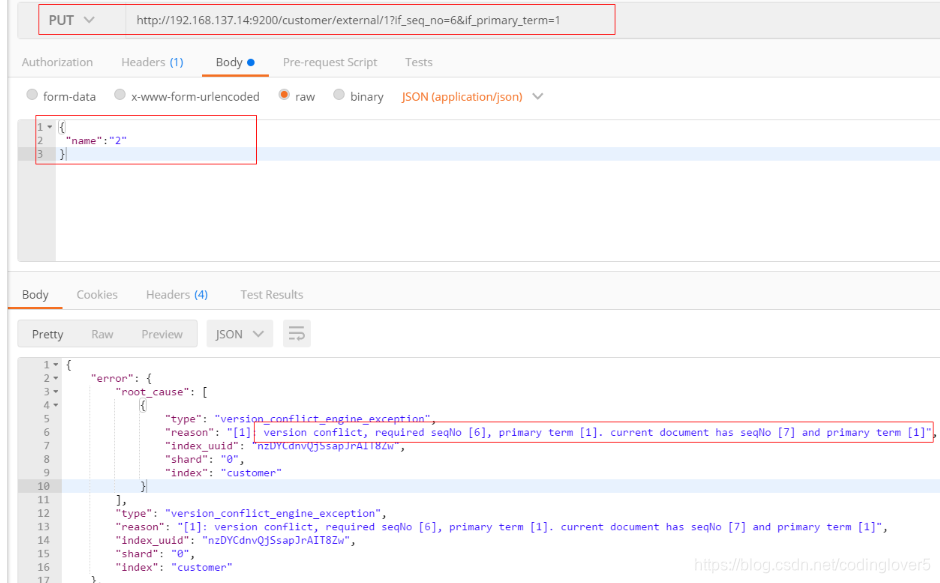
出现更新错误。
(3)查询新的数据
http://#:9200/customer/external/1
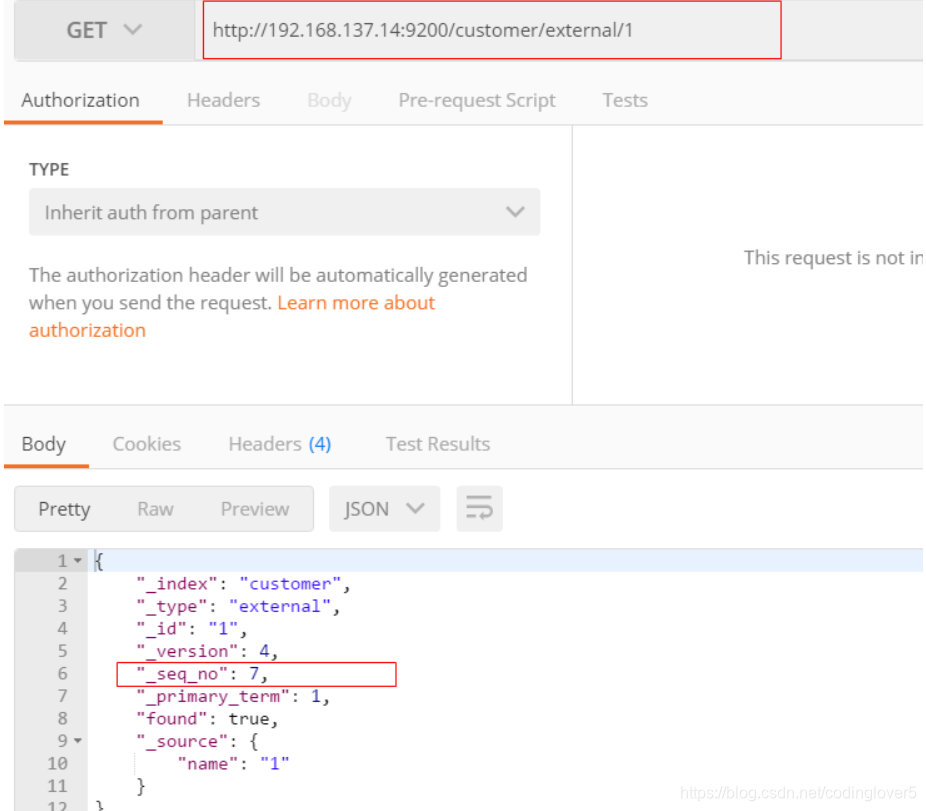
能够看到_seq_no变为7。
(4)再次更新,更新成功
http://#:9200/customer/external/1?if_seq_no=7&if_primary_term=1
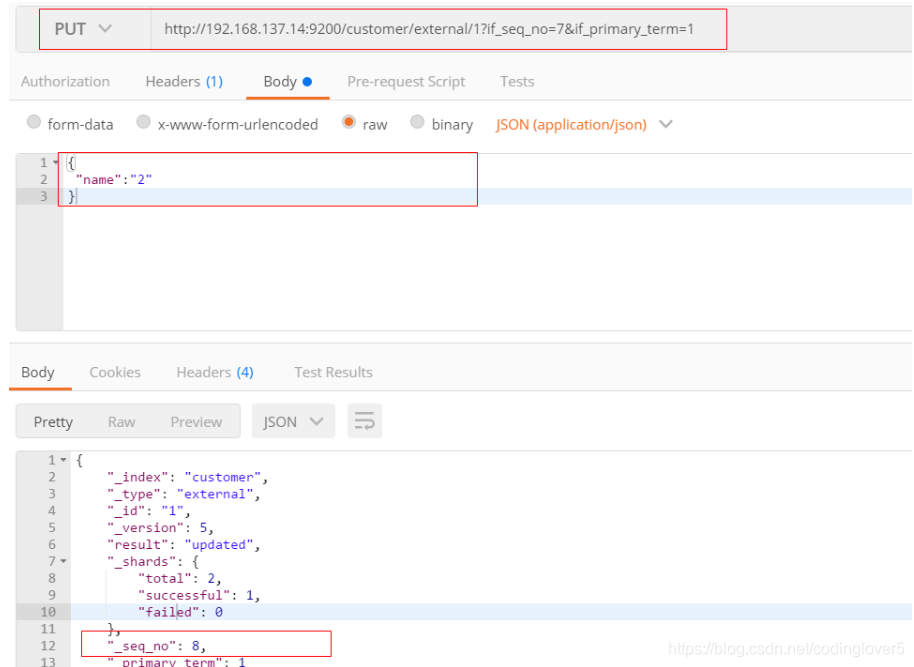
4)更新文档
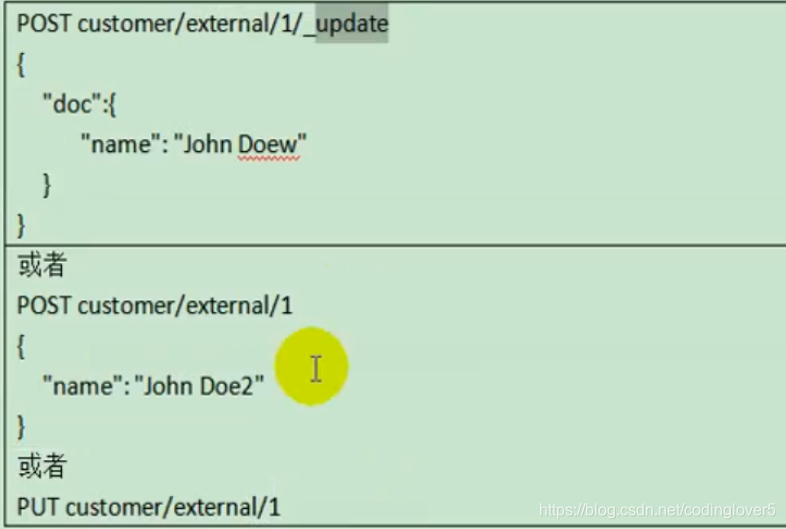
(1)POST更新文档,带有_update
http://#:9200/customer/external/1/_update

如果再次执行更新,则不执行任何操作,序列号也不发生变化
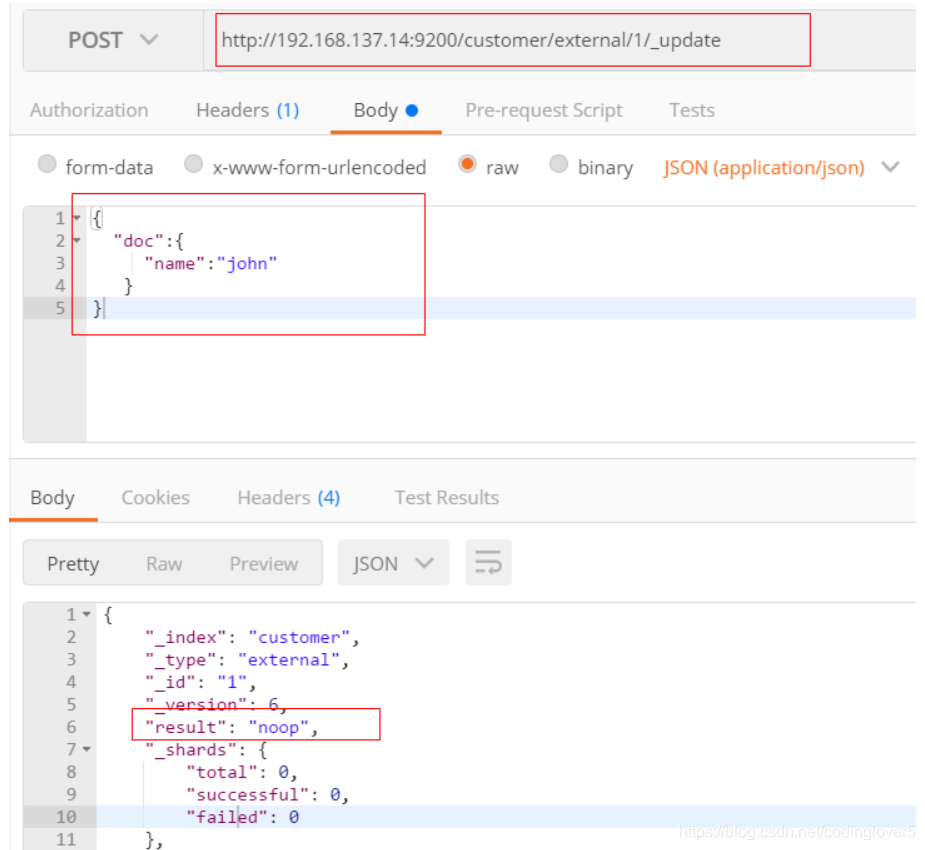
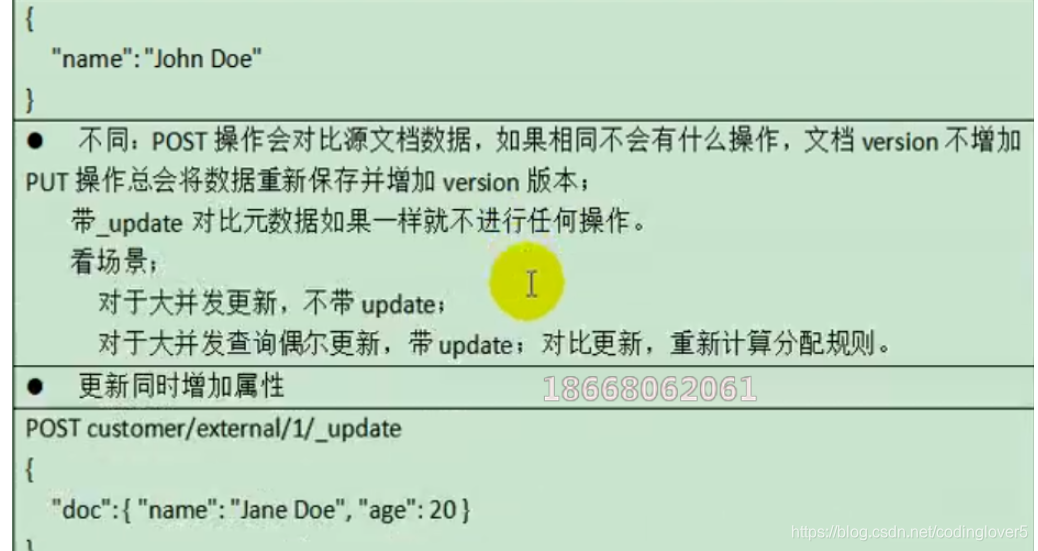
POST更新方式,会对比原来的数据,和原来的相同,则不执行任何操作(version和_seq_no)都不变。
(2)POST更新文档,不带_update
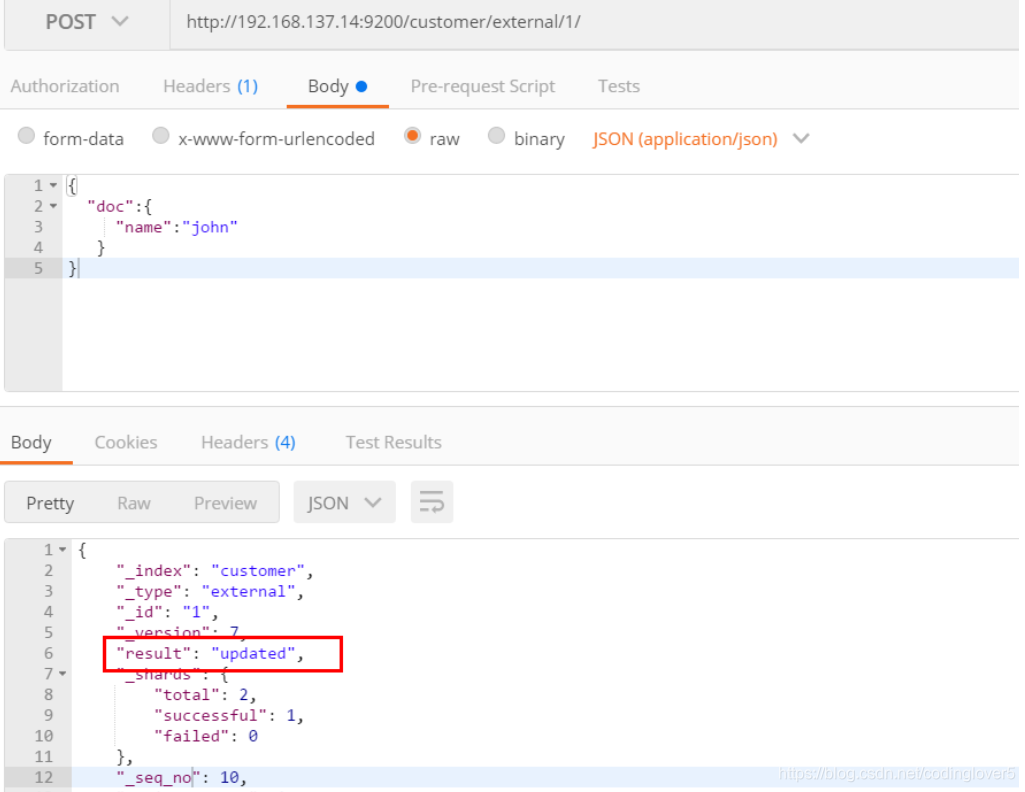
在更新过程中,重复执行更新操作,数据也能够更新成功,不会和原来的数据进行对比。
5)删除文档或索引
DELETE customer/external/1
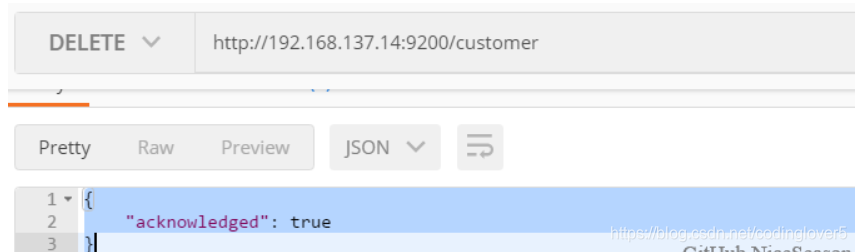
DELETE customer
注:elasticsearch并没有提供删除类型的操作,只提供了删除索引和文档的操作。
实例:删除id=1的数据,删除后继续查询
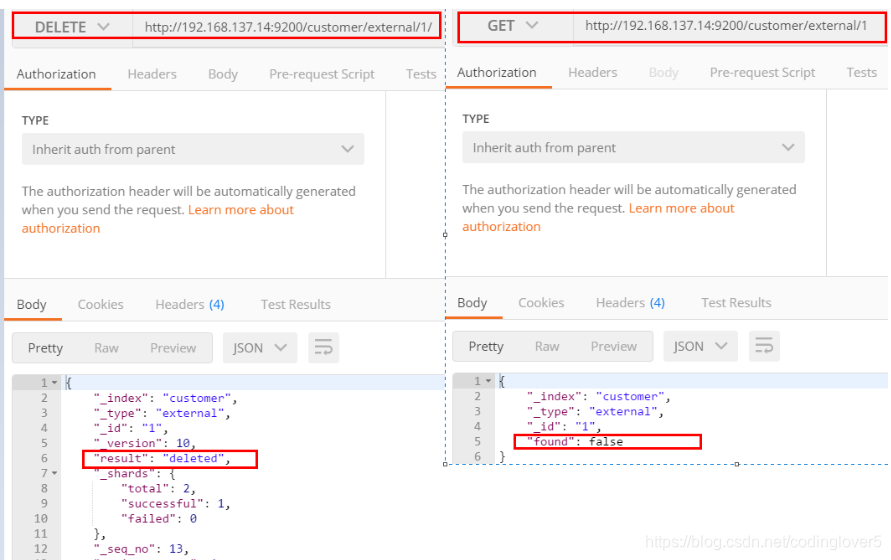
实例:删除整个costomer索引数据
删除前,所有的索引
green  open .kibana_task_manager_1   KWLtjcKRRuaV9so_v15WYg 1 0 2 0 39.8kb 39.8kb
green  open .apm-agent-configuration cuwCpJ5ER0OYsSgAJ7bVYA 1 0 0 0   283b   283b
green  open .kibana_1                PqK_LdUYRpWMy4fK0tMSPw 1 0 7 0 31.2kb 31.2kb
yellow open customer                 nzDYCdnvQjSsapJrAIT8Zw 1 1 4 0  4.4kb  4.4kb
删除“ customer ”索引
删除后,所有的索引
green  open .kibana_task_manager_1   KWLtjcKRRuaV9so_v15WYg 1 0 2 0 39.8kb 39.8kb
green  open .apm-agent-configuration cuwCpJ5ER0OYsSgAJ7bVYA 1 0 0 0   283b   283b
green  open .kibana_1                PqK_LdUYRpWMy4fK0tMSPw 1 0 7 0 31.2kb 31.2kb
6)eleasticsearch的批量操作——bulk
语法格式:
{action:{metadata}}
{request body  }

{action:{metadata}}
{request body  }
这里的批量操作,当发生某一条执行发生失败时,其他的数据仍然能够接着执行,也就是说彼此之间是独立的。
bulk api以此按顺序执行所有的action(动作)。如果一个单个的动作因任何原因失败,它将继续处理它后面剩余的动作。当bulk api返回时,它将提供每个动作的状态(与发送的顺序相同),所以您可以检查是否一个指定的动作是否失败了。
实例1: 执行多条数据
POST customer/external/_bulk
{"index":{"_id":"1"}}
{"name":"John Doe"}
{"index":{"_id":"2"}}
{"name":"John Doe"}
执行结果
#! Deprecation: [types removal] Specifying types in bulk requests is deprecated.
{
  "took" : 491,
  "errors" : false,
  "items" : [
    {
      "index" : {
        "_index" : "customer",
        "_type" : "external",
        "_id" : "1",
        "_version" : 1,
        "result" : "created",
        "_shards" : {
          "total" : 2,
          "successful" : 1,
          "failed" : 0
        },
        "_seq_no" : 0,
        "_primary_term" : 1,
        "status" : 201
      }
    },
    {
      "index" : {
        "_index" : "customer",
        "_type" : "external",
        "_id" : "2",
        "_version" : 1,
        "result" : "created",
        "_shards" : {
          "total" : 2,
          "successful" : 1,
          "failed" : 0
        },
        "_seq_no" : 1,
        "_primary_term" : 1,
        "status" : 201
      }
    }
  ]
}
实例2:对于整个索引执行批量操作
POST /_bulk
{"delete":{"_index":"website","_type":"blog","_id":"123"}}
{"create":{"_index":"website","_type":"blog","_id":"123"}}
{"title":"my first blog post"}
{"index":{"_index":"website","_type":"blog"}}
{"title":"my second blog post"}
{"update":{"_index":"website","_type":"blog","_id":"123"}}
{"doc":{"title":"my updated blog post"}}
运行结果:
#! Deprecation: [types removal] Specifying types in bulk requests is deprecated.
{
  "took" : 608,
  "errors" : false,
  "items" : [
    {
      "delete" : {
        "_index" : "website",
        "_type" : "blog",
        "_id" : "123",
        "_version" : 1,
        "result" : "not_found",
        "_shards" : {
          "total" : 2,
          "successful" : 1,
          "failed" : 0
        },
        "_seq_no" : 0,
        "_primary_term" : 1,
        "status" : 404
      }
    },
    {
      "create" : {
        "_index" : "website",
        "_type" : "blog",
        "_id" : "123",
        "_version" : 2,
        "result" : "created",
        "_shards" : {
          "total" : 2,
          "successful" : 1,
          "failed" : 0
        },
        "_seq_no" : 1,
        "_primary_term" : 1,
        "status" : 201
      }
    },
    {
      "index" : {
        "_index" : "website",
        "_type" : "blog",
        "_id" : "MCOs0HEBHYK_MJXUyYIz",
        "_version" : 1,
        "result" : "created",
        "_shards" : {
          "total" : 2,
          "successful" : 1,
          "failed" : 0
        },
        "_seq_no" : 2,
        "_primary_term" : 1,
        "status" : 201
      }
    },
    {
      "update" : {
        "_index" : "website",
        "_type" : "blog",
        "_id" : "123",
        "_version" : 3,
        "result" : "updated",
        "_shards" : {
          "total" : 2,
          "successful" : 1,
          "failed" : 0
        },
        "_seq_no" : 3,
        "_primary_term" : 1,
        "status" : 200
      }
    }
  ]
}
7)样本测试数据
准备了一份顾客银行账户信息的虚构的JSON文档样本。每个文档都有下列的schema(模式)。
{
	"account_number": 1,
	"balance": 39225,
	"firstname": "Amber",
	"lastname": "Duke",
	"age": 32,
	"gender": "M",
	"address": "880 Holmes Lane",
	"employer": "Pyrami",
	"email": "amberduke@pyrami.com",
	"city": "Brogan",
	"state": "IL"
}
https://github.com/elastic/elasticsearch/blob/master/docs/src/test/resources/accounts.json ,导入测试数据,
POST bank/account/_bulk
3、检索
1)search Api
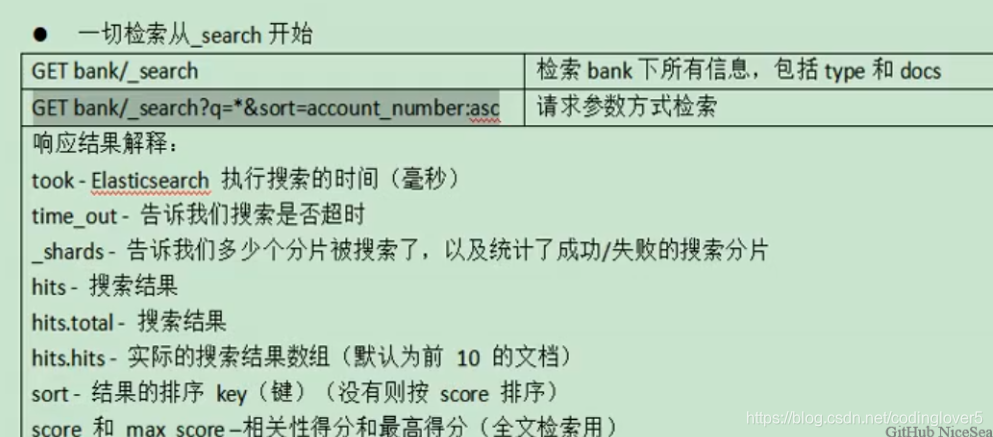
ES支持两种基本方式检索;
- 通过REST request uri 发送搜索参数 (uri +检索参数);
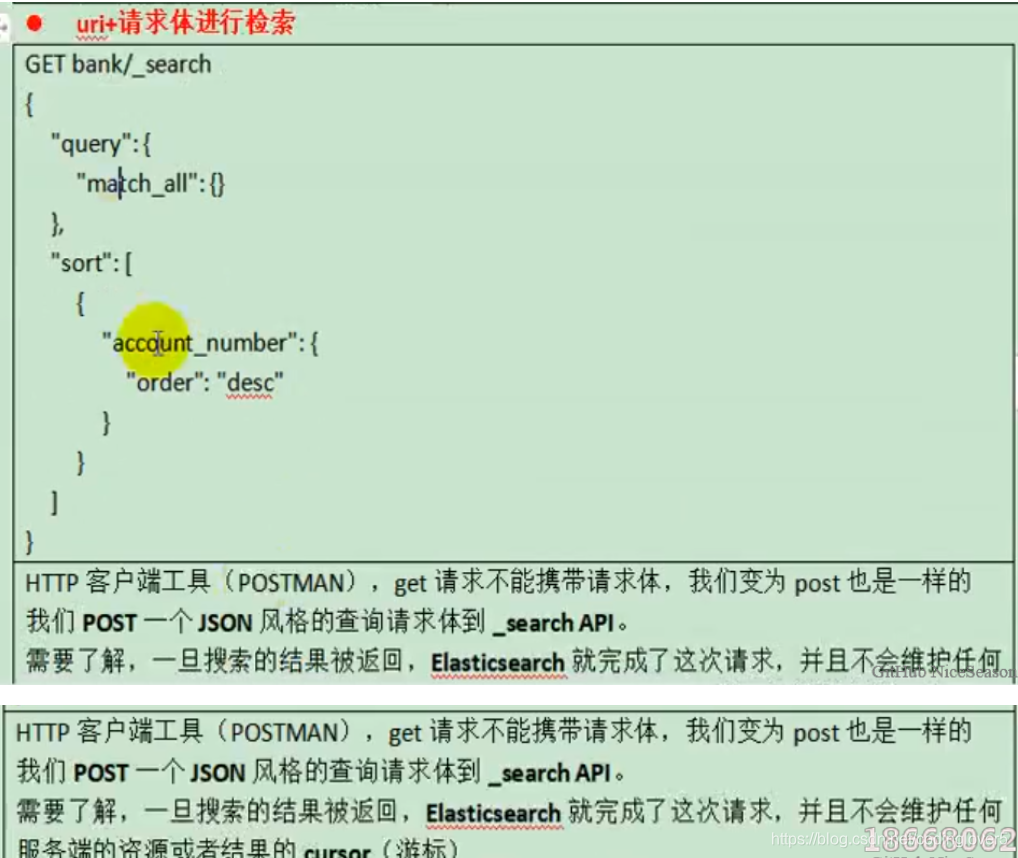
- 通过REST request body 来发送它们(uri+请求体);
信息检索
uri+请求体进行检索
GET /bank/_search
{
  "query": { "match_all": {} },
  "sort": [
    { "account_number": "asc" },
    {"balance":"desc"}
  ]
}
HTTP客户端工具(),get请求不能够携带请求体,
GET bank/_search?q=*&sort=account_number:asc
返回结果:
{
  "took" : 235,
  "timed_out" : false,
  "_shards" : {
    "total" : 1,
    "successful" : 1,
    "skipped" : 0,
    "failed" : 0
  },
  "hits" : {
    "total" : {
      "value" : 1000,
      "relation" : "eq"
    },
    "max_score" : null,
    "hits" : [
      {
        "_index" : "bank",
        "_type" : "account",
        "_id" : "0",
        "_score" : null,
        "_source" : {
          "account_number" : 0,
          "balance" : 16623,
          "firstname" : "Bradshaw",
          "lastname" : "Mckenzie",
          "age" : 29,
          "gender" : "F",
          "address" : "244 Columbus Place",
          "employer" : "Euron",
          "email" : "bradshawmckenzie@euron.com",
          "city" : "Hobucken",
          "state" : "CO"
        },
        "sort" : [
          0
        ]
      },
      {
        "_index" : "bank",
        "_type" : "account",
        "_id" : "1",
        "_score" : null,
        "_source" : {
          "account_number" : 1,
          "balance" : 39225,
          "firstname" : "Amber",
          "lastname" : "Duke",
          "age" : 32,
          "gender" : "M",
          "address" : "880 Holmes Lane",
          "employer" : "Pyrami",
          "email" : "amberduke@pyrami.com",
          "city" : "Brogan",
          "state" : "IL"
        },
        "sort" : [
          1
        ]
      },
      {
        "_index" : "bank",
        "_type" : "account",
        "_id" : "2",
        "_score" : null,
        "_source" : {
          "account_number" : 2,
          "balance" : 28838,
          "firstname" : "Roberta",
          "lastname" : "Bender",
          "age" : 22,
          "gender" : "F",
          "address" : "560 Kingsway Place",
          "employer" : "Chillium",
          "email" : "robertabender@chillium.com",
          "city" : "Bennett",
          "state" : "LA"
        },
        "sort" : [
          2
        ]
      },
      {
        "_index" : "bank",
        "_type" : "account",
        "_id" : "3",
        "_score" : null,
        "_source" : {
          "account_number" : 3,
          "balance" : 44947,
          "firstname" : "Levine",
          "lastname" : "Burks",
          "age" : 26,
          "gender" : "F",
          "address" : "328 Wilson Avenue",
          "employer" : "Amtap",
          "email" : "levineburks@amtap.com",
          "city" : "Cochranville",
          "state" : "HI"
        },
        "sort" : [
          3
        ]
      },
      {
        "_index" : "bank",
        "_type" : "account",
        "_id" : "4",
        "_score" : null,
        "_source" : {
          "account_number" : 4,
          "balance" : 27658,
          "firstname" : "Rodriquez",
          "lastname" : "Flores",
          "age" : 31,
          "gender" : "F",
          "address" : "986 Wyckoff Avenue",
          "employer" : "Tourmania",
          "email" : "rodriquezflores@tourmania.com",
          "city" : "Eastvale",
          "state" : "HI"
        },
        "sort" : [
          4
        ]
      },
      {
        "_index" : "bank",
        "_type" : "account",
        "_id" : "5",
        "_score" : null,
        "_source" : {
          "account_number" : 5,
          "balance" : 29342,
          "firstname" : "Leola",
          "lastname" : "Stewart",
          "age" : 30,
          "gender" : "F",
          "address" : "311 Elm Place",
          "employer" : "Diginetic",
          "email" : "leolastewart@diginetic.com",
          "city" : "Fairview",
          "state" : "NJ"
        },
        "sort" : [
          5
        ]
      },
      {
        "_index" : "bank",
        "_type" : "account",
        "_id" : "6",
        "_score" : null,
        "_source" : {
          "account_number" : 6,
          "balance" : 5686,
          "firstname" : "Hattie",
          "lastname" : "Bond",
          "age" : 36,
          "gender" : "M",
          "address" : "671 Bristol Street",
          "employer" : "Netagy",
          "email" : "hattiebond@netagy.com",
          "city" : "Dante",
          "state" : "TN"
        },
        "sort" : [
          6
        ]
      },
      {
        "_index" : "bank",
        "_type" : "account",
        "_id" : "7",
        "_score" : null,
        "_source" : {
          "account_number" : 7,
          "balance" : 39121,
          "firstname" : "Levy",
          "lastname" : "Richard",
          "age" : 22,
          "gender" : "M",
          "address" : "820 Logan Street",
          "employer" : "Teraprene",
          "email" : "levyrichard@teraprene.com",
          "city" : "Shrewsbury",
          "state" : "MO"
        },
        "sort" : [
          7
        ]
      },
      {
        "_index" : "bank",
        "_type" : "account",
        "_id" : "8",
        "_score" : null,
        "_source" : {
          "account_number" : 8,
          "balance" : 48868,
          "firstname" : "Jan",
          "lastname" : "Burns",
          "age" : 35,
          "gender" : "M",
          "address" : "699 Visitation Place",
          "employer" : "Glasstep",
          "email" : "janburns@glasstep.com",
          "city" : "Wakulla",
          "state" : "AZ"
        },
        "sort" : [
          8
        ]
      },
      {
        "_index" : "bank",
        "_type" : "account",
        "_id" : "9",
        "_score" : null,
        "_source" : {
          "account_number" : 9,
          "balance" : 24776,
          "firstname" : "Opal",
          "lastname" : "Meadows",
          "age" : 39,
          "gender" : "M",
          "address" : "963 Neptune Avenue",
          "employer" : "Cedward",
          "email" : "opalmeadows@cedward.com",
          "city" : "Olney",
          "state" : "OH"
        },
        "sort" : [
          9
        ]
      }
    ]
  }
}
(1)只有6条数据,这是因为存在分页查询;
使用from和size可以指定查询
GET /bank/_search
{
  "query": { "match_all": {} },
  "sort": [
    { "account_number": "asc" },
    {"balance":"desc"}
  ],
  "from": 20,
  "size": 10
}
(2)详细的字段信息,参照: https://www.elastic.co/guide/en/elasticsearch/reference/current/getting-started-search.html
The response also provides the following information about the search request:
took– how long it took Elasticsearch to run the query, in millisecondstimed_out– whether or not the search request timed out_shards– how many shards were searched and a breakdown of how many shards succeeded, failed, or were skipped.max_score– the score of the most relevant document foundhits.total.value- how many matching documents were foundhits.sort- the document’s sort position (when not sorting by relevance score)hits._score- the document’s relevance score (not applicable when usingmatch_all)
2)Query DSL
(1)基本语法格式
Elasticsearch提供了一个可以执行查询的Json风格的DSL。这个被称为Query DSL,该查询语言非常全面。
一个查询语句的典型结构
QUERY_NAME:{
   ARGUMENT:VALUE,
   ARGUMENT:VALUE,...
}
如果针对于某个字段,那么它的结构如下:
{
  QUERY_NAME:{
     FIELD_NAME:{
       ARGUMENT:VALUE,
       ARGUMENT:VALUE,...
      }
   }
}
GET bank/_search
{
  "query": {
    "match_all": {}
  },
  "from": 0,
  "size": 5,
  "sort": [
    {
      "account_number": {
        "order": "desc"
      }
    }
  ]
}
query定义如何查询;
- match_all查询类型【代表查询所有的所有】,es中可以在query中组合非常多的查询类型完成复杂查询;
- 除了query参数之外,我们可也传递其他的参数以改变查询结果,如sort,size;
- from+size限定,完成分页功能;
- sort排序,多字段排序,会在前序字段相等时后续字段内部排序,否则以前序为准;
(2)返回部分字段
GET bank/_search
{
  "query": {
    "match_all": {}
  },
  "from": 0,
  "size": 5,
  "sort": [
    {
      "account_number": {
        "order": "desc"
      }
    }
  ],
  "_source": ["balance","firstname"]

}
查询结果:
{
  "took" : 18,
  "timed_out" : false,
  "_shards" : {
    "total" : 1,
    "successful" : 1,
    "skipped" : 0,
    "failed" : 0
  },
  "hits" : {
    "total" : {
      "value" : 1000,
      "relation" : "eq"
    },
    "max_score" : null,
    "hits" : [
      {
        "_index" : "bank",
        "_type" : "account",
        "_id" : "999",
        "_score" : null,
        "_source" : {
          "firstname" : "Dorothy",
          "balance" : 6087
        },
        "sort" : [
          999
        ]
      },
      {
        "_index" : "bank",
        "_type" : "account",
        "_id" : "998",
        "_score" : null,
        "_source" : {
          "firstname" : "Letha",
          "balance" : 16869
        },
        "sort" : [
          998
        ]
      },
      {
        "_index" : "bank",
        "_type" : "account",
        "_id" : "997",
        "_score" : null,
        "_source" : {
          "firstname" : "Combs",
          "balance" : 25311
        },
        "sort" : [
          997
        ]
      },
      {
        "_index" : "bank",
        "_type" : "account",
        "_id" : "996",
        "_score" : null,
        "_source" : {
          "firstname" : "Andrews",
          "balance" : 17541
        },
        "sort" : [
          996
        ]
      },
      {
        "_index" : "bank",
        "_type" : "account",
        "_id" : "995",
        "_score" : null,
        "_source" : {
          "firstname" : "Phelps",
          "balance" : 21153
        },
        "sort" : [
          995
        ]
      }
    ]
  }
}
(3)match匹配查询
- 基本类型(非字符串),精确控制
GET bank/_search
{
  "query": {
    "match": {
      "account_number": "20"
    }
  }
}
match返回account_number=20的数据。
查询结果:
{
  "took" : 1,
  "timed_out" : false,
  "_shards" : {
    "total" : 1,
    "successful" : 1,
    "skipped" : 0,
    "failed" : 0
  },
  "hits" : {
    "total" : {
      "value" : 1,
      "relation" : "eq"
    },
    "max_score" : 1.0,
    "hits" : [
      {
        "_index" : "bank",
        "_type" : "account",
        "_id" : "20",
        "_score" : 1.0,
        "_source" : {
          "account_number" : 20,
          "balance" : 16418,
          "firstname" : "Elinor",
          "lastname" : "Ratliff",
          "age" : 36,
          "gender" : "M",
          "address" : "282 Kings Place",
          "employer" : "Scentric",
          "email" : "elinorratliff@scentric.com",
          "city" : "Ribera",
          "state" : "WA"
        }
      }
    ]
  }
}
- 字符串,全文检索
GET bank/_search
{
  "query": {
    "match": {
      "address": "kings"
    }
  }
}
全文检索,最终会按照评分进行排序,会对检索条件进行分词匹配。
查询结果:
{
  "took" : 30,
  "timed_out" : false,
  "_shards" : {
    "total" : 1,
    "successful" : 1,
    "skipped" : 0,
    "failed" : 0
  },
  "hits" : {
    "total" : {
      "value" : 2,
      "relation" : "eq"
    },
    "max_score" : 5.990829,
    "hits" : [
      {
        "_index" : "bank",
        "_type" : "account",
        "_id" : "20",
        "_score" : 5.990829,
        "_source" : {
          "account_number" : 20,
          "balance" : 16418,
          "firstname" : "Elinor",
          "lastname" : "Ratliff",
          "age" : 36,
          "gender" : "M",
          "address" : "282 Kings Place",
          "employer" : "Scentric",
          "email" : "elinorratliff@scentric.com",
          "city" : "Ribera",
          "state" : "WA"
        }
      },
      {
        "_index" : "bank",
        "_type" : "account",
        "_id" : "722",
        "_score" : 5.990829,
        "_source" : {
          "account_number" : 722,
          "balance" : 27256,
          "firstname" : "Roberts",
          "lastname" : "Beasley",
          "age" : 34,
          "gender" : "F",
          "address" : "305 Kings Hwy",
          "employer" : "Quintity",
          "email" : "robertsbeasley@quintity.com",
          "city" : "Hayden",
          "state" : "PA"
        }
      }
    ]
  }
}
(4) match_phrase [短句匹配]
将需要匹配的值当成一整个单词(不分词)进行检索
GET bank/_search
{
  "query": {
    "match_phrase": {
      "address": "mill road"
    }
  }
}
查处address中包含mill_road的所有记录,并给出相关性得分
查看结果:
{
  "took" : 32,
  "timed_out" : false,
  "_shards" : {
    "total" : 1,
    "successful" : 1,
    "skipped" : 0,
    "failed" : 0
  },
  "hits" : {
    "total" : {
      "value" : 1,
      "relation" : "eq"
    },
    "max_score" : 8.926605,
    "hits" : [
      {
        "_index" : "bank",
        "_type" : "account",
        "_id" : "970",
        "_score" : 8.926605,
        "_source" : {
          "account_number" : 970,
          "balance" : 19648,
          "firstname" : "Forbes",
          "lastname" : "Wallace",
          "age" : 28,
          "gender" : "M",
          "address" : "990 Mill Road",
          "employer" : "Pheast",
          "email" : "forbeswallace@pheast.com",
          "city" : "Lopezo",
          "state" : "AK"
        }
      }
    ]
  }
}
match_phrase和Match的区别,观察如下实例:
GET bank/_search
{
  "query": {
    "match_phrase": {
      "address": "990 Mill"
    }
  }
}
查询结果:
{
  "took" : 0,
  "timed_out" : false,
  "_shards" : {
    "total" : 1,
    "successful" : 1,
    "skipped" : 0,
    "failed" : 0
  },
  "hits" : {
    "total" : {
      "value" : 1,
      "relation" : "eq"
    },
    "max_score" : 10.806405,
    "hits" : [
      {
        "_index" : "bank",
        "_type" : "account",
        "_id" : "970",
        "_score" : 10.806405,
        "_source" : {
          "account_number" : 970,
          "balance" : 19648,
          "firstname" : "Forbes",
          "lastname" : "Wallace",
          "age" : 28,
          "gender" : "M",
          "address" : "990 Mill Road",
          "employer" : "Pheast",
          "email" : "forbeswallace@pheast.com",
          "city" : "Lopezo",
          "state" : "AK"
        }
      }
    ]
  }
}
使用match的keyword
GET bank/_search
{
  "query": {
    "match": {
      "address.keyword": "990 Mill"
    }
  }
}
查询结果,一条也未匹配到
{
  "took" : 0,
  "timed_out" : false,
  "_shards" : {
    "total" : 1,
    "successful" : 1,
    "skipped" : 0,
    "failed" : 0
  },
  "hits" : {
    "total" : {
      "value" : 0,
      "relation" : "eq"
    },
    "max_score" : null,
    "hits" : [ ]
  }
}
修改匹配条件为“990 Mill Road”
GET bank/_search
{
  "query": {
    "match": {
      "address.keyword": "990 Mill Road"
    }
  }
}
查询出一条数据
{
  "took" : 1,
  "timed_out" : false,
  "_shards" : {
    "total" : 1,
    "successful" : 1,
    "skipped" : 0,
    "failed" : 0
  },
  "hits" : {
    "total" : {
      "value" : 1,
      "relation" : "eq"
    },
    "max_score" : 6.5032897,
    "hits" : [
      {
        "_index" : "bank",
        "_type" : "account",
        "_id" : "970",
        "_score" : 6.5032897,
        "_source" : {
          "account_number" : 970,
          "balance" : 19648,
          "firstname" : "Forbes",
          "lastname" : "Wallace",
          "age" : 28,
          "gender" : "M",
          "address" : "990 Mill Road",
          "employer" : "Pheast",
          "email" : "forbeswallace@pheast.com",
          "city" : "Lopezo",
          "state" : "AK"
        }
      }
    ]
  }
}
文本字段的匹配,使用keyword,匹配的条件就是要显示字段的全部值,要进行精确匹配的。
match_phrase是做短语匹配,只要文本中包含匹配条件,就能匹配到。
(5)multi_math【多字段匹配】
GET bank/_search
{
  "query": {
    "multi_match": {
      "query": "mill",
      "fields": [
        "state",
        "address"
      ]
    }
  }
}
state或者address中包含mill,并且在查询过程中,会对于查询条件进行分词。
查询结果:
{
  "took" : 28,
  "timed_out" : false,
  "_shards" : {
    "total" : 1,
    "successful" : 1,
    "skipped" : 0,
    "failed" : 0
  },
  "hits" : {
    "total" : {
      "value" : 4,
      "relation" : "eq"
    },
    "max_score" : 5.4032025,
    "hits" : [
      {
        "_index" : "bank",
        "_type" : "account",
        "_id" : "970",
        "_score" : 5.4032025,
        "_source" : {
          "account_number" : 970,
          "balance" : 19648,
          "firstname" : "Forbes",
          "lastname" : "Wallace",
          "age" : 28,
          "gender" : "M",
          "address" : "990 Mill Road",
          "employer" : "Pheast",
          "email" : "forbeswallace@pheast.com",
          "city" : "Lopezo",
          "state" : "AK"
        }
      },
      {
        "_index" : "bank",
        "_type" : "account",
        "_id" : "136",
        "_score" : 5.4032025,
        "_source" : {
          "account_number" : 136,
          "balance" : 45801,
          "firstname" : "Winnie",
          "lastname" : "Holland",
          "age" : 38,
          "gender" : "M",
          "address" : "198 Mill Lane",
          "employer" : "Neteria",
          "email" : "winnieholland@neteria.com",
          "city" : "Urie",
          "state" : "IL"
        }
      },
      {
        "_index" : "bank",
        "_type" : "account",
        "_id" : "345",
        "_score" : 5.4032025,
        "_source" : {
          "account_number" : 345,
          "balance" : 9812,
          "firstname" : "Parker",
          "lastname" : "Hines",
          "age" : 38,
          "gender" : "M",
          "address" : "715 Mill Avenue",
          "employer" : "Baluba",
          "email" : "parkerhines@baluba.com",
          "city" : "Blackgum",
          "state" : "KY"
        }
      },
      {
        "_index" : "bank",
        "_type" : "account",
        "_id" : "472",
        "_score" : 5.4032025,
        "_source" : {
          "account_number" : 472,
          "balance" : 25571,
          "firstname" : "Lee",
          "lastname" : "Long",
          "age" : 32,
          "gender" : "F",
          "address" : "288 Mill Street",
          "employer" : "Comverges",
          "email" : "leelong@comverges.com",
          "city" : "Movico",
          "state" : "MT"
        }
      }
    ]
  }
}
(6)bool用来做复合查询
复合语句可以合并,任何其他查询语句,包括符合语句。这也就意味着,复合语句之间
可以互相嵌套,可以表达非常复杂的逻辑。
must:必须达到must所列举的所有条件
GET bank/_search
{
   "query":{
        "bool":{
             "must":[
              {"match":{"address":"mill"}},
              {"match":{"gender":"M"}}
             ]
         }
    }
}
must_not,必须不匹配must_not所列举的所有条件。
should,应该满足should所列举的条件。
实例:查询gender=m,并且address=mill的数据
GET bank/_search
{
  "query": {
    "bool": {
      "must": [
        {
          "match": {
            "gender": "M"
          }
        },
        {
          "match": {
            "address": "mill"
          }
        }
      ]
    }
  }
}
查询结果:
{
  "took" : 1,
  "timed_out" : false,
  "_shards" : {
    "total" : 1,
    "successful" : 1,
    "skipped" : 0,
    "failed" : 0
  },
  "hits" : {
    "total" : {
      "value" : 3,
      "relation" : "eq"
    },
    "max_score" : 6.0824604,
    "hits" : [
      {
        "_index" : "bank",
        "_type" : "account",
        "_id" : "970",
        "_score" : 6.0824604,
        "_source" : {
          "account_number" : 970,
          "balance" : 19648,
          "firstname" : "Forbes",
          "lastname" : "Wallace",
          "age" : 28,
          "gender" : "M",
          "address" : "990 Mill Road",
          "employer" : "Pheast",
          "email" : "forbeswallace@pheast.com",
          "city" : "Lopezo",
          "state" : "AK"
        }
      },
      {
        "_index" : "bank",
        "_type" : "account",
        "_id" : "136",
        "_score" : 6.0824604,
        "_source" : {
          "account_number" : 136,
          "balance" : 45801,
          "firstname" : "Winnie",
          "lastname" : "Holland",
          "age" : 38,
          "gender" : "M",
          "address" : "198 Mill Lane",
          "employer" : "Neteria",
          "email" : "winnieholland@neteria.com",
          "city" : "Urie",
          "state" : "IL"
        }
      },
      {
        "_index" : "bank",
        "_type" : "account",
        "_id" : "345",
        "_score" : 6.0824604,
        "_source" : {
          "account_number" : 345,
          "balance" : 9812,
          "firstname" : "Parker",
          "lastname" : "Hines",
          "age" : 38,
          "gender" : "M",
          "address" : "715 Mill Avenue",
          "employer" : "Baluba",
          "email" : "parkerhines@baluba.com",
          "city" : "Blackgum",
          "state" : "KY"
        }
      }
    ]
  }
}
must_not:必须不是指定的情况
实例:查询gender=m,并且address=mill的数据,但是age不等于38的
GET bank/_search
{
  "query": {
    "bool": {
      "must": [
        {
          "match": {
            "gender": "M"
          }
        },
        {
          "match": {
            "address": "mill"
          }
        }
      ],
      "must_not": [
        {
          "match": {
            "age": "38"
          }
        }
      ]
    }
  }
查询结果:
{
  "took" : 4,
  "timed_out" : false,
  "_shards" : {
    "total" : 1,
    "successful" : 1,
    "skipped" : 0,
    "failed" : 0
  },
  "hits" : {
    "total" : {
      "value" : 1,
      "relation" : "eq"
    },
    "max_score" : 6.0824604,
    "hits" : [
      {
        "_index" : "bank",
        "_type" : "account",
        "_id" : "970",
        "_score" : 6.0824604,
        "_source" : {
          "account_number" : 970,
          "balance" : 19648,
          "firstname" : "Forbes",
          "lastname" : "Wallace",
          "age" : 28,
          "gender" : "M",
          "address" : "990 Mill Road",
          "employer" : "Pheast",
          "email" : "forbeswallace@pheast.com",
          "city" : "Lopezo",
          "state" : "AK"
        }
      }
    ]
  }
}
should:应该达到should列举的条件,如果到达会增加相关文档的评分,并不会改变查询的结果。如果query中只有should且只有一种匹配规则,那么should的条件就会被作为默认匹配条件二区改变查询结果。
实例:匹配lastName应该等于Wallace的数据
GET bank/_search
{
  "query": {
    "bool": {
      "must": [
        {
          "match": {
            "gender": "M"
          }
        },
        {
          "match": {
            "address": "mill"
          }
        }
      ],
      "must_not": [
        {
          "match": {
            "age": "18"
          }
        }
      ],
      "should": [
        {
          "match": {
            "lastname": "Wallace"
          }
        }
      ]
    }
  }
}
查询结果:
{
  "took" : 5,
  "timed_out" : false,
  "_shards" : {
    "total" : 1,
    "successful" : 1,
    "skipped" : 0,
    "failed" : 0
  },
  "hits" : {
    "total" : {
      "value" : 3,
      "relation" : "eq"
    },
    "max_score" : 12.585751,
    "hits" : [
      {
        "_index" : "bank",
        "_type" : "account",
        "_id" : "970",
        "_score" : 12.585751,
        "_source" : {
          "account_number" : 970,
          "balance" : 19648,
          "firstname" : "Forbes",
          "lastname" : "Wallace",
          "age" : 28,
          "gender" : "M",
          "address" : "990 Mill Road",
          "employer" : "Pheast",
          "email" : "forbeswallace@pheast.com",
          "city" : "Lopezo",
          "state" : "AK"
        }
      },
      {
        "_index" : "bank",
        "_type" : "account",
        "_id" : "136",
        "_score" : 6.0824604,
        "_source" : {
          "account_number" : 136,
          "balance" : 45801,
          "firstname" : "Winnie",
          "lastname" : "Holland",
          "age" : 38,
          "gender" : "M",
          "address" : "198 Mill Lane",
          "employer" : "Neteria",
          "email" : "winnieholland@neteria.com",
          "city" : "Urie",
          "state" : "IL"
        }
      },
      {
        "_index" : "bank",
        "_type" : "account",
        "_id" : "345",
        "_score" : 6.0824604,
        "_source" : {
          "account_number" : 345,
          "balance" : 9812,
          "firstname" : "Parker",
          "lastname" : "Hines",
          "age" : 38,
          "gender" : "M",
          "address" : "715 Mill Avenue",
          "employer" : "Baluba",
          "email" : "parkerhines@baluba.com",
          "city" : "Blackgum",
          "state" : "KY"
        }
      }
    ]
  }
}
能够看到相关度越高,得分也越高。
(7)Filter【结果过滤】
并不是所有的查询都需要产生分数,特别是哪些仅用于filtering过滤的文档。为了不计算分数,elasticsearch会自动检查场景并且优化查询的执行。
GET bank/_search
{
  "query": {
    "bool": {
      "must": [
        {
          "match": {
            "address": "mill"
          }
        }
      ],
      "filter": {
        "range": {
          "balance": {
            "gte": "10000",
            "lte": "20000"
          }
        }
      }
    }
  }
}
这里先是查询所有匹配address=mill的文档,然后再根据10000<=balance<=20000进行过滤查询结果
查询结果:
{
  "took" : 2,
  "timed_out" : false,
  "_shards" : {
    "total" : 1,
    "successful" : 1,
    "skipped" : 0,
    "failed" : 0
  },
  "hits" : {
    "total" : {
      "value" : 1,
      "relation" : "eq"
    },
    "max_score" : 5.4032025,
    "hits" : [
      {
        "_index" : "bank",
        "_type" : "account",
        "_id" : "970",
        "_score" : 5.4032025,
        "_source" : {
          "account_number" : 970,
          "balance" : 19648,
          "firstname" : "Forbes",
          "lastname" : "Wallace",
          "age" : 28,
          "gender" : "M",
          "address" : "990 Mill Road",
          "employer" : "Pheast",
          "email" : "forbeswallace@pheast.com",
          "city" : "Lopezo",
          "state" : "AK"
        }
      }
    ]
  }
}
Each must, should, and must_not element in a Boolean query is referred to as a query clause. How well a document meets the criteria in each must or should clause contributes to the document’s relevance score. The higher the score, the better the document matches your search criteria. By default, Elasticsearch returns documents ranked by these relevance scores.
在boolean查询中,must, should 和must_not 元素都被称为查询子句 。 文档是否符合每个“must”或“should”子句中的标准,决定了文档的“相关性得分”。 得分越高,文档越符合您的搜索条件。 默认情况下,Elasticsearch返回根据这些相关性得分排序的文档。
The criteria in a must_not clause is treated as a filter. It affects whether or not the document is included in the results, but does not contribute to how documents are scored. You can also explicitly specify arbitrary filters to include or exclude documents based on structured data.
“must_not”子句中的条件被视为“过滤器”。 它影响文档是否包含在结果中, 但不影响文档的评分方式。 还可以显式地指定任意过滤器来包含或排除基于结构化数据的文档。
filter在使用过程中,并不会计算相关性得分:
GET bank/_search
{
  "query": {
    "bool": {
      "must": [
        {
          "match": {
            "address": "mill"
          }
        }
      ],
      "filter": {
        "range": {
          "balance": {
            "gte": "10000",
            "lte": "20000"
          }
        }
      }
    }
  }
}
查询结果:
{
  "took" : 1,
  "timed_out" : false,
  "_shards" : {
    "total" : 1,
    "successful" : 1,
    "skipped" : 0,
    "failed" : 0
  },
  "hits" : {
    "total" : {
      "value" : 213,
      "relation" : "eq"
    },
    "max_score" : 0.0,
    "hits" : [
      {
        "_index" : "bank",
        "_type" : "account",
        "_id" : "20",
        "_score" : 0.0,
        "_source" : {
          "account_number" : 20,
          "balance" : 16418,
          "firstname" : "Elinor",
          "lastname" : "Ratliff",
          "age" : 36,
          "gender" : "M",
          "address" : "282 Kings Place",
          "employer" : "Scentric",
          "email" : "elinorratliff@scentric.com",
          "city" : "Ribera",
          "state" : "WA"
        }
      },
      {
        "_index" : "bank",
        "_type" : "account",
        "_id" : "37",
        "_score" : 0.0,
        "_source" : {
          "account_number" : 37,
          "balance" : 18612,
          "firstname" : "Mcgee",
          "lastname" : "Mooney",
          "age" : 39,
          "gender" : "M",
          "address" : "826 Fillmore Place",
          "employer" : "Reversus",
          "email" : "mcgeemooney@reversus.com",
          "city" : "Tooleville",
          "state" : "OK"
        }
      },
      {
        "_index" : "bank",
        "_type" : "account",
        "_id" : "51",
        "_score" : 0.0,
        "_source" : {
          "account_number" : 51,
          "balance" : 14097,
          "firstname" : "Burton",
          "lastname" : "Meyers",
          "age" : 31,
          "gender" : "F",
          "address" : "334 River Street",
          "employer" : "Bezal",
          "email" : "burtonmeyers@bezal.com",
          "city" : "Jacksonburg",
          "state" : "MO"
        }
      },
      {
        "_index" : "bank",
        "_type" : "account",
        "_id" : "56",
        "_score" : 0.0,
        "_source" : {
          "account_number" : 56,
          "balance" : 14992,
          "firstname" : "Josie",
          "lastname" : "Nelson",
          "age" : 32,
          "gender" : "M",
          "address" : "857 Tabor Court",
          "employer" : "Emtrac",
          "email" : "josienelson@emtrac.com",
          "city" : "Sunnyside",
          "state" : "UT"
        }
      },
      {
        "_index" : "bank",
        "_type" : "account",
        "_id" : "121",
        "_score" : 0.0,
        "_source" : {
          "account_number" : 121,
          "balance" : 19594,
          "firstname" : "Acevedo",
          "lastname" : "Dorsey",
          "age" : 32,
          "gender" : "M",
          "address" : "479 Nova Court",
          "employer" : "Netropic",
          "email" : "acevedodorsey@netropic.com",
          "city" : "Islandia",
          "state" : "CT"
        }
      },
      {
        "_index" : "bank",
        "_type" : "account",
        "_id" : "176",
        "_score" : 0.0,
        "_source" : {
          "account_number" : 176,
          "balance" : 18607,
          "firstname" : "Kemp",
          "lastname" : "Walters",
          "age" : 28,
          "gender" : "F",
          "address" : "906 Howard Avenue",
          "employer" : "Eyewax",
          "email" : "kempwalters@eyewax.com",
          "city" : "Why",
          "state" : "KY"
        }
      },
      {
        "_index" : "bank",
        "_type" : "account",
        "_id" : "183",
        "_score" : 0.0,
        "_source" : {
          "account_number" : 183,
          "balance" : 14223,
          "firstname" : "Hudson",
          "lastname" : "English",
          "age" : 26,
          "gender" : "F",
          "address" : "823 Herkimer Place",
          "employer" : "Xinware",
          "email" : "hudsonenglish@xinware.com",
          "city" : "Robbins",
          "state" : "ND"
        }
      },
      {
        "_index" : "bank",
        "_type" : "account",
        "_id" : "222",
        "_score" : 0.0,
        "_source" : {
          "account_number" : 222,
          "balance" : 14764,
          "firstname" : "Rachelle",
          "lastname" : "Rice",
          "age" : 36,
          "gender" : "M",
          "address" : "333 Narrows Avenue",
          "employer" : "Enaut",
          "email" : "rachellerice@enaut.com",
          "city" : "Wright",
          "state" : "AZ"
        }
      },
      {
        "_index" : "bank",
        "_type" : "account",
        "_id" : "227",
        "_score" : 0.0,
        "_source" : {
          "account_number" : 227,
          "balance" : 19780,
          "firstname" : "Coleman",
          "lastname" : "Berg",
          "age" : 22,
          "gender" : "M",
          "address" : "776 Little Street",
          "employer" : "Exoteric",
          "email" : "colemanberg@exoteric.com",
          "city" : "Eagleville",
          "state" : "WV"
        }
      },
      {
        "_index" : "bank",
        "_type" : "account",
        "_id" : "272",
        "_score" : 0.0,
        "_source" : {
          "account_number" : 272,
          "balance" : 19253,
          "firstname" : "Lilly",
          "lastname" : "Morgan",
          "age" : 25,
          "gender" : "F",
          "address" : "689 Fleet Street",
          "employer" : "Biolive",
          "email" : "lillymorgan@biolive.com",
          "city" : "Sunbury",
          "state" : "OH"
        }
      }
    ]
  }
}
能看到所有文档的 “_score” : 0.0。
(8)term
和match一样。匹配某个属性的值。全文检索字段用match,其他非text字段匹配用term。
Avoid using the
termquery fortextfields.避免对文本字段使用“term”查询
By default, Elasticsearch changes the values of
textfields as part of analysis. This can make finding exact matches fortextfield values difficult.默认情况下,Elasticsearch作为analysis的一部分更改’ text '字段的值。这使得为“text”字段值寻找精确匹配变得困难。
To search
textfield values, use the match.要搜索“text”字段值,请使用匹配。
https://www.elastic.co/guide/en/elasticsearch/reference/7.6/query-dsl-term-query.html
使用term匹配查询
GET bank/_search
{
  "query": {
    "term": {
      "address": "mill Road"
    }
  }
}
查询结果:
{
  "took" : 0,
  "timed_out" : false,
  "_shards" : {
    "total" : 1,
    "successful" : 1,
    "skipped" : 0,
    "failed" : 0
  },
  "hits" : {
    "total" : {
      "value" : 0,
      "relation" : "eq"
    },
    "max_score" : null,
    "hits" : [ ]
  }
}
一条也没有匹配到
而更换为match匹配时,能够匹配到32个文档
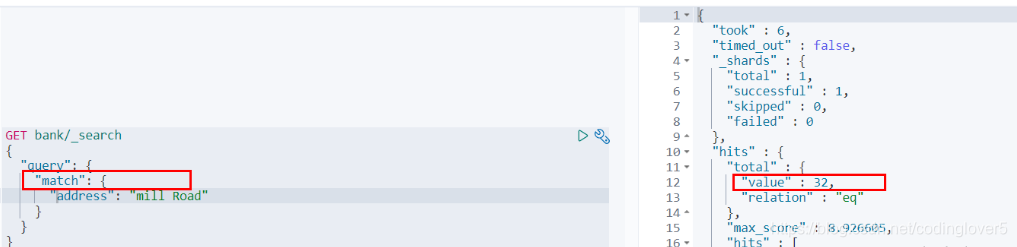
也就是说,全文检索字段用match,其他非text字段匹配用term。
(9)Aggregation(执行聚合)
聚合提供了从数据中分组和提取数据的能力。最简单的聚合方法大致等于SQL Group by和SQL聚合函数。在elasticsearch中,执行搜索返回this(命中结果),并且同时返回聚合结果,把以响应中的所有hits(命中结果)分隔开的能力。这是非常强大且有效的,你可以执行查询和多个聚合,并且在一次使用中得到各自的(任何一个的)返回结果,使用一次简洁和简化的API啦避免网络往返。
“size”:0
size:0不显示搜索数据
aggs:执行聚合。聚合语法如下:
"aggs":{
    "aggs_name这次聚合的名字,方便展示在结果集中":{
        "AGG_TYPE聚合的类型(avg,term,terms)":{}
     }
},
搜索address中包含mill的所有人的年龄分布以及平均年龄,但不显示这些人的详情
GET bank/_search
{
  "query": {
    "match": {
      "address": "Mill"
    }
  },
  "aggs": {
    "ageAgg": {
      "terms": {
        "field": "age",
        "size": 10
      }
    },
    "ageAvg": {
      "avg": {
        "field": "age"
      }
    },
    "balanceAvg": {
      "avg": {
        "field": "balance"
      }
    }
  },
  "size": 0
}
查询结果:
{
  "took" : 2,
  "timed_out" : false,
  "_shards" : {
    "total" : 1,
    "successful" : 1,
    "skipped" : 0,
    "failed" : 0
  },
  "hits" : {
    "total" : {
      "value" : 4,
      "relation" : "eq"
    },
    "max_score" : null,
    "hits" : [ ]
  },
  "aggregations" : {
    "ageAgg" : {
      "doc_count_error_upper_bound" : 0,
      "sum_other_doc_count" : 0,
      "buckets" : [
        {
          "key" : 38,
          "doc_count" : 2
        },
        {
          "key" : 28,
          "doc_count" : 1
        },
        {
          "key" : 32,
          "doc_count" : 1
        }
      ]
    },
    "ageAvg" : {
      "value" : 34.0
    },
    "balanceAvg" : {
      "value" : 25208.0
    }
  }
}
复杂:
按照年龄聚合,并且求这些年龄段的这些人的平均薪资
GET bank/_search
{
  "query": {
    "match_all": {}
  },
  "aggs": {
    "ageAgg": {
      "terms": {
        "field": "age",
        "size": 100
      },
      "aggs": {
        "ageAvg": {
          "avg": {
            "field": "balance"
          }
        }
      }
    }
  },
  "size": 0
}
输出结果:
{
  "took" : 49,
  "timed_out" : false,
  "_shards" : {
    "total" : 1,
    "successful" : 1,
    "skipped" : 0,
    "failed" : 0
  },
  "hits" : {
    "total" : {
      "value" : 1000,
      "relation" : "eq"
    },
    "max_score" : null,
    "hits" : [ ]
  },
  "aggregations" : {
    "ageAgg" : {
      "doc_count_error_upper_bound" : 0,
      "sum_other_doc_count" : 0,
      "buckets" : [
        {
          "key" : 31,
          "doc_count" : 61,
          "ageAvg" : {
            "value" : 28312.918032786885
          }
        },
        {
          "key" : 39,
          "doc_count" : 60,
          "ageAvg" : {
            "value" : 25269.583333333332
          }
        },
        {
          "key" : 26,
          "doc_count" : 59,
          "ageAvg" : {
            "value" : 23194.813559322032
          }
        },
        {
          "key" : 32,
          "doc_count" : 52,
          "ageAvg" : {
            "value" : 23951.346153846152
          }
        },
        {
          "key" : 35,
          "doc_count" : 52,
          "ageAvg" : {
            "value" : 22136.69230769231
          }
        },
        {
          "key" : 36,
          "doc_count" : 52,
          "ageAvg" : {
            "value" : 22174.71153846154
          }
        },
        {
          "key" : 22,
          "doc_count" : 51,
          "ageAvg" : {
            "value" : 24731.07843137255
          }
        },
        {
          "key" : 28,
          "doc_count" : 51,
          "ageAvg" : {
            "value" : 28273.882352941175
          }
        },
        {
          "key" : 33,
          "doc_count" : 50,
          "ageAvg" : {
            "value" : 25093.94
          }
        },
        {
          "key" : 34,
          "doc_count" : 49,
          "ageAvg" : {
            "value" : 26809.95918367347
          }
        },
        {
          "key" : 30,
          "doc_count" : 47,
          "ageAvg" : {
            "value" : 22841.106382978724
          }
        },
        {
          "key" : 21,
          "doc_count" : 46,
          "ageAvg" : {
            "value" : 26981.434782608696
          }
        },
        {
          "key" : 40,
          "doc_count" : 45,
          "ageAvg" : {
            "value" : 27183.17777777778
          }
        },
        {
          "key" : 20,
          "doc_count" : 44,
          "ageAvg" : {
            "value" : 27741.227272727272
          }
        },
        {
          "key" : 23,
          "doc_count" : 42,
          "ageAvg" : {
            "value" : 27314.214285714286
          }
        },
        {
          "key" : 24,
          "doc_count" : 42,
          "ageAvg" : {
            "value" : 28519.04761904762
          }
        },
        {
          "key" : 25,
          "doc_count" : 42,
          "ageAvg" : {
            "value" : 27445.214285714286
          }
        },
        {
          "key" : 37,
          "doc_count" : 42,
          "ageAvg" : {
            "value" : 27022.261904761905
          }
        },
        {
          "key" : 27,
          "doc_count" : 39,
          "ageAvg" : {
            "value" : 21471.871794871793
          }
        },
        {
          "key" : 38,
          "doc_count" : 39,
          "ageAvg" : {
            "value" : 26187.17948717949
          }
        },
        {
          "key" : 29,
          "doc_count" : 35,
          "ageAvg" : {
            "value" : 29483.14285714286
          }
        }
      ]
    }
  }
}
查出所有年龄分布,并且这些年龄段中M的平均薪资和F的平均薪资以及这个年龄段的总体平均薪资
GET bank/_search
{
  "query": {
    "match_all": {}
  },
  "aggs": {
    "ageAgg": {
      "terms": {
        "field": "age",
        "size": 100
      },
      "aggs": {
        "genderAgg": {
          "terms": {
            "field": "gender.keyword"
          },
          "aggs": {
            "balanceAvg": {
              "avg": {
                "field": "balance"
              }
            }
          }
        },
        "ageBalanceAvg": {
          "avg": {
            "field": "balance"
          }
        }
      }
    }
  },
  "size": 0
}
输出结果:
{
  "took" : 119,
  "timed_out" : false,
  "_shards" : {
    "total" : 1,
    "successful" : 1,
    "skipped" : 0,
    "failed" : 0
  },
  "hits" : {
    "total" : {
      "value" : 1000,
      "relation" : "eq"
    },
    "max_score" : null,
    "hits" : [ ]
  },
  "aggregations" : {
    "ageAgg" : {
      "doc_count_error_upper_bound" : 0,
      "sum_other_doc_count" : 0,
      "buckets" : [
        {
          "key" : 31,
          "doc_count" : 61,
          "genderAgg" : {
            "doc_count_error_upper_bound" : 0,
            "sum_other_doc_count" : 0,
            "buckets" : [
              {
                "key" : "M",
                "doc_count" : 35,
                "balanceAvg" : {
                  "value" : 29565.628571428573
                }
              },
              {
                "key" : "F",
                "doc_count" : 26,
                "balanceAvg" : {
                  "value" : 26626.576923076922
                }
              }
            ]
          },
          "ageBalanceAvg" : {
            "value" : 28312.918032786885
          }
        }
      ]
        .......//省略其他
    }
  }
}
3)Mapping
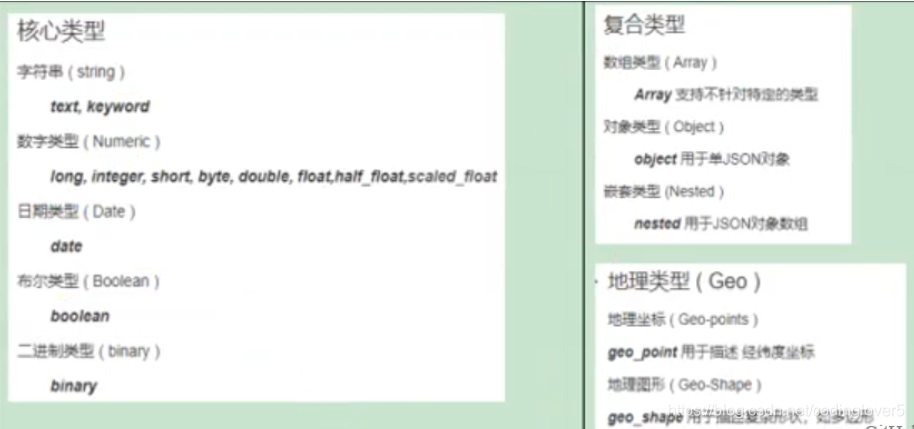
(1)字段类型
(2)映射
Mapping(映射)
Maping是用来定义一个文档(document),以及它所包含的属性(field)是如何存储和索引的。比如:使用maping来定义:
-
哪些字符串属性应该被看做全文本属性(full text fields);
-
哪些属性包含数字,日期或地理位置;
-
文档中的所有属性是否都嫩被索引(all 配置);
-
日期的格式;
-
自定义映射规则来执行动态添加属性;
-
查看mapping信息
GET bank/_mapping{ "bank" : { "mappings" : { "properties" : { "account_number" : { "type" : "long" }, "address" : { "type" : "text", "fields" : { "keyword" : { "type" : "keyword", "ignore_above" : 256 } } }, "age" : { "type" : "long" }, "balance" : { "type" : "long" }, "city" : { "type" : "text", "fields" : { "keyword" : { "type" : "keyword", "ignore_above" : 256 } } }, "email" : { "type" : "text", "fields" : { "keyword" : { "type" : "keyword", "ignore_above" : 256 } } }, "employer" : { "type" : "text", "fields" : { "keyword" : { "type" : "keyword", "ignore_above" : 256 } } }, "firstname" : { "type" : "text", "fields" : { "keyword" : { "type" : "keyword", "ignore_above" : 256 } } }, "gender" : { "type" : "text", "fields" : { "keyword" : { "type" : "keyword", "ignore_above" : 256 } } }, "lastname" : { "type" : "text", "fields" : { "keyword" : { "type" : "keyword", "ignore_above" : 256 } } }, "state" : { "type" : "text", "fields" : { "keyword" : { "type" : "keyword", "ignore_above" : 256 } } } } } } } -
修改mapping信息
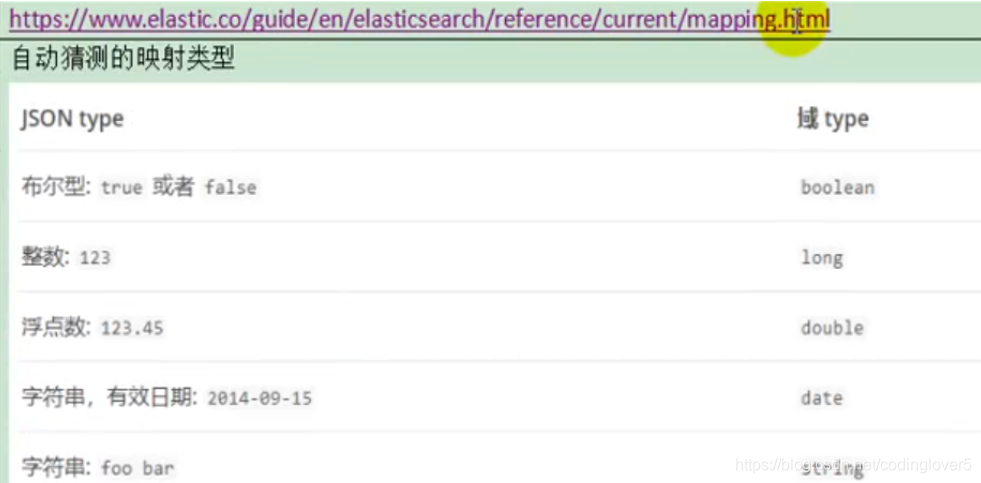
(3)新版本改变
ElasticSearch7-去掉type概念
-
关系型数据库中两个数据表示是独立的,即使他们里面有相同名称的列也不影响使用,但ES中不是这样的。elasticsearch是基于Lucene开发的搜索引擎,而ES中不同type下名称相同的filed最终在Lucene中的处理方式是一样的。
- 两个不同type下的两个user_name,在ES同一个索引下其实被认为是同一个filed,你必须在两个不同的type中定义相同的filed映射。否则,不同type中的相同字段名称就会在处理中出现冲突的情况,导致Lucene处理效率下降。
- 去掉type就是为了提高ES处理数据的效率。
-
Elasticsearch 7.x URL中的type参数为可选。比如,索引一个文档不再要求提供文档类型。
-
Elasticsearch 8.x 不再支持URL中的type参数。
-
解决:
将索引从多类型迁移到单类型,每种类型文档一个独立索引将已存在的索引下的类型数据,全部迁移到指定位置即可。详见数据迁移
Elasticsearch 7.x
- Specifying types in requests is deprecated. For instance, indexing a document no longer requires a document
type. The new index APIs arePUT {index}/_doc/{id}in case of explicit ids andPOST {index}/_docfor auto-generated ids. Note that in 7.0,_docis a permanent part of the path, and represents the endpoint name rather than the document type.- The
include_type_nameparameter in the index creation, index template, and mapping APIs will default tofalse. Setting the parameter at all will result in a deprecation warning.- The
_default_mapping type is removed.Elasticsearch 8.x
- Specifying types in requests is no longer supported.
- The
include_type_nameparameter is removed.
创建映射
创建索引并指定映射
PUT /my_index
{
  "mappings": {
    "properties": {
      "age": {
        "type": "integer"
      },
      "email": {
        "type": "keyword"
      },
      "name": {
        "type": "text"
      }
    }
  }
}
输出:
{
  "acknowledged" : true,
  "shards_acknowledged" : true,
  "index" : "my_index"
}
查看映射
GET /my_index
输出结果:
{
  "my_index" : {
    "aliases" : { },
    "mappings" : {
      "properties" : {
        "age" : {
          "type" : "integer"
        },
        "email" : {
          "type" : "keyword"
        },
        "employee-id" : {
          "type" : "keyword",
          "index" : false
        },
        "name" : {
          "type" : "text"
        }
      }
    },
    "settings" : {
      "index" : {
        "creation_date" : "1588410780774",
        "number_of_shards" : "1",
        "number_of_replicas" : "1",
        "uuid" : "ua0lXhtkQCOmn7Kh3iUu0w",
        "version" : {
          "created" : "7060299"
        },
        "provided_name" : "my_index"
      }
    }
  }
}
添加新的字段映射
PUT /my_index/_mapping
{
  "properties": {
    "employee-id": {
      "type": "keyword",
      "index": false
    }
  }
}
这里的 “index”: false,表明新增的字段不能被检索,只是一个冗余字段。
更新映射
对于已经存在的字段映射,我们不能更新。更新必须创建新的索引,进行数据迁移。
数据迁移
先创建new_twitter的正确映射。然后使用如下方式进行数据迁移。
POST _reindex [固定写法]
{
  "source":{
      "index":"twitter"
   },
  "dest":{
      "index":"new_twitters"
   }
}
将旧索引的type下的数据进行迁移
POST _reindex [固定写法]
{
  "source":{
      "index":"twitter",
      "twitter":"twitter"
   },
  "dest":{
      "index":"new_twitters"
   }
}
更多详情见: https://www.elastic.co/guide/en/elasticsearch/reference/7.6/docs-reindex.html
就你看
GET /bank/_search
{
  "took" : 0,
  "timed_out" : false,
  "_shards" : {
    "total" : 1,
    "successful" : 1,
    "skipped" : 0,
    "failed" : 0
  },
  "hits" : {
    "total" : {
      "value" : 1000,
      "relation" : "eq"
    },
    "max_score" : 1.0,
    "hits" : [
      {
        "_index" : "bank",
        "_type" : "account",//类型为account
        "_id" : "1",
        "_score" : 1.0,
        "_source" : {
          "account_number" : 1,
          "balance" : 39225,
          "firstname" : "Amber",
          "lastname" : "Duke",
          "age" : 32,
          "gender" : "M",
          "address" : "880 Holmes Lane",
          "employer" : "Pyrami",
          "email" : "amberduke@pyrami.com",
          "city" : "Brogan",
          "state" : "IL"
        }
      },
      ...
GET /bank/_search
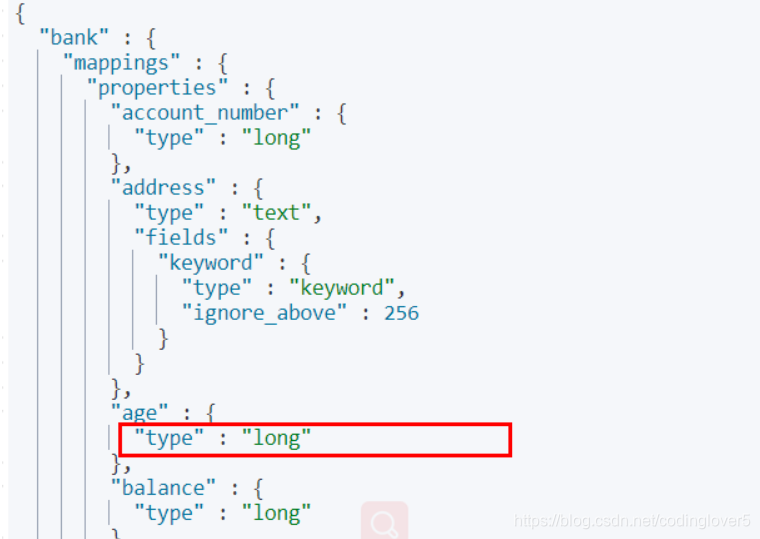
想要将年龄修改为integer
PUT /newbank
{
  "mappings": {
    "properties": {
      "account_number": {
        "type": "long"
      },
      "address": {
        "type": "text"
      },
      "age": {
        "type": "integer"
      },
      "balance": {
        "type": "long"
      },
      "city": {
        "type": "keyword"
      },
      "email": {
        "type": "keyword"
      },
      "employer": {
        "type": "keyword"
      },
      "firstname": {
        "type": "text"
      },
      "gender": {
        "type": "keyword"
      },
      "lastname": {
        "type": "text",
        "fields": {
          "keyword": {
            "type": "keyword",
            "ignore_above": 256
          }
        }
      },
      "state": {
        "type": "keyword"
      }
    }
  }
}
查看“newbank”的映射:
GET /newbank/_mapping

能够看到age的映射类型被修改为了integer.
将bank中的数据迁移到newbank中
POST _reindex
{
  "source": {
    "index": "bank",
    "type": "account"
  },
  "dest": {
    "index": "newbank"
  }
}
运行输出:
#! Deprecation: [types removal] Specifying types in reindex requests is deprecated.
{
  "took" : 768,
  "timed_out" : false,
  "total" : 1000,
  "updated" : 0,
  "created" : 1000,
  "deleted" : 0,
  "batches" : 1,
  "version_conflicts" : 0,
  "noops" : 0,
  "retries" : {
    "bulk" : 0,
    "search" : 0
  },
  "throttled_millis" : 0,
  "requests_per_second" : -1.0,
  "throttled_until_millis" : 0,
  "failures" : [ ]
}
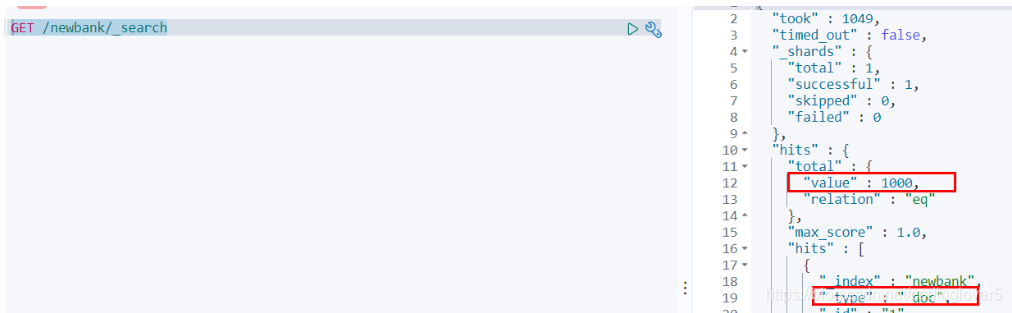
查看newbank中的数据
4)分词
一个tokenizer(分词器)接收一个字符流,将之分割为独立的tokens(词元,通常是独立的单词),然后输出tokens流。
例如:whitespace tokenizer遇到空白字符时分割文本。它会将文本“Quick brown fox!”分割为[Quick,brown,fox!]。
该tokenizer(分词器)还负责记录各个terms(词条)的顺序或position位置(用于phrase短语和word proximity词近邻查询),以及term(词条)所代表的原始word(单词)的start(起始)和end(结束)的character offsets(字符串偏移量)(用于高亮显示搜索的内容)。
elasticsearch提供了很多内置的分词器,可以用来构建custom analyzers(自定义分词器)。
关于分词器: https://www.elastic.co/guide/en/elasticsearch/reference/7.6/analysis.html
POST _analyze
{
  "analyzer": "standard",
  "text": "The 2 QUICK Brown-Foxes jumped over the lazy dog's bone."
}
执行结果:
{
  "tokens" : [
    {
      "token" : "the",
      "start_offset" : 0,
      "end_offset" : 3,
      "type" : "<ALPHANUM>",
      "position" : 0
    },
    {
      "token" : "2",
      "start_offset" : 4,
      "end_offset" : 5,
      "type" : "<NUM>",
      "position" : 1
    },
    {
      "token" : "quick",
      "start_offset" : 6,
      "end_offset" : 11,
      "type" : "<ALPHANUM>",
      "position" : 2
    },
    {
      "token" : "brown",
      "start_offset" : 12,
      "end_offset" : 17,
      "type" : "<ALPHANUM>",
      "position" : 3
    },
    {
      "token" : "foxes",
      "start_offset" : 18,
      "end_offset" : 23,
      "type" : "<ALPHANUM>",
      "position" : 4
    },
    {
      "token" : "jumped",
      "start_offset" : 24,
      "end_offset" : 30,
      "type" : "<ALPHANUM>",
      "position" : 5
    },
    {
      "token" : "over",
      "start_offset" : 31,
      "end_offset" : 35,
      "type" : "<ALPHANUM>",
      "position" : 6
    },
    {
      "token" : "the",
      "start_offset" : 36,
      "end_offset" : 39,
      "type" : "<ALPHANUM>",
      "position" : 7
    },
    {
      "token" : "lazy",
      "start_offset" : 40,
      "end_offset" : 44,
      "type" : "<ALPHANUM>",
      "position" : 8
    },
    {
      "token" : "dog's",
      "start_offset" : 45,
      "end_offset" : 50,
      "type" : "<ALPHANUM>",
      "position" : 9
    },
    {
      "token" : "bone",
      "start_offset" : 51,
      "end_offset" : 55,
      "type" : "<ALPHANUM>",
      "position" : 10
    }
  ]
}
(1)安装ik分词器
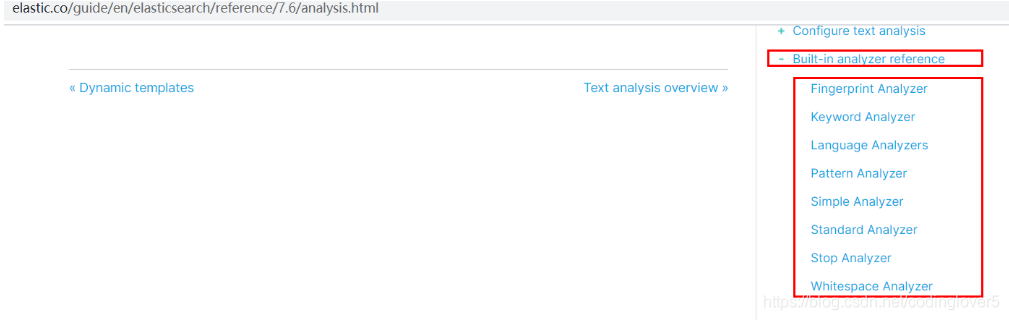
所有的语言分词,默认使用的都是“Standard Analyzer”,但是这些分词器针对于中文的分词,并不友好。为此需要安装中文的分词器。
注意:不能用默认elasticsearch-plugin install xxx.zip 进行自动安装
https://github.com/medcl/elasticsearch-analysis-ik/releases/download 对应es版本安装
在前面安装的elasticsearch时,我们已经将elasticsearch容器的“/usr/share/elasticsearch/plugins”目录,映射到宿主机的“ /mydata/elasticsearch/plugins”目录下,所以比较方便的做法就是下载“/elasticsearch-analysis-ik-7.6.2.zip”文件,然后解压到该文件夹下即可。安装完毕后,需要重启elasticsearch容器。
如果不嫌麻烦,还可以采用如下的方式。
(1)查看elasticsearch版本号:
[root@hadoop-104 ~]# curl http://localhost:9200
{
  "name" : "0adeb7852e00",
  "cluster_name" : "elasticsearch",
  "cluster_uuid" : "9gglpP0HTfyOTRAaSe2rIg",
  "version" : {
    "number" : "7.7.0",      #版本号为7.7.0
    "build_flavor" : "default",
    "build_type" : "docker",
    "build_hash" : "ef48eb35cf30adf4db14086e8aabd07ef6fb113f",
    "build_date" : "2020-03-26T06:34:37.794943Z",
    "build_snapshot" : false,
    "lucene_version" : "8.4.0",
    "minimum_wire_compatibility_version" : "6.8.0",
    "minimum_index_compatibility_version" : "6.0.0-beta1"
  },
  "tagline" : "You Know, for Search"
}
[root@hadoop-104 ~]#
(2)进入es容器内部plugin目录
- docker exec -it 容器id /bin/bash
[root@hadoop-104 ~]# docker exec -it elasticsearch /bin/bash
[root@0adeb7852e00 elasticsearch]#
- wget https://github.com/medcl/elasticsearch-analysis-ik/releases/download/v7.6.2/elasticsearch-analysis-ik-7.6.2.zip
[root@0adeb7852e00 elasticsearch]# pwd
/usr/share/elasticsearch
#下载ik7.6.2
[root@0adeb7852e00 elasticsearch]# wget https://github.com/medcl/elasticsearch-analysis-ik/releases/download/v7.6.2/elasticsearch-analysis-ik-7.6.2.zip
- unzip 下载的文件
[root@0adeb7852e00 elasticsearch]# unzip elasticsearch-analysis-ik-7.6.2.zip -d ik
Archive:  elasticsearch-analysis-ik-7.6.2.zip
   creating: ik/config/
  inflating: ik/config/main.dic
  inflating: ik/config/quantifier.dic
  inflating: ik/config/extra_single_word_full.dic
  inflating: ik/config/IKAnalyzer.cfg.xml
  inflating: ik/config/surname.dic
  inflating: ik/config/suffix.dic
  inflating: ik/config/stopword.dic
  inflating: ik/config/extra_main.dic
  inflating: ik/config/extra_stopword.dic
  inflating: ik/config/preposition.dic
  inflating: ik/config/extra_single_word_low_freq.dic
  inflating: ik/config/extra_single_word.dic
  inflating: ik/elasticsearch-analysis-ik-7.6.2.jar
  inflating: ik/httpclient-4.5.2.jar
  inflating: ik/httpcore-4.4.4.jar
  inflating: ik/commons-logging-1.2.jar
  inflating: ik/commons-codec-1.9.jar
  inflating: ik/plugin-descriptor.properties
  inflating: ik/plugin-security.policy
[root@0adeb7852e00 elasticsearch]#
#移动到plugins目录下
[root@0adeb7852e00 elasticsearch]# mv ik plugins/
- rm -rf *.zip
[root@0adeb7852e00 elasticsearch]# rm -rf elasticsearch-analysis-ik-7.6.2.zip
确认是否安装好了分词器
(2)测试分词器
使用默认
GET my_index/_analyze
{
   "text":"我是中国人"
}
请观察执行结果:
{
  "tokens" : [
    {
      "token" : "我",
      "start_offset" : 0,
      "end_offset" : 1,
      "type" : "<IDEOGRAPHIC>",
      "position" : 0
    },
    {
      "token" : "是",
      "start_offset" : 1,
      "end_offset" : 2,
      "type" : "<IDEOGRAPHIC>",
      "position" : 1
    },
    {
      "token" : "中",
      "start_offset" : 2,
      "end_offset" : 3,
      "type" : "<IDEOGRAPHIC>",
      "position" : 2
    },
    {
      "token" : "国",
      "start_offset" : 3,
      "end_offset" : 4,
      "type" : "<IDEOGRAPHIC>",
      "position" : 3
    },
    {
      "token" : "人",
      "start_offset" : 4,
      "end_offset" : 5,
      "type" : "<IDEOGRAPHIC>",
      "position" : 4
    }
  ]
}
GET my_index/_analyze
{
   "analyzer": "ik_smart",
   "text":"我是中国人"
}
输出结果:
{
  "tokens" : [
    {
      "token" : "我",
      "start_offset" : 0,
      "end_offset" : 1,
      "type" : "CN_CHAR",
      "position" : 0
    },
    {
      "token" : "是",
      "start_offset" : 1,
      "end_offset" : 2,
      "type" : "CN_CHAR",
      "position" : 1
    },
    {
      "token" : "中国人",
      "start_offset" : 2,
      "end_offset" : 5,
      "type" : "CN_WORD",
      "position" : 2
    }
  ]
}
GET my_index/_analyze
{
   "analyzer": "ik_max_word",
   "text":"我是中国人"
}
输出结果:
{
  "tokens" : [
    {
      "token" : "我",
      "start_offset" : 0,
      "end_offset" : 1,
      "type" : "CN_CHAR",
      "position" : 0
    },
    {
      "token" : "是",
      "start_offset" : 1,
      "end_offset" : 2,
      "type" : "CN_CHAR",
      "position" : 1
    },
    {
      "token" : "中国人",
      "start_offset" : 2,
      "end_offset" : 5,
      "type" : "CN_WORD",
      "position" : 2
    },
    {
      "token" : "中国",
      "start_offset" : 2,
      "end_offset" : 4,
      "type" : "CN_WORD",
      "position" : 3
    },
    {
      "token" : "国人",
      "start_offset" : 3,
      "end_offset" : 5,
      "type" : "CN_WORD",
      "position" : 4
    }
  ]
}
(3)自定义词库
安装Nginx
,然后创建“fenci.txt”文件,内容如下:
echo "樱桃萨其马,带你甜蜜入夏" > /mydata/nginx/html/fenci.txt
测试效果:
GET my_index/_analyze
{
   "analyzer": "ik_max_word",
   "text":"樱桃萨其马,带你甜蜜入夏"
}
输出结果:
{
  "tokens" : [
    {
      "token" : "樱桃",
      "start_offset" : 0,
      "end_offset" : 2,
      "type" : "CN_WORD",
      "position" : 0
    },
    {
      "token" : "萨其马",
      "start_offset" : 2,
      "end_offset" : 5,
      "type" : "CN_WORD",
      "position" : 1
    },
    {
      "token" : "带你",
      "start_offset" : 6,
      "end_offset" : 8,
      "type" : "CN_WORD",
      "position" : 2
    },
    {
      "token" : "甜蜜",
      "start_offset" : 8,
      "end_offset" : 10,
      "type" : "CN_WORD",
      "position" : 3
    },
    {
      "token" : "入夏",
      "start_offset" : 10,
      "end_offset" : 12,
      "type" : "CN_WORD",
      "position" : 4
    }
  ]
}
4、elasticsearch-Rest-Client
1)9300: TCP
- spring-data-elasticsearch:transport-api.jar;
- springboot版本不同,ransport-api.jar不同,不能适配es版本
- 7.x已经不建议使用,8以后就要废弃
2)9200: HTTP
-
jestClient: 非官方,更新慢;
-
RestTemplate:模拟HTTP请求,ES很多操作需要自己封装,麻烦;
-
HttpClient:同上;
-
Elasticsearch-Rest-Client:官方RestClient,封装了ES操作,API层次分明,上手简单;
最终选择Elasticsearch-Rest-Client(elasticsearch-rest-high-level-client);
https://www.elastic.co/guide/en/elasticsearch/client/java-rest/current/java-rest-high.html
5、附录:安装Nginx
-
随便启动一个nginx实例,只是为了复制出配置
docker run -p80:80 --name nginx -d nginx:1.10 -
将容器内的配置文件拷贝到/mydata/nginx/conf/ 下
mkdir -p /mydata/nginx/html mkdir -p /mydata/nginx/logs mkdir -p /mydata/nginx/conf docker container cp nginx:/etc/nginx/* /mydata/nginx/conf/ #由于拷贝完成后会在config中存在一个nginx文件夹,所以需要将它的内容移动到conf中 mv /mydata/nginx/conf/nginx/* /mydata/nginx/conf/ rm -rf /mydata/nginx/conf/nginx -
终止原容器:
docker stop nginx -
执行命令删除原容器:
docker rm nginx -
创建新的Nginx,执行以下命令
docker run -p 80:80 --name nginx \ -v /mydata/nginx/html:/usr/share/nginx/html \ -v /mydata/nginx/logs:/var/log/nginx \ -v /mydata/nginx/conf/:/etc/nginx \ -d nginx:1.10 -
设置开机启动nginx
docker update nginx --restart=always -
创建“/mydata/nginx/html/index.html”文件,测试是否能够正常访问
echo '<h2>hello nginx!</h2>' >index.html访问:http://ngix所在主机的IP:80/index.html
SpringBoot整合ElasticSearch
1、导入依赖
这里的版本要和所按照的ELK版本匹配。
<dependency>
    <groupId>org.elasticsearch.client</groupId>
    <artifactId>elasticsearch-rest-high-level-client</artifactId>
    <version>7.7.0</version>
</dependency>
在spring-boot-dependencies中所依赖的ELK版本位6.8.7
<elasticsearch.version>6.8.7</elasticsearch.version>
需要在项目中将它改为7.7.0
    <properties>
        ...
        <elasticsearch.version>7.7.0</elasticsearch.version>
    </properties>
2、编写测试类
1)测试保存数据
    @Test
    public void indexData() throws IOException {
        IndexRequest indexRequest = new IndexRequest ("users");

        User user = new User();
        user.setUserName("张三");
        user.setAge(20);
        user.setGender("男");
        String jsonString = JSON.toJSONString(user);
        //设置要保存的内容
        indexRequest.source(jsonString, XContentType.JSON);
        //执行创建索引和保存数据
        IndexResponse index = client.index(indexRequest, GulimallElasticSearchConfig.COMMON_OPTIONS);

        System.out.println(index);

    }
测试前:
测试后:
2)测试获取数据
https://www.elastic.co/guide/en/elasticsearch/client/java-rest/current/java-rest-high-search.html
    @Test
    public void searchData() throws IOException {
        GetRequest getRequest = new GetRequest(
                "users",
                "_-2vAHIB0nzmLJLkxKWk");

        GetResponse getResponse = client.get(getRequest, RequestOptions.DEFAULT);
        System.out.println(getResponse);
        String index = getResponse.getIndex();
        System.out.println(index);
        String id = getResponse.getId();
        System.out.println(id);
        if (getResponse.isExists()) {
            long version = getResponse.getVersion();
            System.out.println(version);
            String sourceAsString = getResponse.getSourceAsString();
            System.out.println(sourceAsString);
            Map<String, Object> sourceAsMap = getResponse.getSourceAsMap();
            System.out.println(sourceAsMap);
            byte[] sourceAsBytes = getResponse.getSourceAsBytes();
        } else {

        }
    }
查询state="AK"的文档:
{
	"took": 1,
	"timed_out": false,
	"_shards": {
		"total": 1,
		"successful": 1,
		"skipped": 0,
		"failed": 0
	},
	"hits": {
		"total": {
			"value": 22,   //匹配到了22条
			"relation": "eq"
		},
		"max_score": 3.7952394,
		"hits": [{
			"_index": "bank",
			"_type": "account",
			"_id": "210",
			"_score": 3.7952394,
			"_source": {
				"account_number": 210,
				"balance": 33946,
				"firstname": "Cherry",
				"lastname": "Carey",
				"age": 24,
				"gender": "M",
				"address": "539 Tiffany Place",
				"employer": "Martgo",
				"email": "cherrycarey@martgo.com",
				"city": "Fairacres",
				"state": "AK"
			}
		},
           ....//省略其他
          ]
	}
}
搜索address中包含mill的所有人的年龄分布以及平均年龄,平均薪资
GET bank/_search
{
  "query": {
    "match": {
      "address": "Mill"
    }
  },
  "aggs": {
    "ageAgg": {
      "terms": {
        "field": "age",
        "size": 10
      }
    },
    "ageAvg": {
      "avg": {
        "field": "age"
      }
    },
    "balanceAvg": {
      "avg": {
        "field": "balance"
      }
    }
  }
}
java实现
    /**
     * 复杂检索:在bank中搜索address中包含mill的所有人的年龄分布以及平均年龄,平均薪资
     * @throws IOException
     */
    @Test
    public void searchData() throws IOException {
        //1. 创建检索请求
        SearchRequest searchRequest = new SearchRequest();

        //1.1)指定索引
        searchRequest.indices("bank");
        //1.2)构造检索条件
        SearchSourceBuilder sourceBuilder = new SearchSourceBuilder();
        sourceBuilder.query(QueryBuilders.matchQuery("address","Mill"));

        //1.2.1)按照年龄分布进行聚合
        TermsAggregationBuilder ageAgg=AggregationBuilders.terms("ageAgg").field("age").size(10);
        sourceBuilder.aggregation(ageAgg);

        //1.2.2)计算平均年龄
        AvgAggregationBuilder ageAvg = AggregationBuilders.avg("ageAvg").field("age");
        sourceBuilder.aggregation(ageAvg);
        //1.2.3)计算平均薪资
        AvgAggregationBuilder balanceAvg = AggregationBuilders.avg("balanceAvg").field("balance");
        sourceBuilder.aggregation(balanceAvg);

        System.out.println("检索条件:"+sourceBuilder);
        searchRequest.source(sourceBuilder);
        //2. 执行检索
        SearchResponse searchResponse = client.search(searchRequest, RequestOptions.DEFAULT);
        System.out.println("检索结果:"+searchResponse);

        //3. 将检索结果封装为Bean
        SearchHits hits = searchResponse.getHits();
        SearchHit[] searchHits = hits.getHits();
        for (SearchHit searchHit : searchHits) {
            String sourceAsString = searchHit.getSourceAsString();
            Account account = JSON.parseObject(sourceAsString, Account.class);
            System.out.println(account);

        }

        //4. 获取聚合信息
        Aggregations aggregations = searchResponse.getAggregations();

        Terms ageAgg1 = aggregations.get("ageAgg");

        for (Terms.Bucket bucket : ageAgg1.getBuckets()) {
            String keyAsString = bucket.getKeyAsString();
            System.out.println("年龄:"+keyAsString+" ==> "+bucket.getDocCount());
        }
        Avg ageAvg1 = aggregations.get("ageAvg");
        System.out.println("平均年龄:"+ageAvg1.getValue());

        Avg balanceAvg1 = aggregations.get("balanceAvg");
        System.out.println("平均薪资:"+balanceAvg1.getValue());


    }
可以尝试对比打印的条件和执行结果,和前面的ElasticSearch的检索语句和检索结果进行比较;
其他
1. kibana控制台命令
ctrl+home:回到文档首部;
ctril+end:回到文档尾部。

 1294


 扫一扫


 被折叠的 条评论
为什么被折叠?
 到【灌水乐园】发言


