





 本文介绍了基于Android Studio的汽车APP项目开发,包括APP客户端和后台管理系统的设计。后台管理涉及汽车数据维护,如发布、图集上传、销售商、类型等。APP客户端涵盖用户注册、登录、汽车搜索、详情等功能。开发工具包括Android Studio、模拟器、MySQL等。项目功能结构详细,文章仅概述部分,更多内容可联系作者。
一 项目介绍
汽车APP项目 包含了 APP客户端和后台管理系统,后台管理系统主要维护汽车的数据,比如汽车发布,汽车图集多图上传,汽车销售商,汽车类型,客户管理,系统管理等,APP客户端包含 用户注册,登录,个人中心,汽车首页,推荐汽车,品牌搜索,多条件搜索,汽车列表,汽车详情,汽车图片预览 汽车销售商和汽车类型等等
二 项目开发工具
android studio
逍遥模拟器或者夜神模拟器
mysql
idea或者eclipse
vscode
三 项目功能结构图

四 项目功能开发和设计

首页:有三块区域 1顶部图片,2品牌搜索区 3汽车推荐列表区
布局文件:
<?xml version="1.0" encoding="utf-8"?>
<LinearLayout xmlns:android="http://schemas.android.com/apk/res/android"
    xmlns:app="http://schemas.android.com/apk/res-auto"
    xmlns:tools="http://schemas.android.com/tools"
    style="@style/Theme.AppCompat.NoActionBar"
    android:layout_width="match_parent"
    android:layout_height="match_parent"
    android:orientation="vertical"
    >
	<!-- 区域一-->
    <LinearLayout
        android:layout_width="match_parent"
        android:layout_height="180dp"
        android:orientation="vertical"
        tools:ignore="MissingConstraints"
        android:background="@mipmap/lb2">
    </LinearLayout>
    <!-- 区域二	-->
    <LinearLayout
        android:layout_width="fill_parent"
        android:layout_height="50dp"
        android:layout_marginLeft="20dp"
        android:layout_marginRight="20dp"
        android:orientation="horizontal"
        >
        <TextView
            android:layout_width="wrap_content"
            android:layout_height="50dp"
            android:paddingTop="20dp"
            android:text="品牌搜索"
            android:textSize="18dp"
            android:layout_weight="1">
        </TextView>
        <TextView
            android:layout_width="wrap_content"
            android:layout_height="50dp"
            android:paddingTop="20dp"
            android:text="更多 >"
            android:id="@+id/viewMoreTv"
            android:textSize="18dp">
        </TextView>

    </LinearLayout>
    <!-- 区域三-->
    <ScrollView
        android:layout_width="fill_parent"
        android:layout_height="fill_parent"
        android:scrollbars="vertical"
        android:fadingEdge="vertical">
    <LinearLayout
        android:layout_width="match_parent"
        android:layout_height="match_parent"
        android:orientation="vertical">
        <LinearLayout
            android:layout_width="match_parent"
            android:layout_height="50dp"
            android:layout_marginLeft="20dp"
            android:layout_marginRight="20dp" >
            <TextView
                android:layout_width="match_parent"
                android:layout_height="50dp"
                android:paddingTop="20dp"
                android:text="推荐汽车"
                android:textSize="18dp">
            </TextView>
        </LinearLayout>
        <!--推荐汽车start-->
        <LinearLayout
            android:id="@+id/tjlistView_layout"
            android:layout_width="match_parent"
            android:layout_height="match_parent"
            android:layout_marginLeft="20dp"
            android:layout_marginRight="20dp"
            >

                <ListView
                    android:id="@+id/spotstjListViewId"
                    android:layout_width="match_parent"
                    android:layout_height="wrap_content">
                </ListView>

        </LinearLayout>
        <!--推荐汽车end-->
    </LinearLayout>
    </ScrollView>
列表页:
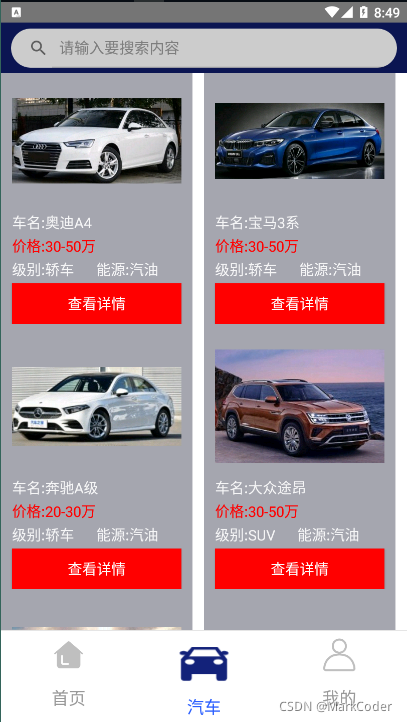
列表页功能实现:
    //根据条件查询汽车
    public void queryCarsByCondition(Long brandid,Long jbid,Long nyid,Long pricefwid) {
      getAppComponent().getAPIService().queryCarsByCondition(brandid,jbid,nyid,pricefwid)
                .subscribe(new BaseObserver<HttpResult<String>>() {

                    @Override
                    public void onSuccess(HttpResult<String> resp) {
                        if (resp.isSuccess()) {
                            //查询成功
                            List<Car> spotsEntites = CommonUtils.transeToCarsList(resp.getData());
                            mCarsView.loadData(spotsEntites);
                        } else {

                        }
                    }
					//失败处理
                    @Override
                    public void onFailure(Throwable e) {
                        System.out.println(e.getMessage());
                    }
                });
    }
后台服务:
	@RequestMapping("/front/car/queryAllCars")
    @ResponseBody
    public ResultResponse queryAllCars( CarQuery carQuery){
        try {

            List<Car> cars = carService.queryAllCars(carQuery);
            cars = cars.stream().map(temp_car -> {
                temp_car.setFmUrl(carsPicRequestPath + "/" + temp_car.getFmUrl());
                return temp_car;
            }).collect(Collectors.toList());

            return ResultResponse.ok("操作成功").put("data",JSON.toJSON(cars).toString());

        } catch (Exception e) {
            e.printStackTrace();
        }
        return ResultResponse.fail("操作失败");
    }
当然 一篇 文章 不能说明整个项目的情况,项目东西还有很多. 请加 扣扣 : 二— 五— 七— 九— 六— 九— 二-- 六— 零— 六
汽车详情页面:
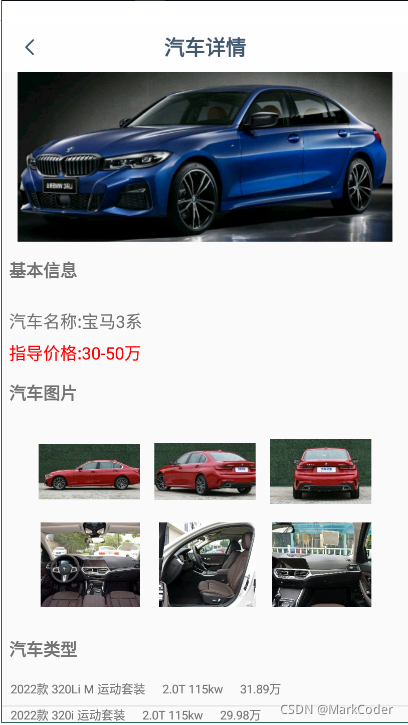
核心代码:
<?xml version="1.0" encoding="utf-8"?>
<ScrollView
    xmlns:android="http://schemas.android.com/apk/res/android"
    xmlns:app="http://schemas.android.com/apk/res-auto"
    xmlns:tools="http://schemas.android.com/tools"
    android:layout_width="match_parent"
    android:layout_height="match_parent"
    android:scrollbars="vertical"
    android:fadingEdge="vertical">
    <LinearLayout
        android:layout_width="match_parent"
        android:layout_height="match_parent"
        android:orientation="vertical"
        tools:context=".ui.activity.CarDetailActivity">

        <RelativeLayout
            android:layout_width="match_parent"
            android:layout_height="match_parent">
                <TextView
                android:id="@+id/carsdetail_carstype_label"
                android:layout_width="match_parent"
                android:layout_height="30dp"
                android:text="汽车类型"
                android:textSize="20dp"
                android:layout_marginLeft="8dp"
                android:layout_marginTop="20dp"
                android:layout_marginBottom="20dp"
                android:textStyle="bold"
                android:layout_below="@+id/imgsSV"
                >
            </TextView>
            <ListView
                android:layout_width="match_parent"
                android:layout_height="match_parent"
                android:id="@+id/carstypeLv"
                android:layout_below="@+id/carsdetail_carstype_label">

            </ListView>
            <TextView
                android:id="@+id/carsdetail_carsshop_label"
                android:layout_width="match_parent"
                android:layout_height="30dp"
                android:text="销售商"
                android:textSize="20dp"
                android:layout_marginLeft="8dp"
                android:layout_marginTop="20dp"
                android:layout_marginBottom="20dp"
                android:textStyle="bold"
                android:layout_below="@+id/carstypeLv"
                >
            </TextView>
            <ListView
                android:layout_width="match_parent"
                android:layout_height="match_parent"
                android:id="@+id/carsshopLv"
                android:layout_below="@+id/carsdetail_carsshop_label">

            </ListView>

            <TextView
                android:id="@+id/carsdetail_cspzinfoWv_label"
                android:layout_width="match_parent"
                android:layout_height="30dp"
                android:layout_marginLeft="8dp"
                android:text="汽车配置"
                android:textSize="20dp"
                android:layout_marginTop="20dp"
                android:layout_marginBottom="20dp"
                android:textStyle="bold"
                android:layout_below="@+id/carsshopLv"
                >

            </TextView>

            <!-- 汽车配置信息-->
            <WebView
                android:id="@+id/carsdetail_cspzinfoWv"
                android:layout_marginTop="10dp"
                android:layout_marginLeft="8dp"
                android:layout_marginRight="8dp"
                android:layout_width="match_parent"
                android:layout_height="wrap_content"
                android:layout_below="@id/carsdetail_cspzinfoWv_label"/>
        </RelativeLayout>
            </LinearLayout>
</ScrollView>





 扫一扫
扫一扫


 864
864


 到【灌水乐园】发言



