



先看看最终效果
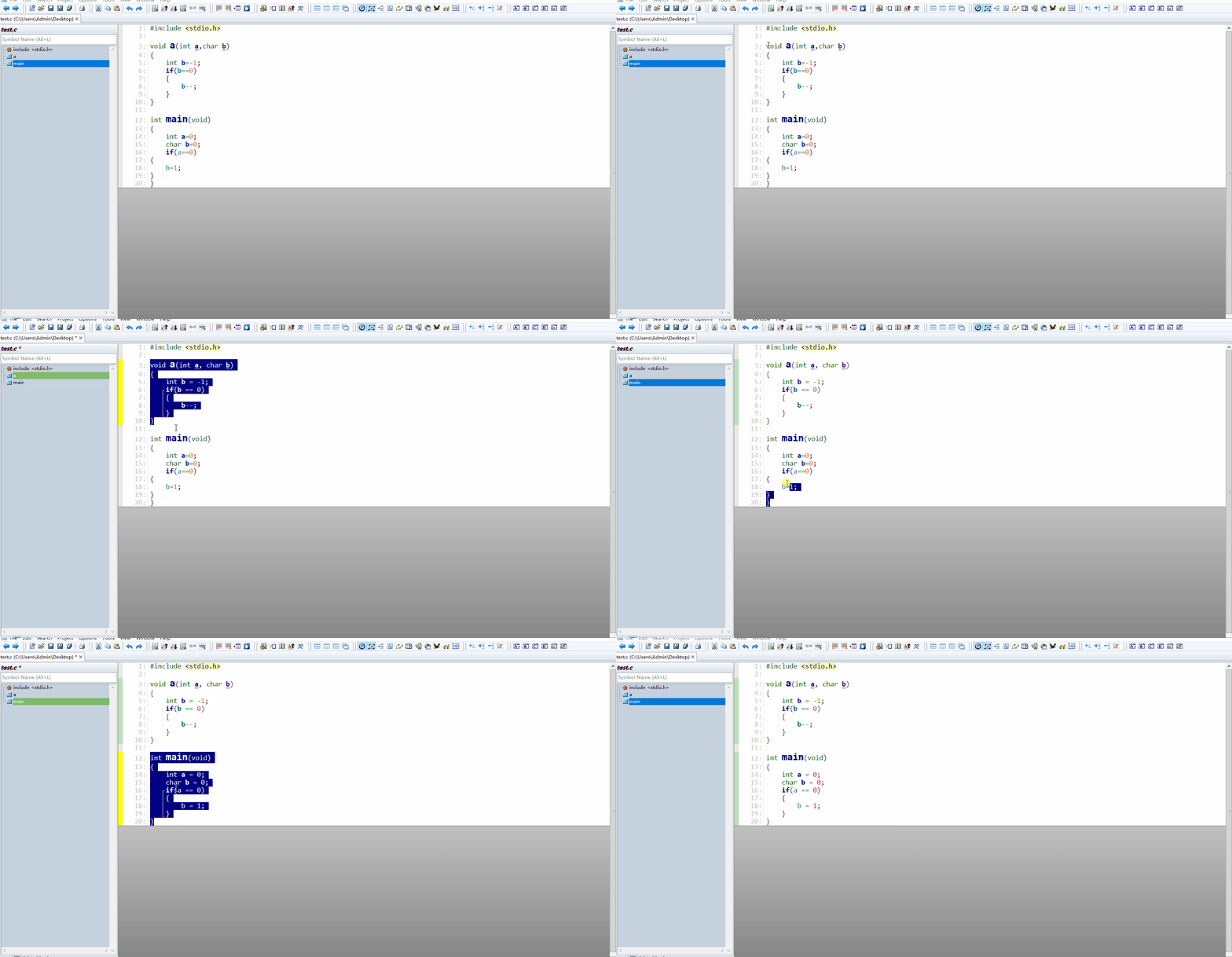
我们想在source insight里面完成代码段的格式化,注意不是整个.c .h源文件格式化,先说目前几种格式化的方案
- source insight自带的格式化工具,这个有点弱,很多特性不支持,形同虚设
- 改为vscode格式化,那还是和我们初衷不符,我们不想脱离source insight
- 调用外部命令astyle进行格式化,这也是目前很多方案选择的,但是只能格式化整个源文件,有时候一个很小的地方修改,格式化以后不利于其他人对比审核代码
那有没有一种方案,只格式化我选择的某个函数,或者代码段呢?
- 实现思路,利用source insight自带的macro宏,读取选择的代码,然后导出到临时文件,然后调用astyle进行格式化,然后再回写到当前区域
操作步骤:
下载astyle,就选最新的版本就好
- astyle,下载完后解压出astyle.exe文件
- 复制astyle.exe文件到Roaming目录(快捷键Win+R,输入%appdata%,回车后快速进入该目录)
复制如下内容,并新建文件名为formatcode.em
macro CreateIndentString(nIndentSize)
{
    // 初始化空字符串
    szIndent = ""

    // 使用循环添加指定数量的空格
    i = 0
    while (i < nIndentSize)
    {
        szIndent = Cat(szIndent, " ")
        i = i + 1
    }

    // 或者使用制表符(取消注释以启用)
    // nTabs = nIndentSize / GetTabWidth()
    // szIndent = ""
    // i = 0
    // while (i < nTabs)
    // {
    //     szIndent = Cat(szIndent, "\t")
    //     i = i + 1
    // }

    return szIndent
}

macro FormatCode()
{
    hwnd = GetCurrentWnd()
    if (hwnd == 0)
        stop

    sel = GetWndSel(hwnd)
    if(sel == 0)
    	stop

    hbuf = GetWndBuf(hwnd)

	// find current source file suffix
	suffix=".c"    //default
	szCurLine=GetBufName(hbuf)
    lineLen = strlen(szCurLine)
    i = lineLen
    while(i>=0)
    {
        if(szCurLine[i] == ".")
        {
        	suffix=strmid(szCurLine,i,lineLen)
            break
        }
        i--
    }

    // combine temp file name
    path=GetEnv("temp")
    path=path # "\\" # "__astyle_format_tmp" # suffix

	// copy current selection to temp file
	line_index=0
	Ln=sel.lnFirst;

    // 获取当前行的内容
    szLine = GetBufLine(hbuf, Ln)

    // 计算选择的首行缩进大小,后面写入的都是按照首行缩进来
    nIndent = 0
    i = 0
    len = strlen(szLine)

    while (i < len)
    {
        ch = szLine[i]
        if (ch == " ") // 空格
        {
            nIndent = nIndent + 1
        }
        else if (ch == "\t") // 制表符
        {
            // tab宽度,根据实际设置替换为 2、4、8 或其他值
            nIndent = nIndent + 4
        }
        else
        {
            break // 遇到非空白字符,停止计数
        }
        i = i + 1
    }

	// 构造缩进字符串
    szIndent = CreateIndentString(nIndent)

	nbuf=NewBuf(path)
	while(Ln <= sel.lnLast)
	{
		line = GetBufLine(hbuf, Ln)
		InsBufLine(nbuf, line_index, line)
		Ln++;
		line_index++;
	}

	SaveBufAs(nbuf,path)
	CloseBuf(nbuf)

	astyle_path=GetEnv("appdata")
	cmdLine = "@astyle_path@\\astyle.exe --style=allman -s4 -S -N -L -m0 -M40 --pad-oper --pad-comma --unpad-paren --suffix=none --convert-tabs @path@"

	ret=RunCmdLine(cmdLine,"C:",1)
	if(ret)
	{
		Ln=sel.lnFirst
		lnLast=sel.lnLast

		// delete selected code
		while(Ln <= lnLast)
		{
			DelbufLine(hbuf,sel.lnFirst)
			Ln++
		}

		// format successful,copy back
		nbuf=OpenBuf(path)
		if(nbuf)
		{
			Ln=0
			line_index=sel.lnFirst
			lnLast=GetBufLineCount(nbuf)
			while(Ln < lnLast)
			{
				line = GetBufLine(nbuf, Ln)

				// 拼接缩进和目标行内容
				szNewLine = Cat(szIndent, line)

				InsBufLine(hbuf,line_index,szNewLine)

				Ln++;
				line_index++;
			}

			CloseBuf(nbuf)
		}else{
			Msg("restore @path@ file failure")
		}
	}else{
		Msg("not found astyle.exe in path @astyle_path@")
	}
}
打开source insight自带的工程Base,这个工程如果不小心被删掉了,自己再创建一个(参考网络教程)
- 把formatcode.em文件复制到Base工程所在的目录,并添加该文件
在source insight中添加快捷键,这样选中代码以后,直接快捷键,就可以实现格式化了,注意,这里只打开Base工程,其他工程全部暂时关闭
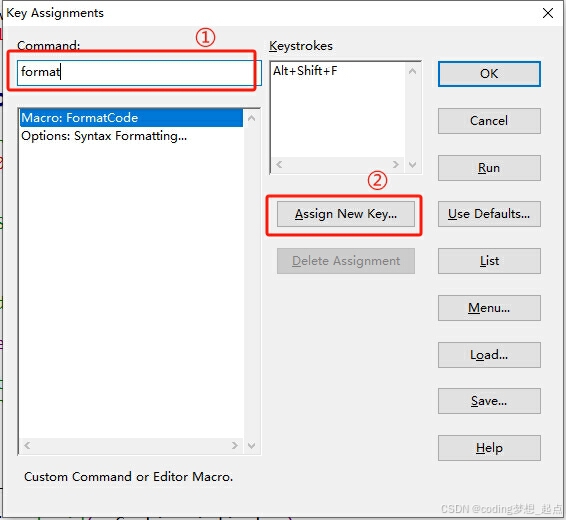
-还是在Base工程,Options->Key Assignments,左边输入FormatCode搜索到,然后点Assign New Key,然后按快捷键(我这里图省事,直接用vscode里面的快捷键),之后点OK保存,至此完成快捷键的设置,关闭Base工程
- 之后在其他工程中就可以选中代码,然后Alt+Shift+F对其进行格式化了





 扫一扫
扫一扫


 1066
1066

 被折叠的 条评论
为什么被折叠?
被折叠的 条评论
为什么被折叠?
 到【灌水乐园】发言





