



概述
Spring MVC的国际化是将Java国际化功能进行了简单的封装和简化的。
在Spring MVC中加载资源属性文件是利用bean(messageSource)告诉Spring MVC框架要将资源属性文件放到哪里。
如:
    <!--配置资源属性文件-->
    <!--如果修改了国际资源化文件需要重启JVM-->
    <bean id="messageSource" class="org.springframework.context.support.ReloadableResourceBundleMessageSource">
        <!--classpath:messages指的是classpath路径下的messages_zh_CN.properties文件和messages_en_US.properties文件-->
        <!--<property name="basename" value="classpath:message"/>-->
        <!--将国际化资源文件放在其他的路径下-->
        <property name="basename" value="/WEB-INF/resource/messages"/>
    </bean>
如果是一组属性文件,则要用到basenames替换basename,例:
    <bean id="messageSource" class="org.springframework.context.support.ReloadableResourceBundleMessageSource">
        <property name="basenames">
            <list>
                <value>/WEB-INF/resource/messages</value>
                <value>/WEB-INF/resource/messages2</value>
            </list>
        </property>
    </bean>
除此之外,还要对语言区域进行解析。
在SpringMVC中可以使用语言区域解析器bean选择语言区域,该bean有3个常见实现,即AcceptHeaderLocaleResolver、SessionLocaleResolver和CookieLocaleResolver。
- AcceptHeaderLocaleResolver:根据浏览器HttpHeader中的accept-language域设定(accept-language域中一般包含了
当前操作系统的语言设定,可通过HttpServletRequest.getLocale方法获得此域的内容)。改变Locale是不支持的,即不能调用LocaleResolver接口的setLocale(HttpServletRequestredquest,HttpServletResponseresponse,Localelocale)方法设置Locale。 - SessionLocaleResolver:根据用户本次会话过程中的语言设定决定语言区域(例如用户进入首页时选择语言种
类,则此次会话周期内统一使用该语言设定)。 - CookieLocaleResolver:根据Cookie判定用户的语言设定(Cookie中保存着用户前一次的语言设定参数)。
使用SessionLocaleResolver实现bean定义:
    <bean id="localeResolver" class="org.springframework.web.servlet.i18n.SessionLocaleResolver">
        <property name="defaultLocale" value="zh_CN"></property>
    </bean>
并且SessionLocaleResolver和CookieLocaleResolver的国际化实现,还要配置LocaleChangeInterceptor拦截器:
    <mvc:interceptors>
        <bean class="org.springframework.web.servlet.i18n.LocaleChangeInterceptor"/>
    </mvc:interceptors>
在SpringMVC框架中使用Spring的message标签在JSP页面显示国际化消息。
在使用message标签时需要在JSP页面指定声明:
<%@ taglib prefix="spring" uri="http://www.springframework.org/tags" %>
message标签的属性如下:
- code:获得国际化消息的key
- arguments:该标签的参数
- argumentSeparator:用来分隔该标签参数的字符,默认为逗号
- text:code属性不存在,或指定的key无法获取消息时所展示的默认文本信息
实例
自由切换语言。
创建Spring MVC项目,按照下图创建文件及文件夹。
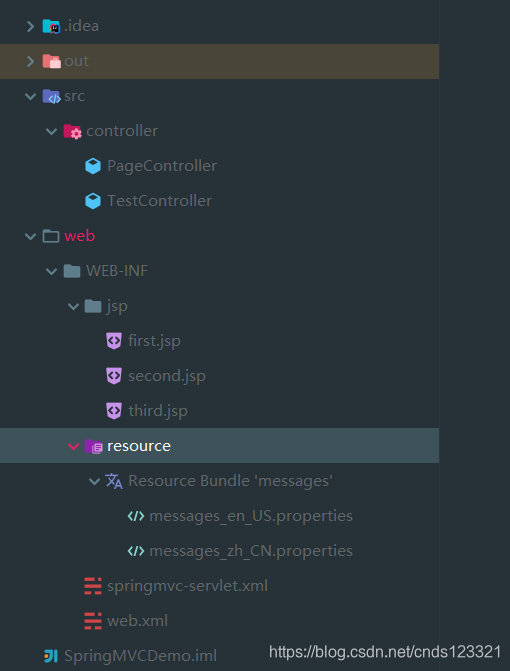
创建国际化资源文件
messages_en_US.properties
first=first
second=second
third={0} third {1}
language.en=English
language.cn=Chinese
messages_zh_CN.properties
first=\u7B2C\u4E00\u9875
second=\u7B2C\u4E8C\u9875
third={0} \u7B2C\u4E09\u9875 {1}
language.en=\u82F1\u6587
language.cn=\u4E2D\u6587
中文为:
first=第一页
second=第二页
third={0} 第三页 {1}
language.en=英文
language.cn=中文
创建JSP视图文件
first.jsp
<%@ taglib prefix="spring" uri="http://www.springframework.org/tags" %>
<%@ page contentType="text/html;charset=UTF-8" language="java" %>
<html>
<head>
    <title><spring:message code="first"/></title>
</head>
<body>
<a href="${pageContext.request.contextPath}/test?locale=zh_CN"><spring:message code="language.cn"/></a>
<a href="${pageContext.request.contextPath}/test?locale=en_US"><spring:message code="language.en"/></a>
<br><br>
<spring:message code="first"/>
<br><br>
<a href="${pageContext.request.contextPath}/toPage/second"><spring:message code="second"/></a>
</body>
</html>
second.jsp
<%@ taglib prefix="spring" uri="http://www.springframework.org/tags" %>
<%@ page contentType="text/html;charset=UTF-8" language="java" %>
<html>
<head>
    <title><spring:message code="second"/></title>
</head>
<body>
    <spring:message code="second"/>
    <br><br>
    <a href="${pageContext.request.contextPath}/toPage/third"><spring:message code="third" arguments="arg1,arg2"/></a>
</body>
</html>
third.jsp
<%@ taglib prefix="spring" uri="http://www.springframework.org/tags" %>
<%@ page contentType="text/html;charset=UTF-8" language="java" %>
<html>
<head>
    <title><spring:message code="third" arguments=","/></title>
</head>
<body>
    <spring:message code="third" arguments="arg1,arg2"/>
    <br><br>
    <a href="${pageContext.request.contextPath}/toPage/first"><spring:message code="first"/></a>
</body>
</html>
创建控制器类
PageController.java
package controller;

import org.springframework.stereotype.Controller;
import org.springframework.web.bind.annotation.RequestMapping;

@Controller
@RequestMapping("/toPage")
public class PageController {
    @RequestMapping("/first")
    public String first(){
        return "first";
    }

    @RequestMapping("/second")
    public String second(){
        return "second";
    }

    @RequestMapping("/third")
    public String third(){
        return "third";
    }
}
TestController.java
package controller;

import org.springframework.stereotype.Controller;
import org.springframework.web.bind.annotation.RequestMapping;

import java.util.Locale;

@Controller
public class TestController {
    @RequestMapping("/test")
    /**
     * locale接收请求参数locale值,并存储到session中
     */
    public String first(Locale locale){
        return "first";
    }
}
创建配置文件
springmvc-servlet.xml
<?xml version="1.0" encoding="UTF-8"?>
<beans xmlns="http://www.springframework.org/schema/beans"
       xmlns:xsi="http://www.w3.org/2001/XMLSchema-instance"
       xmlns:context="http://www.springframework.org/schema/context"
       xmlns:mvc="http://www.springframework.org/schema/mvc"
       xsi:schemaLocation="
    	http://www.springframework.org/schema/beans
    	http://www.springframework.org/schema/beans/spring-beans.xsd
        http://www.springframework.org/schema/context
        http://www.springframework.org/schema/context/spring-context.xsd
        http://www.springframework.org/schema/mvc
        http://www.springframework.org/schema/mvc/spring-mvc.xsd">
    <!-- 使用扫描机制,扫描包 -->
    <context:component-scan base-package="controller"/>
    <!-- 注册格式化转换器,因为用到日期转换-->
    <bean id="conversionService" class="org.springframework.format.support.FormattingConversionServiceFactoryBean"/>
    <mvc:annotation-driven conversion-service="conversionService"/>

    <!--国际化操作拦截器,如果采用基于Session/Cookie则必须配置-->
    <mvc:interceptors>
        <bean class="org.springframework.web.servlet.i18n.LocaleChangeInterceptor"/>
    </mvc:interceptors>
    <!--存储区域设置信息-->
    <bean id="localeResolver" class="org.springframework.web.servlet.i18n.SessionLocaleResolver">
        <property name="defaultLocale" value="zh_CN"/>
    </bean>
    <!--加载国际化资源文件-->
    <!--如果修改了国际资源化文件需要重启JVM-->
    <bean id="messageSource" class="org.springframework.context.support.ReloadableResourceBundleMessageSource">
        <!--classpath:messages指的是classpath路径下的messages_zh_CN.properties文件和messages_en_US.properties文件-->
        <!--<property name="basename" value="classpath:message"/>-->
        <!--将国际化资源文件放在其他的路径下-->
        <property name="basename" value="/WEB-INF/resource/messages"/>
    </bean>

    <!--注册校验器-->
    <bean id="validator" class="org.springframework.validation.beanvalidation.LocalValidatorFactoryBean">
        <!--hibernate校验器-->
        <property name="providerClass" value="org.hibernate.validator.HibernateValidator"/>
        <!--指定校验使用的资源文件,在文件中配置校验错误信息,如果不指定则默认使用-->
        <property name="validationMessageSource" ref="messageSource"/>
    </bean>
    <!--开启Spring的Valid功能-->
    <mvc:annotation-driven conversion-service="conversionService" validator="validator"/>

    <!-- 配置视图解析器 -->
    <bean class="org.springframework.web.servlet.view.InternalResourceViewResolver"
          id="internalResourceViewResolver">
        <!-- 前缀 -->
        <property name="prefix" value="/WEB-INF/jsp/"/>
        <!-- 后缀 -->
        <property name="suffix" value=".jsp"/>
    </bean>
</beans>
web.xml
<?xml version="1.0" encoding="UTF-8"?>
<web-app xmlns:xsi="http://www.w3.org/2001/XMLSchema-instance" xmlns="http://xmlns.jcp.org/xml/ns/javaee" xsi:schemaLocation="http://xmlns.jcp.org/xml/ns/javaee http://xmlns.jcp.org/xml/ns/javaee/web-app_3_1.xsd" id="WebApp_ID" version="3.1">
  <servlet>
    <servlet-name>springmvc</servlet-name>
    <servlet-class>org.springframework.web.servlet.DispatcherServlet</servlet-class>
    <load-on-startup>1</load-on-startup>
  </servlet>
  <servlet-mapping>
    <servlet-name>springmvc</servlet-name>
    <url-pattern>/</url-pattern>
  </servlet-mapping>
  <!-- 避免中文乱码 -->
  <filter>
    <filter-name>characterEncodingFilter</filter-name>
    <filter-class>org.springframework.web.filter.CharacterEncodingFilter</filter-class>
    <init-param>
      <param-name>encoding</param-name>
      <param-value>UTF-8</param-value>
    </init-param>
    <init-param>
      <param-name>forceEncoding</param-name>
      <param-value>true</param-value>
    </init-param>
  </filter>
  <filter-mapping>
    <filter-name>characterEncodingFilter</filter-name>
    <url-pattern>/*</url-pattern>
  </filter-mapping>
</web-app>
运行程序效果如下:
通过地址:http://localhost:8080/toPage/first访问
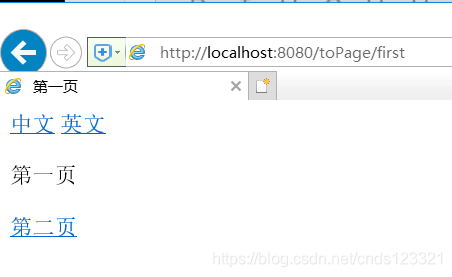
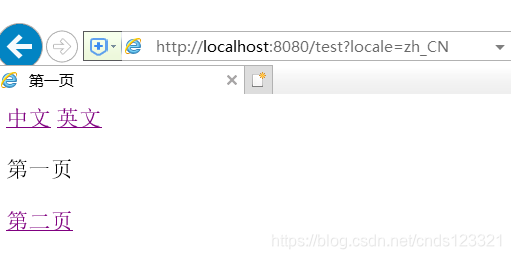
点击【第二页】超链接
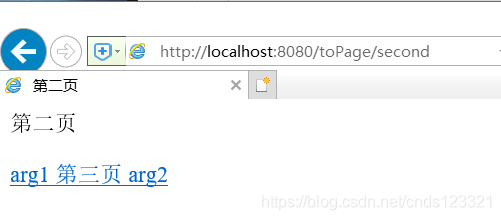
点击【第三页】超链接
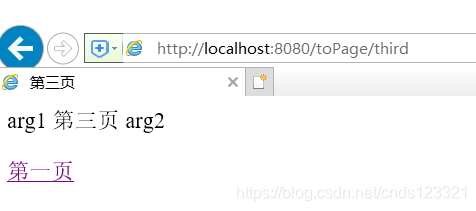
点击【第一页】超链接,回到第一页
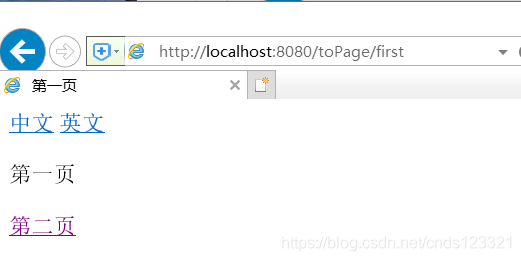
点击【英文】超链接,切换到英文
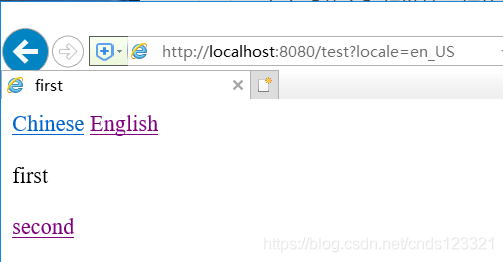
点击【second】超链接,到第二页
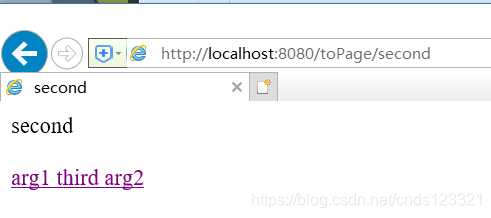
点击【third】超链接,跳转到下一页
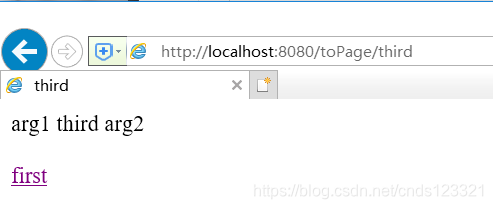
点击【first】超链接,跳转到第一页
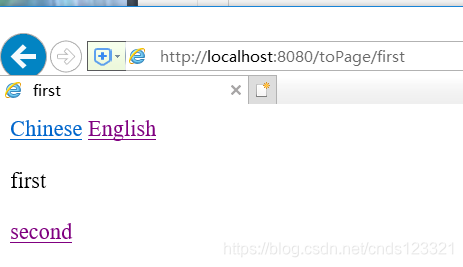
点击【Chinese】超链接,切换成中文状态。
如果对完整源码有兴趣。
可搜索微信公众号【Java实例程序】或者扫描下方二维码关注公众号获取更多。
注意:在公众号后台回复【优快云201911171404】可获取本节源码。





 扫一扫
扫一扫


 1507
1507

 被折叠的 条评论
为什么被折叠?
被折叠的 条评论
为什么被折叠?
 到【灌水乐园】发言





