





学习VUE+Element一周左右,完全小白。。。有错勿喷
下面就是二次封装组件的代码
<template>
    <el-tree :data="optionList" node-key="id" :highligh-tcurrent="highlightcurrent" :props="defaultProps" :show-checkbox="checkbox" :default-expand-all="expandall"
             :api="api" :apimethod="apimethod" :debug="debug" @node-click="NodeClick"
             :default-expanded-keys="expanded" ref="tree3" :Checkedlabel="Checkedlabel" :Checkedid="Checkedid"
             :default-checked-keys="checked"></el-tree>


</template>

<script>
    import request from '@/utils/request'

    export default {
        name: 'Tree3',
        //定义控件参数
        props: {
            data: {
                type: Array,
                //default:[]
            },
            Checkedlabel: {
                type: String
            },
            Checkedid: {
                type: String
            },
            highlightcurrent: {//:highligh-tcurrent 开启选中样式 后面增加2个css样式
                type: Boolean,
                default: true
            },
            //ref: {
            //    type: String,//"ref" is a reserved attribute and cannot be used as component prop.
            //    //default:[]
            //},
            //key: {//"key" is a reserved attribute and cannot be used as component prop.
            //    type: String,
            //    default: 'id'
            //},
            //defaultProps: {
            //    type: Object,
            //    //default: {
            //    //    label: 'label',
            //    //    children: 'children',
            //    //    disabled: 'disabled'
            //    //}
            //},//绑定值变量
            api: String,//apiurl
            apimethod: {//get/post
                type: String,
                default: "get"//默认get
            },
            debug: {//debug//console输出 选择值 数据源 等
                type: Boolean,
                default: false//默认不禁用
            },
            expandall: {//全部展开
                type: Boolean,
                default: true
            },
            expanded: {//指定展开
                type: Array,
                default: null
            },
            checked: {//指定选中
                type: Array,
                default: null
            },
            checkbox: {//复选框
                type: Boolean,
                default: false
            },
        },
        data() {
            return {
                isdebug: this.debug,
                defaultProps: {
                    children: 'children',
                    label: 'label'
                },
                //接收props参数的值,注:名称不能重复 否则会异常【error  Duplicated key 'api'  vue/no-dupe-keys】
                TreeData: [],
                optionList: [],
            };
        },
        methods: {
            NodeClick(data) {
                if (this.debug) {
                    console.log("选择的值类型:", typeof (data))
                    console.log("选择的值:", data);
                }
                //this.checked = data.id
                this.$emit('NodeClick', data)
                //this.$emit('NodeClick', data.id)
                //子组件向父组件传值 子组件需要定义 绑定方法 v-on:NodeClick="NodeClick"   ||   @NodeClick="NodeClick"

            },
            //递归组装children
            changeTree(parentID) {
                if (this.isdebug) {
                    console.log('children:' + parentID);
                    console.log(this.TreeData.filter(a => a.parentID == parentID).length);
                }
                //递归删除末级空的children
                let arr = [];
                if (this.TreeData.filter(a => a.parentID == parentID).length > 0) {
                    this.TreeData.filter(a => a.parentID == parentID).forEach((item) => {
                        let obj = {};
                        obj.label = item.name;
                        obj.id = item.id;
                        if (this.TreeData.filter(a => a.parentID == item.id).length > 0) {
                            obj.children = this.changeTree(item.id);
                        }
                        arr.push(obj);
                    });
                }

                return arr;
            },
            //初始化api
            ApiInit() {
                if (this.isdebug)
                    console.log("this.api:", this.api);

                if (this.api != null) {
                    request({
                        url: this.api,// 还可以直接把参数拼接在url后边
                        method: this.apimethod,
                        //params: {
                        //    Name: ''//参数
                        //}
                    }).then(response => {//这个地方如果要访问this.XXXX 必须用res=> {}方式
                        this.TreeData = response.data;

                        if (this.isdebug)
                            console.log("data:", this.TreeData.length);

                        const guid = '00000000-0000-0000-0000-000000000000';
                        this.optionList = this.changeTree(guid)

                        if (this.isdebug)
                            console.log("Tree:", this.optionList);

                    }).catch(function (error) {
                        this.optionList = [{ label: '数据异常', id: '' }]

                        if (this.isdebug)
                            console.log(error);
                    });
                }
            }
        },
        // created 在模板渲染成html前调用,即通常初始化某些属性值,然后再渲染成视图
        created() {
            this.ApiInit();
        }
    };
</script>

<style>
    /*选中的时候的背景颜色*/
    .is-current > .el-tree-node__content {
        background: #ccc;
        position: relative;
    }
        /*左侧蓝条*/
        .is-current > .el-tree-node__content::before {
            content: "";
            position: absolute;
            width: 3px;
            height: 100%;
            background: #1989FA;
            top: 0;
            left: 0;
        }
        /*选择的时候的背景颜色*/
    .el-tree-node:focus > .el-tree-node__content {
        background-color: #ccc !important;
    }
</style>
VUE页面下的调用
<el-card shadow="never" class="body-small fh filter-item" style="overflow: auto;height:500px;">
                    <div slot="header" class="clearfix">
                        <el-button type="text" @click="getCheckedNodes">通过 node 获取</el-button>
                        <el-button type="text" @click="getCheckedKeys">通过 key 获取</el-button>
                        <el-button type="text" @click="setCheckedNodes">通过 node 设置</el-button>
                        <el-button type="text" @click="setCheckedKeys">通过 key 设置</el-button>
                        <el-button type="text" @click="resetChecked">清空</el-button>
                    </div>
                    <Tree3 ref="tree" :api="'/AreaInfos/LoadCascaderData'" :debug="false" :expandall="true"
                           @NodeClick="NodeClick" :checked="checked"></Tree3>

                </el-card>
数据源

原本子组件里没有写ref的时候调用getCheckedNodes getCheckedKeys setCheckedNodes setCheckedKeys resetChecked,会异常

于是console.log("this.$refs.tree", this.$refs.tree);
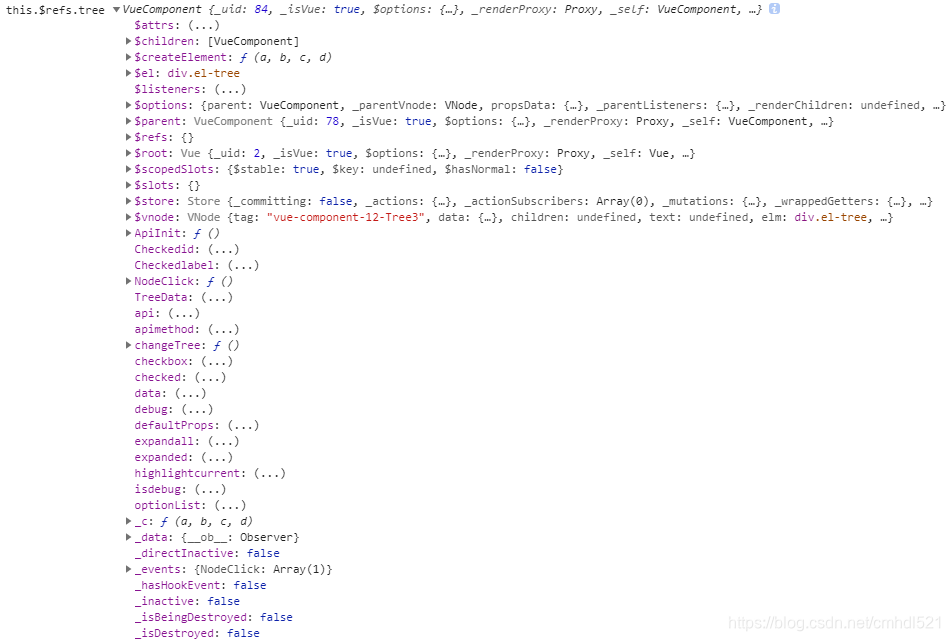
完全没有官方给的getCheckedNodes getCheckedKeys setCheckedNodes setCheckedKeys resetChecked
猜想可能是子组件的问题,想着调用选择节点的方法,this.$emit('NodeClick', data) 也是需要子组件向父组件传值,估计是没有把对应的属性方法返回回来
于是加入了ref='tree3',再输出,出现了tree3
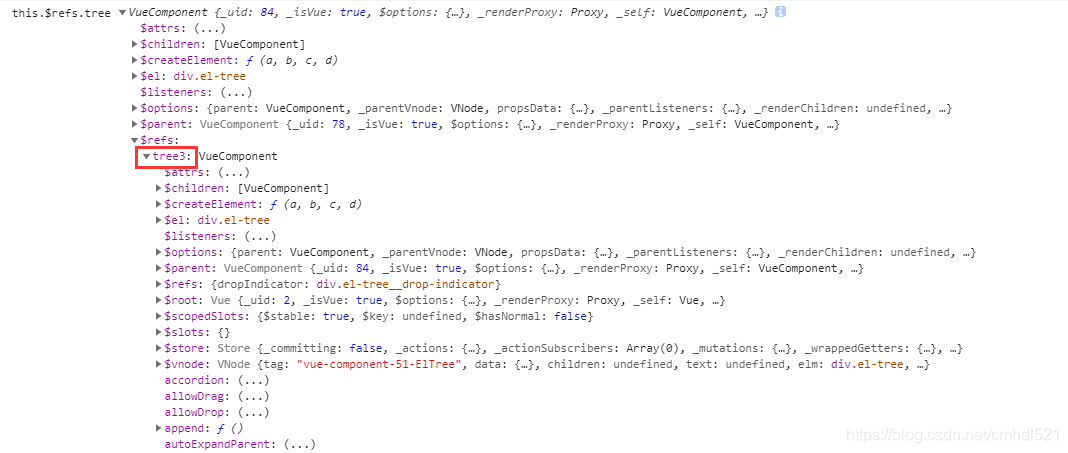
而且对应的方法都出现了。
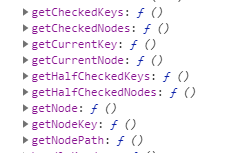

于是调用的方式多了一点
getCheckedNodes() {
                console.log("this.$refs.tree", this.$refs.tree);
                //console.log("this.$refs.tree.getCheckedNodes()", this.$refs.tree.getCheckedNodes());

                let node = this.$refs.tree.$refs.tree3.getCheckedNodes()

                console.log("node", node);

                console.log("id", node[0].id);
                console.log("label", node[0].label);
                console.log("children", node[0].children);
            },
            getCheckedKeys() {
                console.log("getCheckedKeys()", this.$refs.tree.$refs.tree.getCheckedKeys());
                this.$refs.tree.$refs.tree.getCheckedKeys()
            },
            setCheckedNodes() {
                this.$refs.tree.$refs.tree.setCheckedNodes([{
                    id: '3BB7B9E3-2586-426D-850B-37F6F8E0A5F2',
                    label: '北碚区'
                }]);
            },
            setCheckedKeys() {
                this.$refs.tree.$refs.tree.setCheckedKeys(['3BB7B9E3-2586-426D-850B-37F6F8E0A5F2']);
            },
            resetChecked() {
                this.$refs.tree.$refs.tree.setCheckedKeys([]);
            },
            NodeClick: function (data) {
                console.log("data.id", data.id);
            },
在data里写好的checked: ["64BE3941-5359-4323-8969-2F4A706237F8"] 则自动绑定默认选项,对应的属性就是:default-checked-keys
上面set的几个方法、默认值赋值,都必须要把:show-checkbox(复选框)打开(本子组件是:checkbox="true"),如果没有打开复选框,则是看不到选中的结果,但是get方法输出出来的确是选中对应的值。
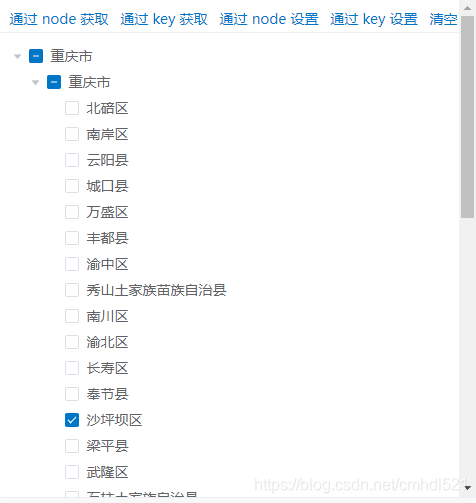
尝试性的解决了。。。还有很多都没弄明白。。。突然转前端真心有点恶心。





 扫一扫
扫一扫


 636
636

 被折叠的 条评论
为什么被折叠?
被折叠的 条评论
为什么被折叠?
 到【灌水乐园】发言





