



 本文介绍如何使用.NET框架中的Microsoft.Office.Interop.Word库来创建、编辑并保存Word文档。通过示例代码展示了添加引用、设置应用程序可见性、新建文档、插入文本、保存及关闭文档和应用程序的完整流程。
[编程语言][.NET Office][Word].NET打开/保存/关闭Word文档
添加引用
-
在项目中添加引用Microsoft.Office.Interop.Word。
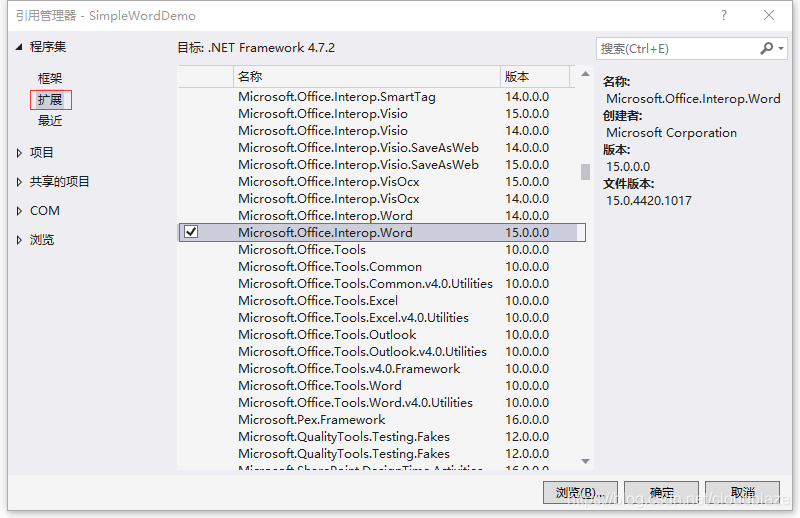
-
设置其“嵌入互操作类型”属性为False。
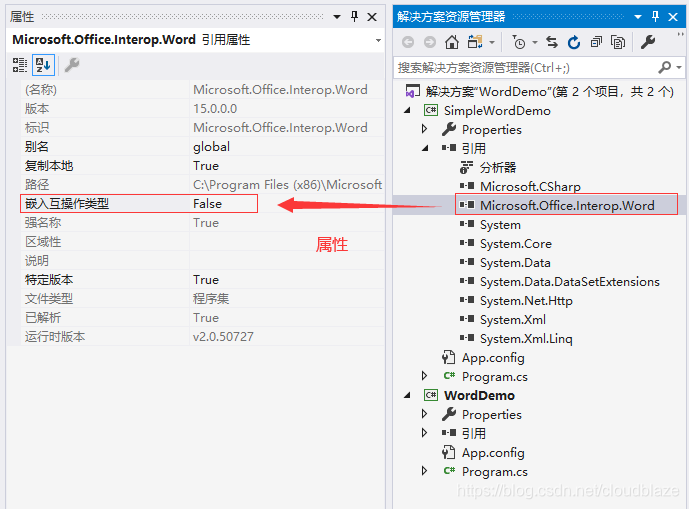
-
引用命名空间。
using MSWord = Microsoft.Office.Interop.Word;
打开Word应用程序
MSWord.ApplicationClass wordApplication = new MSWord.ApplicationClass();
// 设置应用程序可见
wordApplication.Visible = true;
新建Word文档
MSWord.Document wordDocument = wordApplication.Documents.Add();
添加文本
wordDocument.Content.InsertAfter("这是一个测试信息!");
保存文档
object path = @"D:\temp.docx";
wordDocument.SaveAs2(ref path, MSWord.WdSaveFormat.wdFormatDocumentDefault);
关闭Word文档
wordDocument.Close();
关闭Word应用程序
wordApplication.Quit();
代码示例
using MSWord = Microsoft.Office.Interop.Word;

namespace SimpleWordDemo
{
       class Program
       {
              static void Main(string[] args)
              {
                     MSWord.ApplicationClass wordApplication = new MSWord.ApplicationClass();
                     wordApplication.Visible = true;

                     MSWord.Document wordDocument = wordApplication.Documents.Add();

                     wordDocument.Content.InsertAfter("这是一个测试信息!");

                     object path = @"D:\temp.docx";
                     wordDocument.SaveAs2(ref path, MSWord.WdSaveFormat.wdFormatDocumentDefault);

                     wordDocument.Close();

                     wordApplication.Quit();
              }
       }
}





 扫一扫
扫一扫


 644
644

 被折叠的 条评论
为什么被折叠?
被折叠的 条评论
为什么被折叠?
 到【灌水乐园】发言





