



 本文解决了一个常见的Android Studio编译错误——Unknown host ‘dl.google.com’。通过修改app/build.gradle文件中的URL从https://maven.google.com/更改为https://dl.google.com/dl/android/maven2,并更新Ubuntu系统的hosts文件,将dl.google.com指向IP地址203.208.40.36,成功解决了该问题。
这个问题没有能直接解决…
解决方案:
app/build.gradle 原代码:
// Top-level build file where you can add configuration options common to all sub-projects/modules.
buildscript {
    repositories {
        maven {
            url 'https://maven.google.com/'
            name 'Google'
        }
    }

    dependencies {
        ...
    }
}
allprojects {

    repositories {
        maven {
            url 'https://maven.google.com/'
            name 'Google'
        }
    }
}
第一步:更改 url
// Top-level build file where you can add configuration options common to all sub-projects/modules.
buildscript {
    repositories {
        maven {
            url 'https://dl.google.com/dl/android/maven2'
            name 'Google'
        }
    }

    dependencies {
        ...
    }
}
allprojects {

    repositories {
        maven {
            url 'https://dl.google.com/dl/android/maven2'
            name 'Google'
        }
    }
}
第二部,更改 hosts 文件 (Ubuntu 系统文件路径:/etc/hosts)
sudo gedit /etc/hosts
写入:203.208.40.36 dl.google.com
写入后的 hosts 文件:
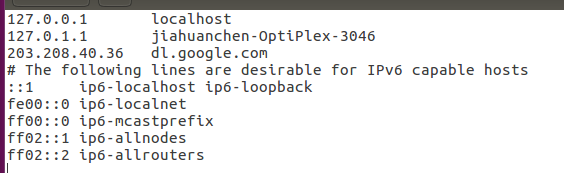
重新编译,搞定!!!
附上参考博客:AndroidStudio编译时Unknown host ‘dl.google.com’. You may need to adjust the proxy settings





 扫一扫
扫一扫


 2619
2619

 被折叠的 条评论
为什么被折叠?
被折叠的 条评论
为什么被折叠?
 到【灌水乐园】发言





