


 该文详细阐述了如何在Django中处理不同Content-Type的请求数据。对于application/x-www-form-urlencoded的表单数据,可通过request.POST获取,如`a=request.POST.get(a)`。而对于JSON格式(application/json)或文件(multipart/form-data)的数据,需使用request.body,如`json_result=json.loads(request.body)`,展示了如何解析JSON数据。
表单数据:Content-Type(请求头)为application/x-www-form-urlencoded的数据。
用request.POST获取
a = request.POST.get('a')
a = request.POST['a']
alist = request.POST.getlist('a')
非表单数据:Content-Type(请求头)为非application/x-www-form-urlencoded的数据。
-
非表单数据---json格式:Content-Type(请求头)为application/json
-
非表单数据---文件格式:Content-Type(请求头)为multipart/form-data
用request.body获取
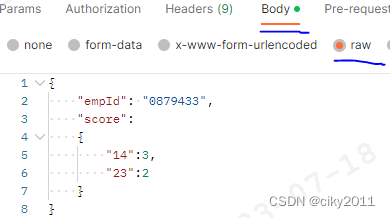
如Postman配置如下:
views.py解析requst.body
def set_score(request):
    json_result = json.loads(request.body)

# json_result为{'empId': '0879433', 'score': {'14': 3, '23': 2}}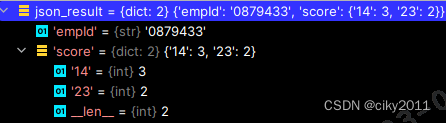
参考文章:Django request.POST 、 request.body 、request.data使用_蓝绿色~菠菜的博客-优快云博客





 扫一扫
扫一扫


 882
882

 被折叠的 条评论
为什么被折叠?
被折叠的 条评论
为什么被折叠?
 到【灌水乐园】发言





