import javafx.application.Application
import javafx.geometry.Pos
import tornadofx.*

fun main() = Application.launch(TestApp::class.java)
class TestApp : App(TestView::class)
class TestView : View("Learn") {
    val maxDepth = intProperty(1)
    val sliderr = intProperty(1)
    val oldValuee = intProperty(0)

    override val root = vbox(10) {
        prefHeight = 200.0
        prefWidth = 250.0
        alignment = Pos.CENTER
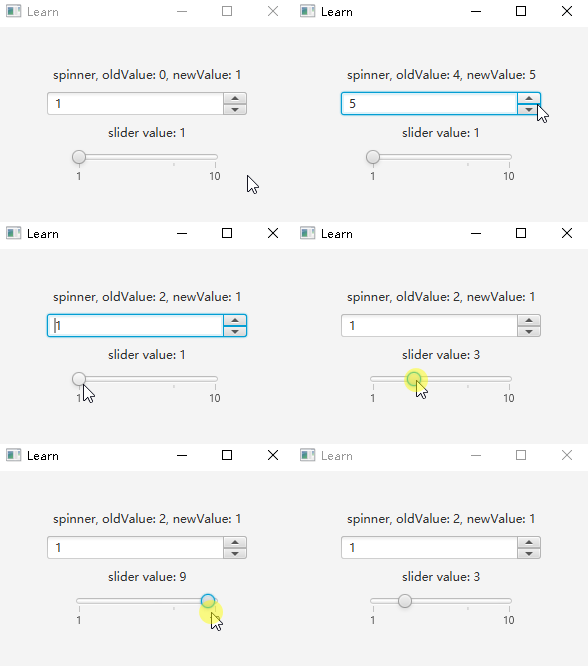
        label(maxDepth.stringBinding{"spinner, oldValue: ${oldValuee.value}, newValue: ${maxDepth.value}"})
        spinner(1, 10, 4, 1, true, maxDepth) {
            minWidth = 200.0
            valueProperty().addListener { _, oldValue, newValue ->
                oldValuee.value=oldValue.toInt()

            }
        }

        label(sliderr.stringBinding { "slider value: $it" })
        slider(1,10,4){
            maxWidth = 150.0
            isShowTickLabels = true
            isShowTickMarks = true
            valueProperty().bindBidirectional(sliderr)
            valueProperty().addListener { _, oldValue, newValue ->
                println("oldValue: ${oldValue.toInt()}, newValue: ${newValue.toInt()}")
            }
        }
    }
}


 本文介绍了一个使用 JavaFX 创建的简单用户界面示例,包括 Spinner 和 Slider 控件的使用,展示了如何通过属性绑定和监听器来实现 UI 的动态更新。





 扫一扫
扫一扫


 851
851

 被折叠的 条评论
为什么被折叠?
被折叠的 条评论
为什么被折叠?
 到【灌水乐园】发言





