


 本文介绍了PHP中字符串的基本概念及连接方式,演示了如何处理HTML表单数据,包括换行符、HTML标签的安全处理,以及字符串编码和解码。
字符串是PHP的最常用的变量类型之一,是由单引号或者双引号括起来的一系列字符。一个字符串变量可以包含一个字母,一个单词,一个句子,一个段落,HTML代码,甚至是一些没有意义的字符、数字和符号。
字符串连接
PHP字符串连接主要用三种方式,
第一种使用句号(.)连接;
$str1="hello, ";
$str2="world";
$str3=$str1.$str2//hello, world
第二种是变量连接方式
$str1="hello, ";
$str2="world";
$str3="$str1$str2";//hello, world;
第三种是采用赋值运算符连接:
$str="hello, "
$str.=“world”//hello, world
HTML代码
<!DOCTYPE html>
<html>
<head>
	<meta charset="utf-8">
	<meta http-equiv="X-UA-Compatible" content="IE=edge">
	<title></title>
	<link rel="stylesheet" href="">
</head>
<body>
	<div><p>Please complete this form to submit your posting:</p>

<form action="price_menu.php" method="post">

	<p>First Name: <input type="text" name="first_name" size="20" /></p>

	<p>Last Name: <input type="text" name="last_name" size="20" /></p>

	<p>Email Address: <input type="text" name="email" size="30" /></p>

	<p>Posting: <textarea name="posting" rows="9" cols="30"></textarea></p>

	<input type="submit" name="submit" value="Send My Posting" />

</form>
</body>
</html>
PHP代码:
<!DOCTYPE html>
<html>
<head>
	<meta charset="utf-8">
	<meta http-equiv="X-UA-Compatible" content="IE=edge">
	<title></title>
	<link rel="stylesheet" href="">
</head>
<body>
	  <?php
      $first_name=$_POST['first_name'];
      $last_name=$_POST['last_name'];
      $email=$_POST['email'];
      $posting=$_POST['posting'];
     $name=$last_name.$first_name
print "<p>你的姓名是:$name</p> <p>你的邮箱是:$email</p> <p>你的留言是:$posting</p>" ;?> </body> </html> 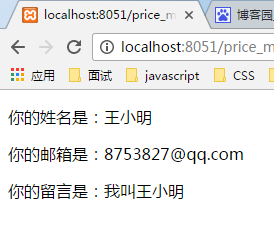
处理换行符
如果要让用户输入的文档段落在服务器中保持一致,使用nl2br()函数,$val=nl2br($val),$va是要换行的函数l
<!DOCTYPE html>
<html>
<head>
	<meta charset="utf-8">
	<meta http-equiv="X-UA-Compatible" content="IE=edge">
	<title></title>
	<link rel="stylesheet" href="">
</head>
<body>
	  <?php
      $first_name=$_POST['first_name'];
      $last_name=$_POST['last_name'];
      $name=$last_name." ".$first_name;
      $email=$_POST['email'];
      $posting=nl2br($_POST['posting']);
      print "<p>你的姓名是:$name</p>
              <p>你的邮箱是:$email</p>
              <p>你的留言是:$posting</p>"
	  ;?>

</body>
</html> 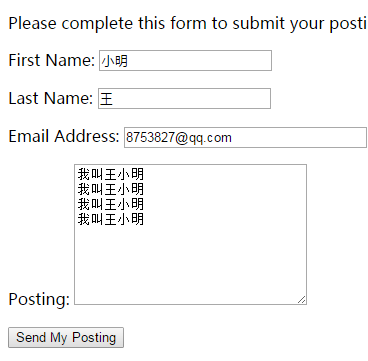
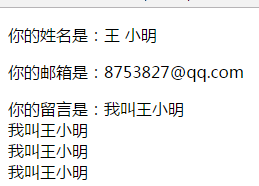
还可以通过在要换行的字符串之间插入换行符(\n)来设置换行
也可以是用HTML的P标签进行换行
处理PHP字符串变量中的HTML标签
PHP是用来想浏览器发送数据的后端技术,发送的数据既可以是文本,也可以是HTML标签。,或者二者皆可。但是如果发送HTML标签,可能会破坏页面格式,或者引发安全问题(防止黑客通过表单提交JavaScript代码,使用跨站点脚本方式(cross-site scripting,XSS)攻击服务器)。所以PHP提供了用于处理PHP变量中的HTML标签的函数。
htmlspecialcharts()将特定的HTML标签转换为实体文本;
htmlentities()将所有的HTML转换成实体版本;
strip_tags()移除所有的HTML标签和PHP标签
html_entity_decode()将所有实体的HTML标签转换成相应的HTML标签
wordwrap()向浏览器输出字符串,按照指定的长度折行处理字符串。
HTNL标签:
<!DOCTYPE html>
<html>
<head>
	<meta charset="utf-8">
	<meta http-equiv="X-UA-Compatible" content="IE=edge">
	<title></title>
	<link rel="stylesheet" href="">
</head>
<body>
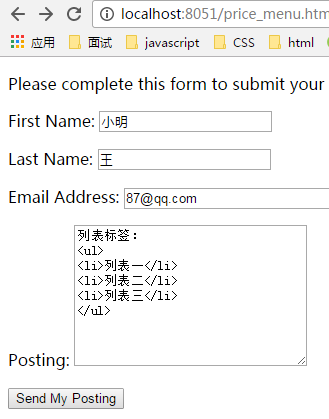
	<div><p>Please complete this form to submit your posting:</p>

<form action="price_menu.php" method="post">

	<p>First Name: <input type="text" name="first_name" size="20" /></p>

	<p>Last Name: <input type="text" name="last_name" size="20" /></p>

	<p>Email Address: <input type="text" name="email" size="30" /></p>

	<p>Posting: <textarea name="posting" rows="9" cols="30"></textarea></p>

	<input type="submit" name="submit" value="Send My Posting" />

</form>
</body>
</html>
PHP代码:
<!DOCTYPE html>
<html>
<head>
	<meta charset="utf-8">
	<meta http-equiv="X-UA-Compatible" content="IE=edge">
	<title></title>
	<link rel="stylesheet" href="">
</head>
<body>
	  <?php
      $first_name=$_POST['first_name'];
      $last_name=$_POST['last_name'];
      $name=$last_name." ".$first_name;
      $posting=$_POST['posting'];
      $email=$_POST['email'];
      $posting=nl2br($posting);
      $html_post=htmlentities($_POST['posting']);
      $strip_post=strip_tags($_POST['posting']);
      print "<p>你的姓名是:$name</p>
              <p>你的邮箱是:$email</p>
              <p>你的留言是:$posting</p>
              <P>将所有HTML标签转换成实体:$html_post</P>
               <p>移除所有HTML标签:$strip_post</p>
              "
	  ;?>

</body>
</html>
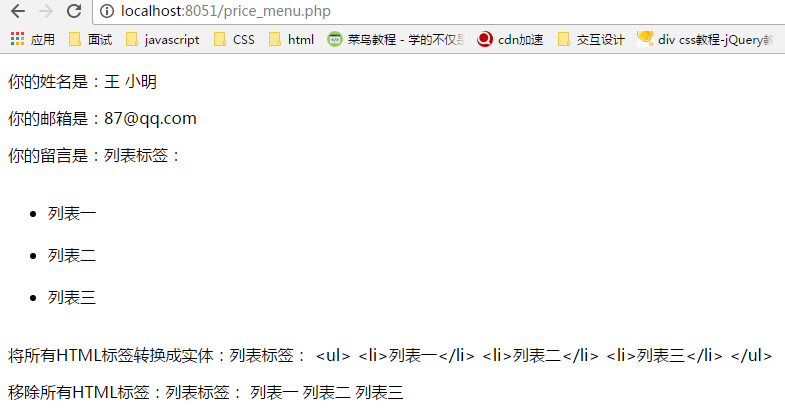
输出结果
字符串和字符编码和解码
通过url发送到接收的脚本只能传递一个单词,且不能带有空格和标点。所以如果传递含有多个词的变量或特殊字符时可以使用urlencode()函数,该函数可以通过URL安全地向PHP脚本传递任意值。urlencode()接受一个字符串,并对之编码,以便它完全适合作为url的一部分传输。这个函数用+号代替空格,并将特殊字符转换为较少出现问题的形式。
$string=urlencode($string);





 扫一扫
扫一扫


 186
186

 被折叠的 条评论
为什么被折叠?
被折叠的 条评论
为什么被折叠?
 到【灌水乐园】发言





