


 本文介绍如何在CentOS 6.8上安装和配置Cobbler进行自动化部署。包括安装Cobbler及其组件、配置各项参数、启动所需服务等步骤,并解决配置中可能出现的问题。
1.概述
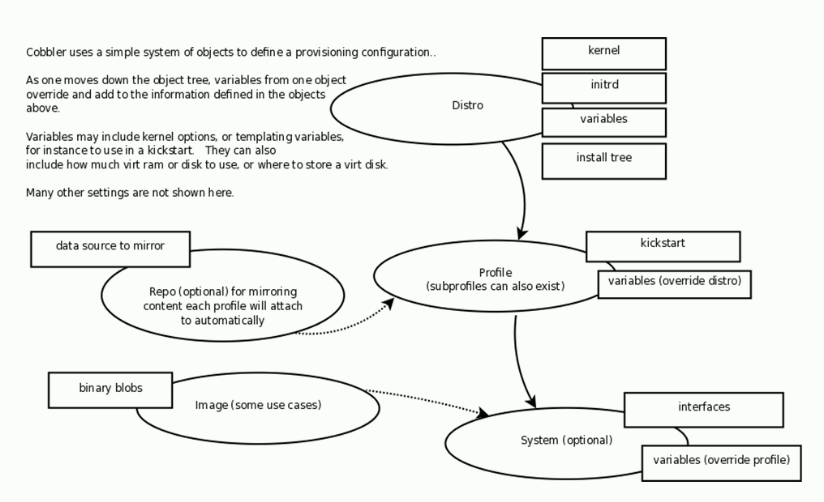
Distros 定义外部内核文件和init,import内部
Profiles 定义安装配置,指定kickstart文件和lab
Repos 管理镜像
2.安装和配置cobbler
| centos6.8 | 192.168.195.213 |
安装
# 安装yum源,yum源连接:dl.fedoraproject.org/pub/epel/
[root@localhost ~]# rpm -ivh http://dl.fedoraproject.org/pub/epel/6/x86_64/epel-release-6-8.noarch.rpm
[root@localhost ~]# yum list all cobbler
已加载插件:fastestmirror
Loading mirror speeds from cached hostfile
 * base: mirrors.163.com
 * epel: mirrors.tuna.tsinghua.edu.cn
 * extras: mirrors.163.com
 * updates: mirrors.cn99.com
已安装的软件包
cobbler.x86_64                   2.6.11-1.el6                               @epel
# 安装cobbler组件
[root@localhost ~]# yum -y install cobbler httpd cobbler-web debmirror pykickstart
启动
[root@localhost cobbler]# service httpd start
正在启动 httpd:
[root@localhost cobbler]# service cobblerd start
Starting cobbler daemon:                                   [确定]
[root@localhost cobbler]# ss -tuanlp | grep cobbler
tcp    LISTEN     0      5              127.0.0.1:25151                 *:*      users:(("cobblerd",1490,8))
配置
# 检查cobbler配置
[root@localhost cobbler]# cobbler check
The following are potential configuration items that you may want to fix:

1 : The 'server' field in /etc/cobbler/settings must be set to something other than localhost, or kickstarting features will not work.  This should be a resolvable hostname or IP for the boot server as reachable by all machines that will use it.
2 : For PXE to be functional, the 'next_server' field in /etc/cobbler/settings must be set to something other than 127.0.0.1, and should match the IP of the boot server on the PXE network.
3 : change 'disable' to 'no' in /etc/xinetd.d/tftp
4 : some network boot-loaders are missing from /var/lib/cobbler/loaders, you may run 'cobbler get-loaders' to download them, or, if you only want to handle x86/x86_64 netbooting, you may ensure that you have installed a *recent* version of the syslinux package installed and can ignore this message entirely.  Files in this directory, should you want to support all architectures, should include pxelinux.0, menu.c32, elilo.efi, and yaboot. The 'cobbler get-loaders' command is the easiest way to resolve these requirements.
5 : change 'disable' to 'no' in /etc/xinetd.d/rsync
6 : file /etc/xinetd.d/rsync does not exist
7 : since iptables may be running, ensure 69, 80/443, and 25151 are unblocked
8 : comment out 'dists' on /etc/debmirror.conf for proper debian support
9 : comment out 'arches' on /etc/debmirror.conf for proper debian support
10 : The default password used by the sample templates for newly installed machines (default_password_crypted in /etc/cobbler/settings) is still set to 'cobbler' and should be changed, try: "openssl passwd -1 -salt 'random-phrase-here' 'your-password-here'" to generate new one
11 : fencing tools were not found, and are required to use the (optional) power management features. install cman or fence-agents to use them

Restart cobblerd and then run 'cobbler sync' to apply changes.
# 更改响应配置
[root@localhost cobbler]# vim /etc/cobbler/settings
server: 192.168.195.213
next_server: 192.168.195.213
[root@localhost cobbler]# vim /etc/xinetd.d/tftp
disable                 = no
[root@localhost cobbler]# cobbler get-loaders # 需要联网
[root@localhost cobbler]# vim /etc/xinetd.d/rsync
disable = no
[root@localhost cobbler]# cobbler sync
[root@localhost cobbler]# service iptables stop
[root@localhost cobbler]# vim /etc/debmirror.conf
#@dists="sid";
#@arches="i386";
[root@localhost cobbler]# openssl passwd -1 -salt 'openssl rand -hex 4'
Password:
$1$openssl $rALaBX04PfE0AZemCjcoy1
[root@localhost cobbler]# vim /etc/cobbler/settings
default_password_crypted: "$1$openssl $rALaBX04PfE0AZemCjcoy1"
[root@localhost cobbler]# yum -y install cman fence-agents
# 重启cobblerd
[root@localhost cobbler]# service cobblerd restart
Stopping cobbler daemon:                                   [确定]
Starting cobbler daemon:                                   [确定]
[root@localhost cobbler]# cobbler check
The following are potential configuration items that you may want to fix:

1 : file /etc/xinetd.d/rsync does not exist

Restart cobblerd and then run 'cobbler sync' to apply changes.
3.配置及启动cobbler所依赖的服务
[root@localhost ~]# cd /etc/cobbler/
[root@localhost cobbler]# vim settings
manage_dhcp: 0
manage_dns: 0
# 默认为0 不需要cobbler管理,改为1cobbler管理modules下定义的dns dhcp服务
[root@localhost cobbler]# vim modules.conf
这里独立管理,不通过cobbler管理dhcp、tftp、rsync及dns服务
[root@localhost dhcp]# yum -y install dhcp
[root@localhost dhcp]# rpm -q tftp-server
tftp-server-0.49-8.el6.x86_64
# 配置dhcp服务
[root@localhost dhcp]# cd /etc/dhcp/
[root@localhost dhcp]# cp /usr/share/doc/dhcp-4.1.1/dhcpd.conf.sample ./dhcpd.conf
cp:是否覆盖"./dhcpd.conf"? y
[root@localhost dhcp]# vim dhcpd.conf
option domain-name "test.com";
option domain-name-servers 192.168.10.254 172.16.0.1;

default-lease-time 43200;
max-lease-time 86400;
subnet 192.168.10.0 netmask 255.255.255.0 {
        range 192.168.10.21 192.168.10.100;
        option routers 192.168.10.254;
}
# 命令行模式下:,.$d
# 删除余下
1:10





 扫一扫
扫一扫


 3118
3118

 被折叠的 条评论
为什么被折叠?
被折叠的 条评论
为什么被折叠?
 到【灌水乐园】发言





