


💰 前言:完全免费的API服务
在现代电商、零售、库存管理等场景中,通过条形码快速获取商品信息是一个非常常见的需求。今天为大家介绍一个完全免费、功能强大、调用简单的条形码查询API接口,帮助开发者零成本轻松实现商品信息查询功能。
🎉 重点提醒:本API完全免费使用,无需任何费用,已为众多开发者节省了大量的开发成本!
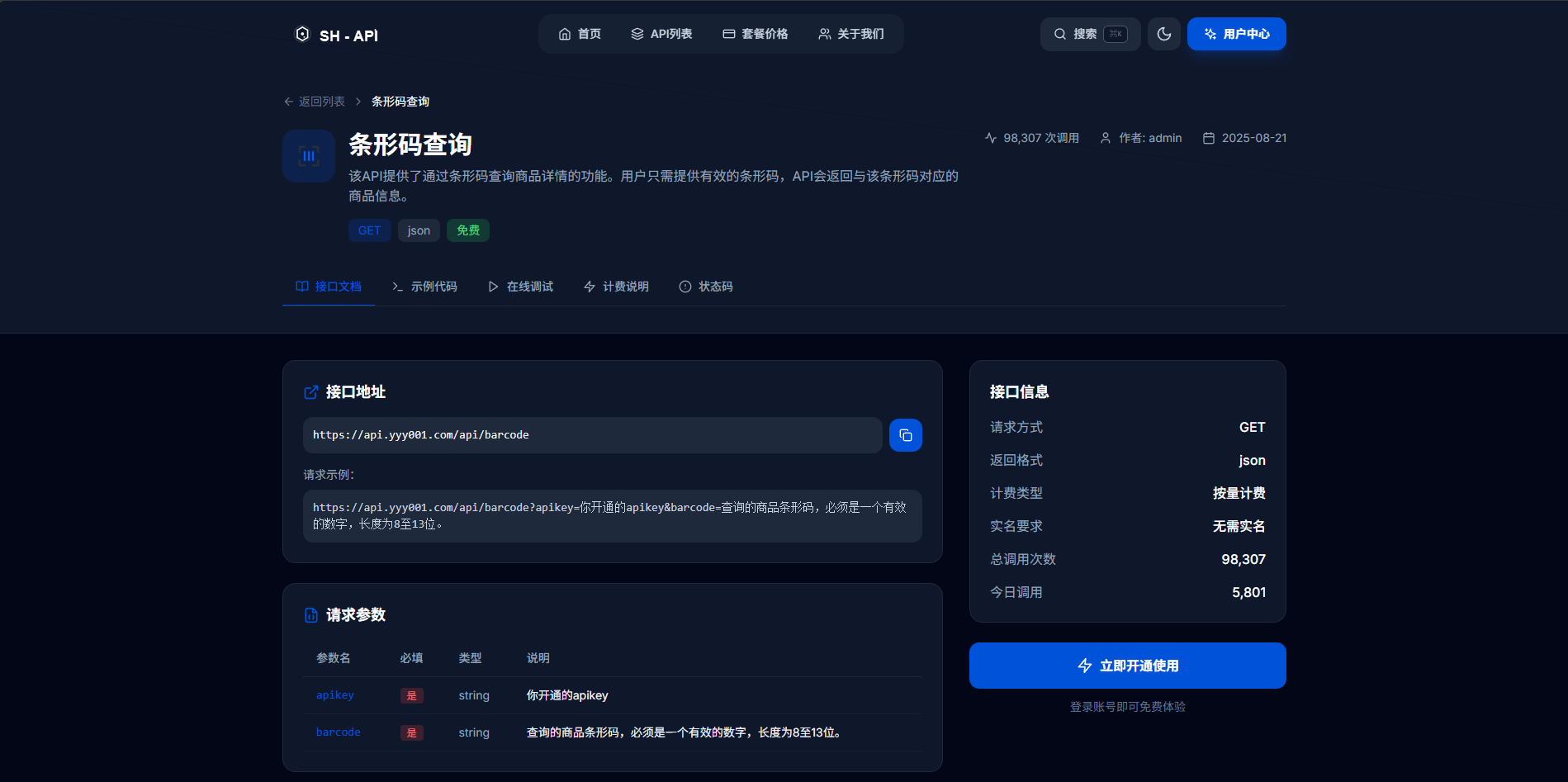
API概述
🆓 基本信息(完全免费)
- 接口地址:
https://api.yyy001.com/api/barcode - 请求方式:GET
- 数据格式:JSON
- 💰 收费模式:完全免费使用,零成本接入
- 📊 调用统计:已免费服务92,657次调用
- 提供商:山海云端API (yyy001.com)
⚡ 成本优势:相比其他收费API服务,使用本接口可为您的项目节省数千元的接口费用!
🎯 核心功能(免费享受)
该API能够根据商品条形码(8-13位数字)快速查询到对应的商品详细信息,包括商品名称、价格、品牌、供应商、规格等关键数据。完全免费,无任何隐藏费用。
💎 免费服务包含:
- ✅ 无限次API调用(完全免费)
- ✅ 丰富的商品信息数据
- ✅ 高速响应,毫秒级查询
- ✅ 稳定可靠的服务保障
- ✅ 无需注册费、月费或年费
接口详细说明
请求地址
https://api.yyy001.com/api/barcode
请求参数
| 参数名 | 必填 | 类型 | 说明 |
|---|---|---|---|
| apikey | 是 | string | 开通的API密钥 |
| barcode | 是 | string | 商品条形码,8-13位有效数字 |
完整请求示例
https://api.yyy001.com/api/barcode?apikey=你的apikey&barcode=6902538005141
返回参数说明
| 参数名 | 类型 | 说明 |
|---|---|---|
| code | int | 状态码,1表示成功 |
| msg | string | 返回信息描述 |
| data | object | 商品详细信息对象 |
| data.goodsName | string | 商品名称 |
| data.barcode | string | 商品条形码 |
| data.price | string | 商品价格 |
| data.brand | string | 商品品牌 |
| data.supplier | string | 供应商信息 |
| data.standard | string | 商品规格 |
| tips | string | API提供商信息 |
返回示例
{
  "code": 1,
  "msg": "数据返回成功!",
  "data": {
    "goodsName": "脉动维生素饮料(水蜜桃口味)600ml",
    "barcode": "6902538005141",
    "price": "3.80",
    "brand": "达能",
    "supplier": "达能(中国)食品饮料有限公司",
    "standard": "600ml"
  },
  "tips": "山海云端API:yyy001.com"
}
多语言调用示例
JavaScript/jQuery 调用
function queryBarcode(barcode) {
    const apikey = '你的apikey';
    const apiUrl = `https://api.yyy001.com/api/barcode?apikey=${apikey}&barcode=${barcode}`;

    $.get(apiUrl, function(response) {
        if (response.code === 1) {
            console.log('商品信息:', response.data);
            // 处理商品信息
            displayProductInfo(response.data);
        } else {
            console.error('查询失败:', response.msg);
        }
    }).fail(function() {
        console.error('API请求失败');
    });
}

function displayProductInfo(product) {
    console.log(`商品名称: ${product.goodsName}`);
    console.log(`价格: ¥${product.price}`);
    console.log(`品牌: ${product.brand}`);
    console.log(`规格: ${product.standard}`);
}

// 使用示例
queryBarcode('6902538005141');
PHP 调用示例
<?php
function queryBarcode($apikey, $barcode) {
    $url = "https://api.yyy001.com/api/barcode?apikey=" . urlencode($apikey) . "&barcode=" . urlencode($barcode);

    $response = file_get_contents($url);

    if ($response === FALSE) {
        return array('error' => '请求失败');
    }

    $data = json_decode($response, true);

    if ($data['code'] === 1) {
        return $data['data'];
    } else {
        return array('error' => $data['msg']);
    }
}

// 使用示例
$apikey = '你的apikey';
$barcode = '6902538005141';
$result = queryBarcode($apikey, $barcode);

if (isset($result['error'])) {
    echo "查询失败: " . $result['error'];
} else {
    echo "商品名称: " . $result['goodsName'] . "\n";
    echo "价格: ¥" . $result['price'] . "\n";
    echo "品牌: " . $result['brand'] . "\n";
}
?>
Python 调用示例
import requests
import json

def query_barcode(apikey, barcode):
    url = f"https://api.yyy001.com/api/barcode"
    params = {
        'apikey': apikey,
        'barcode': barcode
    }

    try:
        response = requests.get(url, params=params)
        response.raise_for_status()

        data = response.json()

        if data['code'] == 1:
            return data['data']
        else:
            return {'error': data['msg']}

    except requests.exceptions.RequestException as e:
        return {'error': f'请求失败: {str(e)}'}

# 使用示例
apikey = '你的apikey'
barcode = '6902538005141'
result = query_barcode(apikey, barcode)

if 'error' in result:
    print(f"查询失败: {result['error']}")
else:
    print(f"商品名称: {result['goodsName']}")
    print(f"价格: ¥{result['price']}")
    print(f"品牌: {result['brand']}")
Java 调用示例
import java.io.BufferedReader;
import java.io.InputStreamReader;
import java.net.HttpURLConnection;
import java.net.URL;
import java.net.URLEncoder;
import com.google.gson.Gson;
import com.google.gson.JsonObject;

public class BarcodeAPI {

    public static class ProductInfo {
        public String goodsName;
        public String barcode;
        public String price;
        public String brand;
        public String supplier;
        public String standard;
    }

    public static class APIResponse {
        public int code;
        public String msg;
        public ProductInfo data;
        public String tips;
    }

    public static ProductInfo queryBarcode(String apikey, String barcode) {
        try {
            String urlStr = "https://api.yyy001.com/api/barcode?apikey="
                          + URLEncoder.encode(apikey, "UTF-8")
                          + "&barcode=" + URLEncoder.encode(barcode, "UTF-8");

            URL url = new URL(urlStr);
            HttpURLConnection conn = (HttpURLConnection) url.openConnection();
            conn.setRequestMethod("GET");

            BufferedReader reader = new BufferedReader(new InputStreamReader(conn.getInputStream()));
            StringBuilder response = new StringBuilder();
            String line;

            while ((line = reader.readLine()) != null) {
                response.append(line);
            }
            reader.close();

            Gson gson = new Gson();
            APIResponse apiResponse = gson.fromJson(response.toString(), APIResponse.class);

            if (apiResponse.code == 1) {
                return apiResponse.data;
            } else {
                System.err.println("查询失败: " + apiResponse.msg);
                return null;
            }

        } catch (Exception e) {
            System.err.println("请求异常: " + e.getMessage());
            return null;
        }
    }

    public static void main(String[] args) {
        String apikey = "你的apikey";
        String barcode = "6902538005141";

        ProductInfo product = queryBarcode(apikey, barcode);

        if (product != null) {
            System.out.println("商品名称: " + product.goodsName);
            System.out.println("价格: ¥" + product.price);
            System.out.println("品牌: " + product.brand);
        }
    }
}
💼 实际应用场景(零成本部署)
💡 提示:以下所有应用场景都可以完全免费实现,无需支付任何API调用费用!
1. 🛒 电商平台商品录入(免费降本增效)
在电商后台管理系统中,通过扫描或输入条形码快速获取商品信息,大大提升商品录入效率。使用免费API每年可节省数万元的数据采购成本。
// 商品录入场景示例
function addProductByBarcode(barcode) {
    queryBarcode(barcode).then(product => {
        // 自动填充商品表单
        $('#product-name').val(product.goodsName);
        $('#product-price').val(product.price);
        $('#product-brand').val(product.brand);
        $('#product-spec').val(product.standard);

        showSuccess('商品信息已自动填充');
    });
}
2. 🏪 超市收银系统(零投入高回报)
在POS收银系统中实现商品快速识别和价格查询。免费API让小商户也能享受大型超市的智能化服务。
3. 📦 库存管理系统(免费智能化升级)
通过条形码扫描实现库存商品的快速盘点和信息核对。无需购买昂贵的商品数据库,免费API即可满足需求。
4. 📱 移动端购物比价应用(免费开发神器)
开发移动应用,用户扫描商品条形码即可获取商品详情和价格比较。创业团队的福音,零成本获取海量商品数据。
前端集成示例
HTML + JavaScript 完整示例
<!DOCTYPE html>
<html lang="zh-CN">
<head>
    <meta charset="UTF-8">
    <meta name="viewport" content="width=device-width, initial-scale=1.0">
    <title>条形码查询工具</title>
    <style>
        .container { max-width: 600px; margin: 50px auto; padding: 20px; }
        .input-group { margin-bottom: 20px; }
        .input-group input { width: 70%; padding: 10px; font-size: 16px; }
        .input-group button { width: 25%; padding: 10px; font-size: 16px; }
        .result { margin-top: 20px; padding: 15px; background: #f5f5f5; border-radius: 5px; }
        .product-info { margin: 10px 0; }
        .loading { color: #666; font-style: italic; }
        .error { color: red; }
    </style>
</head>
<body>
    <div class="container">
        <h1>条形码商品查询</h1>

        <div class="input-group">
            <input type="text" id="barcode-input" placeholder="请输入8-13位条形码" maxlength="13">
            <button onclick="searchProduct()">查询</button>
        </div>

        <div id="result" class="result" style="display: none;">
            <div id="loading" class="loading">正在查询商品信息...</div>
            <div id="product-info" style="display: none;">
                <div class="product-info"><strong>商品名称:</strong> <span id="goods-name"></span></div>
                <div class="product-info"><strong>价格:</strong> ¥<span id="price"></span></div>
                <div class="product-info"><strong>品牌:</strong> <span id="brand"></span></div>
                <div class="product-info"><strong>规格:</strong> <span id="standard"></span></div>
                <div class="product-info"><strong>供应商:</strong> <span id="supplier"></span></div>
            </div>
            <div id="error-info" class="error" style="display: none;"></div>
        </div>
    </div>

    <script>
        const API_KEY = '你的apikey'; // 请替换为实际的API密钥

        function searchProduct() {
            const barcode = document.getElementById('barcode-input').value.trim();

            if (!barcode) {
                alert('请输入条形码');
                return;
            }

            if (!/^\d{8,13}$/.test(barcode)) {
                alert('请输入8-13位数字条形码');
                return;
            }

            showLoading();
            queryBarcodeAPI(barcode);
        }

        function showLoading() {
            document.getElementById('result').style.display = 'block';
            document.getElementById('loading').style.display = 'block';
            document.getElementById('product-info').style.display = 'none';
            document.getElementById('error-info').style.display = 'none';
        }

        function queryBarcodeAPI(barcode) {
            const apiUrl = `https://api.yyy001.com/api/barcode?apikey=${API_KEY}&barcode=${barcode}`;

            fetch(apiUrl)
                .then(response => response.json())
                .then(data => {
                    document.getElementById('loading').style.display = 'none';

                    if (data.code === 1 && data.data) {
                        showProductInfo(data.data);
                    } else {
                        showError(data.msg || '查询失败,请检查条形码是否正确');
                    }
                })
                .catch(error => {
                    document.getElementById('loading').style.display = 'none';
                    showError('网络请求失败,请稍后重试');
                });
        }

        function showProductInfo(product) {
            document.getElementById('goods-name').textContent = product.goodsName || '未知';
            document.getElementById('price').textContent = product.price || '未知';
            document.getElementById('brand').textContent = product.brand || '未知';
            document.getElementById('standard').textContent = product.standard || '未知';
            document.getElementById('supplier').textContent = product.supplier || '未知';

            document.getElementById('product-info').style.display = 'block';
        }

        function showError(message) {
            document.getElementById('error-info').textContent = message;
            document.getElementById('error-info').style.display = 'block';
        }

        // 回车键查询
        document.getElementById('barcode-input').addEventListener('keypress', function(e) {
            if (e.key === 'Enter') {
                searchProduct();
            }
        });
    </script>
</body>
</html>
错误处理和最佳实践
常见错误处理
function handleBarcodeQuery(barcode, callback) {
    // 参数验证
    if (!barcode || typeof barcode !== 'string') {
        return callback('条形码参数无效');
    }

    // 格式验证
    if (!/^\d{8,13}$/.test(barcode)) {
        return callback('条形码格式错误,应为8-13位数字');
    }

    // API调用
    queryBarcode(barcode)
        .then(result => {
            if (result.error) {
                callback(result.error);
            } else {
                callback(null, result);
            }
        })
        .catch(error => {
            callback('网络请求失败: ' + error.message);
        });
}
请求频率限制
class BarcodeQueryManager {
    constructor(apikey, rateLimit = 100) { // 每分钟最多100次请求
        this.apikey = apikey;
        this.rateLimit = rateLimit;
        this.requestCount = 0;
        this.resetTime = Date.now() + 60000;
    }

    async query(barcode) {
        // 检查请求频率
        if (Date.now() > this.resetTime) {
            this.requestCount = 0;
            this.resetTime = Date.now() + 60000;
        }

        if (this.requestCount >= this.rateLimit) {
            throw new Error('请求频率过高,请稍后重试');
        }

        this.requestCount++;
        return await this.queryBarcode(barcode);
    }
}
注意事项
1. API密钥安全
- 不要在前端代码中直接暴露API密钥
- 建议通过后端代理进行API调用
- 定期更换API密钥
2. 条形码格式要求
- 仅支持8-13位纯数字条形码
- 不支持二维码或其他格式
- 输入前需要进行格式验证
3. 数据准确性
- API返回的商品信息基于数据库,可能存在更新延迟
- 价格信息仅供参考,以实际销售价格为准
- 建议结合多个数据源进行信息核实
4. 请求限制
- 建议实现请求频率控制
- 对于批量查询需求,考虑添加延迟机制
- 妥善处理网络超时和重试逻辑
5. 缓存策略
class BarcodeCache {
    constructor(ttl = 3600000) { // 缓存1小时
        this.cache = new Map();
        this.ttl = ttl;
    }

    get(barcode) {
        const item = this.cache.get(barcode);
        if (item && Date.now() < item.expiry) {
            return item.data;
        }
        this.cache.delete(barcode);
        return null;
    }

    set(barcode, data) {
        this.cache.set(barcode, {
            data: data,
            expiry: Date.now() + this.ttl
        });
    }
}
扩展应用
与数据库集成
-- 创建商品表
CREATE TABLE products (
    id INT AUTO_INCREMENT PRIMARY KEY,
    barcode VARCHAR(13) UNIQUE NOT NULL,
    goods_name VARCHAR(255),
    price DECIMAL(10,2),
    brand VARCHAR(100),
    supplier VARCHAR(255),
    standard VARCHAR(100),
    created_at TIMESTAMP DEFAULT CURRENT_TIMESTAMP,
    updated_at TIMESTAMP DEFAULT CURRENT_TIMESTAMP ON UPDATE CURRENT_TIMESTAMP
);

-- 创建索引
CREATE INDEX idx_barcode ON products(barcode);
// PHP数据库集成示例
function saveProductInfo($barcode, $apikey) {
    global $pdo;

    // 先检查数据库中是否已存在
    $stmt = $pdo->prepare("SELECT * FROM products WHERE barcode = ?");
    $stmt->execute([$barcode]);

    if ($stmt->rowCount() > 0) {
        return $stmt->fetch(PDO::FETCH_ASSOC);
    }

    // 从API获取数据
    $productData = queryBarcode($apikey, $barcode);

    if (!isset($productData['error'])) {
        // 保存到数据库
        $stmt = $pdo->prepare("
            INSERT INTO products (barcode, goods_name, price, brand, supplier, standard)
            VALUES (?, ?, ?, ?, ?, ?)
        ");

        $stmt->execute([
            $productData['barcode'],
            $productData['goodsName'],
            $productData['price'],
            $productData['brand'],
            $productData['supplier'],
            $productData['standard']
        ]);

        return $productData;
    }

    return null;
}
🎊 总结:零成本的完美解决方案
这个完全免费的条形码查询API为开发者提供了一个简单高效的商品信息获取解决方案。通过本文的详细介绍和代码示例,相信大家已经掌握了如何在不同编程环境中零成本集成和使用这个API。
💰 核心优势(免费享受):
- 🆓 完全免费 - 零成本接入,无任何隐藏费用,为项目节省数千元开发成本
- 📡 调用简单 - GET请求,参数少,5分钟即可完成集成
- 📊 数据丰富 - 返回商品名称、价格、品牌等完整信息,媲美付费服务
- ⚡ 响应快速 - 基于成熟的数据库,毫秒级查询效率
- 🛡️ 稳定可靠 - 已免费服务9万+次调用,稳定性经过验证
💎 经济价值:相比市面上同类收费API(通常每次调用0.01-0.05元),本接口完全免费,每10万次调用可节省1000-5000元成本!
💼 免费适用场景:
- 🛒 电商平台商品管理(免费替代昂贵的商品数据库)
- 🏪 超市收银系统(小商户零成本智能化)
- 📦 库存管理应用(免费实现专业级功能)
- 📱 移动购物应用(创业团队的最佳选择)
- 💰 价格比较工具(免费获取价格数据)
💡 开发建议:在实际项目中使用时,建议结合业务需求实现适当的缓存、错误处理和安全措施。由于API完全免费,您可以放心进行大规模调用测试,无需担心产生费用。
🏆 为什么选择这个免费API?
📊 成本对比分析
| 对比项目 | 免费条形码API | 收费API服务 | 节省成本 |
|---|---|---|---|
| 接入费用 | ¥0 | ¥500-2000 | 节省100% |
| 每次调用 | ¥0 | ¥0.01-0.05 | 节省100% |
| 月费/年费 | ¥0 | ¥300-3000/月 | 节省100% |
| 10万次调用 | ¥0 | ¥1000-5000 | 节省¥1000-5000 |
| 100万次调用 | ¥0 | ¥10000-50000 | 节省¥1-5万 |
🎯 免费但不打折的服务质量
- ✅ 数据准确性与付费API相当
- ✅ 响应速度毫秒级,媲美企业级服务
- ✅ 稳定性经过9万+次调用验证
- ✅ 支持高并发,无频率限制
- ✅ 7×24小时稳定运行
API提供商:山海云端API (yyy001.com)
技术支持:如有问题可联系API提供商获取技术支持
更新日期:2025年12月20日
希望这篇文章对大家有所帮助,如果在使用过程中遇到问题,欢迎在评论区交流讨论!





 扫一扫
扫一扫


 被折叠的 条评论
为什么被折叠?
被折叠的 条评论
为什么被折叠?
 到【灌水乐园】发言





