


 本文档详细介绍了Drift相机的远程控制API,包括如何通过网络进行拍照、配置设置或从相机获取实时流。使用TCP/IP协议进行命令传输,命令集定义为JSON格式。API覆盖了会话管理、摄影、模式切换、系统命令、设置调整、通知、流媒体控制及文件系统操作。
Drift Camera Remote Control API
1 Overview
This document provides the client APP the guide how to control Drift cameras over network such as taking photo, configuring setting or getting the live stream from camera. The command transfer protocol is TCP/IP, and the command set is defined in JSON format.
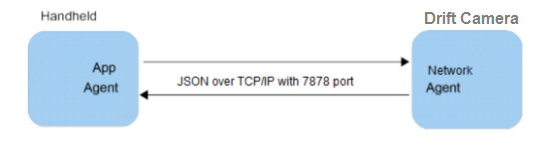
Figure 1-1. Communication between a Handhold Device and Drift Camera.
1.1 The Sequential Diagram of Command
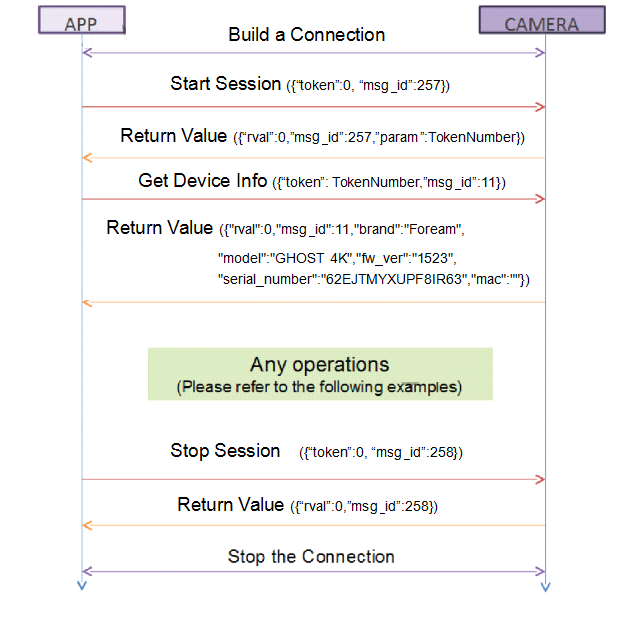
The APP in the following pictures represents the client which might have connection ability. Every request from the client must have a response which is send out by the camera. The camera can only be controlled with an unique client.
The APP establishes a tcp connection with the camera on 7878 port over network for request, response and notification before the session starts. Every application should get the session from the camera first before any operations are performed.
1.2 JSON command
Any client capable of issuing JSON commands over network can control one or more GHOST X cameras. For comprehensive detail on JSON syntax, please refer to http://json.org.
JSON command from the client to the Camera follow simple key:value pairs. Each pair is separated by a comma "," and each key is in the form of a string wrapped in quotation marks "." The value may take the form of alphanumeric character. For example,
{"token":0, "msg_id":1}
The arguments in the commands above are defined:
- token - Session token. Only one App client can connect to one camera at a time. The token number will change with every session.
- msg_id - Command number. This is the number assigned to a particularly remote command.
1.3 Establish Connection
In the normal operations, the client will send the request command to the camera and the camera will give the response of the operation result to the client. Before the client sends any request command, it should connect to command server on port 7878 by using TCP socket. The client will keep the connections until it wants to disconnect, and the camera will not issue close connection with the client actively.
1.4 Get Valid Token
The camera has a valid token management mechanism. Therefore, the client should check whether it can get a valid token or not, If the client fails to get a valid token and start session, the client should break this connection with the camera and check what error has occurred. When the connection is broken, it means that the valid token has been acquired by other client. That is to say, the camera is controlled by one client at the same time. It is not possible to control the camera through multiple clients at the same time.
1.5 Response
The client must check whether it can get the return value of zero or not after it sends out the request command. If the client gets a non-zero return value, it should perform appropriate error handling. However, the client also should handle notification which the camera send out. Notification is not necessary for each request command which the client sends out, but the response is necessary for each request command which the client sends out.
1.6 Examples of communication between App Client and Camera: How to take photos?
Step1. Build TCP connection on port 7878 with Drift Camera.
Step2. Issue "START_SESSION" command and got the TokenNumber.
Step3. Issue “ RECORD_START” command to switch the mode to photo mode.
Step4. Issue " RECORD_STOP" command and the final filename will be returned if the process if taking photo is completed successfully.
Step4. Issue other command.
Step5. Issue "STOP_SESSION" command to stop session.
Step6. Disconnect with Drift Camera.
1.7 Example Code in C language
int tcp_send_cmd(void)
{
int err,iLen;
SOCKET sockSrv = socket(AF_INET,SOCK_STREAM,0);
if(sockSrv == INVALID_SOCKET){
printf("socket error\n");;
return -2;
}
SOCKADDR_IN addrSrv;
addrSrv.sin_family = AF_INET;
addrSrv.sin_addr.S_un.S_addr = inet_addr("192.168.42.1");
addrSrv.sin_port = htons(7878);
int ret = connect(sockSrv,(SOCKADDR*)&addrSrv,sizeof(SOCKADDR));
if (ret>=0)
{
char sndbuf[256]={0};
char recvbuf[1024]={0};
// StartSession
strcpy(sndbuf, "{\"msg_id\": 257, \"token\": 0}");
ret=send(sockSrv,sndbuf,strlen(sndbuf)+1,0);
// recv response
memset(recvbuf,0x00,sizeof(recvbuf));
ret=recv(sockSrv, recvbuf, 256, 0);
// start record
strcpy(sndbuf, "{\"msg_id\": 513, \"token\": 2}");
ret=send(sockSrv,sndbuf,strlen(sndbuf)+1,0);
// recv response
memset(recvbuf,0x00,sizeof(recvbuf));
ret=recv(sockSrv, recvbuf, 256, 0);
//stop record
strcpy(sndbuf, "{\"msg_id\": 514, \"token\": 2}");
ret=send(sockSrv,sndbuf,strlen(sndbuf)+1,0);
// recv response
memset(recvbuf,0x00,sizeof(recvbuf));
ret=recv(sockSrv, recvbuf, 256, 0);
// stop session
strcpy(sndbuf, "{\"msg_id\": 258, \"token\": 2}");
ret=send(sockSrv,sndbuf,strlen(sndbuf)+1,0);
// recv response
memset(recvbuf,0x00,sizeof(recvbuf));
ret=recv(sockSrv, recvbuf, 256, 0);
}
closesocket(sockSrv);
return 0;
}
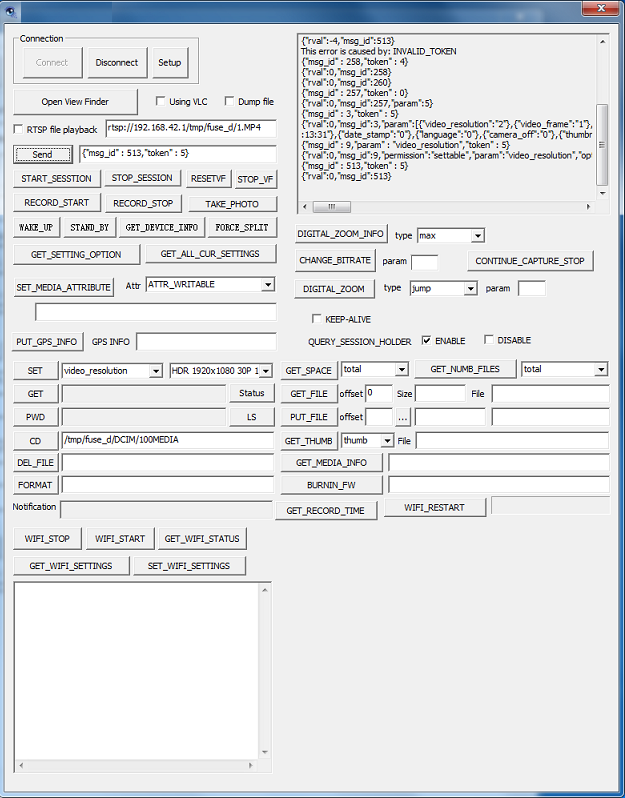
1.8 Examples Tools to test the API commands.
We also provide the Windows Tools to help to verifying actions in Drift camera .
- Session Commands
2.1 START_SESSION
Message ID: msg_id: 0x00000101(257)
Description: This API is used to request the start of a session from the handheld to the camera.
Direction: From the APP to the camera.
Returns: Return value (rval) and the session TokenNumber used in all subsequent command exchanges.
Example:
Start session and get the token number::
{"token": 0, "msg_id":257}
Successful return:
{"rval":0,"msg_id":257,"param":TokenNumber}
Error return:
{"rval":-3,"msg_id":257} //someone holds the session
2.2 STOP_SESSION
Message ID: msg_id: 0x00000102(258)
Description: This API is used to request session termination between the APP and the camera.
Direction: From the APP to the camera.
Example:
Stop session:
{"token":TokenNumber, "msg_id":258}
Successful return:
{"rval":0,"msg_id":258}
- Capture Commands
3.1 RECORD_START
Message ID: msg_id: 0x00000201(513)
Description: This API is used to initiate camera video recording.
Direction: From the APP to the camera.
Example:
Start recording:
{"msg_id" : 513,"token" : 1}
Successful return:
{"rval":0,"msg_id": 518}
3.2 RECORD_STOP
Message ID: msg_id: 0x00000202(514)
Description: This API is used to terminate camera video recording on the camera.
Direction: From the APP to the camera.
Example:
Stop recording:
{"msg_id" : 514,"token" : 1}
Successful return:
{"rval":0,"msg_id":514}
3.3 TAKE_PHOTO
Message ID: msg_id: 0x00000301(769)
Description: This API is used to capture a still image.
Direction: From the APP to the camera.
Example:
Take photo:
{"msg_id" : 769,"token" : 1}
Successful return:
{"rval":0,"msg_id":769}
3.4 START_TIMELAPSE_TAKE_PHOTO
Message ID: msg_id: 0x00000301(769)
Description: This API is used to capture a serial of timelapse image.
Direction: From the APP to the camera.
Example:
Start timelapse capture:
{"msg_id" : 769,"token" : 1}
Successful return:
{"rval":0,"msg_id":769}
3.5 STOP_TIMELAPSE_TAKE_PHOTO
Message ID: msg_id: 0x00000302(770)
Description: This API is used to capture a still image.
Direction: From the APP to the camera.
Example:
Stop timelapse capture:
{"msg_id" : 770,"token" : 1}
Successful return:
{"rval":0,"msg_id":770}
- Switch Mode command
4.1 SWITCH_RECORD_MODE
Message ID: msg_id: 0x0000012(18)
Description: This API is used to switch the capture mode to record mode.
Direction: From the APP to the camera.
Example:
Switch to video mode:
{"msg_id" : 18,"token" : 1}
Successful return:
{"rval":0,"msg_id": 18}
4.2 SWITCH_SINGLE_PHOTO_MODE
Message ID: msg_id: 0x0000013(19)
Description: This API is used to switch the capture mode to single photo mode.
Direction: From the APP to the camera.
Example:
Switch to photo mode:
{"msg_id" : 19,"token" : 1}
Successful return:
{"rval":0,"msg_id": 19}
4.3 SWITCH_PHOTO_TIMELAPSE_MODE
Message ID: msg_id: 0x0000014(20)
Description: This API is used to switch the capture mode to single photo mode.
Direction: From the APP to the camera.
Example:
Switch to timelapse mode:
{"msg_id" : 20,"token" : 1}
Successful return:
{"rval":0,"msg_id": 20}
- System Commands
5.1 GET_DEVICEINFO
Message ID: msg_id: 0x0000000b(11)
Description: This API is used to retrieve information related to the camera device itself, such as the model name, serial number and firmware version.
Direction: From the APP to the camera.
Example:
Get device information:
{"token": TokenNumber, "msg_id":11}
Successful return:
{"rval":0,"msg_id":11,"brand":"Foream","model":"GHOST X","fw_ver":"1523","serial_number":"62EJTMYXUPF8IR63","mac":""}
5.2 GET_DEVICE_STATUS
Message ID: msg_id: 0x00000011(17)
Description: This API is used to retrieve current status related to the camera device itself, such as the recording status, capture mode etc..
Direction: From the APP to the camera.
Example:
Get device status:
{"token": TokenNumber, "msg_id":17}
Successful return:
{"rval":0,"msg_id":17,"video_resolution":"1","video_frame":"0","photo_size":"0","capture_mode":"1","adapter":"1","battery":"60","available":"15027072","capacity":"15151104","rec_timelapse":"0","vdzoom_step":"0"}
5.3 FORMAT
Message ID: msg_id: 0x00000004(4)
Description: This API is used to format the camera SD card.
Direction: From the APP to the camera.
Example:
Format SD card:
{"msg_id" : 4,"param" : "C:","token" : 1}
Successful return:
{"rval":0,"msg_id":4}
5.4 VIDEO_DZOOM
Message ID: msg_id: 0x0000001E(30)
Description: This API is used to digital dzoom .
Direction: From the APP to the camera.
Example:
Digital dzoom to 5X:
{"msg_id" : 30,"param" : "5:","token" : 1}
Successful return:
{"rval":0,"msg_id":30}
5.5 RESET_SETTING
Message ID: msg_id: 0x0000001D(29)
Description: This API is used to restore the setting to default the factory default value .
Direction: From the APP to the camera.
Example:
Reset setting:
{"msg_id" : 29,"token" : 1}
Successful return:
{"rval":0,"msg_id":29}
- Setting Commands
6.1 GET_ALL_CURRENT_SETTINGS
Description: This API is used to retrieve all setting related to the camera device itself, such as the video resolution, photo size etc.
Direction: From the APP to the camera.
Example:
Get all settings of device:
{"token": TokenNumber, "msg_id":3}
Successful return:
{"rval":0,"msg_id":3,"param":[{"video_resolution":"0"},{"video_frame":"1"},{"photo_size":"2"},{"timelapse_size":"2"},{"timelapse_interval":"0"},{"burst_size":"0"},{"burst_rate":"2"},{"fov":"2"},{"exposure":"0"},{"self_timer":"0"},{"video_quality":"1"},{"video_filter":"0"},{"iso":"0"},{"video_tagging":"0"},{"video_tagging_interval":"0"},{"car_dvr_mode":"0"},{"car_dvr_loop_interval":"1"},{"mic_sensitity":"3"},{"speaker_volume":"3"},{"led_indicator":"1"},{"wifi":"2"},{"stand_record":"0"},{"date":"2018-09-28 19
:05:22"},{"date_stamp":"0"},{"language":"0"},{"camera_off":"0"},{"thumbnails":"1"},{"capture_mode":"0"},{"stream_resolution":"0"},{"stream_bitrate":"0"},{"stream_type":"0"},{"streaming":"0"},{"video_res_frame":"256"}]}
Note: The setting value please refer to “setting item define”.
6.2 SET_SETTING
Message ID: msg_id: 0x00000002(2)
Description: This API is used to set the single setting related to the camera device itself, such as the video resolution, photo size etc.
Direction: From the APP to the camera.
Example:
Set the video resolution to 1080P
{"msg_id" : 2,"param" : "3","token" : TokenNumber,"type" : "video_resolution"}
Successful return:
{ "rval": 0, "msg_id": 2 , "param": "1"}
- NOTIFICATION
Message ID: msg_id: 0x00000007(7)
Description: Notifications are send from the camera to the APP to notify it of events, such as manual button presses and task completions.
Direction: From the camera to APP
Notification List:
start_video_record: start record button pressed
start_photo: photo capture button pressed
start_burst: photo capture button pressed on burst mode
start_timelapse_capture: start photo timelapse button pressed
Example:
{ "msg_id": 7, "type": "start_timelapse_capture" }
switch_to_video_mode: mode button pressed and switch to video mode
switch_to_photo_mode: mode button pressed and switch to photo mode
switch_to_timelapse_mode: mode button pressed and switch timelapse mode
switch_to_burst_mode: mode button pressed and switch to timelapse mode
Example:
{ "msg_id": 7, "type": "switch_to_cap_mode" }
photo_taken: complete photo taken and return the photo path and the free space
Example: { "msg_id": 7, "type": "photo_taken" ,"param":{"path":"/tmp/fuse_d/DCIM/100MEDIA/IMGN0033.jpg","available":4526816}}
video_record_complete: complete recording and return the video path and the free space
Example:
{ "msg_id": 7, "type": photo_taken" ,"param":{"path":"/tmp/fuse_d/DCIM/100MEDIA/IMGN0033.jpg","available":4526816}}
battery: battery changed, and return the battery value
Example: { "msg_id": 7, "type": "battery" ,"param": 40}
adapter: USB cabel connected
Example:
{ "msg_id": 7, "type": "adapter" ,"param":0}
sd card status: card inserted or removed
Example: { "msg_id": 7, "type": "sd_card_status" ,"param":"remove"}
{ "msg_id": 7, "type": "sd_card_status" ,"param":"insert"}
Error notification:
STORAGE_RUNOUT
STORAGE_IO_ERROR
LOW_SPEED_CARD
CARD_REMOVED
- Stream Commands
8.1 STOP_STREAM
Message ID: msg_id: 0x0000001A(26)
Description: This API is used to stop stream preview.
Direction: From the APP to the camera.
Example:
Stop streaming:
{"msg_id" : 26,"token" : 1}
Successful return:
{"rval":0,"msg_id":26}
8.2 START_STREAM
Message ID: msg_id: 0x0000001B(27)
Description: This API is used to start stream preview.
Direction: From the APP to the camera.
Example:
Start streaming:
{"msg_id" : 27,"token" : 1}
Successful return:
{"rval":0,"msg_id":27}
9 File System Command
9.1 DEL_FILE
Message ID: msg_id: 0x00000501(1281)
Description: This API is used to delete a file.
Direction: From the APP to the camera.
Example:
Delete a file:
{"msg_id" : 1281,"token" : 1,”param”:”/tmp/SD0/DCIM/100MEDIA/VID00001.MP4”}
Successful return:
{"rval":0,"msg_id":1281}
9.2 LS
Message ID: msg_id: 0x00000502(1282)
Description: This API lists the contents of the directory which is current or specified by parameter, analogous to the command “ls”.
Direction: From the APP to the camera.
Example:
{"msg_id" : 1282,"token" : 1,”param”:”/tmp/SD0/”}
Successful return:
{"rval":0,"msg_id":1282,"listing":[{"FOREAM X1":"2015-01-12 04:52:56"},{"DCIM/":"2015-01-01 00:24:20"},{"MISC/":"2015-01-01 00:24:24"},{"EVENT/":"2018-09-14 14:06:58"},{"sdlog_sdlog.txt":"2015-01-12 04:18:30"},{"fmcam.conf":"2018-09-25 15:47:24"}]}
9.3 CD
Message ID: msg_id: 0x00000503(1283)
Description: This API changes current working directory, analogous to the command “cd”.
Direction: From the APP to the camera.
Example:
{"msg_id" : 1283,"token" : 1,”param”:”/tmp/SD0/”}
Successful return:
{"rval":0,"msg_id":1283,"pwd":"/tmp/SD0"}
9.4 PWD
Message ID: msg_id: 0x00000504(1284)
Description: This API obtains current working directory, analogous to the command “pwd”.
Direction: From the APP to the camera.
Example:
{"msg_id" : 1284,"token" : 1}
Successful return:
{"rval":0,"msg_id":1284,"pwd":"/tmp/SD0"}
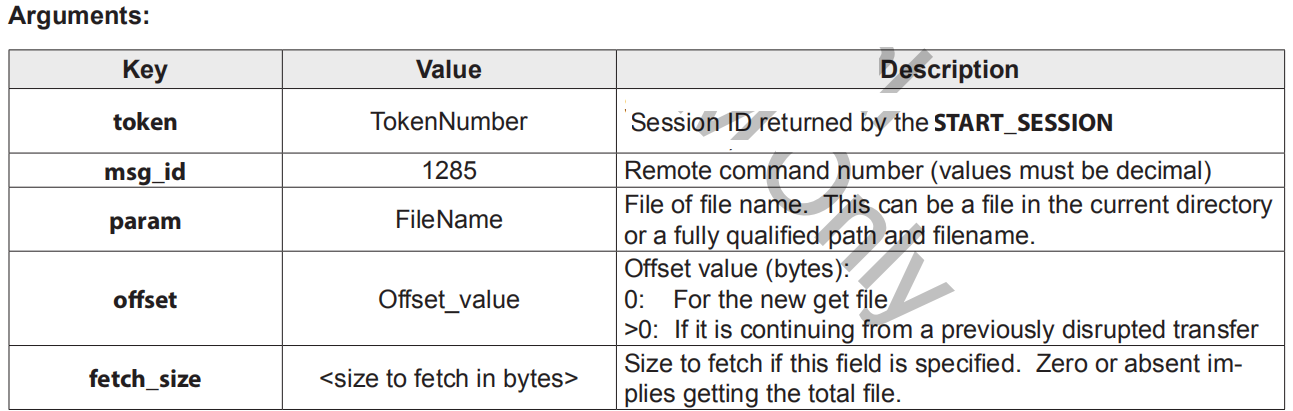
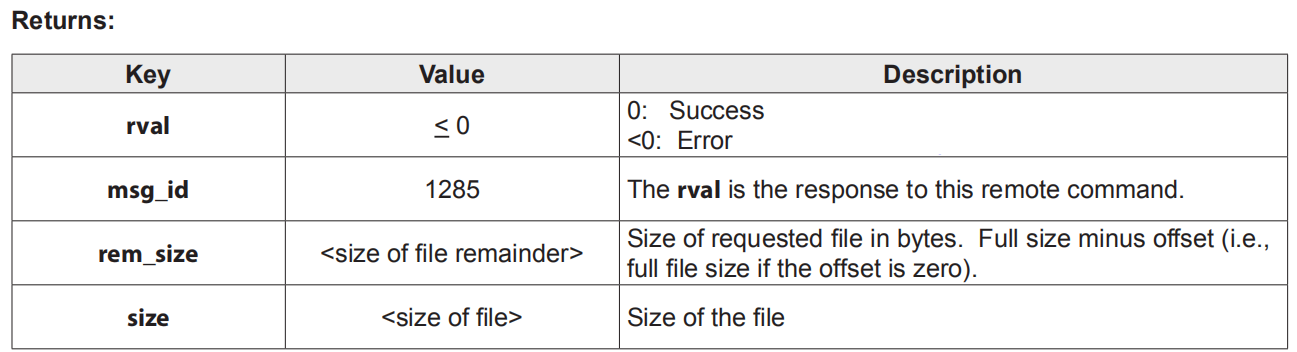
9.5 GET_FILE
Message ID: msg_id: 0x00000505(1285)
Description: This API is used to retrieve a file.
Direction: From the APP to the camera.

10 Bluetooth Live stream Command
Message ID: msg_id: 0x00000020(32)
Description: This API set the Wi-Fi router SSID,Password and the live stream information such as resolution, bitrate etc. Through Bluetooth protocol.
Direction: From the APP to the camera.
Example:
{"msg_id" : 32,"token" : 1,”param”:”{“router_ssid”:”foream_test”,”router_password”:”1234567890”, “rtmp_url”:”rtmp://115.231.182.113:1935/livestream/hy9ekxmn”,”stream_resolution”:”WVGA”,”stream_bitrate”:”3000000”, “rtmp_cbr”:”1”}”}
“router_ssid”: router (AP) ssid
“router_password”: router (AP) password.
“rtmp_url”: live stream address
“stream_resolution”: it is used to set the video streaming resolution, the value can be set below:
- 4KUHD: 3840*2160
- 1080P: 1920*1080
- 720P: 1280*720
- WVGA: 848*420
“stream_bitrate”: it is used to set the video streaming bitrate, value 1000000 means 1Mbps, value 25000000 means 25Mbps, value 800000 means 800kbps.
“rtmp_cbr”: it means if it use the constant bitrate when live stream.
Successful return:
{"rval":0,"msg_id":30}
11 setting items define
- "video_resolution"
0: 1080P [1920*1080], support 25fps, 30fps
1: 960P1280*960[], support 25fps, 30fps
2: 720P [1280*720], support 25fps, 30fps, 50fps, 60fps
3: WVGA [848x480], support 25fps, 30fps, 50fps, 60fps
- "video_frame" :
0: 25fps
1: 30fps
2: 50fps
3: 60fps
- "photo_size" :
0: 12M
1: 8M
2: 4M
- “timelapse_size” :
0: 12M
1: 8M
2: 4M
- “timelapse_interval” :
0: 1s
1: 2s
2: 3s
3: 5s
4: 10s
5: 30s
6: 1m
7: 2m
8: 5m
9: 10m
10: 30m
11: 1h
- “burst_size” :
0: 4M
- “burst_rate” :
0: 5p
1: 10p
2: 15p
- “fov” :
0: 90
1: 115
2: 140
- “exposure” :
0: 0
1: +1
2: +2
3: -1
4: -2
- “self_timer” :
0: off
1: 3s
2: 5s
3: 10s
- “video_quality” :
0: high
1: medium
2: low
- “video_filter” :
0: normal
1: vivid
2: lowlight
3: water
- “iso” :
0: 0
1: 100
2: 200
3: 400
4: 800
- “video_tagging” :
0: Disable
1: Enable
- “video_taggint_interval” :
0: 10s
1: 30s
2: 1m
3: 2m
- “car_dvr_mode” :
0: Disable
1: Enable
- “car_dvr_loop_interval” :
0: 10s
1: 30s
2: 1m
3: 2m
4: 5m
5: 10m
- “mic_sensitity” :
0: off
1: 1
2: 2
3: 3
4: 4
5: 5
- “speaker_volume” :
0: off
1: low
2: medium
3: high
- “led_indicator” :
0: off
1: on
- “wifi” :
0: disconnect
1: AP mode
2: Sta mode
- “date_stamp” :
0: disable
1: enable
- “language” :
0: english
1: chinese
- “camera_off” :
0: off
1: 2m
2: 5m
3: 10m
4: 20m
- “date_stamp” :
0: off
1: on
- “thumbnails” :
0: off
1: on
- “capture_mode” :
0: video mode
1: photo mode
2: timelapse_mode
3: burst_mode





 扫一扫
扫一扫


 1万+
1万+

 被折叠的 条评论
为什么被折叠?
被折叠的 条评论
为什么被折叠?
 到【灌水乐园】发言





