


 本文详细介绍了如何从零开始搭建SpringBoot项目并整合MyBatis,包括配置pom.xml,使用YAML配置文件,数据库操作,以及通过MyBatis Generator自动生成代码的过程。
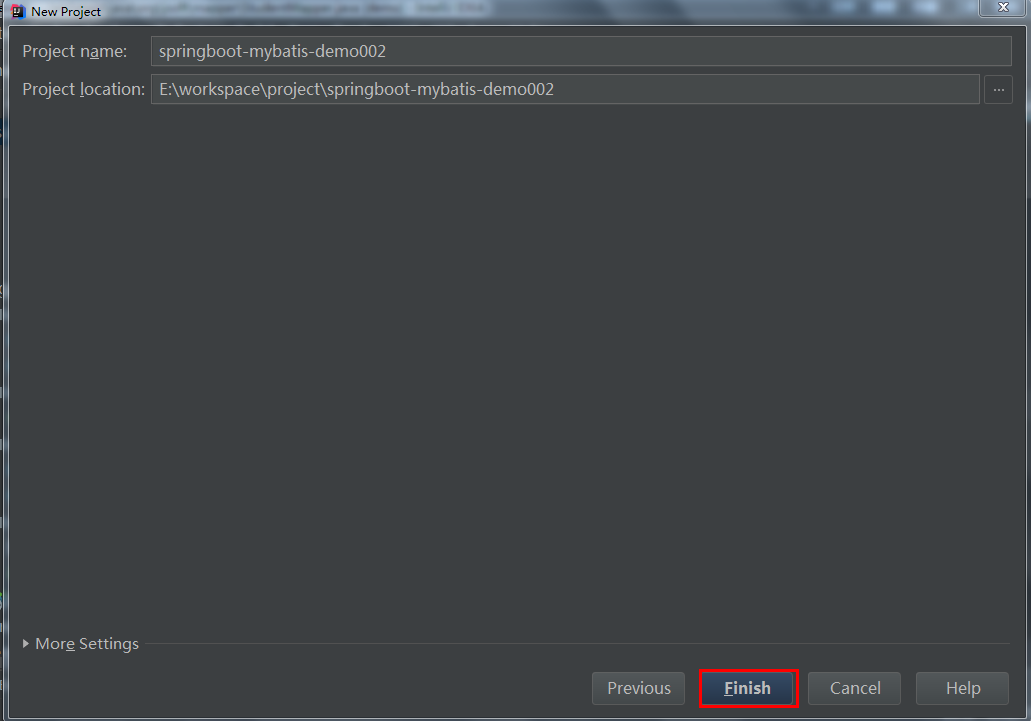
1.创建一个springboot的项目
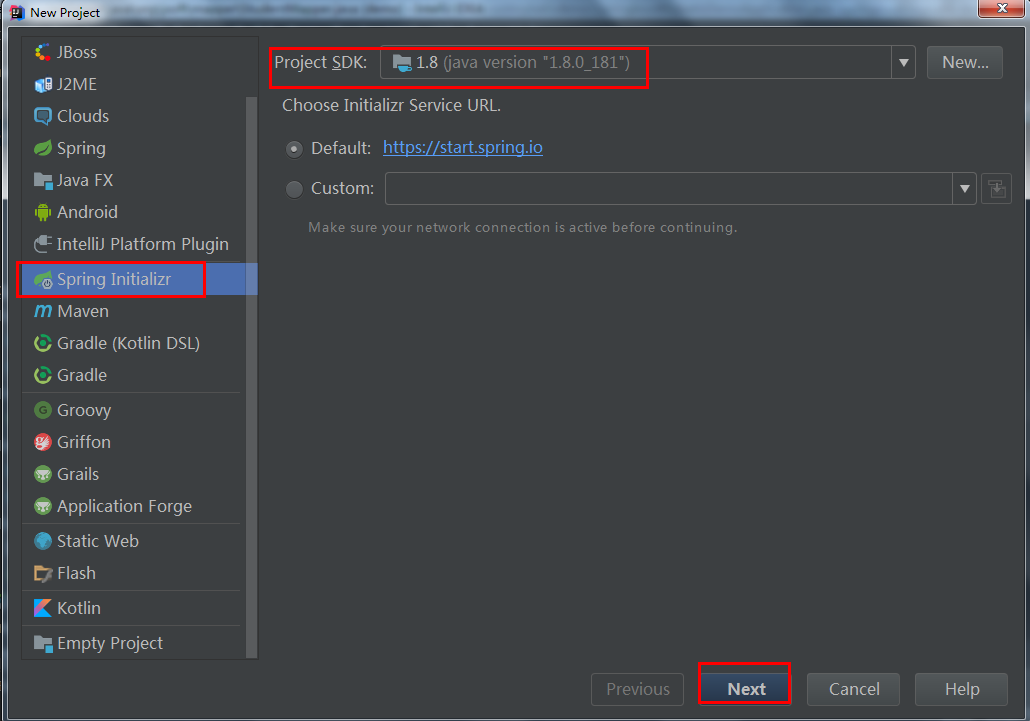
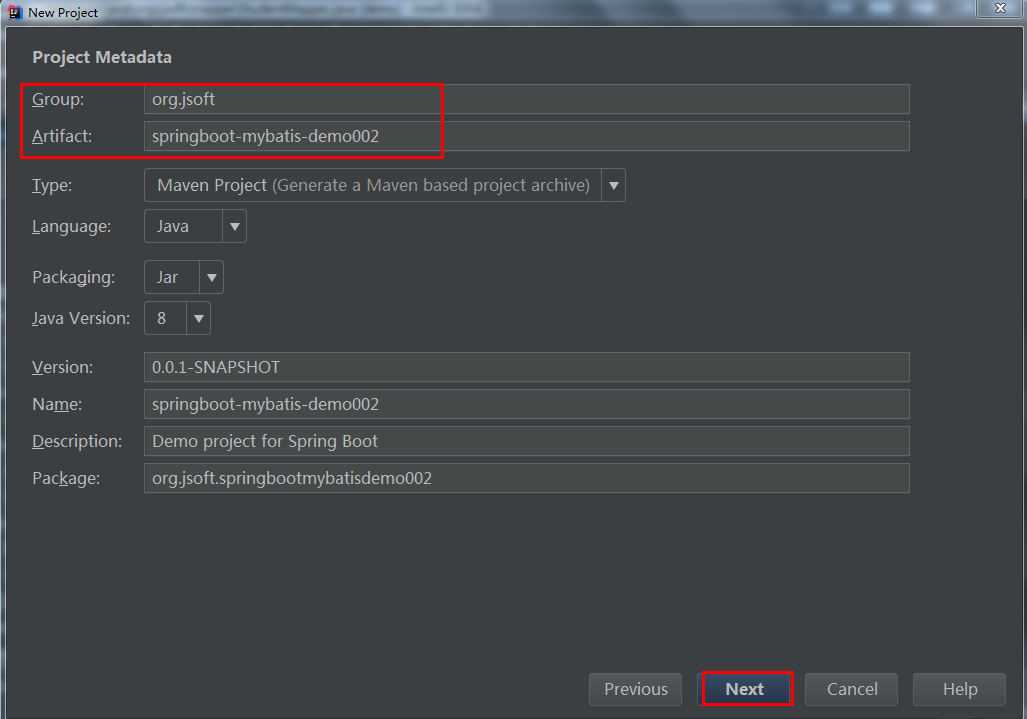
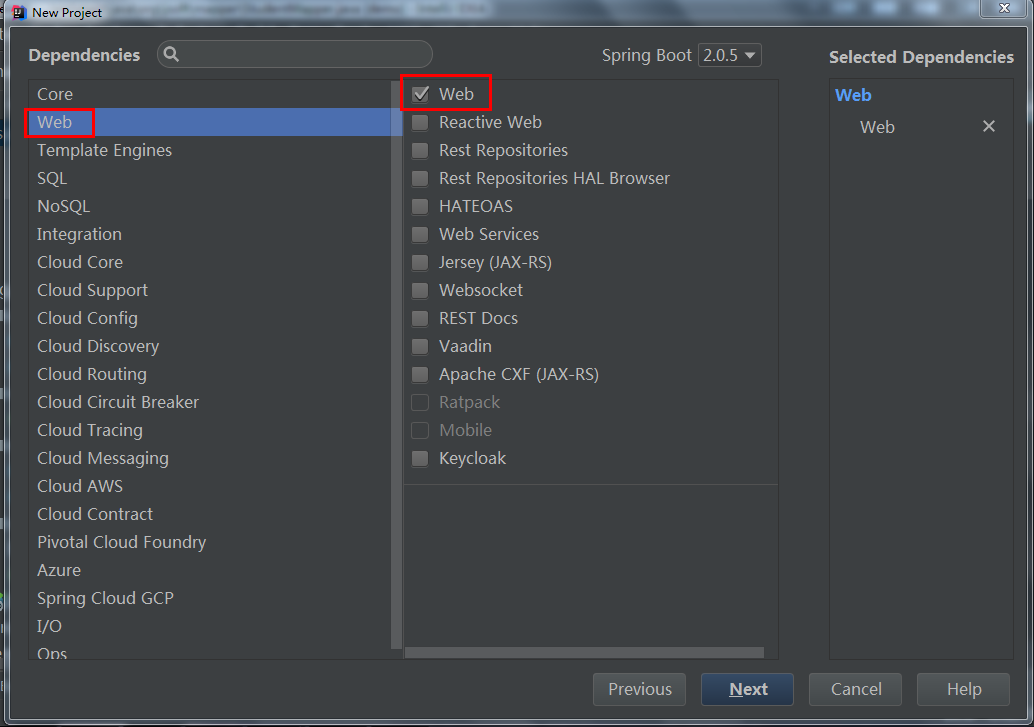
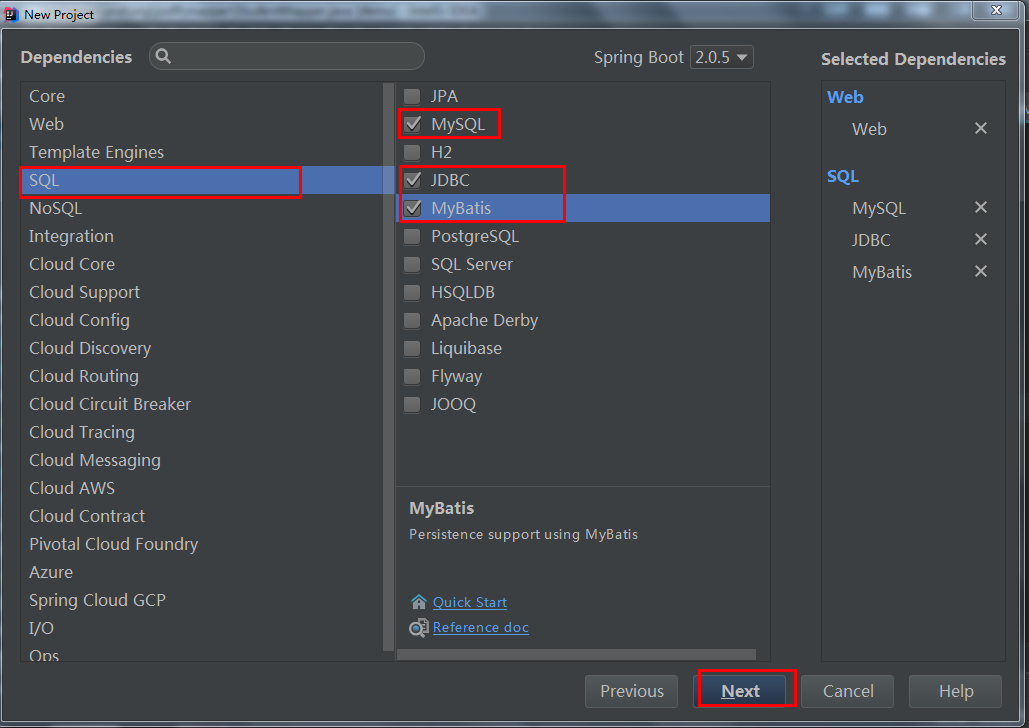
2.改写pom.xml文件 有些插件是自己填进去的
<?xml version="1.0" encoding="UTF-8"?>
<project xmlns="http://maven.apache.org/POM/4.0.0" xmlns:xsi="http://www.w3.org/2001/XMLSchema-instance"
	xsi:schemaLocation="http://maven.apache.org/POM/4.0.0 http://maven.apache.org/xsd/maven-4.0.0.xsd">
	<modelVersion>4.0.0</modelVersion>

	<groupId>com.ocean</groupId>
	<artifactId>springboot-mybatis-demo</artifactId>
	<version>0.0.1-SNAPSHOT</version>
	<packaging>jar</packaging>

	<name>springboot-mybatis-demo</name>
	<description>Demo project for Spring Boot</description>

	<parent>
		<groupId>org.springframework.boot</groupId>
		<artifactId>spring-boot-starter-parent</artifactId>
		<version>2.0.5.RELEASE</version>
		<relativePath/> <!-- lookup parent from repository -->
	</parent>

	<properties>
		<project.build.sourceEncoding>UTF-8</project.build.sourceEncoding>
		<project.reporting.outputEncoding>UTF-8</project.reporting.outputEncoding>
		<java.version>1.8</java.version>
	</properties>

	<dependencies>
		<dependency>
			<groupId>org.springframework.boot</groupId>
			<artifactId>spring-boot-starter-jdbc</artifactId>
		</dependency>

		<dependency>
			<groupId>org.mybatis.spring.boot</groupId>
			<artifactId>mybatis-spring-boot-starter</artifactId>
			<version>1.3.2</version>
		</dependency>

		<dependency>
			<groupId>org.springframework.boot</groupId>
			<artifactId>spring-boot-starter-web</artifactId>
		</dependency>

		<dependency>
			<groupId>mysql</groupId>
			<artifactId>mysql-connector-java</artifactId>
			<version>5.1.6</version>
		</dependency>

		<dependency>
			<groupId>org.springframework.boot</groupId>
			<artifactId>spring-boot-starter-test</artifactId>
			<scope>test</scope>
		</dependency>
	</dependencies>

	<build>
		<plugins>
			<plugin>
				<groupId>org.springframework.boot</groupId>
				<artifactId>spring-boot-maven-plugin</artifactId>
			</plugin>			<!-- mybatis generator 自动生成代码插件 -->
			<plugin>
				<groupId>org.mybatis.generator</groupId>
				<artifactId>mybatis-generator-maven-plugin</artifactId>
				<version>1.3.1</version>
				<configuration>
					<configurationFile>${basedir}/src/main/resources/generator/generatorConfig.xml</configurationFile>
					<overwrite>true</overwrite>
					<verbose>true</verbose>
				</configuration>
			</plugin>
		</plugins>
	</build>


</project>
3.将application.properties文件删除, 在原来的位置上创建application.yml文件
server:
 port: 8080

spring:
  datasource:
   # 自己的数据库
    name: test02
    url: jdbc:mysql://127.0.0.1:3306/test02
    username: root
    password: 123456
    driver-class-name: com.mysql.jdbc.Driver
mybatis:
  mapper-locations: classpath:mapping/*Mapper.xml
  #实体类
  type-aliases-package: org.jsoft.vo
4.创建数据库,并在里面添加两条数据
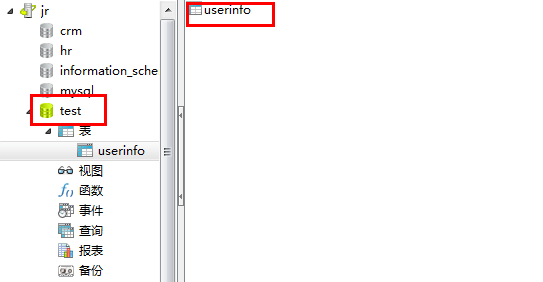
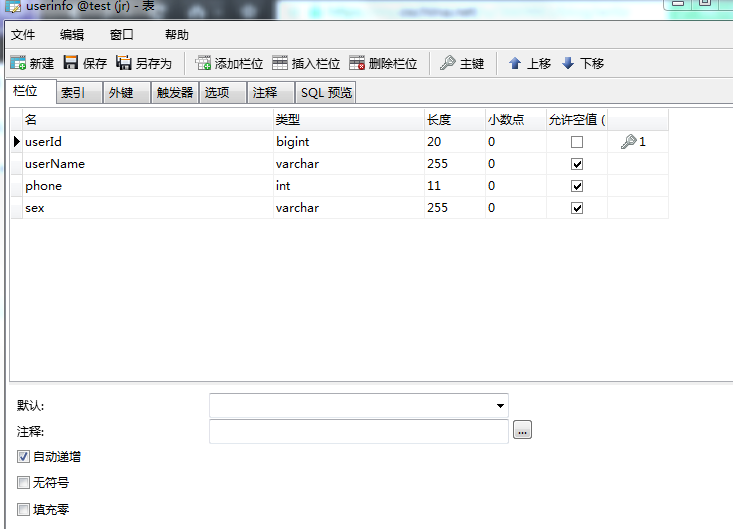
5.配置mybatis generator 自动生成代码插件,在resources下面新建文件夹generator,在新建的文件夹里面创建文件generatorConfig.xml,有注释的地方需要根据自己的情况自行改动
<?xml version="1.0" encoding="UTF-8"?>
<!DOCTYPE generatorConfiguration
        PUBLIC "-//mybatis.org//DTD MyBatis Generator Configuration 1.0//EN"
        "http://mybatis.org/dtd/mybatis-generator-config_1_0.dtd">
<generatorConfiguration>
    <!-- 数据库驱动:选择你的本地硬盘上面的数据库驱动包-->
    <classPathEntry  location="D:\MyJar\MyBatis\mysql-connector-java-5.1.12-bin.jar"/>
    <context id="DB2Tables"  targetRuntime="MyBatis3">
        <commentGenerator>
            <property name="suppressDate" value="true"/>
            <!-- 是否去除自动生成的注释 true:是 : false:否 -->
            <property name="suppressAllComments" value="false"/>
        </commentGenerator>
        <!--数据库连接驱动类,URL,用户名、密码 -->
        <jdbcConnection driverClass="com.mysql.jdbc.Driver" connectionURL="jdbc:mysql://127.0.0.1/test02" userId="root" password="123456">
        </jdbcConnection>
        <javaTypeResolver>
            <property name="forceBigDecimals" value="false"/>
        </javaTypeResolver>        <!-- 生成(实体)模型的包名和位置-->
        <javaModelGenerator targetPackage="org.jsoft.vo" targetProject="src/main/java">
            <property name="enableSubPackages" value="true"/>
            <property name="trimStrings" value="true"/>
        </javaModelGenerator>
        <!-- 生成XML映射文件的包名和位置-->
        <sqlMapGenerator targetPackage="resources.mapping" targetProject="src/main">
            <property name="enableSubPackages" value="true"/>
        </sqlMapGenerator>
        <!-- 生成DAO接口的包名和位置-->
        <javaClientGenerator type="XMLMAPPER" targetPackage="org.jsoft.mapping" targetProject="src/main/java">
            <property name="enableSubPackages" value="true"/>
        </javaClientGenerator>
        <!-- 要生成的表 tableName是数据库中的表名或视图名 domainObjectName是实体类名-->
        <table tableName="student" domainObjectName="Student" enableCountByExample="false" enableUpdateByExample="false" enableDeleteByExample="false" enableSelectByExample="false" selectByExampleQueryId="false">
        </table>
    </context>
</generatorConfiguration>
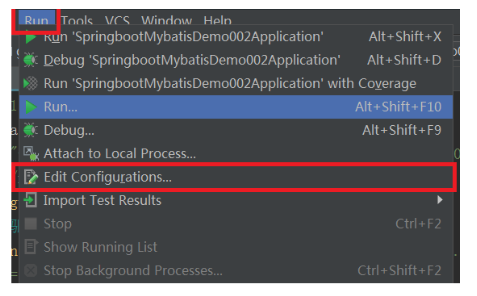
6.自动生成代码
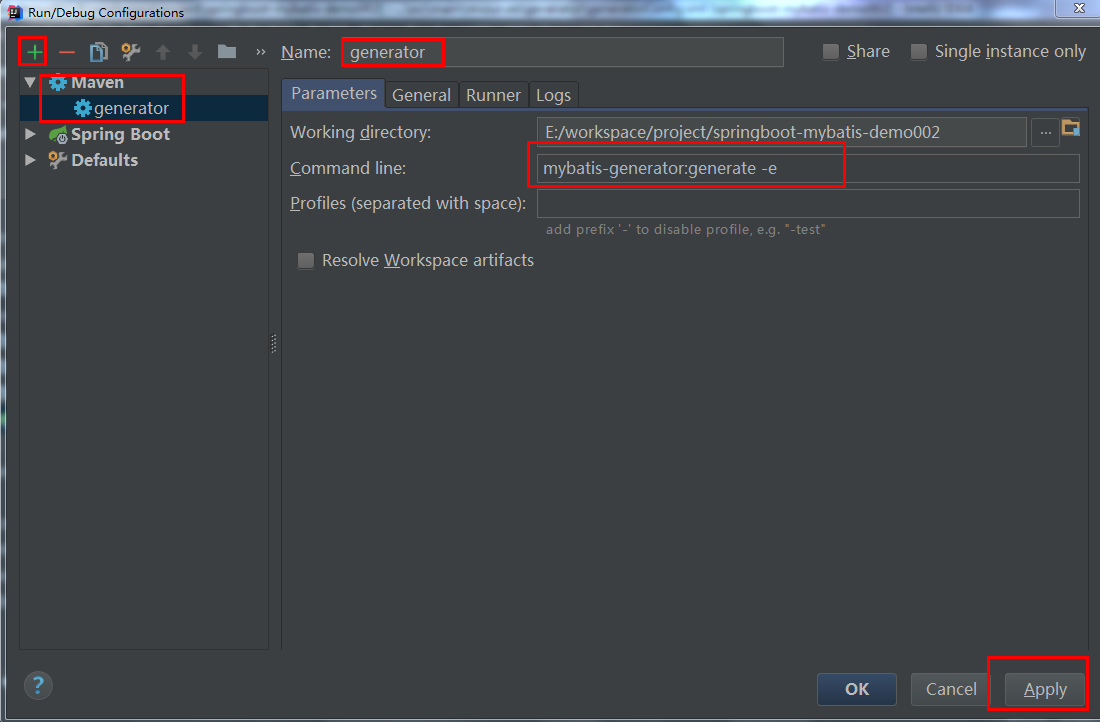

7.打开主配置类SpringbootMybatisDemo002Application,需要添加点东西
package org.jsoft.springbootmybatisdemo002;

import org.mybatis.spring.annotation.MapperScan;
import org.springframework.boot.SpringApplication;
import org.springframework.boot.autoconfigure.SpringBootApplication;
import org.springframework.context.annotation.ComponentScan;

@SpringBootApplication
@MapperScan("org.jsoft.mapping")
@ComponentScan(basePackages = {"org.jsoft.*"})
public class SpringbootMybatisDemo002Application {

	public static void main(String[] args) {
		SpringApplication.run(SpringbootMybatisDemo002Application.class, args);
	}
}
8.编写业务逻辑,以新增学生为例
要新建几个包和类
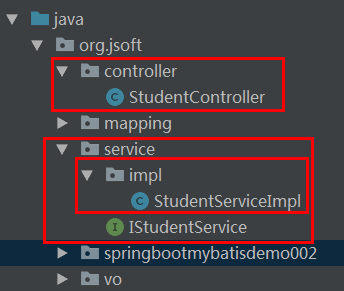
IStudentService
package org.jsoft.service;

import org.jsoft.vo.Student;

public interface IStudentService {

    public Integer insert(Student student);

}
StudentServiceImpl
package org.jsoft.service.impl;

import org.jsoft.mapping.StudentMapper;
import org.jsoft.service.IStudentService;
import org.jsoft.vo.Student;
import org.springframework.beans.factory.annotation.Autowired;
import org.springframework.stereotype.Service;

@Service(value = "studentService")
public class StudentServiceImpl implements IStudentService{

    @Autowired
    private StudentMapper studentMapper;

    @Override
    public Integer insert(Student student) {
        int num = studentMapper.insert(student);
        return num;
    }
}
StudentController
package org.jsoft.controller;

import org.jsoft.service.IStudentService;
import org.jsoft.vo.Student;
import org.springframework.beans.factory.annotation.Autowired;
import org.springframework.web.bind.annotation.RequestMapping;
import org.springframework.web.bind.annotation.RequestMethod;
import org.springframework.web.bind.annotation.RestController;

import javax.servlet.http.HttpServletRequest;

@RestController
public class StudentController {

    @Autowired
    private IStudentService studentService;

    @RequestMapping(value = {"/add"},produces = {"application/json;charset=UTF-8"},method = RequestMethod.GET)
    public void add(HttpServletRequest request){
        Student s = new Student();
        s.setName(request.getParameter("name"));
        s.setAge(Integer.valueOf(request.getParameter("age")));
        int a = studentService.insert(s);
        System.out.println(a);
    }

}
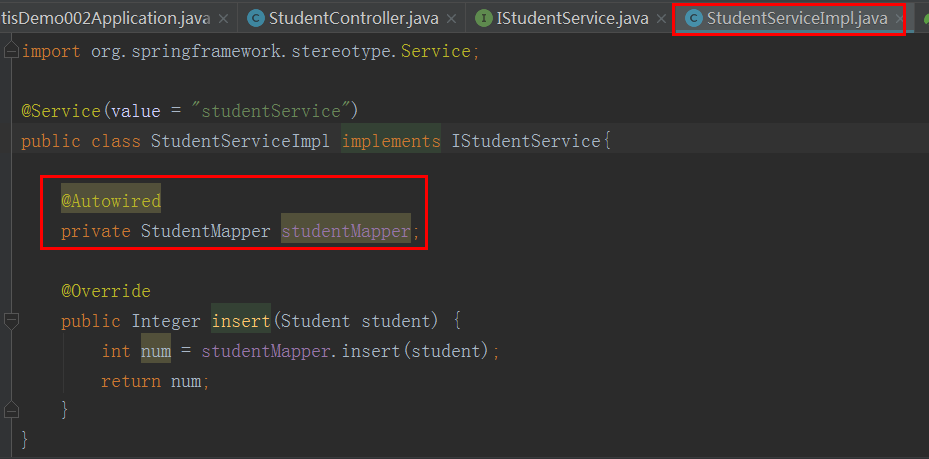
在这个位置容易报错
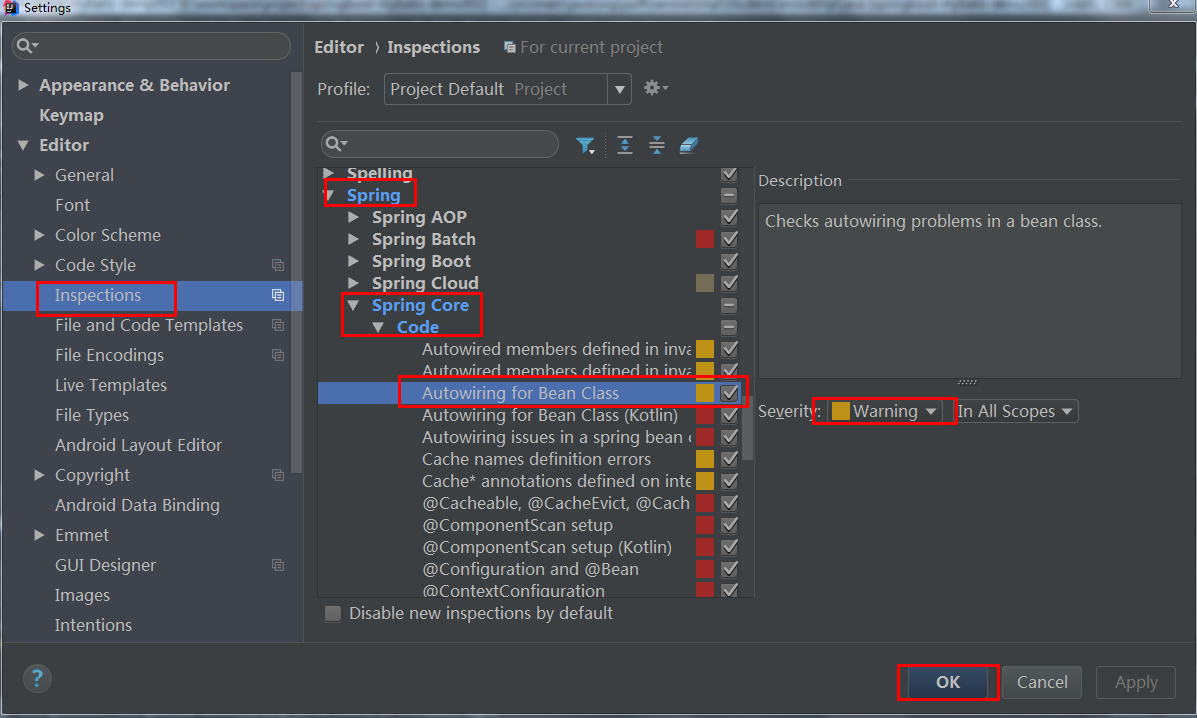
解决办法
9.测试:
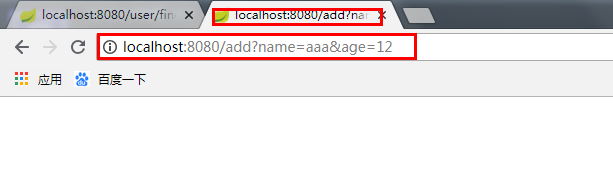
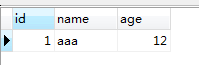
成功!!!
10.我也是根据其他人写的博客做出来的,有什么不懂之处,参照原博客https://blog.youkuaiyun.com/guobinhui/article/details/79289189
虽然我也是照着其他人写出来的,但是还是想把这些过程记录下来,变成自己的





 扫一扫
扫一扫


 1529
1529

 被折叠的 条评论
为什么被折叠?
被折叠的 条评论
为什么被折叠?
 到【灌水乐园】发言





