


今天研究了下VS在读取低版本项目时对其进行升级的迁移报告“UpgradeLog.XML”,这个报告是一个XML文件,但是加载了一个XSLT文件“UpgradeReport.xslt”。这个XSLT文件除了用于逻辑计算的部分外,还包含了一些javascript代码,并引用了一个CSS文件“UpgradeReport.css”用来配置样式。
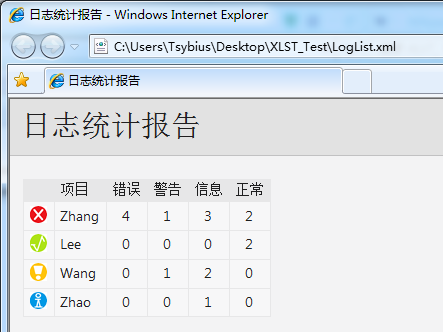
于是我照猫画虎,用XSLT实现了一个简易版的XML日志统计界面,只实现了统计各类日志的功能。
“LogList.xml”的内容如下:
<?xml version="1.0" encoding="gb2312"?>
<?xml-stylesheet type='text/xsl' href='Resources/LogList.xslt'?>
<!--LogLevel:事件等级0-3,LogItem:报警项,LogTime:发生时间,Description:报警信息-->
<LogList>
  <Log LogLevel="0" LogItem="Zhang" Description="PERFECT1"/>
  <Log LogLevel="0" LogItem="Zhang" Description="PERFECT2"/>
  <Log LogLevel="1" LogItem="Zhang" Description="INFO1"/>
  <Log LogLevel="1" LogItem="Zhang" Description="INFO2"/>
  <Log LogLevel="1" LogItem="Zhang" Description="INFO3"/>
  <Log LogLevel="2" LogItem="Zhang" Description="WARNING1"/>
  <Log LogLevel="3" LogItem="Zhang" Description="ERROR1"/>
  <Log LogLevel="3" LogItem="Zhang" Description="ERROR2"/>
  <Log LogLevel="3" LogItem="Zhang" Description="ERROR3"/>
  <Log LogLevel="3" LogItem="Zhang" Description="ERROR4"/>
  <Log LogLevel="0" LogItem="Lee" Description="PERFECT1"/>
  <Log LogLevel="0" LogItem="Lee" Description="PERFECT2"/>
  <Log LogLevel="1" LogItem="Wang" Description="INFO1"/>
  <Log LogLevel="1" LogItem="Wang" Description="INFO2"/>
  <Log LogLevel="2" LogItem="Wang" Description="WARNING1"/>
  <Log LogLevel="1" LogItem="Zhao" Description="INFO1"/>
</LogList>
根节点LogList下,有多个Log标签,LogLevel从0到3分别代表“正常”、“信息”、“警告”、“错误”,LogItem是一个标识,同一个LogItem的日志统计到一起,Description是一个对单条日志的描述,在统计中没有实际意义。
新建一个文件夹Resource,里面我用画图画了4张图片:
1)正常:0_PERFECT.png

2)信息:1_INFO.png

3)警告:2_WARNING.png

4)错误:3_ERROR.png

然后创建一个XSLT文件,取名“LogList.xslt”:
<?xml version="1.0" encoding="gb2312"?>
<xsl:stylesheet version="1.0" xmlns:xsl="http://www.w3.org/1999/XSL/Transform" xmlns:msxsl="urn:schemas-microsoft-com:xslt">
<!-- Keys -->
<xsl:key name="LogItemKey" match="Log" use="@LogItem"/>
<!-- Intermediate Templates -->
<xsl:template match="LogList" mode="LogOverviewXML">
<LogItems>
<xsl:for-each select="Log[generate-id(.) = generate-id(key('LogItemKey', @LogItem))]">
<LogItem>
<xsl:variable name="pNode" select="current()"/>
<xsl:variable name="errorCount" select="count(../Log[@LogItem = current()/@LogItem and @LogLevel=3])"/>
<xsl:variable name="warningCount" select="count(../Log[@LogItem = current()/@LogItem and @LogLevel=2])"/>
<xsl:variable name="infoCount" select="count(../Log[@LogItem = current()/@LogItem and @LogLevel=1])"/>
<xsl:variable name="perfectCount" select="count(../Log[@LogItem = current()/@LogItem and @LogLevel=0])"/>
<xsl:attribute name="Status">
<xsl:choose>
<xsl:when test="$errorCount > 0">Error</xsl:when>
<xsl:when test="$warningCount > 0">Warning</xsl:when>
<xsl:when test="$infoCount > 0">Info</xsl:when>
<xsl:when test="$perfectCount > 0">Perfect</xsl:when>
<xsl:otherwise>Perfect</xsl:otherwise>
</xsl:choose>
</xsl:attribute>
<xsl:attribute name="LogItem">
<xsl:value-of select="@LogItem"/>
</xsl:attribute>
<xsl:attribute name="ErrorCount">
<xsl:value-of select="$errorCount"/>
</xsl:attribute>
<xsl:attribute name="WarningCount">
<xsl:value-of select="$warningCount"/>
</xsl:attribute>
<xsl:attribute name="InfoCount">
<xsl:value-of select="$infoCount"/>
</xsl:attribute>
<xsl:attribute name="PerfectCount">
<xsl:value-of select="$perfectCount"/>
</xsl:attribute>
<xsl:attribute name="TotalCount">
<xsl:value-of select="$errorCount + $warningCount + $infoCount + $perfectCount"/>
</xsl:attribute>
</LogItem>
</xsl:for-each>
</LogItems>
</xsl:template>
<!-- LogItem Overview template -->
<xsl:template match="LogItems" mode="LogOverview">
<table>
<tr>
<th></th>
<th>项目</th>
<th>错误</th>
<th>警告</th>
<th>信息</th>
<th>正常</th>
</tr>
<xsl:for-each select="LogItem">
<tr>
<td>
<img width="16" height="16">
<xsl:attribute name="src">
<xsl:choose>
<xsl:when test="@Status = 'Error'">Resources\3_ERROR.png</xsl:when>
<xsl:when test="@Status = 'Warning'">Resources\2_WARNING.png</xsl:when>
<xsl:when test="@Status = 'Info'">Resources\1_INFO.png</xsl:when>
<xsl:when test="@Status = 'Perfect'">Resources\0_PERFECT.png</xsl:when>
</xsl:choose>
</xsl:attribute>
<xsl:attribute name="alt">
<xsl:value-of select="@Status"/>
</xsl:attribute>
</img>
</td>
<td>
<xsl:value-of select="@LogItem"/>
</td>
<td class="textCentered">
<xsl:value-of select="@ErrorCount"/>
</td>
<td class="textCentered">
<xsl:value-of select="@WarningCount"/>
</td>
<td class="textCentered">
<xsl:value-of select="@InfoCount"/>
</td>
<td class="textCentered">
<xsl:value-of select="@PerfectCount"/>
</td>
</tr>
</xsl:for-each>
</table>
</xsl:template>
<!-- Document, matches "LogList" -->
<xsl:template match="LogList">
<html>
<head>
<meta content="en-us" http-equiv="Content-Language"/>
<meta content="text/html; charset=utf-16" http-equiv="Content-Type"/>
<link type="text/css" rel="stylesheet" href="Resources\LogList.css"/>
<title>
日志统计报告
</title>
</head>
<body>
<h1>
日志统计报告
</h1>
<div id="content">
<br/>
<xsl:variable name="LogOverview">
<xsl:apply-templates select="self::node()" mode="LogOverviewXML"/>
</xsl:variable>
<div id="overview">
<xsl:apply-templates select="msxsl:node-set($LogOverview)/*" mode="LogOverview"/>
</div>
</div>
</body>
</html>
</xsl:template>
</xsl:stylesheet>
这个文件要引用一个样式表文件,创建“LogList.css”,也放到Resources目录下,代码如下:
/* Body style, for the entire document */
body
{
    background: #F3F3F4;
    color: #1E1E1F;
    font-family: "Segoe UI", Tahoma, Geneva, Verdana, sans-serif;
    padding: 0;
    margin: 0;
}

/* Header1 style, used for the main title */
h1
{
    padding: 10px 0px 10px 10px;
    font-size: 21pt;
    background-color: #E2E2E2;
    border-bottom: 1px #C1C1C2 solid;
    color: #201F20;
    margin: 0;
    font-weight: normal;
}

/* Table styles */
table
{
    border-spacing: 0 0;
    border-collapse: collapse;
    font-size: 10pt;
}

table th
{
    background: #E7E7E8;
    text-align: left;
    text-decoration: none;
    font-weight: normal;
    padding: 3px 6px 3px 6px;
}

table td
{
    vertical-align: top;
    padding: 3px 6px 5px 5px;
    margin: 0px;
    border: 1px solid #E7E7E8;
    background: #F7F7F8;
}

/* Center text, used in the over views cells that contain message level counts */
.textCentered
{
    text-align: center;
}

/* The message cells in message tables should take up all avaliable space */
.messageCell
{
    width: 100%;
}

/* Padding around the content after the h1 */
#content
{
    padding: 0px 12px 12px 12px;
}
(这个CSS文件删减自上面所说的UpgradeReport.css)
现在再双击文件“LogList.xml”,就可以在浏览器总看到下面的效果了:
附:本文中文件结构图
C:\Users\Tsybius\Desktop\XLST_Test
|
|-Resources
| |
| |-0_PERFECT.png
| |-1_INFO.png
| |-2_WARNING.png
| |-3_ERROR.png
| |
| |-LogList.css
| |-LogList.xslt
|
|-LogList.xml
END





 扫一扫
扫一扫


 1万+
1万+

 被折叠的 条评论
为什么被折叠?
被折叠的 条评论
为什么被折叠?
 到【灌水乐园】发言





