


 在安装HDP过程中,遇到了连接失败的问题。原因是Python 2.7.5版本中的一个缺陷导致证书验证失败。解决方法是禁用Python中的证书验证。
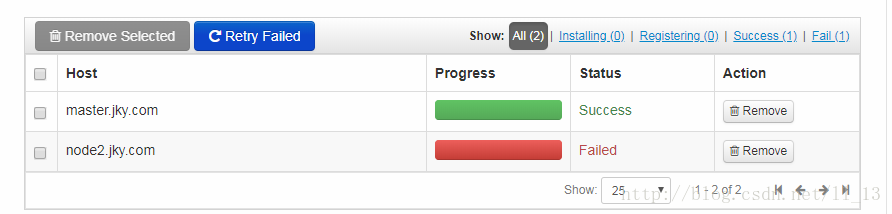
安装HDP过程中,一直遇到问题。(一开始两个都是Failed)。网上搜索,有说是OpenSSL版本太旧要更新,更新后问题解决,但是自己的centos7尝试更新,但显示已经是最新的版本了。最终查到问题所在,是python2.7.5版本问题。网上答案详见错误代码后。)
-
==========================
-
Creating target directory...
-
==========================
-
-
Command start time 2018-02-27 09:30:03
-
-
Connection to node2.jky.com closed.
-
SSH command execution finished
-
host=node2.jky.com, exitcode=0
-
Command end time 2018-02-27 09:30:03
-
-
==========================
-
Copying ambari sudo script...
-
==========================
-
-
Command start time 2018-02-27 09:30:03
-
-
scp /var/lib/ambari-server/ambari-sudo.sh
-
host=node2.jky.com, exitcode=0
-
Command end time 2018-02-27 09:30:03
-
-
==========================
-
Copying common functions script...
-
==========================
-
-
Command start time 2018-02-27 09:30:03
-
-
scp /usr/lib/python2.6/site-packages/ambari_commons
-
host=node2.jky.com, exitcode=0
-
Command end time 2018-02-27 09:30:04
-
-
==========================
-
Copying OS type check script...
-
==========================
-
-
Command start time 2018-02-27 09:30:04
-
-
scp /usr/lib/python2.6/site-packages/ambari_server/os_check_type.py
-
host=node2.jky.com, exitcode=0
-
Command end time 2018-02-27 09:30:04
-
-
==========================
-
Running OS type check...
-
==========================
-
-
Command start time 2018-02-27 09:30:04
-
Cluster primary/cluster OS family is redhat7 and local/current OS family is redhat7
-
-
Connection to node2.jky.com closed.
-
SSH command execution finished
-
host=node2.jky.com, exitcode=0
-
Command end time 2018-02-27 09:30:04
-
-
==========================
-
Checking 'sudo' package on remote host...
-
==========================
-
-
Command start time 2018-02-27 09:30:04
-
-
Connection to node2.jky.com closed.
-
SSH command execution finished
-
host=node2.jky.com, exitcode=0
-
Command end time 2018-02-27 09:30:05
-
-
==========================
-
Copying repo file to 'tmp' folder...
-
==========================
-
-
Command start time 2018-02-27 09:30:05
-
-
scp /etc/yum.repos.d/ambari.repo
-
host=node2.jky.com, exitcode=0
-
Command end time 2018-02-27 09:30:05
-
-
==========================
-
Moving file to repo dir...
-
==========================
-
-
Command start time 2018-02-27 09:30:05
-
-
Connection to node2.jky.com closed.
-
SSH command execution finished
-
host=node2.jky.com, exitcode=0
-
Command end time 2018-02-27 09:30:05
-
-
==========================
-
Changing permissions for ambari.repo...
-
==========================
-
-
Command start time 2018-02-27 09:30:05
-
-
Connection to node2.jky.com closed.
-
SSH command execution finished
-
host=node2.jky.com, exitcode=0
-
Command end time 2018-02-27 09:30:06
-
-
==========================
-
Copying setup script file...
-
==========================
-
-
Command start time 2018-02-27 09:30:06
-
-
scp /usr/lib/python2.6/site-packages/ambari_server/setupAgent.py
-
host=node2.jky.com, exitcode=0
-
Command end time 2018-02-27 09:30:06
-
-
==========================
-
Running setup agent script...
-
==========================
-
-
Command start time 2018-02-27 09:30:06
-
('WARNING 2018-02-27 09:30:14,621 NetUtil.py:116 - Server at https://master.jky.com:8440 is not reachable, sleeping for 10 seconds...
-
INFO 2018-02-27 09:30:14,621 HeartbeatHandlers.py:115 - Stop event received
-
INFO 2018-02-27 09:30:14,621 NetUtil.py:122 - Stop event received
-
INFO 2018-02-27 09:30:14,621 ExitHelper.py:53 - Performing cleanup before exiting...
-
INFO 2018-02-27 09:30:14,621 ExitHelper.py:67 - Cleanup finished, exiting with code:0
-
INFO 2018-02-27 09:30:16,903 main.py:223 - Agent died gracefully, exiting.
-
INFO 2018-02-27 09:30:16,904 ExitHelper.py:53 - Performing cleanup before exiting...
-
INFO 2018-02-27 09:30:17,196 main.py:90 - loglevel=logging.INFO
-
INFO 2018-02-27 09:30:17,197 main.py:90 - loglevel=logging.INFO
-
INFO 2018-02-27 09:30:17,197 main.py:90 - loglevel=logging.INFO
-
INFO 2018-02-27 09:30:17,198 DataCleaner.py:39 - Data cleanup thread started
-
INFO 2018-02-27 09:30:17,199 DataCleaner.py:120 - Data cleanup started
-
INFO 2018-02-27 09:30:17,199 DataCleaner.py:122 - Data cleanup finished
-
INFO 2018-02-27 09:30:17,252 PingPortListener.py:50 - Ping port listener started on port: 8670
-
INFO 2018-02-27 09:30:17,254 main.py:349 - Connecting to Ambari server at https://master.jky.com:8440 (192.168.201.13)
-
INFO 2018-02-27 09:30:17,254 NetUtil.py:62 - Connecting to https://master.jky.com:8440/ca
-
ERROR 2018-02-27 09:30:17,314 NetUtil.py:88 - [SSL: CERTIFICATE_VERIFY_FAILED] certificate verify failed (_ssl.c:579)
-
ERROR 2018-02-27 09:30:17,314 NetUtil.py:89 - SSLError: Failed to connect. Please check openssl library versions.
-
Refer to: https://bugzilla.redhat.com/show_bug.cgi?id=1022468 for more details.
-
WARNING 2018-02-27 09:30:17,315 NetUtil.py:116 - Server at https://master.jky.com:8440 is not reachable, sleeping for 10 seconds...
-
', None)
-
('WARNING 2018-02-27 09:30:14,621 NetUtil.py:116 - Server at https://master.jky.com:8440 is not reachable, sleeping for 10 seconds...
-
INFO 2018-02-27 09:30:14,621 HeartbeatHandlers.py:115 - Stop event received
-
INFO 2018-02-27 09:30:14,621 NetUtil.py:122 - Stop event received
-
INFO 2018-02-27 09:30:14,621 ExitHelper.py:53 - Performing cleanup before exiting...
-
INFO 2018-02-27 09:30:14,621 ExitHelper.py:67 - Cleanup finished, exiting with code:0
-
INFO 2018-02-27 09:30:16,903 main.py:223 - Agent died gracefully, exiting.
-
INFO 2018-02-27 09:30:16,904 ExitHelper.py:53 - Performing cleanup before exiting...
-
INFO 2018-02-27 09:30:17,196 main.py:90 - loglevel=logging.INFO
-
INFO 2018-02-27 09:30:17,197 main.py:90 - loglevel=logging.INFO
-
INFO 2018-02-27 09:30:17,197 main.py:90 - loglevel=logging.INFO
-
INFO 2018-02-27 09:30:17,198 DataCleaner.py:39 - Data cleanup thread started
-
INFO 2018-02-27 09:30:17,199 DataCleaner.py:120 - Data cleanup started
-
INFO 2018-02-27 09:30:17,199 DataCleaner.py:122 - Data cleanup finished
-
INFO 2018-02-27 09:30:17,252 PingPortListener.py:50 - Ping port listener started on port: 8670
-
INFO 2018-02-27 09:30:17,254 main.py:349 - Connecting to Ambari server at https://master.jky.com:8440 (192.168.201.13)
-
INFO 2018-02-27 09:30:17,254 NetUtil.py:62 - Connecting to https://master.jky.com:8440/ca
-
ERROR 2018-02-27 09:30:17,314 NetUtil.py:88 - [SSL: CERTIFICATE_VERIFY_FAILED] certificate verify failed (_ssl.c:579)
-
ERROR 2018-02-27 09:30:17,314 NetUtil.py:89 - SSLError: Failed to connect. Please check openssl library versions.
-
Refer to: https://bugzilla.redhat.com/show_bug.cgi?id=1022468 for more details.
-
WARNING 2018-02-27 09:30:17,315 NetUtil.py:116 - Server at https://master.jky.com:8440 is not reachable, sleeping for 10 seconds...
-
', None)
-
-
Connection to node2.jky.com closed.
-
SSH command execution finished
-
host=node2.jky.com, exitcode=0
-
Command end time 2018-02-27 09:30:19
-
-
Registering with the server...
-
Registration with the server failed.
Cause:
This is due to a defect in newer releases of Python 2.7.5 which causes certificate validation to fail regardless of certificate status.
(这是由于Python 2.7.5的新版本中存在缺陷,导致无论证书状态如何,证书验证都失败。)
Resolution Steps:
NOTE: As a workaround, we strongly recommend that Python not be updated to a version newer than python-2.7.5-48.el*.x86_64 (or downgraded to that version, if newer).
You can verify your release through python -V or python -c 'import sys; print(sys.version)' or yum list installed |grep python. You'll want to confirm that the major version is 2.7.5, the build is from Feb 2017 or older, and the full release is 2.7.5-48 or older.
Alternatively, you can disable certificate verification in Python if you wish to remain on a newer version:
sed -i 's/verify=platform_default/verify=disable/' /etc/python/cert-verification.cfg**我用这条命令解决了问题。只需要两个节点都输入这条命令即可。本文截图只在第一个节点执行了,所以第二个节点还是failed
(注意:作为一种解决方法,我们强烈建议 不要 将Python 更新为比python-2.7.5-48.el * .x86_64更新的版本(或者降级到该版本,如果更新的话)。你可以通过 python -V 或者 python -c'import sys; 打印(sys.version)'或 安装的yum列表| grep python。 您需要确认主要版本为2.7.5,版本为2017年2月或更早版本,完整版本为2.7.5-48或更早版本。
或者,如果您希望保留在新版本中,则可以在Python中禁用证书验证:)
*我通过python -V 只能查看到自己的python版本为2.7.5,但是不知道是否为2.7.5-48,因此没法按照他人的解决办法,把版本降至2.7.5-48,智能禁用证书验证。希望,可以有通过改变python版本的办法解决问题
解决问题参考资料:





 扫一扫
扫一扫


 1万+
1万+

 被折叠的 条评论
为什么被折叠?
被折叠的 条评论
为什么被折叠?
 到【灌水乐园】发言





