



数据类型汇总
Python 中有 7 个标准数据类型:
Number(数字)Tuple(元组)String(字符串) 也可以认为是tuple类型Set(集合)Dictionary(字典)Bool(布尔)None(类型)List(列表)
不可变数据类型: 数字,元组,字符串,可变数据类型: 列表,字典,集合
Python可以同时为多个变量赋值- 一个通过赋值指向不同类型的变量
- 数值除法包含两种: / 返回浮点数 // 返回一个整数
- 在混合运算中,
Python会把整数转换为浮点数
变量定义
Python 中的变量顶定义不需要指定类型,变量需要再使用前赋值,赋值之后变量才会被创建
可以连续的方式为变量赋值
a = b = c = 1
也可以为多个变量指定值
a,b,c = 1,2,"demo"

# ==>
a = 1
b = 2
c = "demo"
string 字符串
Python中的 ’ 和 " 含义完全一样- 使用 ‘’’ 和 “”" 指定一个多行字符串
- 使用转义符 \
- 反斜杠用于转义 比如 \n,但是 r 可以不让 \ 产生转义,比如
r"this is a line\n"不会换行 - 使用空格可以实现级联
"this" "is" "string" = "this is string" - 字符串可以使用
+连接, 使用*字符串重复 Python字符串有两种索引方式,从左到右从 0 开始,从右到左 -1 开始Python中的字符串不能改变Python中没有单独的字符类型,一个字符就是一个长度为1的字符串- 字符串切片
str[start:end]start(包含) 表示开启,end(不包含)表示结束 - 字符串切片可以加上步长
step, 词法格式是str[start:end:step]
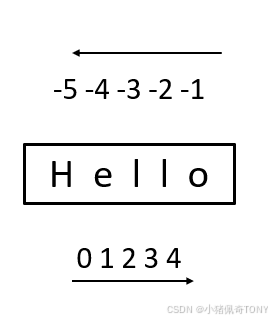
Number 数字类型
Python 中有四种数字类型: 整数,布尔型(一种单独的类型),浮点和数字
int: 没有 long ,可以是正值也可以是负值
bool: 只有 True 和 False
float: 1.23 或者 1.2E-3
complex: 实部加虚部,比如 1+2j
inta = 1000
floatb = 1.23
boolc = True
complexed = 1+2j

print("type inta:", type(inta))
print("type floatb:", type(floatb))
print("type boolc:", type(boolc))
print("type complexed",type(complexed))

print("type inta isinstance:", isinstance(inta, int))
print("type floatb isinstance:", isinstance(floatb, float))
print("type boolc isinstance:", isinstance(boolc,bool))
print("type complexed isinstance:",isinstance(complexed, complex))

def demostrate_number():
    """演示数字类型:整数、浮点数、复数"""
    # 整数
    int_num = 42
    int_negative = -2
    int_large = 123456789

    print("int:{0}, type:{1}".format(int_num, type(int_num)))
    print("negative :{0}, type:{1}".format(int_negative, type(int_negative)))
    print("large :{0}, type:{1}".format(int_large, type(int_large)))

    # 浮点数
    float_num = 3.141592653
    float_scientific = 1.23e-4
    float_negative = -2.5
    print("float number:{0}, type:{1}".format(float_num, type(float_num)))
    print("float scientific:{0}, type:{1}".format(float_scientific, type(float_scientific)))
    print("float negative:{0}, type:{1}".format(float_negative, type(float_negative)))

    # 复数
    complex_num = 3 + 4j
    complex_another = complex(2, -3)
    print("complex:{0}, type:{1}".format(complex_num, type(complex_num)))
    print("complex real:{0} imaginary:{1}".format(complex_num.real, complex_num.imag))
    print("complex() create:{0} type:{1}".format(complex_another, type(complex_another)))

    # 算术运算
    a,b = 15,4
    print("Arithmetic operation {0},{1}".format(a,b))
    print("add {0} + {1} = {2}".format(a, b, a + b))
    print("sub {0} - {1} = {2}".format(a, b, a - b))
    print("mul {0} * {1} = {2}".format(a, b, a * b))
    print("div {0} / {1} = {2}".format(a, b, a / b))
    print("div {0} // {1} = {2}".format(a, b, a // b)) # 取整
    print("remainder {0} % {1} = {2}".format(a, b, a % b))
    print("exponent {0} ** {1} = {2}".format(a, b, a ** b))

    # 类型转换
    print("type change")
    print("int(3.14):{0}".format(int(3.14)))
    print("float(5):{0}".format(float(5)))
    print("complex(2):{0}".format(complex(2)))
python 语言中,数字类型是不可变的,也就是说你一旦定义 val_a 的值为100,这意味着 一个对象 100 被创建,你无法改变它的值,你能做的,就是让变量指向一个全新的,值不同的对象,比如 val_a = 200,val_a 所以变量名类似于一个标签,可以指向不同的对象
Bool 类型
bool类型只有两个值True和Falsebool类型是int类型的子类,因此bool可以被看做整数使用,True的值等于1- 布尔类型可以和其他类型进行比较,比如数字和字符串,比较时
True的值为1,False的值为0 - 布尔类型可以转换为其他数据类型,此时
True的值为1,False的值为0 - 可以使用布尔函数将其他类型的值转换为布尔值
在 Python 中,所有非空和非0的字符串、列表和元组类型都是 True,只有0,空字符串,空列表被视为 False
因此在进行布尔类型的运算的时候,需要注意数据类型的真假性
a = True
b = False

print(type(a))
print(type(b))

# bool
print(bool(0)) # false
print(bool(42))# true
print(bool(-42))# true
print(bool(""))# false
print(bool("hello"))# true
print(bool([]))# false
print(bool([1,2]))# true
print(True and False) # false
print(True or False) # true
print(not False) # true

print(5 > 3) # true
print(5 == 3) # false

def demostrate_boolean():
    """演示布尔类型"""
    # 布尔值
    true_val = True
    false_val = False

    print(f"True: {true_val}, 类型: {type(true_val)}")
    print(f"False: {false_val}, 类型: {type(false_val)}")

    # 布尔运算
    print(f"\n布尔运算:")
    print(f"True and False = {True and False}")
    print(f"True or False = {True or False}")
    print(f"not True = {not True}")
    # 真值测试
    print(f"\n真值测试:")
    test_values = [0, 1, "", "hello", [], [1, 2], None, True, False]
    for value in test_values:
        print(f"  bool({value}) = {bool(value)}")
List 列表类型
list 是 python 中使用最频繁的数据类型
列表中的原生类型可以不相同,它支持数字、字符串甚至包含列表 ,列表中的元素也是支持截取的,但是可字符串不同,列表中的元素可以改变
list 中内置了很多方法 比如 append() ,pop() 等
list 使用 [ ] 进行定义
list = ["abcd", 786, 2.23, "runoob", 70.2]
print("list:", list)
print("list[0]:",list[0])
print("list[1:3]:",list[1:3])
print("list[4::-1]:",list[4::-1])

list[1] = "hahah"
print("list:", list)
#list: ['abcd', 786, 2.23, 'runoob', 70.2]
#list[0]: abcd
#list[1:3]: [786, 2.23]
#list[4::-1]: [70.2, 'runoob', 2.23, 786, 'abcd']
#list: ['abcd', 'hahah', 2.23, 'runoob', 70.2]

def demostrate_list():
    """演示列表类型"""
    # list create
    list1 = [1,2,3,4,5]
    list2 = ["apple", "banana", "grape", "lemon"]
    list3 = [1, "hello", 3.14, True]
    list4 = list(range(5))
    list5 = [x**2 for x in range(6)] # 列表推导式

    print(f"number type list: {list1}")
    print(f"string type list: {list2}")
    print(f"misc type list: {list3}")
    print(f"range create list: {list4}")
    print(f"列表推导式: {list5}")

    print(f"\n list operation")
    print(f"len: len({list1}) = {len(list1)}")
    print(f"index: list[0] = {list1[0]}, list[-1] = {list1[-1]}")
    print(f"split: list[1:4] = {list1[1:4]}")

    # list operation method
    fruits = ["apple", "banana", "grape","cherry"]
    fruits.append("orange")
    print(f"after append: {fruits}")

    fruits.insert(1, "pear")
    print(f"after insert: {fruits}")

    removed = fruits.pop()
    print(f"after pop: {fruits}, removed element:{removed}")

    fruits.remove("grape")
    print(f"after remove: {fruits}")

    fruits.sort()
    print(f"after sort: {fruits}")

    print(f"index of 'cherry': {fruits.index('cherry')}")
    print(f"index of 'apple': {fruits.index('apple')}")
    print(f"count of 'apple': {fruits.count('apple')}")

    # 列表复制
    original = [1,2,3]
    shallow_copy = original.copy()
    shallow_copy[0] = 99
    print(f"\nafter copy: original={original}, copy={shallow_copy}")
Tuple 元组类型
元组和列表类似,不同之处在于元组的元素不能修改,元组写在 ( ) 里,元组之间用逗号隔开
元组中的类型可以不一致,tuple 里可以包含可变对象,比如 list 等
字符串可以看成一种特殊类型的元组
注意:
- 和字符串一样,元组的元素不能修改
- 元组也可以被索引和切片,方法是一样的
- 注意包含
0个和1个元素元组的特殊语法规则,单个元素的元组写成single_element = (42,) - 元组可以使用
+操作符进行拼接
元组(tuple) 使用 () 进行定义
# tuple 内的元素不可改变 # string 是一种特殊的 tuple
tuple = ("abcd", 786, 2.23, "runoob", 70.2)
tinytuple = (123, "runoob")

onetuple = ("hello",)

print(tuple)
print(tuple[0:4])
print(tuple[2:])
print(tuple + tinytuple)
print(tuple + tinytuple + onetuple)

#('abcd', 786, 2.23, 'runoob', 70.2)
#('abcd', 786, 2.23, 'runoob')
#(2.23, 'runoob', 70.2)
#('abcd', 786, 2.23, 'runoob', 70.2, 123, 'runoob')
#('abcd', 786, 2.23, 'runoob', 70.2, 123, 'runoob', 'hello')

def demostrate_tuple():
    """演示元组类型"""
    # tuple create
    tuple1 = (1, 2, 3, 4, 5)
    tuple2 = ("apple", "banana", "cherry")
    tuple3 = (1, "hello", 3.14, True)
    single_element = (42,)
    not_tuple = (42)

    print(f"number tuple: {tuple1}")
    print(f"string tuple: {tuple2}")
    print(f"misc tuple: {tuple3}")
    print(f"single element tuple: {single_element} type:{type(single_element)}")
    print(f"this not a tuple {not_tuple}, type:{type(not_tuple)}") #int

    # tuple operation
    print(f"\ntuple operation:")
    print(f"tuple len: len({tuple1}) = {len(tuple1)}")
    print(f"tuple index: tuple[0] = {tuple1[0]},tuple1[-1] = {tuple1[-1]}")
    print(f"split: tuple1[1:4] = {tuple1[1:4]}")

    # tuple unpack
    a,b,c = (10,20,30)
    print(f"tuple unpack: a={a} b={b} c={c}")

    try:
        tuple1[0] = 99
    except TypeError as e:
        print(f"unmodify tuple: {e}")
Set 集合类型
Python 中的 set 是一种无序的,可变的数据类型,用于存储唯一的元素
集合中的元素不可以重复,并且可以进行并集,差集,交集等集合运算
python 中集合使用 {},元素使用,进行分割
注意创建一个空集用() 而不是 {},用 {} 创建一个空字典 ,Set 定义使用 ()
# Set 元素内容不可重复, Set 内的内容是无序的, Set 可以实现集合操作
sites = {"Google", "Amazon", "baidu", "Google", "mircosoft"}
print(sites)

if "taobao" in sites:
    print("taobao in sites")
else:
    print("taobao not in sites")

a = set("orzhello")
b = set("world")

# {'e', 'o', 'l', 'r', 'z', 'h'}
print("set a:",a)

# a 和 b 交集
print( a & b)

# a 和 b 并集
print( a | b)

# in a not in b
print( a - b)

print( a ^ b)

"""
{'mircosoft', 'Amazon', 'Google', 'baidu'}
taobao not in sites
set a: {'h', 'l', 'r', 'o', 'e', 'z'}
{'o', 'l', 'r'}
{'w', 'd', 'h', 'l', 'r', 'o', 'e', 'z'}
{'z', 'e', 'h'}
{'w', 'd', 'e', 'z', 'h'}
"""
def demostrate_sets():
    """演示集合类型"""
    set1 = {1,2,3,4,5}
    set2 = set([1,2,2,3,3,4,5])
    set3 = {x for x in range(10) if x%2 == 0}

    print(f"const create: {set1}")
    print(f"set() create: {set2}")
    print(f"set() using range: {set3}")

    # set operartion
    A = {1, 2, 3, 4, 5}
    B = {4, 5, 6, 7, 8}

    print(f"set operation:")
    print(f"set a:{A}")
    print(f"set b:{B}")
    print(f"set A | B: {A | B}")
    print(f"set A & B: {A & B}")
    print(f"set A - B: {A - B}")
    print(f"set A ^ B: {A ^ B}")

    A.add(6)
    print(f"after add:{A}")

    A.remove(1)
    print(f"after remove:{A}")

    A.discard(10)  # 不存在不会报错
    print(f"discard不存在的元素后: {A}")

    poped = A.pop()
    print(f"after pop {A} remove element:{poped}")
Dictionary 字典类型
列表是有序对象的集合,集合是无序对象的集合,两种的区别在于: 字典中的元素是通过键来存取的,而不是通过偏移存取
字典是一种映射类型,字典用 { } 标记,它是一种无序的 键(key):值(value) 的集合
# diction 是无序对象的集合, diction 中的元素通过键值存取, 不是通过偏移
# dict 里的内容可以存取的
# dict 也是用 { }
dict = {}
dict["one"] = "hello"
dict[2] = "wangchen"

print(dict)
print(dict.keys())
print(dict.values())

tinydict = {"name":"wangchen", "telnumber":15251059623, "sites":"www.asrmicro.com"}

print(tinydict)
print(tinydict["name"])
print(tinydict["sites"])

tinydict["telnumber"] = 15651022367
print(tinydict)
"""
{'one': 'hello', 2: 'wangchen'}
dict_keys(['one', 2])
dict_values(['hello', 'wangchen'])
{'name': 'wangchen', 'telnumber': 15251059623, 'sites': 'www.asrmicro.com'}
wangchen
www.asrmicro.com
{'name': 'wangchen', 'telnumber': 15651022367, 'sites': 'www.asrmicro.com'}
"""
def demostrate_dictionaries():
    """演示字典类型"""
    #dictionaries demo
    dict1 = {"name":"Alice", "age":25, "city":"New York"}
    dict2 = dict(name="Bob", age=30, city="London")
    dict3 = {x: x**2 for x in range(1, 6)} # 字典推导式

    print(f"const create: {dict1}")
    print(f"dict() create: {dict2}")
    print(f"dict() using range: {dict3}")

    #dict operation
    print(f"\ndict operation:")
    print(f"get value dict1[name]:{dict1["name"]}")
    print(f"get method value dict1.get('age'):{dict1.get("age")}")
    print(f"get method value dict1.get('age'):{dict1.get("age")}")
    print(f"get unexsit value dict.get('country', 'default value') = {dict1.get('country', 'default value')}")
    print(f"all key: dict1.keys() = {list(dict1.keys())}")
    print(f"all values: dict1.values() = {list(dict1.values())}")
    print(f"all items: dict1.items() = {list(dict1.items())}")

    #dict operation
    print(f"\nadd vakue:")
    dict1["email"] = "wangchen@asrmirco.com"
    print(f"after add dict1 = {dict1}")

    removed = dict1.pop("age")
    print(f"after pop: {dict1}, remove: {removed}")

    dict1.update({"city":"Paris","country":"France"})
    print(f"after update: {dict1}")

    print("tranverse dic:")
    for key in dict1:
        print(f"key:{key} value:{dict1[key]}")

    for key,value in dict1.items():
        print(f"  {key} -> {value}")
类型转换
最后补充一下类型转换的使用方法
def demonstrate_none():
    """演示None类型"""
    print("=" * 50)
    none_val = None
    print(f"None value: {none_val}")
    print(f"None type: {type(none_val)}")
    print(f"None == None: {None == None}")
    print(f"None is None: {None is None}")

    # None的常见用法
    def function_without_return():
        """没有返回值的函数"""
        pass

    result = function_without_return()
    print(f"resule with no return value: {result}")

def demostrate_tyoe_conversion():
    """演示类型转换"""
    #all type conversion
    print(f"\nint conversion:")
    print(f" int(3.14) = {int(3.14)}")
    print(f" int('42') = {int('42')}")
    print(f" int(True) = {int(True)}")

    print(f"\nfloat conversion")
    print(f" float(5) = {float(5)}")
    print(f" float('3.14') = {float('3.14')}")
    print(f" float(False) = {float(False)}")

    print(f"\n str conversion")
    print(f"  str(42) = {str(42)}")
    print(f"  str(3.14) = {str(3.14)}")
    print(f"  str(True) = {str(True)}")
    print(f"  str([1,2,3]]) = {str([1,2,3])}")

    print(f"\n bool conversion")
    print(f"  bool(0) = {bool(0)}")
    print(f"  bool(1) = {bool(1)}")
    print(f"  bool('') = {bool('')}")
    print(f"  bool('hello') = {bool('hello')}")
    print(f"  bool([]) = {bool([])}")
    print(f"  bool([1, 2]) = {bool([1, 2])}")

    print(f"\n list conversion")
    print(f" list('hello') = {list('hello')}")
    print(f" list((1,2,3))) = {list((1,2,3))}")
    print(f" list('a':1, 'b':2)) = {list({'a':1, 'b':2, "Hello":5})}")

    print(f"\n tuple conversion")
    print(f" tuple([1,2,3]) = {tuple([1,2,3])}")
    print(f" tuple('Hello') = {tuple('Hello')}")

    print(f"\n set conversion")
    print(f" set[1,2,3,4,3,5] = {set([1,2,3,4,3,5])}")
    print(f" set('Hello') = {set('Hello')}")





 扫一扫
扫一扫


 被折叠的 条评论
为什么被折叠?
被折叠的 条评论
为什么被折叠?
 到【灌水乐园】发言





