


-
KVM虚拟机的管理主要是通过virsh命令对虚拟机进行管理。
1. 查看KVM虚拟机配置文件及运行状态
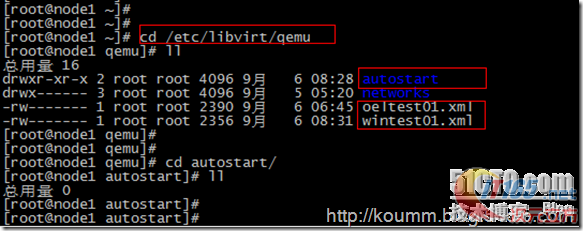
(1) KVM虚拟机默认配置文件位置: /etc/libvirt/qemu/
autostart目录是配置kvm虚拟机开机自启动目录。
(2) virsh命令帮助
# virsh -help
或直接virsh命令和,再执行子命令。如下所示。
[root@node1 ~]# virsh
欢迎使用 virsh,虚拟化的交互式终端。输入:'help' 来获得命令的帮助信息
'quit' 退出virsh # help
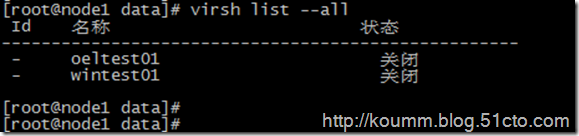
……(3) 查看kvm虚拟机状态
# virsh list --all
2. KVM虚拟机开机
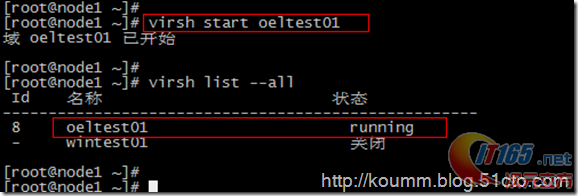
# virsh start oeltest01
3. KVM虚拟机关机或断电
(1) 关机
默认情况下virsh工具不能对linux虚拟机进行关机操作,linux操作系统需要开启与启动acpid服务。在安装KVM linux虚拟机必须配置此服务。
# chkconfig acpid on
# service acpid restartvirsh关机
# virsh shutdown oeltest01

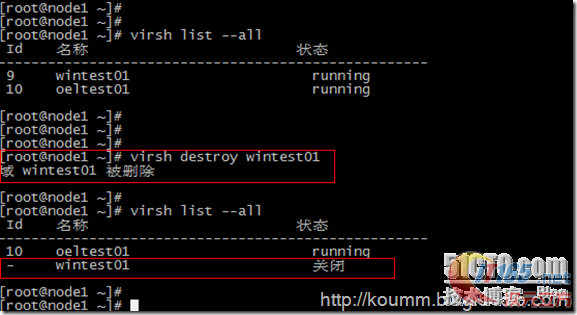
(2) 强制关闭电源
# virsh destroy wintest01
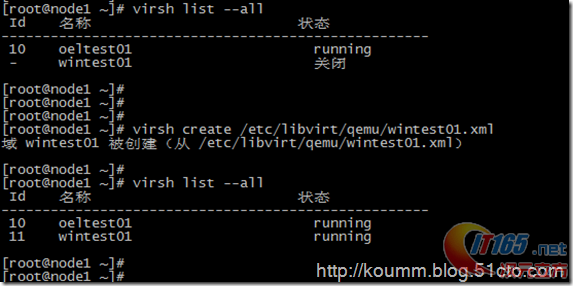
4. 通过配置文件启动虚拟机
# virsh create /etc/libvirt/qemu/wintest01.xml
5. 配置开机自启动虚拟机
# virsh autostart oeltest01
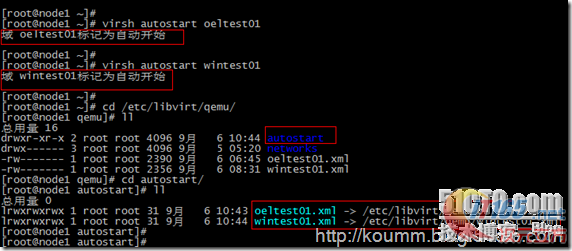
autostart目录是kvm虚拟机开机自启动目录,可以看到该目录中有KVM配置文件链接。
6. 导出KVM虚拟机配置文件
# virsh dumpxml wintest01 > /etc/libvirt/qemu/wintest02.xml
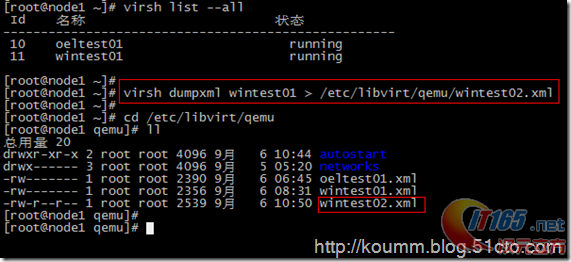
KVM虚拟机配置文件可以通过这种方式进行备份。
7. 添加与删除KVM虚拟机
(1) 删除kvm虚拟机
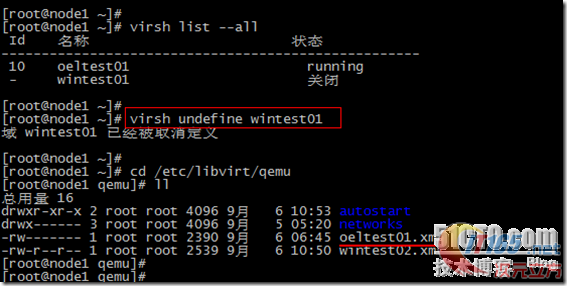
# virsh undefine wintest01
说明:该命令只是删除wintest01的配置文件,并不删除虚拟磁盘文件。如下图所示。
(2) 重新定义虚拟机配置文件
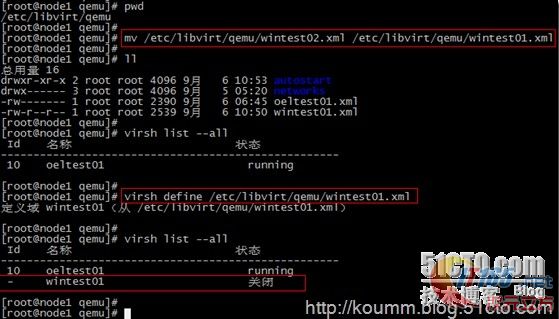
通过导出备份的配置文件恢复原KVM虚拟机的定义,并重新定义虚拟机。
# mv /etc/libvirt/qemu/wintest02.xml /etc/libvirt/qemu/wintest01.xml
# virsh define /etc/libvirt/qemu/wintest01.xml
8. 编辑KVM虚拟机配置文件
# virsh edit wintest01
virsh edit将调用vi命令编辑/etc/libvirt/qemu/wintest01.xml配置文件。也可以直接通过vi命令进行编辑,修改,保存。
可以但不建议直接通过vi编辑。
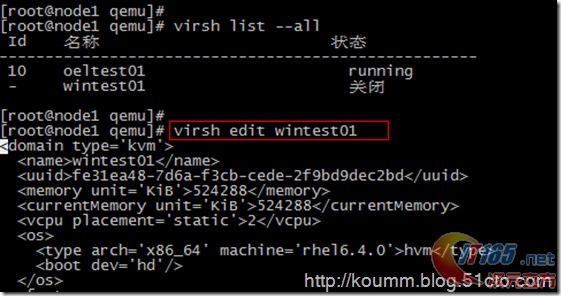
[root@node1 qemu]# vi /etc/libvirt/qemu/wintest01.xml
01.<!--02.WARNING: THIS IS AN AUTO-GENERATED FILE. CHANGES TO IT ARE LIKELY TO BE03.OVERWRITTEN AND LOST. Changes to this xml configuration should be made using:04.virsh edit wintest0105.or other application using the libvirt API.06.-->07.<domaintype='kvm'>08.<name>wintest01</name>09.<uuid>fe31ea48-7d6a-f3cb-cede-2f9bd9dec2bd</uuid>10.<memory unit='KiB'>524288</memory>11.<currentMemory unit='KiB'>524288</currentMemory>12.<vcpu placement='static'>2</vcpu>13.<os>14.<typearch='x86_64' machine='rhel6.4.0'>hvm</type>15.<boot dev='hd'/>16.</os>17.<features>18.<acpi/>19.<apic/>20.<pae/>21.</features>22.<clock offset='utc'/>23.<on_poweroff>destroy</on_poweroff>24.<on_reboot>restart</on_reboot>25.<on_crash>restart</on_crash>26.<devices>27.<emulator>/usr/libexec/qemu-kvm</emulator>28.<disktype='file' device='disk'>29.<driver name='qemu'type='raw' cache='none'/>30.<sourcefile='/data/wintest01.img'/>31.<target dev='hda' bus='ide'/>32.<addresstype='drive' controller='0' bus='0' target='0' unit='0'/>33.</disk>34.<disktype='block' device='cdrom'>35.<driver name='qemu'type='raw'/>36.<target dev='hdc' bus='ide'/>37.<readonly/>38.<addresstype='drive' controller='0' bus='1' target='0' unit='0'/>39.</disk>40.<controllertype='usb' index='0'>41.<addresstype='pci' domain='0x0000' bus='0x00' slot='0x01'function='0x2'/>42.</controller>43.<controllertype='ide' index='0'>44.<addresstype='pci' domain='0x0000' bus='0x00' slot='0x01'function='0x1'/>45.</controller>46.<interfacetype='bridge'>47.<mac address='52:54:00:2b:2f:fe'/>48.<sourcebridge='br0'/>49.<addresstype='pci' domain='0x0000' bus='0x00' slot='0x03'function='0x0'/>50.</interface>51.<serialtype='pty'>52.<target port='0'/>53.</serial>54.<consoletype='pty'>55.<targettype='serial' port='0'/>56.</console>57.<inputtype='mouse' bus='ps2'/>58.<graphicstype='vnc' port='5911' autoport='no' listen='0.0.0.0'>59.<listentype='address' address='0.0.0.0'/>60.</graphics>61.<video>62.<modeltype='cirrus' vram='9216' heads='1'/>63.<addresstype='pci' domain='0x0000' bus='0x00' slot='0x02'function='0x0'/>64.</video>65.<memballoon model='virtio'>66.<addresstype='pci' domain='0x0000' bus='0x00' slot='0x04'function='0x0'/>67.</memballoon>68.</devices>69.<seclabeltype='none'/>70.</domain>9. virsh console 控制台管理linux虚拟机
配置virsh console见下文
kvm虚拟化学习笔记(六)之kvm虚拟机控制台登录配置
# virsh console oeltest01
10. 其它virsh命令
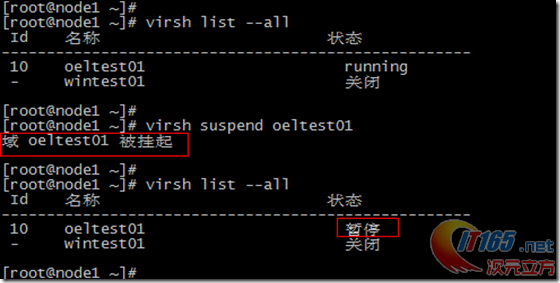
(1) 挂起服务器
# virsh suspend oeltest01
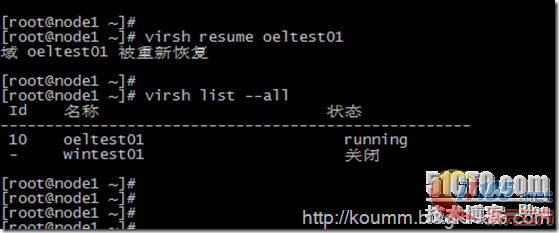
(2) 恢复服务器
# virsh resume oeltest01
virsh命令丰富。可以执行各种维护任务,本文只是从维护与管理的角度例举了常用的命令,为该命令的使用提供一个思路。
kvm虚拟化学习笔记(四)之kvm虚拟机日常管理与配置
最新推荐文章于 2025-10-22 22:22:57 发布
 本文介绍了KVM虚拟机的基本管理方法,包括查看配置文件、启动、关闭虚拟机等常见操作,以及如何通过virsh命令进行维护。





 扫一扫
扫一扫


 2996
2996

 被折叠的 条评论
为什么被折叠?
被折叠的 条评论
为什么被折叠?
 到【灌水乐园】发言





