


 本文详细介绍了PyQt中图像类QPixmap, QImage, QPicture, QBitmap的使用,并通过实例展示了如何利用QSS进行UI美化,包括设置窗口背景、实现不规则窗口、设置样式、窗口透明化以及加载QSS文件等技巧。QSS的选择器、子控件和伪状态在创建美观界面中起到关键作用。"
109612499,10247036,uni-app调用外部应用:浏览器、淘宝、AppStore、QQ实战,"['uni-app', '移动开发', 'Android开发', 'iOS开发']
本文详细介绍了PyQt中图像类QPixmap, QImage, QPicture, QBitmap的使用,并通过实例展示了如何利用QSS进行UI美化,包括设置窗口背景、实现不规则窗口、设置样式、窗口透明化以及加载QSS文件等技巧。QSS的选择器、子控件和伪状态在创建美观界面中起到关键作用。"
109612499,10247036,uni-app调用外部应用:浏览器、淘宝、AppStore、QQ实战,"['uni-app', '移动开发', 'Android开发', 'iOS开发']
目录
1,图像类:QPixmap,QImage,QPicture,QBitmap
1,图像类:QPixmap,QImage,QPicture,QBitmap
PyQt中常用的图像类有四个:QPixmap,QImage,QPicture,QBitmap
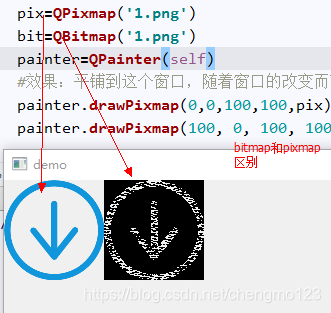
--QPixmap是专门为绘图而设计的,在绘制图片时需要使用Qpixmap
--QImage提供了一个与硬件无关的图像表示函数,可以用于图片的像素级访问
--QPicture是一个绘图设备类,它继承自QPainter类,可以使用QPainter的begin()函数在QPicture上绘图,使用end()函数结束绘图,使用QPicture的save()函数将Qpainter所使用过的绘图指令保存到文件中
--QBitmap是一个继承QPixmap的简单类,它提供了1bit深度的二值图像的类,QBitmap提供的单色图像,可以用来制作游标(QCursor)或者笔刷(QBrush)
'''绘图板'''
import sys
from PyQt5.QtWidgets import QApplication,QWidget,QHBoxLayout,QPushButton,QLabel,QComboBox,QStyleFactory
from PyQt5.QtWebEngineWidgets import QWebEngineView
from PyQt5.QtCore import QUrl,QObject,Qt,QPoint
from PyQt5.QtGui import QPixmap,QPainter

class GuiDemo(QWidget):
    def __init__(self):
        super(GuiDemo, self).__init__()
        self.startPoint=QPoint()
        self.endPoint = QPoint()
        self.initUi()
    def initUi(self):
        self.setWindowTitle('demo')
        self.setGeometry(300,300,500,300)
        #鼠标绘图流程:1,建立Qpixmap绘图面板2,将面板加入到绘制到主界面3,定义鼠标函数和绘制函数绘制到绘图面板
        self.pix=QPixmap(200,200)
        self.pix.fill(Qt.white)

    def paintEvent(self, QPaintEvent):#自动调用该函数
        # 将画布绘制到主界面上
        main_painter = QPainter(self)      #必须在paintEvent中使用才有效
        main_painter.drawPixmap(0, 0, self.pix)

        #将图型绘制到画布上
        draw_painter=QPainter(self.pix)
        draw_painter.drawLine(self.startPoint,self.endPoint)
        self.startPoint=self.endPoint

    def mousePressEvent(self, QMouseEvent):
        if QMouseEvent.button()==Qt.LeftButton:
            self.startPoint=QMouseEvent.pos()
            self.endPoint=self.startPoint
    def mouseMoveEvent(self, QMouseEvent):
        if QMouseEvent.buttons() and Qt.LeftButton:
            self.endPoint=QMouseEvent.pos()
            self.update()
    def mouseReleaseEvent(self, QMouseEvent):
        if QMouseEvent.button()==Qt.LeftButton:
            self.endPoint=QMouseEvent.pos()
            self.update()


if __name__=='__main__':
    app=QApplication(sys.argv)
    demo=GuiDemo()
    demo.show()
    sys.exit(app.exec_())
2,QSS的UI美化
Qss是Qt的样式表,是用来自定义控件外观的一种机制,使页面美化和代码层分开,利于维护,QSS样式由两部分组成,其中一部分是选择器(selector),指定哪些控件会受到影响:另一部分是声明,指定哪些属性应该在控件上进行设置。声明部分是一系列的“属性:值”对,使用分号(;)分割不同的属性值对,使用大括号将所有的声明包括在内
QSS选择器有如下几种类型
- 通配选择器:*,匹配所有的控件
- 类型选择器:QPushButton,匹配所有的QPushButton类及
 最低0.47元/天 解锁文章






 扫一扫
扫一扫


 2458
2458

 被折叠的 条评论
为什么被折叠?
被折叠的 条评论
为什么被折叠?
 到【灌水乐园】发言





