



1.搭建yum源安装软件
[root@localhost network-scripts]# gpk-application##这是一个类似与软件商店的文件
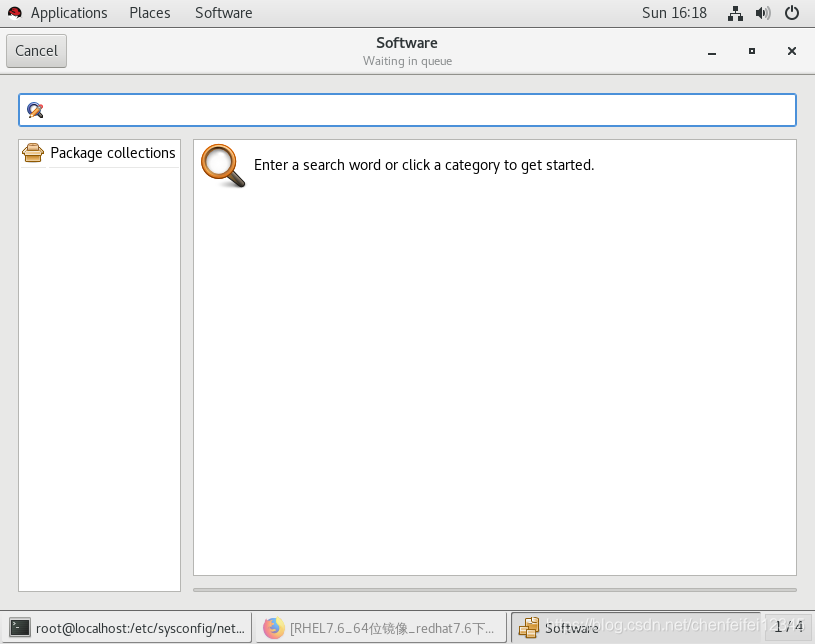
##我们先下载一个匹配系统版本的镜像,然后再使用secureCRT传输到我们的虚拟机里面
[root@localhost root]# mount /dev/cdrom /media/##我们把光盘镜像挂载到media上,我们要是用虚拟机本来没有挂载的话,可以使用mount 下载的镜像 要挂载的位置实现挂载比如[root@localhost Desktop]# mount /root/Desktop/rhel-server-7.6-x86_64-dvd.iso /root/Desktop/westossource/,因为我们这里已经有挂载了所有就不需要这样
[root@localhost root]# mount##查看挂载状态##可以看到已经挂载上了
mount: /dev/sr0 is write-protected, mounting read-only
/dev/sr0 on /media type iso9660 (ro,relatime,uid=0,gid=0,iocharset=utf8,mode=0400,dmode=0500)
[root@localhost root]# cd /media
[root@localhost media]# ls
addons            GPL       media.repo               RPM-GPG-KEY-redhat-release
EFI               images    Packages                 TRANS.TBL
EULA              isolinux  repodata
extra_files.json  LiveOS    RPM-GPG-KEY-redhat-beta
[root@localhost media]# ls Packages/##media里面的Packages都是我们的安装包
389-ds-base-1.3.8.4-15.el7.x86_64.rpm
389-ds-base-libs-1.3.8.4-15.el7.x86_64.rpm
abattis-cantarell-fonts-0.0.25-1.el7.noarch.rpm
abrt-2.1.11-52.el7.x86_64.rpm
abrt-addon-ccpp-2.1.11-52.el7.x86_64.rpm
abrt-addon-kerneloops-2.1.11-52.el7.x86_64.rpm
[root@localhost media]# cd /etc/yum.repos.d/##我们的资源指向性文件
##我们在浏览器前面加上file:// 就可以查看系统中的文件
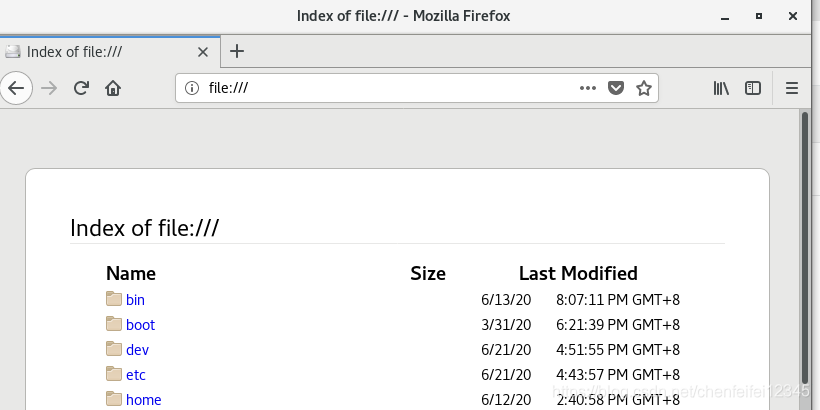
[root@localhost yum.repos.d]# vim westos.repo##配置yum源文件,为了搭建安装环境
[westos]
name=westos
baseurl=file:///media
gpgcheck=0
##第一行为仓库的名字
##第三行为找东西的地址就是我们挂载的地方
##第四行相当每次安装软件的时候都会检测key因为等于0所以不检测,其实就是相当于检测一下是不是自己公司生产的产品,如果不是的话就是第三方公司生产的,如果我们这块输入的是gpgcheck=1,让系统监测的话,就必须也加上key的检测库,必须再加上一行 gpgkey=file///etc/pki/rpm-gpg/RPM-GPG-KEY-redhat-release 这个是他的key库,必须加上对比的库
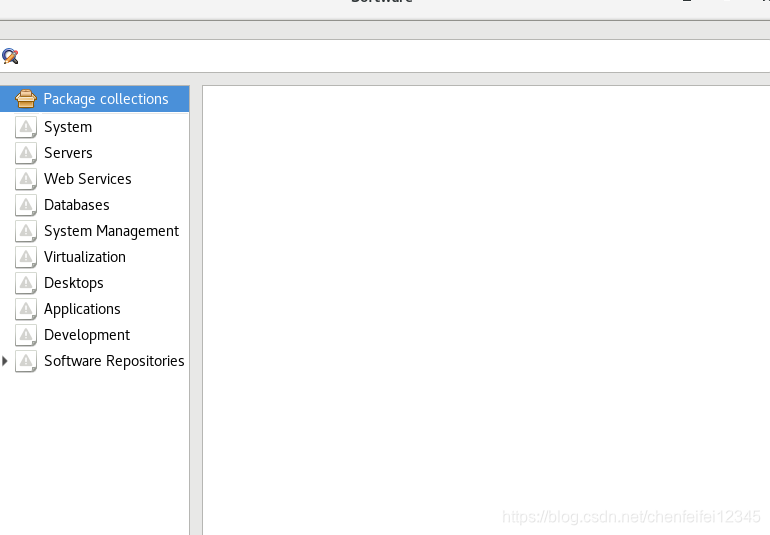
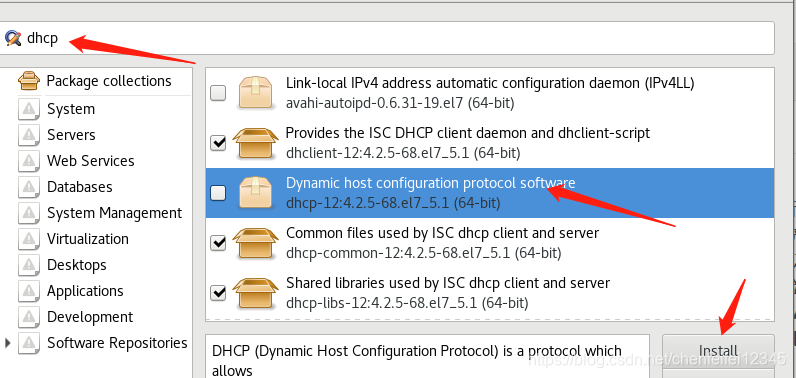
##我们搜索dhcp就可以找到和安装了
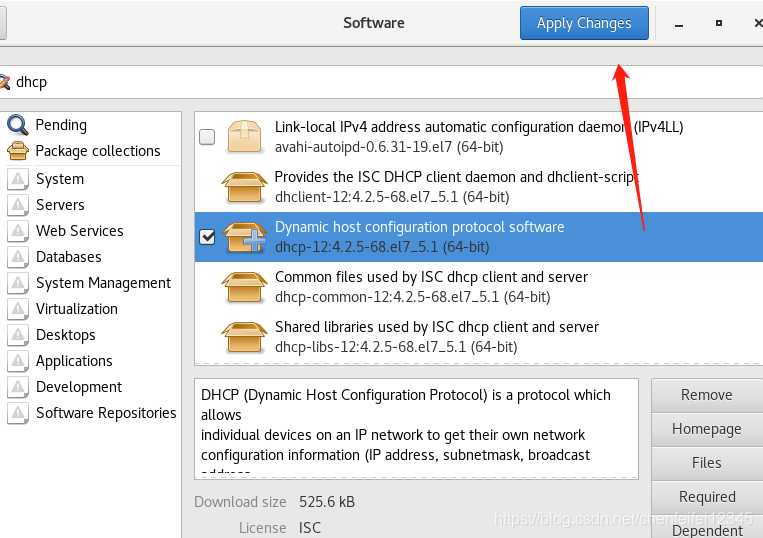
##点击apply changes就安装了,下载的时候可以看到软件商店的名字就叫westos
##总结:这个就是安装系统不存在的软件的方法
##2.yum详解
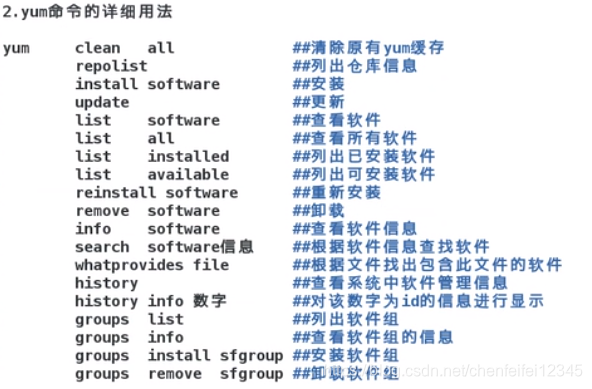
##我们每次做完repo文件的时候都清空一下yum源(yum clean all)
[root@localhost yum.repos.d]# yum list dhcp##我们直接列出dhcp文件
Loaded plugins: langpacks, product-id, search-disabled-repos, subscription-manager
This system is not registered with an entitlement server. You can use subscription-manager to register.
Available Packages
dhcp.x86_64                          12:4.2.5-68.el7_5.1                           westos
[root@localhost yum.repos.d]# yum repolist
Loaded plugins: langpacks, product-id, search-disabled-repos, subscription-manager
This system is not registered with an entitlement server. You can use subscription-manager to register.
westos                                                            | 4.3 kB  00:00:00
(1/2): westos/group_gz                                            | 146 kB  00:00:00
(2/2): westos/primary_db                                          | 4.2 MB  00:00:00
repo id                                   repo name                                status
westos                                    westos                                   5,152
repolist: 5,152
##可以看到我们的repo id(名字)为westos 就是上面第一行的设置[westos],repo name(解释)也是westos是第二行的name=westos,总共有5152个包
[root@localhost yum.repos.d]# yum list all##列出所有已经安装和没有安装的软件
[root@localhost yum.repos.d]# yum list available ##可以安装的软件
[root@localhost yum.repos.d]# yum list installed##已经安装的软件(y表示安装,d表示下载,n表示什么都不做, yum list installed -y 加上 -y就不会有提示了)
[root@localhost yum.repos.d]# yum install dhcp##我们先安装上dhcp
Loaded plugins: langpacks, product-id, search-disabled-repos, subscription-manager
This system is not registered with an entitlement server. You can use subscription-manager to register.
Resolving Dependencies
--> Running transaction check
---> Package dhcp.x86_64 12:4.2.5-68.el7_5.1 will be installed
--> Finished Dependency Resolution

Dependencies Resolved
[root@localhost yum.repos.d]# yum reinsatll dhcp##因为我们上面已经安装了 dhcp,如果想再一次安装直接使用install是无法安装的,需要使用重新安装
[root@localhost yum.repos.d]# yum remove dhcp -y##卸载dhcp
[root@localhost yum.repos.d]# yum info dhcp##可以查看dhcp 的信息
Loaded plugins: langpacks, product-id, search-disabled-repos, subscription-manager
This system is not registered with an entitlement server. You can use subscription-manager to register.
Available Packages
Name        : dhcp
Arch        : x86_64
Epoch       : 12
Version     : 4.2.5
root@localhost yum.repos.d]# yum search dhcp##搜索dhcp的信息
Loaded plugins: langpacks, product-id, search-disabled-repos, subscription-manager
This system is not registered with an entitlement server. You can use subscription-manager to register.
=================================== N/S matched: dhcp ===================================
dhcp-common.x86_64 : Common files used by ISC dhcp client and server
dhcp-libs.i686 : Shared libraries used by ISC dhcp client and server
[root@localhost yum.repos.d]# rm -fr /bin/ls##比如我们误删了我们的ls命令
[root@localhost yum.repos.d]# ls##可以看到ls命令已经没了
bash: /usr/bin/ls: No such file or directory
[root@localhost yum.repos.d]# yum whatprovides /bin/ls##我们这个时候就可以采用whatproveides命令来查询给他提供ls的安装包coreutils-8.22-23.el7.x86_64 ,可以看到这个就是给他提供ls的安装包,当我们不知道他的路径的时候就可以是用*/date来查询
Loaded plugins: langpacks, product-id, search-disabled-repos, subscription-manager
This system is not registered with an entitlement server. You can use subscription-manager to register.
coreutils-8.22-23.el7.x86_64 : A set of basic GNU tools commonly used in shell scripts
Repo        : westos
Matched from:
Filename    : /bin/ls


coreutils-8.22-23.el7.x86_64 : A set of basic GNU tools commonly used in shell scripts
Repo        : @anaconda/7.6
Matched from:
Filename    : /bin/ls
[root@localhost yum.repos.d]# yum install coreutils-8.22-23.el7.x86_64##我们使用安装命令发现不行,因为以前已经安装过,因此必须使用reinstall
Loaded plugins: langpacks, product-id, search-disabled-repos, subscription-manager
This system is not registered with an entitlement server. You can use subscription-manager to register.
Package coreutils-8.22-23.el7.x86_64 already installed and latest version
Nothing to do
[root@localhost yum.repos.d]# yum install coreutils-8.22-23.el7.x86_64 -y##这样就安装好了
[root@localhost yum.repos.d]# ls##ls命令又可以使用了
redhat.repo westos.repo
root@localhost yum.repos.d]# yum history##只会显示删除,重装,更新 安装
Loaded plugins: langpacks, product-id, search-disabled-repos, subscription-manager
This system is not registered with an entitlement server. You can use subscription-manager to register.
ID     | Login user               | Date and time    | Action(s)      | Altered
-------------------------------------------------------------------------------
     4 | root <root>              | 2020-06-21 19:05 | Reinstall      |    1
     3 | root <root>              | 2020-06-21 18:43 | Erase          |    1
     2 | root <root>              | 2020-06-21 18:38 | Install        |    1
     1 | System <unset>           | 2020-03-31 18:09 | Install        | 1365
history list
##上面有一个Erase删除,那我们想知道删除的是哪一个?
[root@localhost yum.repos.d]# yum history info 3 ##加上info 和id编号就可以查询对哪个软件进行删除了
Loaded plugins: langpacks, product-id, search-disabled-repos, subscription-manager
This system is not registered with an entitlement server. You can use subscription-manager to register.
Transaction ID : 3
Begin time     : Sun Jun 21 18:43:35 2020
Begin rpmdb    : 1366:5c4e4903a760781f7a98ff831845823bf135cb15
End time       :            18:43:36 2020 (1 seconds)
End rpmdb      : 1365:79b53c52a924d52215b53bb38613866950ade61e
User           : root <root>
Return-Code    : Success
Command Line   : remove dhcp -y
Transaction performed with:
    Installed     rpm-4.11.3-35.el7.x86_64                  @anaconda/7.6
    Installed     subscription-manager-1.21.10-2.el7.x86_64 @anaconda/7.6
    Installed     yum-3.4.3-161.el7.noarch                  @anaconda/7.6
Packages Altered:
    Erase dhcp-12:4.2.5-68.el7_5.1.x86_64 @westos
history info
[root@localhost yum.repos.d]# yum groups list Virtualization\ Client##我们可以查看软件组的信息
Loaded plugins: langpacks, product-id, search-disabled-repos, subscription-manager
This system is not registered with an entitlement server. You can use subscription-manager to register.
There is no installed groups file.
Maybe run: yum groups mark convert (see man yum)
Warning: no environments/groups match: Virtualization Client
[root@localhost yum.repos.d]# yum groups info Virtualization\ Client
Loaded plugins: langpacks, product-id, search-disabled-repos, subscription-manager
This system is not registered with an entitlement server. You can use subscription-manager to register.
There is no installed groups file.
Maybe run: yum groups mark convert (see man yum)

Group: Virtualization Client
 Group-Id: virtualization-client
 Description: Clients for installing and managing virtualization instances.
 Mandatory Packages:
    gnome-boxes
   +virt-install
   +virt-manager
   +virt-viewer
 Default Packages:
   +virt-top
 Optional Packages:
   libguestfs-inspect-icons
   libguestfs-tools
   libguestfs-tools-c
   python-ipaddr
##+代表如果我们操作软件组的话,他们都会被装上的
[root@localhost yum.repos.d]# yum groups install "Virtualization Client "##我们安装这个Virtualization Client
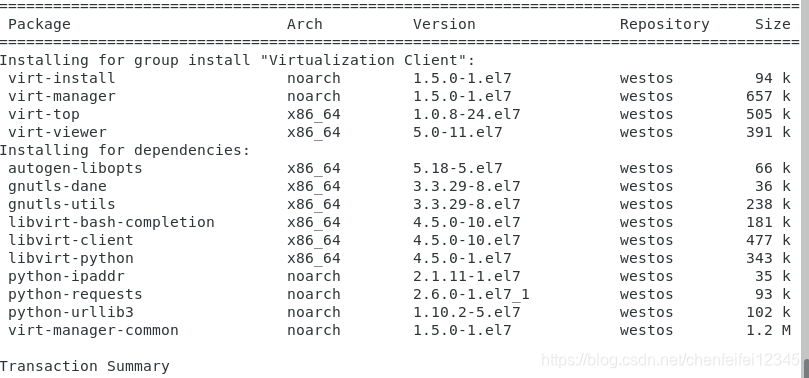
##可以看到我们已经安装了很多组里面的软件,这个就叫软件组,这样我们的虚拟化已经装上了
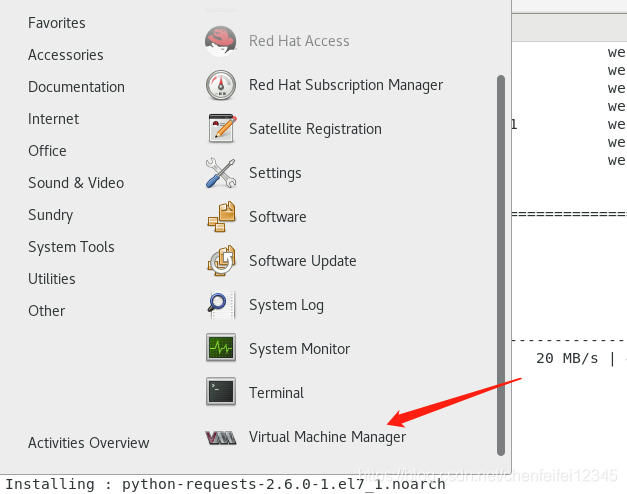
##但是我们的虚拟化还不能使用,因此/proc/partitions |grep svm和/proc/partitions |grep vmx都还不存在
2.搭建网络yum源
##前面我们已经在一台主机上搭建好了yum源了,但是如果我们拥有多个主机的话,如果一个接一个搭建yum源,很麻烦,那我们如何利用网络搭建yum源实现一次完成呢?
##其实我们就可以把搭建好的 /media/共享出来,让其他的主机可以通过网络访问就行(已知的网络共享方式有:1.输入网址的时候前面的http://(超文本传输协议)
[root@localhost yum.repos.d]# curl -I baidu.com##显示头信息,通过查询百度我们发现http://是apache这个软件支持的
HTTP/1.1 200 OK
Date: Sun, 21 Jun 2020 11:45:14 GMT
Server: Apache
Last-Modified: Tue, 12 Jan 2010 13:48:00 GMT
ETag: "51-47cf7e6ee8400"
Accept-Ranges: bytes
Content-Length: 81
Cache-Control: max-age=86400
Expires: Mon, 22 Jun 2020 11:45:14 GMT
Connection: Keep-Alive
Content-Type: text/html
[root@localhost yum.repos.d]# yum search apache##我们搜索apache的软件包
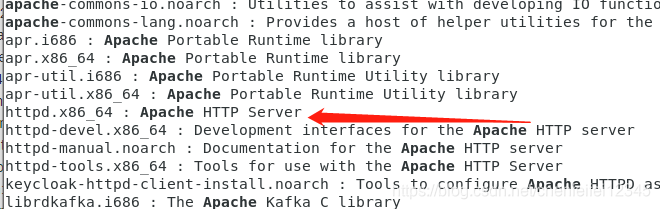
[root@localhost yum.repos.d]# yum install httpd.x86_64 -y##安装apache
[root@localhost yum.repos.d]# systemctl start httpd##启动阿帕奇
[root@localhost yum.repos.d]# systemctl enable httpd##开机自动启动apach
Created symlink from /etc/systemd/system/multi-user.target.wants/httpd.service to /usr/lib/systemd/system/httpd.service.
##我们输入IP测试后发现可以访问,如果不能访问,就是防火墙的问题,关闭防火墙和开机不自启动就行就行
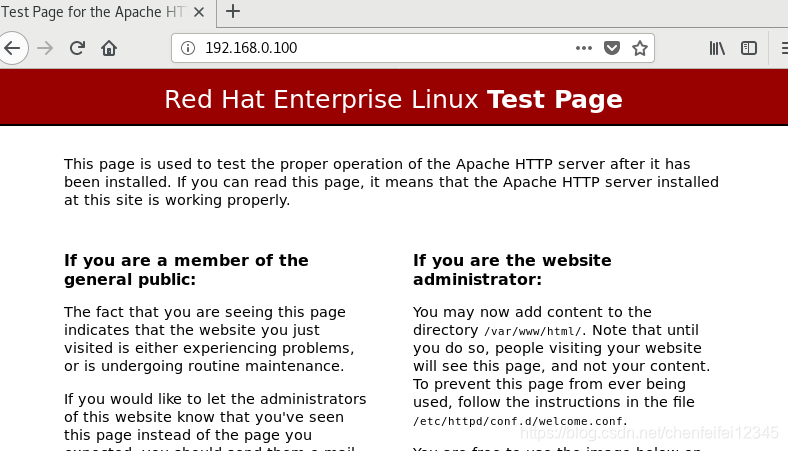
##因为apache是共享类型的软件,共享的是他特定的内容,他共享内容的文件时/var/www/html/里面的内容
[root@localhost yum.repos.d]# vim /var/www/html/westos.html##在里面写入这个
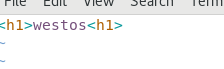
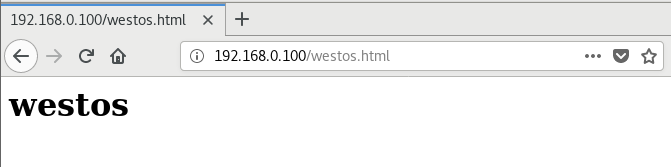
##访问ip加上文件名westos.html就可以查看共享的内容了
[root@localhost yum.repos.d]# mkdir /var/www/html/rhel7.6
[root@localhost yum.repos.d]# mount /dev/cdrom /var/www/html/rhel7.6/##我们将搭载好的yum源挂载到apache共享的rhel7.6文件里
mount: /dev/sr0 is write-protected, mounting read-only
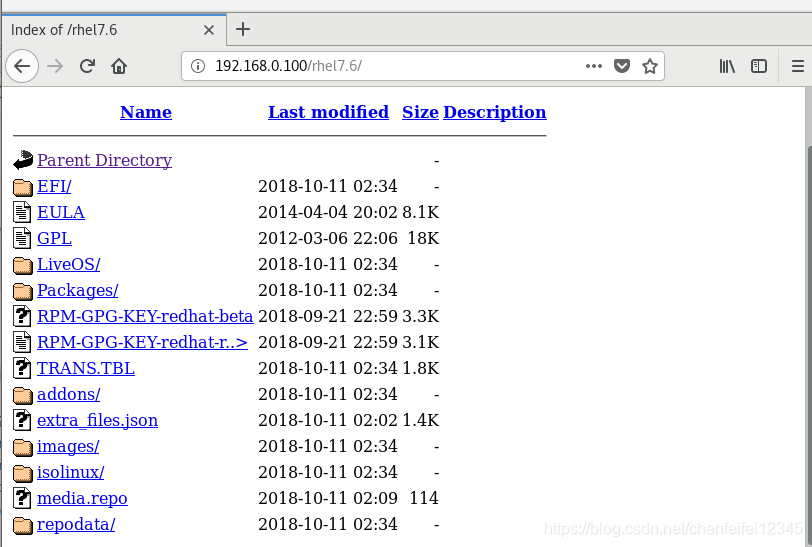
##这样就完成网络构建yum源了
##我们重新找一台没有搭建过yum源的主机,确保新的主机有网络
[root@localhost yum.repos.d]# pwd
/etc/yum.repos.d
[root@localhost yum.repos.d]# vim westos.repo##在yum.repo.d里面新搭建yum源的是狗将链接与本地的区别是改为http://192.168.0.100/rhel7.6,将挂载信息改为apache共享的
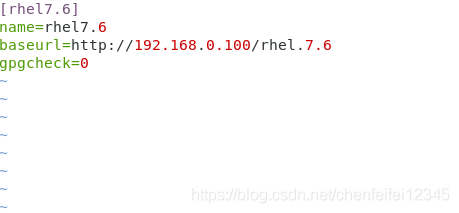
##这样就完成了网络构建yum源
##但是mount命令重启后挂载又会失效,如何让重启后挂载不失效?
[root@localhost yum.repos.d]# vim /etc/rc.d/rc.local##这个是开机自启动的脚本
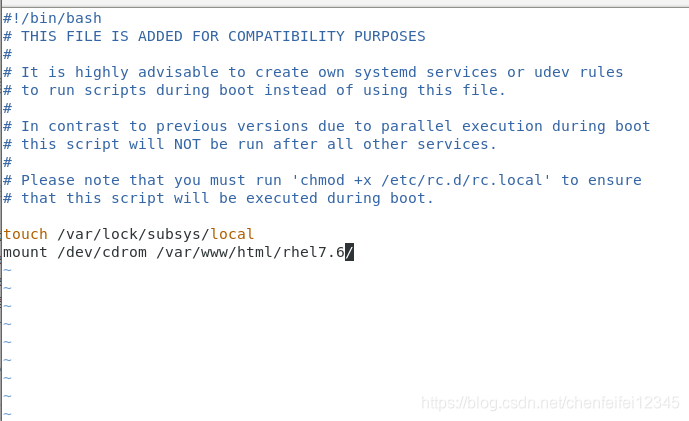
##我们把这个挂在信息写进去
[root@localhost yum.repos.d]# chmod +x /etc/rc.d/rc.local##再给他一个x权限,确保他开机可以自启动
[root@localhost yum.repos.d]# ll /etc/rc.d/rc.local -d
-rwxr-xr-x. 1 root root 513 Jun 21 20:28 /etc/rc.d/rc.local
[root@localhost yum.repos.d]# yum install httpd##但是我们现在又不能安装软件了
Loaded plugins: langpacks, product-id, search-disabled-repos, subscription-manager
This system is not registered with an entitlement server. You can use subscription-manager to register.
Package httpd-2.4.6-88.el7.x86_64 already installed and latest version
Nothing to do

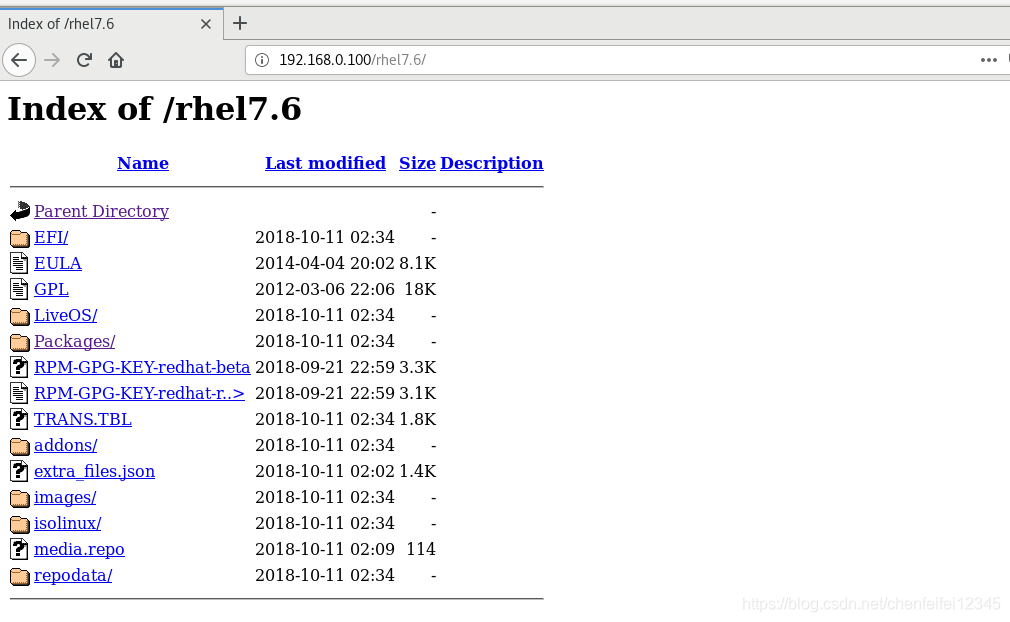
[root@localhost yum.repos.d]# reboot##重启后
[root@localhost ~]# mount##查看挂载情况发现已经自动挂载了
/dev/sr0 on /var/www/html/rhel7.6 type iso9660 (ro,relatime)
tmpfs on /run/user/42 type tmpfs (rw,nosuid,nodev,relatime,seclabel,size=202812k,mode=700,uid=42,gid=42)
tmpfs on /run/user/0 type tmpfs (rw,nosuid,nodev,relatime,seclabel,size=202812k,mode=700)
gvfsd-fuse on /run/user/0/gvfs type fuse.gvfsd-fuse (rw,nosuid,nodev,relatime,user_id=0,group_id=0)
fusectl on /sys/fs/fuse/connections type fusectl (rw,relatime)
3.rpm包和第三方软件
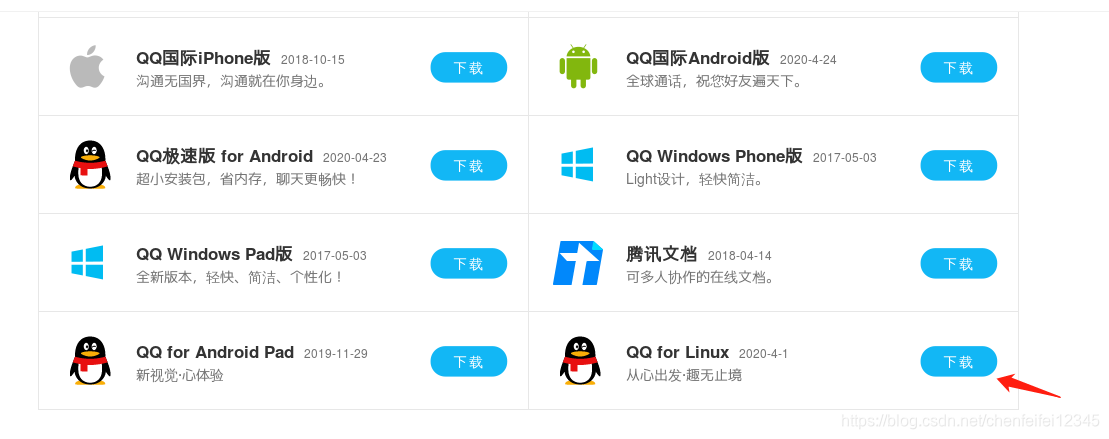
##首先在firefox里面下载qq的linux版本 ×64位,rpm包,也可以找到链接wget下载
##我们将下载好的qq复制到cp桌面
[root@localhost Desktop]# yum install linuxqq_2.0.0-b2-1082_x86_64.rpm ##对其进行安装
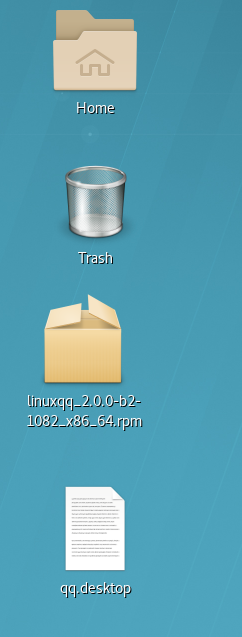
##安装完成后发现没有权限,需要我们给他权限
[root@localhost Desktop]# chmod 755 /root/Desktop/qq.desktop
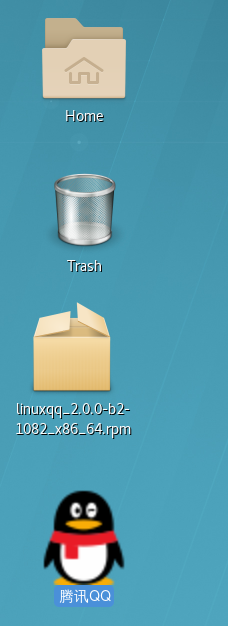
##已经安装好了,因为这个是没有依赖性的软件,所有安装的比较顺利,针对有依赖性的
##我们再下载一个wps,这次我们可以用window下载然后使用secureCRT搬运到linux里面
[root@localhost Desktop]# yum install wps-office-11.1.0.9522-1.x86_64.rpm##我们安装wps
##过程中我们可以看到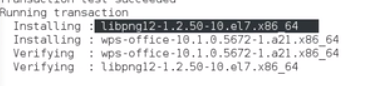
##安装wps的时候需要先安装libpng12-1.2.50-10这个文件,这个文件就叫做wps的依赖性,系统安装的时候就会自动安装很方便,但是还有软件不能在安装的时候自动解决他的依赖性
##我们尝试安装kolourpaint
[root@localhost Desktop]# yum install kolourpaint-4.10.5-4.el7.×86_64.rpm

##但是安装过程中出现问题,这个kolourpaint-libs属于他的依赖没有,下面也提示我们可以使用–skip-broken来跳过不能解决的问题
[root@localhost Desktop]# yum install kolourpaint-4.10.5-4.el7.×86_64.rpm --skip-broken -y##忽略过一些问题后
[root@localhost Desktop]# yum install kolourpaint-4.10.5-4.el7.×86_64.rpm##发现上面的kolourpaint-libs依然没法解决
##我们可以在rpmsearch里面寻找kolourpaint-libs-4.10.5-4.el
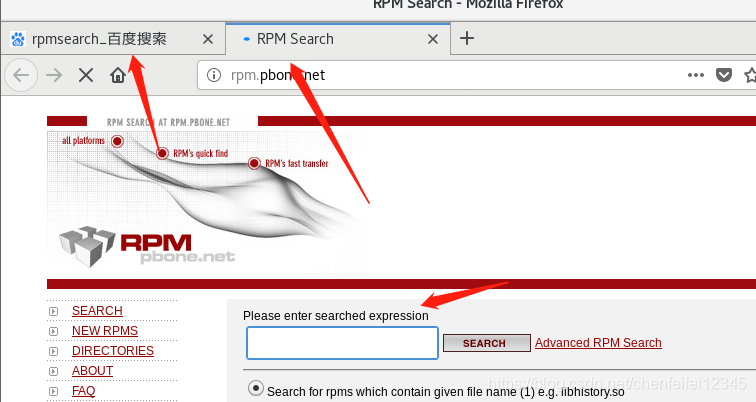
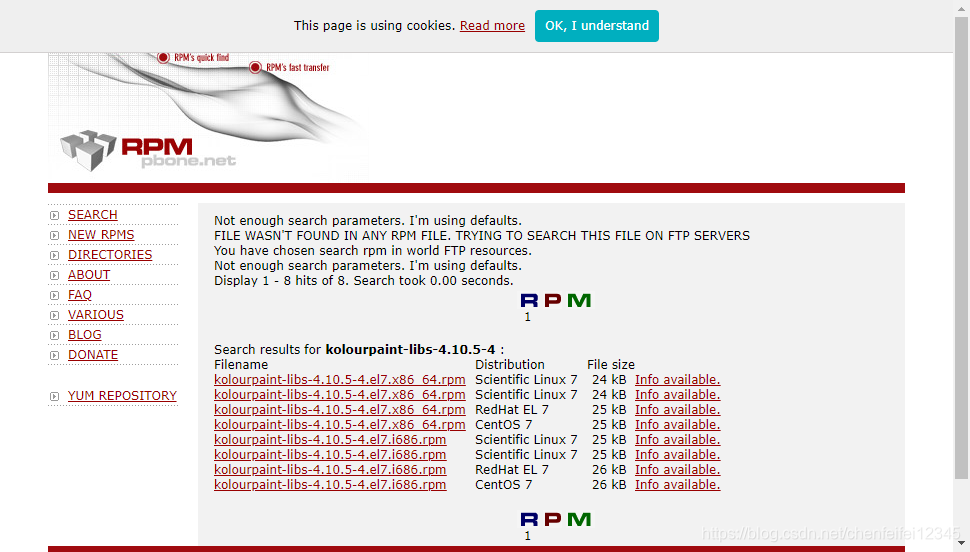
##可以发现已经找到了,复制后wget链接下载
[root@localhost Desktop]# wget http://rpm.pbone.net/index.php3?stat=26&dist=95&size=24540&name=kolourpaint-libs-4.10.5-4.el7.x86_64.rpm
[root@localhost Desktop]# yum install kolourpaint-libs-4.10.5-4.el7.x86_64.rpm##然后安装,但是又提示出现依赖缺失

##这个时候yum就无法解决问题,需要rpm底层工具来解决,rpm的缺点是只能安装软件不能解决他的依赖性,yum可以解决他的依赖性
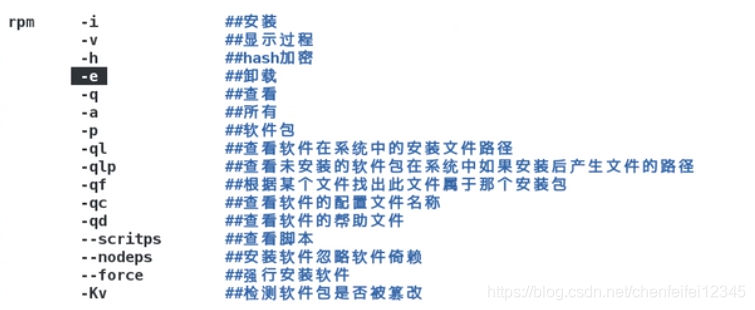
[root@localhost ~]# rpm -e linuxqq##我们尝试用rpm卸载qq
[root@localhost ~]# rpm -ivh wps-office-11.1.0.9522-1.x86_64.rpm##这个是i,v显示过程,h指定软件包的过程是哈希加密
[root@localhost ~]# rpm -q httpd##查看系统中是否安装httpd,看到已经安装
httpd-2.4.6-88.el7.x86_64
[root@localhost ~]# rpm -qa##查看所有安装的软件包
[root@localhost ~]# rpm -ql httpd##查看这个软件在系统中的所有文件
/etc/httpd
/etc/httpd/conf
/etc/httpd/conf.d
/etc/httpd/conf.d/README
/etc/httpd/conf.d/autoindex.conf
/etc/httpd/conf.d/userdir.conf
/etc/httpd/conf.d/welcome.conf
/etc/httpd/conf.modules.d
/etc/httpd/conf.modules.d/00-base.conf
/etc/httpd/conf.modules.d/00-dav.conf
[root@localhost ~]# rpm -qc httpd##查看apache的配置文件
/etc/httpd/conf.d/autoindex.conf
/etc/httpd/conf.d/userdir.conf
/etc/httpd/conf.d/welcome.conf
/etc/httpd/conf.modules.d/00-base.conf
/etc/httpd/conf.modules.d/00-dav.conf
/etc/httpd/conf.modules.d/00-lua.conf
/etc/httpd/conf.modules.d/00-mpm.conf
/etc/httpd/conf.modules.d/00-proxy.conf
/etc/httpd/conf.modules.d/00-systemd.conf
/etc/httpd/conf.modules.d/01-cgi.conf
/etc/httpd/conf/httpd.conf
/etc/httpd/conf/magic
/etc/logrotate.d/httpd
/etc/sysconfig/htcacheclean
/etc/sysconfig/httpd
[root@localhost ~]# rpm -qd httpd##查看他的说明文件
/usr/share/doc/httpd-2.4.6/ABOUT_APACHE
/usr/share/doc/httpd-2.4.6/CHANGES
/usr/share/doc/httpd-2.4.6/LICENSE
/usr/share/doc/httpd-2.4.6/NOTICE
/usr/share/doc/httpd-2.4.6/README
/usr/share/doc/httpd-2.4.6/VERSIONING
/usr/share/doc/httpd-2.4.6/httpd-dav.conf
/usr/share/doc/httpd-2.4.6/httpd-default.conf
/usr/share/doc/httpd-2.4.6/httpd-info.conf
/usr/share/doc/httpd-2.4.6/httpd-languages.conf
/usr/share/doc/httpd-2.4.6/httpd-manual.conf
/usr/share/doc/httpd-2.4.6/httpd-mpm.conf
/usr/share/doc/httpd-2.4.6/httpd-multilang-errordoc.conf
/usr/share/doc/httpd-2.4.6/httpd-vhosts.conf
/usr/share/doc/httpd-2.4.6/proxy-html.conf
/usr/share/man/man8/apachectl.8.gz
/usr/share/man/man8/fcgistarter.8.gz
/usr/share/man/man8/htcacheclean.8.gz
/usr/share/man/man8/httpd.8.gz
/usr/share/man/man8/rotatelogs.8.gz
/usr/share/man/man8/suexec.8.gz
[root@localhost ~]# rpm -qf /bin/date##这个是查看这个date命令是哪个软件支持的,和 yum whatprovides /bin/date 命令一样,然后直接yum reinstall 就行
coreutils-8.22-23.el7.x86_64
[root@localhost ~]# rpm -qp dhcp --scripts ##查看软件包在安装和卸载过程中都会做那些动作,我们通过

##我们查看这个后,发现这个软件包在安装的时候会useradd个新用户然后让他的uid为0,就是窃取root权限,然后passwd改掉超级用户的密码,卸载的时候直接删根,所有查看这个下载未知的第三方软件的时候一定查看
[root@localhost Desktop]# rpm -Kv linuxqq_2.0.0-b2-1082_x86_64.rpm##-Kv查看这个软件包是否被篡改
linuxqq_2.0.0-b2-1082_x86_64.rpm:
    Header SHA1 digest: OK (65a0766024594bee6a711cfda671d6a63128ad7f)
    MD5 digest: OK (ce8a51d7fc009a9eabee1c75a92746e2)
[root@localhost Desktop]# echo hello >> linuxqq_2.0.0-b2-1082_x86_64.rpm##我们追加hello到这个软件包
[root@localhost Desktop]# rpm -Kv linuxqq_2.0.0-b2-1082_x86_64.rpm##这个时候查看,就发现已经被篡改了
linuxqq_2.0.0-b2-1082_x86_64.rpm:
    Header SHA1 digest: OK (65a0766024594bee6a711cfda671d6a63128ad7f)
    MD5 digest: BAD Expected(ce8a51d7fc009a9eabee1c75a92746e2) != (f347b10f79805182aa38a4a5ccead634)
##当我们已经安装了一个软件后,再次安装的话必须使用reinstall,但是我们也可以使用
[root@localhost Desktop]# rpm -ivh linuxqq_2.0.0-b2-1082_x86_64.rpm --force##我们加上–force来达到强制安装
##刚刚我们的kolourpaint的依赖性没有得到解决

##我们可以给原本存在依赖问题的kolourpaint-libs加上nodeps来实现忽略依赖性安装,

##然后再继续安装
4.第三方软件源的搭建
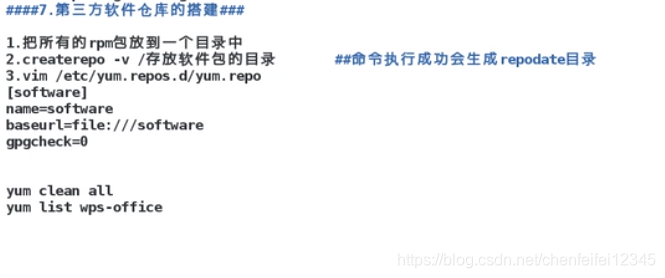
##因为我们第三方的软件都没有在yum源里面,我们如何将他们加入软件源我们可以使用createrepo来采集我们软件的信息并且自动生成primary.xml
[root@localhost Desktop]# createrepo -v /root/Desktop/##扫描桌面然后把linuxqq的信息采集到primary.xml里面,如果目录有其他不属于rpm的文件就会采集失败
Spawning worker 0 with 1 pkgs
Spawning worker 1 with 0 pkgs
Worker 0: reading linuxqq_2.0.0-b2-1082_x86_64.rpm
Workers Finished
Saving Primary metadata
Saving file lists metadata
Saving other metadata
Generating sqlite DBs
Starting other db creation: Mon Jun 22 19:44:43 2020
Ending other db creation: Mon Jun 22 19:44:44 2020
Starting filelists db creation: Mon Jun 22 19:44:44 2020
Ending filelists db creation: Mon Jun 22 19:44:44 2020
Starting primary db creation: Mon Jun 22 19:44:44 2020
Ending primary db creation: Mon Jun 22 19:44:44 2020
Sqlite DBs complete
##Spawning worker 0 with 1 pkgs这个是采集原数据,就是软件原本就存在的数据
[root@localhost Desktop]# ls##采集完成后我们就会发现多了个repodata的文件
linuxqq_2.0.0-b2-1082_x86_64.rpm
repodata
[root@localhost Desktop]# cd repodata/##这个文件里面就由我们需要的primary.xml文件
[root@localhost repodata]# ls
30e5028824000a37409c45dc612caf17d0fb34b96c77a38d0f8d7a87f4f64f74-filelists.sqlite.bz2
672103037e9aa779a5821ad578aa41df1ffee67506b214e083725907863bf41e-other.sqlite.bz2
7c580ae15f63e7f0bafb740fe18952e35ff85af23b09cebf3680912cce1f24d5-filelists.xml.gz
7c90547db062e62abbfdfb3fd3238f1861bc458a86c8771327b6ba9d1ec3346d-other.xml.gz
9ac872353af9441883b7aac48fb66c5d3693af56eef2db9577a9cc5e02028299-primary.xml.gz
e3217e85a3788f3c15ff554ac8784953073ce5e1164271f91a7dd4db75555fd0-primary.sqlite.bz2
repomd.xml
[root@localhost repodata]# gunzip 9ac872353af9441883b7aac48fb66c5d3693af56eef2db9577a9cc5e02028299-primary.xml.gz##解开primary.xml
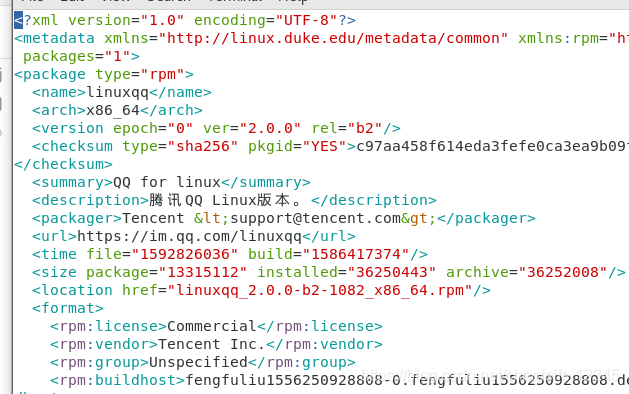
##可以看到有linuxqq,也有它的依赖性
##这个时候桌面存在repodata就成为一个软件仓库
[root@localhost repodata]# vim /etc/yum.repos.d/westos.repo##我们把软件仓库的信息写进yum.repo的westos里面
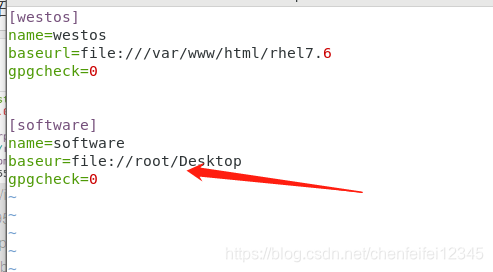

##这样我们就可以在软件仓库搜索到linuxqq了
##我们上面装的画图软件,因为依赖性的问题让我们安装很不方便,然后我们要是把他需要的rpm包都写进yum仓按照上面的方式,那我们下次安装的时候就不会出现他的依赖性缺失的问题,很方便。。。。这个就叫我们的第三方软件仓的搭建





 扫一扫
扫一扫


 5835
5835

 被折叠的 条评论
为什么被折叠?
被折叠的 条评论
为什么被折叠?
 到【灌水乐园】发言





