






@TOC
springboot264基于JAVA的民族婚纱预定系统的设计与实现
绪论
1.1 研究背景
当前社会各行业领域竞争压力非常大,随着当前时代的信息化,科学化发展,让社会各行业领域都争相使用新的信息技术,对行业内的各种相关数据进行科学化,规范化管理。这样的大环境让那些止步不前,不接受信息改革带来的信息技术的企业随时面临被淘汰,被取代的风险。所以当今,各个行业领域,不管是传统的教育行业,餐饮行业,还是旅游行业,医疗行业等领域都将使用新的信息技术进行信息革命,改变传统的纸质化,需要人手工处理工作事务的办公环境。软件信息技术能够覆盖社会各行业领域是时代的发展要求,各种数据以及文件真正实现电子化是信息社会发展的不可逆转的必然趋势。本民族婚纱预定系统也是紧跟科学技术的发展,运用当今一流的软件技术实现软件系统的开发,让考试信息完全通过管理系统实现科学化,规范化,程序化管理。从而帮助信息管理者节省事务处理的时间,降低数据处理的错误率,对于基础数据的管理水平可以起到促进作用,也从一定程度上对随意的业务管理工作进行了避免,同时,民族婚纱预定系统的数据库里面存储的各种动态信息,也为上层管理人员作出重大决策提供了大量的事实依据。总之,民族婚纱预定系统是一款可以真正提升管理者的办公效率的软件系统。
1.2 目的和意义
信息数据的处理完全依赖人工进行操作,会耗费大量的人工成本,特别是面对大量的数据信息时,传统人工操作不仅不能对数据的出错率进行保证,还容易出现各种信息资源的低利用率与低安全性问题。更有甚者,耽误大量的宝贵时间,尤其是对信息的更新,归纳与统计更是耗财耗力的过程。所以电子化信息管理的出现就能缓解以及改变传统人工方式面临的处境,一方面可以确保信息数据在短时间被高效处理,还能节省人力成本,另一方面可以确保信息数据的安全性,可靠性,并可以实现信息数据的快速检索与修改操作,这些优点是之前的旧操作模式无法比拟的。因此民族婚纱预定系统为数据信息的管理模式的升级与改革提供了重要的窗口。
1.3 论文结构安排
为了帮助用户更好的了解和理解程序的开发流程与相关内容,本文将通过六个章节进行内容阐述。
第一章:描述了程序的开发背景,程序运用于现实生活的目的与意义,以及程序文档的结构安排信息;
第二章:描述了程序的开发环境,包括程序开发涉及到的技术,程序开发使用的数据存储工具等信息;
第三章:描述了程序着手进行开发时,会面临的可行性问题,并对程序功能以及性能要求进行描述;
第四章:描述了程序大功能模块下的功能细分信息,以及存储程序数据的数据库表文件结构的设计信息等;
第五章:描述了程序的功能实现界面的内容,也对程序操作人员操作的部分功能进行了描述;
第六章:描述了程序功能的测试内容,并介绍了系统测试的概念与方法。
2 相关技术
2.1 SSM框架介绍
本课题程序开发使用到的框架技术,英文名称缩写是SSM,在JavaWeb开发中使用的流行框架有SSH、SSM、SpringMVC等,作为一个课题程序采用SSH框架也可以,SSM框架也可以,SpringMVC也可以。SSH框架是属于重量级别的框架,配置繁琐,不够灵活,修改程序需要修改好多个文件,并且运行起来也占用内存较高,CPU使用率相对也高,SpringMVC是Spring开发的一套MVC架构,更灵活更好用,SSM框架取中间值,既没有SSH臃肿,也没有SpringMVC简化,属于中间级别的,在配置过程和使用过程中更能编写和理解。MyBatis框架取代Hibernate框架是因为它更灵活,不需要完全在框架里操作,它在数据操作上可以写出更灵活的代码,它的性能也比Hibernate框架更稳定。总的来说,使用SSM框架是通过综合考虑而使用的,网上有很多的使用教程和心得体会,而且SSM又是这么的流行,用SSM框架开发是顺其自然的。
2.2 B/S结构介绍
在早期,一些使用HTML语言编写的文件,再集合一些其它资源文件就可以组成一个最简单的Web程序,了解了Web程序也需要了解Web站点,它们之间的关系就是一个或者多个Web程序可以放在Internet上的一个Web站点(Web服务器)中进行使用。可以说Web应用程序的开发也带动了B/S这种网络结构模式的兴起。B是Brower(浏览器)的首字母,S是Server(服务器)的首字母,两个首字母进行组合就成了网络结构模式的简称B/S。由于这种结构模式通过安装在客户端的浏览器进行服务器的访问,可以把程序的核心功能安排在服务器中进行处理,给程序的开发,后期使用和维护省去了许多工作。图2.2展示的就是使用这种架构开发的程序的工作原理。
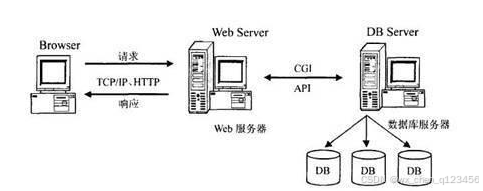
图2.2 B/S架构的工作原理图
2.3 Mysql数据库介绍
开发的程序面向用户的只是程序的功能界面,让用户操作程序界面的各个功能,那么很多人就会问,用户使用程序功能生成的数据信息放在哪里的?这个就需要涉及到数据库的知识了,一般来说,程序开发通常就会对常用数据存储工具的特点进行分析比对,比如Mysql数据库的特点与优势,Access数据库的特点与优势,Sqlserver数据库的特点与优势等,最终看哪个数据库与需要开发的程序比较匹配,也符合程序功能运行需要的数据存储要求,比如,需要开发商业级别的程序,存储的数据对数据库要求较高,可以选用Oracle,如果只是比较简单的程序,对数据存储没有过多要求,可以选用微软旗下的Access,当开发程序要求数据库占用空间小,并能满足程序数据存储要求时,就可以考虑Oracle公司从瑞典MySQL AB公司在很早之前就收购过一个关系型数据库,它是现在的Mysql数据库。在数据库工具里面它是最受认可的其中一个应用软件。需要说明的信息就是,本程序的开发就运用到了此数据库。它将程序数据通过使用不同的数据表格进行保存,在增加了程序数据的存储速度的时候,也提高了数据库的灵活性。 图2.3展示的就是MySQL的架构图。
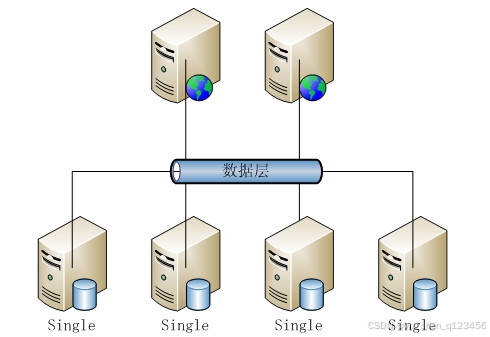
图2.3 MySQL数据库架构图
3 系统分析
当用户确定开发一款程序时,是需要遵循下面的顺序进行工作,概括为:系统分析-->系统设计-->系统开发-->系统测试,无论这个过程是否有变更或者迭代,都是按照这样的顺序开展工作的。系统分析就是分析系统需要做什么的问题,主要目的就是确定系统的功能,这也为接下来的工作做了一个好的开端。
3.1 系统可行性分析
开发一款程序软件不仅需要时间,也需要人力,物力资源。而进行可行性分析这个环节就是解决用户这方面的疑问,看看程序在当前的条件下是否可以进行开发。
3.1.1 技术可行性分析
此程序选用的开发语言是Java,这种编程语言有着丰富的数据类型,在指令控制语句上也比较完善,更重要的就是对类与对象的大力支持,这些优点为程序开发者提供了技术保障,尤其是现在代码都逐渐模块化,有关系统功能开发的源码在网络上都公开展示了,所以让具备一定计算机开发基础的开发人员独立开发系统在技术上也逐渐容易。
3.1.2 经济可行性分析
开发此程序最关键的设备就是一台电脑,无论是学校计算机室配备的电脑,还是自己入学以来购置的笔记本,都是可以符合开发要求的设备,另外在网络上,学校本已完全覆盖了校园网,所以在设备以及网络上无须考虑经济问题。
3.1.3 运行可行性分析
随着电脑软件以及配套硬件的完善升级,当下的计算机环境是一片大好,尤其是计算机已经广泛普及到家家户户,所以计算机设备现在是随处可见,由于本次开发的程序占有的资源耗费较小,在一般的电脑或笔记本上都能轻松运转起来。
通过上面的可行性描述,可以从经济,技术,运行方面解决程序开发是否可行的问题。因此可以认为该程序软件是可以进行开发的。
3.2 系统性能分析
系统性能分析也是比较重要的内容,进行系统性能分析就是为了确保系统的功能要能够在生活中运行使用时,达到规定的指标,因此一个完整的系统软件,是需要进行系统的性能分析这个步骤的。本次进行性能分析主要从易用性指标,可扩展性指标,系统健壮性指标,系统安全性指标这几个方面进行分析。
3.2.1 易用性指标
本次程序软件的开发的目的就是让使用者可以通过使用该软件提高信息数据的管理效率,同时该程序软件也需要针对不同的操作用户设置对应的功能,因此,此程序的操作流程应该尽量与用户日常操作软件的行为习惯相贴合,另外,程序软件的设计与开发也应考虑非计算机专业用户的计算机操作水平,要让大部分使用者都可以轻松操作程序提供的各个功能。
3.2.2 可扩展性指标
当前需要开发的程序软件是根据当下的用户需求进行设计开发的,但是随着时间的推移,社会大环境的改变,开发出的程序也是需要与时俱进的,需要根据用户不断变换的需求进行相应的功能内容的扩展,需要注意的就是,当对成型的程序进行功能模块新增时,仍然需要保证程序原有架构以及功能不能受到影响,新增的功能模块在系统中也能够运行正常,该指标达标也就可以保证此程序是可以在满足信息管理要求下,从容应对市场环境的变化。
3.2.3 健壮性指标
程序软件的开发就是为了投入使用时,可以一直稳定的处理各种数据信息,程序软件一旦不稳定,也会给使用者带来干扰。因此从性能分析的角度,就要要求程序软件在应对使用者的误操作,或者是使用者因为各种原因,填写有误的数据等情况时,程序要一直保持稳定,并能够正常让使用者进行使用。当程序的某个功能模块出现异常时,程序的其它功能模块也要能够确保正常使用。程序的健壮性指标达标可以让使用者产生良好的用户体验。
3.2.4 安全性指标
程序软件的安全问题是首要问题,毕竟程序对应数据库里面存放的数据信息是庞大的,里面也包括了许多重要的个人信息,这就对程序要具备一个完善的安全机制提出了要求。因此程序必须要设置登录功能用以进行用户身份的检查,以及身份和权限的匹配,通过对不同用户身份进行功能约束,绝不容忍用户越权操作程序。另外,也需要时刻防范计算机病毒,还有黑客,通过采取针对性的办法进行安全应对,确保程序时刻处于安全的环境,让使用者放心使用。
3.3 系统流程分析
3.3.1 操作流程分析
程序上交给用户进行使用时,需要提供程序的操作流程图(如图3.1所示),这样便于用户容易理解程序的具体工作步骤,现如今程序的操作流程都有一个大致的标准,即先通过登录页面提交登录数据,通过程序验证正确之后,用户才能在程序功能操作区页面操作对应的功能。
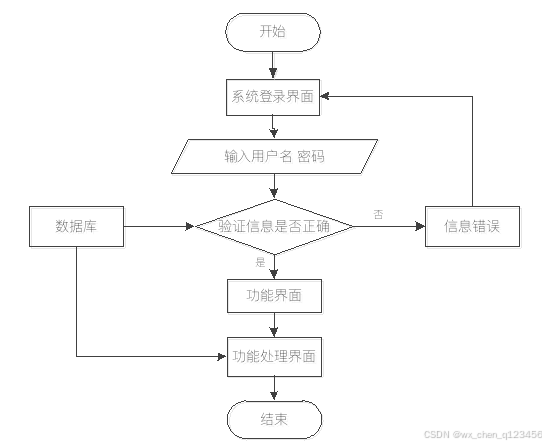
图3.1 程序操作流程图
3.3.2 登录流程分析
在这个部分,需要对程序的登录功能模块的运行流程(如图3.2所示),进行单独说明。程序设置登录模块也是为了安全起见,让用户使用放心,登录模块主要就是让用户提交登录信息,程序进行数据验证,验证通过的用户才能够成功登录程序。

图3.2 程序登录流程图
3.3.3 信息添加流程分析
程序的添加功能就是提供给操作者录入信息的功能,不管是涉及到用户信息添加,还是其它功能模块涉及到的信息添加,程序的信息添加流程(如图3.3所示)都是一致的。程序都是先对操作者录入的数据进行判定,这个判定规则是一段提前编写完成的程序代码,当程序判定数据符合要求时,才会把操作者录入的数据登记在数据表里面,比如添加的用户信息,就会把新添加的用户信息写入用户信息的数据表文件里面。
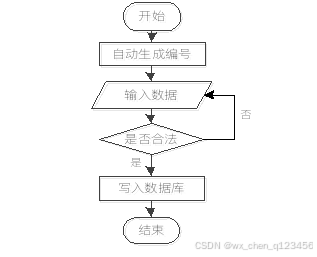
图3.3 信息添加流程图
3.3.4 信息删除流程分析
当从程序里面删除某种无效数据时,遵循程序的信息删除流程(如图3.4所示),先要选中操作者需要删除的数据,程序为了预防操作者误删信息,也会进行提示,当操作者真正确定要删选中的信息时,该信息就会从数据库中被永久删除。
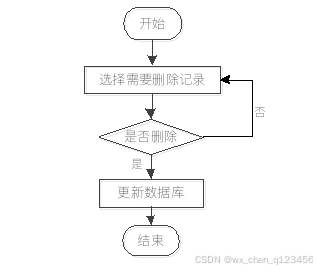
图3.4 信息删除流程图
3.4 系统功能分析
程序功能需要花费一定时间进行分析与设计,需要从大量的参考资料或者是社会上同种类型的程序中吸收对此程序开发有用的知识,可以将其它同类型程序中的合理功能部分规划到此程序里面,另外程序功能也需要针对用户的需求进行分析与设计。
4 系统设计
4.1 总体功能
民族婚纱预定系统是根据需求定制开发,开发软件选用Myeclipse平台配合MySQL数据库进行开发环境的搭建操作,网站采用WEB应用程序中最流行的B/S结构进行开发,用户访问系统数据仅仅需要在客户端安装谷歌浏览器或者是当下常用浏览器就可以访问网站内容。
4.2 系统概要设计
本次拟开发的系统为了节约开发成本,也为了后期在维护和升级上的便利性,打算通过浏览器来实现系统功能界面的展示,让程序软件的主要事务集中在后台的服务器端处理,前端部分只用处理少量的事务逻辑。下面使用一张图(如图4.2所示)来说明程序的工作原理。
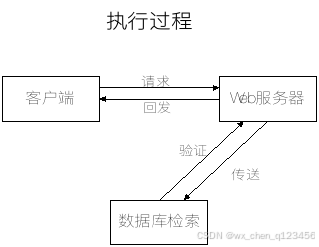
图4.2 程序工作的原理图
4.3 系统功能结构设计
在分析并得出使用者对程序的功能要求时,就可以进行程序设计了。如图4.3展示的就是管理员功能结构图,管理员在后台主要管理字典管理、公告管理、作品管理、作品收藏管理、作品留言管理、摄影师收藏管理、摄影师评价管理、摄影师留言管理、摄影师预约管理、用户管理、摄影师管理、管理员管理等。
民族婚纱预定系统
系个人信息管理
管公告类型管理
管用户管理
管作品管理
大摄影师管理
修个人信息修改
密
修改密码
新摄影师新增
是摄影师修改
删摄影师删除
删作品删除
申
作品新增
申
作品修改
删公告类型删除
新公告类型新增
修公告类型修改
用用户新增
用用户修改
用用户删除
管公告管理
新公告新增
吸公告修改
删公告删除 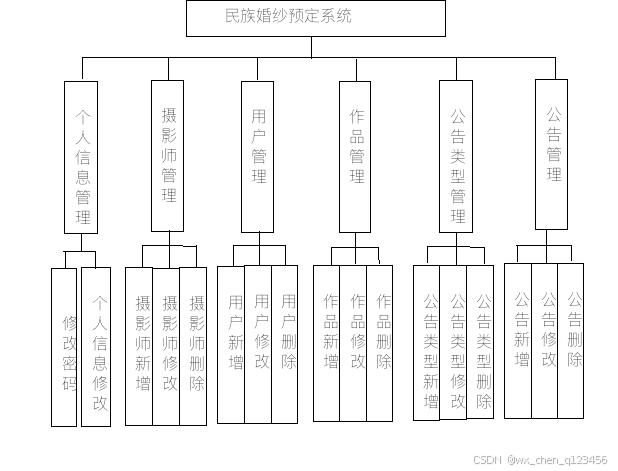
图4.3 管理员功能结构图
4.4 数据库设计
开发一个系统也需要提前设计数据库。这里的数据库是相关数据的集合,存储在一起的这些数据也是按照一定的组织方式进行的。目前,数据库能够服务于多种应用程序,则是源于它存储方式最佳,具备数据冗余率低的优势。虽然数据库为程序提供信息存储服务,但它与程序之间也可以保持较高的独立性。总而言之,数据库经历了很长一段时间的发展,从最初的不为人知,到现在的人尽皆知,其相关技术也越发成熟,同时也拥有着坚实的理论基础。
4.4.1 数据库概念设计
这部分内容需要借助数据库关系图来完成,也需要使用专门绘制数据库关系图的工具,比如Visio工具就可以设计E-R图(数据库关系图)。设计数据库,也需要按照设计的流程进行,首先还是要根据需求完成实体的确定,分析实体具有的特征,还有对实体间的关联关系进行确定。最后才是使用E-R模型的表示方法,绘制本系统的E-R图。不管是使用亿图软件,还是Visio工具,对于E-R模型的表示符号都一样,通常矩形代表实体,实体间存在的关系用菱形符号表示,实体的属性也就是实体的特征用符号椭圆表示。最后使用直线将矩形,菱形和椭圆等符号连接起来。接下来就开始对本系统的E-R图进行绘制。
(1)下图是作品收藏实体和其具备的属性。
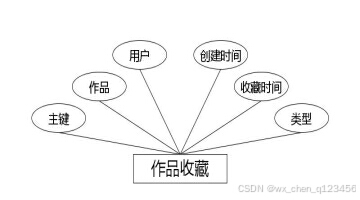 图4.1 作品收藏实体属性图
(2)下图是用户实体和其具备的属性。
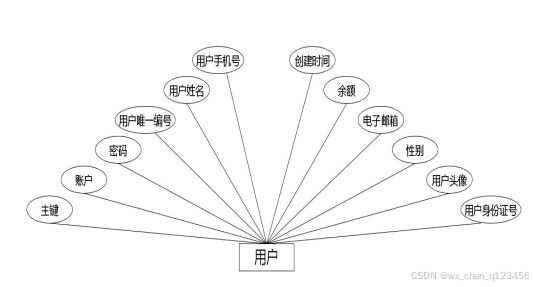 图4.2 用户实体属性图
(3)下图是摄影师收藏实体和其具备的属性。
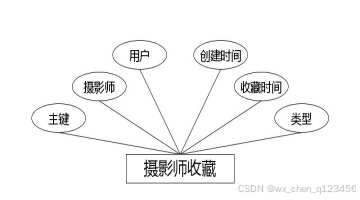 图4.3 摄影师收藏实体属性图
(4)下图是作品实体和其具备的属性。
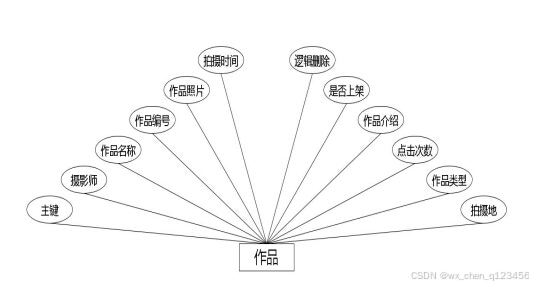 图4.4 作品实体属性图
(5)下图是作品留言实体和其具备的属性。
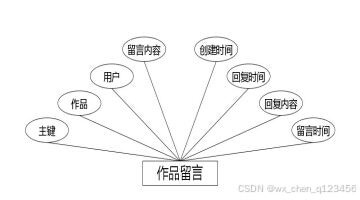 图4.5 作品留言实体属性图
(6)下图是摄影师评价实体和其具备的属性。
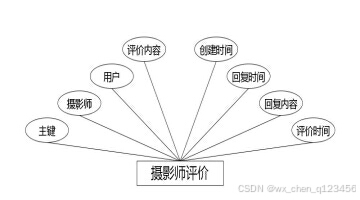 图4.6 摄影师评价实体属性图
(7)下图是公告实体和其具备的属性。
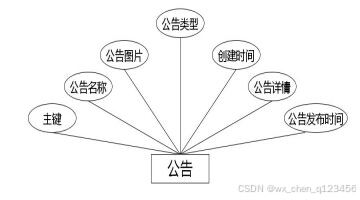 图4.7 公告实体属性图
(8)下图是摄影师留言实体和其具备的属性。
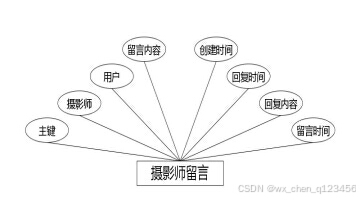 图4.8 摄影师留言实体属性图
(9)下图是摄影师预约实体和其具备的属性。
 图4.9 摄影师预约实体属性图
(10)下图是摄影师实体和其具备的属性。
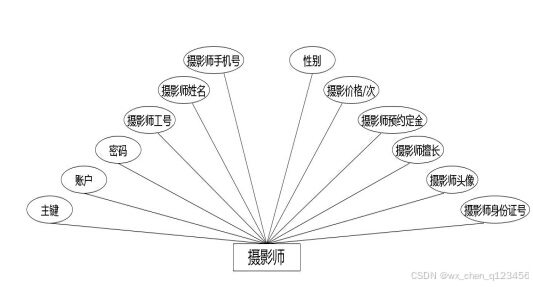 图4.10 摄影师实体属性图
4.4.2 数据库表结构设计
数据库系统一旦选定之后,需要根据程序要求在数据库中建立数据库文件,并在已经完成创建的数据库文件里面,为程序运行中产生的数据建立对应的数据表格,数据表结构设计就是对创建的数据表格进行字段设计,字段长度设计,字段类型设计等,当数据表格合理设计完成之后,才能正常存储相关程序运行产生的数据信息。
表4.1字典表
| 序号 | 列名 | 数据类型 | 说明 | 允许空 |
|---|---|---|---|---|
| 1 | Id | Int | id | 否 |
| 2 | dic_code | String | 字段 | 是 |
| 3 | dic_name | String | 字段名 | 是 |
| 4 | code_index | Integer | 编码 | 是 |
| 5 | index_name | String | 编码名字 | 是 |
| 6 | super_id | Integer | 父字段id | 是 |
| 7 | beizhu | String | 备注 | 是 |
| 8 | create_time | Date | 创建时间 | 是 |
表4.2公告表
| 序号 | 列名 | 数据类型 | 说明 | 允许空 |
|---|---|---|---|---|
| 1 | Id | Int | id | 否 |
| 2 | gonggao_name | String | 公告名称 | 是 |
| 3 | gonggao_photo | String | 公告图片 | 是 |
| 4 | gonggao_types | Integer | 公告类型 | 是 |
| 5 | insert_time | Date | 公告发布时间 | 是 |
| 6 | gonggao_content | String | 公告详情 | 是 |
| 7 | create_time | Date | 创建时间 | 是 |
表4.3组团活动表
| 序号 | 列名 | 数据类型 | 说明 | 允许空 |
|---|---|---|---|---|
| 1 | Id | Int | id | 否 |
| 2 | huodongguanliyuan_id | Integer | 活动管理员 | 是 |
| 3 | huodong_name | String | 组团活动名称 | 是 |
| 4 | huodong_uuid_number | String | 组团活动编号 | 是 |
| 5 | huodong_photo | String | 组团活动照片 | 是 |
| 6 | kaishi_time | Date | 活动开始时间 | 是 |
| 7 | jieshu_time | Date | 活动结束时间 | 是 |
| 8 | huodong_address | String | 活动地点 | 是 |
| 9 | huodong_types | Integer | 组团活动类型 | 是 |
| 10 | huodong_zuida_number | Integer | 最大参与人数 | 是 |
| 11 | huodong_clicknum | Integer | 活动热度 | 是 |
| 12 | zan_number | Integer | 赞数量 | 是 |
| 13 | cai_number | Integer | 踩数量 | 是 |
| 14 | huodong_content | String | 组团活动详细介绍 | 是 |
| 15 | shangxia_types | Integer | 是否上架 | 是 |
| 16 | huodong_delete | Integer | 逻辑删除 | 是 |
| 17 | create_time | Date | 创建时间 | 是 |
表4.4组团活动收藏表
| 序号 | 列名 | 数据类型 | 说明 | 允许空 |
|---|---|---|---|---|
| 1 | Id | Int | id | 否 |
| 2 | huodong_id | Integer | 组团活动 | 是 |
| 3 | yonghu_id | Integer | 用户 | 是 |
| 4 | huodong_collection_types | Integer | 类型 | 是 |
| 5 | insert_time | Date | 收藏时间 | 是 |
| 6 | create_time | Date | 创建时间 | 是 |
表4.5组团活动留言表
| 序号 | 列名 | 数据类型 | 说明 | 允许空 |
|---|---|---|---|---|
| 1 | Id | Int | id | 否 |
| 2 | huodong_id | Integer | 组团活动 | 是 |
| 3 | yonghu_id | Integer | 用户 | 是 |
| 4 | huodong_liuyan_text | String | 留言内容 | 是 |
| 5 | insert_time | Date | 留言时间 | 是 |
| 6 | reply_text | String | 回复内容 | 是 |
| 7 | update_time | Date | 回复时间 | 是 |
| 8 | create_time | Date | 创建时间 | 是 |
表4.6组团活动报名表
| 序号 | 列名 | 数据类型 | 说明 | 允许空 |
|---|---|---|---|---|
| 1 | Id | Int | id | 否 |
| 2 | huodong_order_uuid_number | String | 申请编号 | 是 |
| 3 | huodong_id | Integer | 组团活动 | 是 |
| 4 | yonghu_id | Integer | 用户 | 是 |
| 5 | lianxiren_name | String | 联系人姓名 | 是 |
| 6 | lianxiren_phone | String | 联系人手机号 | 是 |
| 7 | huodong_order_content | String | 加入活动的理由 | 是 |
| 8 | insert_time | Date | 申请时间 | 是 |
| 9 | huodong_order_yesno_types | Integer | 报名状态 | 是 |
| 10 | huodong_order_yesno_text | String | 审核意见 | 是 |
| 11 | huodong_order_shenhe_time | Date | 审核时间 | 是 |
| 12 | create_time | Date | 创建时间 | 是 |
表4.7用户表
| 序号 | 列名 | 数据类型 | 说明 | 允许空 |
|---|---|---|---|---|
| 1 | Id | Int | id | 否 |
| 2 | yonghu_uuid_number | String | 用户编号 | 是 |
| 3 | yonghu_name | String | 用户姓名 | 是 |
| 4 | yonghu_phone | String | 用户手机号 | 是 |
| 5 | yonghu_id_number | String | 用户身份证号 | 是 |
| 6 | yonghu_photo | String | 用户头像 | 是 |
| 7 | yonghu_email | String | 电子邮箱 | 是 |
| 8 | xueyuan_types | Integer | 学院 | 是 |
| 9 | zhuanye_types | Integer | 专业 | 是 |
| 10 | banji_types | Integer | 班级 | 是 |
| 11 | create_time | Date | 创建时间 | 是 |
表4.8活动管理员表
| 序号 | 列名 | 数据类型 | 说明 | 允许空 |
|---|---|---|---|---|
| 1 | Id | Int | id | 否 |
| 2 | huodongguanliyuan_uuid_number | String | 活动管理员编号 | 是 |
| 3 | huodongguanliyuan_name | String | 活动管理员姓名 | 是 |
| 4 | huodongguanliyuan_phone | String | 活动管理员手机号 | 是 |
| 5 | huodongguanliyuan_id_number | String | 活动管理员身份证号 | 是 |
| 6 | huodongguanliyuan_photo | String | 活动管理员头像 | 是 |
| 7 | huodongguanliyuan_email | String | 电子邮箱 | 是 |
| 8 | create_time | Date | 创建时间 | 是 |
表4.9管理员表
| 序号 | 列名 | 数据类型 | 说明 | 允许空 |
|---|---|---|---|---|
| 1 | Id | Int | id | 否 |
| 2 | username | String | 用户名 | 是 |
| 3 | password | String | 密码 | 是 |
| 4 | role | String | 角色 | 是 |
| 5 | addtime | Date | 新增时间 | 是 |
5 系统实现
系统实现部分就是将系统分析,系统设计部分的内容通过编码进行功能实现,以一个实际应用系统的形式展示系统分析与系统设计的结果。前面提到的系统分析,系统设计最主要还是进行功能,系统操作逻辑的设计,也包括了存储数据的数据库方面的设计等内容,系统实现就是一个最终的实施阶段,将前面的设计成果进行物理转化,最终出具可以运用于实际的软件系统。
5.1 管理员功能介绍
5.1.1 摄影师列表
如图5.1显示的就是摄影师列表页面,此页面提供给管理员的功能有:查看摄影师、新增摄影师、修改摄影师、删除摄影师等。
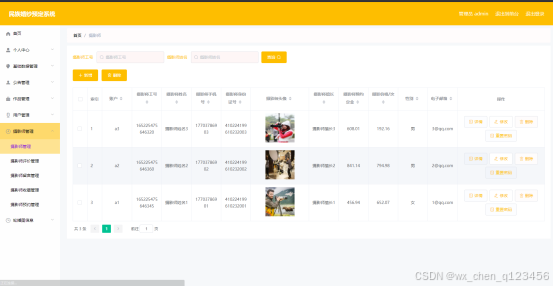
图5.1 摄影师列表页面
5.1.2 公告信息管理
公告信息管理页面提供的功能操作有:新增公告,修改公告,删除公告操作。下图就是公告信息管理页面。
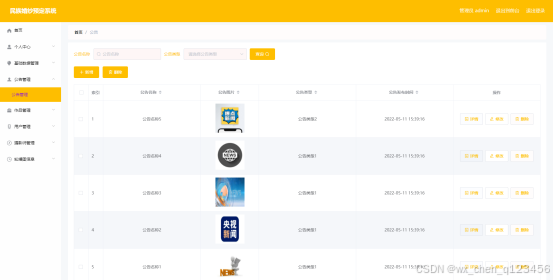
图5.3 公告信息管理页面
5.1.3公告类型管理
公告类型管理页面显示所有公告类型,在此页面既可以让管理员添加新的公告信息类型,也能对已有的公告类型信息执行编辑更新,失效的公告类型信息也能让管理员快速删除。下图就是公告类型管理页面。
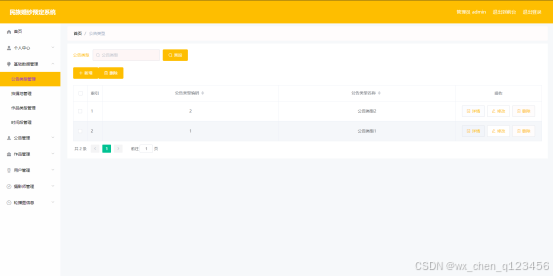
图5.4 公告类型列表页面
系统
ShangpinServiceImpl.java
package com.service.impl;

import com.utils.StringUtil;
import org.springframework.stereotype.Service;
import java.lang.reflect.Field;
import java.util.*;
import com.baomidou.mybatisplus.plugins.Page;
import com.baomidou.mybatisplus.service.impl.ServiceImpl;
import org.springframework.transaction.annotation.Transactional;
import com.utils.PageUtils;
import com.utils.Query;
import org.springframework.web.context.ContextLoader;
import javax.servlet.ServletContext;
import javax.servlet.http.HttpServletRequest;
import com.dao.ShangpinDao;
import com.entity.ShangpinEntity;
import com.service.ShangpinService;
import com.entity.view.ShangpinView;

/**
 * 作品 服务实现类
 */
@Service("shangpinService")
@Transactional
public class ShangpinServiceImpl extends ServiceImpl<ShangpinDao, ShangpinEntity> implements ShangpinService {

    @Override
    public PageUtils queryPage(Map<String,Object> params) {
        if(params != null && (params.get("limit") == null || params.get("page") == null)){
            params.put("page","1");
            params.put("limit","10");
        }
        Page<ShangpinView> page =new Query<ShangpinView>(params).getPage();
        page.setRecords(baseMapper.selectListView(page,params));
        return new PageUtils(page);
    }


}
DictionaryController.java
package com.controller;

import java.io.File;
import java.math.BigDecimal;
import java.net.URL;
import java.text.SimpleDateFormat;
import com.alibaba.fastjson.JSONObject;
import java.util.*;
import org.springframework.beans.BeanUtils;
import javax.servlet.http.HttpServletRequest;
import org.springframework.web.context.ContextLoader;
import javax.servlet.ServletContext;
import com.service.TokenService;
import com.utils.*;
import java.lang.reflect.InvocationTargetException;

import com.service.DictionaryService;
import org.apache.commons.lang3.StringUtils;
import com.annotation.IgnoreAuth;
import org.slf4j.Logger;
import org.slf4j.LoggerFactory;
import org.springframework.beans.factory.annotation.Autowired;
import org.springframework.stereotype.Controller;
import org.springframework.web.bind.annotation.*;
import com.baomidou.mybatisplus.mapper.EntityWrapper;
import com.baomidou.mybatisplus.mapper.Wrapper;
import com.entity.*;
import com.entity.view.*;
import com.service.*;
import com.utils.PageUtils;
import com.utils.R;
import com.alibaba.fastjson.*;

/**
 * 字典
 * 后端接口
 * @author
 * @email
*/
@RestController
@Controller
@RequestMapping("/dictionary")
public class DictionaryController {
    private static final Logger logger = LoggerFactory.getLogger(DictionaryController.class);

    @Autowired
    private DictionaryService dictionaryService;


    @Autowired
    private TokenService tokenService;

    //级联表service

    @Autowired
    private YonghuService yonghuService;
    @Autowired
    private SheyingshiService sheyingshiService;


    /**
    * 后端列表
    */
    @RequestMapping("/page")
    @IgnoreAuth
    public R page(@RequestParam Map<String, Object> params, HttpServletRequest request){
        logger.debug("page方法:,,Controller:{},,params:{}",this.getClass().getName(),JSONObject.toJSONString(params));
        if(params.get("orderBy")==null || params.get("orderBy")==""){
            params.put("orderBy","id");
        }
        PageUtils page = dictionaryService.queryPage(params);

        //字典表数据转换
        List<DictionaryView> list =(List<DictionaryView>)page.getList();
        for(DictionaryView c:list){
            //修改对应字典表字段
            dictionaryService.dictionaryConvert(c, request);
        }
        return R.ok().put("data", page);
    }

    /**
    * 后端详情
    */
    @RequestMapping("/info/{id}")
    public R info(@PathVariable("id") Long id, HttpServletRequest request){
        logger.debug("info方法:,,Controller:{},,id:{}",this.getClass().getName(),id);
        DictionaryEntity dictionary = dictionaryService.selectById(id);
        if(dictionary !=null){
            //entity转view
            DictionaryView view = new DictionaryView();
            BeanUtils.copyProperties( dictionary , view );//把实体数据重构到view中

            //修改对应字典表字段
            dictionaryService.dictionaryConvert(view, request);
            return R.ok().put("data", view);
        }else {
            return R.error(511,"查不到数据");
        }

    }

    /**
    * 后端保存
    */
    @RequestMapping("/save")
    public R save(@RequestBody DictionaryEntity dictionary, HttpServletRequest request){
        logger.debug("save方法:,,Controller:{},,dictionary:{}",this.getClass().getName(),dictionary.toString());

        String role = String.valueOf(request.getSession().getAttribute("role"));
        if(false)
            return R.error(511,"永远不会进入");

        Wrapper<DictionaryEntity> queryWrapper = new EntityWrapper<DictionaryEntity>()
            .eq("dic_code", dictionary.getDicCode())
            .eq("index_name", dictionary.getIndexName())
            ;
        if(dictionary.getDicCode().contains("_erji_types")){
            queryWrapper.eq("super_id",dictionary.getSuperId());
        }

        logger.info("sql语句:"+queryWrapper.getSqlSegment());
        DictionaryEntity dictionaryEntity = dictionaryService.selectOne(queryWrapper);
        if(dictionaryEntity==null){
            dictionary.setCreateTime(new Date());
            dictionaryService.insert(dictionary);
            //字典表新增数据,把数据再重新查出,放入监听器中
            List<DictionaryEntity> dictionaryEntities = dictionaryService.selectList(new EntityWrapper<DictionaryEntity>());
            ServletContext servletContext = request.getServletContext();
            Map<String, Map<Integer,String>> map = new HashMap<>();
            for(DictionaryEntity d :dictionaryEntities){
                Map<Integer, String> m = map.get(d.getDicCode());
                if(m ==null || m.isEmpty()){
                    m = new HashMap<>();
                }
                m.put(d.getCodeIndex(),d.getIndexName());
                map.put(d.getDicCode(),m);
            }
            servletContext.setAttribute("dictionaryMap",map);
            return R.ok();
        }else {
            return R.error(511,"表中有相同数据");
        }
    }

    /**
    * 后端修改
    */
    @RequestMapping("/update")
    public R update(@RequestBody DictionaryEntity dictionary, HttpServletRequest request){
        logger.debug("update方法:,,Controller:{},,dictionary:{}",this.getClass().getName(),dictionary.toString());

        String role = String.valueOf(request.getSession().getAttribute("role"));
//        if(false)
//            return R.error(511,"永远不会进入");
        //根据字段查询是否有相同数据
        Wrapper<DictionaryEntity> queryWrapper = new EntityWrapper<DictionaryEntity>()
            .notIn("id",dictionary.getId())
            .eq("dic_code", dictionary.getDicCode())
            .eq("index_name", dictionary.getIndexName())
            ;

        if(dictionary.getDicCode().contains("_erji_types")){
            queryWrapper.eq("super_id",dictionary.getSuperId());
        }
        logger.info("sql语句:"+queryWrapper.getSqlSegment());
        DictionaryEntity dictionaryEntity = dictionaryService.selectOne(queryWrapper);
        if(dictionaryEntity==null){
            dictionaryService.updateById(dictionary);//根据id更新
            //如果字典表修改数据的话,把数据再重新查出,放入监听器中
            List<DictionaryEntity> dictionaryEntities = dictionaryService.selectList(new EntityWrapper<DictionaryEntity>());
            ServletContext servletContext = request.getServletContext();
            Map<String, Map<Integer,String>> map = new HashMap<>();
            for(DictionaryEntity d :dictionaryEntities){
                Map<Integer, String> m = map.get(d.getDicCode());
                if(m ==null || m.isEmpty()){
                    m = new HashMap<>();
                }
                m.put(d.getCodeIndex(),d.getIndexName());
                map.put(d.getDicCode(),m);
            }
            servletContext.setAttribute("dictionaryMap",map);
            return R.ok();
        }else {
            return R.error(511,"表中有相同数据");
        }
    }


    /**
    * 删除
    */
    @RequestMapping("/delete")
    public R delete(@RequestBody Integer[] ids){
        logger.debug("delete:,,Controller:{},,ids:{}",this.getClass().getName(),ids.toString());
        dictionaryService.deleteBatchIds(Arrays.asList(ids));
        return R.ok();
    }

    /**
     * 最大值
     */
    @RequestMapping("/maxCodeIndex")
    public R maxCodeIndex(@RequestBody DictionaryEntity dictionary){
        logger.debug("maxCodeIndex:,,Controller:{},,dictionary:{}",this.getClass().getName(),dictionary.toString());
        List<String> descs = new ArrayList<>();
        descs.add("code_index");
        Wrapper<DictionaryEntity> queryWrapper = new EntityWrapper<DictionaryEntity>()
                .eq("dic_code", dictionary.getDicCode())
                .orderDesc(descs);
        logger.info("sql语句:"+queryWrapper.getSqlSegment());
        List<DictionaryEntity> dictionaryEntityList = dictionaryService.selectList(queryWrapper);
        if(dictionaryEntityList.size()>0 ){
            return R.ok().put("maxCodeIndex",dictionaryEntityList.get(0).getCodeIndex()+1);
        }else{
            return R.ok().put("maxCodeIndex",1);
        }
    }

    /**
     * 批量上传
     */
    @RequestMapping("/batchInsert")
    public R save( String fileName, HttpServletRequest request){
        logger.debug("batchInsert方法:,,Controller:{},,fileName:{}",this.getClass().getName(),fileName);
        Integer yonghuId = Integer.valueOf(String.valueOf(request.getSession().getAttribute("userId")));
        SimpleDateFormat sdf = new SimpleDateFormat("yyyy-MM-dd HH:mm:ss");
        try {
            List<DictionaryEntity> dictionaryList = new ArrayList<>();//上传的东西
            Map<String, List<String>> seachFields= new HashMap<>();//要查询的字段
            Date date = new Date();
            int lastIndexOf = fileName.lastIndexOf(".");
            if(lastIndexOf == -1){
                return R.error(511,"该文件没有后缀");
            }else{
                String suffix = fileName.substring(lastIndexOf);
                if(!".xls".equals(suffix)){
                    return R.error(511,"只支持后缀为xls的excel文件");
                }else{
                    URL resource = this.getClass().getClassLoader().getResource("static/upload/" + fileName);//获取文件路径
                    File file = new File(resource.getFile());
                    if(!file.exists()){
                        return R.error(511,"找不到上传文件,请联系管理员");
                    }else{
                        List<List<String>> dataList = PoiUtil.poiImport(file.getPath());//读取xls文件
                        dataList.remove(0);//删除第一行,因为第一行是提示
                        for(List<String> data:dataList){
                            //循环
                            DictionaryEntity dictionaryEntity = new DictionaryEntity();
//                            dictionaryEntity.setDicCode(data.get(0));                    //字段 要改的
//                            dictionaryEntity.setDicName(data.get(0));                    //字段名 要改的
//                            dictionaryEntity.setCodeIndex(Integer.valueOf(data.get(0)));   //编码 要改的
//                            dictionaryEntity.setIndexName(data.get(0));                    //编码名字 要改的
//                            dictionaryEntity.setSuperId(Integer.valueOf(data.get(0)));   //父字段id 要改的
//                            dictionaryEntity.setBeizhu(data.get(0));                    //备注 要改的
//                            dictionaryEntity.setCreateTime(date);//时间
                            dictionaryList.add(dictionaryEntity);


                            //把要查询是否重复的字段放入map中
                        }

                        //查询是否重复
                        dictionaryService.insertBatch(dictionaryList);
                        return R.ok();
                    }
                }
            }
        }catch (Exception e){
            e.printStackTrace();
            return R.error(511,"批量插入数据异常,请联系管理员");
        }
    }


}
ShangpinCollectionController.java
package com.controller;

import java.io.File;
import java.math.BigDecimal;
import java.net.URL;
import java.text.SimpleDateFormat;
import com.alibaba.fastjson.JSONObject;
import java.util.*;
import org.springframework.beans.BeanUtils;
import javax.servlet.http.HttpServletRequest;
import org.springframework.web.context.ContextLoader;
import javax.servlet.ServletContext;
import com.service.TokenService;
import com.utils.*;
import java.lang.reflect.InvocationTargetException;

import com.service.DictionaryService;
import org.apache.commons.lang3.StringUtils;
import com.annotation.IgnoreAuth;
import org.slf4j.Logger;
import org.slf4j.LoggerFactory;
import org.springframework.beans.factory.annotation.Autowired;
import org.springframework.stereotype.Controller;
import org.springframework.web.bind.annotation.*;
import com.baomidou.mybatisplus.mapper.EntityWrapper;
import com.baomidou.mybatisplus.mapper.Wrapper;
import com.entity.*;
import com.entity.view.*;
import com.service.*;
import com.utils.PageUtils;
import com.utils.R;
import com.alibaba.fastjson.*;

/**
 * 作品收藏
 * 后端接口
 * @author
 * @email
*/
@RestController
@Controller
@RequestMapping("/shangpinCollection")
public class ShangpinCollectionController {
    private static final Logger logger = LoggerFactory.getLogger(ShangpinCollectionController.class);

    @Autowired
    private ShangpinCollectionService shangpinCollectionService;


    @Autowired
    private TokenService tokenService;
    @Autowired
    private DictionaryService dictionaryService;

    //级联表service
    @Autowired
    private ShangpinService shangpinService;
    @Autowired
    private YonghuService yonghuService;

    @Autowired
    private SheyingshiService sheyingshiService;


    /**
    * 后端列表
    */
    @RequestMapping("/page")
    public R page(@RequestParam Map<String, Object> params, HttpServletRequest request){
        logger.debug("page方法:,,Controller:{},,params:{}",this.getClass().getName(),JSONObject.toJSONString(params));
        String role = String.valueOf(request.getSession().getAttribute("role"));
        if(false)
            return R.error(511,"永不会进入");
        else if("用户".equals(role))
            params.put("yonghuId",request.getSession().getAttribute("userId"));
        else if("摄影师".equals(role))
            params.put("sheyingshiId",request.getSession().getAttribute("userId"));
        if(params.get("orderBy")==null || params.get("orderBy")==""){
            params.put("orderBy","id");
        }
        PageUtils page = shangpinCollectionService.queryPage(params);

        //字典表数据转换
        List<ShangpinCollectionView> list =(List<ShangpinCollectionView>)page.getList();
        for(ShangpinCollectionView c:list){
            //修改对应字典表字段
            dictionaryService.dictionaryConvert(c, request);
        }
        return R.ok().put("data", page);
    }

    /**
    * 后端详情
    */
    @RequestMapping("/info/{id}")
    public R info(@PathVariable("id") Long id, HttpServletRequest request){
        logger.debug("info方法:,,Controller:{},,id:{}",this.getClass().getName(),id);
        ShangpinCollectionEntity shangpinCollection = shangpinCollectionService.selectById(id);
        if(shangpinCollection !=null){
            //entity转view
            ShangpinCollectionView view = new ShangpinCollectionView();
            BeanUtils.copyProperties( shangpinCollection , view );//把实体数据重构到view中

                //级联表
                ShangpinEntity shangpin = shangpinService.selectById(shangpinCollection.getShangpinId());
                if(shangpin != null){
                    BeanUtils.copyProperties( shangpin , view ,new String[]{ "id", "createTime", "insertTime", "updateTime"});//把级联的数据添加到view中,并排除id和创建时间字段
                    view.setShangpinId(shangpin.getId());
                }
                //级联表
                YonghuEntity yonghu = yonghuService.selectById(shangpinCollection.getYonghuId());
                if(yonghu != null){
                    BeanUtils.copyProperties( yonghu , view ,new String[]{ "id", "createTime", "insertTime", "updateTime"});//把级联的数据添加到view中,并排除id和创建时间字段
                    view.setYonghuId(yonghu.getId());
                }
            //修改对应字典表字段
            dictionaryService.dictionaryConvert(view, request);
            return R.ok().put("data", view);
        }else {
            return R.error(511,"查不到数据");
        }

    }

    /**
    * 后端保存
    */
    @RequestMapping("/save")
    public R save(@RequestBody ShangpinCollectionEntity shangpinCollection, HttpServletRequest request){
        logger.debug("save方法:,,Controller:{},,shangpinCollection:{}",this.getClass().getName(),shangpinCollection.toString());

        String role = String.valueOf(request.getSession().getAttribute("role"));
        if(false)
            return R.error(511,"永远不会进入");
        else if("用户".equals(role))
            shangpinCollection.setYonghuId(Integer.valueOf(String.valueOf(request.getSession().getAttribute("userId"))));

        Wrapper<ShangpinCollectionEntity> queryWrapper = new EntityWrapper<ShangpinCollectionEntity>()
            .eq("shangpin_id", shangpinCollection.getShangpinId())
            .eq("yonghu_id", shangpinCollection.getYonghuId())
            .eq("shangpin_collection_types", shangpinCollection.getShangpinCollectionTypes())
            ;

        logger.info("sql语句:"+queryWrapper.getSqlSegment());
        ShangpinCollectionEntity shangpinCollectionEntity = shangpinCollectionService.selectOne(queryWrapper);
        if(shangpinCollectionEntity==null){
            shangpinCollection.setInsertTime(new Date());
            shangpinCollection.setCreateTime(new Date());
            shangpinCollectionService.insert(shangpinCollection);
            return R.ok();
        }else {
            return R.error(511,"表中有相同数据");
        }
    }

    /**
    * 后端修改
    */
    @RequestMapping("/update")
    public R update(@RequestBody ShangpinCollectionEntity shangpinCollection, HttpServletRequest request){
        logger.debug("update方法:,,Controller:{},,shangpinCollection:{}",this.getClass().getName(),shangpinCollection.toString());

        String role = String.valueOf(request.getSession().getAttribute("role"));
//        if(false)
//            return R.error(511,"永远不会进入");
//        else if("用户".equals(role))
//            shangpinCollection.setYonghuId(Integer.valueOf(String.valueOf(request.getSession().getAttribute("userId"))));
        //根据字段查询是否有相同数据
        Wrapper<ShangpinCollectionEntity> queryWrapper = new EntityWrapper<ShangpinCollectionEntity>()
            .notIn("id",shangpinCollection.getId())
            .andNew()
            .eq("shangpin_id", shangpinCollection.getShangpinId())
            .eq("yonghu_id", shangpinCollection.getYonghuId())
            .eq("shangpin_collection_types", shangpinCollection.getShangpinCollectionTypes())
            ;

        logger.info("sql语句:"+queryWrapper.getSqlSegment());
        ShangpinCollectionEntity shangpinCollectionEntity = shangpinCollectionService.selectOne(queryWrapper);
        if(shangpinCollectionEntity==null){
            shangpinCollectionService.updateById(shangpinCollection);//根据id更新
            return R.ok();
        }else {
            return R.error(511,"表中有相同数据");
        }
    }


    /**
    * 删除
    */
    @RequestMapping("/delete")
    public R delete(@RequestBody Integer[] ids){
        logger.debug("delete:,,Controller:{},,ids:{}",this.getClass().getName(),ids.toString());
        shangpinCollectionService.deleteBatchIds(Arrays.asList(ids));
        return R.ok();
    }


    /**
     * 批量上传
     */
    @RequestMapping("/batchInsert")
    public R save( String fileName, HttpServletRequest request){
        logger.debug("batchInsert方法:,,Controller:{},,fileName:{}",this.getClass().getName(),fileName);
        Integer yonghuId = Integer.valueOf(String.valueOf(request.getSession().getAttribute("userId")));
        SimpleDateFormat sdf = new SimpleDateFormat("yyyy-MM-dd HH:mm:ss");
        try {
            List<ShangpinCollectionEntity> shangpinCollectionList = new ArrayList<>();//上传的东西
            Map<String, List<String>> seachFields= new HashMap<>();//要查询的字段
            Date date = new Date();
            int lastIndexOf = fileName.lastIndexOf(".");
            if(lastIndexOf == -1){
                return R.error(511,"该文件没有后缀");
            }else{
                String suffix = fileName.substring(lastIndexOf);
                if(!".xls".equals(suffix)){
                    return R.error(511,"只支持后缀为xls的excel文件");
                }else{
                    URL resource = this.getClass().getClassLoader().getResource("static/upload/" + fileName);//获取文件路径
                    File file = new File(resource.getFile());
                    if(!file.exists()){
                        return R.error(511,"找不到上传文件,请联系管理员");
                    }else{
                        List<List<String>> dataList = PoiUtil.poiImport(file.getPath());//读取xls文件
                        dataList.remove(0);//删除第一行,因为第一行是提示
                        for(List<String> data:dataList){
                            //循环
                            ShangpinCollectionEntity shangpinCollectionEntity = new ShangpinCollectionEntity();
//                            shangpinCollectionEntity.setShangpinId(Integer.valueOf(data.get(0)));   //作品 要改的
//                            shangpinCollectionEntity.setYonghuId(Integer.valueOf(data.get(0)));   //用户 要改的
//                            shangpinCollectionEntity.setShangpinCollectionTypes(Integer.valueOf(data.get(0)));   //类型 要改的
//                            shangpinCollectionEntity.setInsertTime(date);//时间
//                            shangpinCollectionEntity.setCreateTime(date);//时间
                            shangpinCollectionList.add(shangpinCollectionEntity);


                            //把要查询是否重复的字段放入map中
                        }

                        //查询是否重复
                        shangpinCollectionService.insertBatch(shangpinCollectionList);
                        return R.ok();
                    }
                }
            }
        }catch (Exception e){
            e.printStackTrace();
            return R.error(511,"批量插入数据异常,请联系管理员");
        }
    }


    /**
    * 前端列表
    */
    @IgnoreAuth
    @RequestMapping("/list")
    public R list(@RequestParam Map<String, Object> params, HttpServletRequest request){
        logger.debug("list方法:,,Controller:{},,params:{}",this.getClass().getName(),JSONObject.toJSONString(params));

        // 没有指定排序字段就默认id倒序
        if(StringUtil.isEmpty(String.valueOf(params.get("orderBy")))){
            params.put("orderBy","id");
        }
        PageUtils page = shangpinCollectionService.queryPage(params);

        //字典表数据转换
        List<ShangpinCollectionView> list =(List<ShangpinCollectionView>)page.getList();
        for(ShangpinCollectionView c:list)
            dictionaryService.dictionaryConvert(c, request); //修改对应字典表字段
        return R.ok().put("data", page);
    }

    /**
    * 前端详情
    */
    @RequestMapping("/detail/{id}")
    public R detail(@PathVariable("id") Long id, HttpServletRequest request){
        logger.debug("detail方法:,,Controller:{},,id:{}",this.getClass().getName(),id);
        ShangpinCollectionEntity shangpinCollection = shangpinCollectionService.selectById(id);
            if(shangpinCollection !=null){


                //entity转view
                ShangpinCollectionView view = new ShangpinCollectionView();
                BeanUtils.copyProperties( shangpinCollection , view );//把实体数据重构到view中

                //级联表
                    ShangpinEntity shangpin = shangpinService.selectById(shangpinCollection.getShangpinId());
                if(shangpin != null){
                    BeanUtils.copyProperties( shangpin , view ,new String[]{ "id", "createDate"});//把级联的数据添加到view中,并排除id和创建时间字段
                    view.setShangpinId(shangpin.getId());
                }
                //级联表
                    YonghuEntity yonghu = yonghuService.selectById(shangpinCollection.getYonghuId());
                if(yonghu != null){
                    BeanUtils.copyProperties( yonghu , view ,new String[]{ "id", "createDate"});//把级联的数据添加到view中,并排除id和创建时间字段
                    view.setYonghuId(yonghu.getId());
                }
                //修改对应字典表字段
                dictionaryService.dictionaryConvert(view, request);
                return R.ok().put("data", view);
            }else {
                return R.error(511,"查不到数据");
            }
    }


    /**
    * 前端保存
    */
    @RequestMapping("/add")
    public R add(@RequestBody ShangpinCollectionEntity shangpinCollection, HttpServletRequest request){
        logger.debug("add方法:,,Controller:{},,shangpinCollection:{}",this.getClass().getName(),shangpinCollection.toString());
        Wrapper<ShangpinCollectionEntity> queryWrapper = new EntityWrapper<ShangpinCollectionEntity>()
            .eq("shangpin_id", shangpinCollection.getShangpinId())
            .eq("yonghu_id", shangpinCollection.getYonghuId())
            .eq("shangpin_collection_types", shangpinCollection.getShangpinCollectionTypes())
            ;
        logger.info("sql语句:"+queryWrapper.getSqlSegment());
        ShangpinCollectionEntity shangpinCollectionEntity = shangpinCollectionService.selectOne(queryWrapper);
        if(shangpinCollectionEntity==null){
            shangpinCollection.setInsertTime(new Date());
            shangpinCollection.setCreateTime(new Date());
        shangpinCollectionService.insert(shangpinCollection);
            return R.ok();
        }else {
            return R.error(511,"您已经收藏过了");
        }
    }


}
update-password.vue
<template>
  <div>
    <el-form
      class="detail-form-content"
      ref="ruleForm"
      :rules="rules"
      :model="ruleForm"
      label-width="80px"
    >
      <el-form-item label="原密码" prop="password">
        <el-input v-model="ruleForm.password" show-password></el-input>
      </el-form-item>
      <el-form-item label="新密码" prop="newpassword">
        <el-input type="password" v-model="ruleForm.newpassword" show-password></el-input>
      </el-form-item>
      <el-form-item label="确认密码" prop="repassword">
        <el-input type="password" v-model="ruleForm.repassword" show-password></el-input>
      </el-form-item>
      <el-form-item>
        <el-button type="primary" @click="onUpdateHandler">确 定</el-button>
      </el-form-item>
    </el-form>
  </div>
</template>
<script>
export default {
  data() {
    return {
      dialogVisible: false,
      ruleForm: {},
      user: {},
      rules: {
        password: [
          {
            required: true,
            message: "密码不能为空",
            trigger: "blur"
          }
        ],
        newpassword: [
          {
            required: true,
            message: "新密码不能为空",
            trigger: "blur"
          }
        ],
        repassword: [
          {
            required: true,
            message: "确认密码不能为空",
            trigger: "blur"
          }
        ]
      }
    };
  },
  mounted() {
    this.$http({
      url: `${this.$storage.get("sessionTable")}/session`,
      method: "get"
    }).then(({ data }) => {
      if (data && data.code === 0) {
        this.user = data.data;
      } else {
        this.$message.error(data.msg);
      }
    });
  },
  methods: {
    onLogout() {
      this.$storage.remove("Token");
      this.$router.replace({ name: "login" });
    },
    // 修改密码
    onUpdateHandler() {
      this.$refs["ruleForm"].validate(valid => {
        if (valid) {
          var password = "";
          if (this.user.mima) {
            password = this.user.mima;
          } else if (this.user.password) {
            password = this.user.password;
          }
          if (this.ruleForm.password != password) {
            this.$message.error("原密码错误");
            return;
          }
          if (this.ruleForm.newpassword != this.ruleForm.repassword) {
            this.$message.error("两次密码输入不一致");
            return;
          }
          this.user.password = this.ruleForm.newpassword;
          this.user.mima = this.ruleForm.newpassword;
          this.$http({
            url: `${this.$storage.get("sessionTable")}/update`,
            method: "post",
            data: this.user
          }).then(({ data }) => {
            if (data && data.code === 0) {
              this.$message({
                message: "修改密码成功,下次登录系统生效",
                type: "success",
                duration: 1500,
                onClose: () => {
                }
              });
            } else {
              this.$message.error(data.msg);
            }
          });
        }
      });
    }
  }
};
</script>
<style lang="scss" scoped>
</style>





 扫一扫
扫一扫


 852
852

 被折叠的 条评论
为什么被折叠?
被折叠的 条评论
为什么被折叠?
 到【灌水乐园】发言





