






springboot018母婴商城
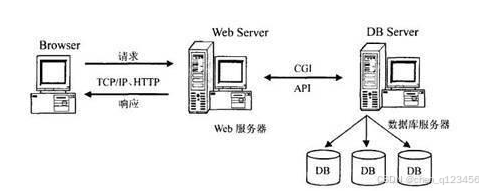
在早期,一些使用HTML语言编写的文件,再集合一些其它资源文件就可以组成一个最简单的Web程序,了解了Web程序也需要了解Web站点,它们之间的关系就是一个或者多个Web程序可以放在Internet上的一个Web站点(Web服务器)中进行使用。可以说Web应用程序的开发也带动了B/S这种网络结构模式的兴起。B是Brower(浏览器)的首字母,S是Server(服务器)的首字母,两个首字母进行组合就成了网络结构模式的简称B/S。由于这种结构模式通过安装在用户端的浏览器进行服务器的访问,可以把程序的核心功能安排在服务器中进行处理,给程序的开发,后期使用和维护省去了许多工作。图2.1展示的就是使用这种架构开发的程序的工作原理。
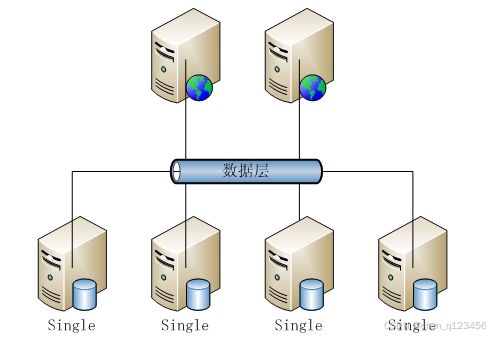
开发的程序面向用户的只是程序的功能界面,让用户操作程序界面的各个功能,那么很多人就会问,用户使用程序功能生成的数据信息放在哪里的?这个就需要涉及到数据库的知识了,一般来说,程序开发通常就会对常用数据存储工具的特点进行分析比对,比如Mysql数据库的特点与优势,Access数据库的特点与优势,Sqlserver数据库的特点与优势等,最终看哪个数据库与需要开发的程序比较匹配,也符合程序功能运行需要的数据存储要求,比如,需要开发商业级别的程序,存储的数据对数据库要求较高,可以选用Oracle,如果只是比较简单的程序,对数据存储没有过多要求,可以选用微软旗下的Access,当开发程序要求数据库占用空间小,并能满足程序数据存储要求时,就可以考虑Oracle公司从瑞典MySQL AB公司在很早之前就收购过一个关系型数据库,它是现在的Mysql数据库。在数据库工具里面它是最受认可的其中一个应用软件。需要说明的信息就是,本程序的开发就运用到了此数据库。它将程序数据通过使用不同的数据表格进行保存,在增加了程序数据的存储速度的时候,也提高了数据库的灵活性。 图2.2展示的就是MySQL的架构图。
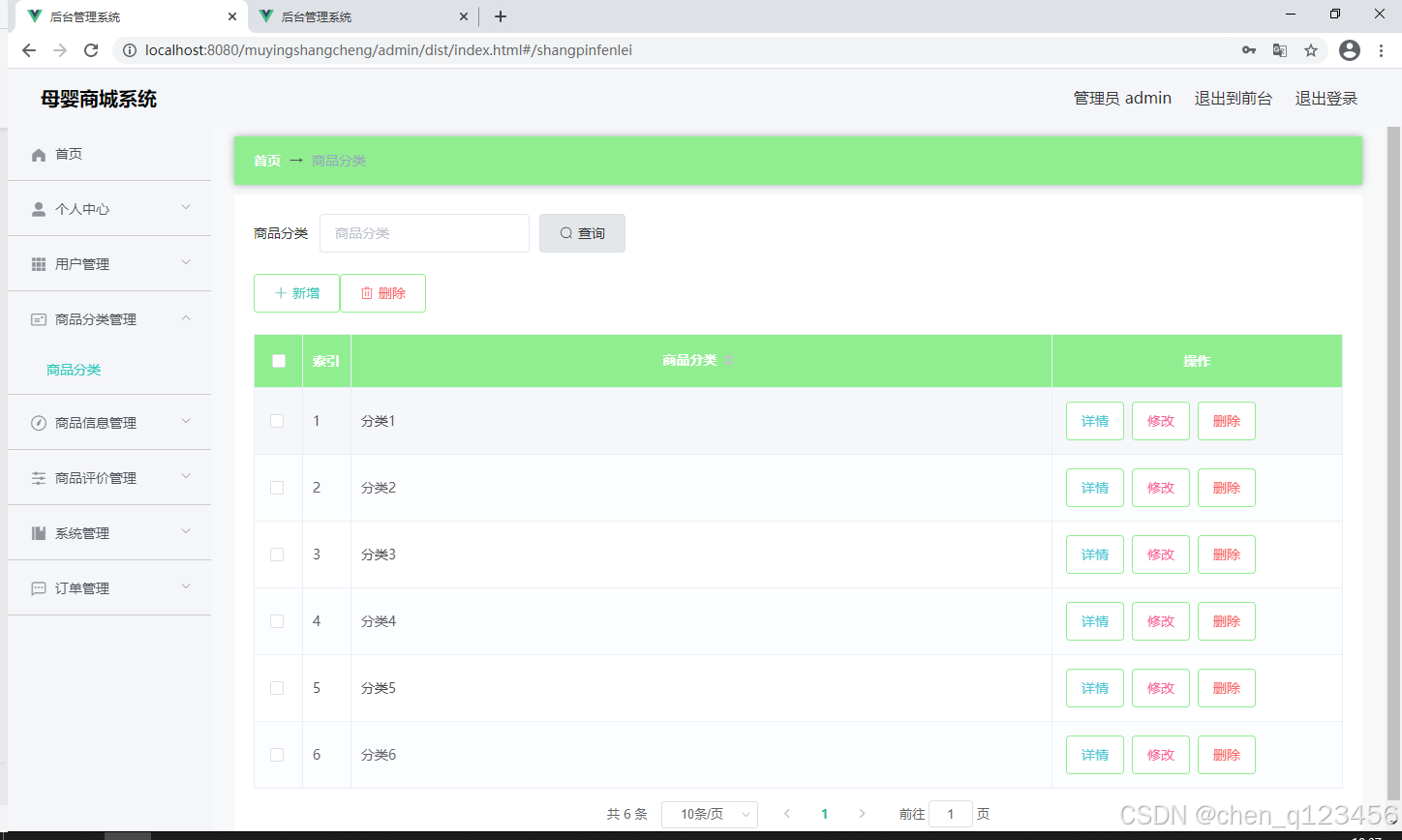
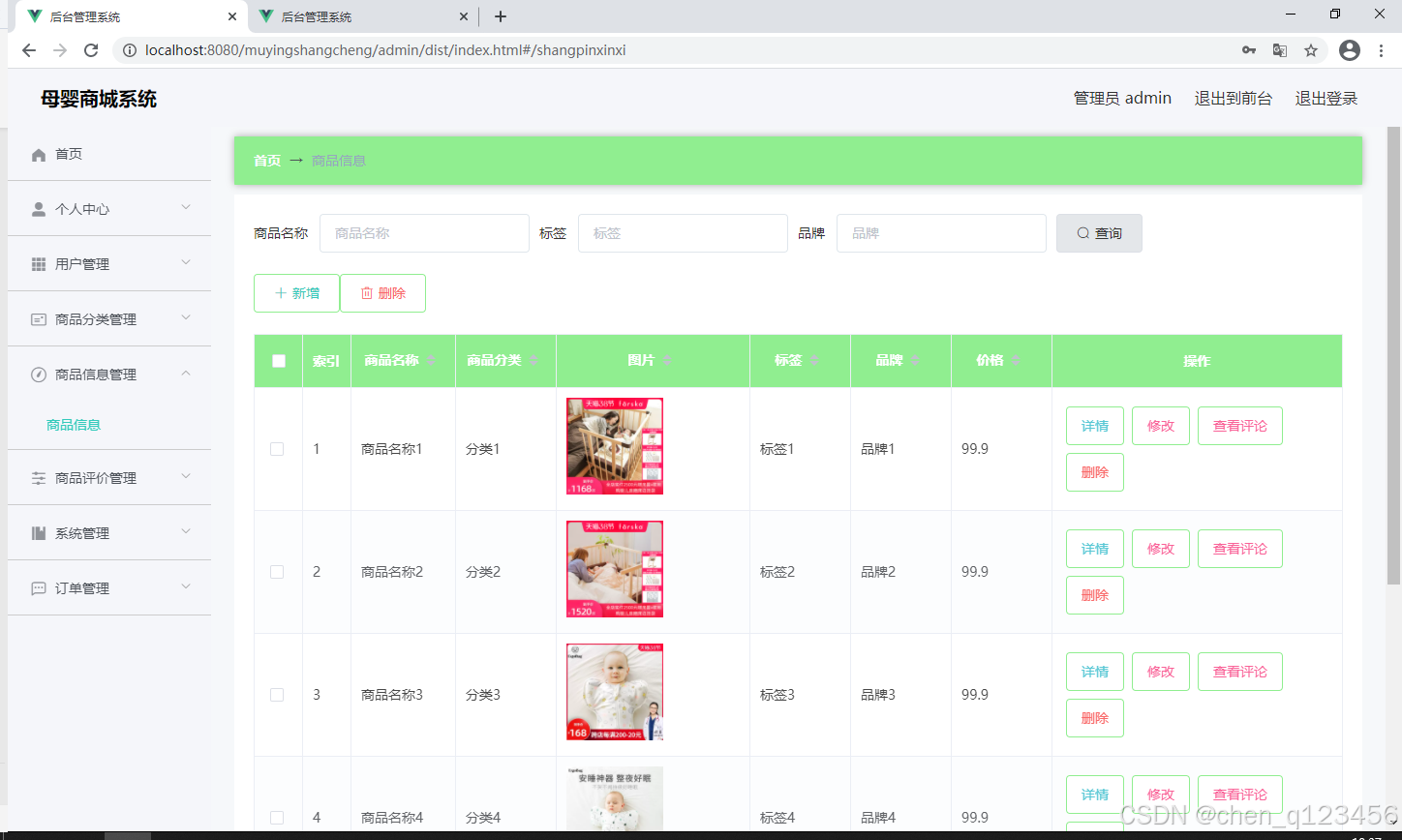
如图5.2显示的就是商品分类管理页面,此页面提供给管理员的功能有:查看已发布的商品分类数据,修改商品分类,商品分类作废,即可删除。
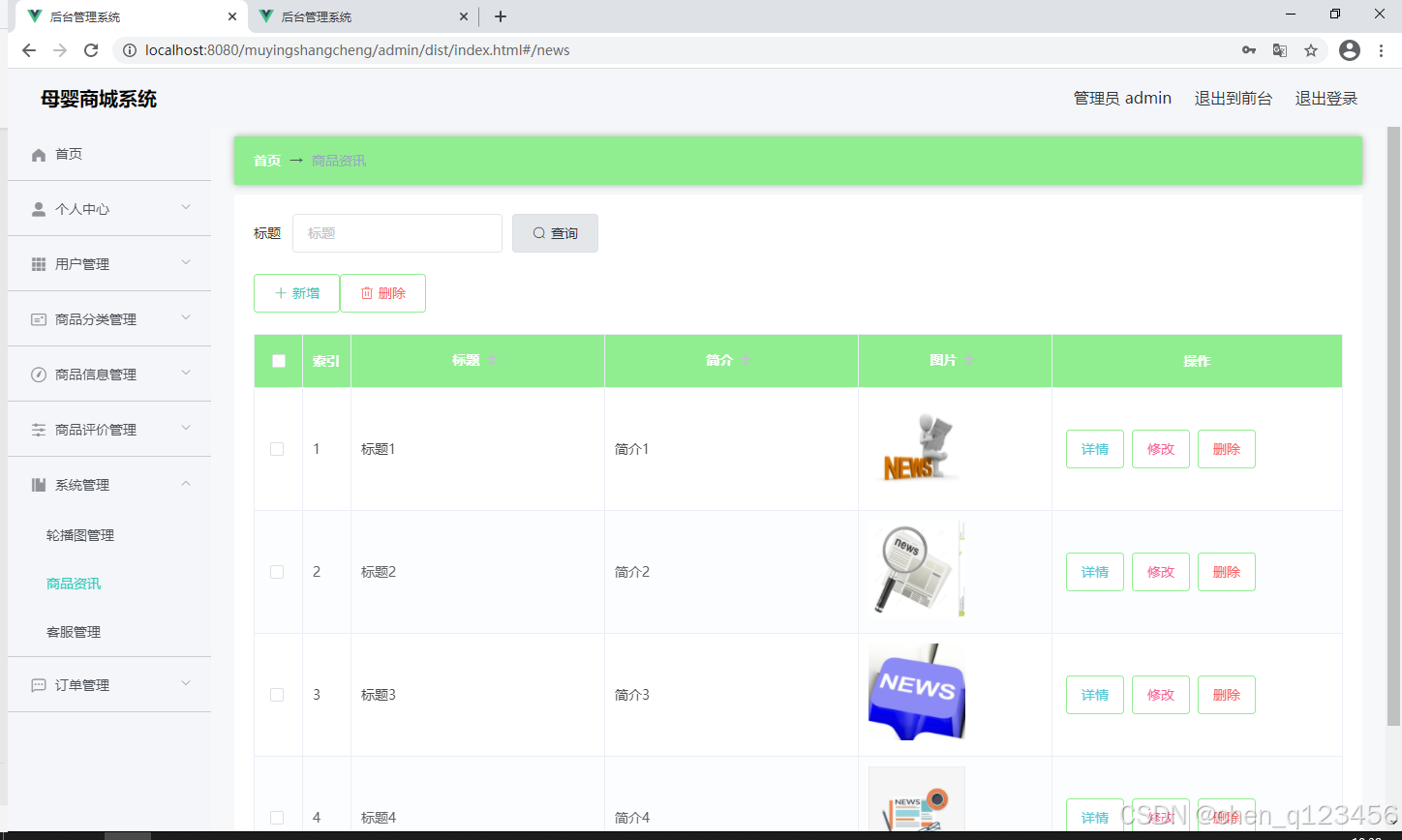
CommonUtil.java
package com.utils;

import java.util.Random;

public class CommonUtil {
	/**
     * 获取随机字符串
     *
     * @param num
     * @return
     */
    public static String getRandomString(Integer num) {
        String base = "abcdefghijklmnopqrstuvwxyz0123456789";
        Random random = new Random();
        StringBuffer sb = new StringBuffer();
        for (int i = 0; i < num; i++) {
            int number = random.nextInt(base.length());
            sb.append(base.charAt(number));
        }
        return sb.toString();
    }
}
FileController.java
package com.controller;

import java.io.File;
import java.io.FileNotFoundException;
import java.io.IOException;
import java.util.Arrays;
import java.util.Date;
import java.util.HashMap;
import java.util.List;
import java.util.Map;
import java.util.Random;
import java.util.UUID;

import org.apache.commons.io.FileUtils;
import org.apache.commons.lang3.StringUtils;
import org.springframework.beans.factory.annotation.Autowired;
import org.springframework.http.HttpHeaders;
import org.springframework.http.HttpStatus;
import org.springframework.http.MediaType;
import org.springframework.http.ResponseEntity;
import org.springframework.util.ResourceUtils;
import org.springframework.web.bind.annotation.PathVariable;
import org.springframework.web.bind.annotation.RequestBody;
import org.springframework.web.bind.annotation.RequestMapping;
import org.springframework.web.bind.annotation.RequestParam;
import org.springframework.web.bind.annotation.RestController;
import org.springframework.web.multipart.MultipartFile;

import com.annotation.IgnoreAuth;
import com.baomidou.mybatisplus.mapper.EntityWrapper;
import com.entity.ConfigEntity;
import com.entity.EIException;
import com.service.ConfigService;
import com.utils.R;

/**
 * 上传文件映射表
 */
@RestController
@RequestMapping("file")
@SuppressWarnings({"unchecked","rawtypes"})
public class FileController{
	@Autowired
    private ConfigService configService;
	/**
	 * 上传文件
	 */
	@RequestMapping("/upload")
	public R upload(@RequestParam("file") MultipartFile file,String type) throws Exception {
		if (file.isEmpty()) {
			throw new EIException("上传文件不能为空");
		}
		String fileExt = file.getOriginalFilename().substring(file.getOriginalFilename().lastIndexOf(".")+1);
		File path = new File(ResourceUtils.getURL("classpath:static").getPath());
		if(!path.exists()) {
		    path = new File("");
		}
		File upload = new File(path.getAbsolutePath(),"/upload/");
		if(!upload.exists()) {
		    upload.mkdirs();
		}
		String fileName = new Date().getTime()+"."+fileExt;
		File dest = new File(upload.getAbsolutePath()+"/"+fileName);
		file.transferTo(dest);
		if(StringUtils.isNotBlank(type) && type.equals("1")) {
			ConfigEntity configEntity = configService.selectOne(new EntityWrapper<ConfigEntity>().eq("name", "faceFile"));
			if(configEntity==null) {
				configEntity = new ConfigEntity();
				configEntity.setName("faceFile");
				configEntity.setValue(fileName);
			} else {
				configEntity.setValue(fileName);
			}
			configService.insertOrUpdate(configEntity);
		}
		return R.ok().put("file", fileName);
	}

	/**
	 * 下载文件
	 */
	@IgnoreAuth
	@RequestMapping("/download")
	public ResponseEntity<byte[]> download(@RequestParam String fileName) {
		try {
			File path = new File(ResourceUtils.getURL("classpath:static").getPath());
			if(!path.exists()) {
			    path = new File("");
			}
			File upload = new File(path.getAbsolutePath(),"/upload/");
			if(!upload.exists()) {
			    upload.mkdirs();
			}
			File file = new File(upload.getAbsolutePath()+"/"+fileName);
			if(file.exists()){
				/*if(!fileService.canRead(file, SessionManager.getSessionUser())){
					getResponse().sendError(403);
				}*/
				HttpHeaders headers = new HttpHeaders();
			    headers.setContentType(MediaType.APPLICATION_OCTET_STREAM);
			    headers.setContentDispositionFormData("attachment", fileName);
			    return new ResponseEntity<byte[]>(FileUtils.readFileToByteArray(file),headers, HttpStatus.CREATED);
			}
		} catch (IOException e) {
			e.printStackTrace();
		}
		return new ResponseEntity<byte[]>(HttpStatus.INTERNAL_SERVER_ERROR);
	}

}
IndexAsideSub.vue
<template>
  <el-submenu v-if="menu.list && menu.list.length >= 1" :index="menu.menuId + ''">
    <template slot="title">
      <span>{{ menu.name }}</span>
    </template>
    <sub-menu
      v-for="item in menu.list"
      :key="item.menuId"
      :menu="item"
      :dynamicMenuRoutes="dynamicMenuRoutes"
    ></sub-menu>
  </el-submenu>
  <el-menu-item v-else :index="menu.menuId + ''" @click="gotoRouteHandle(menu)">
    <span>{{ menu.name }}</span>
  </el-menu-item>
</template>

<script>
import SubMenu from "./IndexAsideSub";
export default {
  name: "sub-menu",
  props: {
    menu: {
      type: Object,
      required: true
    },
    dynamicMenuRoutes: {
      type: Array,
      required: true
    }
  },
  components: {
    SubMenu
  },
  methods: {
    // 通过menuId与动态(菜单)路由进行匹配跳转至指定路由
    gotoRouteHandle(menu) {
      var route = this.dynamicMenuRoutes.filter(
        item => item.meta.menuId === menu.menuId
      );
      if (route.length >= 1) {
        if (route[0].component != null) {
          this.$router.replace({ name: route[0].name });
        } else {
          this.$router.push({ name: "404" });
        }
      }
    }
  }
};
</script>
register.vue
<template>
  <div>
    <div class="container">
      <div class="login-form" style="backgroundColor:rgba(208, 163, 140, 0.53);borderRadius:10px">
        <h1 class="h1" style="color:rgba(255, 255, 255, 1);fontSize:28px;">母婴商城系统注册</h1>
		<el-form ref="rgsForm" class="rgs-form" :model="rgsForm" label-width="120px">
															<!-- <div v-if="tableName=='yonghu'" class="input-group">
			   <div class="label">用户名</div>
			   <div class="input-container">
			     <input v-model="ruleForm.yonghuming" class="input" type="text" placeholder="用户名">
			   </div>
			 </div> -->
			<el-form-item label="用户名" class="input" v-if="tableName=='yonghu'">
			  <el-input v-model="ruleForm.yonghuming" autocomplete="off" placeholder="用户名" type="text" />
			</el-form-item>
												<!-- <div v-if="tableName=='yonghu'" class="input-group">
			   <div class="label">密码</div>
			   <div class="input-container">
			     <input v-model="ruleForm.mima" class="input" type="text" placeholder="密码">
			   </div>
			 </div> -->
			<el-form-item label="密码" class="input" v-if="tableName=='yonghu'">
			  <el-input v-model="ruleForm.mima" autocomplete="off" placeholder="密码" type="text" />
			</el-form-item>
												<!-- <div v-if="tableName=='yonghu'" class="input-group">
			   <div class="label">姓名</div>
			   <div class="input-container">
			     <input v-model="ruleForm.xingming" class="input" type="text" placeholder="姓名">
			   </div>
			 </div> -->
			<el-form-item label="姓名" class="input" v-if="tableName=='yonghu'">
			  <el-input v-model="ruleForm.xingming" autocomplete="off" placeholder="姓名" type="text" />
			</el-form-item>
																														<!-- <div v-if="tableName=='yonghu'" class="input-group">
			   <div class="label">联系电话</div>
			   <div class="input-container">
			     <input v-model="ruleForm.lianxidianhua" class="input" type="text" placeholder="联系电话">
			   </div>
			 </div> -->
			<el-form-item label="联系电话" class="input" v-if="tableName=='yonghu'">
			  <el-input v-model="ruleForm.lianxidianhua" autocomplete="off" placeholder="联系电话" type="text" />
			</el-form-item>
																																																																																										<el-button class="btn" type="primary" @click="login()">注册</el-button>
		</el-form>
      </div>
      <!-- <div class="nk-navigation">
        <a href="#">
          <div @click="login()">注册</div>
        </a>
      </div> -->
    </div>
  </div>
</template>
<script>
export default {
  data() {
    return {
      ruleForm: {
              },
      tableName:"",
      rules: {}
    };
  },
  mounted(){
    let table = this.$storage.get("loginTable");
    this.tableName = table;
  },
  methods: {
    // 获取uuid
    getUUID () {
      return new Date().getTime();
    },
    // 注册
    login() {
                              if((!this.ruleForm.yonghuming) && `yonghu` == this.tableName){
        this.$message.error(`用户名不能为空`);
        return
      }
                                                                  if((!this.ruleForm.mima) && `yonghu` == this.tableName){
        this.$message.error(`密码不能为空`);
        return
      }
                                                                                                                                                                                                                                                            if(`yonghu` == this.tableName && this.ruleForm.lianxidianhua&&(!this.$validate.isMobile(this.ruleForm.lianxidianhua))){
        this.$message.error(`联系电话应输入手机格式`);
        return
      }
                                                      if(`yonghu` == this.tableName && this.ruleForm.money&&(!this.$validate.isNumber(this.ruleForm.money))){
        this.$message.error(`余额应输入数字`);
        return
      }
                                                                                                                                                                                                this.$http({
        url: `${this.tableName}/register`,
        method: "post",
        data:this.ruleForm
      }).then(({ data }) => {
        if (data && data.code === 0) {
          this.$message({
            message: "注册成功",
            type: "success",
            duration: 1500,
            onClose: () => {
              this.$router.replace({ path: "/login" });
            }
          });
        } else {
          this.$message.error(data.msg);
        }
      });
    }
  }
};
</script>
<style lang="scss" scoped>
	.el-radio__input.is-checked .el-radio__inner {
		border-color: #00c292;
		background: #00c292;
	}

	.el-radio__input.is-checked .el-radio__inner {
		border-color: #00c292;
		background: #00c292;
	}

	.el-radio__input.is-checked .el-radio__inner {
		border-color: #00c292;
		background: #00c292;
	}

	.el-radio__input.is-checked+.el-radio__label {
		color: #00c292;
	}

	.el-radio__input.is-checked+.el-radio__label {
		color: #00c292;
	}

	.el-radio__input.is-checked+.el-radio__label {
		color: #00c292;
	}

	.h1 {
		margin-top: 10px;
	}

	body {
		padding: 0;
		margin: 0;
	}

	// .container {
 //    min-height: 100vh;
 //    text-align: center;
 //    // background-color: #00c292;
 //    padding-top: 20vh;
 //    background-image: url(../assets/img/bg.jpg);
 //    background-size: 100% 100%;
 //    opacity: 0.9;
 //  }

	// .login-form:before {
	// 	vertical-align: middle;
	// 	display: inline-block;
	// }

	// .login-form {
	// 	max-width: 500px;
	// 	padding: 20px 0;
	// 	width: 80%;
	// 	position: relative;
	// 	margin: 0 auto;

	// 	.label {
	// 		min-width: 60px;
	// 	}

	// 	.input-group {
	// 		max-width: 500px;
	// 		padding: 20px 0;
	// 		width: 80%;
	// 		position: relative;
	// 		margin: 0 auto;
	// 		display: flex;
	// 		align-items: center;

	// 		.input-container {
	// 			display: inline-block;
	// 			width: 100%;
	// 			text-align: left;
	// 			margin-left: 10px;
	// 		}

	// 		.icon {
	// 			width: 30px;
	// 			height: 30px;
	// 		}

	// 		.input {
	// 			position: relative;
	// 			z-index: 2;
	// 			float: left;
	// 			width: 100%;
	// 			margin-bottom: 0;
	// 			box-shadow: none;
	// 			border-top: 0px solid #ccc;
	// 			border-left: 0px solid #ccc;
	// 			border-right: 0px solid #ccc;
	// 			border-bottom: 1px solid #ccc;
	// 			padding: 0px;
	// 			resize: none;
	// 			border-radius: 0px;
	// 			display: block;
	// 			width: 100%;
	// 			height: 34px;
	// 			padding: 6px 12px;
	// 			font-size: 14px;
	// 			line-height: 1.42857143;
	// 			color: #555;
	// 			background-color: #fff;
	// 		}

	// 	}
	// }

	.nk-navigation {
		margin-top: 15px;

		a {
			display: inline-block;
			color: #fff;
			background: rgba(255, 255, 255, .2);
			width: 100px;
			height: 50px;
			border-radius: 30px;
			text-align: center;
			display: flex;
			align-items: center;
			margin: 0 auto;
			justify-content: center;
			padding: 0 20px;
		}

		.icon {
			margin-left: 10px;
			width: 30px;
			height: 30px;
		}
	}

	.register-container {
		margin-top: 10px;

		a {
			display: inline-block;
			color: #fff;
			max-width: 500px;
			height: 50px;
			border-radius: 30px;
			text-align: center;
			display: flex;
			align-items: center;
			margin: 0 auto;
			justify-content: center;
			padding: 0 20px;

			div {
				margin-left: 10px;
			}
		}
	}

	.container {
		background-image: url("http://localhost:8080/muyingshangcheng/admin/dist/0.jpg");
		height: 100vh;
		background-position: center center;
		background-size: cover;
		background-repeat: no-repeat;

		.login-form {
			right: 50%;
			top: 50%;
			height: auto;
			transform: translate3d(50%, -50%, 0);
			border-radius: 10px;
			background-color: rgba(255,255,255,.5);
			width: 420px;
			padding: 30px 30px 40px 30px;
			font-size: 14px;
			font-weight: 500;

			.h1 {
				margin: 0;
				text-align: center;
				line-height: 54px;
			    font-size: 24px;
			    color: #000;
			}

			.rgs-form {
				display: flex;
				flex-direction: column;
				justify-content: center;
				align-items: center;

				.input {
					width: 100%;

					& /deep/ .el-form-item__label {
						line-height: 40px;
						color: rgba(254, 254, 254, 1);
						font-size: #606266;
					}

					& /deep/ .el-input__inner {
						height: 40px;
						color: #606266;
						font-size: 14px;
						border-width: 0px;
						border-style: solid;
						border-color: #606266;
						border-radius: 4px;
						background-color: #fff;
					}
				}

				.btn {
					width: 100px;
					height: 44px;
					color: #fff;
					font-size: 14px;
					border-width: 0px;
					border-style: solid;
					border-color: #409EFF;
					border-radius: 4px;
					background-color: rgba(249, 104, 104, 0.9);
				}
			}
		}
	}
</style>





 扫一扫
扫一扫


 1075
1075

 被折叠的 条评论
为什么被折叠?
被折叠的 条评论
为什么被折叠?
 到【灌水乐园】发言





