




 本文介绍TensorFlow中的图像处理函数,包括图像的编码与解码、尺寸调整等操作,并通过实例展示了如何使用这些函数进行图像处理。
TensorFlow提供了几类图像处理函数,下面介绍图像的编码与解码,图像尺寸调整。
编码与解码
图像解码与编码:一张RGB三通道的彩色图像可以看成一个三维矩阵,矩阵中的不位置上的数字代表图像的像素值。然后图像在存储时并不是直接记录这些矩阵中的数字,而是经过了压缩编码。所以将一张图像还原成一个三维矩阵的过程就是解码的过程,反之就是编码了。其实如果大家熟悉opencv的话,imread和imwrite就是一个解码和编码的过程。
TensorFlow提供了常用图片格式的解码和编码操作,下面用一个jpg的图像演示:
import matplotlib.pyplot as plt
import tensorflow as tf


image_raw_data = tf.gfile.FastGFile('.//image//1.jpg','rb').read()

with tf.Session() as sess:
     img_data = tf.image.decode_jpeg(image_raw_data)
     print(img_data.eval())

     plt.imshow(img_data.eval())
     plt.show()

     #img_data = tf.image.convert_image_dtype(img_data,dtype = tf.float32)

     encoded_image = tf.image.encode_jpeg(img_data)
     with tf.gfile.GFile(".//image//3.jpg","wb") as f:
          f.write(encoded_image.eval())
其中:
decode_jpeg函数为jpeg(jpg)图片解码的过程,对应的encode_jpeg函数为编码过程,编码后将图片重命名写入到指定的路径下。
图像尺寸调整
图像尺寸调整属于基础的图像几何变换,TensorFlow提供了几种尺寸调整的函数:
tf.image.resize_images:将原始图像缩放成指定的图像大小,其中的参数method(默认值为ResizeMethod.BILINEAR)提供了四种插值算法,具体解释可以参考图像几何变换(缩放、旋转)中的常用的插值算法
tf.image.resize_image_with_crop_or_pad:剪裁或填充处理,会根据原图像的尺寸和指定的目标图像的尺寸选择剪裁还是填充,如果原图像尺寸大于目标图像尺寸,则在中心位置剪裁,反之则用黑色像素填充。
tf.image.central_crop:比例调整,central_fraction决定了要指定的比例,取值范围为(0,1],该函数会以中心点作为基准,选择整幅图中的指定比例的图像作为新的图像。
import matplotlib.pyplot as plt
import tensorflow as tf
import numpy as np

image_raw_data = tf.gfile.FastGFile('.//image//1.jpg','rb').read()

with tf.Session() as sess:
     img_data = tf.image.decode_jpeg(image_raw_data)
     plt.imshow(img_data.eval())
     plt.show()


     resized = tf.image.resize_images(img_data, [100, 100], method=0)
     # TensorFlow的函数处理图片后存储的数据是float32格式的,需要转换成uint8才能正确打印图片。
     print("Digital type: ", resized.dtype)
     resized = np.asarray(resized.eval(), dtype='uint8')
     # tf.image.convert_image_dtype(rgb_image, tf.float32)
     plt.imshow(resized)
     plt.show()

     croped = tf.image.resize_image_with_crop_or_pad(img_data, 100, 100)
     padded = tf.image.resize_image_with_crop_or_pad(img_data, 500, 500)
     plt.imshow(croped.eval())
     plt.show()
     plt.imshow(padded.eval())
     plt.show()

     central_cropped = tf.image.central_crop(img_data, 0.5)
     plt.imshow(central_cropped.eval())
     plt.show()
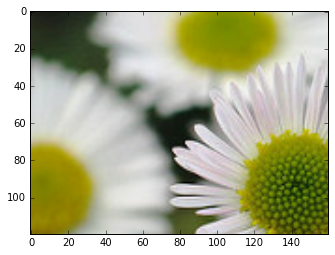
原图:

resize_images(img_data, [100, 100], method=0):

resize_image_with_crop_or_pad(img_data, 100, 100):

resize_image_with_crop_or_pad(img_data, 500, 500):

central_crop(img_data, 0.5):






 扫一扫
扫一扫


 2310
2310


 到【灌水乐园】发言



