



forms+windows添加激活水印
- 多语言水印文本,根据系统语言自动切换。
- 水印显示在每个屏幕的右下角,位置动态调整。
- 半透明灰色文字,微软雅黑字体。
- 窗口无边框、置顶、透明背景,不干扰用户操作。
- 支持多显示器。
- 高DPI适配。
效果图:
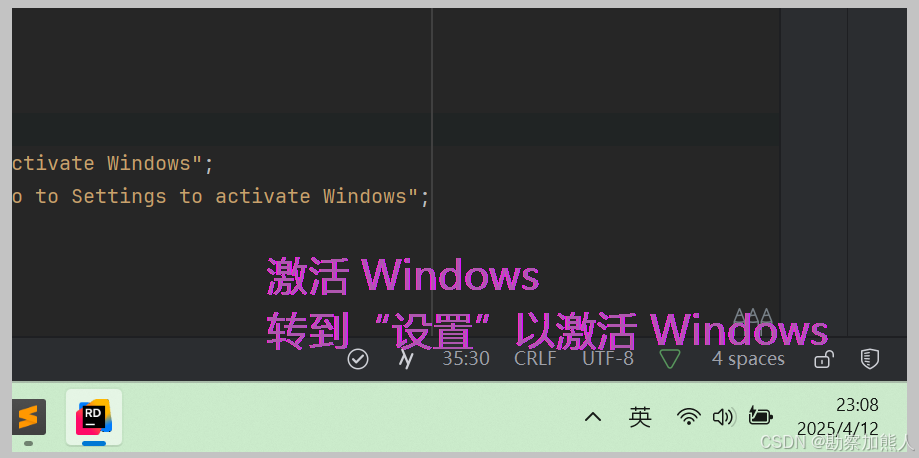
step1:C:\Users\wangrusheng\RiderProjects\WinFormsApp37\WinFormsApp37\Program.cs
namespace WinFormsApp37;

static class Program
{
    /// <summary>
    ///  The main entry point for the application.
    /// </summary>
    [STAThread]
    static void Main()
    {
        Application.SetHighDpiMode(HighDpiMode.PerMonitorV2);
        Application.EnableVisualStyles();

        foreach (var screen in Screen.AllScreens)
        {
            new WatermarkForm(screen).Show();
        }

        Application.Run();

    }
}
step2:C:\Users\wangrusheng\RiderProjects\WinFormsApp37\WinFormsApp37\WatermarkForm.cs
using System;
using System.Collections.Generic;
using System.Drawing;
using System.Globalization;
using System.Windows.Forms;
using System.Runtime.InteropServices;


namespace WinFormsApp37;


public class WatermarkForm : Form
{
    [DllImport("user32.dll")]
    static extern int GetWindowLong(IntPtr hWnd, int nIndex);

    [DllImport("user32.dll")]
    static extern int SetWindowLong(IntPtr hWnd, int nIndex, int dwNewLong);

    const int GWL_EXSTYLE = -20;
    const int WS_EX_LAYERED = 0x80000;
    const int WS_EX_TRANSPARENT = 0x20;

    private readonly string text1, text2;
    private readonly Font font = new Font("Microsoft YaHei", 20, FontStyle.Regular);

    public WatermarkForm(Screen screen)
    {
        // 初始化窗口属性
        InitializeWindow();

        // 加载多语言文本
        var translations = LoadTranslations();
        string lang = CultureInfo.CurrentCulture.TwoLetterISOLanguageName;
        text1 = translations.TryGetValue($"{lang}_line1", out var t1) ? t1 : "Activate Windows";
        text2 = translations.TryGetValue($"{lang}_line2", out var t2) ? t2 : "Go to Settings to activate Windows";

        // 计算窗口位置
        CalculatePosition(screen);
    }

    private void InitializeWindow()
    {
        FormBorderStyle = FormBorderStyle.None;
        TopMost = true;
        BackColor = Color.Magenta;
        TransparencyKey = Color.Magenta;
        ShowInTaskbar = false;

        // 设置窗口样式
        int style = GetWindowLong(Handle, GWL_EXSTYLE);
        SetWindowLong(Handle, GWL_EXSTYLE, style | WS_EX_LAYERED | WS_EX_TRANSPARENT);
    }

    private Dictionary<string, string> LoadTranslations() => new()
    {
        ["zh_line1"] = "激活 Windows",
        ["zh_line2"] = "转到“设置”以激活 Windows",
        ["en_line1"] = "Activate Windows",
        ["en_line2"] = "Go to Settings to activate Windows",
        // 其他语言翻译...
    };

    private void CalculatePosition(Screen screen)
    {
        using var g = CreateGraphics();
        var size1 = g.MeasureString(text1, font);
        var size2 = g.MeasureString(text2, font);

        int width = (int)Math.Max(size1.Width, size2.Width) + 20;
        int height = (int)(size1.Height + size2.Height) + 10;

        Location = new Point(
            screen.Bounds.Right - width - 50,
            screen.Bounds.Bottom - height - 80);
        Size = new Size(width, height);
    }

    protected override void OnPaint(PaintEventArgs e)
    {
        base.OnPaint(e);
        using var brush = new SolidBrush(Color.FromArgb(160, 120, 120, 120));
        e.Graphics.DrawString(text1, font, brush, 0, 0);
        e.Graphics.DrawString(text2, font, brush, 0, font.Height + 2);
    }
}
end





 扫一扫
扫一扫


 1145
1145

 被折叠的 条评论
为什么被折叠?
被折叠的 条评论
为什么被折叠?
 到【灌水乐园】发言





