


#pragma once
class CSpinButtonCtrlEx : public SSpinButtonCtrl
{
	DEF_SOBJECT(CSpinButtonCtrlEx, L"spinButtonEx")
public:
	CSpinButtonCtrlEx();
	~CSpinButtonCtrlEx();

public:
	int GetActionButton();
};
#include "stdafx.h"
#include "CSpinButtonCtrlEx.h"
CSpinButtonCtrlEx::CSpinButtonCtrlEx()
{
}

CSpinButtonCtrlEx::~CSpinButtonCtrlEx()
{
}

int CSpinButtonCtrlEx::GetActionButton()
{
	//获取点击的up或者down按钮
	return m_iActionBtn;
}
主要的地方就是先获取按下的状态根据自身的业务做加减操作或者递增递减操作
使用:
1、控件注册
m_theApp->RegisterWindowClass<CSpinButtonCtrlEx>();
2、在布局中使用控件
<edit name="edit_name" inset="5,0,0,25" pos="[0,{0,@100,@30" font="face:微软雅黑,size:12"/>
<spinButtonEx name="spin_edit_name" pos="[-20,{5"></spinButtonEx>
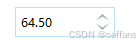
将spin控件点击事件跟edit关联起来
void OnBnClickNameSpin()
{
	CSpinButtonCtrlEx* pSpin = FindChildByName2<CSpinButtonCtrlEx>(L"spin_edit_name");
	SEdit* pEdit = FindChildByName2<SEdit>(L"edit_name");
	SASSERT(pSpin);
	SASSERT(pEdit);

	//1、获取edit内容
	SStringW sstrValue = pEdit->GetWindowTextW();
	//假设内容为double类型
	double dValue = std::stod(sstrValue.GetBuffer());
	//2、获取spin的状态,以及根据状态处理内容
	int nActionButton = pSpin->GetActionButton();
	switch (nActionButton)
	{
	case 0:		//up
		dValue += 0.1;
		break;
	case 1:		//down
		dValue -= 0.1;
		break;
	default:
		break;
	}

	//3、重新设置edit内容
	SStringW sstrContent;
	sstrContent.Format(L"%0.2f", dValue);
	pEdit->SetWindowTextW(sstrContent);
}





 扫一扫
扫一扫


 612
612

 被折叠的 条评论
为什么被折叠?
被折叠的 条评论
为什么被折叠?
 到【灌水乐园】发言





