


 文章展示了在Vue.js应用中如何使用van-uploader组件进行图片上传,并利用Quagga库进行条形码扫描识别。用户上传图片后,文件被处理并发送到服务器,同时实现对拍摄图片的条形码信息提取。当条形码成功识别时,会显示代码结果;未识别到条形码则给出提示。
文件上传
html部分
<van-uploader v-model="productImage" >
	     <div class="productComplaint-form-upload-icon" >
	        <van-icon name="plus" />
	      </div>
	    </van-uploader>
JS部分
const productImage = ref([])//产品图片
watch(productImage, (now, old) => {
  console.log(now, old);
  let list=[]
  now.map(res=>{
    let params = new FormData()
    params.append("image", res.file)
    uploadImg(params).then(res => {
      let data = res.data
      if (data.code === 0) {
        list.push(data.data)
      } else {
        showToast(data.message);
      }
    })
  })
  obj.productImage=list
})
扫描吊牌号
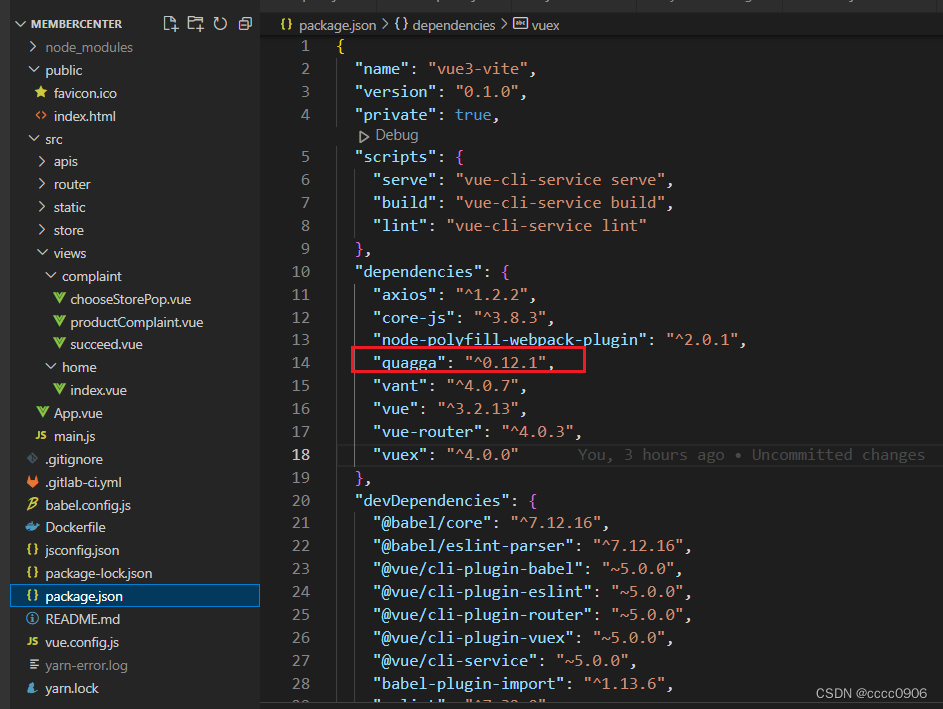
引入Quagga
import Quagga from 'quagga'
html
<van-uploader capture="camera"   :after-read="afterRead">
                  <div class="productComplaint-form-upload-icon">
                    <van-icon name="scan" />
                  </div>
                </van-uploader>
JS
const afterRead = (file) => {
  getUrl(file.file)
}
const getUrl = (file) => {
  let url = getObjectURL(file);
  let config = Object.assign( { src: url });
  Quagga.decodeSingle(config, function (result) {
    //识别结果
    if (result.codeResult) {
      console.log(result.codeResult.code);
    } else {
      alert("未识别到图片中的条形码!");
    }
  });
}





 扫一扫
扫一扫


 1332
1332

 被折叠的 条评论
为什么被折叠?
被折叠的 条评论
为什么被折叠?
 到【灌水乐园】发言





