



 本文详细介绍了如何在SpringWeb项目中集成Redis作为缓存解决方案,包括配置日志、redis属性配置、bean配置及使用缓存的示例代码,展示了如何通过Spring Data Redis进行高效的数据读写。
起点在Springweb实践基础上https://blog.youkuaiyun.com/caststudy/article/details/102508211
redis(window安装使用)
http://www.runoob.com/redis/redis-tutorial.html
运行前要先启动redis数据库

依赖关系
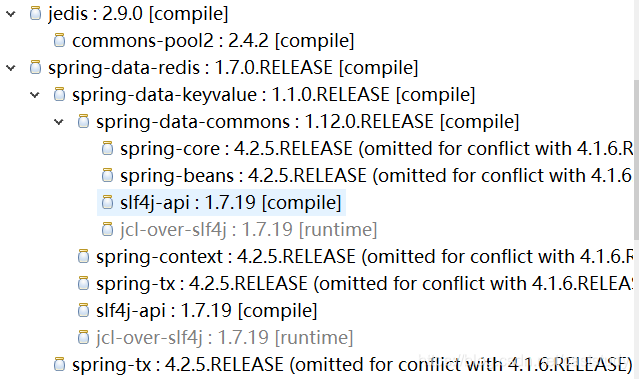
spring版本库
https://repo.spring.io/release/org/springframework/spring/4.2.6.RELEASE/
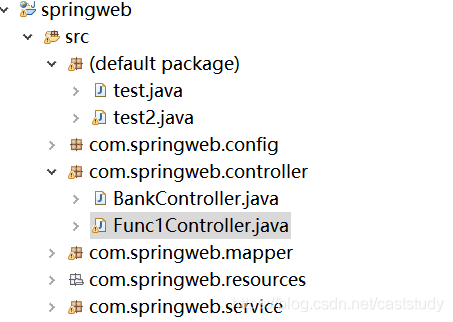
项目代码结构
配置日志
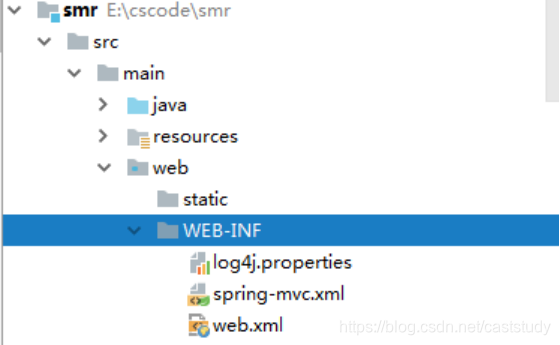
log4j.properties
log4j.rootLogger=INFO,A1,A2

#ConsoleAppender
log4j.appender.A1=org.apache.log4j.ConsoleAppender
log4j.appender.A1.layout=org.apache.log4j.PatternLayout
log4j.appender.A1.layout.ConversionPattern=%d{yyyy-MM-dd HH\:mm\:ss} [%l] [%p] %m%n

# FileAppender
log4j.appender.A2=org.apache.log4j.RollingFileAppender
log4j.appender.A2.File=${springweb}/smr.log
log4j.appender.A2.MaxFileSize=1MB
log4j.appender.auditLogger.MaxBackupIndex=1
log4j.appender.A2.layout=org.apache.log4j.PatternLayout
log4j.appender.A2.layout.ConversionPattern=%d{yyyy-MM-dd HH\:mm\:ss}[%l]  [%p]%m%n
web.xml配置文件
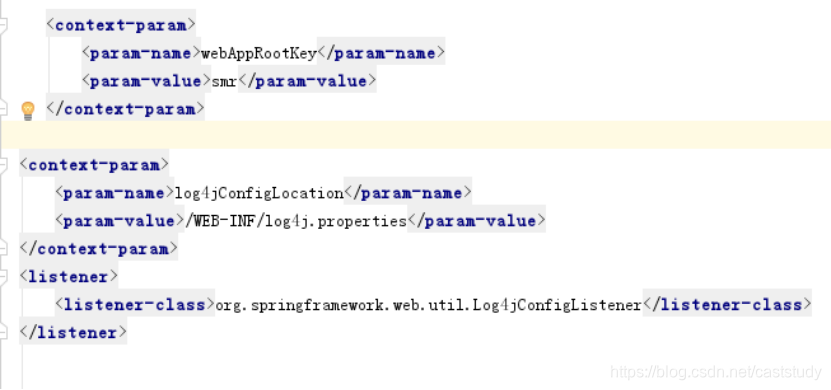
使用redis实现缓存
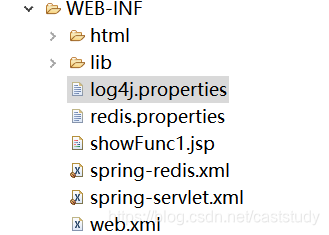
redis属性配置redis.properties
# Redis settings
redis.host=127.0.0.1
redis.port=6379
#redis.pass=password
redis.dbIndex=0
#
redis.expiration=20
redis.maxIdle=5
redis.maxActive=10
redis.maxWait=5000
redis.testOnBorrow=true
redis相关bean配置(spring-redis.xml)
<?xml version="1.0" encoding="UTF-8"?>
<beans xmlns="http://www.springframework.org/schema/beans"
	   xmlns:xsi="http://www.w3.org/2001/XMLSchema-instance"
	   xmlns:aop="http://www.springframework.org/schema/aop"
	   xmlns:context="http://www.springframework.org/schema/context"
	   xmlns:mvc="http://www.springframework.org/schema/mvc"
	   xmlns:p="http://www.springframework.org/schema/p"
	   xmlns:tx="http://www.springframework.org/schema/tx" xmlns:cache="http://www.springframework.org/schema/cache"
	   xsi:schemaLocation="http://www.springframework.org/schema/beans http://www.springframework.org/schema/beans/spring-beans.xsd
		http://www.springframework.org/schema/aop http://www.springframework.org/schema/aop/spring-aop-4.1.xsd
		http://www.springframework.org/schema/context http://www.springframework.org/schema/context/spring-context-4.1.xsd
		http://www.springframework.org/schema/mvc http://www.springframework.org/schema/mvc/spring-mvc-4.1.xsd
		http://www.springframework.org/schema/tx http://www.springframework.org/schema/tx/spring-tx-4.1.xsd http://www.springframework.org/schema/cache http://www.springframework.org/schema/cache/spring-cache.xsd">

	<bean class="org.springframework.beans.factory.config.PropertyPlaceholderConfigurer">
		<property name="locations">
			<list>
				<value>/WEB-INF/redis.properties</value>
			</list>
		</property>
	</bean>
	<!--配置redis的参数-->
	<bean id="poolConfig" class="redis.clients.jedis.JedisPoolConfig" >
		<property name="maxIdle" value="${redis.maxIdle}"/>
		<property name="maxTotal" value="${redis.maxActive}"/>
		<property name="maxWaitMillis" value="${redis.maxWait}"/>
		<property name="testOnBorrow" value="${redis.testOnBorrow}"/>
	</bean>
	<!--配置redis的连接参数 如需要密码,请配置,database是redis的指定哪个库-->
	<bean id="jedisConnectionFactory" class="org.springframework.data.redis.connection.jedis.JedisConnectionFactory">
		<property name="hostName" value="${redis.host}"/>
		<property name="port" value="${redis.port}"/>
		<!--<property name="password" value="${redis.password}"/>-->
		<property name="database" value="${redis.dbIndex}"/>
		<property name="poolConfig" ref="poolConfig"/>
	</bean>

	<!--redis操作模版,使用该对象可以操作redis  -->
	<bean id="redisTemplate" class="org.springframework.data.redis.core.StringRedisTemplate">
		<property name="connectionFactory" ref="jedisConnectionFactory"/>
		<property name="keySerializer">
			<bean class="org.springframework.data.redis.serializer.StringRedisSerializer"/>
		</property>
		<property name="valueSerializer">
			<bean class="org.springframework.data.redis.serializer.JdkSerializationRedisSerializer"/>
		</property>
		<!--开启事务-->
		<property name="enableTransactionSupport" value="true"/>
	</bean>

	<!-- 配置redis缓存管理器 -->
	<bean id="redisCacheManager" class="org.springframework.data.redis.cache.RedisCacheManager">
		<constructor-arg name="redisOperations" ref="redisTemplate"/>
		<property name="defaultExpiration" value="${redis.expiration}"/>
	</bean>
	<!-- 配置RedisCacheConfig -->
	<bean id="redisCacheConfig" class="com.springweb.config.RedisCacheConfig">
		<constructor-arg ref="jedisConnectionFactory"/>
		<constructor-arg ref="redisTemplate"/>
		<constructor-arg ref="redisCacheManager"/>
	</bean>
	<bean id="keyGenerator" class="com.springweb.config.CusKeyGenerator"/>
	<cache:annotation-driven cache-manager="redisCacheManager" key-generator="keyGenerator"/>
</beans>
spring配置引用redis配置

redis配置代码
package com.springweb.config;

import org.springframework.cache.annotation.CachingConfigurerSupport;
import org.springframework.data.redis.cache.RedisCacheManager;
import org.springframework.data.redis.connection.jedis.JedisConnectionFactory;
import org.springframework.data.redis.core.RedisTemplate;

public class RedisCacheConfig extends CachingConfigurerSupport {
    private volatile JedisConnectionFactory jedisConnectionFactory;
    private volatile RedisTemplate<String, String> redisTemplate;
    private volatile RedisCacheManager redisCacheManager;

    public RedisCacheConfig() {
    }

    /**
     * 带参数的构造方法 初始化所有的成员变量
     *
     * @param jedisConnectionFactory
     * @param redisTemplate
     * @param redisCacheManager
     */
    public RedisCacheConfig(JedisConnectionFactory jedisConnectionFactory, RedisTemplate<String, String> redisTemplate,
                            RedisCacheManager redisCacheManager) {
        this.jedisConnectionFactory = jedisConnectionFactory;
        this.redisTemplate = redisTemplate;
        this.redisCacheManager = redisCacheManager;
    }

    public JedisConnectionFactory getJedisConnecionFactory() {
        return jedisConnectionFactory;
    }

    public RedisTemplate<String, String> getRedisTemplate() {
        return redisTemplate;
    }

    public RedisCacheManager getRedisCacheManager() {
        return redisCacheManager;
    }


}
package com.springweb.config;
import org.springframework.cache.interceptor.KeyGenerator;
import java.lang.reflect.Method;
public class CusKeyGenerator implements KeyGenerator {
public Object generate(Object o, Method method, Object... params) {
//规定 本类名+方法名+参数名 为key
StringBuilder sb = new StringBuilder();
sb.append(o.getClass().getName());
sb.append("-");
sb.append(method.getName());
sb.append("-");
for (Object param : params) {
sb.append(param.toString());
}
return sb.toString();
}
}设置使用缓存
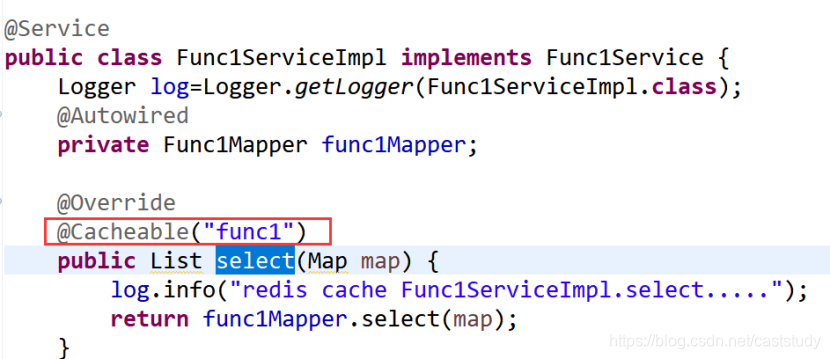
package com.springweb.service;

import java.util.List;
import java.util.Map;

import org.apache.log4j.Logger;
import org.springframework.beans.factory.annotation.Autowired;
import org.springframework.cache.annotation.Cacheable;
import org.springframework.stereotype.Service;

import com.springweb.mapper.Func1Mapper;

@Service
public class Func1ServiceImpl implements Func1Service {
    Logger log=Logger.getLogger(Func1ServiceImpl.class);
	@Autowired
	private Func1Mapper func1Mapper;

	@Override
	@Cacheable("func1")
	public List select(Map map) {
        log.info("redis cache Func1ServiceImpl.select.....");
		return func1Mapper.select(map);
	}

}
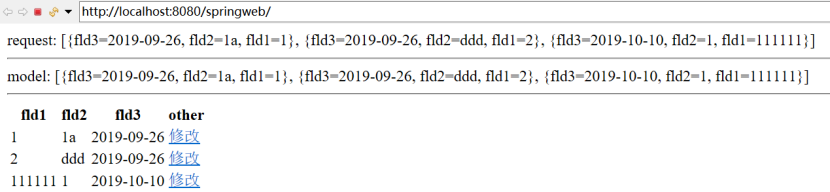
运行效果(相隔20秒刷新)
查看日志

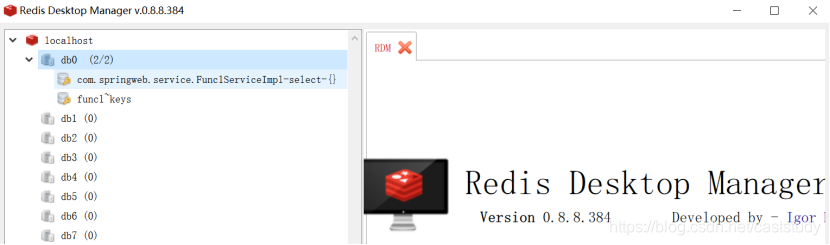
Redis Desktop Manager查看缓存
安装包
https://pan.baidu.com/s/13ucFi9HvGNx5pZdIxRWeSA





 扫一扫
扫一扫


 7145
7145

 被折叠的 条评论
为什么被折叠?
被折叠的 条评论
为什么被折叠?
 到【灌水乐园】发言





