


Qss是应用于窗体界面的,与 HTML 的 CSS 类似, QSS 是纯文本的样式定义,应用程序运行时可以载入和解析这些样式定义。与 HTML 的 CSS 句法几乎完全相同。
属性选择器
如处于只读属性的LineEdit,和已经选中的checkBox 背景红色
QLineEdit[readOnly="true"], QCheckBox[checked="true"]

{
    background-color: rgb(255, 0, 0)
}
QComboBox QSpinBox 组件的下拉或向上按钮的图片
QComboBox::drop-down{ image: url(:/images/images/down.bmp); }
QSpinBox::up-button{ image: url(:/images/images/up.bmp); }
QSpinBox::down-button{ image: url(:/images/images/down.bmp); }
界面上设置Qss
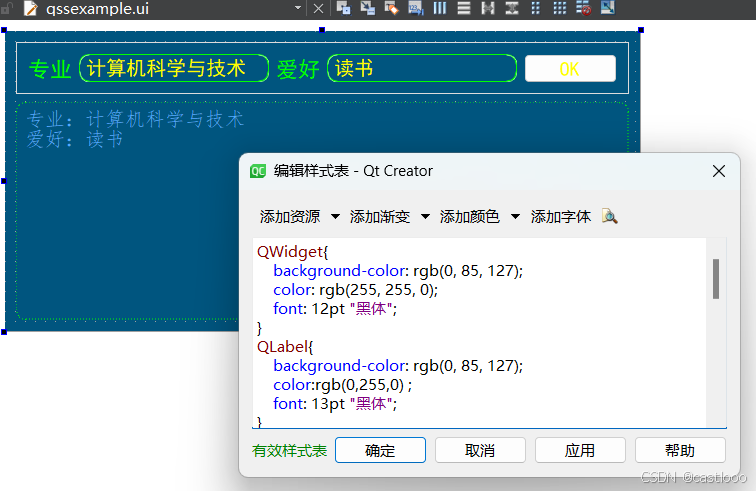
QWidget{
	background-color: rgb(0, 85, 127);
	color: rgb(255, 255, 0);
	font: 12pt "黑体";
}
QLabel{
	background-color: rgb(0, 85, 127);
	color:rgb(0,255,0) ;
	font: 13pt "黑体";
}

QLineEdit{
     border: 1px groove gray;
     border-radius: 10px;
     padding: 2px 4px;
 	 color: rgb(255, 255, 0);
     border-color: rgb(0,255,0);
}

QPlainTextEdit{
     font:12pt "仿宋";
     border: 1px groove gray;
	 border-style: dashed;
     border-radius: 10px;
     padding: 2px 4px;
 	 color: rgb(85, 170, 255);
     border-color: rgb(0,255,0);
}

QPushButton
{
	background-color: rgb(34, 167, 255);
	color: rgb(255, 255, 0);
}
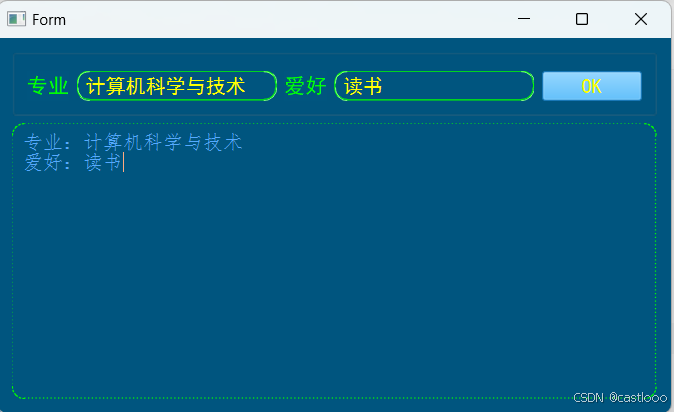
效果





 扫一扫
扫一扫


 391
391

 被折叠的 条评论
为什么被折叠?
被折叠的 条评论
为什么被折叠?
 到【灌水乐园】发言





