手把手教你用Python操纵Word自动编写离职报告

Python自动化办公:Word/PDF模板填充与格式转换实战指南 在数据处理与文档处理领域,模板填充与格式转换是提升工作效率、实现流程自动化的核心技术。其原理是通过程序将结构化数据(如数据库记录、JSON)与预设模板结合,批量生成最终文档,从而替代繁琐的手工操作。这项技术的核心价值在于将人力从重复性劳动中解放出来,极大提升了文档处理的准确性与一致性,并支持大规模、高并发的业务场景。典型的应用场景包括批量生成合同、报告、证书、通知等标准化文档,以及在不同格式(如Word、PDF、Markdown)间进行高质量转换。本文聚焦于使用Python生态中的 `docxtpl`、`p 阅读详情

大家好,今天给大家分享一篇Python自动化文章。

Python 是自动化处理的一把好手,比如自动编写离职申请!!!

安装
pip install python-docx -i https://pypi.douban.com/simple/
基本用法
创建一个docx文档
from docx import Document
from docx.enum.text import WD_PARAGRAPH_ALIGNMENT
from docx.oxml.ns import qn
from docx.shared import RGBColor, Pt


# 初始化一个文档
document = Document()


# 加个标题
paragraph = document.add_heading('开空调', level=3)


document.save('开空调.docx')
添加一个段落
# LEFT      =>  左对齐
# CENTER    =>  文字居中
# RIGHT     =>  右对齐
# JUSTIFY   =>  文本两端对齐


paragraph = document.add_paragraph("前几天最热的时候我们家热得快炸了!!!")
# 字体格式设置
paragraph_format = paragraph.paragraph_format
paragraph_format.alignment = WD_PARAGRAPH_ALIGNMENT.CENTER
paragraph.add_run('粗体').bold = True
添加一张图片
from docx.shared import Inches, RGBColor


paragraph = document.add_paragraph()
# 图片居中设置
paragraph.alignment = WD_PARAGRAPH_ALIGNMENT.CENTER
run = paragraph.add_run("")
run.add_picture('./ico.jpg', width=Inches(1.0), height=Inches(1.0))
设置字体颜色和大小
paragraph = document.add_paragraph()
paragraph.add_run('那你开')
paragraph.add_run('空调').font.color.rgb = RGBColor(54, 95, 145)
paragraph.add_run('啊!!')
paragraph.add_run('开空调!!').font.size = Pt(30)  # 字体大小设置,和word里面的字号相对应
嵌入表格
document.add_page_break()
# 创建表格
table = document.add_table(rows=2, cols=2)
table.style = 'LightShading-Accent1'
cell = table.cell(0, 1)
cell.text = '这是第一行第二列的单元格'


row = table.rows[1]
row.cells[0].text = '第二行第一列'
row.cells[1].text = '第二行第二列'
开始编写离职报告
# -*- coding: utf-8 -*-
"""
@Time :2021/2/1 10:51
@Auth :wutong
@File :自动离职报告.py
@IDE :PyCharm
"""
from docx import Document
from docx.enum.text import WD_PARAGRAPH_ALIGNMENT
from docx.oxml.ns import qn
from docx.shared import RGBColor, Pt
from docx.shared import Inches, RGBColor
from lzStr import lzStr


# todo 初始化一个文档
document = Document()
# 全局指定字体
document.styles['Normal'].font.name = u'.萍方-简'
document.styles['Normal']._element.rPr.rFonts.set(qn('w:eastAsia'), u'.萍方-简')


# todo 加个标题
paragraph = document.add_heading('离职申请', level=3)


# todo 居中
paragraph_format = paragraph.paragraph_format
paragraph_format.alignment = WD_PARAGRAPH_ALIGNMENT.CENTER


paragraph = document.add_paragraph()
paragraph.alignment = WD_PARAGRAPH_ALIGNMENT.CENTER
run = paragraph.add_run("")
run.add_picture('./image.jpg', width=Inches(1.0), height=Inches(1.0))


paragraph = document.add_paragraph()
lz_add_run = paragraph.add_run(lzStr.format(name="吴老板"))
lz_add_run.font.size = Pt(8)  # 字体大小设置,和word里面的字号相对应
lz_add_run.font.color.rgb = RGBColor(54, 95, 145)


document.save('离职.docx')
模板文件(lzStr.py)
# -*- coding: utf-8 -*-
"""
@Time :2021/2/1 10:53
@Auth :wutong
@File :lz.py
@IDE :PyCharm
"""


"""此模板来自网络,做了小小改动 !!!"""


lzStr = '''\t\t你好啊! 我({name})已决定于2050年4月15日正式离职,\n
\t\t所以特提前半月向您提交这份辞职申请。\n
\t\t还请留意一下简历中是否有适合接替我工作的人选,\n
\t\t感激你这几年对我的照顾和帮忙,十分感激!\n
\t\t最近在整理自我的简历,突然发觉这几年我在公司做的工种实在太多了,\n
\t\t细数一下,有不下十种。\n
\t\t先是1900年3月从前台开始做起,\n
\t\t然后是人事,行政,市场开拓,婚庆,护肤品牌信息收集,再到之后的外贸。\n
\t\t还有兼职文案,校对,送货,以及各种各样的手工。\n
\t\t并且大多数时候我同时在做好几件事情,\n
\t\t虽然我从来没有抱怨过我的工作太多可是这并不表示我的工作量小。\n
\t\t并且我所有的工作都有做完的那天,或者是被人接手的那一天,\n
\t\t这也就意味着一个新的工作即将来临。\n
\t\t有时候就觉得自我是个高级打杂工,真的太杂了,\n
\t\t杂到我此刻已经搞不清楚我自我能干什么,想干什么,\n
\t\t我此刻对自我的职业定位和前程也是一片迷茫。\n
\t\t所以,我此刻想休息一下,为自我的将来好好打算一下,\n
\t\t重新规划自我的职业和人生。\n\n


\t\t记得年前已经跟你谈过一次,谈过我的想法,\n
\t\t所以想必我的辞职对你来说应当不会太意外。\n
\t\t我是公司刚起步不久就过来帮你创业了,\n
\t\t到此刻为止已经做了快3年多了,\n
\t\t看着公司一天天成长壮大,慢慢的走上正轨我心里也是蛮高兴的。\n
\t\t老实说离开公司多少还是有些不舍。我明白你的想法点子也很多,\n
\t\t以前每一次你有新想法我都很支持你,\n
\t\t都会全心全意按着你的想法去做事。\n
\t\t公司出现了什么问题,我都会尽我最大的努力去帮你处理好\n
\t\t因为我很重承诺,我答应的事情必须会做到。\n\n


\t\t此刻公司已经走上正轨并且新鲜血液不断供给,\n
\t\t我想我能够激流勇退了,也请你给我一次机会,\n
\t\t一次让我实现自我想法的机会。\n


\t\t{name}\t2050-04-15 04:15:15\n
'''
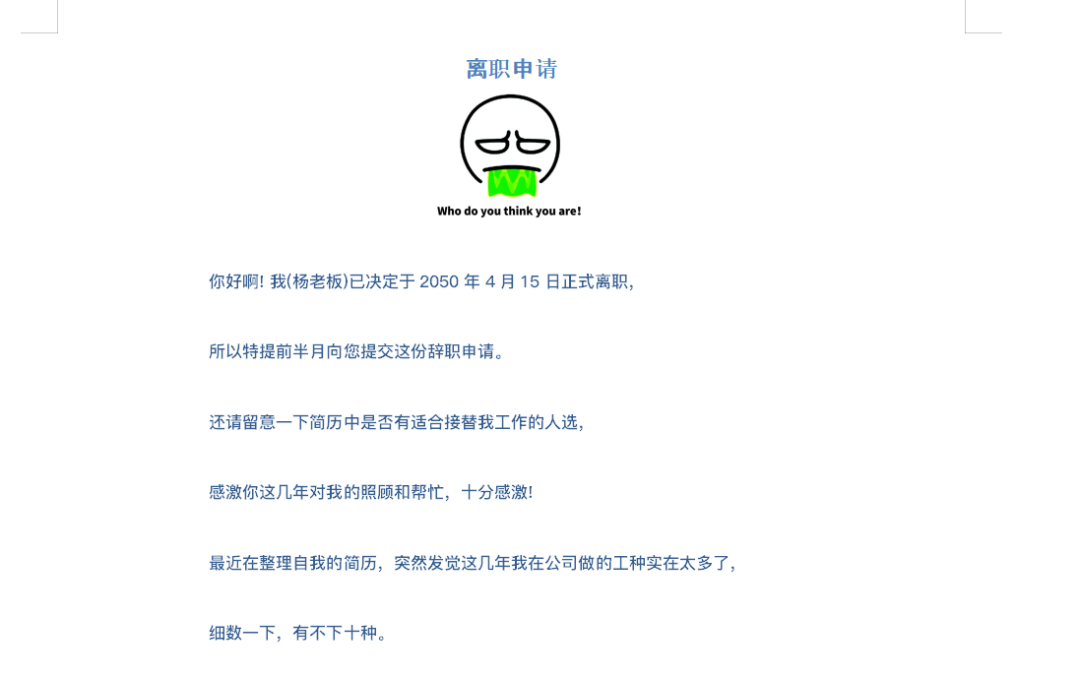
程序运行之后,会在代码的当前目录下生成一个名为“离职.docx”的文件,生成的离职报告内容如下:

上面的图片是自己可以自定义的,需要和代码文件放在同一个目录下,命名为image.jpg。

好了,可以拿去递交辞呈了 !!!(悄悄告诉你,现在都用钉钉提交申请,没人会打印纸质版了哈哈哈哈)

近期热门文章

使用Python操纵Word自动编写离职报告 离职报告是员工离职时必须提交的文件,其中包含了员工在公司的表现、工作经历、离职原因等信息。传统的手动编写离职报告不仅耗时费力,而且容易出错。一旦出现格式错误、遗漏信息等问题,就会给员工和公司带来不必要的麻烦。因此,自动编写离职报告的需求越来越迫切。使用Python操纵Word自动编写离职报告可以提高工作效率和准确性,但需要注意一些关键问题。通过充分测试、遵守法律法规、优化用户体验和持续改进,可以更好地满足实际需求,提高工作效率和员工满意度。 阅读详情

相关推荐

时间卷积网络(TCN):结构+pytorch代码

文章目录TCNTCN结构1-D FCN的结构因果卷积(Causal Convolutions)膨胀因果卷积(Dilated Causal Convolutions)膨胀非因果卷积(Dilated Non-Causal Convolutions)残差块结构pytorch代码讲解 TCN   TCN(Temporal Convolutional Network)是由Shaojie Bai et al....

Leon_winter的博客 11万+

python-docx办公自动化批量生成离职证明

这是存放在Excel中的数据,根据数据遍历其中的内容,写入word当中。首先,在网络找到这样一份模板内容,可以根据这么模板进行排版。关注公众号:Python Lab。

はんみん的博客 869

TCGA数据下载保姆级教程:用GDC-client从零搞定,附配置文件避坑指南

本文提供TCGA数据下载的完整教程,详细讲解如何使用GDC-client工具从零开始配置到高效获取基因组数据。涵盖环境准备、认证配置、数据检索、高效下载及故障处理等关键步骤,并附配置文件避坑指南,帮助生物医学研究者快速掌握TCGA数据下载技巧。

weixin_30892037的博客 263

人事工作中的Python运用——离职证明生成器

自动生成离职证明,你值得拥有

aimersong69的博客 3956

集群路径规划实战(一)之EGO-swarm环境搭建与调试

本文详细介绍了EGO-swarm分布式无人机集群运动规划系统的仿真环境搭建与调试全流程。内容涵盖ROS Melodic安装、代码获取、依赖库配置、编译问题解决(如multi_map_server头文件缺失)以及最终通过roslaunch启动集群仿真与Rviz可视化,为学习和研究集群路径规划算法提供了可运行的实战平台。

weixin_29243279的博客 251

《华为项目管理之道》第1章笔记

performance indicator,KPI)纳入个人绩效承诺书,贯彻结果导向的理念,以向员工。客户需求是华为发展的原动力,为客户服务是华为存在的唯一理由。目经理‘用兵’,依靠市场机制‘调兵’”,打破了人员在功能部门的板结,实现了听得。为管理者选拔的必要条件,项目经理成为人人向往的岗位。《华为项目管理之道》,是新出的华为官方的项目管理书,整个书不错。伴随着项目型组织的建立,华为逐步形成了完备的项目管理流程和制度,从而将业务运。为此,通过改革,重新明确了项目经理承担的经营责任,并开始以项。

jackyrongvip的专栏 2128

利用python制作word成绩报告

利用python来制作一个word报告

早八人的上课笔记收录哈哈哈 521

从零玩转显示屏:手把手教你用Arduino驱动SPI屏幕(附引脚定义图)

本文提供了一份详尽的Arduino驱动SPI屏幕的入门指南。从SPI接口的核心引脚定义(如DC、RESET)与RGB接口的区别讲起,手把手指导硬件连接与软件库配置,并最终通过一个天气显示器实战项目,帮助读者掌握驱动SPI屏幕、显示RGB色彩内容的核心技能。

weixin_29189987的博客 132

python自动处理文档_Python自动化办公 — 对 word 文本处理实现自动化操作!

之前介绍了一个Python包 openpyxl ,用于处理 Excel ;而对于 Word 文本时同样也有对应的 Python库 Python-docx,在日常办公中,如果需要处理多个 word 文本,且操作步骤都是重复单调的,我想这个库就可以帮到你在了解 Python-docx 常用函数之前,需要知道 在 Python-docx 各命令所对应 word 各部件,下图所示,Document 指的...

weixin_39620279的博客 501

保姆级教程:用torch.profiler给你的vLLM推理做个“全身体检”(附Perfetto可视化分析)

本文提供了一份详细的vLLM推理性能分析教程,通过torch.profiler和Perfetto工具链实现从数据采集到可视化分析的全流程。文章涵盖了环境配置、性能数据采集、trace文件解析以及Perfetto可视化分析,帮助开发者优化大模型推理服务的性能,显著降低计算资源消耗。

weixin_29041767的博客 359

正负数据如何归一化_生信干货 | LC-MS代谢组学QI软件下机数据代谢物筛选和归一化如何做?...

上海·2019第一届多层组学前言技术发展华东区客户研讨会倒计时1天LC-MS非靶向代谢组学数据下机啦~~拿到一堆数据怎么办?不会高端代码,也不会自己写脚本,我怎么处理数据?​本期小编带来了LC-MS非靶向代谢组学下机数据处理实用干货,包括:下机定性结果表格的解析、代谢物筛选如何做?以及定量数据如何做归一化?实用干货,赶紧来抢~~话不多说,赶紧来学习吧~~非靶向LC-MS代谢组学的分析流程LC-MS...

weixin_36441329的博客 2986

手把手教你用Python操纵Word自动编写离职报告!

前言 大家好,我是角哥,今天给大家分享一篇Python自动化文章。 Python 是自动化处理的一把好手,比如自动编写离职申请!!! ​ 安装 pip install python-docx -i https://pypi.douban.com/simple/ 基本用法 创建一个docx文档 from docx import Document from docx...

爬遍所有网站 317

【Flink】Flink 消费一段时间1万多条数据就卡死

我们有个现场环境,发现了奇怪的现象,就是每次启动任务后,消费1万多条数据后就会卡死,然后整个流不消费,也不往下输出,看起来卡死了一样。缺图这里面出现的网闸原因导致的,但是经过我们写了一个简单的kafka消费程序,然后在出问题的节点上消费数据,实际排查,发现不是这个问题。这个问题,发现也不是,这段时间没有进行过kafka数据清理。里面的问题。因为这个问题,我们后面的代码刻意规范了,不这样操作。后来是在没办法了,然后我们dump了线程,发现有如下代码。

九师兄 353

Python操纵Word神器——python-docx大全(含插入pptx图表)

生成合同、报告等信息需要用到Word,含插入pptx图表

XerCis的博客 4万+

Devexpress16.2.6破解工具

Devexpress16.2.6破解工具Devexpress16.2.6破解工具Devexpress16.2.6破解工具Devexpress16.2.6破解工具

win10 跳过U8环境检测的IE WebControls.rar

win10 安装u8的时候 提示IE WebControls 不通过,这个工具可以欺骗u8的检查。 跳过U8环境检测的IE WebControls。提示导入失败后,重新检测通过。

使用Python库python-docx自动操纵Word文档

通过使用库,我们可以轻松地创建、更新和管理Word文档。无论是添加文本、修改标题、插入表格还是图片,都可以通过几行代码轻松实现。这不仅提高了我们的工作效率,还减少了手动操作带来的错误。在未来的工作中,我们可以更加充分地利用这个强大的工具来处理Word文档。👇热门内容👇python使用案例与应用_安城安的博客-优快云博客软硬件教学_安城安的博客-优快云博客Orbslam3&Vinsfusion_安城安的博客-优快云博客网络安全_安城安的博客-优快云博客教程_安城安的博客-优快云博客。

anananajiushiwo的博客 904

ET2012新版免狗免安装绿色软件

ET2012新版免狗免安祖昂绿色软件。,新界面,新视觉,

一点学习心得:python操纵word

继续上一篇。现在工作基本完成,对碰到的一些问题来个小结,方便后面的回顾.     先说一下这两天调试遇到的一些很傻的问题:1)字符串空值,不断报异常;2)最麻烦的,和word的VBA相比,要对Word文档中表进行操作,但是VBA中的Table(1).Rows(1).Cells(1)这种不能用了,cell的range的方法连select都用不了,最后只好想了个很傻的方法来回避;3)就是很

Leonardo的博客 4203

深度学习工具包 DeepLearningToolbox

深度学习工具包Deprecation notice.-----This toolbox is outdated and no longer maintained.There are much better tools available for deep learning than this toolbox, e.g. [Theano](http://deeplearning.net/software/theano/), [torch](http://torch.ch/) or [tensorflow](http://www.tensorflow.org/)I would suggest you use one of the tools mentioned above rather than use this toolbox.Best, Rasmus.DeepLearnToolbox================A Matlab toolbox for Deep Learning.Deep Learning is a new subfield of machine learning that focuses on learning deep hierarchical models of data.It is inspired by the human brain's apparent deep (layered, hierarchical) architecture.A good overview of the theory of Deep Learning theory is[Learning Deep Architectures for AI](http://www.iro.umontreal.ca/~bengioy/papers/ftml_book.pdf)For a more informal introduction, see the following videos by Geoffrey Hinton and Andrew Ng.* [The Next Generation of Neural Networks](http://www.youtube.com/watch?v=AyzOUbkUf3M) (Hinton, 2007)* [Recent Developments in Deep Learning](http://www.youtube.com/watch?v=VdIURAu1-aU) (Hinton, 2010)* [Unsupervised Feature Learning and Deep Learning](http://www.youtube.com/watch?v=ZmNOAtZIgIk) (Ng, 2011)If you use this toolbox in your research please cite [Prediction as a candidate for learning deep hierarchical models of data](http://www2.imm.dtu.dk/pubdb/views/publication_details.php?id=6284)```@MASTERSTHESIS\{IMM2012-06284, author = "R. B. Palm", title = "Prediction as a candidate for learning deep hierarchical models of data", year = "2012",}```Contact: rasmusbergpalm at gmail dot comDirectories included in the toolbox-----------------------------------`NN/` - A library for Feedforward Backpropagation Neural Networks`CNN/` - A library for Convolutional Neural Networks`DBN/` - A library for Deep Belief Networks`SAE/` - A library for Stacked Auto-Encoders`CAE/` - A library for Convolutional Auto-Encoders`util/` - Utility functions used by the libraries`data/` - Data used by the examples`tests/` - unit tests to verify toolbox is workingFor references on each library check REFS.mdSetup-----1. Download.2. addpath(genpath('DeepLearnToolbox'));Example: Deep Belief Network---------------------```matlabfunction test_example_DBNload mnist_uint8;train_x = double(train_x) / 255;test_x = double(test_x) / 255;train_y = double(train_y);test_y = double(test_y);%% ex1 train a 100 hidden unit RBM and visualize its weightsrand('state',0)dbn.sizes = [100];opts.numepochs = 1;opts.batchsize = 100;opts.momentum = 0;opts.alpha = 1;dbn = dbnsetup(dbn, train_x, opts);dbn = dbntrain(dbn, train_x, opts);figure; visualize(dbn.rbm{1}.W'); % Visualize the RBM weights%% ex2 train a 100-100 hidden unit DBN and use its weights to initialize a NNrand('state',0)%train dbndbn.sizes = [100 100];opts.numepochs = 1;opts.batchsize = 100;opts.momentum = 0;opts.alpha = 1;dbn = dbnsetup(dbn, train_x, opts);dbn = dbntrain(dbn, train_x, opts);%unfold dbn to nnnn = dbnunfoldtonn(dbn, 10);nn.activation_function = 'sigm';%train nnopts.numepochs = 1;opts.batchsize = 100;nn = nntrain(nn, train_x, train_y, opts);[er, bad] = nntest(nn, test_x, test_y);assert(er < 0.10, 'Too big error');```Example: Stacked Auto-Encoders---------------------```matlabfunction test_example_SAEload mnist_uint8;train_x = double(train_x)/255;test_x = double(test_x)/255;train_y = double(train_y);test_y = double(test_y);%% ex1 train a 100 hidden unit SDAE and use it to initialize a FFNN% Setup and train a stacked denoising autoencoder (SDAE)rand('state',0)sae = saesetup([784 100]);sae.ae{1}.activation_function = 'sigm';sae.ae{1}.learningRate = 1;sae.ae{1}.inputZeroMaskedFraction = 0.5;opts.numepochs = 1;opts.batchsize = 100;sae = saetrain(sae, train_x, opts);visualize(sae.ae{1}.W{1}(:,2:end)')% Use the SDAE to initialize a FFNNnn = nnsetup([784 100 10]);nn.activation_function = 'sigm';nn.learningRate = 1;nn.W{1} = sae.ae{1}.W{1};% Train the FFNNopts.numepochs = 1;opts.batchsize = 100;nn = nntrain(nn, train_x, train_y, opts);[er, bad] = nntest(nn, test_x, test_y);assert(er < 0.16, 'Too big error');```Example: Convolutional Neural Nets---------------------```matlabfunction test_example_CNNload mnist_uint8;train_x = double(reshape(train_x',28,28,60000))/255;test_x = double(reshape(test_x',28,28,10000))/255;train_y = double(train_y');test_y = double(test_y');%% ex1 Train a 6c-2s-12c-2s Convolutional neural network %will run 1 epoch in about 200 second and get around 11% error. %With 100 epochs you'll get around 1.2% errorrand('state',0)cnn.layers = { struct('type', 'i') %input layer struct('type', 'c', 'outputmaps', 6, 'kernelsize', 5) %convolution layer struct('type', 's', 'scale', 2) %sub sampling layer struct('type', 'c', 'outputmaps', 12, 'kernelsize', 5) %convolution layer struct('type', 's', 'scale', 2) %subsampling layer};cnn = cnnsetup(cnn, train_x, train_y);opts.alpha = 1;opts.batchsize = 50;opts.numepochs = 1;cnn = cnntrain(cnn, train_x, train_y, opts);[er, bad] = cnntest(cnn, test_x, test_y);%plot mean squared errorfigure; plot(cnn.rL);assert(er<0.12, 'Too big error');```Example: Neural Networks---------------------```matlabfunction test_example_NNload mnist_uint8;train_x = double(train_x) / 255;test_x = double(test_x) / 255;train_y = double(train_y);test_y = double(test_y);% normalize[train_x, mu, sigma] = zscore(train_x);test_x = normalize(test_x, mu, sigma);%% ex1 vanilla neural netrand('state',0)nn = nnsetup([784 100 10]);opts.numepochs = 1; % Number of full sweeps through dataopts.batchsize = 100; % Take a mean gradient step over this many samples[nn, L] = nntrain(nn, train_x, train_y, opts);[er, bad] = nntest(nn, test_x, test_y);assert(er < 0.08, 'Too big error');%% ex2 neural net with L2 weight decayrand('state',0)nn = nnsetup([784 100 10]);nn.weightPenaltyL2 = 1e-4; % L2 weight decayopts.numepochs = 1; % Number of full sweeps through dataopts.batchsize = 100; % Take a mean gradient step over this many samplesnn = nntrain(nn, train_x, train_y, opts);[er, bad] = nntest(nn, test_x, test_y);assert(er < 0.1, 'Too big error');%% ex3 neural net with dropoutrand('state',0)nn = nnsetup([784 100 10]);nn.dropoutFraction = 0.5; % Dropout fraction opts.numepochs = 1; % Number of full sweeps through dataopts.batchsize = 100; % Take a mean gradient step over this many samplesnn = nntrain(nn, train_x, train_y, opts);[er, bad] = nntest(nn, test_x, test_y);assert(er < 0.1, 'Too big error');%% ex4 neural net with sigmoid activation functionrand('state',0)nn = nnsetup([784 100 10]);nn.activation_function = 'sigm'; % Sigmoid activation functionnn.learningRate = 1; % Sigm require a lower learning rateopts.numepochs = 1; % Number of full sweeps through dataopts.batchsize = 100; % Take a mean gradient step over this many samplesnn = nntrain(nn, train_x, train_y, opts);[er, bad] = nntest(nn, test_x, test_y);assert(er < 0.1, 'Too big error');%% ex5 plotting functionalityrand('state',0)nn = nnsetup([784 20 10]);opts.numepochs = 5; % Number of full sweeps through datann.output = 'softmax'; % use softmax outputopts.batchsize = 1000; % Take a mean gradient step over this many samplesopts.plot = 1; % enable plottingnn = nntrain(nn, train_x, train_y, opts);[er, bad] = nntest(nn, test_x, test_y);assert(er < 0.1, 'Too big error');%% ex6 neural net with sigmoid activation and plotting of validation and training error% split training data into training and validation datavx = train_x(1:10000,:);tx = train_x(10001:end,:);vy = train_y(1:10000,:);ty = train_y(10001:end,:);rand('state',0)nn = nnsetup([784 20 10]); nn.output = 'softmax'; % use softmax outputopts.numepochs = 5; % Number of full sweeps through dataopts.batchsize = 1000; % Take a mean gradient step over this many samplesopts.plot = 1; % enable plottingnn = nntrain(nn, tx, ty, opts, vx, vy); % nntrain takes validation set as last two arguments (optionally)[er, bad] = nntest(nn, test_x, test_y);assert(er < 0.1, 'Too big error');```[![Bitdeli Badge](https://d2weczhvl823v0.cloudfront.net/rasmusbergpalm/deeplearntoolbox/trend.png)](https://bitdeli.com/free "Bitdeli Badge")

python操作word生成目录_Python操作Word批量生成文章

如何用python或者R批量生成固定格式的word文档我选择离开,不是想成全,不是想放弃,只是想你我重新认识。新建Word文档 doc =人生最困难的不是努力,也不是奋斗,而是做出正确的抉择。python如何读取word文件中的文本内容并写入到新的t使用pycharm将所示的类似word文本读取,然后写入到一个新的txt文件from docx import Document # 打开 word文件...

weixin_39710462的博客 1047

python生成word目录_使用Python更新MS Word .docx文档的目录(目录)

我使用python包“ python-docx”来修改MS Word .docx文档的结构和内容.该软件包无法更新TOC(目录)[Python: Create a “Table Of Contents” with python-docx/lxml.是否有解决方法来更新文档的目录?我考虑过使用python软件包“ pywin32” [https://pypi.python.org/pypi/pypi...

weixin_39947522的博客 995

探秘Python-docx:轻松操作Word文档的秘密武器

在数字化时代,处理和生成Microsoft Word文档的需求仍然广泛存在。而Python-docx正是一个强大的Python库,允许程序员以编程方式创建、修改和操作Word (.docx)文件。借助这个库,我们可以将复杂的数据转换为精美报告,自动化文档生成,或者进行任何需要Word处理的任务。在本文中,我们将深入了解Python-docx的功能、技术特点及其应用场景。 ## 项目概述 Pyt

gitblog_00086的博客 787

python操作word 调用vb_在Microsoft Word实例上的python中使用AccessibleObjectFromWindow

I am trying to manipulate a particular already-open, unsaved (so no path) Word document (*.doc) with python. The manipulations work great if only one Word instance is open, however multiple instances...

weixin_39602560的博客 496

使用 Python 管理 Word 节及页面布局设置

小李盯着刚写完的80页项目报告,眉头拧成一团。前面的章节都是标准纵向排版,但中间有两张数据表实在太宽,放在纵向页面里,字小得得拿放大镜看。他试过把这两页改成横向,结果整个文档都跟着转了,完全乱套。这其实是Word里一个特别经典的问题。大部分人都在“页面布局”里点来点去,改了一页,后面全跟着变,气得想摔鼠标。秘密就藏在Word的一个核心概念里——节(Section)。

这家伙很懒,什么都没有留下 625
上一篇: 福利来了!68个Python内置函数最全总结,建议收藏!
下一篇: 收藏,7个学习Python编程的最佳开源库!
菜鸟学Python
博客等级 码龄9年 8089粉丝 571原创
评论
成就一亿技术人!
拼手气红包6.0元
还能输入1000个字符
 
 条评论被折叠 查看
添加红包

请填写红包祝福语或标题

个

红包个数最小为10个

元

红包金额最低5元

当前余额3.43元 前往充值 >
需支付:10.00元
成就一亿技术人!
领取后你会自动成为博主和红包主的粉丝 规则
hope_wisdom
发出的红包
实付元
使用余额支付
点击重新获取
扫码支付
钱包余额 0

抵扣说明:

1.余额是钱包充值的虚拟货币,按照1:1的比例进行支付金额的抵扣。
2.余额无法直接购买下载,可以购买VIP、付费专栏及课程。

余额充值