



 本文详细介绍了如何使用Spring Boot进行Web测试,包括MockMvc的虚拟请求、响应状态、内容和头的匹配,以及事务控制的实践。通过实例展示如何确保测试的准确性和事务一致性。
发送虚拟请求
第一步:构建Web环境
@SpringBootTest(webEnvironment = SpringBootTest.WebEnvironment.RANDOM_PORT)
@RestController
@RequestMapping("/books")
public class BookController {

    @GetMapping
    public String getById(){
        System.out.println("getById is running ....");
        return "springboot";
    }
}
第二步:开启虚拟Mvc调用(为了注入MockMvc对象)
@AutoConfigureMockMvc
第三步:利用MockMvcRequestBuilders工具类获取请求URI(/books),然后执行请求
//开启web环境
@SpringBootTest(webEnvironment = SpringBootTest.WebEnvironment.RANDOM_PORT)
//开启虚拟MVC调用
@AutoConfigureMockMvc
public class WebTest {
    @Test
    void testRandomPort(){

    }

    @Test
    void testWeb(@Autowired MockMvc mvc) throws Exception {
        //创建虚拟请求,当前访问的是 books
        MockHttpServletRequestBuilder builder= MockMvcRequestBuilders.get("/books");
        //执行对应的请求
        mvc.perform(builder);
    }
}
匹配响应执行状态
第一步:MockMvcResultMatchers类首先设置预期值(eg:判断当前status是否是200,是即成功,否即失败)
        //设置预计值
        StatusResultMatchers status = MockMvcResultMatchers.status();
        ResultMatcher ok = status.isOk();
第二步:将预计值添加到本次调用过程中
MockHttpServletRequestBuilder builder= MockMvcRequestBuilders.get("/books1");
        ResultActions action = mvc.perform(builder);

action.andExpect(ok);
结果出现
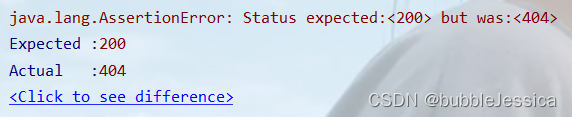
原因是:访问路径错了,上面写的是/books1,而实际上是/books ,所以报错
匹配响应体(字符串)
第一步:MockMvcResultMatchers类首先设置预期值(eg:判断响应内容是否是springboot2)
ContentResultMatchers content = MockMvcResultMatchers.content();
ResultMatcher result = content.string("springboot2");
第二步:将预计值添加到本次调用过程中
action.andExpect(result);
结果出现:

原因是:真实返回结果是springboot,预期返回结果是springboot2,不匹配,所以报错
匹配响应体(json)
第一步:MockMvcResultMatchers类首先设置预期值
ContentResultMatchers content = MockMvcResultMatchers.content();
ResultMatcher result = content.json("{\"id\":1,\"name\":\"springboot2\",\"description\":\"springboot\",\"type\":\"springboot\"}");
第二步:将预计值添加到本次调用过程中
action.andExpect(result);
结果出现:
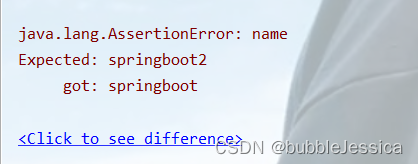
原因是: json中name属性真实值是springboot,匹配值是springboot2,所以报错
匹配响应头
第一步:MockMvcResultMatchers类首先设置预期值
HeaderResultMatchers header = MockMvcResultMatchers.header();
ResultMatcher contentType = header.string("Content-Type", "text/plain");
第二步:将预计值添加到本次调用过程中
action.andExpect(contentType);
结果出现:

原因是:响应头不匹配,事实上是application/json,期望的是text/plain,所以报错
总结
整体测试表现层的操作如下:
@Test
    void testGetById(@Autowired MockMvc mvc) throws Exception {
        MockHttpServletRequestBuilder builder= MockMvcRequestBuilders.get("/books");
        ResultActions action = mvc.perform(builder);

        StatusResultMatchers status = MockMvcResultMatchers.status();
        ResultMatcher ok = status.isOk();
        action.andExpect(ok);

        ContentResultMatchers content1 = MockMvcResultMatchers.content();
        ResultMatcher result1 = content1.json("{\"id\":1,\"name\":\"springboot\",\"description\":\"springboot\",\"type\":\"springboot\"}");
        action.andExpect(result1);

        HeaderResultMatchers header = MockMvcResultMatchers.header();
        ResultMatcher contentType = header.string("Content-Type", "application/json");
        action.andExpect(contentType);
    }
具体还是看企业具体要求,这样测试需要时间成本,但是可靠性强
业务层测试事务
@SpringBootTest
public class ServiceTest {
    @Autowired
    private BookService bookService;

    @Test
    public void testSave(){
        Book book=new Book();
        book.setName("springboot");
        book.setType("springboot");
        book.setDescription("springboot");
        bookService.save(book);
    }
}
执行通过后存储到数据库中

可是一旦加上注解@Transactional
@SpringBootTest
@Transactional
public class ServiceTest {
    @Autowired
    private BookService bookService;

    @Test
    public void testSave(){
        Book book=new Book();
        book.setName("springboot2");
        book.setType("springboot2");
        book.setDescription("springboot2");
        bookService.save(book);
    }
}
执行通过后却没有存储到数据库中,可是注释掉注解@Transactional ,结果存储到数据库当中

说明上一条记录占用id:29,执行成功但是没有提交事务或者换句话说它自己做了一个回滚,是因为它回滚默认处于开启状态,一旦加上注解@Rollback(false)之后,它就显示在数据库中了
@SpringBootTest
@Transactional
@Rollback(false)
public class ServiceTest {
    @Autowired
    private BookService bookService;

    @Test
    public void testSave(){
        Book book=new Book();
        book.setName("springboot3");
        book.setType("springboot3");
        book.setDescription("springboot3");
        bookService.save(book);
    }
}
结果通过并显示在数据库中

总结:在测试业务层时,为了不让脏数据保留到数据库当中,我们可以在类上加上事务控制注解@Transactional





 扫一扫
扫一扫


 4万+
4万+

 被折叠的 条评论
为什么被折叠?
被折叠的 条评论
为什么被折叠?
 到【灌水乐园】发言





