


最近学习了js之后就想着能不能编写出一个网页游戏。
正好想起了小时候课间经常和同桌一起玩的五子棋。
首先我这里用的是表格进行布局
 //构造表格的HTML代码
 var html = "<table cellspacing='0'>";
然后构造下棋的棋格
  //循环生成表格的行和列
      var size = 15;
      for(i=0;i<=size;i++){
        html += "<tr>";
        for(j=0;j<=size;j++){
          var tag= j + "_" + i;
          if(i==size||j==size)
            html += "<td></td>";
          else
            html += "<td><div tag='" + tag + "' class='chessCell'><div></td>";
        }
        html += "</tr>";
      }
注册下棋这个事件
规则是执黑先行,然后黑白交替着下。
这里我的思路是点击之后着色,着色之后就立马改变颜色属性的值,确保下一次着色是相反的颜色。
//注册落子事件
      var color = "black";
      $(".chessCell").on("click", function(){
        var cellItems = $(this).attr("tag").split("_");
        var x = cellItems[0], y = cellItems[1];
        var id = color + "_" + x + "_" + y;
        //this是触发了click事件的DOM元素,$(this)是将该元素转为jQuery对象
        $(this).html("<div id='" + id + "' class='" + color + "Chess'></div>");
        //原生JavaScript的写法,与上一行等价
        //this.innerHTML="<div class='chess'></div>";
        //判断胜负
        if(judgeWin(color))
          alert(color + " win!")
        //交换颜色
        if(color=="black")
          color="white";
        else
          color="black";
      });
最后就是判断输赢啦
这里就是运用简单的对每个方向是否有五个棋子进行判断。
最后返回赢家的颜色,在网页的对话框显示出来。
 //判断胜负
    var judgeWin = function (color){
      var isWin = false;
      $("." + color + "Chess").each(function (){
        //从棋子的id中拿到棋子的颜色和坐标
        var chessInfo = $(this).attr("id").split("_");
        var x = parseInt(chessInfo[1]), y = parseInt(chessInfo[2]);
        //判断右边是否五连
        if($("#" + color + "_" + (x + 1) + "_" + y).length > 0 &&
                $("#" + color + "_" + (x + 2) + "_" + y).length > 0 &&
                $("#" + color + "_" + (x + 3) + "_" + y).length > 0 &&
                $("#" + color + "_" + (x + 4) + "_" + y).length > 0)
          isWin = true;
        //判断下边是否五连
        if($("#" + color + "_" + x + "_" + (y + 1)).length > 0 &&
                $("#" + color + "_" + x + "_" + (y + 2)).length > 0 &&
                $("#" + color + "_" + x + "_" + (y + 3)).length > 0 &&
                $("#" + color + "_" + x + "_" + (y + 4)).length > 0)
          isWin = true;
        //判断右下是否五连
        if($("#" + color + "_" + (x + 1) + "_" + (y + 1)).length > 0 &&
                $("#" + color + "_" + (x + 2) + "_" + (y + 2)).length > 0 &&
                $("#" + color + "_" + (x + 3) + "_" + (y + 3)).length > 0 &&
                $("#" + color + "_" + (x + 4) + "_" + (y + 4)).length > 0)
          isWin = true;
        //判断左下是否五连
        if($("#" + color + "_" + (x - 1) + "_" + (y + 1)).length > 0 &&
                $("#" + color + "_" + (x - 2) + "_" + (y + 2)).length > 0 &&
                $("#" + color + "_" + (x - 3) + "_" + (y + 3)).length > 0 &&
                $("#" + color + "_" + (x - 4) + "_" + (y + 4)).length > 0)
          isWin = true;
        //如果已经赢了,就退出each函数
        //当回调函数返回false,each函数就退出(相当于循环语句的break)
        //当回调函数返回true,each函数继续循环(相当于循环语句的continue)
        if(isWin)
          return false;
      });
      return isWin;
    }
效果展示
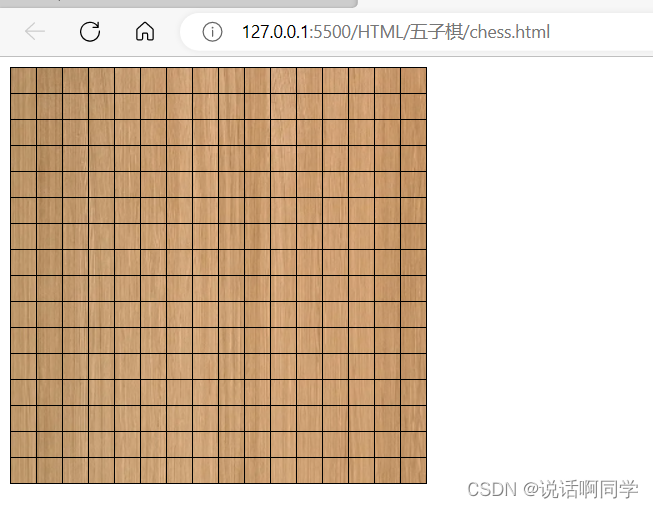
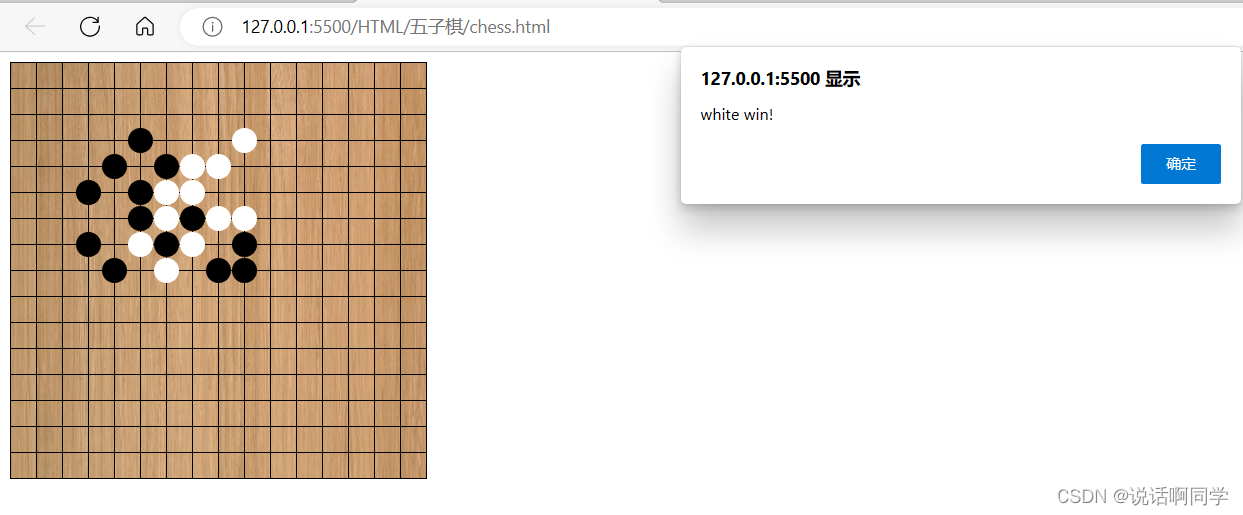
下面就是期待已久的完整代码啦
<!DOCTYPE html>
<html lang="en">
<head>
  <meta charset="UTF-8">
  <title>五子棋</title>
  <style>
    #chessBoard td{
      border:#000000 solid;
      border-width:0px 0px 1px 1px;
      padding: 0px;
      height:20px;
      width:20px;
    }
    #chessBoard table{
      border:#000000 solid;
      border-width:1px 1px 0px 0px;
      background-image: url("wood.jpg");
    }
    .chessCell{
      position:relative;
      top:10px;
      left:10px;
      height: 20px;
      width: 20px;
    }
    .blackChess{
      height: 20px;
      width: 20px;
      background-color:black;
      border-radius:10px;
    }
    .whiteChess{
      height: 20px;
      width: 20px;
      background-color:white;
      border-radius:10px;
    }
  </style>
  <script src="js/jquery-3.1.1.min.js"></script>
  <script>
    $().ready(function (){
      //构造表格的HTML代码
      var html = "<table cellspacing='0'>";
      //循环生成表格的行和列
      var size = 15;
      for(i=0;i<=size;i++){
        html += "<tr>";
        for(j=0;j<=size;j++){
          var tag= j + "_" + i;
          if(i==size||j==size)
            html += "<td></td>";
          else
            html += "<td><div tag='" + tag + "' class='chessCell'><div></td>";
        }
        html += "</tr>";
      }
      html += "</table>";
      //将表格的HTML代码渲染到chessBoard中
      $("#chessBoard").html(html);
      //原生JavaScript的写法,与上一行等价
      //document.getElementById("chessBoard").innerHTML=html;
      //注册落子事件
      var color = "black";
      $(".chessCell").on("click", function(){
        var cellItems = $(this).attr("tag").split("_");
        var x = cellItems[0], y = cellItems[1];
        var id = color + "_" + x + "_" + y;
        //this是触发了click事件的DOM元素,$(this)是将该元素转为jQuery对象
        $(this).html("<div id='" + id + "' class='" + color + "Chess'></div>");
        //原生JavaScript的写法,与上一行等价
        //this.innerHTML="<div class='chess'></div>";
        //判断胜负
        if(judgeWin(color))
          alert(color + " win!")
        //交换颜色
        if(color=="black")
          color="white";
        else
          color="black";
      });
    });

    //判断胜负
    var judgeWin = function (color){
      var isWin = false;
      $("." + color + "Chess").each(function (){
        //从棋子的id中拿到棋子的颜色和坐标
        var chessInfo = $(this).attr("id").split("_");
        var x = parseInt(chessInfo[1]), y = parseInt(chessInfo[2]);
        //判断右边是否五连
        if($("#" + color + "_" + (x + 1) + "_" + y).length > 0 &&
                $("#" + color + "_" + (x + 2) + "_" + y).length > 0 &&
                $("#" + color + "_" + (x + 3) + "_" + y).length > 0 &&
                $("#" + color + "_" + (x + 4) + "_" + y).length > 0)
          isWin = true;
        //判断下边是否五连
        if($("#" + color + "_" + x + "_" + (y + 1)).length > 0 &&
                $("#" + color + "_" + x + "_" + (y + 2)).length > 0 &&
                $("#" + color + "_" + x + "_" + (y + 3)).length > 0 &&
                $("#" + color + "_" + x + "_" + (y + 4)).length > 0)
          isWin = true;
        //判断右下是否五连
        if($("#" + color + "_" + (x + 1) + "_" + (y + 1)).length > 0 &&
                $("#" + color + "_" + (x + 2) + "_" + (y + 2)).length > 0 &&
                $("#" + color + "_" + (x + 3) + "_" + (y + 3)).length > 0 &&
                $("#" + color + "_" + (x + 4) + "_" + (y + 4)).length > 0)
          isWin = true;
        //判断左下是否五连
        if($("#" + color + "_" + (x - 1) + "_" + (y + 1)).length > 0 &&
                $("#" + color + "_" + (x - 2) + "_" + (y + 2)).length > 0 &&
                $("#" + color + "_" + (x - 3) + "_" + (y + 3)).length > 0 &&
                $("#" + color + "_" + (x - 4) + "_" + (y + 4)).length > 0)
          isWin = true;
        //如果已经赢了,就退出each函数
        //当回调函数返回false,each函数就退出(相当于循环语句的break)
        //当回调函数返回true,each函数继续循环(相当于循环语句的continue)
        if(isWin)
          return false;
      });
      return isWin;
    }
  </script>
</head>
<body>
<!--设置一个棋盘容器,整个游戏渲染到容器内部-->
<div id="chessBoard"></div>
</body>
</html>
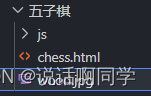
最后温馨提示一下:棋盘的背景图片需要自己diy一下哦





 扫一扫
扫一扫


 284
284


 到【灌水乐园】发言



