

AndroidStudio 3.1 版本,No version of ******* in offline mode

升级到Android Studio 3.1后,遇到编译错误提示'No version of * in offline mode',尝试删除缓存、更改依赖库版本及StackOverflow建议的方法无效。分析认为是新版本AS与gradle更新引起。解决方案是在Project Structure中直接添加删除的依赖库,如butterknife,通过搜索并添加,重新编译后问题解决。此方案可能不适用于所有情况。

AndroidStudio 3.1 版本,No version of * in offline mode

最近更新了AndroidStudio到最新的稳定版,3.1版本。然而在编译运行原有代码的时候,出现了一个意外的错误,由于引入了butterknife,运行时报错,提示no version of ** in offline mode;

可以肯定的是,我的gradle配置的并不是offline模式,而且之前的AndroidStudio版本编译运行正常的。

做过一下尝试:

  • 删除~/.gradle,重新下载,无效
  • 更改**那个依赖库的版本,无效
  • 查看stackoverflow上面的说法,什么config run build之类的,依旧无效。stackoverflow
  • 切换其他工程,依旧如此。

分析:

可以肯定的是因为使用了新版的AndroidStudio,以及更新了对应的gradle版本3.0.1为3.1.0而引起的,但是我还是新欢使用新版软件,一般新事物总会战胜旧事物,这是哲学常理!

好在新版的AndroidStuido,在ProjectStructure–dependence中可以直接添加依赖库了(之前几个版本曾无效了好久);

解决方案:

在dependence中删除掉你那个报错的依赖库,然后从这里+,搜索添加需要的按个依赖库,重新便宜,问题就OK了
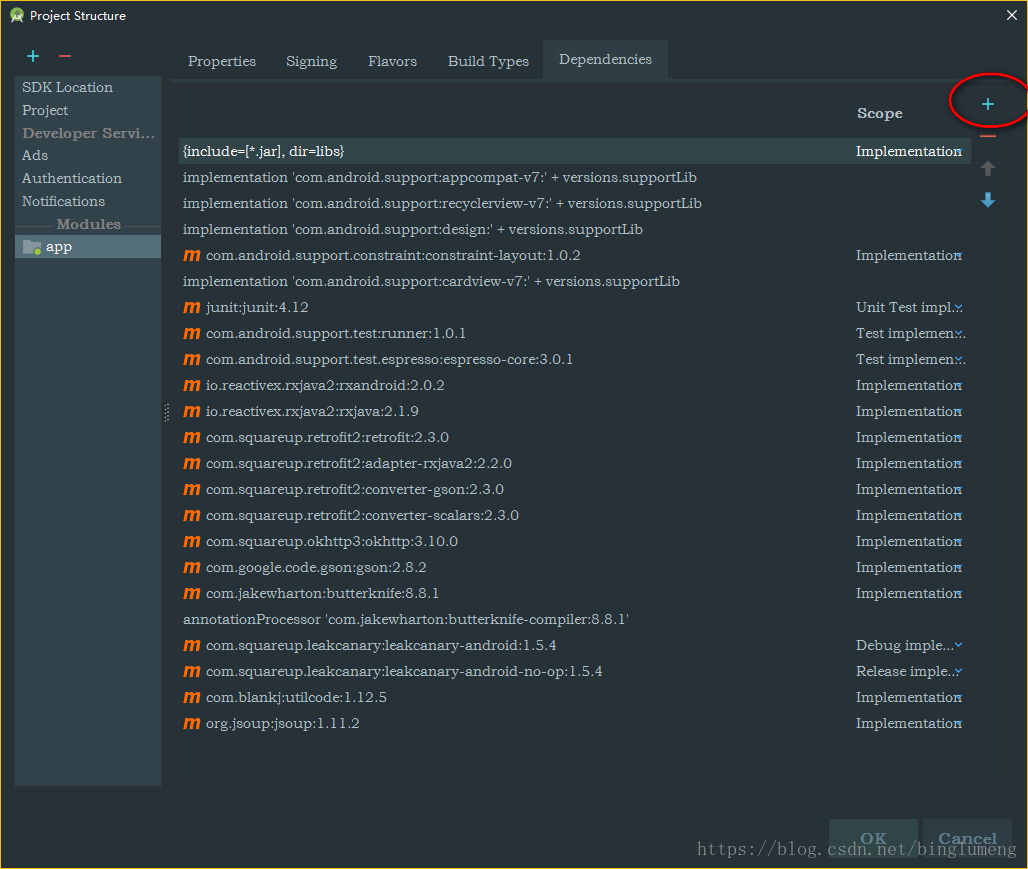
dependences

我的报错no version of butterknife在github主页上是添加

implementation 'com.jakewharton:butterknife:8.8.1'
    annotationProcessor 'com.jakewharton:butterknife-compiler:8.8.1'

而在AndroidStudio中的dependence中搜索添加,则为:

implementation 'com.jakewharton:butterknife:8.8.1'
implementation 'com.jakewharton:butterknife-compiler:8.8.1'
implementation 'com.jakewharton:butterknife-annotations:8.8.1'

这样编译一次,本地就有了对应的版本,即使在改回第一种依赖配置,也是可以的了。

本解决方案,希望能帮助到需要的小伙伴,也不见得是通用解决方案。

AILURE: Build completed with 3 failures. 1: Task failed with an exception. ----------- * What went wrong: Execution failed for task ':app:compileDebugCoverageUnitTestJavaWithJavac'. > Could not resolve all files for configuration ':app:debugCoverageUnitTestCompileClasspath'. > Could not find org.mockito:mockito-inline:5.4.0. Required by: project :app > Could not find org.robolectric:androidx-support-v4:4.10.3. Required by: project :app > Could not find org.robolectric:androidx-core:4.10.3. Required by: project :app * Try: > Run with --stacktrace option to get the stack trace. > Run with --info or --debug option to get more log output. > Run with --scan to get full insights. ============================================================================== 2: Task failed with an exception. ----------- * What went wrong: Execution failed for task ':app:compileDebugUnitTestJavaWithJavac'. > Could not resolve all files for configuration ':app:debugUnitTestCompileClasspath'. > Could not find org.mockito:mockito-inline:5.4.0. Required by: project :app > Could not find org.robolectric:androidx-support-v4:4.10.3. Required by: project :app > Could not find org.robolectric:androidx-core:4.10.3. Required by: project :app * Try: > Run with --stacktrace option to get the stack trace. > Run with --info or --debug option to get more log output. > Run with --scan to get full insights. ============================================================================== 3: Task failed with an exception. ----------- * What went wrong: Execution failed for task ':app:compileReleaseUnitTestJavaWithJavac'. > Could not resolve all files for configuration ':app:releaseUnitTestCompileClasspath'. > Could not find org.mockito:mockito-inline:5.4.0. Required by: project :app > Could not find org.robolectric:androidx-support-v4:4.10.3. Required by: project :app > Could not find org.robolectric:androidx-core:4.10.3. Required by: project :app * Try: > Run with --stacktrace option to get the stack trace. > Run with --info or --debug option to get more log output. > Run with --scan to get full insights. ============================================================================== * Get more help at https://help.gradle.org Deprecated Gradle features were used in this build, making it incompatible with Gradle 8.0. You can use '--warning-mode all' to show the individual deprecation warnings and determine if they come from your own scripts or plugins. See https://docs.gradle.org/7.3.3/userguide/command_line_interface.html#sec:command_line_warnings BUILD FAILED in 20s 81 actionable tasks: 81 executed apply plugin: 'jacoco' tasks.withType(Test) { jacoco.includeNoLocationClasses = true jacoco.excludes = ['jdk.internal.*'] } configurations { jacocoAnt jacocoRuntime } jacoco { toolVersion = "0.8.5" } def offline_instrumented_outputDir = "$buildDir.path/intermediates/classes-instrumented/debugCoverage" tasks.withType(Test) { jacoco.includeNoLocationClasses = true jacoco.excludes = ['jdk.internal.*'] } def coverageSourceDirs = [ 'src/main/java' ] task jacocoTestReport(type: JacocoReport, dependsOn: "test") { group = "Reporting" description = "Generate Jacoco coverage reports" classDirectories.from = fileTree( dir: './build/intermediates/javac/debugCoverage/classes/', excludes: [ '**/R.class', '**/R$*.class', '**/Manifest*.*', '**/*Test*.*', 'android/**/*.*', '**/BuildConfig.*', '**/**Bean.class', '**/inputmethod/*', '**/config/*.*', '**/flex/*.*', '**/AssetsUtils.class' ] ) getSourceDirectories().setFrom(files(coverageSourceDirs)) getExecutionData().setFrom(files('./build/jacoco/testDebugUnitTest.exec')) } jacocoTestReport { reports { xml.enabled true html.enabled true html.destination file("build/test-results/jacocoHtml") } } task createOfflineTestCoverageReport(dependsOn: ['instrument', 'testDebugCoverageUnitTest']) { group = "reporting" doLast { ant.taskdef(name: 'report', classname: 'org.jacoco.ant.ReportTask', classpath: configur3+ations.jacocoAnt.asPath) ant.report() { executiondata { ant.file(file: "$buildDir.path/jacoco/testDebugCoverageUnitTest.exec") } structure(name: 'Example') { classfiles { fileset(dir: "$project.buildDir/intermediates/javac/debugCoverage") } sourcefiles { fileset(dir: 'src/main/java') } } } } } createOfflineTestCoverageReport.dependsOn(clean) gradle.taskGraph.whenReady { graph -> if (graph.hasTask(instrument)) { tasks.withType(Test) { doFirst { systemProperty 'jacoco-agent.destfile', buildDir.path + '/jacoco/testDebugCoverageUnitTest.exec' classpath = files(offline_instrumented_outputDir) + classpath + configurations.jacocoRuntime } } } } task instrument(dependsOn:'compileDebugUnitTestSources') { doLast { println 'Instrumenting classes' ant.taskdef(name: 'instrument', classname: 'org.jacoco.ant.InstrumentTask', classpath: configurations.jacocoAnt.asPath) ant.instrument(destdir: offline_instrumented_outputDir) { fileset(dir: "$buildDir.path/intermediates/javac/debugCoverage") } } } plugins { id 'com.android.application' } apply from: 'jacoco-report.gradle' android { signingConfigs { debug { storeFile file('./keystore/platform.jks') storePassword '123456' keyPassword '123456' keyAlias 'ktplatfrom' } } compileSdk 32 defaultConfig { applicationId "com.st.manual" minSdk 21 targetSdk 32 versionCode 1 versionName "1.0" testInstrumentationRunner "androidx.test.runner.AndroidJUnitRunner" } buildTypes { release { minifyEnabled false proguardFiles getDefaultProguardFile('proguard-android-optimize.txt'), 'proguard-rules.pro' } debugCoverage { minifyEnabled false testCoverageEnabled false } } compileOptions { sourceCompatibility JavaVersion.VERSION_1_8 targetCompatibility JavaVersion.VERSION_1_8 } applicationVariants.all { variant -> variant.outputs.all { output -> outputFileName = "ktUserManual.apk" } } dataBinding{ enabled = true } testOptions { unitTests { includeAndroidResources = true returnDefaultValues = true all { systemProperty 'robolectric.logging.enabled', 'true' systemProperty 'robolectric.ignoreMissingApplication', 'true' } } } defaultConfig{ testInstrumentationRunner "androidx.test.runner.AndroidJUnitRunner" } } dependencies { implementation 'androidx.appcompat:appcompat:1.5.1' implementation 'com.google.android.material:material:1.8.0' implementation 'androidx.constraintlayout:constraintlayout:2.1.4' // testImplementation 'junit:junit:4.13.2' // ----------------------------------------------------- // 新增测试依赖 testImplementation 'junit:junit:4.13.2' // Mockito 5.x 支持 mockStatic 和 new 操作 testImplementation 'org.mockito:mockito-core:5.4.0' testImplementation 'org.mockito:mockito-inline:5.4.0' // Robolectric 测试 AndroidX 支持 testImplementation 'org.robolectric:robolectric:4.10.3' testImplementation 'org.robolectric:androidx-support-v4:4.10.3' testImplementation 'org.robolectric:androidx-core:4.10.3' // testImplementation 'junit:junit:4.13.2' // testImplementation 'androidx.test.ext:junit:1.1.4' // testImplementation 'androidx.test.espresso:espresso-core:3.5.0' // // test // testImplementation 'androidx.test:runner:1.6.2' // testImplementation 'androidx.test.ext:junit:1.2.1' // // testImplementation 'androidx.fragment:fragment-testing:1.6.2' // testImplementation 'androidx.test:core:1.4.0' // // // todo test 依赖 // testImplementation 'org.robolectric:robolectric:4.8' // testImplementation 'androidx.test:rules:1.6.1' // testImplementation 'org.powermock:powermock-module-junit4:2.0.7' // testImplementation 'org.powermock:powermock-module-junit4-rule:1.7.4' // testImplementation 'org.powermock:powermock-api-mockito2:2.0.7' // testImplementation 'org.mockito:mockito-core:3.3.3' // testImplementation 'android.arch.core:core-testing:1.1.1' // testImplementation 'org.mockito:mockito-inline:3.11.2' } 请问应该怎么处理
07-25
评论
成就一亿技术人!
拼手气红包6.0元
还能输入1000个字符
 
红包 添加红包
表情包 插入表情
 条评论被折叠 查看
添加红包

请填写红包祝福语或标题

红包个数最小为10个

红包金额最低5元

当前余额3.43前往充值 >
需支付:10.00
成就一亿技术人!
领取后你会自动成为博主和红包主的粉丝 规则
hope_wisdom
发出的红包
实付
使用余额支付
点击重新获取
扫码支付
钱包余额 0

抵扣说明:

1.余额是钱包充值的虚拟货币,按照1:1的比例进行支付金额的抵扣。
2.余额无法直接购买下载,可以购买VIP、付费专栏及课程。

余额充值


